
A duty manager starts the Monday morning handover at a 220-room hotel, but the team can't get moving. Three of five housekeepers keep losing their connection to the property management system. The lobby kiosk has fallen off the staff network again. The duty phone is ringing about guest WiFi while the front desk tries to reset another shared password.
Nobody in that scene is refusing to work. The working system is getting in their way.
Staff productivity rarely collapses through one dramatic outage. It slips through repeated authentication prompts, unreliable device onboarding, shared credentials, slow application access and unmanaged wireless networks. A few minutes lost by one person becomes a much larger operational cost when the same friction appears across every shift, ward, shop floor or property.
The practical answer isn't another generic time-management program. It's to measure valued output properly, identify the access-layer obstacles that interrupt work and use identity-based networking to remove them without weakening control.
The Day Productivity Quietly Falls Apart
The hotel's handover eventually begins, but the lost time has already spread. Housekeeping can't receive room assignments reliably, the duty manager has to relay information manually and the front desk takes calls that should have been resolved by the guest network. Each workaround looks minor in isolation. Together, they delay room turnaround, increase interruptions and force experienced staff to perform tasks that the system should handle.
That pattern appears across other properties. In a hospital, a nurse may need to authenticate repeatedly on a shared workstation before accessing a clinical application. In retail, a new hire may wait for a manager to provide a WiFi password before using a handheld device. In multi-family residential property, a contractor may have access long after their assignment has ended because nobody has connected the departure process to network permissions.
Friction hides inside ordinary tasks
The most damaging problems often look like support requests rather than productivity issues:
- Authentication delays: Staff spend time recovering passwords, waiting for account approval or repeating sign-in attempts.
- Shared credentials: Managers can't reliably connect access to an individual, and one password change can disrupt an entire department.
- Brittle onboarding: Devices need manual configuration before a person can reach the systems required for a shift.
- Poor network separation: Guest, staff, operational and clinical traffic compete or sit too close together.
- Unmanaged devices: Personal or legacy equipment creates exceptions that IT teams must troubleshoot manually.
Practical rule: Treat every recurring login, connection and provisioning ticket as a possible output problem, not just a technical nuisance.
This is why staff productivity should be viewed as the result of a working environment, not a judgment about attitude. Training and management still matter, but motivated staff can't compensate indefinitely for access systems that fail at the point of work. The useful question is whether people can reach the right application, with the right permissions, on the right device, at the start of the task.
The rest of the measurement should follow that reality. Start with a defensible US definition of productivity, then connect operational metrics to the access controls that influence them.
What Staff Productivity Actually Means
The US Bureau of Labor Statistics labor productivity framework defines labor productivity as output divided by labor input. Its quarterly dataset tracks output per hour, output per job and output per worker across the whole economy and industries.
For an operations leader, the distinction matters:
- Output per hour worked compares the value or volume produced with the hours used to produce it. This is usually the clearest measure for shift-based teams, because it shows whether a team completes more valued work within the hours scheduled.
- Output per job relates output to jobs in the workforce. It can help when comparing roles or labor structures, although it may be less sensitive to changes in hours.
- Output per worker divides output by the number of workers. It's more useful for salaried headcount planning and workforce design than for diagnosing an individual shift's interruptions.
Productivity isn't the same as utilization, busyness or screen activity. A receptionist answering repetitive access queries may appear busy while contributing less valued output than when completing guest check-ins. A warehouse coworker moving quickly between tasks may still produce less if poor connectivity causes repeated scanning failures.
Use the measure that matches the work
| Measure | What it Captures | Best Used For |
|---|---|---|
| Output per hour | Output relative to time worked | Shift planning, service delivery and operational comparisons |
| Output per job | Output relative to roles or jobs | Workforce structure and role-level analysis |
| Output per worker | Output relative to people employed | Headcount planning and broader workforce decisions |
The national figure shouldn't become a blunt target for every site. The regional productivity framework covers different regions and measures output per hour and output per job, providing a basis for comparing places through standard productivity measures. Regional labor markets and sector conditions affect the baseline, so a hotel, retailer, hospital or property operator should compare like with like before judging performance.
The same discipline applies when work is distributed across locations or supported by external teams. If you're assessing operating models that include overseas administrative support, the LATAM virtual assistants resource provides useful context for thinking about role design, task ownership and the boundaries between internal and outsourced work.
The Metrics That Actually Move Output
A useful productivity dashboard begins with output per hour, but it can't stop there. The headline measure tells you what happened. Operational measures help identify why it happened and which team can fix it.
The ONS regional framework is valuable because it makes comparison more disciplined. It shows that productivity varies across US regions and industries, so a New York office, a coastal hotel and a Midwest shopping center shouldn't inherit identical targets because they share a corporate brand. Establish your own site baseline first, then use relevant regional and sector comparisons as context.
Build a driver tree beneath the headline
Track measures that connect directly to a working-system decision:
- Shift-on-time start rate: If staff are scheduled and present but can't access the tools required for their first task, review onboarding, device readiness and network authentication.
- First-time-login success: A low result points toward directory synchronization, password policy, certificate issuance or application integration.
- New-starter provisioning time: Measure the interval between a joiner being recorded and having the access required for the role. Long delays usually indicate manual approvals or disconnected systems.
- Ticket reopen rate: Reopened WiFi and access tickets often show that the immediate symptom was addressed without resolving the underlying policy, coverage or device issue.
- Revenue or completed tasks per labor hour: Use role-appropriate output, such as completed room tasks, transactions, patient administration or maintenance jobs, rather than generic activity counts.
A sector baseline should guide interpretation rather than create false precision. The ONS data supports comparisons across regions and industries, but it doesn't tell an individual operator what a particular shift should deliver. That requires local measurement, consistent definitions and an understanding of service quality.
A target that ignores service quality turns staff productivity into speed at any cost. A useful target combines output, time and the standard the customer or patient expects.
The IT team should own the technical drivers, while operations owns the service outcome. If login success falls while helpdesk demand rises, fix the access flow. If connections are stable but output remains weak, investigate scheduling, process design, training or workload. This separation prevents network improvements from becoming a substitute for sound management.
Why Hybrid Work Is Not the Real Problem
Hybrid work is an easy explanation for a productivity dip because location is visible and management quality is harder to measure. Evidence points to a more practical conclusion. The LSE account of business evidence on remote work, training and management reports that firms pairing hybrid or digital work with systematic training and formal management practices were more likely to report positive productivity effects than firms making no such investment.
The implication isn't that hybrid arrangements automatically improve output. It's that location alone doesn't explain the result. People need clear outcomes, reliable tools, timely feedback and a manager who notices when a process is failing.
Management practices that travel well
The most effective routines work whether staff sit in an office, move around a property or operate between sites:
- Short daily coordination: Clarify priorities, dependencies and exceptions before the shift fragments.
- Visible output targets: Define what completion means for each role, including quality and service conditions.
- Fast feedback: Resolve blockers while they're still small rather than waiting for a weekly review.
- Structured onboarding: Give new hires a repeatable path through applications, devices, policies and escalation routes.
- Documented ownership: Make it clear who can approve access, change a device policy or resolve an operational exception.
Hybrid work does create specific risks. Staff may use unmanaged home networks, lose devices, accumulate permissions across multiple roles or rely on shared accounts when the sign-in process is inconvenient. Those are identity and control problems, not proof that remote work itself is unproductive.
The US evidence also shows that employees only became more confident that hybrid working improved productivity after they had experienced it. That supports a measured rollout with explicit performance indicators, rather than relying on initial opinions. Test the operating model, watch actual output and remove the access friction that prevents people from adapting.
Identity-Based WiFi and Zero-Trust Access Compared
A shared staff SSID is simple to deploy and familiar to users. It's also difficult to govern. Everyone receives the same secret, employees who have left may retain knowledge of it and a password rotation can create a wave of avoidable support work.
Identity-based WiFi changes the unit of access from the shared password to the individual, device or role. Depending on the property, that can use WPA2-Enterprise with RADIUS, per-user certificates, identity providers or identity-based pre-shared keys. Zero-trust access adds policy decisions around who the user is, what device they're using, where they're connecting and which application they're allowed to reach.
Choose based on operational consequences
| Dimension | Password-Based Shared SSID | Identity-Based WiFi + Zero-Trust |
|---|---|---|
| Provisioning | Manual password distribution or device setup | Access can follow directory identity and role |
| Off-boarding | Password may remain known after departure | Individual access can be revoked |
| Accountability | Activity is difficult to tie to one person | Authentication is linked to an identity or device |
| Guest separation | Depends on SSID and network configuration | Policies can separate staff, guest and operational access |
| Password support | Resets can affect many users | Per-user credentials reduce shared-secret dependency |
| Security exposure | Shared secrets can be reused or disclosed | Reduced credential reuse and lateral movement, with more policy dependencies |
| Legacy equipment | Often works immediately | May require iPSK, certificates or a controlled exception |
Zero-trust isn't free of trade-offs. The access decision depends more heavily on the identity directory, certificate lifecycle and policy engine. If group membership is stale or a certificate renewal fails, a stronger control can become a service interruption.
iPSK can be a useful middle path for legacy handhelds, scanners and shared equipment. It preserves a familiar wireless model while assigning a distinct key to a person, device or role, so IT can revoke one credential without changing access for an entire estate.
For a detailed overview of the access model, see identity-based networking for staff and guest environments. The decision should be treated as a productivity design choice as much as a security project. Faster, more dependable access reduces interruptions, while individual policy enforcement limits the operational damage when a device or account is compromised.
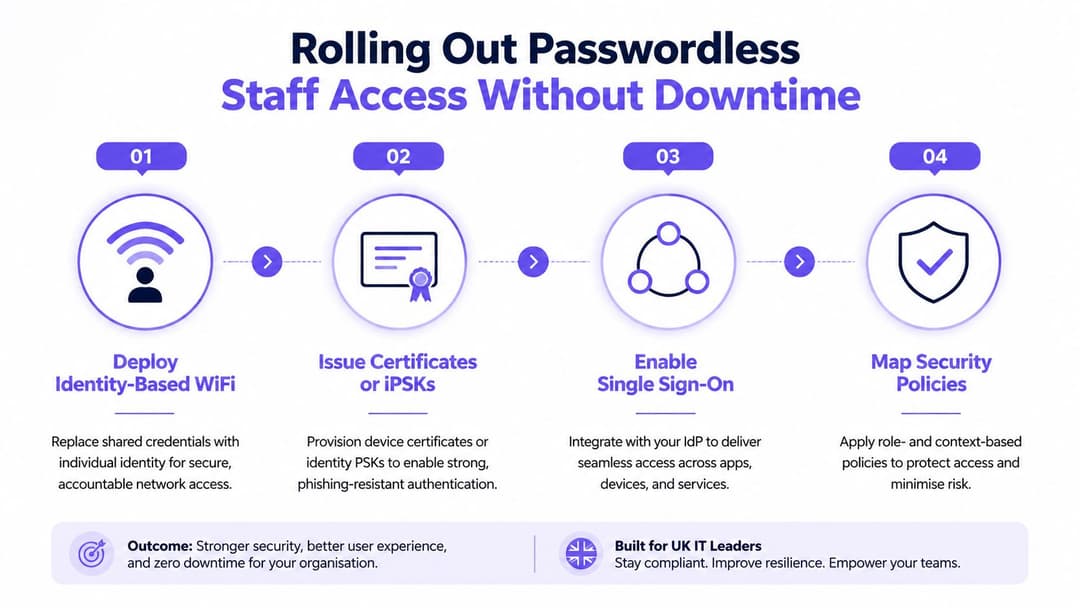
Rolling Out Passwordless Staff Access Without Downtime
Passwordless staff access should be introduced as a controlled operational change, not as a single switch. Begin with a clean identity source, such as Microsoft Entra ID, Okta or Google Workspace, and inventory the devices that need connectivity. Include shared workstations, clinical equipment, front-of-house tablets and legacy scanners, because exceptions discovered after launch create avoidable pressure on the helpdesk.
Use a staged sequence
Pilot one site or department. Choose a contained environment with a clear owner and representative devices. A housekeeping team, outpatient department or store cluster can reveal practical issues faster than a large estate-wide launch.
Connect the network to identity. Configure RADIUS or a cloud NAC service, define authentication failure handling and confirm that a loss of the identity service won't strand critical operations without an approved fallback.
Issue individual credentials. Use certificates where device management supports them, or iPSKs for suitable legacy equipment. Test issuance, renewal and revocation before moving beyond the pilot.
Map policies to roles. A housekeeper, clinician, cashier and contractor shouldn't receive identical network access. Link directory groups to staff, operational and restricted resources, then validate the result with real users.
Application access comes next. Enable SSO for systems such as a PMS, EHR or POS platform where supported, but don't assume wireless authentication solves application authorization. The directory, device policy and application role must agree.
Test the awkward edges
Stale group membership can leave former staff connected or new starters blocked. Certificate renewal gaps can create failures that appear random. Shared devices need a deliberate sign-in model, and captive portals can break on older handheld scanners that don't support modern browser flows.
A practical deployment should report reduced password-reset volume, faster onboarding provisioning and fewer WiFi tickets. It should also confirm that staff can complete the first task of a shift without manual intervention. For a passwordless WiFi implementation that connects identity and network access, review Purple's passwordless WiFi approach.
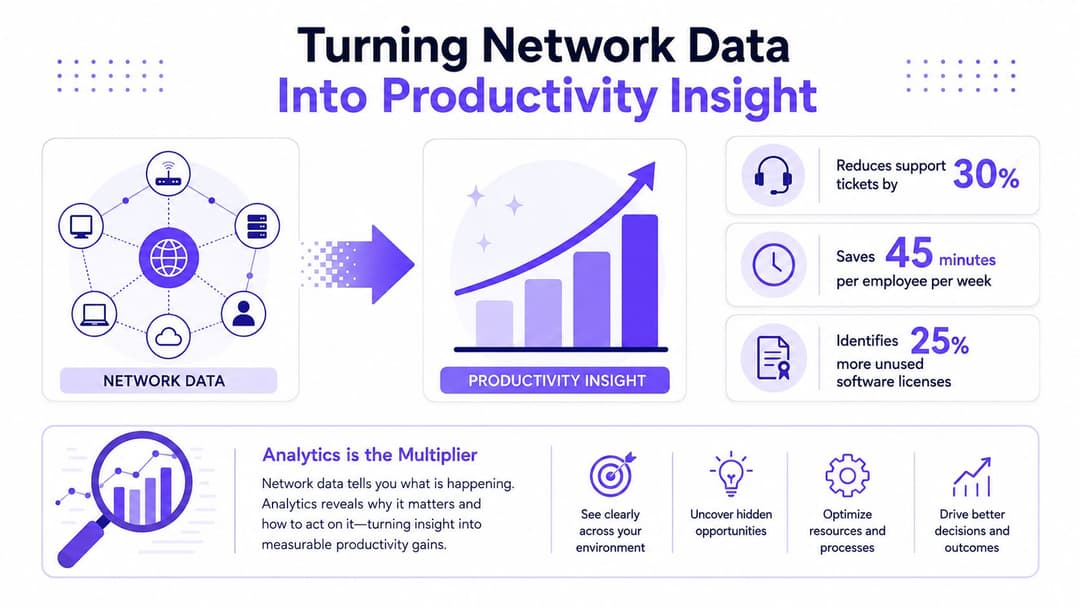
Turning Network Data Into Productivity Insight
Identity-based WiFi creates useful operational signals, but raw telemetry isn't insight. The value appears when network data connects to the systems that show whether work started, stopped or needed intervention.
Track session counts by device and role, roaming events, failed-authentication spikes, time to connect for new starters and the separation between staff and guest traffic. Export relevant feeds to a SIEM or business intelligence dashboard, and where appropriate connect them to a CRM, PMS or service-management workflow.
Look for operational patterns
A hotel may find repeated connection failures in housekeeping corridors rather than across the whole property. A retailer may see failed authentication rise after a particular device image is deployed. A hospital may discover that a help desk surge follows a certificate renewal event.
Those patterns support targeted action:
- Coverage remediation: Prioritize a dead zone that interrupts a particular workflow instead of upgrading every access point.
- Policy correction: Investigate a group or device rule that repeatedly rejects legitimate staff.
- Automated provisioning: Trigger access from joiner and leaver events rather than waiting for a manual request.
- Capacity planning: Identify recurring congestion by time, location and role.
The privacy boundary matters. Staff telemetry should serve security, service reliability and operational improvement, with clear purpose, access controls and retention rules. Guest analytics should remain distinct from workforce monitoring, and neither should become a hidden productivity surveillance system.
For practical context on the relationship between network performance and work output, slow networks kill productivity is a useful resource. The important point is that dashboards aren't the return on investment. Automated remediation, faster diagnosis and fewer repeated interruptions are.
Teams assessing this capability can also review staff WiFi analytics as part of their wider monitoring and reporting design.
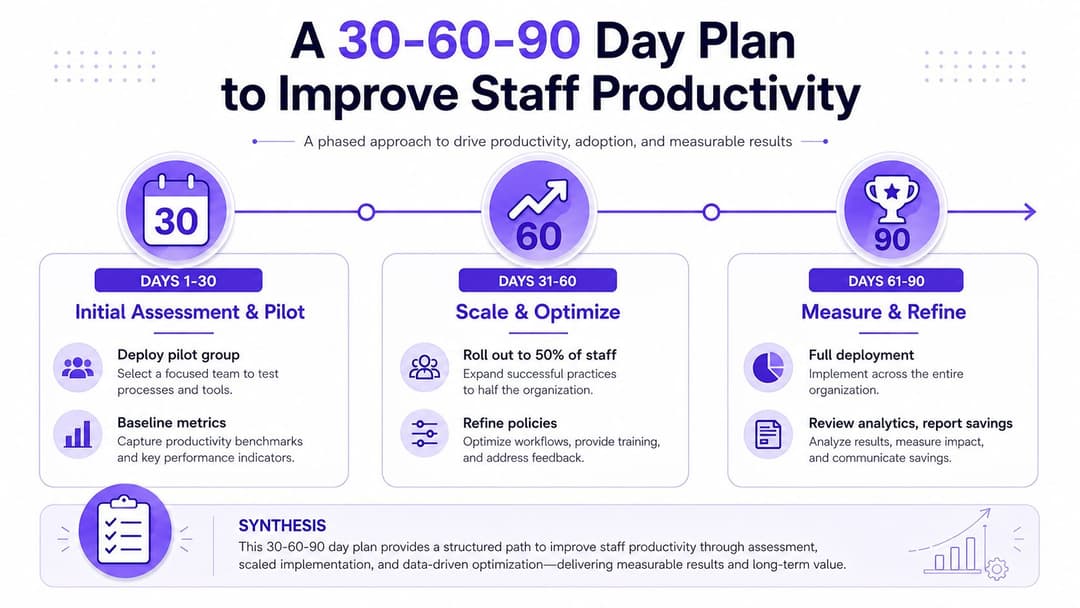
A 30 - 60 - 90 Day Plan to Improve Staff Productivity
The first objective isn't to buy another platform. It's to create a baseline that makes friction visible and gives operations, IT and finance a shared language.
Days 1 to 30, measure the starting point
- Pull the relevant output-per-hour context for your US region and sector, then record your own site's output measure.
- Audit authentication tickets, repeated logins, failed connections and time taken to provision a new starter.
- List every staff SSID, shared password, unmanaged device and manual access exception.
- Select one pilot group and define success in operational terms, such as an on-time shift start or fewer reopened access tickets.
Days 31 to 60, remove obvious friction
Consolidate identity directories where practical and enable SSO for the staff applications that create the most interruption. Issue per-user certificates or iPSKs for the pilot estate, map access policies to roles and build one dashboard showing failed authentication, connection time and roaming events.
Don't expand because the technology works in a lab. Expand when staff can complete real tasks reliably and managers understand the support path.
Days 61 to 90, automate and review
Connect HRIS joiner and leaver events to provisioning and revocation workflows. Add alerts for unusual device behavior, repeated failures and unexpected access patterns. Compare the results with the baseline from the first month, separating network improvements from changes in staffing, demand or operating conditions.
Identity-led networking compounds because every resolved exception reduces the manual tail. Review the measures regularly, retire shared credentials in controlled stages and keep the fallback process documented for critical services.
Purple can help operators connect staff identity to passwordless WiFi, SSO, policy-based access and network analytics across hospitality, retail, healthcare and property environments. Visit Purple to assess how an identity-led access layer could reduce authentication friction and make staff productivity easier to measure across your property.