

Network Onboarding Automation Advisor & ROI Calculator
Evaluate automated device onboarding across 802.1X, Passpoint, dynamic PSK, and MDM zero-trust workflows. Calculate ticket time savings, eliminate orphan accounts, and inspect production controller blueprints.
Environment Sizing Parameters
| Onboarding Mechanism | Ideal Persona | Encryption Strength | Headless IoT Support | Credential Revocation | User Friction Score |
|---|---|---|---|---|---|
| 802.1X EAP-TLS / SCEP | Corporate Staff & Managed Laptops | Enterprise WPA3 (Highest) | Poor (No 802.1X Supplicant) | Instant (OCSP / CRL Revoke) | Zero (Silent Auto-Connect) |
| Passpoint (Hotspot 2.0 / 802.11u) | Roaming Guests & Multi-Site Staff | Enterprise WPA3-AES | Partial (Smartphones/Laptops only) | Automated Profile Expiration | Zero (Zero Splash Page) |
| Dynamic PSK (IPSK / MPSK) | Headless IoT, Smart TVs, Scanners | WPA2-AES / WPA3-SAE | 100% Native Compatibility | Instant Single-Key Revocation | Low (Standard WiFi Key Entry) |
| Self-Service Captive Portal (Purple) | Public Visitors, Contractors & Shoppers | OWE (Opportunistic Wireless Enc.) | Incompatible (Requires Browser) | Session Timeout & RADIUS CoA | Low (1-Click Social / SMS Auth) |
| Shared Static PSK (Legacy) | Unmanaged Legacy Sites | Shared Key (Vulnerable to Sniffing) | Universal | Impossible (Requires AP Reboot) | High Risk (Shared Passphrase Leaks) |
Joiner-Mover-Leaver (JML) Automated Lifecycle Architecture
SCIM webhook triggers user creation from BambooHR, Workday, or Entra ID. Digital certificate or dynamic PSK is minted instantly.
Device attempts 802.1X association. Cloud RADIUS inspects client certificate validity, MDM compliance tag, and OS patch version.
RADIUS Access-Accept returns RFC 2868 Tunnel-Private-Group-ID attributes, binding the endpoint strictly to isolated role VLANs.
HR departure event sends immediate RADIUS Disconnect-Request (RFC 3576). Endpoint is instantly booted from the air with zero delays.
Verified Production Controller Blueprints
Meraki Dashboard SSID configuration for enterprise WPA3-Enterprise 802.1X, linking Purple RADIUS and automated SCIM user provisioning.
# Cisco Meraki Dashboard Wireless SSID Configuration
# Target SSID: Enterprise-Corporate-Secure
SSID Name: Enterprise-Corporate-Secure
Association: WPA3-Enterprise with 802.11r Fast Roaming
802.1X Radius Servers:
  - Host: radius.purple.ai (198.51.100.10)
    Port: 1812
    Secret: <PURPLE_RADIUS_SHARED_SECRET>
  - Secondary Host: radius-backup.purple.ai (198.51.100.11)
    Port: 1812
    Secret: <PURPLE_RADIUS_SHARED_SECRET>
Radius Accounting:
  - Enabled: True
    Port: 1813
    Interim-Update-Interval: 300
VLAN Assignment:
  - Dynamic VLAN assignment: Enabled
  - Default VLAN ID: 100 (Unassigned / Quarantine)
  - Tunnel-Type: 13 (VLAN)
  - Tunnel-Medium-Type: 6 (802)
  - Tunnel-Private-Group-ID: Dynamic attribute from IdP role
# Automated Joiner-Mover-Leaver Webhook Handler:
POST https://api.meraki.com/api/v1/networks/<NETWORK_ID>/wireless/ssids/<SSID_NUM>
Header: X-Cisco-Meraki-API-Key: <MERAKI_DASHBOARD_API_TOKEN>
Payload: { "radiusCoaEnabled": true, "radiusFailoverTimeout": 5 }ArubaOS 10 / AOS-CX WLAN security profile mapping authenticated 802.1X user roles directly into isolated microsegmented VLANs.
! HPE Aruba Wireless Profile: Enterprise Onboarding Automation
wlan ssid-profile "Corp-Auto-Onboard"
  enable
  essid "Corp-Auto-Onboard"
  type employee
  opmode wpa3-aes-ccmp wpa3-sae-aes-ccmp
  wpa-passphrase-required none
  dot1x
  radius-server-group "Purple-Cloud-Radius"
  accounting-server-group "Purple-Cloud-Radius"
  dynamic-user-role
  okc
  dot11r
  dot11k
  dot11v
exit

aaa server-group "Purple-Cloud-Radius"
  server "Purple-Primary"
  server "Purple-Secondary"
exit

aaa authentication-server radius "Purple-Primary"
  host "radius.purple.ai"
  key <PURPLE_RADIUS_SHARED_SECRET>
  auth-port 1812
  acct-port 1813
  rfc3576-server "198.51.100.10"
  rfc3576-key <PURPLE_RADIUS_SHARED_SECRET>
exit

aaa rfc3576-server "radius.purple.ai"
  key <PURPLE_RADIUS_SHARED_SECRET>
exit
Automated unique per-device PSK provisioning for headless smart devices, guest BYOD, and automated revocation via API.
! Ruckus SmartZone DPSK Automation Blueprint
wlan "Smart-Living-DPSK"
  ssid "Smart-Living-DPSK"
  type standard
  auth-method open
  encryption wpa2-aes wpa3-sae
  dpsk
  dpsk-server "purple-dpsk-api"
  bypass-cna disable
  vlan dynamic
  session-timeout 86400
  grace-period 120
exit

dpsk-server "purple-dpsk-api"
  url "https://api.purple.ai/v2/onboarding/ruckus-dpsk"
  api-key <PURPLE_API_INTEGRATION_KEY>
  cache-timeout 600
  passphrase-length 12
  allow-mac-binding enable
exit

# Dynamic Role Push via Radius Disconnect-Message (RFC 3576):
# Echo 'User-Name="guest-dev-01",Calling-Station-Id="00:11:22:33:44:55"' | radclient -x 198.51.100.20:3799 disconnect <SECRET>
FortiGate RADIUS client setup with Disconnect-Request (CoA) support to immediately revoke network access upon employee HR exit.
# FortiGate Zero-Trust Wireless Controller Configuration
config user radius
    edit "Purple-Cloud-Radius"
        set server "radius.purple.ai"
        set secret <PURPLE_RADIUS_SHARED_SECRET>
        set auth-type ms_chap_v2
        set acct-interim-interval 300
        set radius-coa enable
        set radius-port 1812
        set coa-port 3799
    next
end

config wireless-controller vap
    edit "Corp-ZeroTrust"
        set ssid "Corp-ZeroTrust"
        set security wpa3-enterprise
        set auth user
        set user-group "Purple-Radius-Users"
        set vlanid 100
        set dynamic-vlan enable
        set schedule "always"
    next
end

config user group
    edit "Purple-Radius-Users"
        set member "Purple-Cloud-Radius"
    next
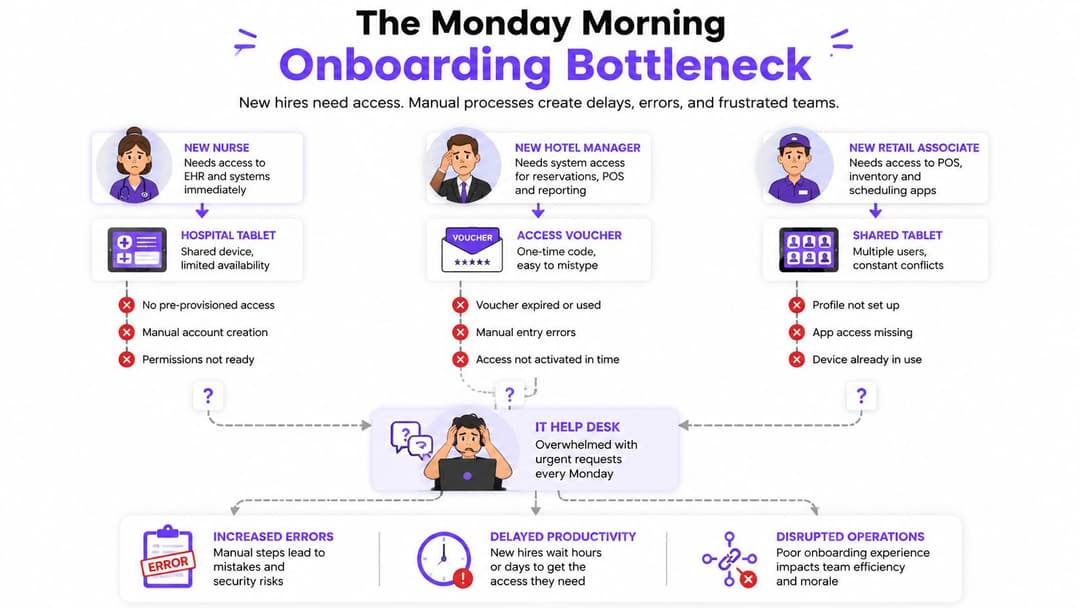
endA new starter arrives on Monday and has no access to the clinical system. A hotel manager needs a staff voucher before the morning shift. A retail employee is waiting for a shared tablet to join the sales network. At the same time, a former night supervisor can still connect because HR, IT, and the network team handled access removal in separate queues.
The core onboarding problem in a multi-site environment is that it isn't just paperwork or a slow help desk. It is an identity and network-control failure when the organization can't reliably decide who or what is connecting, which services that connection may reach, and when access must end. US businesses also operate against a difficult security backdrop. The US Government Cyber Security Breaches Survey 2025 reported that 43% of US businesses experienced a cyber breach or attack in the last year, making dependable joiner-mover-leaver controls more than an administrative convenience.
Good onboarding automation links an approved identity or device record to authentication, policy, network enforcement, logging, and revocation. It removes repetitive switch changes and spreadsheet updates, but it doesn't remove the need for judgment. Contractors, borrowed scanners, clinical equipment, and unknown building systems still need controlled exceptions.
The Monday Morning Onboarding Bottleneck
At 8:15 AM, the IT queue already contains three urgent requests. A nurse needs access to a clinical application and a managed iPad. A hotel manager needs a staff network profile before taking over the front desk. A retail associate needs a shared tablet placed on the correct sales VLAN.
Each request looks simple until the handoffs begin. HR confirms the person, a manager confirms the role, IT creates an account, someone else changes a wireless or switch policy, and a ticketing system records only part of the process. The former night supervisor's credentials remain active because the departure event didn't reach every system.
The queue is a security control
Manual VLAN assignment, shared secrets, emailed passwords, and spreadsheet inventories create two problems at once. New people wait for access, while former staff, unmanaged devices, or forgotten accounts can retain access longer than intended.
US onboarding guidance links the 43% breach or attack figure to the importance of automating account and permission provisioning and revocation, particularly when employees change roles or leave the organization. The practical connection is straightforward. If an HR departure event can trigger identity disablement, certificate revocation, session termination, and network policy removal, the organization has a more dependable control than a ticket that somebody may process later.
Practical rule: Automate the handoff, not the judgment.
A useful workflow asks four questions for every connection:
- Identity: Is this a named employee, contractor, guest, device, or service?
- Reach: Which applications, network segments, and management paths are permitted?
- Context: Is the device managed, compliant, correctly located, and associated with the right tenant?
- Expiry: What event removes access, and how will active sessions be terminated?
Faster doesn't mean unconditional
The strongest design makes routine access predictable while routing unusual cases to people. A managed staff laptop with a valid certificate can receive its role automatically. A borrowed barcode scanner may need a temporary profile. An unfamiliar smart-building controller shouldn't be placed on a production network because a device name looks plausible.
The objective isn't faster WiFi. It is consistent policy from first connection to final removal. Once onboarding is treated as a network-layer identity lifecycle, IT can reduce the Monday queue without pretending every exception is safe to automate.
What Onboarding Automation Means in a Network Context
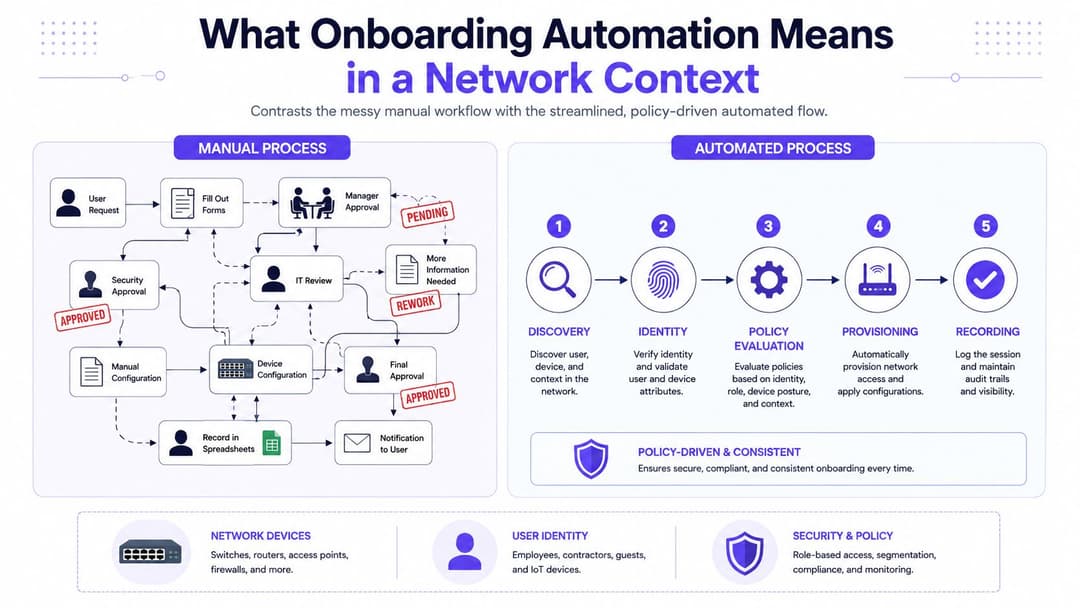
In networking, onboarding automation is a policy-driven process that discovers a user or device, establishes its identity, evaluates its context, provisions the appropriate role, and records the decision without requiring an engineer to edit each switch or wireless configuration.
An airport provides a useful comparison. Passengers, staff, contractors, and freight don't enter through one undifferentiated lane. Each group presents different evidence and receives access to different areas. A network should work the same way. Guests, managed staff endpoints, operational technology, legacy hardware, and contractors need distinct authentication and authorization paths.
A portal is only one lane
A captive portal generally exchanges a password, voucher, email address, or approval for a network session. That can work well for a passwordless guest journey, particularly where the guest needs internet access and no internal services. It doesn't, by itself, manage the complete lifecycle of a staff identity or device.
Network onboarding automation can combine:
- Identity attributes: User, group, role, tenant, and employment status.
- Device evidence: Management enrollment, certificate validity, operating system state, and posture.
- Context: Site, access method, location, and connection time.
- Enforcement: VLAN, downloadable ACL, software-defined segment, application route, or firewall policy.
- Lifecycle events: Joiner, mover, leaver, certificate expiration, device wipe, and sponsor withdrawal.
For staff, the better model is zero trust. Verify each connection, grant the minimum practical path, reassess when context changes, and revoke access when the source identity no longer qualifies. Passwordless guest access can remain simple because its purpose is different. A guest session isn't a substitute for staff identity assurance.
A Captive Portal authenticates a session. An onboarding system manages an access lifecycle.
Teams evaluating broader workflow orchestration can also review these enterprise AI automation use cases, particularly where identity, approvals, and operational systems need coordinated triggers. The networking distinction remains important, though. An AI workflow may route a task, but the access policy still needs deterministic inputs and enforceable outcomes.
How the Architecture Fits Together
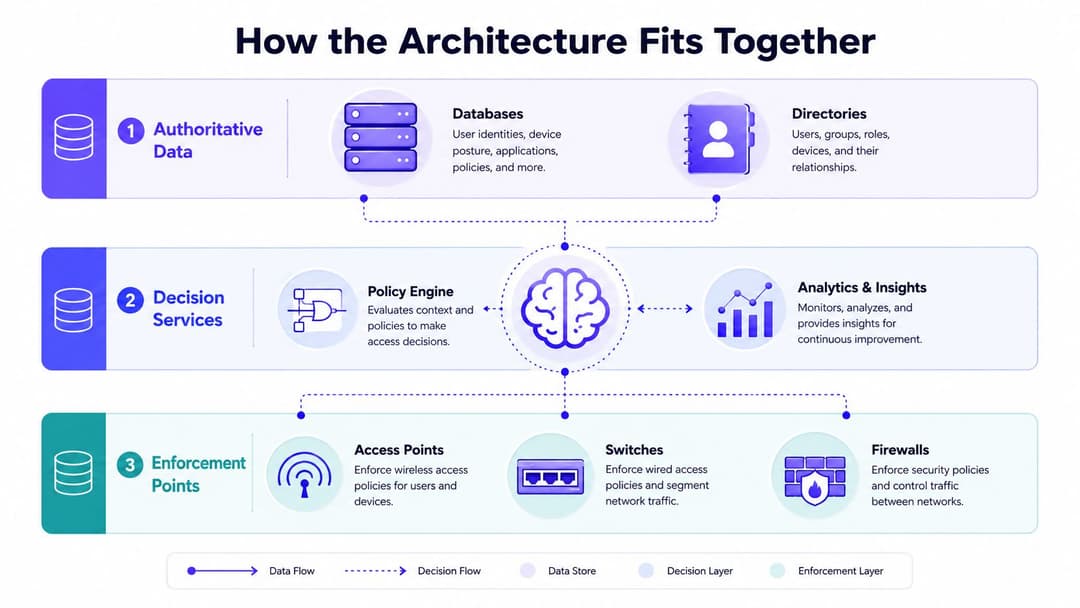
A reliable design separates authoritative data, decision services, and enforcement points. That separation prevents every access point or switch from querying HR, device management, and property systems independently, which creates inconsistent logic and fragile dependencies.
Authoritative data
The identity provider supplies users, groups, authentication strength, and lifecycle events. Depending on the environment, those exchanges may use SAML, OIDC, directory synchronization, or RADIUS. HR remains the source for employment status and role context, while a property or venue system may supply tenant, site, or occupancy information.
The device-management platform contributes enrollment, compliance state, ownership, and certificate status. Treat these systems as sources of facts, not as places where each network device invents its own interpretation.
Decision services
A network access control platform or policy engine evaluates the facts. It asks whether the connecting identity is known, whether the device is managed, which tenant and site apply, and what access method was used. It then returns a decision the network can enforce.
Common integration patterns include RADIUS with EAP-TLS for certificate-authenticated access, SAML or OIDC for browser-based employee flows, APIs for bulk provisioning, and syslog or streaming telemetry for audit records. RADIUS attributes can carry a role, VLAN, ACL, or other policy result to the enforcement layer.
Keep mappings version-controlled. A group-to-role mapping that means “clinical staff” at one site but “general employee” at another will produce a dangerous operational surprise. In a multi-tenant environment, the tenant identifier must travel consistently from the identity source to policy, enforcement, and audit records.
Enforcement points
Access points, switches, firewalls, VPN concentrators, and gateways apply the decision. They should enforce a centrally defined result rather than hold a separate copy of business logic.
Use brokers or standardized attributes to create one meaning across sites. Log the inputs and outcome needed for investigation, but don't copy passwords, private keys, or sensitive authentication material into general monitoring platforms. For teams connecting physical network hardware and access infrastructure, hardware integrations for enterprise networks provide useful context for assessing vendor compatibility without confusing integration breadth with policy quality.
Device and User Lifecycle from Zero Touch to Decommission
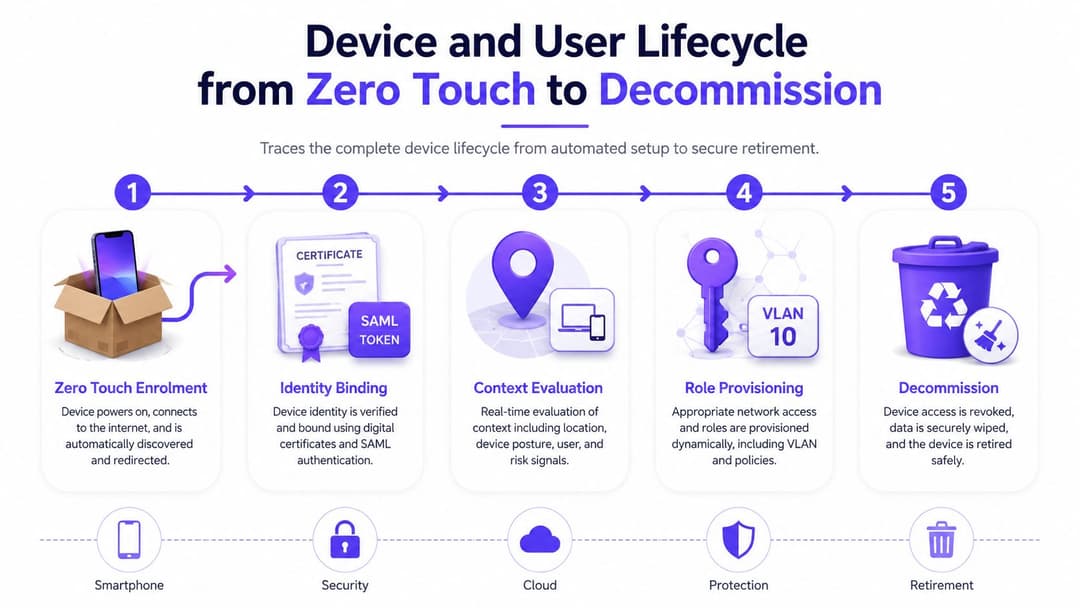
A device shouldn't receive a permanent network identity just because it connected successfully once. Its access should follow the same lifecycle as the person using it, with a new decision whenever ownership, posture, location, or employment status changes.
Start with zero-touch enrollment
A factory-shipped laptop or tablet can be associated with the organization before it reaches a clinician, hotel reception desk, or store. On first boot, the device redirects to the chosen mobile-device-management platform, enrolls under the correct tenant or department, and receives baseline configuration.
The device then binds to an identity. Modern staff endpoints should favor certificates and EAP-TLS, while browser-based employee workflows may use SAML or OIDC to establish the user relationship. Certificates provide a stronger per-device identity than a shared pre-shared key because they can be issued, tracked, renewed, and revoked individually.
Reassess during the working life
A device's role should depend on current context, not only its initial VLAN. The policy engine can evaluate management status, certificate validity, location, device type, and posture. If a device becomes non-compliant, a posture agent or management signal can trigger reauthentication or a restricted role.
RADIUS Change of Authorization helps apply those changes to active sessions. It can move a device to remediation access, terminate a session, or force a fresh decision after a material change. Zero trust becomes operational rather than a slogan.
End access deliberately
A leaver event should disable the identity, revoke or invalidate the certificate, terminate active sessions, and remove downstream access. A mover event needs similar care. A person changing from front desk to finance shouldn't retain the old role just because nobody revisited a static VLAN assignment.
Contractor devices, shared kiosks, and clinical equipment often need human approval. The exception should have an owner, purpose, scope, and expiration. At retirement, MDM wipe and certificate expiration are technical controls, but physical handling still matters. Organizations disposing of devices should pair logical decommissioning with secure IT asset disposal from Beyond Surplus so retired hardware doesn't reappear with data or credentials intact.
A practical reference for staff access design is this staff WiFi lifecycle guidance, especially where identity changes must reach the network without relying on shared passwords.
Multi-Tenant and Legacy Device Strategies
Multi-family and multi-tenant venues rarely have the luxury of replacing every endpoint. A hotel, hospital, shopping mall, or managed office may contain modern laptops alongside scanners, pumps, printers, building controllers, and specialist equipment that can't support 802.1X.
Three approaches cover most environments, but none is universally correct.
| Method | Best For | Limitation |
|---|---|---|
| Dynamic VLANs through RADIUS | Staff and devices whose role can be derived from identity and site attributes | Switches and wireless infrastructure need consistent AAA configuration |
| iPSK | Legacy devices that can't support 802.1X while keeping the SSID stable | Keys still reside on devices, so accountability and rotation are weaker |
| Certificate-based EAP-TLS | Managed modern endpoints requiring strong, individual identity | PKI issuance, renewal, revocation, and trust-chain hygiene demand operational discipline |
Use a deliberate hybrid
Certificates should be the default for staff devices that can support them. Dynamic VLANs or downloadable ACLs can then place those devices into the right role without creating a new SSID for every department or tenant.
iPSK is a practical compromise for old medical, retail, or operational equipment. It can isolate a device group without forcing an immediate hardware refresh, but it shouldn't be treated as equivalent to individual certificate authentication. Keep the key scope narrow, document ownership, monitor its use, and set a replacement path.
True guests belong in a separate passwordless flow with sponsor approval where necessary. A guest shouldn't inherit tenant access because they know a venue password, and a contractor shouldn't receive unrestricted staff connectivity just because they need internet access.
The multi-tenant WiFi guide is useful when planning the boundary between tenant simplicity and enterprise isolation. The central design choice is not whether segmentation exists. It is whether the segment remains correct when people, devices, and contracts change.
Sector Use Cases Across Hospitality, Retail, Healthcare, and Property
The same lifecycle pattern appears in different forms across sectors: identify, assign policy, enforce access, and retire it. The enforcement detail changes, but the control sequence shouldn't.
Hospitality
A hotel group can automate staff onboarding across properties by tying an approved employee record to the correct site, role, and certificate profile. Seasonal workers can receive staff access without relying on a shared password, while guests follow a separate passwordless journey that doesn't expose operational systems.
The exception is a temporary worker moving between properties or a contractor supporting a booking system. The workflow should pause for a manager or site sponsor rather than guessing which tenant and role apply.
Healthcare
Clinician iPads are well suited to MDM-driven provisioning and certificate-based access. Shared workstations can require user authentication while receiving a device role, and legacy infusion pumps or imaging equipment may need tightly isolated iPSK access.
Healthcare is where total automation fails most visibly. A clinical safety device may behave predictably only within a tightly controlled network path, and a false posture decision can disrupt care. Human review belongs around exceptions, maintenance windows, unfamiliar devices, and any change that could affect a clinical workflow.
Retail
A store associate can receive the correct role when HR records the person, while a POS vendor's contractor connection can be isolated to approved systems. When HR terminates the worker, the identity event should remove wireless, wired, and remote access without waiting for a manager to submit separate tickets.
Property management
Managed offices, multi-family sites, and student housing need tenant-scoped policies. Residents or office tenants should not share a flat network with building operations. Contractors can receive time-bound access, while smart-building sensors remain on a dedicated IoT segment with restricted routes.
Selective automation works better than total automation in all four sectors. Routine identity and device decisions should run automatically. Safety, unusual documents, customer suitability, AML, KYC, and potential regulatory compliance issues under the FTC and state attorneys general should retain human approval where the consequences of a wrong decision are significant.
Implementation Roadmap, KPIs, and Common Pitfalls
A rollout usually fails when the team automates the visible request form before fixing identity quality, certificate ownership, and exception handling. Start with the policy inventory, not the portal.
Checkpoint one, discovery and design
Map joiner, mover, leaver events across HR, identity, MDM, ticketing, wireless, switching, VPN, and property systems. Produce the role matrix, tenant attributes, certificate templates, RADIUS rules, and an exception register. Define who approves contractors, shared devices, and legacy equipment.
US guidance describes five useful lifecycle control points, pre-start, day one, week one, month one, and probation. A US mid-market firm with 50 to 500 people can typically implement the administrative layer in 3 to 6 weeks, according to US onboarding process automation guidance. That timeframe doesn't remove the need for testing across identity, network, and endpoint systems.
Checkpoint two, pilot and test
Pilot one site or department. Test successful joins, movers, leavers, expired certificates, unavailable identity services, duplicate device records, rejected posture, and sponsor withdrawal. Keep RADIUS test results and an exception queue that operators can inspect without searching across several tools.
Checkpoint three, production and optimization
Use a parallel-run period before cutover. Compare automated decisions with the existing process, then tune policy conditions and alert thresholds. For a 200-employee SMB model, one US analysis estimates annual onboarding-related cost falling from $71,200 manually to $10,900 with automation, including stated savings of $8,400 in administration, $4,900 in IT setup, and $28,000 in avoided productivity loss. The US onboarding automation case study attributes the largest economic variable to delayed access, not merely clerical work.
Measure outcomes that expose operational risk:
- First-time-connect success: Whether the correct device joins without a help desk intervention.
- Onboarding latency: Time from approved identity or device record to usable access.
- Access-request tickets: Whether routine requests are disappearing.
- Certificate renewal failures: Whether the PKI lifecycle works after launch.
- Residual offboarding access: Whether any path remains active after a leaver event.
At week six, look for captive portals shadowing staff flows, identity provider rate limits during login surges, certificates nearing expiration, and guest rules that bypass a needed human override. The reported model also estimates a 16% improvement in new-hire retention after automation, but that result comes from the linked analysis and shouldn't be assumed for every deployment.
What to Prioritize Next
IT leads and property owners don't need to automate every workflow at once. The first 30 days should establish the dependencies that make later automation trustworthy.
- Stabilize identity and PKI: Confirm the identity provider, certificate authority, group model, renewal process, and revocation path.
- Connect enforcement points: Wire staff SSIDs, wired ports, VPN concentrators, and relevant gateways to those identity decisions.
- Fix offboarding first: Test leaver events before adding more joiner flows. A former worker retaining WiFi access presents a more serious control problem than a new starter waiting for an extra manual approval.
- Document exceptions: Record the owner, reason, permitted scope, expiration, and replacement plan for medical equipment, IoT, kiosks, and legacy devices.
- Pilot narrowly: Choose one site or department, measure failure modes, and expand only after operators can see and resolve them.
Multi-tenant venues need tenant-scoped attributes from the beginning. A flat pilot may appear successful while hiding cross-tenant access errors that surface during expansion.
Use this checklist as a starting point:
- Identity groups and tenant attributes are defined
- Certificate issuance, renewal, and revocation are tested
- Staff and guest flows are separate
- Leaver access is terminated across active sessions
- Legacy devices have named owners and expiration dates
- Operators can inspect failed decisions and exceptions
Automation earns trust when its failure modes are visible. If the network team can't explain why a device received a role, or who can override it, the workflow isn't ready for a wider rollout.
Purple connects passwordless guest access, staff identity, certificate-based policy, and multi-tenant network segmentation without forcing teams to manage disconnected onboarding queues. Visit Purple to see how its integrations and lifecycle controls can support faster provisioning, clearer enforcement, and immediate revocation across venues and enterprise networks.



