
How to Set Up a Captive Portal on Starlink: A Guide for Maritime, Transportation, and Remote Sites
This technical guide explains how to bypass Starlink's native CGNAT limitations to deploy a secure, CCPA/CPRA-compliant captive portal for guest WiFi. It covers network architecture, VLAN segmentation, and cloud RADIUS integration for maritime, transportation, and remote enterprise sites.
Video overview
Listen to this guide
View podcast transcript
Part of our core series: Captive Portal Guide →
Executive Summary
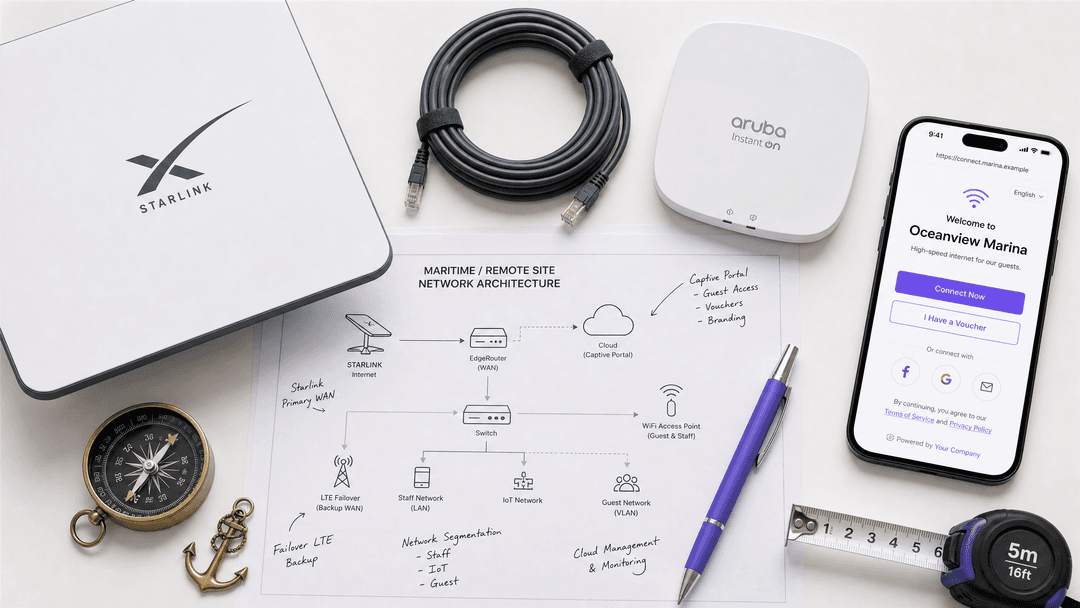
Starlink delivers high-speed satellite connectivity to remote locations, but its native consumer-grade router lacks the security, authentication, and compliance controls required for enterprise environments. For IT managers operating maritime vessels, remote construction camps, or transport hubs, deploying a captive portal on Starlink presents a specific technical challenge: Starlink operates behind Carrier-Grade Network Address Translation (CGNAT), which breaks traditional inbound RADIUS authentication flows.
This guide details how to bypass the native Starlink hardware and integrate a cloud-managed captive portal using enterprise routing equipment. By implementing outbound cloud RADIUS authentication and strict VLAN segmentation, network architects can deliver a secure, branded, and legally compliant Guest WiFi experience while isolating critical operational systems. Purple provides the identity management layer to capture first-party data and enforce bandwidth quotas, ensuring a single guest cannot saturate the satellite uplink.
Technical Deep-Dive
The CGNAT Constraint
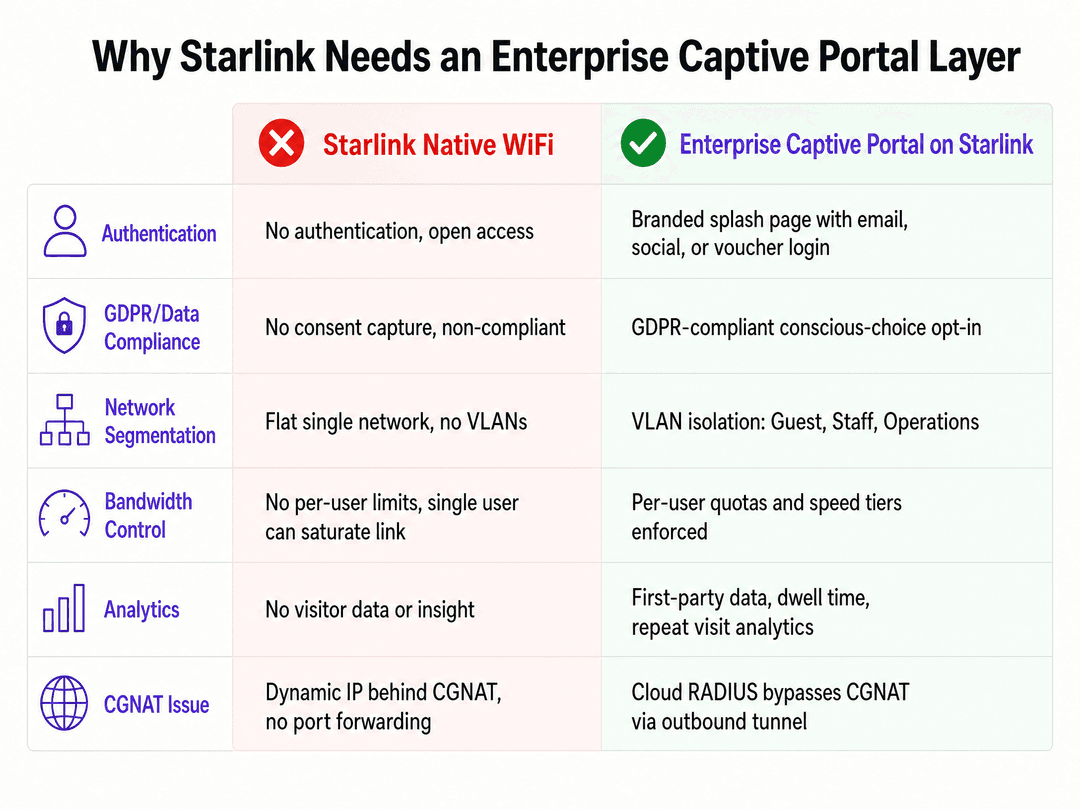
Starlink manages its IPv4 address space using CGNAT. Your terminal shares a public IP address with other subscribers, meaning you cannot accept inbound connections or configure traditional port forwarding.
Traditional on-premise captive portal controllers often expect to receive inbound authentication callbacks from a RADIUS server. When deployed behind Starlink, these inbound packets drop at the CGNAT boundary, breaking the login flow.
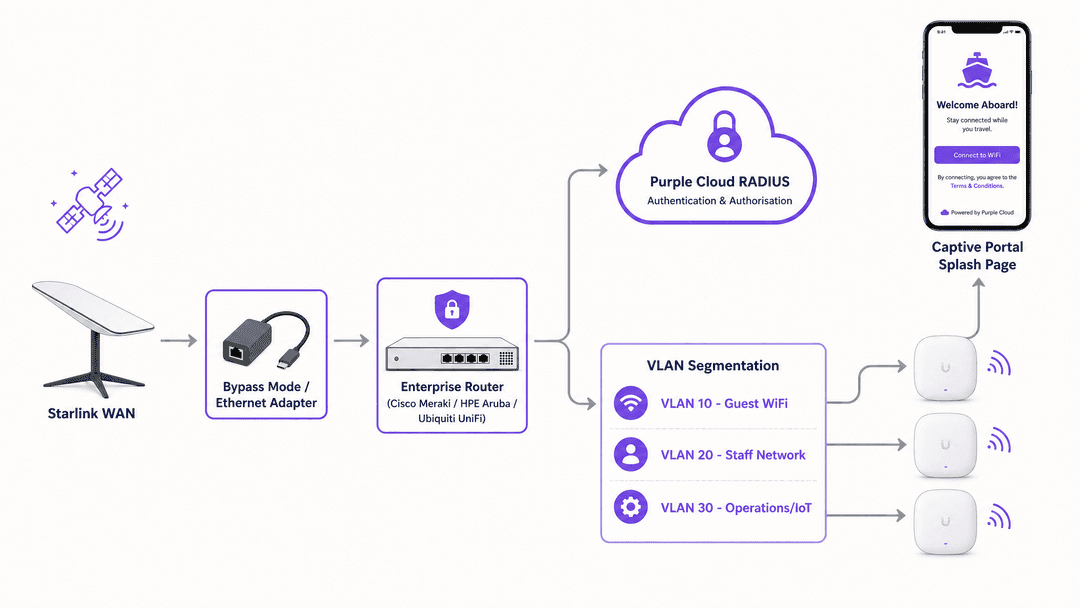
The architectural solution is an outbound-only authentication model. Instead of the controller waiting for an inbound request, it initiates a secure outbound tunnel to a cloud-native RADIUS server. Purple's platform uses FreeRADIUS servers backed by cloud databases to handle this authentication [1]. The on-site controller passes the client details to Purple, which processes the login and returns an Access-Accept packet through the established outbound connection, entirely bypassing the CGNAT limitation.
Bypassing the Native Hardware
The Starlink router provides a flat, unmanaged network. It does not support 802.1Q VLAN tagging, per-user bandwidth limits, or enterprise authentication.
To deploy a captive portal, you must remove the Starlink router from the routing path. On standard kits, this requires enabling bypass mode in the Starlink app and using the ethernet adapter. For maritime and enterprise deployments using the High Performance or Flat High Performance kits, you connect the Starlink power supply directly to the WAN port of an enterprise router.
Purple integrates with all major enterprise hardware vendors. The canonical hardware list for this architecture includes Cisco Meraki, HPE Aruba, Ruckus, Juniper Mist, and Ubiquiti UniFi. These platforms provide the necessary features to configure walled gardens, tag VLANs, and forward authentication requests to Purple's cloud RADIUS.
Walled Garden Configuration
Before a user authenticates, their device must be able to reach the captive portal infrastructure. This requires configuring a walled garden - a list of permitted domains accessible pre-authentication.
When a device connects to the open SSID, its embedded Captive Network Assistant (CNA) attempts to reach a predefined URL to check for internet access [1]. When this request is intercepted by the controller, the CNA launches a pseudo-browser to display the captive portal.
Your walled garden must allow access to Purple's splash page servers, static content delivery networks (Cloudfront), and any required social login endpoints (such as Google or Microsoft Entra ID). If these domains are blocked, the CNA cannot load the login page, and the user remains stranded offline.
Got questions about your specific setup?
Our team works with venue operators, IT managers, and network engineers across 80,000 venues. Book a 20-minute call and we will show you how others like you solved it.
Implementation Guide
1. Network Segmentation
Never deploy a flat network over a shared satellite link. You must isolate traffic using VLANs to protect operational integrity.
For a maritime vessel or remote site, implement a minimum of three VLANs:
- VLAN 10 (Guest WiFi): The public-facing network where the captive portal resides. Apply strict per-user bandwidth quotas (e.g., 5 Mbps down / 1 Mbps up) to prevent link saturation.
- VLAN 20 (Staff Network): A secure network for crew or employees, authenticated via WPA3-Enterprise or secure passphrases.
- VLAN 30 (Operations/IoT): A highly restricted network for bridge navigation, SCADA systems, or point-of-sale terminals. Deny all inbound traffic from VLAN 10 and VLAN 20.
2. Controller Configuration
Configure your enterprise router to point to Purple's RADIUS servers.
- Set the primary and secondary RADIUS IP addresses provided in your Purple portal.
- Configure the shared RADIUS secret.
- Set the redirect URL to your custom Purple splash page.
- Input the walled garden domains required for the portal to load.
3. Handling SSL Certificates (Cisco Specific)
If you deploy Cisco Catalyst 9800 Series controllers, you may encounter an issue where the initial redirect uses HTTP (e.g., http://192.168.0.2/login.html). Modern desktop browsers expect HTTPS and will display a "Your connection is not private" warning, degrading the user experience [2].
\nTo resolve this, you must install a publicly trusted SSL/TLS certificate on the Cisco WLC. Ensure the Virtual IPv4 Hostname on the controller matches the Common Name (CN) specified in the certificate [2]. This secures the web authentication process and satisfies browser security requirements.
Best Practices
Mitigating macOS CNA Limitations
Apple's macOS restricts cookies within the CNA pop-up browser. Purple requires a temporary session cookie to maintain the login journey through the authentication flow [1].
When a macOS user connects, the CNA pop-up will recommend they open a full system browser (like Safari or Chrome) and navigate to neverssl.com [1]. This plain HTTP site triggers the controller's redirect cleanly without SSL interference, allowing the portal to set the required cookie and complete the login. Ensure your support staff understand this behavior to assist users.
Bandwidth Management
Starlink provides high bandwidth, but it is finite. A single user downloading a 50 GB game update can trigger throttling for the entire site.
Use your enterprise controller to enforce per-user speed limits. Purple's platform allows you to configure data quotas (e.g., 1 GB per day) and time limits. Once a user hits their quota, Purple revokes access via RADIUS CoA (Change of Authorization) or the user is prompted to purchase a premium tier.
Troubleshooting & Risk Mitigation
The Portal Fails to Load
If the captive portal does not appear when a device connects:
- Check the Walled Garden: Ensure all Purple domains and social login endpoints are whitelisted. If a required script is blocked, the page will hang.
- Verify DNS: The client device must receive a valid DNS server via DHCP to resolve the walled garden domains.
- Test with HTTP: Open a browser and navigate to an HTTP site (like neverssl.com) to force the redirect.
Authentication Fails
If the user sees the portal but cannot get online after submitting their details:
- Check RADIUS Reachability: Ensure your enterprise router can reach Purple's RADIUS IPs over ports 1812 and 1813.
- Verify the Shared Secret: A mismatched RADIUS secret will cause the server to silently drop packets.
- Confirm Outbound NAT: Ensure the router is correctly translating the source IP of the RADIUS packets to the Starlink WAN IP.
ROI & Business Impact
Deploying an enterprise captive portal transforms Starlink from a raw internet pipe into a managed business asset.
For Hospitality and Transport operators, it provides the mechanism to capture first-party data. When 440 million logins occur across Purple's network annually, venues gain visibility into visitor demographics, dwell times, and repeat visit frequencies. This data feeds directly into marketing platforms to drive loyalty and revenue.
Furthermore, it ensures compliance. Providing open WiFi without capturing explicit consent exposes the organization to data privacy risks. Purple's captive portal captures conscious-choice opt-ins, ensuring your network operations align with CCPA/CPRA and ISO 27001 standards.
References
[1] Purple Support, "Captive Portal", https://support.purple.ai/hc/en-gb/articles/13856885831069-Captive-Portal [2] Purple Support, "Cisco WLC Captive Portal Certificate Setup", https://support.purple.ai/hc/en-gb/articles/31098410273693-Cisco-WLC-Captive-Portal-Certificate-Setup
Key Definitions
CGNAT (Carrier-Grade Network Address Translation)
A method used by ISPs to share a single public IP address among multiple customers.
Starlink uses CGNAT, which prevents IT teams from configuring port forwarding or accepting inbound connections to local controllers.
Captive Network Assistant (CNA)
A mini-browser embedded in operating systems (iOS, Android, Windows) that detects when internet access is blocked and automatically opens to display a login page.
The CNA is what triggers the pop-up on a guest's cell phone when they connect to the WiFi, driving them to the Purple splash page.
Walled Garden
A restricted network environment that allows access only to specific, approved web domains before a user authenticates.
IT teams must configure the walled garden to include Purple's servers and social login domains, otherwise the captive portal will fail to load.
RADIUS (Remote Authentication Dial-In User Service)
A networking protocol that provides centralized authentication, authorization, and accounting management.
Purple uses cloud-hosted FreeRADIUS servers to securely authenticate users after they complete the splash page journey.
VLAN (Virtual Local Area Network)
A logical subnetwork that groups a collection of devices, isolating their traffic from other devices on the same physical network.
Essential for maritime and remote deployments to separate untrusted guest traffic from critical operational systems.
Bypass Mode
A configuration setting that disables the routing and WiFi functions of a consumer router, turning it into a simple bridge.
Required on standard Starlink hardware to allow an enterprise router to manage the network and handle captive portal redirection.
Session Cookie
A small piece of data stored temporarily by a browser to remember state during a specific browsing session.
Purple requires a session cookie to maintain the login state. macOS CNA blocks these, requiring a redirect to an HTTP site like neverssl.com.
Change of Authorization (CoA)
A RADIUS extension that allows a server to dynamically modify the authorization attributes of an active session.
Used by Purple to instantly revoke network access or throttle speeds when a user exceeds their defined data quota.
Worked Examples
A 200-room remote eco-lodge installs Starlink to provide guest internet. Within three days, guests complain of slow speeds, and the operator notices the Starlink connection is throttled. How should the IT team resolve this?
The IT team must bypass the native Starlink router and install an enterprise controller (e.g., HPE Aruba or Ubiquiti UniFi). They configure two VLANs: one for staff and one for guests. On the guest VLAN, they deploy Purple's captive portal. They configure the controller to enforce a hard speed limit of 5 Mbps per user. Within the Purple portal, they set a daily data quota of 1 GB per device. When a guest hits the limit, they are disconnected to preserve bandwidth for others.
A maritime ferry operator deploys Starlink. They configure a captive portal using an on-premises RADIUS server located at their headquarters. The ferry's local controller attempts to authenticate guests by sending RADIUS requests back to HQ, but all logins fail. Why, and how is it fixed?
The logins fail because Starlink uses CGNAT, meaning the ferry does not have a dedicated public IP. If the HQ RADIUS server attempts to send packets back to the ferry, or if the architecture relies on inbound connections, the CGNAT boundary drops the traffic. The fix is to migrate to a cloud-native RADIUS architecture like Purple. The ferry's controller initiates an outbound connection to Purple's cloud RADIUS, bypassing the CGNAT restriction entirely.
Practice Questions
Q1. You are deploying Starlink at a remote retail site. You have enabled bypass mode and connected a Cisco Meraki MX router. Users connect to the guest SSID, but the captive portal page never appears. The screen remains blank. What is the most likely configuration error?
Hint: Consider what domains the device needs to reach before authentication is complete.
View model answer
The walled garden configuration is incomplete or missing. Before authentication, the device must be able to reach Purple's splash page servers and any associated content delivery networks. If these domains are not whitelisted in the Meraki controller, the Captive Network Assistant cannot load the page.
Q2. A maritime IT director wants to use their existing on-premise RADIUS server located at their London headquarters to authenticate crew members on a vessel equipped with Starlink. Why will this architecture fail, and what is the recommended alternative?
Hint: Think about how Starlink handles public IP addresses and inbound routing.
View model answer
It will fail because Starlink uses CGNAT, meaning the vessel does not have a dedicated public IP and cannot accept inbound connections from the London HQ. The recommended alternative is a cloud-native RADIUS architecture, where the vessel's local controller initiates an outbound connection to a cloud RADIUS server, bypassing the CGNAT restriction.
Q3. A hotel operator reports that guests using Apple MacBooks are unable to complete the login process. The pop-up appears, but the session drops before authentication finishes. Windows and Android users are unaffected. How should the support team instruct the MacBook users?
Hint: Consider how macOS handles cookies within the Captive Network Assistant.
View model answer
macOS does not allow cookies within the CNA browser session, which Purple requires to maintain the login state. The support team should instruct MacBook users to open a full system browser (like Safari) and navigate to an HTTP site such as neverssl.com. This will cleanly trigger the redirect and allow the cookie to be set.
Continue reading in this series
Ubiquiti UniFi guest portal not redirecting: causes and fixes
This guide isolates a UniFi guest portal redirect failure by following the guest state, redirect, pre-authorization route and controller authorization in sequence. It gives venue IT teams a sourced method to address guest-network versus Hotspot confusion, external portal hand-offs, current UniFi OS account requirements and DNS isolation testing.
Cisco Meraki splash page not working: a troubleshooting flowchart
This practical day-two guide isolates where a Cisco Meraki splash flow has failed: client authorization, HTTP redirect initiation, walled-garden reachability or RADIUS sign-on. It gives venue IT teams a controlled evidence path, so they can restore Guest WiFi without making broad changes to a live estate.
Enterprise Guest WiFi Setup Guide: VLAN Segmentation, Security, and Captive Portals
This technical guide shows IT teams how to set up Guest WiFi as a controlled internet-access service, using VLAN segmentation, firewall policy, and a captive portal. It also explains how Purple's registration forms and onboarding controls support a proportionate visitor experience without weakening the boundary around staff, payment, and operational systems.
Got questions about your specific setup?
Our team works with venue operators, IT managers, and network engineers across 80,000 venues. Book a 20-minute call and we will show you how others like you solved it.