
Minimising Student Distractions with Network-Level Ad Blocking
This authoritative technical reference guide details the architecture, deployment, and business impact of network-level ad blocking in educational environments. It provides IT managers and network architects with actionable strategies to reclaim bandwidth, strengthen compliance, and eliminate malvertising risks.
Listen to this guide
View podcast transcript
कार्यकारी सारांश
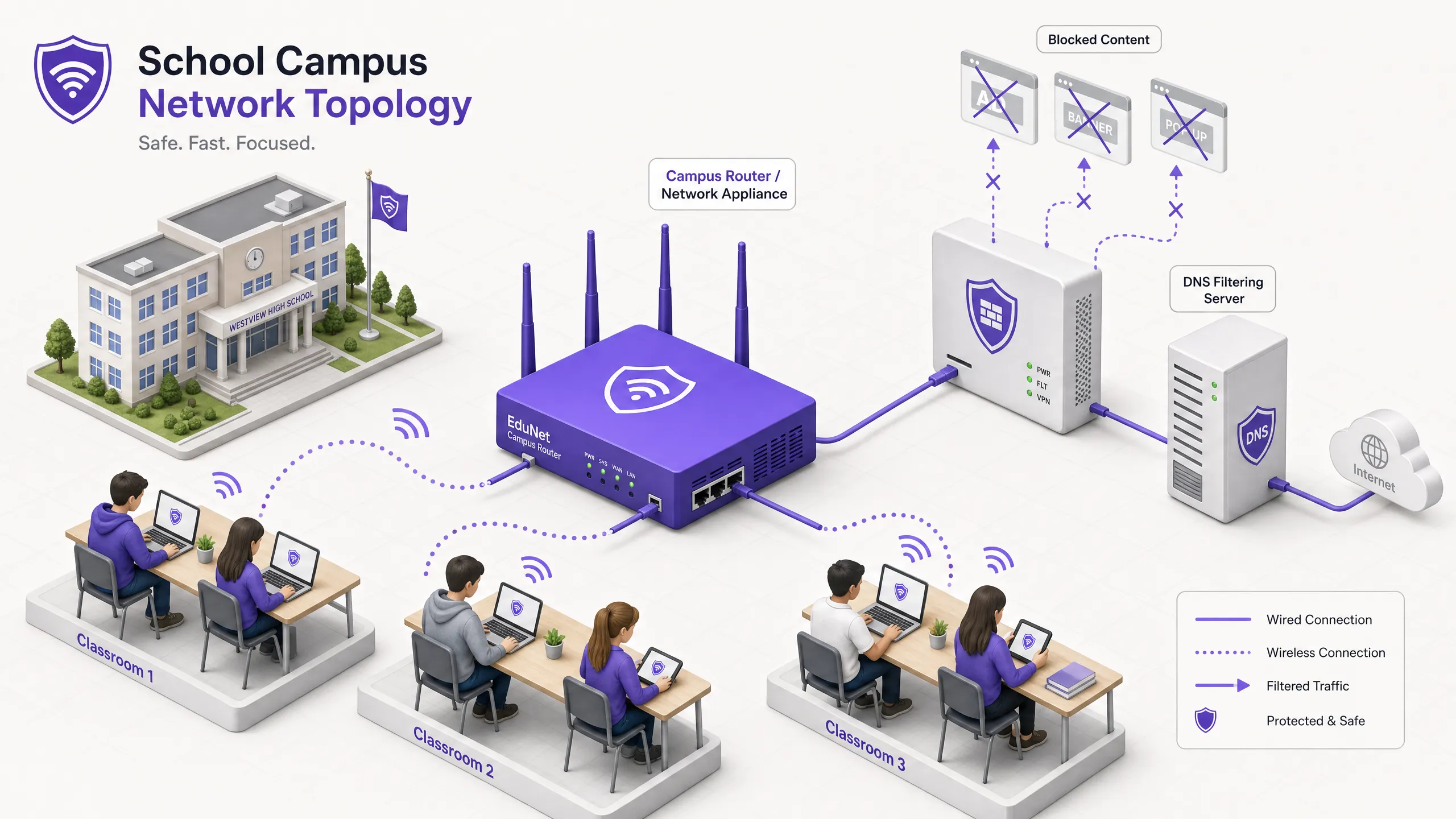
शैक्षिक वातावरण का प्रबंधन करने वाले IT निदेशकों और नेटवर्क आर्किटेक्ट्स के लिए, उपकरणों के प्रसार ने बैंडविड्थ की खपत, सुरक्षा जोखिमों और अनुपालन अंतराल का एक बड़ा संकट पैदा कर दिया है। छात्रों द्वारा कैंपस में औसतन 2.5 उपकरण लाने के साथ, एंडपॉइंट-आधारित फ़िल्टरिंग का प्रबंधन अब एक व्यवहार्य परिचालन रणनीति नहीं रह गया है।
नेटवर्क-लेवल एड ब्लॉकिंग एंडपॉइंट प्रबंधन से इंफ्रास्ट्रक्चर-लेयर नियंत्रण में एक बुनियादी बदलाव का प्रतिनिधित्व करता है। क्लाइंट डिवाइस तक पहुंचने से पहले DNS या प्रॉक्सी स्तर पर ट्रैफ़िक को रोककर, IT टीमें एकतरफा रूप से 30% तक गैर-शैक्षिक बैंडविड्थ खपत को समाप्त कर सकती हैं, मैलवर्टाइजिंग (malvertising) जोखिमों को कम कर सकती हैं, और GDPR और COPPA जैसे डेटा सुरक्षा फ्रेमवर्क के साथ अनुपालन लागू कर सकती हैं।
यह तकनीकी संदर्भ मार्गदर्शिका उच्च-घनत्व वाले वातावरण में वास्तविक दुनिया की तैनाती के आधार पर, K-12 और विश्वविद्यालय परिसरों में नेटवर्क-लेवल एड ब्लॉकिंग को लागू करने के लिए आर्किटेक्चर, परिनियोजन कार्यप्रणाली और ROI माप की रूपरेखा तैयार करती है।
रणनीतिक अवलोकन के लिए हमारा सहयोगी पॉडकास्ट सुनें:
तकनीकी डीप-डाइव
नेटवर्क लेयर पर एड ब्लॉकिंग को लागू करने के लिए आधुनिक वेब ट्रैफ़िक की विविधता, विशेष रूप से HTTPS की सर्वव्यापकता और उभरते एन्क्रिप्टेड DNS प्रोटोकॉल को संभालने के लिए एक स्तरित (layered) आर्किटेक्चरल दृष्टिकोण की आवश्यकता होती है。
DNS-लेवल फ़िल्टरिंग आर्किटेक्चर
नेटवर्क एड ब्लॉकिंग की आधारभूत परत DNS फ़िल्टरिंग है। जब कोई क्लाइंट डिवाइस विज्ञापन नेटवर्क, टेलीमेट्री या ट्रैकिंग से जुड़े डोमेन को रिज़ॉल्व करने का प्रयास करता है, तो नेटवर्क का DNS रिज़ॉल्वर क्वेरी को इंटरसेप्ट करता है और डायनामिक ब्लॉकलिस्ट के विरुद्ध इसकी जांच करता है।
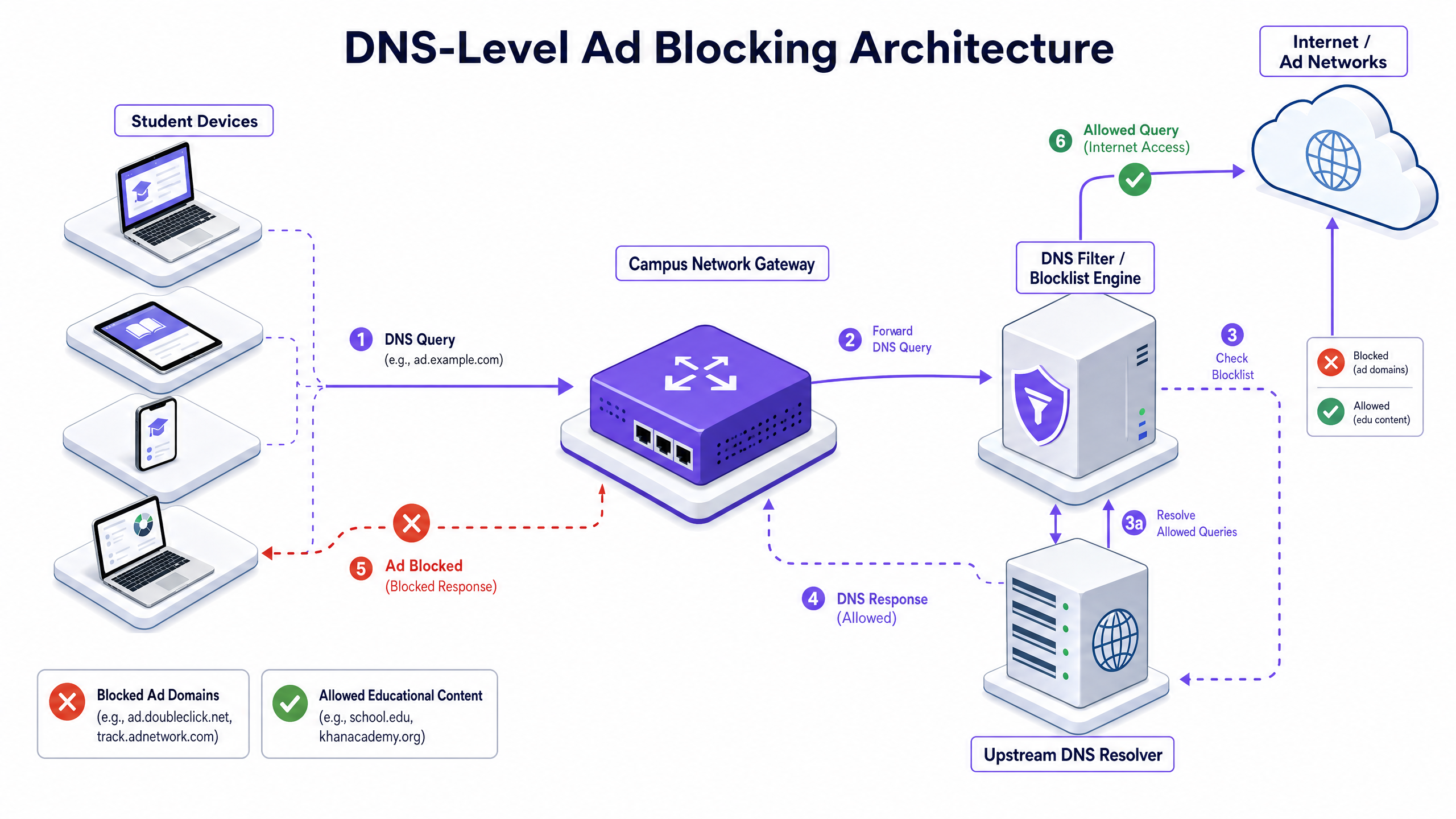
यह दृष्टिकोण अत्यधिक कुशल है क्योंकि यह कनेक्शन को स्थापित होने से ही रोकता है। विज्ञापन पेलोड कभी डाउनलोड नहीं होता है, और ट्रैकिंग स्क्रिप्ट कभी निष्पादित नहीं होती है। हालाँकि, आधुनिक परिनियोजन में DNS-over-HTTPS (DoH) और DNS-over-TLS (DoT) को ध्यान में रखना चाहिए। यदि क्लाइंट डिवाइस एन्क्रिप्टेड DNS का उपयोग करके स्थानीय रिज़ॉल्वर को बायपास करते हैं, तो फ़िल्टरिंग परत दरकिनार हो जाती है। नेटवर्क आर्किटेक्ट्स को ज्ञात DoH/DoT एंडपॉइंट्स (जैसे पोर्ट 443 पर 8.8.8.8) को ब्लॉक करने के लिए परिधि फ़ायरवॉल को कॉन्फ़िगर करना चाहिए ताकि मानक DNS (पोर्ट 53) पर फ़ॉलबैक को बाध्य किया जा सके, या एक गेटवे समाधान तैनात करना चाहिए जो मूल रूप से DoH ट्रैफ़िक का निरीक्षण करता हो।
प्रॉक्सी और SSL इंस्पेक्शन
जबकि DNS फ़िल्टरिंग अधिकांश विज्ञापन ट्रैफ़िक को संभालता है, पारदर्शी HTTP/HTTPS प्रॉक्सीइंग संपूर्ण डोमेन के बजाय विशिष्ट URL पर विस्तृत नियंत्रण प्रदान करता है। चूँकि अधिकांश वेब ट्रैफ़िक एन्क्रिप्टेड होता है, डीप पैकेट इंस्पेक्शन के लिए SSL इंस्पेक्शन (Man-in-the-Middle डिक्रिप्शन) तैनात करना आवश्यक है।
इसके लिए सभी प्रबंधित उपकरणों पर एक विश्वसनीय रूट प्रमाणपत्र तैनात करने की आवश्यकता होती है। उद्यम वातावरण में मानक अभ्यास होने के बावजूद, शैक्षिक सेटिंग्स में SSL इंस्पेक्शन के लिए संवेदनशील ट्रैफ़िक (जैसे, बैंकिंग या हेल्थकेयर पोर्टल) को डिक्रिप्ट करने से बचने के लिए सावधानीपूर्वक स्कोपिंग की आवश्यकता होती है और इसे संगठन की स्वीकार्य उपयोग नीति के अनुरूप होना चाहिए।
नेटवर्क एक्सेस कंट्रोल (NAC) के साथ एकीकरण
प्रभावी फ़िल्टरिंग के लिए पहचान-जागरूक नीतियों की आवश्यकता होती है। IEEE 802.1X के साथ एकीकरण नेटवर्क को प्रमाणित उपयोगकर्ता या डिवाइस प्रोफ़ाइल के आधार पर विभेदित फ़िल्टरिंग नीतियां लागू करने की अनुमति देता है। WPA3-Enterprise के माध्यम से नेटवर्क में लॉग इन करने वाले छात्र को एक प्रतिबंधात्मक नीति प्राप्त होती है, जबकि एक स्टाफ सदस्य को एक अलग नीति प्राप्त होती है, और Guest WiFi नेटवर्क पर एक आगंतुक को बेसलाइन अनुपालन नीति प्राप्त होती है।
कार्यान्वयन मार्गदर्शिका
वैध शैक्षिक गतिविधियों को बाधित करने से बचने के लिए नेटवर्क-लेवल एड ब्लॉकिंग को तैनात करने के लिए चरणबद्ध दृष्टिकोण की आवश्यकता होती है।
चरण 1: ट्रैफ़िक ऑडिटिंग और बेसलाइनिंग
किसी भी ब्लॉकिंग नियम को लागू करने से पहले, फ़िल्टरिंग समाधान को 14-21 दिनों के लिए पैसिव मॉनिटरिंग (केवल-लॉगिंग) मोड में तैनात करें। यह वर्तमान DNS क्वेरी वॉल्यूम और वर्गीकरण की एक बेसलाइन स्थापित करता है। वर्तमान में बैंडविड्थ की खपत करने वाले शीर्ष विज्ञापन नेटवर्क और ट्रैकिंग डोमेन की पहचान करने के लिए इस डेटा का उपयोग करें। यह बेसलाइन बाद की ROI गणना और WiFi Analytics रिपोर्टिंग के लिए महत्वपूर्ण है।
चरण 2: पायलट परिनियोजन
पायलट चरण के लिए एक प्रतिनिधि नेटवर्क सेगमेंट—जैसे कि एक एकल छात्र VLAN या एक विशिष्ट भवन—का चयन करें। ज्ञात विज्ञापन नेटवर्क और ट्रैकर्स को लक्षित करने वाली प्रारंभिक ब्लॉकलिस्ट नीतियां लागू करें।
महत्वपूर्ण कदम: एक त्वरित-प्रतिक्रिया वाइटलिस्ट अनुरोध प्रक्रिया स्थापित करें। शिक्षकों को अनिवार्य रूप से फॉल्स पॉजिटिव का सामना करना पड़ेगा जहां वैध शैक्षिक सामग्री विज्ञापन या ट्रैकिंग के रूप में वर्गीकृत डोमेन पर होस्ट की जाती है। हितधारकों का विश्वास बनाए रखने के लिए IT हेल्पडेस्क को डोमेन का तुरंत मूल्यांकन करने और वाइटलिस्ट करने के लिए तैयार रहना चाहिए।
चरण 3: पूर्ण रोलआउट और पॉलिसी ट्यूनिंग
802.1X एकीकरण के माध्यम से विभेदित नीतियों को लागू करते हुए, सभी प्रासंगिक नेटवर्क सेगमेंट में परिनियोजन का विस्तार करें। किसी भी प्रणालीगत समस्या की पहचान करने के लिए पहले 48 घंटों तक लॉग की लगातार निगरानी करें।
सुनिश्चित करें कि परिनियोजन व्यापक सुरक्षा नीतियों के साथ संरेखित है, जैसे कि सुरक्षा आवश्यकताओं के अनुपालन को प्रदर्शित करने के लिए Explain what is audit trail for IT Security in 2026 बनाए रखना।
सर्वोत्तम अभ्यास
- स्तरित रक्षा (Layered Defense): केवल DNS फ़िल्टरिंग पर निर्भर न रहें। स्कूल के स्वामित्व वाले उपकरणों के लिए एंडपॉइंट प्रबंधन और बायपास प्रयासों (जैसे, VPN प्रोटोकॉल, DoH) को ब्लॉक करने के लिए मजबूत फ़ायरवॉल नियमों के साथ इसे मिलाएं।
- मानकीकृत सुरक्षा: सुनिश्चित करें कि सभी नए वायरलेस परिनियोजन क्रेडेंशियल चोरी से बचाने के लिए WPA3 का उपयोग करते हैं, जो फ़िल्टरिंग को बायपास करने के लिए स्टाफ नेटवर्क तक पहुंचने का प्रयास करने वाले छात्रों के लिए एक सामान्य वेक्टर है।
- अनुपालन संरेखण: यूके में, सुनिश्चित करें कि आपकी फ़िल्टरिंग नीतियां IWF Compliance for Public WiFi Networks in the UK (या स्पेनिश-भाषी संचालन के लिए Cumplimiento IWF para redes WiFi públicas en el Reino Unido ) में उल्लिखित बेसलाइन आवश्यकताओं को पूरा करती हैं।
- नियमित समीक्षा: विज्ञापन नेटवर्क ब्लॉकलिस्ट से बचने के लिए लगातार डोमेन बदलते रहते हैं। सुनिश्चित करें कि आपका फ़िल्टरिंग समाधान स्थिर सूचियों के बजाय गतिशील रूप से अपडेट किए गए थ्रेट इंटेलिजेंस फ़ीड का उपयोग करता है।
समस्या निवारण और जोखिम न्यूनीकरण
| विफलता मोड | मूल कारण | न्यूनीकरण रणनीति |
|---|---|---|
| एन्क्रिप्टेड DNS के माध्यम से बायपास | छात्र DoH/DoT (जैसे, Cloudflare, Google DNS) का उपयोग करने के लिए ब्राउज़र कॉन्फ़िगर कर रहे हैं। | फ़ायरवॉल पर ज्ञात DoH प्रदाता IP पतों को ब्लॉक करें; DHCP के माध्यम से स्थानीय DNS रिज़ॉल्यूशन लागू करें। |
| VPN के माध्यम से बायपास | वाणिज्यिक VPN क्लाइंट या ब्राउज़र एक्सटेंशन का उपयोग। | छात्र VLAN पर सामान्य VPN प्रोटोकॉल (IPsec, OpenVPN, WireGuard) और ज्ञात VPN प्रदाता डोमेन को ब्लॉक करें। |
| ओवर-ब्लॉकिंग (फॉल्स पॉजिटिव) | आक्रामक अनुमानी (heuristic) फ़िल्टरिंग शैक्षिक सामग्री को ब्लॉक कर रही है। | शिक्षण कर्मचारियों के लिए एक सुव्यवस्थित, SLA-समर्थित वाइटलिस्ट अनुरोध प्रक्रिया लागू करें; पूर्ण परिनियोजन से पहले नीतियों का अच्छी तरह से पायलट करें। |
| IPv6 लीकेज | फ़िल्टरिंग केवल IPv4 पर लागू होती है, जिससे IPv6 DNS रिज़ॉल्यूशन के माध्यम से बायपास की अनुमति मिलती है। | सुनिश्चित करें कि फ़िल्टरिंग समाधान और नेटवर्क इंफ्रास्ट्रक्चर IPv6 स्टैक में नीतियों का पूरी तरह से समर्थन और कार्यान्वयन करते हैं। |
ROI और व्यावसायिक प्रभाव
नेटवर्क-लेवल एड ब्लॉकिंग के लिए व्यावसायिक मामला सुरक्षा से परे है; यह मापने योग्य परिचालन क्षमता प्रदान करता है।
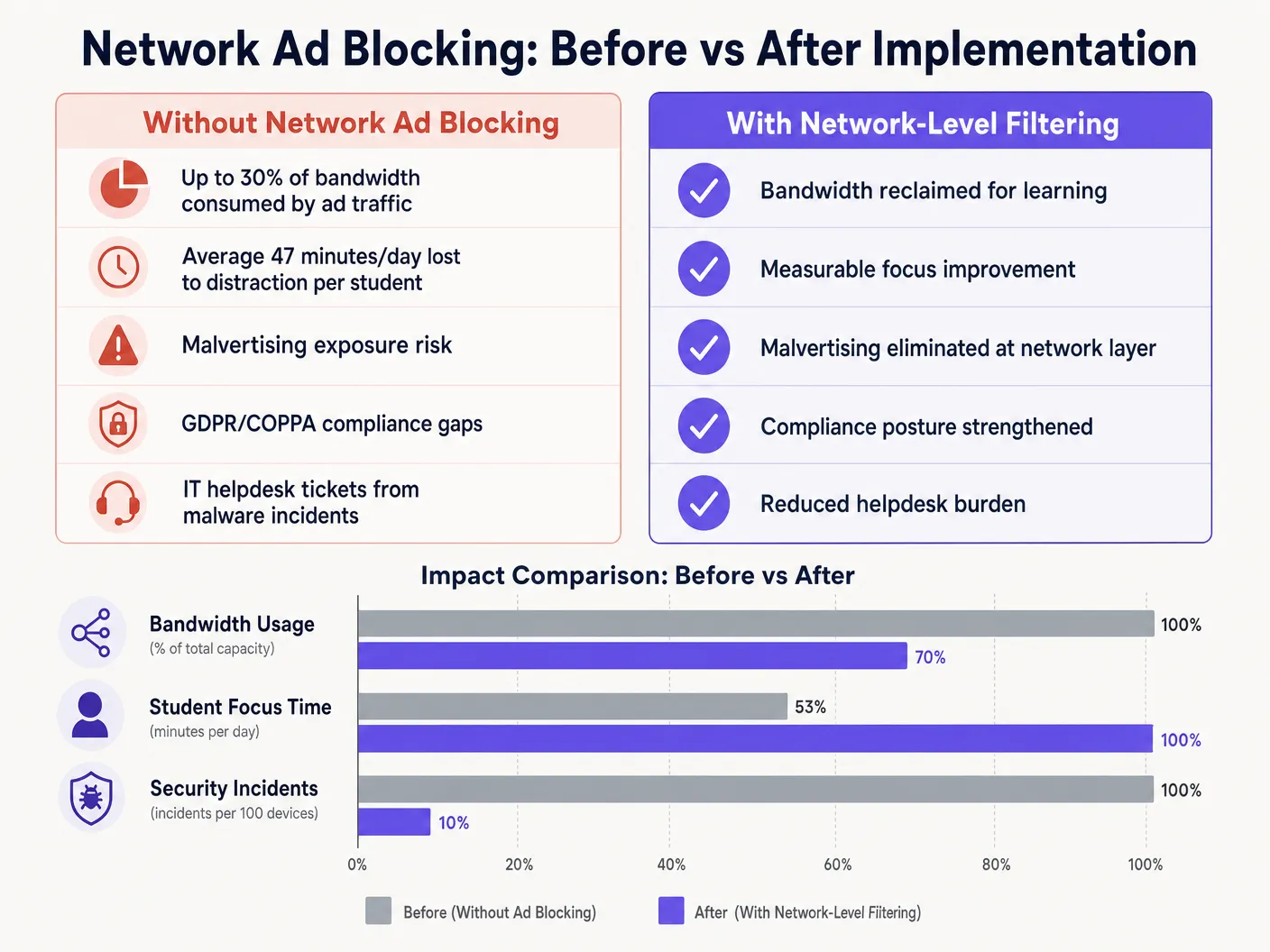
नेटवर्क एज पर विज्ञापन पेलोड और ट्रैकिंग स्क्रिप्ट को समाप्त करके, स्थान आमतौर पर अपने कुल बैंडविड्थ का 15% से 30% पुनः प्राप्त करते हैं। यह पुनः प्राप्त क्षमता महंगे सर्किट अपग्रेड की आवश्यकता को टालती है और महत्वपूर्ण क्लाउड एप्लिकेशन के प्रदर्शन में सुधार करती है। इसके अलावा, DNS स्तर पर मैलवर्टाइजिंग डोमेन को ब्लॉक करने से मैलवेयर घटनाओं की मात्रा काफी कम हो जाती है, जिससे सीधे IT हेल्पडेस्क टिकट वॉल्यूम और उपचारात्मक लागत कम हो जाती है।
चाहे स्कूल में परिनियोजन करना हो, Office Wi Fi: Optimize Your Modern Office Wi-Fi Network को अनुकूलित करना हो, या Retail , Healthcare , Hospitality , या Transport में उच्च-घनत्व वाले वातावरण का प्रबंधन करना हो, भौतिक परत को समझना, जैसे Wi Fi Frequencies: A Guide to Wi-Fi Frequencies in 2026 , और DNS फ़िल्टरिंग के माध्यम से तार्किक परत को सुरक्षित करना आधुनिक नेटवर्क आर्किटेक्चर के आवश्यक घटक हैं।
Key Definitions
DNS Filtering
The process of using the Domain Name System to block malicious websites and filter out harmful or unwanted content by returning a null IP address for blocked domains.
The primary mechanism for network-level ad blocking, operating upstream of client devices.
DNS-over-HTTPS (DoH)
A protocol for performing remote Domain Name System resolution via the HTTPS protocol, encrypting the data between the DoH client and the DoH-based DNS resolver.
A common method used to bypass local network DNS filtering policies.
Malvertising
The use of online advertising to spread malware, often through legitimate advertising networks without the publisher's knowledge.
A key security risk mitigated by network-level ad blocking.
SSL Inspection
The process of intercepting, decrypting, and inspecting HTTPS traffic for malicious content or policy violations before re-encrypting and forwarding it.
Required for deep packet inspection of encrypted web traffic, though complex to deploy in BYOD environments.
IEEE 802.1X
An IEEE Standard for port-based Network Access Control (PNAC), providing an authentication mechanism to devices wishing to attach to a LAN or WLAN.
Used to identify users and devices to apply differentiated filtering policies.
WPA3-Enterprise
The latest generation of Wi-Fi security, providing enhanced cryptographic strength and protecting against dictionary attacks.
Essential for securing campus networks and ensuring users cannot easily spoof identities to bypass filtering.
VLAN (Virtual Local Area Network)
A logical subnetwork that groups a collection of devices from different physical LANs.
Used to segment student, staff, and guest traffic to apply different security and filtering policies.
Transparent Proxy
An intermediary system that sits between a user and a content provider, intercepting requests without requiring client-side configuration.
Used to enforce URL-level filtering policies without deploying endpoint agents.
Worked Examples
A large multi-academy trust with 15,000 students across 12 campuses needs to implement ad blocking. They currently use a mix of school-issued Chromebooks and a BYOD policy for sixth-form students. The network is struggling with bandwidth congestion during peak hours.
- Deploy a cloud-managed DNS filtering solution across all 12 campuses, pointing all DHCP-assigned DNS settings to the cloud resolvers.
- Configure the firewall to block outbound port 53 traffic to any external IP other than the approved cloud resolvers to prevent manual DNS overrides.
- Block known DoH provider IPs at the firewall.
- Integrate the DNS filtering solution with the trust's Active Directory via 802.1X to apply different filtering policies: a strict policy for the Chromebook VLAN and a slightly more permissive policy for the BYOD VLAN, while maintaining core ad and malvertising blocking across both.
A university campus IT team receives complaints from the Computer Science faculty that the new network ad blocking solution is preventing access to legitimate development tools and APIs used in coursework.
- Review the DNS query logs for the Computer Science VLAN to identify the specific domains being blocked.
- Create a dedicated policy group for the Computer Science faculty and student VLANs.
- Implement a scoped whitelist for the required development domains, applying it only to the Computer Science policy group to maintain security across the rest of the campus.
- Establish a fast-track IT ticketing category specifically for 'Educational Content Blocking' to handle future requests with a 2-hour SLA.
Practice Questions
Q1. You have deployed DNS filtering across the campus network, but monitoring shows that a significant number of student BYOD devices are still loading ads and accessing restricted content. What is the most likely cause, and how should you address it?
Hint: Consider how modern browsers handle DNS queries independently of the operating system's network settings.
View model answer
The most likely cause is that modern browsers on the BYOD devices are using DNS-over-HTTPS (DoH) to bypass the local network's DNS resolver. To address this, configure the perimeter firewall to block known DoH provider IP addresses and drop outbound traffic on port 53 that does not originate from the approved campus DNS resolvers. This forces the devices to fall back to the local, filtered DNS infrastructure.
Q2. The school's leadership team wants to block all social media and advertising networks globally across the entire campus to ensure maximum compliance. As the IT Director, why might you advise against a single global policy, and what architecture would you propose instead?
Hint: Consider the different user groups on campus and their specific needs.
View model answer
A single global policy will inevitably cause operational friction. Staff may need access to social media for communications or marketing, and certain ad networks may be required for legitimate educational tools. Instead, propose a segmented architecture using 802.1X integration to apply identity-aware policies. Create distinct VLANs and policy groups for Students, Staff, and Guests, applying strict blocking to students while allowing necessary access for staff.
Q3. Before switching the new DNS filtering solution into active enforcement mode, what critical operational process must be established with the IT helpdesk?
Hint: Think about the impact of false positives on teaching staff.
View model answer
A rapid-response whitelist request process must be established. Heuristic filtering will inevitably block some legitimate educational resources (false positives). Without a fast, SLA-backed process for teachers to request domains be unblocked, the deployment will disrupt learning and cause stakeholder resistance.
Continue reading in this series
How to Set Up Guest WiFi: The Enterprise Network Segmentation Guide
This guide details the technical architecture, authentication standards, and deployment methodology required to build a secure, segmented enterprise WiFi network. You will learn how to implement the three-SSID model, deploy 802.1X for staff authentication, configure captive portals for GDPR-compliant guest access, and reduce your PCI DSS scope.
How to Set Up Guest WiFi: The Enterprise Network Segmentation Guide
This guide details the technical architecture, authentication standards, and deployment methodology required to build a secure, segmented enterprise WiFi network. You will learn how to implement the three-SSID model, deploy 802.1X for staff authentication, configure captive portals for GDPR-compliant guest access, and reduce your PCI DSS scope.
How to Implement Time and Bandwidth Restrictions on Guest WiFi
An authoritative technical reference guide on implementing time and bandwidth restrictions on enterprise guest WiFi networks. This guide provides actionable architectural blueprints, vendor-neutral configurations, and real-world case studies to help IT leaders balance network performance, security compliance, and visitor experience.