
Museum and Gallery WiFi: Creating a Connected Visitor Experience
This guide provides a comprehensive technical blueprint for deploying high-density WiFi in museums and galleries. It covers network architecture, visitor engagement strategies, and how to leverage WiFi analytics to drive ROI and operational efficiency.
Listen to this guide
View podcast transcript
執行摘要
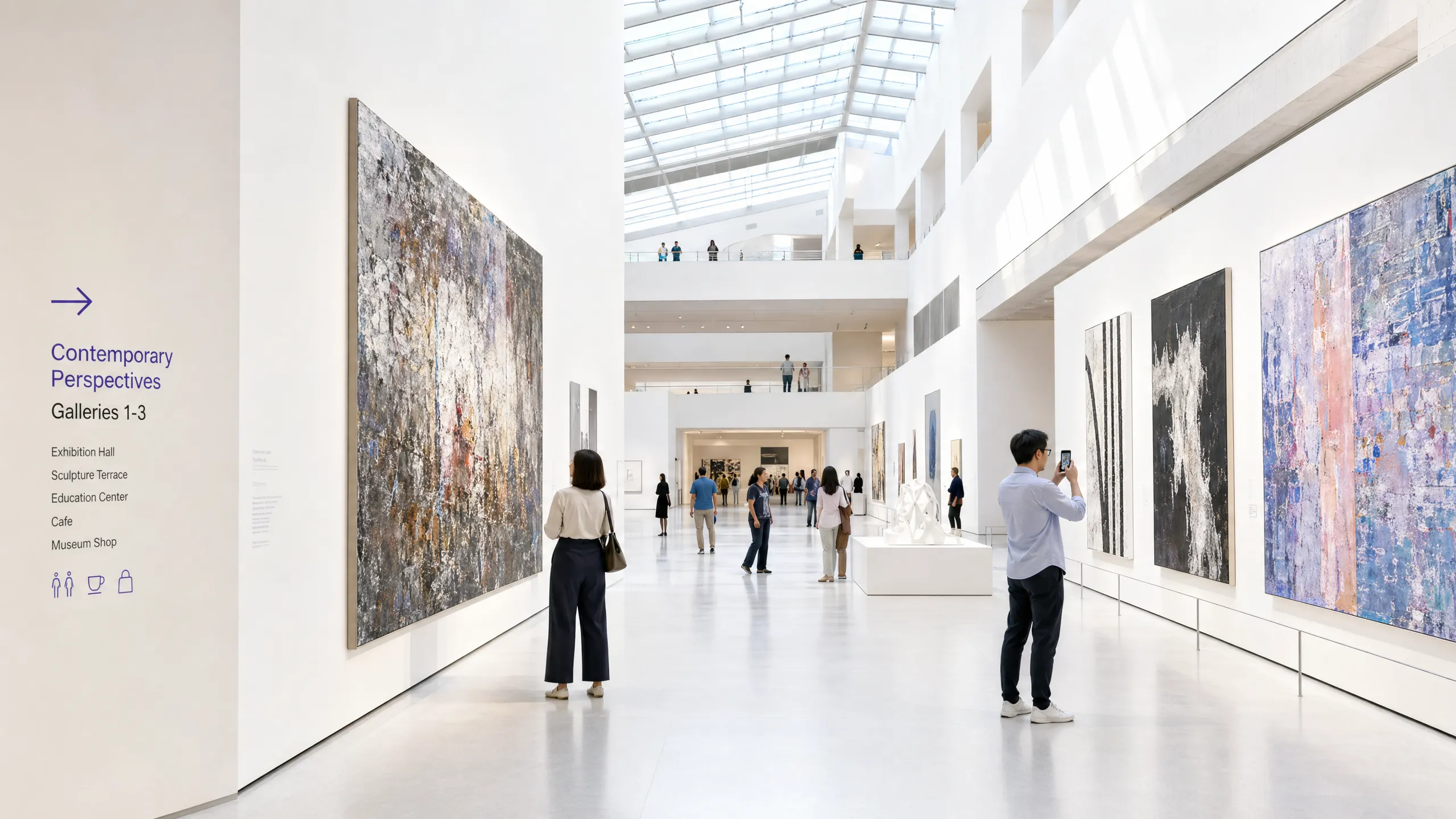
對於現代博物館與美術館而言,WiFi 不再只是被動的公用設施,而是數位訪客旅程的基礎建設。隨著文化機構從靜態展示轉型為互動式、多媒體豐富的環境,對無線網路的需求呈指數級增長。本指南為 IT 經理、網路架構師和場館營運總監提供實用的藍圖,用於在複雜的文化場館中設計與部署高密度 WiFi 網路。
我們將探討歷史建築和高人流量帶來的特定 RF 挑戰、無縫連線的架構需求,以及 Purple 等平台如何透過 Guest WiFi 登入引導和進階 WiFi Analytics 將成本中心轉化為策略資產。透過實施此處概述的策略,場館可以為數位票務、導航和互動式展覽提供可靠的連線,同時擷取具可行性的第一方數據,以推動會員增長和營收。
技術深度剖析
文化機構中的 RF 挑戰
博物館呈現出獨特的 RF(射頻)環境。與標準辦公空間不同,這些場館通常具有厚實的石牆、大量的金屬框架以及延伸的多層佈局。這些物理特性會導致顯著的訊號衰減和多路徑干擾。
此外,使用者密度可能會劇烈波動。特展可能會吸引數千名訪客進入狹窄的空間,使設計不良的網路不堪重負。為了緩解這些問題,需要強大、高密度的網路架構。
高密度網路架構
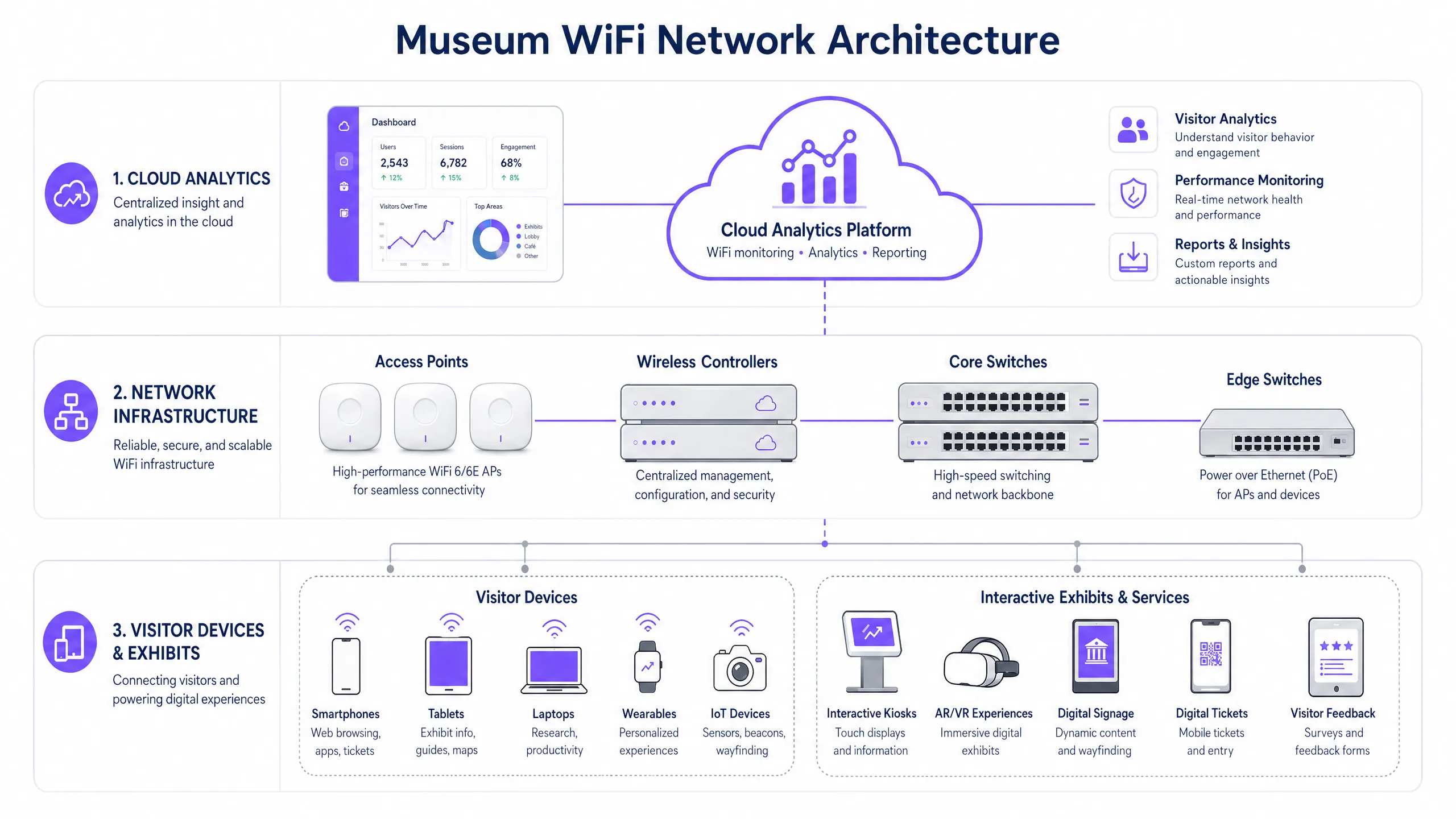
為了支援連網的訪客體驗,底層基礎建設必須具備彈性與可擴充性。
- WiFi 6/6E 標準: 部署 IEEE 802.11ax (WiFi 6) 或 WiFi 6E 至關重要。這些標準引入了 OFDMA(正交頻分多址)和 MU-MIMO(多使用者多輸入多輸出),透過允許存取點同時與多個裝置進行通訊,大幅提升了高密度環境中的網路效率。
- 存取點 (AP) 密度與配置: 預測性場地勘測是不可或缺的。AP 必須進行策略性配置,以提供重疊的覆蓋範圍,同時避免同頻道干擾。在佈線受限的歷史建築中,可能需要網狀網路或點對點無線橋接,儘管核心基礎建設始終首選有線連接。
- 網路隔離: 訪客流量必須與企業網路、銷售點 (POS) 系統和建築管理系統 (BMS) 嚴格隔離。這通常透過 VLAN(虛擬區域網路)和強大的防火牆策略來實現,以確保安全性和合規性。
實施指南
部署博物館 WiFi 網路需要精心規劃,以平衡效能、美觀和使用者體驗。
步驟 1:數位登入引導體驗
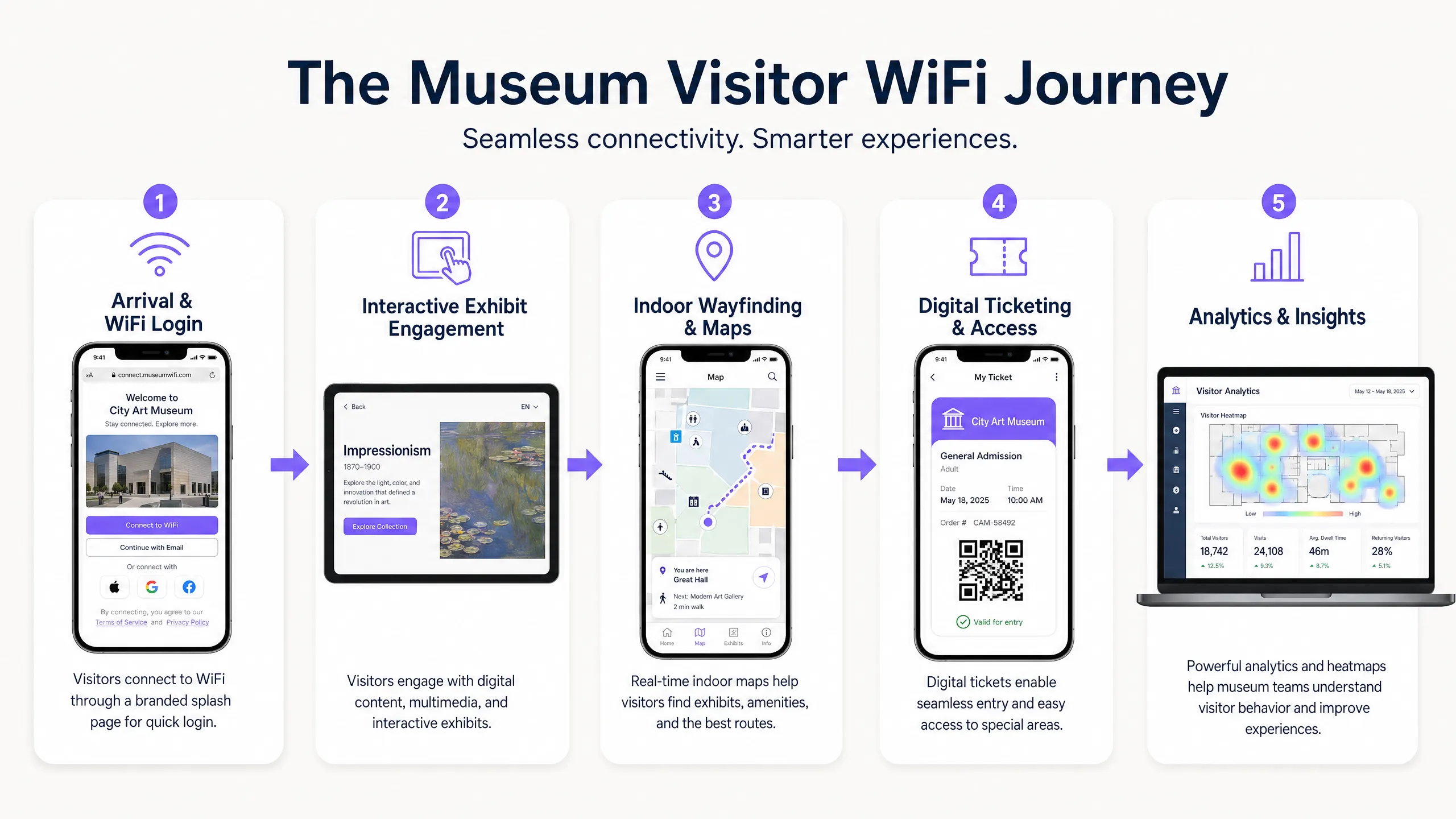
Captive Portal 是第一個數位接觸點。它必須流暢且安全。整合 Purple 的 Guest WiFi 等解決方案可實現基於設定檔的驗證。訪客可以透過社群媒體、電子郵件或 OpenRoaming 等無縫協定進行驗證。這減少了阻礙並鼓勵網路採用,這對於數據收集至關重要。
步驟 2:啟用訪客旅程
連線後,網路必須支援整個訪客旅程:
- 數位票務與入場: 入口處的高可用性對於無延遲掃描數位門票至關重要。
- 互動式展覽: 必須為與展覽相關的多媒體串流和 AR/VR 體驗分配專用頻寬。
- 室內導航: 透過將 WiFi 網路與 BLE(低功耗藍牙)信標結合使用,場館可以提供精確的室內導航,引導訪客穿過複雜的展廳佈局。
步驟 3:數據擷取與分析
網路的真正價值在於它所產生的數據。實施 WiFi Analytics 可讓 IT 和行銷團隊將訪客行為視覺化。熱圖可以揭示熱門展品、停留時間和流動模式。這些數據對於優化場館佈局、安排員工排班和量身定制行銷活動非常寶貴。
最佳實踐
- 優先考慮安全與合規性: 確保網路符合 GDPR 等數據保護法規。在擷取訪客數據時,選擇加入機制必須透明且溝通清晰。盡可能使用 WPA3 加密來保護網路,並在訪客流量和企業流量之間實施嚴格的隔離。
- 實施頻寬管理: 利用服務品質 (QoS) 協定,將關鍵流量(例如票務掃描器)的優先級置於一般訪客瀏覽之上。實施每位使用者的頻寬限制,以防止單一使用者降低其他人的體驗。
- 持續監控: 網路效能並非靜態不變。利用雲端管理儀表板即時監控 AP 健康狀況、用戶端連線率和整體網路吞吐量。
疑難排解與風險緩解
即使是設計最完善的網路也會遇到問題。常見的故障模式包括de:
- 同頻干擾 (CCI): 在高密度部署中,相同頻道的 AP 可能會互相干擾。緩解措施: 實施動態頻道分配並仔細調整發射功率電平。
- Captive Portal 故障: 如果 Captive Portal 無法載入,訪客將無法連線。緩解措施: 確保 DNS 基礎架構健全,並考慮在完全驗證之前,針對基本服務實施「圍牆花園 (walled garden)」存取。(請參閱: 透過強大的 DNS 和安全性保護您的網路 )。
- 裝置不相容: 網路必須支援大量的用戶端裝置,包括較舊的舊型硬體。緩解措施: 在針對現代裝置進行優化的同時,保持對舊標準(例如 802.11ac)的支援,確保最低共同標準不會拖累整體網路效能。
投資報酬率 (ROI) 與商業影響
部署企業級 WiFi 網路是一項重大投資。然而,其 ROI 可從多個維度進行衡量:
- 營運效率: 自動化數據收集減少了手動進行訪客調查的需求。室內導航減少了員工提供路線指引的負擔。
- 增加營收: 透過 Guest WiFi 收集的第一方數據所驅動的精準行銷活動,可以促進會員升級、特展門票銷售以及零售/咖啡廳的消費。
- 提升訪客滿意度: 無縫的數位體驗與更高的訪客滿意度評分和正面的線上評論直接相關,進而帶動未來的參觀人數。
透過將 WiFi 網路視為參與和分析的策略平台,而不僅僅是 IT 支出,博物館和美術館可以顯著提升其營運與商業成功。
Key Definitions
High-Density Environment
A physical space where a large number of client devices are connecting to the network simultaneously, requiring specialized RF design and AP configuration.
Museum atriums, special exhibition halls, and auditoriums are prime examples where standard office WiFi designs will fail.
Captive Portal
A web page that the user of a public-access network is obliged to view and interact with before access is granted.
This is the primary tool for visitor onboarding and data capture in a museum setting, often integrated with CRM systems.
WiFi 6 (802.11ax)
The current standard for wireless networks, designed specifically to improve efficiency and capacity in high-density environments.
Essential for modern museum deployments to handle the multitude of visitor smartphones and interactive exhibit devices.
VLAN (Virtual Local Area Network)
A logical grouping of devices on a network, allowing for the segmentation of traffic even if devices share the same physical infrastructure.
Used to separate visitor WiFi traffic from sensitive corporate or ticketing data, ensuring security.
Band Steering
A feature that encourages dual-band capable clients to connect to the less congested 5GHz or 6GHz bands rather than the crowded 2.4GHz band.
Crucial for optimizing performance in crowded museum spaces.
First-Party Data
Information a company collects directly from its customers and owns.
Gathered via the WiFi captive portal, this data is highly valuable for targeted marketing and understanding the visitor demographic.
RSSI (Received Signal Strength Indicator)
A measurement of the power present in a received radio signal.
Used during site surveys and troubleshooting to determine if a visitor has sufficient signal strength to maintain a reliable connection.
OpenRoaming
A roaming federation service enabling an automatic and secure WiFi experience globally.
Allows visitors to seamlessly connect to the museum WiFi without manually interacting with a captive portal, improving the user experience.
Worked Examples
A historic gallery with strict preservation orders needs to deploy WiFi to support a new AR (Augmented Reality) exhibit. Running new CAT6 cabling to the exhibit space is prohibited. How should the network architect proceed?
The architect should design a wireless mesh network or utilize point-to-point wireless bridges. High-capacity APs (WiFi 6) should be placed at the perimeter where cabling is permitted. These edge APs will wirelessly backhaul traffic from mesh APs located near the AR exhibit. The mesh APs should be housed in aesthetically appropriate, non-metallic enclosures to comply with preservation orders.
A large science museum is experiencing network congestion in its main atrium during peak weekend hours, leading to slow captive portal load times and visitor complaints.
The IT team should implement several optimization steps: 1) Enable band steering to force capable devices onto the less congested 5GHz band. 2) Implement strict per-user bandwidth limits (e.g., 5 Mbps down/up) to prevent bandwidth hogging. 3) Review the AP deployment in the atrium; if APs are maxed out on client connections, additional APs with directional antennas may be required to sectorize the coverage area and increase overall capacity.
Practice Questions
Q1. A museum is planning a temporary outdoor exhibit in an adjacent courtyard. The exhibit will require reliable WiFi for digital interactive kiosks. Running cabling to the courtyard is not feasible. What is the most appropriate wireless architecture?
Hint: Consider the need for reliable backhaul for the kiosks without physical cabling.
View model answer
Deploy a point-to-multipoint wireless bridge from the main building to the courtyard. Use outdoor-rated, directional antennas on the building to establish a strong backhaul link to outdoor APs in the courtyard. These outdoor APs will then provide localized WiFi coverage for the kiosks.
Q2. The marketing director wants to use WiFi analytics to track how many visitors enter a specific, small gallery room (5m x 5m). Currently, there is one AP in the adjacent hallway providing coverage to the room. Will this setup provide accurate location data for that specific room?
Hint: Think about how location tracking works using WiFi and the requirements for accuracy.
View model answer
No, it will likely not provide accurate data. WiFi location analytics generally require trilateration, meaning a client device needs to be heard by at least three APs to accurately determine its position. A single AP in an adjacent hallway can only determine that the device is nearby, not its precise location within a small 5x5m room. Additional APs or BLE beacons would be required for precise indoor location tracking.
Q3. During a busy weekend, the IT dashboard shows that the 2.4GHz band is heavily congested, while the 5GHz band has plenty of capacity. However, many dual-band capable devices are still connecting to 2.4GHz. What configuration change should be implemented?
Hint: What feature forces or encourages capable devices to use a specific frequency band?
View model answer
Enable and aggressively configure 'Band Steering' on the wireless controller. This feature will actively encourage dual-band capable clients to connect to the 5GHz band, freeing up airtime on the 2.4GHz band for legacy devices that only support 2.4GHz.
Continue reading in this series
Cisco iPSK: a comprehensive guide for businesses
This comprehensive guide explores Cisco iPSK (Identity Pre-Shared Key) architecture, implementation, and business benefits. It provides IT leaders in BTR, hospitality, and retail with actionable strategies for deploying secure, segmented, and automated WiFi networks without the complexity of 802.1X.
Cisco iPSK: a comprehensive guide for businesses
This comprehensive guide explores Cisco iPSK (Identity Pre-Shared Key) architecture, implementation, and business benefits. It provides IT leaders in BTR, hospitality, and retail with actionable strategies for deploying secure, segmented, and automated WiFi networks without the complexity of 802.1X.
Kepanjangan iPSK ff: a comprehensive guide for businesses
iPSK - Identity Pre-Shared Key - is the authentication standard that enables multi-tenant WiFi in Build-to-Rent, student accommodation, and MDU environments. It assigns a unique WiFi password to every resident, creating an isolated Private Area Network (PAN) on shared infrastructure. This guide covers the technical architecture, RADIUS-based authentication flow, vendor-specific implementation details, and the commercial case for deploying iPSK as a managed amenity.