
Managed WiFi service: a comprehensive guide for businesses
This comprehensive guide details how property developers and BTR operators can deploy managed WiFi services using cloud overlay architecture. It covers the technical implementation of per-resident isolation via iPSK, network segmentation best practices, and the commercial ROI of treating WiFi as a managed amenity.
Video overview
Listen to this guide
View podcast transcript
Executive summary
Managed WiFi service has evolved from a basic hardware support contract into a sophisticated cloud overlay architecture. For property developers, landlords, and BTR operators, the network is no longer just infrastructure; it is a critical amenity and a commercial asset. This guide provides a comprehensive technical framework for designing, deploying, and managing enterprise WiFi across multi-tenant environments.
By migrating to a cloud-managed controller architecture and deploying per-resident isolation via iPSK, operators can deliver a home-like connectivity experience while maintaining strict security and compliance. We explore the implementation strategies, deployment architecture, and business benefits of treating WiFi as a managed service, backed by real-world data from Purple's 80,000+ live venues.
Technical deep-dive: the cloud overlay architecture
A modern managed WiFi service operates across four distinct layers. The physical access layer and switching infrastructure form the foundation, but the true value resides in the cloud management platform and the services layer.
The access layer relies on enterprise-grade hardware. Cisco Meraki, HPE Aruba, Ruckus, Juniper Mist, Ubiquiti UniFi, Cambium, Extreme, and Fortinet provide the physical access points. However, the hardware alone cannot solve the fundamental challenge of a multi-tenant environment: isolating hundreds of households on a single shared physical network.
This is where the services layer becomes critical. Standard guest WiFi isolates every device from every other device. This approach fails in a residential context, where a resident expects their smartphone to discover their smart TV, and their voice assistant to control their lighting.
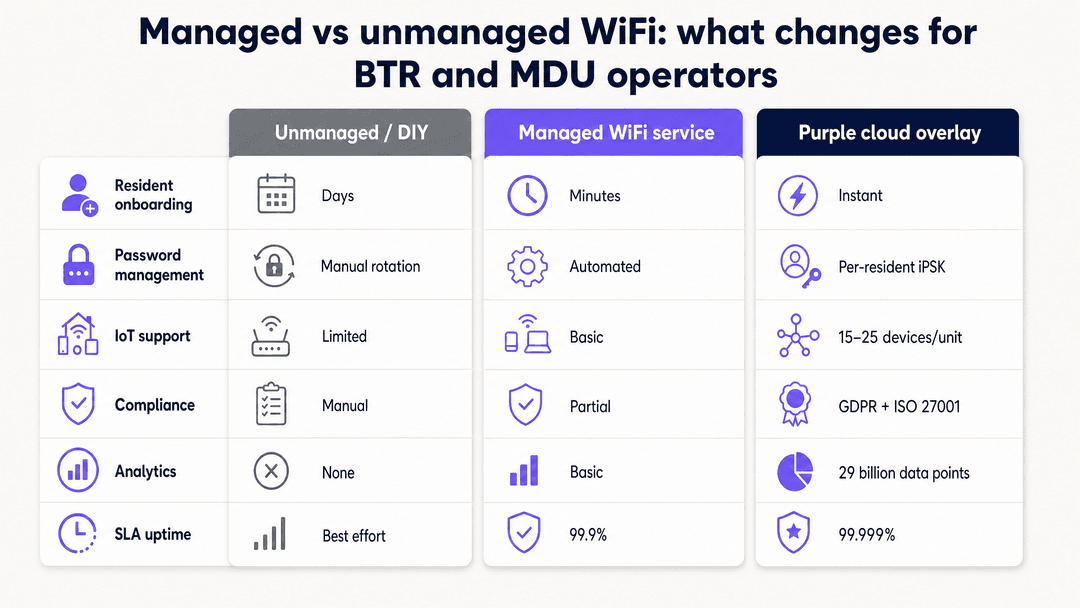
The technical solution is iPSK (Identity Pre-Shared Key). Each resident receives a unique WiFi credential tied to their lease. The network uses this credential to place all of that resident's devices into a private, isolated segment. Devices on the same credential recognise each other; devices on different credentials remain completely invisible. This architecture supports the 15 to 25 devices typical of a modern BTR household without compromising the security of neighbouring units.
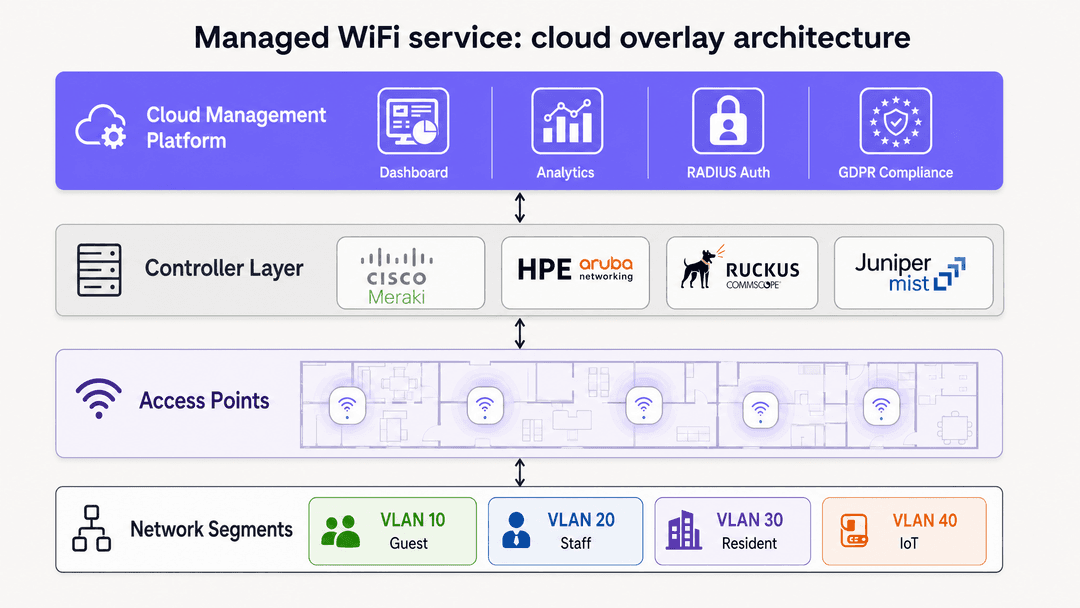
From a security perspective, this isolation is mandatory. Under GDPR, an operator must ensure that one resident cannot access another resident's data or devices. iPSK provides this isolation at the network layer. When combined with WPA3 encryption and IEEE 802.1X authentication for staff networks, the architecture delivers a robust, defensible security posture.
Implementation guide: deploying multi-tenant WiFi
Deploying a managed WiFi service requires a structured, phased approach. Skipping these phases inevitably leads to poor performance and resident dissatisfaction.
The process begins with a predictive radio frequency site survey. Using tools to model signal propagation through specific building materials ensures accurate access point placement. Estimating AP density based purely on square footage is a guaranteed route to coverage holes and co-channel interference.
Traffic classification and VLAN design follow the physical planning. A BTR environment typically requires at least three distinct network populations: residents, staff, and visitors. Each population requires a dedicated VLAN and a strict firewall policy.
For example, Guest WiFi in the lobby should sit on VLAN 10 with outbound internet access only. Staff operations sit on VLAN 20, secured by WPA3-Enterprise. Residents sit on VLAN 30, with iPSK handling the per-unit isolation. The firewall must enforce a default-deny policy between these segments. If you need guidance on configuring these rules, review our guide on How to Safely Segregate Staff and Guest WiFi Networks .
Controller configuration involves mapping these VLANs to SSIDs. Best practice dictates broadcasting no more than three or four SSIDs per radio band to minimise management overhead and preserve wireless airtime. For a deeper look at SSID strategy, see Three SSIDs to rule them all: guest, Passpoint, and IoT WiFi .
The final phase integrates the services layer. Purple's cloud overlay connects to the wireless controller via standard RADIUS and API integrations. This layer handles the automated resident onboarding, credential management, and WiFi Analytics , turning the physical network into a managed service.
Best practices for BTR and MDU operators
Treating WiFi as a managed amenity requires a shift in operational thinking. The network must be designed for density, self-service, and continuous monitoring.
Automate the resident onboarding. Residents expect to be online the moment they move in. Integrate the WiFi provisioning with your property management system so that credentials are automatically generated and issued via email or a resident app before the tenancy begins.
Design for IoT density. A modern BTR unit contains 15 to 25 connected devices. The network architecture must support this density, and the onboarding process must accommodate devices without screens, such as smart plugs and sensors.
Retain the commercial value. Avoid bundling the WiFi service with a third-party broadband contract. By owning the hardware and running a software overlay, the operator retains the rent premium associated with high-quality WiFi.
Implement strict network segmentation. Never run building management systems, CCTV, or payment terminals on the same logical network as resident or guest traffic. Use dedicated VLANs with explicit firewall rules.
Troubleshooting and risk mitigation
Even a well-designed network encounters issues. Understanding the common failure modes allows operators to mitigate risks before they impact the resident experience.
The most frequent support ticket in a multi-tenant environment relates to device discovery - typically a resident unable to cast to their smart TV. If the network uses standard guest isolation instead of iPSK, device discovery will fail. Ensure iPSK is correctly configured and that multicast traffic is permitted within, but strictly contained to, the individual resident's VLAN segment.
Misconfigured trunk ports represent a significant security risk. If a switch port carrying multiple VLANs is accidentally configured as an access port, the segmentation collapses, exposing all traffic on a single broadcast domain. Audit switch configurations regularly.
Finally, monitor the wired infrastructure. A secure wireless architecture is useless if a visitor can plug a laptop into an exposed Ethernet port in a common area and access the corporate VLAN. Secure all physical ports with MAC authentication or 802.1X.
ROI and business impact
A managed WiFi service delivers measurable commercial returns for BTR operators and landlords. The impact spans revenue generation, operational efficiency, and asset valuation.
High-quality WiFi is a top-five amenity factor for prospective tenants. Operators providing a seamless, home-like connectivity experience command a rent premium of 20 to 40 GBP per unit, per month. Furthermore, properties with move-in ready WiFi experience shorter vacancy periods, as the immediate availability of connectivity removes a significant friction point for new residents.
Operationally, a cloud-managed overlay reduces IT support overhead. Automated onboarding and self-service device management eliminate the need for manual password resets and troubleshooting. The centralised dashboard provides real-time visibility across the entire estate, allowing support teams to identify and resolve issues before residents report them.
Purple's platform, deployed across 80,000+ venues and processing 440 million logins in 2024, provides the analytics and compliance framework necessary to turn a cost centre into a revenue-generating asset. By capturing first-party data and understanding network utilisation, operators can optimise their spaces and deliver a superior resident experience.
Key Definitions
iPSK (Identity Pre-Shared Key)
A security mechanism that allows multiple unique WiFi passwords to be used on a single SSID, with each password assigning the user to a specific VLAN or policy.
Essential for BTR and MDU environments, allowing operators to give each resident a private network experience on shared infrastructure.
VLAN (Virtual Local Area Network)
A logical subnetwork that groups a collection of devices from different physical LAN segments into a single broadcast domain.
Used to securely segment traffic, such as keeping guest devices completely separate from staff laptops and payment terminals.
Cloud Overlay
A software management and services layer that operates above the physical network hardware, providing centralised control, authentication, and analytics.
Allows operators to deploy advanced features like Purple's multi-tenant onboarding without replacing existing access points.
IEEE 802.1X
An IEEE Standard for port-based Network Access Control, providing an authentication mechanism to devices wishing to attach to a LAN or WLAN.
The gold standard for securing staff and corporate networks, requiring users to authenticate with individual credentials rather than a shared password.
Captive Portal
A web page that a user of a public-access network is obliged to view and interact with before access is granted.
Used on guest networks to capture first-party data, present terms of service, and manage GDPR marketing consent.
WPA3
The latest generation of WiFi security, providing enhanced cryptographic strength and better protection against offline dictionary attacks.
Should be the default encryption standard for all new enterprise and residential network deployments.
RADIUS
A networking protocol that provides centralised Authentication, Authorization, and Accounting management for users who connect and use a network service.
The backend engine that verifies credentials for 802.1X staff networks and validates iPSK passwords for resident networks.
SSID (Service Set Identifier)
The public name of a wireless network that devices see and connect to.
Operators should limit the number of broadcasted SSIDs to preserve wireless airtime and maintain network performance.
Worked Examples
A 250-unit Build-to-Rent development is experiencing a high volume of support tickets from residents unable to connect their smart speakers and casting devices to the building's shared WiFi network. The current setup uses a single SSID with a captive portal and standard client isolation.
Migrate the network to an iPSK (Identity Pre-Shared Key) architecture. Configure the wireless LAN controller to issue a unique WiFi credential to each resident upon move-in. Map these credentials via a RADIUS server to dynamically assign each resident's devices to a private VLAN segment or a micro-segmented 'WiFi bubble'. Disable standard client isolation within these individual segments, but maintain strict firewall rules preventing routing between different residents' segments.
A multi-site coworking operator needs to deploy a secure network that supports transient daily guests, long-term corporate members requiring VPN access, and internal staff operations, all running on the existing Cisco Meraki hardware.
Implement a strict VLAN segmentation strategy across the existing hardware. Deploy three distinct SSIDs. SSID 1 (Guest): Maps to VLAN 10, uses an open network with a Purple captive portal for GDPR-compliant data capture, and restricts traffic to outbound internet only. SSID 2 (Members): Maps to VLAN 20, uses WPA3-Enterprise with 802.1X authentication against the operator's identity provider, allowing VPN passthrough. SSID 3 (Staff): Maps to VLAN 30, uses WPA3-Enterprise, and permits access to internal management systems.
Practice Questions
Q1. You are deploying WiFi across a new 400-unit student housing block. The developer suggests using a single open SSID with a captive portal to simplify the login process for students. What is the primary technical risk of this approach, and what architecture should you recommend instead?
Hint: Consider how students use devices like games consoles, smart TVs, and wireless printers in their rooms.
View model answer
The primary risk is that a captive portal with standard client isolation breaks device-to-device communication, meaning smart TVs, wireless printers, and casting devices will not function. Furthermore, games consoles often struggle to authenticate via captive portals. The recommended architecture is to deploy an iPSK solution, issuing each student a unique credential that places their devices into a private, isolated VLAN segment, allowing their devices to communicate with each other while remaining secure from other students.
Q2. During a network audit of a retail chain, you discover that the point-of-sale (POS) terminals and the public guest WiFi are operating on the same physical access points and broadcasting on the same subnet. What compliance standard is currently being violated, and how do you remediate the issue?
Hint: Think about the requirements for handling payment card data.
View model answer
This configuration violates PCI DSS (Payment Card Industry Data Security Standard), which requires strict isolation of the cardholder data environment. To remediate this, you must implement VLAN segmentation. The POS terminals must be moved to a dedicated, highly restricted VLAN. The guest WiFi must operate on a separate VLAN with a firewall policy that explicitly denies any routing between the guest subnet and the POS subnet.
Q3. A BTR operator wants to switch their access point hardware from Cisco Meraki to HPE Aruba across their portfolio, but they are concerned about losing their existing Purple captive portal and analytics data. Is this concern valid?
Hint: Consider where the intelligence sits in a cloud overlay architecture.
View model answer
The concern is not valid. Purple operates as a hardware-agnostic cloud overlay. It integrates with both Cisco Meraki and HPE Aruba via standard RADIUS and API protocols. The operator can replace the physical access layer hardware without losing their captive portal designs, marketing automation flows, or historical analytics data, as these services reside in the Purple cloud platform, not on the local access points.
Continue reading in this series
Staff WiFi vs. Guest WiFi: Best Practices for Corporate Network Segmentation
A comprehensive technical guide for IT leaders on segmenting staff and guest WiFi networks. It covers VLAN architecture, 802.1X authentication, firewall policies, and the business impact of secure network design.
Apartment WiFi solutions: a comprehensive guide for businesses
This guide covers the architecture, deployment, and business case for apartment WiFi solutions in Build to Rent and multi-dwelling unit properties. It explains how Identity Pre-Shared Key (iPSK) technology creates secure, isolated network bubbles for each resident while supporting smart devices and IoT. Property developers, landlords, and BTR operators will find actionable deployment guidance, ROI data, and worked implementation scenarios.
Cox business managed WiFi: a comprehensive guide for businesses
This guide details how property developers and BTR operators can deploy scalable, secure networks using Cox Business managed WiFi. It covers network architecture, vendor-neutral hardware deployment, and the business impact of transitioning connectivity from an operational headache to reliable infrastructure.