
WiFi 6 vs WiFi 5: Does it Solve Channel Interference?
This guide provides a technical deep dive into how WiFi 6 (802.11ax) addresses channel interference in high-density enterprise environments through OFDMA and BSS Coloring. It equips IT managers, network architects, and CTOs with actionable deployment strategies, real-world case studies from hospitality and healthcare, and a framework for evaluating the ROI of infrastructure upgrades in venues where wireless performance is business-critical.
Video overview
Listen to this guide
View podcast transcript
Part of our core series: WiFi RF Engineering Guide →

Executive Summary
For IT directors and network architects managing high-density environments - whether in hospitality, retail, or large public venues - co-channel interference remains the primary barrier to wireless performance. The traditional approach of mitigating interference by reducing transmit power or disabling 2.4 GHz radios on alternating access points has reached its logical limit.
The transition from Wi-Fi 5 (802.11ac) to WiFi 6 (802.11ax) represents a fundamental architectural shift. Instead of merely increasing theoretical throughput, WiFi 6 was specifically engineered to address capacity and efficiency in congested airspace. Through the introduction of Orthogonal Frequency-Division Multiple Access (OFDMA) and Basic Service Set (BSS) Coloring, WiFi 6 provides deterministic mechanisms to manage interference rather than merely reacting to it.
This guide explores the technical realities of WiFi 6 interference mitigation, providing actionable deployment strategies for enterprise IT teams. We examine how these standards perform in mixed-client environments and how integrating intelligence platforms like Guest WiFi analytics can validate the ROI of your infrastructure refresh.
Technical Deep-Dive: How WiFi 6 Changes the Rules
To understand how WiFi 6 addresses interference, we must first examine the limitations of its predecessor.
The Wi-Fi 5 Contention Problem
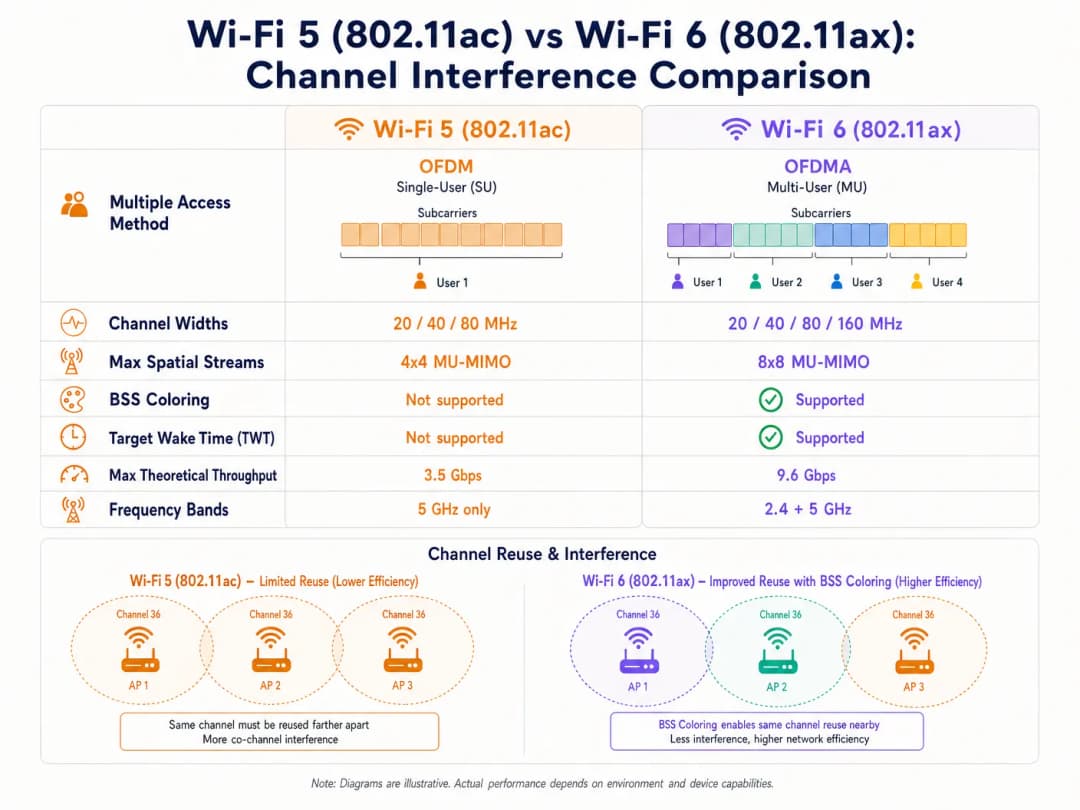
Wi-Fi 5 relies on Orthogonal Frequency-Division Multiplexing (OFDM). In this single-user model, an access point (AP) must allocate the entire channel bandwidth - whether 20, 40, or 80 MHz - to a single client for a given transmission, regardless of the payload size. This is highly inefficient for small data packets, such as those generated by IoT devices or real-time telemetry.
Furthermore, Wi-Fi 5 utilizes a strict Carrier Sense Multiple Access with Collision Avoidance (CSMA/CA) mechanism. If an AP or client detects RF energy above a specific threshold (typically -82 dBm) on its channel, it defers transmission. In dense deployments, overlapping coverage areas result in significant co-channel interference (CCI), where devices spend more time waiting than transmitting. This is the core problem WiFi 6 was designed to solve.
OFDMA: Granular Spectrum Allocation
WiFi 6 introduces OFDMA, which divides the channel into smaller, distinct sub-carriers called Resource Units (RUs). Instead of dedicating an entire 20 MHz channel to a single device, an AP can partition that channel into up to nine separate RUs, transmitting to or receiving from multiple clients simultaneously. This significantly reduces contention overhead and latency. Although OFDMA does not eliminate external interference, it makes the network much more efficient, reducing the overall time the medium is busy and therefore lowering the probability of collisions.
BSS Coloring: Spatial Reuse in Action
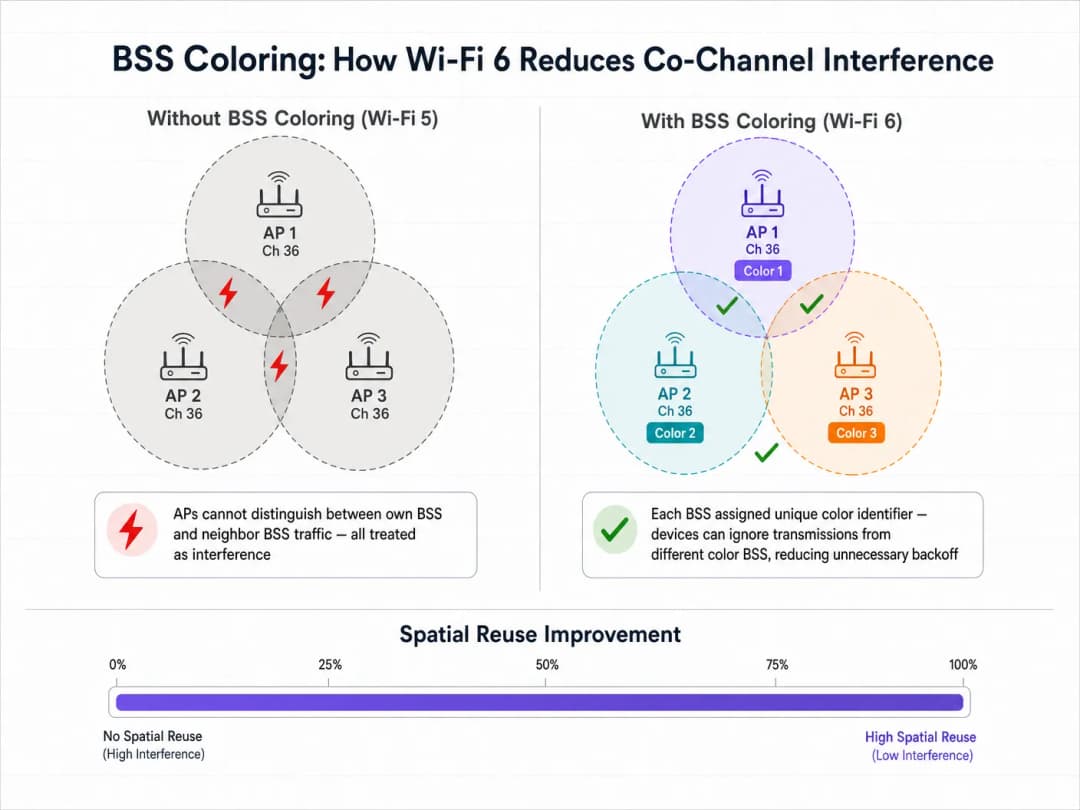
The feature targeting co-channel interference most directly is BSS Coloring, formally known as spatial reuse. In a dense deployment, multiple APs often operate on the same channel due to limited spectrum availability. In WiFi 5, a client device cannot differentiate between traffic intended for its own AP (its Basic Service Set) and traffic from a neighboring AP on the same channel. It treats all traffic as interference and defers transmission, regardless of how weak the interfering signal actually is.
WiFi 6 adds a 6-bit identifier - "color" - to the physical layer (PHY) header. Devices can now differentiate between intra-BSS traffic (same color) and inter-BSS traffic (different color). If a device detects a transmission with a different color, it applies an adaptive Clear Channel Assessment (CCA) threshold. If the interfering signal is relatively weak, the device can ignore it and transmit simultaneously, significantly increasing overall network capacity through spatial reuse.
Got questions about your specific setup?
Our team works with venue operators, IT managers, and network engineers across 80,000 venues. Book a 20-minute call and we will show you how others like you solved it.
Implementation Guide: Deployment for High Density
Deploying WiFi 6 requires a strategic shift from coverage-centric design to capacity-centric architecture. The following recommendations apply to Hospitality, Retail, and public-sector environments.
1. Channel Width Strategy
Although WiFi 6 supports 160 MHz channels, deploying them in enterprise environments is rarely recommended. Wider channels mean fewer non-overlapping channels are available, significantly increasing co-channel interference.
Recommendation: Standardize on 20 MHz or 40 MHz channels in the 5 GHz band for high-density environments like stadiums and conference centers. Rely on OFDMA and higher modulation schemes (1024-QAM) to provide throughput, rather than forcing it with wider channels. When planning your spectrum, keep in mind the guidance in DFS Channels: What They Are and When to Avoid Them. Although WiFi 6 is more efficient, radar detection events will still force channel changes, disrupting client connectivity. For Italian-language teams, the same guidance is available as Canali DFS: Cosa sono e quando evitarli.
2. Managing the Mixed-Client Reality
The primary caveat of WiFi 6 features like OFDMA and BSS coloring is that they require client support. In public-facing environments like Retail or Hospitality, you do not control the client devices. When legacy WiFi 5 or WiFi 4 devices connect, the network must revert to standard OFDM and legacy contention mechanisms for those specific transmissions. Therefore, the interference mitigation benefits of WiFi 6 scale in proportion to the penetration of WiFi 6 clients in your environment.
3. Integrating Network Intelligence
To justify the capital expenditure of a WiFi 6 upgrade, IT leaders require visibility into network utilization and client capabilities. This is where a WiFi Analytics platform becomes essential. By integrating Purple's analytics overlay, network architects can track the adoption rate of WiFi 6 enabled devices entering their venues, correlate network performance metrics with footfall and dwell time data, and identify specific areas where legacy devices are causing disproportionate contention.
Best Practice and Security Integration
Seamless Onboarding at Scale
As you upgrade infrastructure to handle higher capacity, the onboarding experience must scale accordingly. WiFi 6 mandates support for WPA3, which provides stronger encryption. For public Guest WiFi, the industry is moving toward seamless, secure authentication. Purple acts as a free identity provider for services like OpenRoaming under the Connect licence, allowing users to connect automatically and securely without a Captive Portal while leveraging enterprise-grade 802.1X authentication. This is particularly relevant as we look to the future of connectivity - see our recent insights on How a wi fi assistant Enables Passwordless Access in 2026.
Optimizing the 2.4 GHz Band
Unlike WiFi 5, which operated only in the 5 GHz band, WiFi 6 applies to both 2.4 GHz and 5 GHz. This breathes new life into the congested 2.4 GHz spectrum, which is critical for IoT deployments in Healthcare and logistics. Given the limited number of non-overlapping channels (1, 6, and 11), BSS coloring is particularly valuable here. Target Wake Time (TWT) also dramatically extends the battery life of IoT sensors and medical telemetry devices operating in this band.
Compliance Considerations
For deployments in regulated industries, security improvements in WiFi 6 are directly relevant to compliance posture. WPA3 with Simultaneous Authentication of Equals (SAE) addresses those vulnerabilities in WPA2-Personal that could be exploited through offline dictionary attacks. For environments subject to PCI DSS (retail payment processing) or CCPA/CPRA (guest data capture), WPA3 strengthens the encryption layer of the wireless network, thereby reducing the scope of compliance risk.
Troubleshooting and Risk Mitigation
Common Failure Modes
The most common cause of self-induced interference in WiFi 6 deployments is the over-provisioning of transmit power. IT teams often leave AP transmit power on "Auto", resulting in APs with overlapping coverage cells shouting over one another. The mitigation is to manually tune transmit power limits, ensuring that cell overlap is sufficient for seamless roaming but tight enough to minimize co-channel interference.
Another common failure is designing networks assuming all clients support WiFi 6, creating capacity bottlenecks when the reality of legacy device prevalence becomes clear. The mitigation is to use analytics to understand your specific client mix before finalizing the RF design.
Finally, misconfigured BSS coloring - where APs are not properly assigning or coordinating color identifiers - means that the benefits of spatial reuse are not being realized. Ensure that your wireless LAN controller or cloud management platform is running the latest firmware and that BSS coloring is explicitly enabled and monitored through the management console.
ROI and Business Impact
The business case for WiFi 6 extends beyond IT metrics. In large venues, network performance directly impacts user experience and operational efficiency. For instance, in stadium environments, enabling seamless connectivity allows for in-seat ordering and real-time engagement. By combining WiFi 6 infrastructure with Purple's platform, venues can leverage location-based services and indoor navigation - Purple has recently launched Offline Maps Mode for Seamless, Secure Navigation to WiFi Hotspots, which extends this capability even without an active internet connection.
Furthermore, Purple's expansion into new sectors - including the recent appointment of Iain Fox as VP Growth for the Public Sector to Drive Digital Inclusion and Smart City Innovation - highlights the growing need for robust, interference-resistant connectivity in municipal and Transportation deployments, where network reliability is a matter of public safety and service delivery.
Measuring success: On the technical side, track the reduction in channel utilization percentage during peak hours and lower client retry rates. On the business side, measure the increase in concurrent connected users, higher data capture rates via the guest portal, and improved guest satisfaction scores. WiFi 6 does not break the laws of physics - RF interference is still present. However, it provides IT teams with sophisticated, deterministic tools to manage that interference, transforming wireless from a best-effort medium into a reliable enterprise utility.
Key Definitions
BSS Coloring (Spatial Reuse)
A WiFi 6 mechanism that adds a 6-bit identifier to PHY headers, allowing devices to differentiate between their own network traffic and overlapping neighbor network traffic, thereby reducing unnecessary transmission deferrals and enabling simultaneous transmissions on the same channel.
Critical for high-density environments (stadiums, multi-tenant buildings) where co-channel interference previously crippled network capacity. Must be enabled explicitly on the wireless LAN controller.
OFDMA (Orthogonal Frequency-Division Multiple Access)
A multi-user technology that subdivides a WiFi channel into smaller Resource Units (RUs), allowing an AP to communicate with multiple clients simultaneously within a single channel occupancy event.
Solves the inefficiency of WiFi 5 OFDM, particularly for environments with many devices sending small amounts of data - IoT sensors, retail point-of-sale terminals, and mobile messaging applications.
Resource Unit (RU)
The smallest unit of frequency allocation in OFDMA. A 20 MHz channel can be divided into up to 9 RUs, each serving a different client simultaneously.
IT architects need to understand RUs to grasp how WiFi 6 achieves its capacity improvements without requiring wider channels or additional spectrum.
Co-Channel Interference (CCI)
Performance degradation that occurs when multiple access points and clients operate on the exact same frequency channel within range of one another, forcing them to wait for clear airtime via CSMA/CA.
The primary enemy of high-density WiFi design. Mitigated by careful channel planning, cell size management, and WiFi 6 BSS Coloring.
Target Wake Time (TWT)
A WiFi 6 feature that allows APs to negotiate scheduled wake windows with client devices, defining exactly when they will wake up to send or receive data.
Crucial for IoT deployments in healthcare and retail logistics, as it dramatically extends device battery life and reduces overall medium contention by preventing all devices from competing for airtime simultaneously.
Clear Channel Assessment (CCA)
The 'listen before talk' mechanism devices use to determine if the RF medium is busy before transmitting. In WiFi 5, a single threshold applies to all detected energy. In WiFi 6, BSS Coloring enables adaptive CCA thresholds based on the color of the detected transmission.
BSS Coloring modifies the CCA thresholds, allowing devices to be more aggressive in transmitting when the interfering signal originates from a different-color BSS.
1024-QAM (Quadrature Amplitude Modulation)
An advanced modulation scheme in WiFi 6 that encodes 10 bits of data per symbol, a 25% increase over WiFi 5's 256-QAM (8 bits per symbol).
Delivers higher peak throughput, but requires very high Signal-to-Noise Ratio (SNR). Clients must be in close proximity to the AP to benefit, making it most relevant for short-range, high-throughput use cases.
OpenRoaming
A federation standard built on Passpoint (802.11u/Hotspot 2.0) that allows users to seamlessly and securely connect to participating WiFi networks without captive portals, using 802.1X authentication and roaming agreements between identity providers.
The future of enterprise guest access. Purple acts as a free identity provider for this service under the Connect license, streamlining the user journey while maintaining enterprise-grade security and enabling CCPA/CPRA-compliant data capture.
Worked Examples
A large conference center is upgrading its main auditorium from WiFi 5 to WiFi 6. The current deployment uses 80 MHz channels to maximize marketing claims of "gigabit speeds," but during keynote speeches with 2,000 attendees, the network grinds to a halt due to co-channel interference. How should the new WiFi 6 architecture be configured?
Step 1: Reduce channel width from 80 MHz to 20 MHz. This increases the number of available non-overlapping channels in the 5 GHz band from 6 to 25, drastically reducing co-channel interference. Step 2: Enable BSS Coloring on the wireless controller to allow spatial reuse among APs that must share a channel. Step 3: Implement OFDMA for both uplink and downlink to efficiently handle the high volume of small packets (social media updates, messaging) typical of conference environments. Step 4: Tune AP transmit power down to create smaller, denser micro-cells, minimizing the RF footprint of each AP. Step 5: Disable legacy data rates (below 12 Mbps) to force clients to use more efficient modulation and clear the airtime faster.
A hospital IT director is deploying a new fleet of WiFi 6 IoT telemetry monitors across a ward. The ward already has legacy WiFi 4 guest devices operating heavily on the 2.4 GHz band. How does WiFi 6 help, and what configuration is required?
Step 1: Unlike WiFi 5, WiFi 6 operates in the 2.4 GHz band. The new telemetry monitors can leverage OFDMA and Target Wake Time (TWT) in 2.4 GHz, dramatically extending battery life. Step 2: Configure a dedicated SSID for the IoT devices on a separate VLAN, steering them to specific AP radios if the hardware supports dual 5GHz or software-defined radios. Step 3: Enable BSS Coloring on the 2.4 GHz band to mitigate interference from the legacy guest devices and neighboring wards. Step 4: Strictly enforce the 1, 6, 11 channel plan with 20 MHz channel widths on 2.4 GHz - do not use 40 MHz channels. Step 5: Integrate Purple's analytics to monitor the airtime utilization of the legacy guest devices and ensure they are not starving the critical IoT traffic.
Practice Questions
Q1. You are designing the WiFi network for a high-density shopping mall. You have deployed WiFi 6 APs on 20 MHz channels. However, your analytics dashboard shows high latency and channel utilization during peak trading hours. You verify that BSS Coloring is enabled and correctly configured. What is the most likely cause of the ongoing interference, and how do you investigate it?
Hint: Consider the capabilities of the devices actually connecting to the network in a public retail space, and how legacy devices interact with WiFi 6 efficiency features.
View model answer
The most likely cause is a high percentage of legacy (WiFi 4 or WiFi 5) client devices. BSS Coloring and OFDMA only mitigate interference when the client devices also support WiFi 6. In a public retail environment, the network must fall back to legacy CSMA/CA contention mechanisms for older devices, negating many of the WiFi 6 efficiency benefits. To investigate, use Purple's analytics to generate a client capability breakdown, segmenting devices by WiFi generation. If less than 60-70% of clients are WiFi 6 capable, the interference mitigation gains will be limited. The remediation is to increase AP density to create smaller cells, reduce transmit power further, and potentially implement band steering to push capable devices to less congested channels.
Q2. A stadium IT team is planning to use 80 MHz channels to support 4K video streaming for journalists in the press box. The press box has 15 APs deployed in close proximity across a 4,300 square foot area. Why is this a high-risk design, even with WiFi 6, and what is the recommended alternative?
Hint: Calculate how many non-overlapping 80 MHz channels exist in the 5 GHz band, then consider what happens when 15 APs must share those channels.
View model answer
Using 80 MHz channels in the 5 GHz band provides only 6 non-overlapping channels (including DFS). With 15 APs in a 4,300 square foot area, every channel must be reused multiple times in close proximity. Even with BSS Coloring, the noise floor will be elevated to the point where the adaptive CCA threshold cannot provide sufficient spatial reuse benefit - the signals will simply be too strong to ignore. The recommended alternative is to use 20 MHz channels (25 non-overlapping channels available), rely on OFDMA to handle the multi-stream video traffic efficiently, and configure the APs for micro-cell architecture with reduced transmit power. For the specific 4K streaming use case, the guaranteed throughput of a 20 MHz OFDMA channel serving a small number of dedicated journalists is more than sufficient.
Q3. You are configuring a new WiFi 6 deployment in a hospital. The medical telemetry devices are legacy 2.4 GHz only (802.11n / WiFi 4). How should you configure the 2.4 GHz radios on the new WiFi 6 APs to support these devices while minimizing interference? What compliance considerations apply?
Hint: Focus on fundamental RF design principles for the 2.4 GHz band, which only has 3 non-overlapping channels, and consider the regulatory environment for medical devices.
View model answer
You must strictly adhere to the 1, 6, 11 channel plan using 20 MHz channel widths - never use 40 MHz channels in 2.4 GHz in a healthcare environment. Carefully tune transmit power down to minimize cell overlap. Disable lower data rates (1, 2, 5.5, 11 Mbps) to force clients to use more efficient modulation schemes, clearing the airtime faster. Enable BSS Coloring on the 2.4 GHz radios to help manage interference from neighboring wards. From a compliance perspective, medical device wireless deployments must adhere to IEC 60601-1-2 (electromagnetic compatibility for medical electrical equipment). You should conduct a formal RF site survey before and after deployment, and document the interference environment as part of the device risk assessment. Ensure the telemetry devices are on a dedicated VLAN with QoS prioritization, and that the network is segmented from general guest traffic in accordance with HIPAA.
Continue reading in this series
Understanding RSSI and Signal Strength for Optimal Channel Planning
This guide provides a comprehensive technical deep-dive into RSSI, Signal-to-Noise Ratio (SNR), and RF propagation principles for optimal channel planning. It equips IT managers, network architects, and venue operations directors with actionable strategies to mitigate Co-Channel and Adjacent Channel Interference, optimize AP placement, and leverage analytics for measurable business impact across hospitality, retail, and public-sector environments.
20MHz vs 40MHz vs 80MHz: Which Channel Width Should You Use?
This guide provides a definitive, vendor-neutral technical reference for IT managers, network architects, and venue operations directors on selecting the correct WiFi channel width - 20MHz, 40MHz, or 80MHz - across enterprise deployments in hospitality, retail, events, and public-sector environments. It covers the underlying IEEE 802.11 mechanics, real-world capacity trade-offs, and step-by-step deployment guidance to help teams make the right call this quarter. Understanding channel width selection is one of the highest-leverage decisions in any wireless LAN design, directly impacting throughput, interference, client density support, and the reliability of guest-facing services.
5GHz DFS WiFi Channels: When to Use & Avoid in Enterprise
Learn how 5GHz DFS WiFi channels work, radar interference risks, CAC wait times, weather radar channels, and enterprise channel planning best practices.
Got questions about your specific setup?
Our team works with venue operators, IT managers, and network engineers across 80,000 venues. Book a 20-minute call and we will show you how others like you solved it.