
WiFi managed service: a comprehensive guide for businesses
This guide covers the technical architecture, deployment strategy, and business case for a WiFi managed service in multi-tenant and enterprise environments. It explains how iPSK isolation works, how to segment resident, staff, and guest networks, and how to measure ROI - with specific relevance to BTR operators, property developers, and landlords.
Video overview
Listen to this guide
View podcast transcript
Executive summary
Deploying enterprise WiFi across multi-tenant environments requires more than consumer-grade hardware and a shared password. For IT managers, network architects, and venue operations directors, a WiFi managed service transforms connectivity from a capital-intensive headache into a predictable operational utility.
Purple manages networks for 80,000+ venues globally, processing 440 million logins in 2024 (Purple internal data). We see the difference between networks that scale and networks that fail. This guide details how to architect, deploy, and manage a WiFi managed service that isolates traffic securely, supports resident smart devices, and delivers a 99.999% uptime SLA.
Whether you manage Build-to-Rent (BTR) properties, student housing, or retail environments, you need a hardware-agnostic cloud overlay that integrates with Cisco Meraki, HPE Aruba, Ruckus, Juniper Mist, Ubiquiti UniFi, Cambium, Extreme, and Fortinet. This guide covers the architecture, the deployment phases, the compliance requirements, and the business case.
Technical deep-dive: the architecture of multi-tenant WiFi
The core challenge in multi-tenant environments like BTR or MDU is delivering a home-like network experience on enterprise shared infrastructure. Guest WiFi , designed for transient visitors with captive portals, fails this requirement. Residents need their smart TVs to discover their smartphones, while remaining completely invisible to the apartment next door.
The technical solution is Identity Pre-Shared Key (iPSK), also known as PPSK by HPE Aruba or Personal Private Network by Cisco Meraki. The terminology varies by vendor; the concept is identical.
The iPSK "WiFi bubble"
iPSK assigns a unique WPA2 or WPA3 passphrase to each resident or tenant. The RADIUS server uses this unique key to assign the connecting device to a specific VLAN or apply a micro-segmentation policy. The result is a per-resident WiFi bubble.
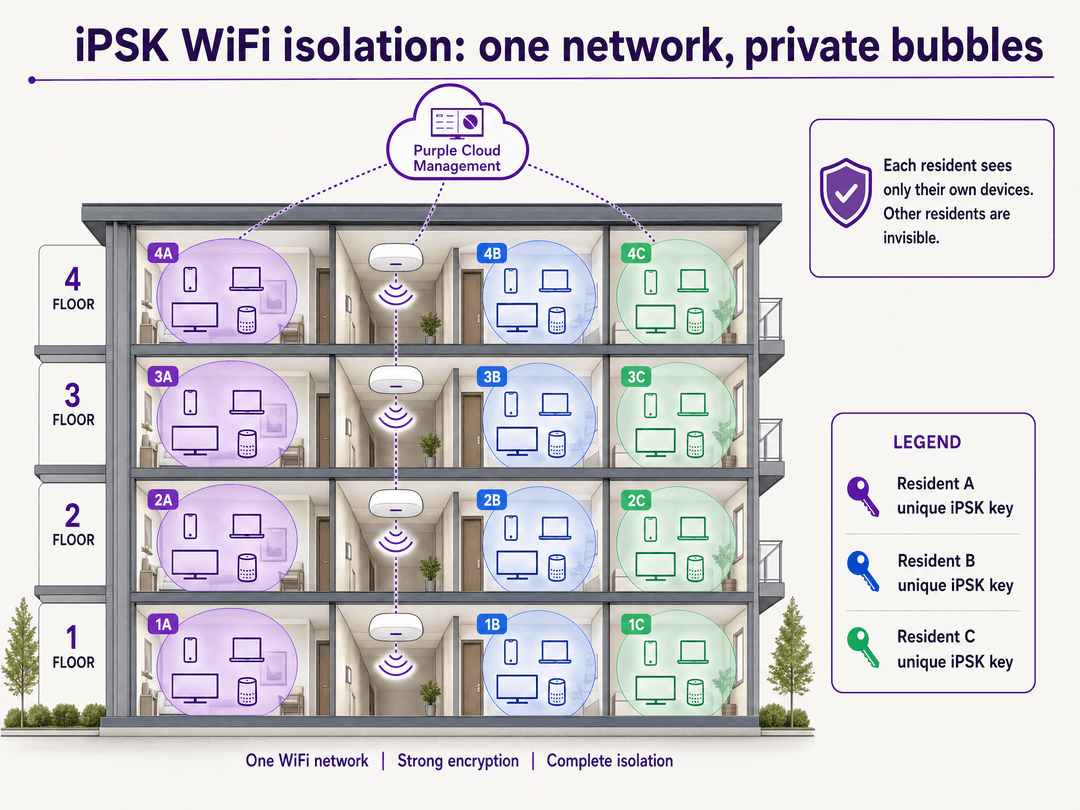
Three properties define the bubble. First, privacy between residents: devices on Resident A's key cannot see devices on Resident B's key, even when connected to the exact same physical access point. Second, continuity within a household: Resident A's phone discovers their Chromecast and smart speaker seamlessly, exactly as it would on a home network. Third, resident-specific access: when a resident moves out, Purple revokes their specific key via the cloud overlay. You do not rotate a building-wide password. No other resident is affected.
For a deeper comparison of PPSK and iPSK deployment models, see our guide on Power probe PPSK: comparing features and deployment models .
Hardware-agnostic cloud overlay
A modern WiFi managed service operates as a software overlay above the hardware layer. This architecture separates the control plane from the data plane. Purple integrates directly with your existing wireless LAN controllers or cloud dashboards. We handle the RADIUS authentication, policy enforcement, and user onboarding, while the local hardware handles RF transmission.
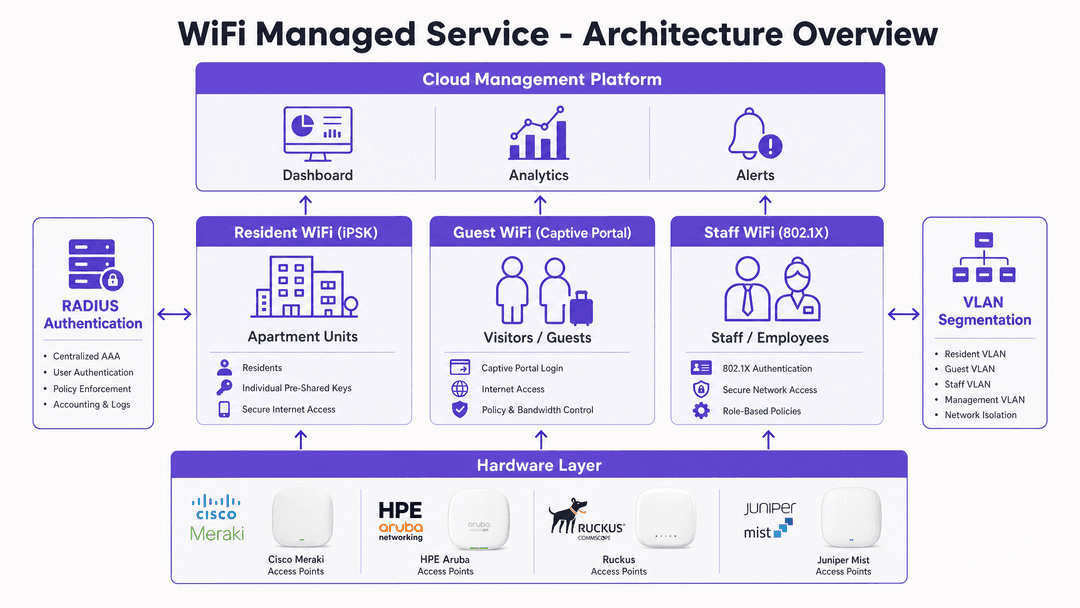
The architecture segments traffic into three distinct logical networks, each with its own security model. Resident WiFi uses iPSK with per-key VLAN assignment. Guest WiFi uses a captive portal with client isolation and conscious-choice opt-ins for marketing data capture. Staff WiFi uses IEEE 802.1X with EAP-TLS or PEAP, tied to Microsoft Entra ID, Okta, or Google Workspace. For a detailed breakdown of how to structure these three SSIDs, see our guide on Three SSIDs to rule them all: guest, Passpoint, and IoT WiFi .
Security standards and compliance
A WiFi managed service must pass audit. Purple is ISO 27001 certified, GDPR and CCPA compliant, and Cyber Essentials certified. For properties handling payment data, the network segmentation model supports PCI DSS compliance by isolating point-of-sale traffic on a dedicated VLAN with no lateral movement to resident or guest segments. WPA3 is supported across Cisco Meraki, HPE Aruba, Ruckus, and Juniper Mist hardware, providing forward secrecy and protection against offline dictionary attacks.
Implementation guide
Deploying a WiFi managed service requires rigorous planning across four phases. Skipping any phase is the most common cause of post-deployment support tickets.
Phase 1: RF design and hardware selection
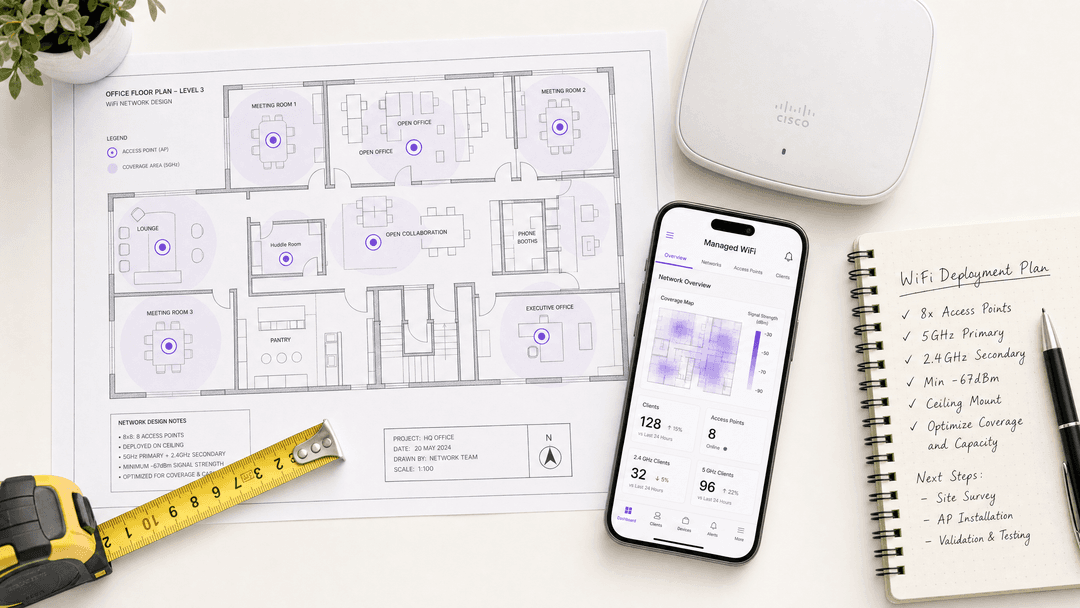
Do not guess access point placement. Conduct a predictive RF survey using tools like Ekahau before procurement. For BTR environments, the standard is typically one access point per apartment unit to guarantee 5GHz coverage and handle the density of 15-25 IoT devices per household (Purple internal data). A 200-unit building has between 3,000 and 5,000 devices on the WiFi at any given moment.
Select hardware from the canonical list: Cisco Meraki, HPE Aruba, Ruckus, Juniper Mist, Ubiquiti UniFi, Cambium, Extreme, or Fortinet. Purple runs as a cloud overlay on all of them. You are not locked in.
Phase 2: Network segmentation strategy
Design your VLAN structure before configuring the cloud platform. The management VLAN is strictly for APs and switches, with no user traffic. Resident VLANs are dynamically assigned via iPSK, with one VLAN per resident key or per resident group. The staff VLAN is secured via 802.1X using your identity provider. The guest VLAN is an open network with a captive portal and client isolation enabled. Never bridge these VLANs.
Phase 3: Identity and authentication integration
Connect the Purple cloud overlay to your identity provider. For staff networks, configure SAML or SCIM provisioning from Microsoft Entra ID or Okta. For resident networks, integrate the WiFi provisioning step into your property management system so keys are generated automatically upon lease signing. Residents receive their unique WiFi key via email or the Purple app before they arrive. Self-service device management reduces IT support tickets significantly. For hospitality environments, integrate with your PMS to provision guest WiFi access automatically at check-in.
Phase 4: Validation and testing
Before resident move-in, validate the iPSK isolation. Connect two devices using Resident A's key and confirm they can ping each other. Connect a third device using Resident B's key and confirm it cannot ping Resident A's devices. Run a throughput test from each apartment to confirm the backhaul is not a bottleneck. Validate the captive portal flow on iOS and Android, including the MAC randomisation handling.
Best practices
When deploying a WiFi managed service, adhere to these vendor-neutral standards.
Mandate WPA3 where client devices support it. Enforce WPA3 for resident networks to prevent offline dictionary attacks. WPA3's Simultaneous Authentication of Equals (SAE) handshake replaces the vulnerable 4-way handshake in WPA2-PSK. Most devices manufactured after 2020 support WPA3.
Automate onboarding end-to-end. Residents should receive their unique WiFi key before they arrive. Tie key generation to lease signing in your property management system. Self-service device management via the Purple app eliminates the need for IT involvement in day-to-day moves and additions.
Implement per-key bandwidth shaping. Apply per-user or per-key bandwidth limits via RADIUS attributes to prevent a single resident from saturating the site's backhaul connection. This is also the mechanism for tiered service packages: the default key profile delivers 100Mbps, and an upgraded profile delivers 1Gbps, with no hardware changes required.
Isolate IoT devices by band. Encourage residents to use the 2.4GHz band for smart home devices, reserving the 5GHz and 6GHz bands for high-bandwidth applications like laptops and consoles. This reduces co-channel interference on the 5GHz band and improves overall network performance.
Use WiFi Analytics for common areas. Aggregate, anonymised footfall data from lobbies, gyms, and co-working spaces helps you optimise space utilisation and justify investment in additional amenity areas.
Troubleshooting and risk mitigation
Even with a 99.999% uptime SLA, physical and RF issues occur. Prepare for these common failure modes.
Co-channel interference (CCI). In dense BTR deployments with an AP in every unit, APs on the same channel will interfere with each other. Enable automated radio resource management (RRM) on your hardware controller to dynamically adjust channels and transmit power. On Cisco Meraki, this is Radio Settings > Auto RF. On HPE Aruba, this is ARM (Adaptive Radio Management).
Multicast and broadcast flooding. Smart home devices rely heavily on multicast traffic, specifically mDNS for Chromecast, Apple TV, and Sonos discovery. Uncontrolled multicast traffic degrades network performance across all residents. Use your hardware's multicast DNS gateway features to contain discovery traffic within the specific iPSK VLAN or policy group. On Ruckus, this is the SmartZone mDNS proxy. On Juniper Mist, this is the mDNS policy.
Captive portal interception and MAC randomisation. For the guest network, modern OS updates including iOS 14+ and Android 10+ randomise MAC addresses by default, which can disrupt captive portal flows. Ensure your walled garden allows access to essential OS validation URLs, including captive.apple.com and connectivitycheck.gstatic.com. For a seamless alternative, implement Passpoint (Hotspot 2.0) for automatic, certificate-based association without a portal login.
RADIUS server availability. If your RADIUS server is unavailable, iPSK authentication fails and residents cannot connect. Purple's Cloud RADIUS is geo-redundant with 99.999% uptime. If you run an on-premise RADIUS server, configure a secondary RADIUS server on every AP group as a failover.
ROI and business impact
A WiFi managed service shifts the financial model from a sunk capital cost to a predictable operational expense. The comparison below illustrates the key differences.
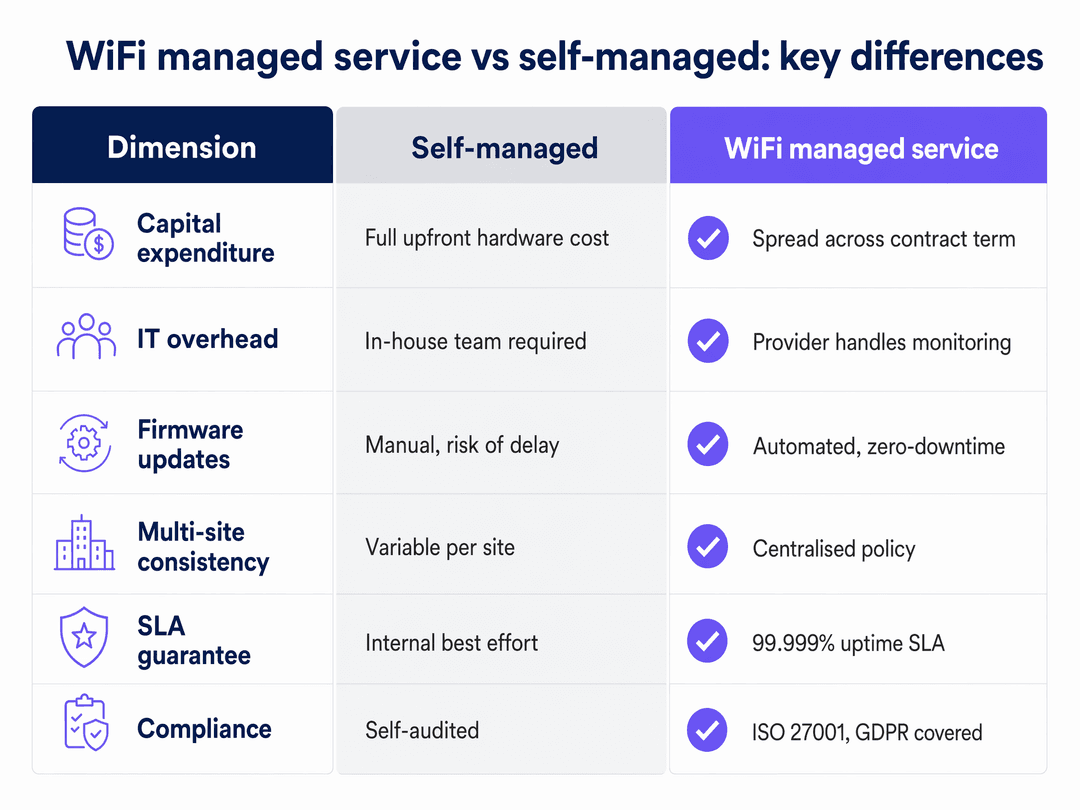
For BTR operators, treating WiFi as a managed amenity drives measurable returns. Properties with enterprise-grade managed WiFi command a rent premium. Managed WiFi as an amenity is consistently NOI-positive when deployed as a software overlay on owned hardware, according to National Apartment Association benchmarks. The model deteriorates when WiFi is bundled with a third-party broadband contract that captures the value.
Operational efficiency gains are equally significant. Eliminating password resets and manual onboarding saves IT hours per month. Self-service key management means residents add new devices without raising a support ticket. When a resident moves out, Purple revokes their key automatically if integrated with the property management system.
For retail environments, the Guest WiFi analytics layer adds a further dimension. Purple has collected 29 billion data points (Purple internal data) across 80,000+ venues. That data translates into footfall patterns, dwell-time analysis, and repeat visitor rates that inform merchandising and staffing decisions.
For transport hubs and healthcare facilities, the compliance and security posture of a managed service reduces audit overhead. ISO 27001 certification, GDPR compliance, and Cyber Essentials certification are inherited from the platform rather than self-audited.
Listen to our full technical briefing below for a deeper discussion on deployment strategies and pitfalls.
Key Definitions
iPSK (Identity Pre-Shared Key)
A security mechanism that allows multiple unique WPA2 or WPA3 passphrases to operate on a single SSID. The RADIUS server uses the specific passphrase to identify the user and apply a VLAN assignment or policy. Also called PPSK by HPE Aruba and Personal Private Network by Cisco Meraki.
Essential for multi-tenant environments. Provides resident isolation without requiring hundreds of separate SSIDs or VLANs configured at the hardware level.
RADIUS (Remote Authentication Dial-In User Service)
A networking protocol providing centralised Authentication, Authorisation, and Accounting (AAA) management for users connecting to a network service. Defined in RFC 2865.
The authentication engine behind both 802.1X and iPSK. Purple provides Cloud RADIUS, eliminating the need for on-premise RADIUS servers and the associated maintenance overhead.
VLAN (Virtual Local Area Network)
A logical subnetwork that groups a collection of devices from different physical LANs. Defined in IEEE 802.1Q. It isolates broadcast traffic and improves security by preventing lateral movement between segments.
Used to separate resident traffic from staff traffic, and to isolate individual residents from each other within the same building.
Captive portal
A web page that a user must view and interact with before network access is granted. Typically used to present terms and conditions and capture first-party data.
Appropriate for Guest WiFi in lobbies and common areas. Not suitable for resident networks, where persistent, automatic connectivity is required.
802.1X
An IEEE standard for port-based network access control (PNAC). It provides an authentication mechanism requiring individual credentials before network access is granted. Commonly implemented with EAP-TLS (certificate-based) or PEAP (username and password).
The gold standard for Staff WiFi. Requires unique credentials tied to an identity provider rather than a shared password, enabling instant access revocation when staff leave.
BTR (Build-to-Rent)
Purpose-built residential developments designed specifically for long-term rental rather than sale. Characterised by professional management, shared amenities, and a focus on resident experience.
A primary market for multi-tenant managed WiFi. Connectivity is treated as a core amenity comparable to gym access, commanding a measurable rent premium.
Passpoint (Hotspot 2.0)
A Wi-Fi Alliance standard that enables automatic, secure network discovery and association without a captive portal. Devices connect using certificates or SIM credentials, providing a cellular-like roaming experience.
Used to eliminate repeated captive portal logins for returning visitors and to provide seamless roaming across multi-site deployments.
Cloud overlay
A software-based management and policy layer that operates above the physical network hardware. Handles authentication, policy enforcement, analytics, and onboarding without requiring changes to the underlying hardware configuration.
The architectural model that makes Purple hardware-agnostic. The overlay integrates with the hardware API rather than replacing the hardware, preserving existing investment.
WPA3 (Wi-Fi Protected Access 3)
The current generation of Wi-Fi security protocol, defined by the Wi-Fi Alliance. Introduces Simultaneous Authentication of Equals (SAE) to replace the vulnerable 4-way handshake in WPA2-PSK, providing forward secrecy and resistance to offline dictionary attacks.
Recommended for all new deployments. Supported on Cisco Meraki, HPE Aruba, Ruckus, and Juniper Mist hardware. Most devices manufactured after 2020 support WPA3.
Worked Examples
A 250-unit Build-to-Rent property in Manchester needs to provide secure WiFi for residents, staff, and visitors. The property manager wants to include 100Mbps WiFi in the base rent, with an option for residents to upgrade to 1Gbps. How should the network be architected?
Deploy a single physical network using HPE Aruba access points, one per unit. Implement Purple's cloud overlay to manage three distinct services from one platform. Staff WiFi uses 802.1X authentication tied to Microsoft Entra ID. Guest WiFi deploys a captive portal in the lobby and gym for visitors and prospective tenants. Resident WiFi uses iPSK: Purple generates a unique key for each apartment at lease signing. The default key profile is throttled to 100Mbps via RADIUS attributes. When a resident purchases the upgrade tier, the RADIUS profile updates to 1Gbps automatically. No hardware changes. No engineer visits. The property management system triggers the key update via the Purple API.
A national retail chain with 400 locations needs to roll out a consistent guest WiFi experience. Their current self-managed setup requires manual firmware updates, resulting in inconsistent security postures across sites. They also need to capture first-party marketing data compliantly.
Transition to a WiFi managed service. Deploy Cisco Meraki access points across all 400 sites, managed via a centralised dashboard. Integrate Purple's captive portal across all sites from a single cloud account. The managed service handles automated, scheduled firmware updates during off-hours, ensuring zero downtime and a consistent security posture. The Purple portal presents a conscious-choice opt-in for marketing, capturing first-party data (email, demographics) and pushing it directly to the chain's CRM via Purple's integration layer. GDPR compliance is inherited from the platform.
Practice Questions
Q1. You are deploying a network for a 500-bed student housing complex. The operator wants residents to connect smart TVs, gaming consoles, and smartphones. They currently plan to use a single SSID with a captive portal that requires MAC address registration for headless devices. What is the flaw in this plan, and what is the correct approach?
Hint: Consider how devices like Chromecast discover the controlling smartphone on a network, and what client isolation does to that discovery process.
View model answer
The flaw is that a captive portal with client isolation prevents device discovery. A smartphone cannot cast to a smart TV because the devices cannot see each other on the network. MAC address registration for headless devices is also operationally unsustainable at 500-bed scale. The correct approach is iPSK. Provide each student with a unique passphrase. This creates a private VLAN bubble for that student, allowing their devices to communicate with each other while remaining isolated from the other 499 residents. Headless devices connect using the same passphrase as the student's phone, requiring no MAC registration.
Q2. A hotel chain wants to upgrade its Staff WiFi. Currently, all staff use a single WPA2-PSK password. When an employee leaves, IT rarely changes the password due to the overhead of updating every device. Recommend a secure, enterprise-grade solution and explain the immediate operational benefit.
Hint: Look for an authentication method that ties network access to individual user identities rather than a shared secret.
View model answer
Replace the shared WPA2-PSK with 802.1X authentication (WPA2 or WPA3-Enterprise). Integrate the wireless network with the hotel's identity provider, such as Microsoft Entra ID. Staff authenticate using their individual corporate credentials. When an employee leaves, their Entra ID account is disabled, immediately revoking their WiFi access without affecting any other staff member. No password rotation. No device re-configuration. The operational benefit is zero-touch offboarding: IT disables one account and the network access is revoked automatically.
Q3. A BTR property developer is planning a 300-unit development. Their finance director asks why they cannot simply use a consumer broadband router per unit rather than a managed WiFi service. Construct a three-point business case for the managed service model.
Hint: Consider the NOI impact, the operational overhead, and the resident experience differentiators.
View model answer
Point one: NOI per door. A managed WiFi amenity commands a measurable rent premium per unit per month. Per-unit broadband contracts capture that value for the ISP, not the operator. A software overlay on owned hardware retains the value. Point two: operational efficiency. Consumer routers require per-unit maintenance, firmware updates, and password resets. A managed service handles all of this centrally. When a resident moves out, their key is revoked automatically. No engineer visit. Point three: resident experience. Consumer routers cannot support 15-25 IoT devices per household with proper isolation. A managed iPSK service delivers a home-like experience where smart devices work correctly, reducing support tickets and improving retention.
Continue reading in this series
Staff WiFi vs. Guest WiFi: Best Practices for Corporate Network Segmentation
A comprehensive technical guide for IT leaders on segmenting staff and guest WiFi networks. It covers VLAN architecture, 802.1X authentication, firewall policies, and the business impact of secure network design.
Apartment WiFi solutions: a comprehensive guide for businesses
This guide covers the architecture, deployment, and business case for apartment WiFi solutions in Build to Rent and multi-dwelling unit properties. It explains how Identity Pre-Shared Key (iPSK) technology creates secure, isolated network bubbles for each resident while supporting smart devices and IoT. Property developers, landlords, and BTR operators will find actionable deployment guidance, ROI data, and worked implementation scenarios.
Cox business managed WiFi: a comprehensive guide for businesses
This guide details how property developers and BTR operators can deploy scalable, secure networks using Cox Business managed WiFi. It covers network architecture, vendor-neutral hardware deployment, and the business impact of transitioning connectivity from an operational headache to reliable infrastructure.