
Zoo and Theme Park WiFi: High-Footfall Venue Connectivity Guide
This guide provides IT leaders and network architects with a comprehensive framework for deploying high-performance WiFi across zoos and theme parks. It covers outdoor RF planning, captive portal deployment, family-safe content filtering, and strategies for turning connectivity into actionable operational analytics.
Video overview
Listen to this guide
View podcast transcript
Part of our core series: WiFi Analytics Guide →
Executive Summary
For large-scale leisure venues like zoos and theme parks, deploying reliable Guest WiFi is no longer a luxury—it is a foundational operational requirement. Visitors expect seamless connectivity to access digital maps, book ride times, and share their experiences on social media. Concurrently, venue operators rely on this infrastructure to power point-of-sale systems, mobile ticketing, and real-time crowd management.
However, outdoor deployments present unique engineering challenges. Unpredictable crowd densities, complex RF environments involving water and foliage, and the need for robust content filtering require a strategic approach to network design. This guide provides IT managers, network architects, and CTOs with actionable, vendor-neutral recommendations for architecting high-density wireless networks in high-footfall outdoor environments. We will explore access point selection, backhaul strategies, captive portal optimization, and how to leverage WiFi Analytics to drive tangible ROI.
Technical Deep-Dive
Outdoor RF Planning and Access Point Selection
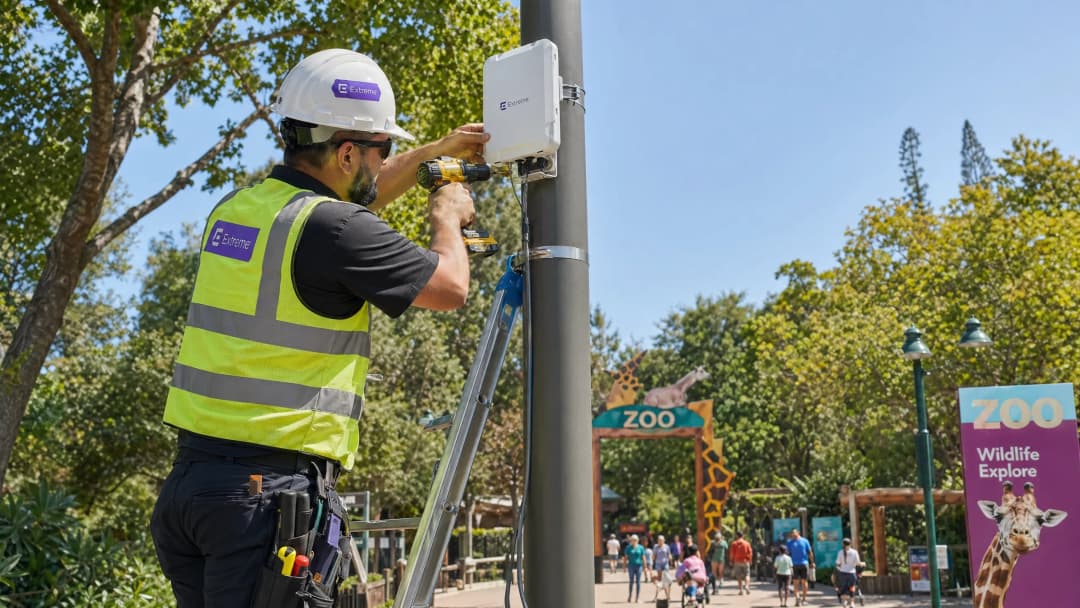
Deploying wireless infrastructure across expansive outdoor areas requires hardware engineered for harsh conditions. Indoor access points (APs) will fail rapidly when exposed to moisture, temperature fluctuations, and UV radiation.
For outdoor zones, IT teams must specify APs with an IP66 or IP67 rating, ensuring complete protection against dust ingress and high-pressure water jets. Furthermore, the hardware must support an operating temperature range suitable for the local climate, typically -20°C to +60°C. In areas accessible to the public, such as queue lines or low-hanging structures, vandal-resistant enclosures are mandatory to protect the investment.
From a protocol perspective, IEEE 802.11ax (Wi-Fi 6) is the baseline standard for new deployments. The critical advantage of Wi-Fi 6 in high-footfall environments is Orthogonal Frequency Division Multiple Access (OFDMA). OFDMA allows a single AP channel to be subdivided into smaller resource units, enabling simultaneous transmission to multiple clients. This significantly reduces latency and improves efficiency in dense areas like food courts or animal exhibits, where hundreds of devices may compete for airtime. While Wi-Fi 6E introduces the 6 GHz band, the hardware premium is currently difficult to justify for most outdoor venue deployments, making Wi-Fi 6 the pragmatic choice for balancing performance and budget.
Backhaul Architecture and Redundancy
A robust RF design is irrelevant if the backhaul infrastructure cannot support the aggregated throughput. Zoos and theme parks often span dozens or hundreds of acres, making traditional copper cabling unviable for connecting edge switches back to the core.
A hybrid backhaul approach is typically required:
- Fibre Optic Rings: Deploy single-mode fibre rings to connect distribution switches across the site. This provides high bandwidth and resilience; if one path is severed (e.g., during groundworks), traffic can route in the opposite direction.
- Point-to-Point Wireless: In areas where trenching fibre is environmentally sensitive or prohibitively expensive (e.g., across a lake or through a dense woodland exhibit), high-capacity point-to-point or point-to-multipoint wireless bridges provide reliable connectivity.
- Power over Ethernet (PoE): From the distribution switches, run Cat6A cable to provide both data and power to the individual APs, ensuring runs do not exceed the 100-metre standard.
For the primary internet uplink, consumer broadband is insufficient. Venues must procure a dedicated leased line, as detailed in our guide What Is a Leased Line? Dedicated Business Internet, to guarantee symmetric bandwidth and strict Service Level Agreements (SLAs).
Network Segmentation and Security
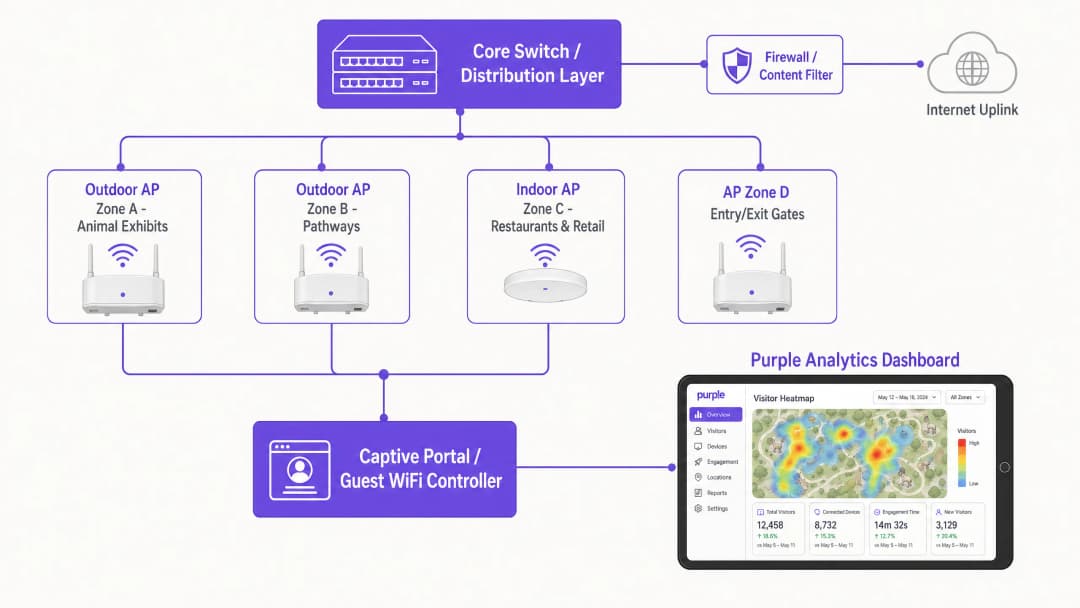
Security is paramount when mixing public guest access with critical venue operations. The network must be logically segmented using Virtual Local Area Networks (VLANs).
- Guest Network: Configured with WPA3-Personal (or WPA2/WPA3 mixed mode for legacy device support) and strictly isolated from all internal resources. Client isolation should be enabled at the AP level to prevent guest devices from communicating with one another.
- Operational Network: Dedicated VLANs for point-of-sale (POS) terminals, digital signage, and IoT devices. Access should be secured using IEEE 802.1X with certificate-based authentication to ensure only corporate-owned devices can connect.
For further insights on securing venue infrastructure, refer to our article: Protect Your Network with Strong DNS and Security.
Got questions about your specific setup?
Our team works with venue operators, IT managers, and network engineers across 80,000 venues. Book a 20-minute call and we will show you how others like you solved it.
Implementation Guide
Step 1: Comprehensive Site Survey
Never rely solely on predictive modeling for outdoor environments. Conduct an active RF site survey using spectrum analysis tools. Trees, water features, and metal enclosures (like cages or ride structures) absorb and reflect RF signals unpredictably. The survey must map coverage requirements zone by zone, identifying interference sources and optimal AP mounting locations.
Step 2: Captive Portal and Authentication Flow
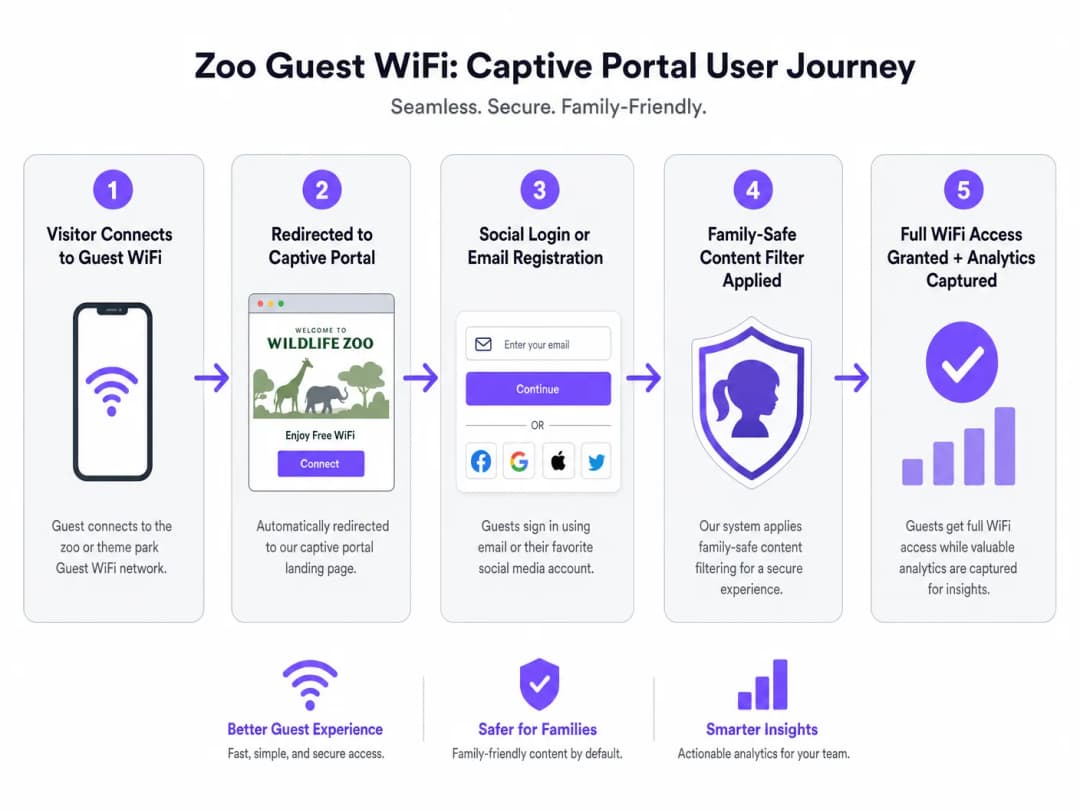
The captive portal is the gateway to the guest network and the primary mechanism for data capture. A seamless onboarding experience is critical for maximizing connection rates.
- Authentication Options: Offer social login (Facebook, Google, Apple) alongside traditional email registration. Venues offering social login typically observe connection rates 30-40% higher than those relying exclusively on form-fills.
- Compliance: Ensure the portal explicitly captures consent for data processing and marketing communications, adhering strictly to GDPR or local privacy regulations.
- Frictionless Re-authentication: Utilize MAC address caching or platforms like OpenRoaming to automatically reconnect returning visitors without requiring them to complete the captive portal flow again.
Step 3: Implementing Family-Safe Content Filtering
Zoos and theme parks have a duty of care to provide a safe digital environment. DNS-based content filtering is the most efficient method for achieving this at scale. By intercepting DNS requests and blocking resolution for domains categorized as adult content, gambling, or violence, venues can enforce acceptable use policies without the latency introduced by deep packet inspection (DPI). This filtering must be applied by default to the guest SSID.
Best Practices
- Design for Peak Density, Not Averages: Venues frequently underestimate device counts during peak periods (e.g., bank holidays). Assume 2-3 devices per visitor (smartphone, smartwatch, tablet) and engineer AP density accordingly. A general rule of thumb is one AP per 500 square metres in high-density zones (food courts, show arenas) and one per 1,000 square metres in lower-density transit areas.
- Prioritize the User Journey: The captive portal must be mobile-optimized and load rapidly. Any delay in rendering the portal will lead to abandonment.
- Leverage Existing Infrastructure: When mounting outdoor APs, utilize existing lighting columns, CCTV poles, or building facades to minimize installation costs and visual impact.
Troubleshooting & Risk Mitigation
| Failure Mode | Root Cause | Mitigation Strategy |
|---|---|---|
| Network Collapse Under Load | Insufficient AP density; lack of OFDMA support. | Upgrade to Wi-Fi 6 infrastructure; redesign coverage maps based on peak concurrent user estimates. |
| Captive Portal Fails to Load | DNS misconfiguration; aggressive mobile OS security settings. | Ensure the walled garden includes all necessary domains for social login APIs and captive portal detection URLs (e.g., captive.apple.com). |
| Poor Roaming Performance | AP transmit power set too high, causing clients to "stick" to distant APs. | Implement dynamic radio management; lower TX power to encourage client devices to roam to closer APs; enable 802.11k/v/r. |
ROI & Business Impact
The business case for deploying high-performance WiFi extends far beyond basic connectivity. When integrated with a robust analytics platform, the network becomes a strategic asset.
- Operational Intelligence: By tracking MAC addresses (even anonymized), venues can generate heatmaps and analyze visitor flow. This data identifies congestion points, measures dwell times at specific exhibits, and informs staffing and security deployments.
- Marketing and Revenue Generation: First-party data captured via the captive portal feeds directly into the venue's CRM. This enables targeted post-visit email campaigns, loyalty program enrollment, and personalized offers, driving repeat visits and increasing lifetime value.
- Enhanced Guest Experience: Reliable connectivity enables the use of venue-specific mobile applications for wayfinding, mobile food ordering, and virtual queuing, directly improving guest satisfaction scores and reducing operational friction.
As seen in similar deployments across the Hospitality and Retail sectors, the integration of connectivity and analytics transforms IT infrastructure from a cost center into a revenue-enabling platform. For further reading on temporary deployments, see our guide on Event WiFi: Planning and Deploying Temporary Wireless Networks.
Key Definitions
Captive Portal
A web page that intercepts a user's initial HTTP request on a public network, requiring authentication or acceptance of terms before granting internet access.
The primary mechanism for capturing visitor data and enforcing acceptable use policies in venue deployments.
OFDMA (Orthogonal Frequency Division Multiple Access)
A feature of WiFi 6 that allows an AP to divide a wireless channel into smaller sub-channels (Resource Units), enabling simultaneous data transmission to multiple devices.
Critical for maintaining network performance in high-density areas like queues and food courts by reducing latency and overhead.
IP67 Rating
An ingress protection standard indicating a device is completely protected against dust and can withstand temporary immersion in water.
The minimum required environmental protection rating for hardware deployed in outdoor zoo and theme park environments.
Walled Garden
A limited environment that controls the user's access to web content and services prior to full authentication.
Must be configured to allow access to social media login APIs and captive portal detection URLs before the guest is fully connected.
DNS-Based Content Filtering
A security technique that blocks access to inappropriate websites by preventing the Domain Name System (DNS) from resolving restricted URLs into IP addresses.
The standard method for ensuring family-safe browsing on venue guest networks without impacting performance.
Client Isolation
A wireless security feature that prevents devices connected to the same AP or VLAN from communicating directly with one another.
Mandatory on guest networks to prevent lateral movement of malware and protect visitor devices from unauthorized access.
VLAN (Virtual Local Area Network)
A logical grouping of network devices that behave as if they are on the same physical network, regardless of their actual location.
Used to securely segment guest traffic from critical operational systems (e.g., point-of-sale, CCTV).
MAC Caching
A feature that remembers the Media Access Control (MAC) address of a previously authenticated device, allowing it to bypass the captive portal on subsequent visits.
Significantly improves the guest experience by providing frictionless connectivity for returning visitors.
Worked Examples
A regional zoo spanning 40 acres is upgrading its legacy WiFi 4 network. The IT Director notes that during the summer holidays, the network in the main food court (a 2,000 sq metre outdoor plaza) completely fails, with guests unable to load the captive portal. How should the team architect the food court coverage?
- Upgrade to WiFi 6 (802.11ax) APs with IP67 ratings to leverage OFDMA for high-density client handling.
- Deploy high-density directional antennas (patch antennas) rather than omnidirectional antennas to create smaller, focused RF cells. This minimizes co-channel interference.
- Install 4-6 APs around the perimeter of the food court, pointing inward, ensuring transmit power is lowered to encourage roaming and prevent cell overlap.
- Ensure the backhaul switch supporting this zone has at least a 10Gbps uplink to the core to handle the aggregated traffic.
A theme park marketing team wants to increase the number of email addresses captured via the guest WiFi. Currently, visitors must fill out a 5-field form (Name, Email, Phone, Postcode, DOB). The connection rate is only 12%. What technical and strategic changes should be implemented?
- Implement Social Login (Facebook, Google, Apple) on the captive portal to provide a one-click authentication option.
- Reduce the manual form fields to just Name and Email for users who prefer not to use social login.
- Enable 'Seamless Mac Authentication' (MAC caching) so returning visitors are automatically reconnected without seeing the portal again, improving the user experience.
- Ensure the walled garden configuration allows traffic to the social network authentication APIs before the user is fully authorized.
Practice Questions
Q1. You are designing the WiFi coverage for a new 5-acre outdoor primate enclosure. The landscape architect has specified dense tree planting and a large central water feature. What are the primary RF considerations, and how should you position the APs?
Hint: Consider how water and foliage interact with RF signals, particularly at 5GHz.
View model answer
Foliage (which contains water) and the central water feature will heavily absorb and reflect RF signals, particularly in the 5GHz band. Predictive modeling will be inaccurate here. You must conduct an active site survey. APs should be positioned at the perimeter facing inward using directional antennas to punch through the foliage, rather than relying on omnidirectional APs in the center. Ensure all hardware is IP67 rated due to the outdoor environment.
Q2. During a busy bank holiday weekend, the IT helpdesk receives reports that guests in the main plaza can connect to the WiFi network but cannot reach the internet. The captive portal does not load. The APs show high utilization but are online. What is the most likely cause, and how do you resolve it?
Hint: Think about the IP addressing process before a device can reach the captive portal.
View model answer
The most likely cause is DHCP pool exhaustion. The sheer volume of devices (including those just passing through and probing the network) has consumed all available IP addresses in the guest VLAN. The mitigation is to reduce the DHCP lease time (e.g., to 30 minutes or 1 hour) to quickly reclaim IP addresses from devices that have left the area, and to expand the subnet size for the guest VLAN (/22 or /21 instead of a standard /24).
Q3. The venue's operations director wants to use WiFi analytics to track visitor dwell times at various exhibits to optimize staffing. However, they are concerned about GDPR compliance, as they are tracking MAC addresses. How do you architect the solution to provide analytics while maintaining compliance?
Hint: Consider the difference between anonymized location data and personally identifiable information (PII).
View model answer
To maintain compliance, the WiFi analytics platform must anonymize or pseudonymize MAC addresses (e.g., via cryptographic hashing) immediately upon collection if the user has not authenticated. For users who do authenticate via the captive portal, explicit consent must be obtained to link their location data with their PII (email/social profile). The privacy policy must clearly state that location analytics are being gathered and provide an opt-out mechanism.
Continue reading in this series
What is a Probe Request? Understanding How Devices Discover Networks
This technical reference guide provides a deep-dive into IEEE 802.11 probe requests, active versus passive scanning, and the impact of MAC randomisation on venue analytics. It delivers actionable implementation strategies for network architects to optimise high-density deployments, mitigate probe storms, and ensure accurate, CCPA/CPRA-compliant data collection using authenticated identity layers.
Retail WiFi: How In-Store WiFi Drives Sales, Loyalty and Footfall
This authoritative technical reference guide details how enterprise IT and operations teams can deploy retail WiFi as a strategic commercial asset. It covers the shift from basic connectivity to a revenue-generating infrastructure through first-party data capture, footfall analytics, and secure, high-density network architecture.
Retail WiFi: From Traffic Analytics to Personalised In-Store Experiences
This technical reference guide details the architectural shift from legacy guest WiFi to intelligent edge platforms in retail environments. It provides actionable guidance for IT leaders on deploying identity-driven networks, integrating analytics with CRM systems, and driving measurable ROI through personalised in-store experiences. From RF design and captive portal optimisation to clienteling integration and GDPR compliance, this guide covers the full end-to-end deployment lifecycle.
Got questions about your specific setup?
Our team works with venue operators, IT managers, and network engineers across 80,000 venues. Book a 20-minute call and we will show you how others like you solved it.