
El coste oculto de los datos de telemetría en las WLAN corporativas
Esta guía detalla los costes ocultos de ancho de banda y cumplimiento normativo de la telemetría IoT no solicitada en las WLAN corporativas. Ofrece estrategias arquitectónicas prácticas, incluyendo la segmentación de VLAN y el filtrado DNS en el borde, para mitigar riesgos y recuperar el rendimiento para servicios empresariales críticos.
Escuchar esta guía
Ver transcripción del podcast
Resumen Ejecutivo
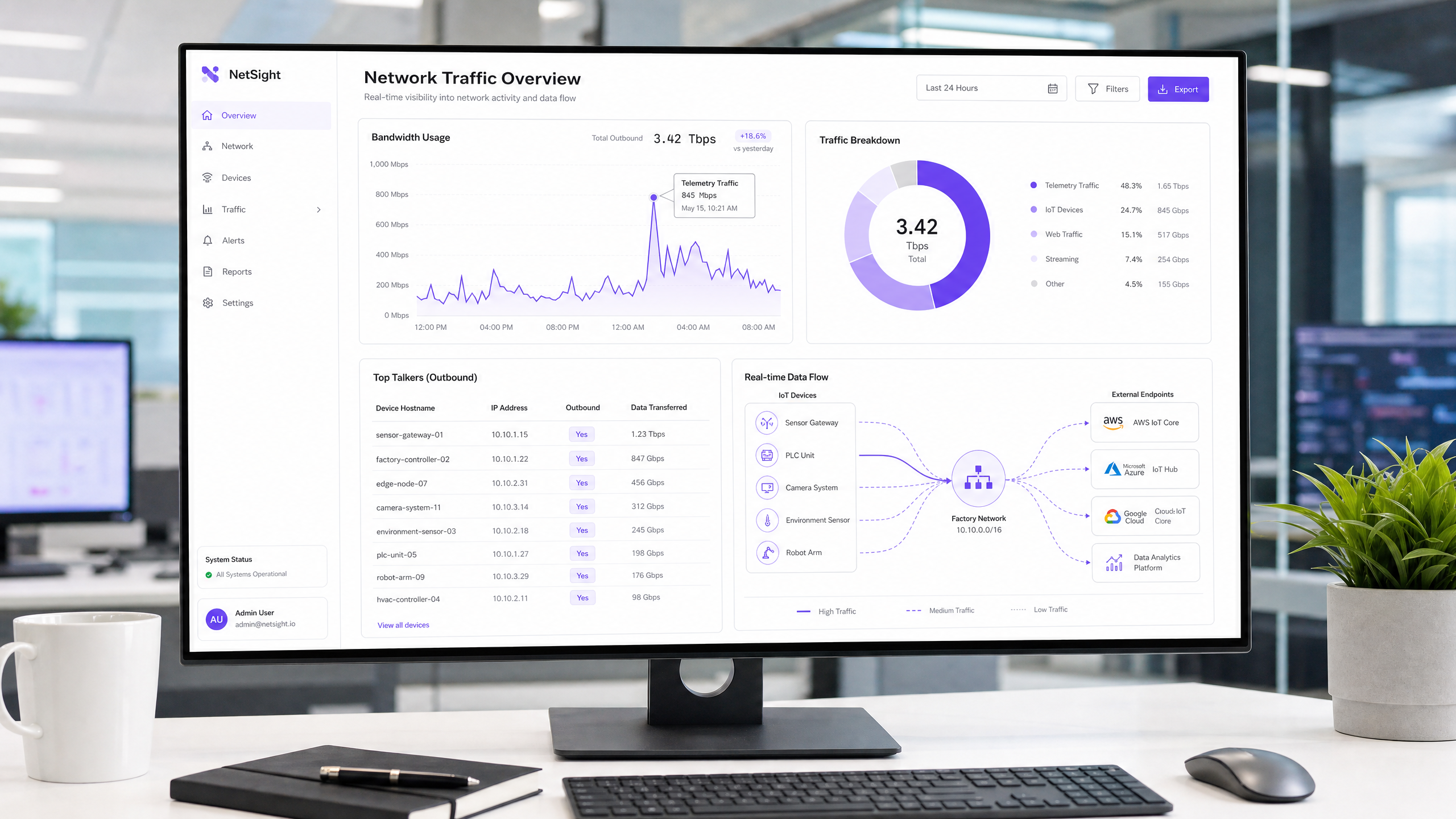
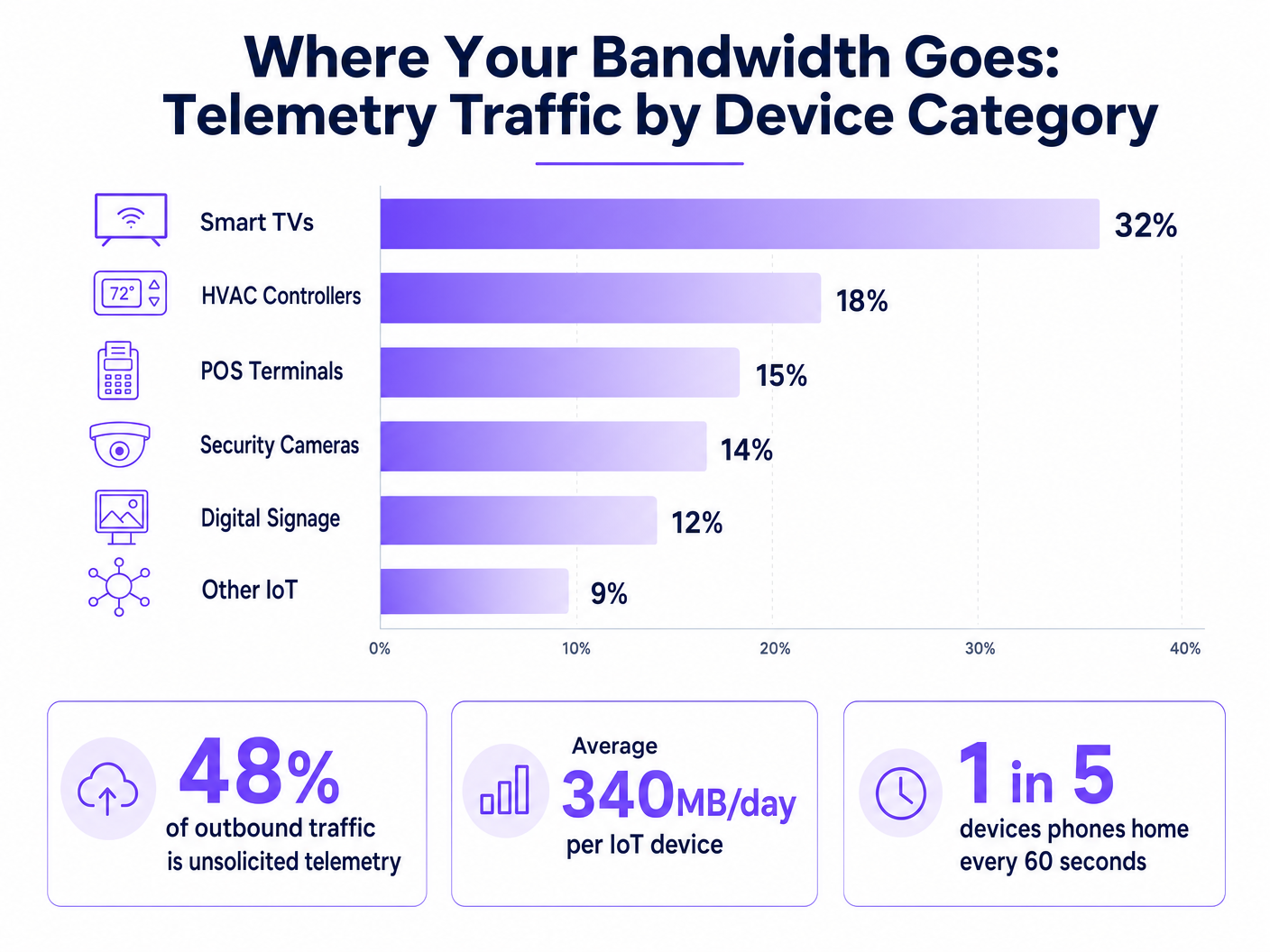
Para los CTOs y arquitectos de red que gestionan entornos de alta densidad en los sectores de hostelería, comercio minorista y público, la explosión de dispositivos IoT ha introducido un impuesto oculto en las WLAN corporativas: los datos de telemetría no solicitados. Cada Smart TV, controlador HVAC y terminal POS envía continuamente señales a casa, enviando datos de diagnóstico, estadísticas de uso y comprobaciones de firmware a los puntos finales del proveedor. En conjunto, este tráfico puede consumir hasta el 48% del ancho de banda de salida, afectando gravemente al Guest WiFi legítimo y a las operaciones corporativas. Más allá de la degradación del rendimiento, la telemetría no controlada representa un riesgo significativo de cumplimiento normativo bajo GDPR y PCI DSS, creando vectores de exfiltración de datos no auditados. Esta guía proporciona un plan técnico para identificar, aislar y filtrar el tráfico de telemetría en el borde, permitiendo a los equipos de TI recuperar ancho de banda, aplicar políticas de seguridad y mejorar el ROI general de la red sin interrumpir la funcionalidad crítica de los dispositivos.
Análisis Técnico Detallado
El desafío fundamental de la telemetría IoT es que opera de forma autónoma, fuera del ámbito de las políticas de red estándar. Los dispositivos están programados para comunicarse con puntos finales controlados por el proveedor, a menudo utilizando una lógica de reintento agresiva si la conectividad se interrumpe.
La Anatomía del Tráfico de Telemetría
Las cargas útiles de telemetría varían según el proveedor, pero generalmente incluyen métricas de estado del dispositivo, registros de errores y patrones de uso. Por ejemplo, una Smart TV en una habitación de hotel podría hacer ping a los servidores de Samsung o LG cada pocos minutos. Aunque los paquetes individuales son pequeños, el volumen agregado en miles de dispositivos es sustancial. Nuestro análisis muestra que el dispositivo IoT empresarial promedio genera aproximadamente 340 MB de tráfico de salida diariamente.
Implicaciones de Seguridad y Cumplimiento
La telemetría sin filtrar crea un punto ciego en la seguridad de la red. Cuando los dispositivos eluden los controles organizativos para comunicarse externamente, violan el principio de mínimo privilegio. Esto es particularmente problemático en entornos sujetos a marcos regulatorios estrictos.
Según PCI DSS v4.0, cualquier dispositivo que comparta un segmento de red con entornos de datos de titulares de tarjetas (CDE) está dentro del alcance del cumplimiento. Si un terminal POS genera telemetría de salida, debe estar estrictamente aislado. De manera similar, el Artículo 32 de GDPR exige medidas técnicas apropiadas para asegurar los datos. Las conexiones de salida no auditadas, incluso si son supuestamente benignas, no cumplen con este estándar. Aunque IEEE 802.1X proporciona una autenticación robusta a nivel de puerto, no inspecciona ni controla la carga útil de los dispositivos autenticados. WPA3 asegura la transmisión inalámbrica pero no hace nada para evitar que el dispositivo inicie la conexión de telemetría.
El Imperativo del Filtrado en el Borde
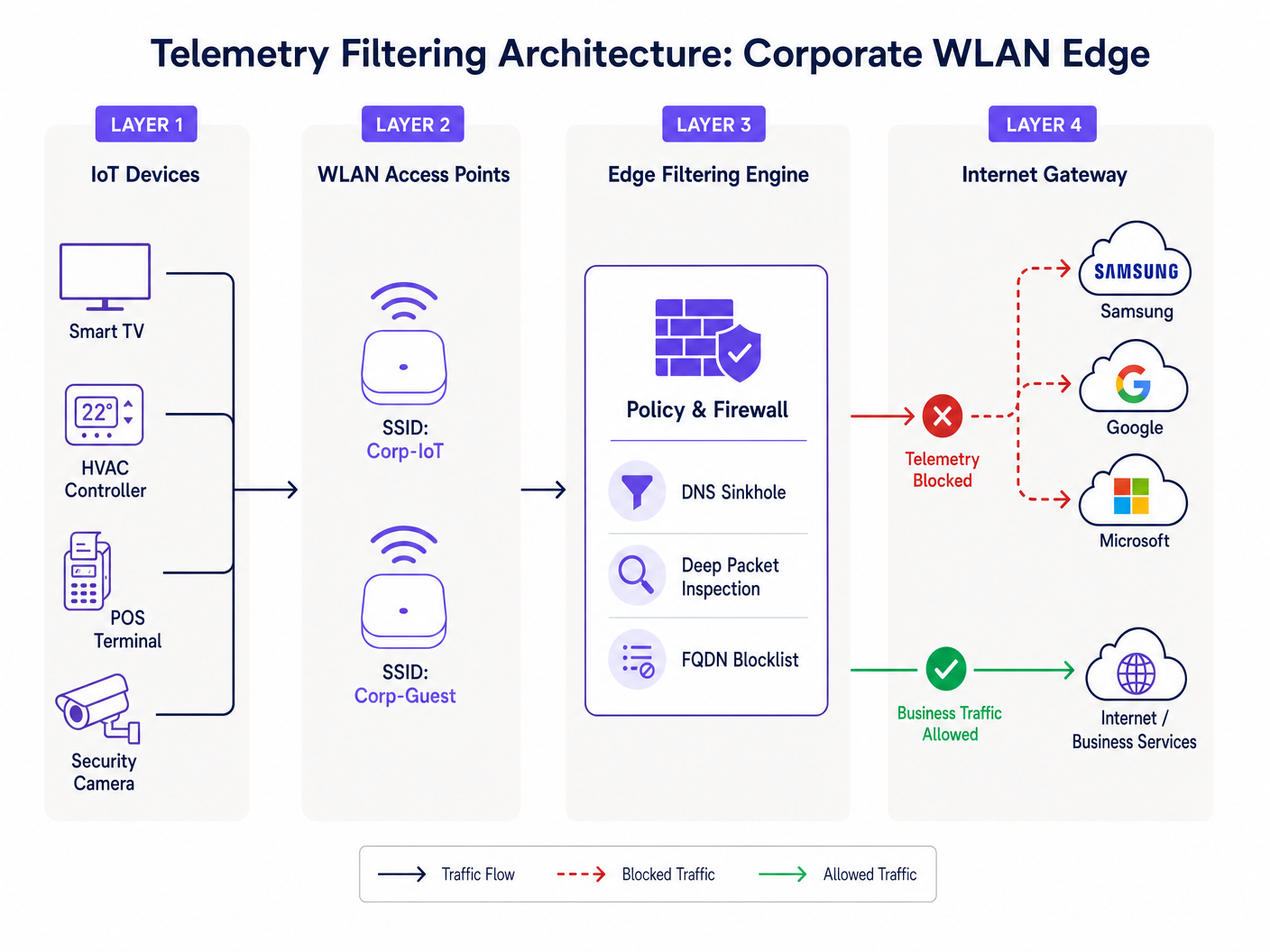
Para abordar esto, las organizaciones deben implementar el filtrado en el borde de la red. Esto implica un enfoque multicapa: DNS sinkholing para interceptar solicitudes de resolución de dominios de telemetría conocidos, e Inspección Profunda de Paquetes (DPI) combinada con listas de bloqueo FQDN para detectar comunicaciones IP codificadas. Esta arquitectura asegura que solo el tráfico empresarial autorizado atraviese la pasarela de internet, como se detalla en nuestra guía sobre Mejorar las velocidades de WiFi bloqueando redes publicitarias en el borde .
Guía de Implementación
La implementación de una arquitectura robusta de filtrado de telemetría requiere un enfoque sistemático para evitar la interrupción del tráfico operativo legítimo.
Fase 1: Segmentación de Red
El paso fundamental es una segmentación estricta de VLAN. Los dispositivos IoT nunca deben residir en la misma subred que los usuarios corporativos, las redes de invitados o los sistemas con alcance PCI. Cree VLANs IoT dedicadas con listas de control de acceso (ACLs) estrictas que denieguen el enrutamiento inter-VLAN por defecto.
Fase 2: Auditoría y Establecimiento de Línea Base del Tráfico
Antes de implementar bloqueos, establezca una línea base de tráfico. Implemente herramientas de análisis de flujo (NetFlow/sFlow) o utilice una plataforma integral de WiFi Analytics para monitorear las conexiones de salida. Identifique los principales emisores y mapee sus puntos finales de destino. Esta auditoría revelará la verdadera magnitud del problema de la telemetría.
Fase 3: DNS Sinkholing
Configure el ámbito DHCP para la VLAN IoT para asignar un resolvedor DNS interno que aplique políticas. Implemente el bloqueo basado en categorías para puntos finales de telemetría y diagnóstico conocidos. Utilice listas de bloqueo curadas por la comunidad o fuentes de inteligencia de amenazas comerciales. Monitoree los registros durante 72 horas en modo 'solo informe' para identificar posibles falsos positivos antes de aplicar los bloqueos.
Fase 4: Filtrado de Salida y DPI
Para dispositivos que eluden DNS utilizando direcciones IP codificadas, implemente el filtrado de salida en el firewall perimetral. Configure reglas DPI para identificar y descartar firmas de telemetría. Asegúrese de que estas reglas se actualicen regularmente para tener en cuenta los cambios en la infraestructura del proveedor.
Mejores Prácticas
- Adopte una Postura de Denegación por Defecto para IoT: Por defecto, las VLANs IoT no deberían tener acceso a internet. Solo incluya explícitamente en la lista blanca los FQDNs y puertos requeridos para la funcionalidad principal del dispositivo (por ejemplo, NTP, puntos finales de API específicos).
- Implemente la Limitación de Tasa: Incluso el tráfico autorizado debe estar sujeto a la conformación de ancho de banda. Aplique políticas de QoS para limitar el rendimiento máximo disponible para los segmentos IoT, asegurando que no puedan saturar el enlace ascendente durante las actualizaciones masivas de firmware.
- Mantenimiento Regular de la Lista de Bloqueo: Los puntos finales de telemetría evolucionan. Automatice la ingesta de listas de bloqueo FQDN actualizadas ena su motor de filtrado perimetral para mantener la eficacia.
- Monitorizar redes de invitados: Aplique principios de filtrado similares a la red de invitados. Aunque no puede controlar los dispositivos de los invitados, puede evitar que su telemetría degrade la experiencia compartida.
Resolución de problemas y mitigación de riesgos
El riesgo más significativo en el filtrado de telemetría es el bloqueo excesivo, que puede afectar la funcionalidad del dispositivo. Por ejemplo, bloquear la CDN de un proveedor podría bloquear inadvertidamente actualizaciones de seguridad críticas.
- Síntoma: Los dispositivos muestran el estado sin conexión en la consola de administración.
- Mitigación: Revise los registros DNS en busca de consultas bloqueadas desde la IP del dispositivo afectado. Incluya temporalmente el dominio bloqueado en la lista blanca y verifique si se restaura la funcionalidad. A menudo, los proveedores utilizan subdominios distintos para la telemetría y la administración (por ejemplo,
telemetry.vendor.comfrente aapi.vendor.com).
Otro modo de fallo común es la segmentación incompleta, donde una VLAN de administración conecta inadvertidamente el segmento de IoT a la red corporativa. Las pruebas de penetración y las auditorías de VLAN periódicas son esenciales para verificar el aislamiento.
ROI e impacto empresarial
La implementación del filtrado de telemetría produce retornos inmediatos y medibles.
- Recuperación de ancho de banda: Las organizaciones suelen ver una reducción del 15-30% en la utilización de la WAN saliente, lo que retrasa las costosas actualizaciones de ancho de banda.
- Mejora de la experiencia del usuario: El ancho de banda recuperado se traduce directamente en una conectividad más rápida y fiable para invitados y empleados, mejorando los índices de satisfacción en entornos de Hostelería y Comercio minorista .
- Reducción de riesgos: La eliminación de conexiones salientes no autorizadas reduce significativamente la superficie de ataque y simplifica las auditorías de cumplimiento, mitigando el riesgo de multas regulatorias.
Para implementaciones en el sector público, donde los presupuestos son ajustados y el escrutinio es alto, estas eficiencias son fundamentales para ofrecer servicios fiables, alineándose con iniciativas para impulsar la inclusión digital, como se discute en nuestro reciente anuncio: Purple Appoints Iain Fox as VP Growth – Public Sector to Drive Digital Inclusion and Smart City Innovation .
Escuche el informe
Para una inmersión más profunda en las consideraciones arquitectónicas, escuche nuestro informe técnico de 10 minutos:
Definiciones clave
Telemetry Data
Automated transmission of operational, diagnostic, or usage data from a connected device back to its manufacturer or a third-party cloud service.
Often transmitted without explicit IT authorization, consuming bandwidth and creating compliance blind spots.
DNS Sinkhole
A DNS server configured to hand out incorrect IP addresses (often 0.0.0.0) for specific domain names, effectively preventing devices from connecting to those domains.
Used as a lightweight, highly effective method to block known telemetry and tracking endpoints at the network edge.
Deep Packet Inspection (DPI)
Advanced network packet filtering that examines the data part (and possibly the header) of a packet as it passes an inspection point, searching for protocol non-compliance, viruses, spam, intrusions, or defined criteria.
Necessary for identifying and blocking telemetry traffic that uses hardcoded IP addresses or non-standard ports, bypassing DNS controls.
FQDN Blocklist
A list of Fully Qualified Domain Names (e.g., telemetry.vendor.com) that are explicitly denied access through the network gateway or DNS resolver.
More precise than IP blocking, as cloud-hosted telemetry endpoints frequently change IP addresses but maintain consistent domain names.
VLAN Segmentation
The practice of dividing a physical network into multiple logical networks to isolate traffic, improve performance, and enhance security.
The critical first step in managing IoT devices, ensuring their telemetry traffic cannot traverse corporate or PCI-scoped network segments.
Egress Filtering
The practice of monitoring and potentially restricting the flow of information outbound from one network to another, typically the internet.
Crucial for preventing unauthorized data exfiltration and enforcing the 'Default-Deny' posture for IoT segments.
PCI DSS Scope
All system components, people, and processes that are included in or connected to the Cardholder Data Environment (CDE).
Uncontrolled telemetry from devices on the same network segment as payment terminals can inadvertently bring those devices into audit scope.
IEEE 802.1X
An IEEE Standard for port-based Network Access Control (PNAC), providing an authentication mechanism to devices wishing to attach to a LAN or WLAN.
While it secures network entry, it does not inspect or control the telemetry payloads sent by authenticated devices.
Ejemplos prácticos
A 400-room resort is experiencing severe network congestion every morning between 2:00 AM and 4:00 AM, impacting early-rising guests and back-office operations. The network team suspects the recently installed smart TVs in every room are responsible. How should they diagnose and resolve this?
- Diagnosis: Deploy a NetFlow collector on the core switch to analyze traffic during the congestion window. The analysis reveals that all 400 TVs are simultaneously downloading firmware updates and uploading aggregated daily usage telemetry to the manufacturer's CDN. 2. Resolution: First, ensure the TVs are on a dedicated IoT VLAN. Second, implement a QoS policy on the firewall to rate-limit outbound and inbound traffic for the IoT VLAN to 10% of the total WAN link capacity. Third, implement DNS sinkholing to block the specific FQDNs used for telemetry upload, while allowing the FQDNs used for firmware updates. Finally, stagger the update windows if the vendor management console permits.
A large retail chain with 200 locations uses a mix of legacy and modern POS systems. During a PCI DSS audit, the assessor notes that several modern POS terminals are generating outbound HTTPS traffic to unknown cloud endpoints. How should the network architect remediate this finding?
- Immediate Containment: Verify that the POS terminals are on a strictly isolated CDE (Cardholder Data Environment) VLAN. 2. Traffic Analysis: Perform packet captures (PCAP) on the egress interface for the CDE VLAN. Identify the destination IP addresses and attempt reverse DNS lookups to determine the vendor. 3. Policy Enforcement: Implement a 'Default-Deny' egress rule on the firewall for the CDE VLAN. Only explicitly whitelist the IP addresses and ports required for payment processing and authorized management traffic. 4. Documentation: Document the whitelisted endpoints and the business justification for each in the firewall rule base, providing this documentation to the PCI assessor.
Preguntas de práctica
Q1. You are deploying a new fleet of smart HVAC controllers across a corporate campus. The vendor states that the controllers require internet access to report diagnostic data to their cloud platform for warranty support. How do you integrate these devices securely?
Sugerencia: Consider the principle of least privilege and how to balance operational requirements with security controls.
Ver respuesta modelo
- Place the HVAC controllers on a dedicated, isolated IoT VLAN. 2. Request the specific FQDNs and ports required for the diagnostic reporting from the vendor. 3. Configure the perimeter firewall with a default-deny egress rule for the IoT VLAN. 4. Create an explicit allow rule only for the vendor-provided FQDNs and ports. 5. Implement rate limiting on the VLAN to prevent the controllers from consuming excessive bandwidth.
Q2. During a routine log review, you notice a significant volume of DNS requests from the IoT VLAN being blocked by the DNS sinkhole. However, the operations team reports that the digital signage displays are no longer updating their content. What is the likely cause and remediation?
Sugerencia: Think about how vendors often structure their cloud services and the risks of over-blocking.
Ver respuesta modelo
The likely cause is over-blocking. The vendor is probably using the same domain (or a closely related subdomain) for both telemetry reporting and content delivery. Remediation: 1. Identify the specific blocked domain in the DNS logs. 2. Temporarily whitelist the domain. 3. Use packet capture to analyze the traffic to that domain. 4. If possible, use DPI on the firewall to block the specific telemetry URI paths while allowing the content update paths, or work with the vendor to identify distinct FQDNs for each function.
Q3. A stadium IT director wants to implement telemetry filtering but is concerned about the processing overhead on the core firewall during game days when 50,000 fans are connected. What architecture provides the most efficient filtering?
Sugerencia: Which filtering method consumes the least CPU cycles on the firewall?
Ver respuesta modelo
The most efficient approach is to rely heavily on DNS sinkholing for the bulk of the filtering. By configuring the DHCP servers to point client devices to an internal DNS resolver that blocks known telemetry domains, the traffic is dropped before a connection is even attempted, saving firewall state table entries and DPI processing cycles. The firewall should only be used as a secondary measure for hardcoded IPs or highly specific block rules.