
Implementación de WiFi en exteriores: Protección contra la intemperie, PoE y opciones de malla
Esta guía autorizada detalla las consideraciones de ingeniería críticas para la implementación de WiFi en exteriores, centrándose en la protección contra la intemperie (clasificaciones IP), las estrategias de Power over Ethernet (PoE) para tendidos de cable largos y las compensaciones arquitectónicas entre la malla inalámbrica y el backhaul cableado. Ofrece recomendaciones prácticas para que los líderes de TI garanticen una conectividad resistente y de alto rendimiento en entornos exteriores hostiles.
Escuchar esta guía
Ver transcripción del podcast
Resumen Ejecutivo
Implementar WiFi en entornos exteriores —ya sea un complejo turístico extenso, un parque comercial al aire libre o un estadio con capacidad para 50.000 espectadores— presenta desafíos físicos y arquitectónicos fundamentalmente diferentes de los espacios interiores alfombrados. Los gerentes de TI y los arquitectos de red deben considerar el entorno exterior como activamente hostil para el equipo de red. La humedad, las temperaturas extremas, los rayos y las distancias físicas prolongadas conspiran para degradar el rendimiento y destruir el hardware.
Esta guía proporciona un marco integral para la implementación de WiFi en exteriores. Examinamos las clasificaciones obligatorias de Protección de Ingreso (IP) requeridas para los puntos de acceso (APs) y el cableado, las estrategias para superar la limitación de 100 metros de Ethernet para Power over Ethernet (PoE), y un análisis crítico de cuándo usar malla inalámbrica frente a backhaul cableado. Al adherirse a estos principios de ingeniería, los operadores de recintos pueden asegurar que sus redes exteriores ofrezcan el rendimiento determinista requerido para WiFi de invitados de alta densidad y una recopilación de datos fiable para WiFi Analytics .
Análisis Técnico Detallado
Protección contra la intemperie y el sistema de clasificación IP
La base de cualquier implementación en exteriores es la resistencia física. El estándar de la industria para definir la protección ambiental es el sistema de clasificación de Protección de Ingreso (IP). Para implementaciones empresariales en exteriores, el hardware de grado de consumo o "resistente a la intemperie" es insuficiente.
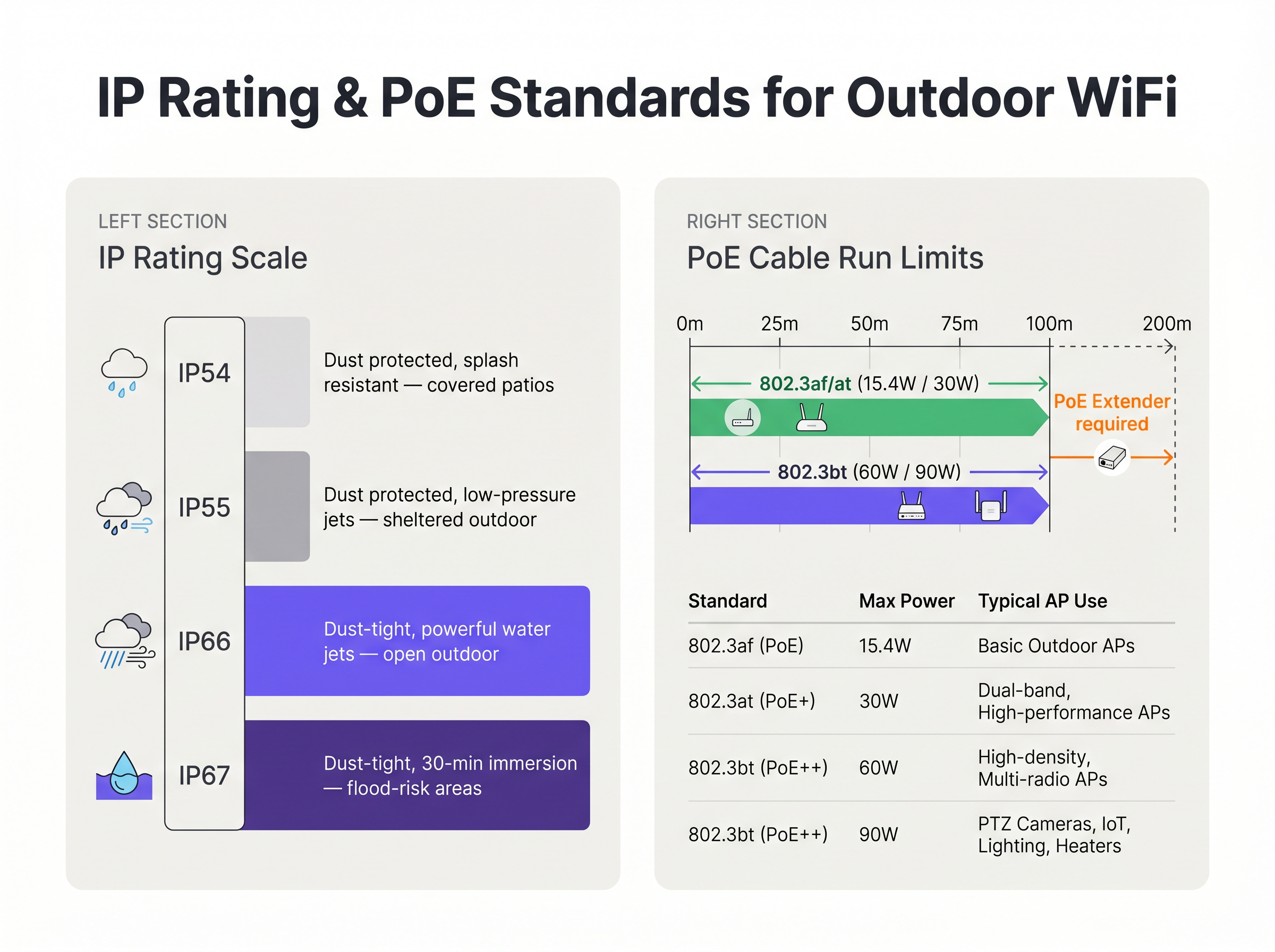
- IP54/IP55: Adecuado solo para áreas muy protegidas, como patios cubiertos profundos o muelles de carga protegidos de la lluvia directa.
- IP66: El estándar mínimo para la implementación general en exteriores. Asegura que la unidad es completamente estanca al polvo y puede soportar potentes chorros de agua desde cualquier dirección.
- IP67: El estándar de oro para entornos expuestos, que ofrece protección contra la inmersión temporal en agua. Esto es obligatorio para áreas propensas a inundaciones, puertos deportivos o regiones sujetas a tormentas tropicales severas.
Fundamentalmente, la carcasa del AP rara vez es el punto de fallo. La vulnerabilidad más común es la entrada de cables. Los conectores RJ45 mal sellados permiten que el agua se filtre por el cable Ethernet directamente al chasis del AP o de vuelta al switch PoE. Las implementaciones deben utilizar prensaestopas impermeables aprobados por el fabricante, cableado CAT6A con clasificación para exteriores (estabilizado contra rayos UV) y bucles de goteo obligatorios para desviar el agua del conector.
Power over Ethernet (PoE) para distancias extendidas
Las implementaciones en exteriores frecuentemente exceden la longitud máxima de canal de 100 metros especificada por IEEE 802.3 para Ethernet estándar sobre par trenzado. Cuando un AP se monta en un poste de luz a 150 metros del Marco de Distribución Intermedio (IDF) más cercano, los ingenieros deben seleccionar un método apropiado de suministro de energía y datos.
- Fibra Óptica con Alimentación Local: El uso de fibra monomodo proporciona una distancia prácticamente ilimitada para los datos, pero requiere una fuente de alimentación local en la ubicación del AP. Esto a menudo implica conectarse a los circuitos de alimentación del alumbrado público, que pueden estar energizados solo por la noche, lo que requiere costosas baterías de respaldo en línea o un nuevo cableado.
- Extensores PoE: Los repetidores en línea pueden regenerar la señal de datos y transmitir la alimentación PoE, duplicando efectivamente el alcance a 200 metros. Sin embargo, introducen puntos de fallo adicionales y deben alojarse en carcasas NEMA resistentes a la intemperie.
- Switches PoE de Largo Alcance: Los switches especializados pueden transmitir energía y datos hasta 250 metros a través de cobre estándar, pero esto generalmente obliga al enlace a auto-negociar a 10 Mbps. Si bien es suficiente para Sensores de bajo ancho de banda, es completamente inadecuado para el tráfico de usuarios de alta densidad.
Además, los APs modernos de alta densidad para exteriores, particularmente aquellos con calentadores internos para climas fríos, demandan una potencia sustancial. Frecuentemente requieren IEEE 802.3bt (PoE++), consumiendo hasta 60W o 90W. La infraestructura de switch subyacente debe ser capaz de mantener este presupuesto de energía en todos los puertos utilizados.
Arquitectura de Backhaul: Malla vs. Cableado
La decisión arquitectónica de cómo conectar el AP exterior de vuelta a la red central dicta el rendimiento y la fiabilidad a largo plazo de la implementación.
Backhaul Cableado (El Estándar de Oro) Excavar conductos y tender fibra o cobre a cada AP es la solución más robusta. Garantiza una latencia determinista, proporciona el máximo rendimiento agregado y asegura que el enlace de backhaul sea inmune a la interferencia de RF. Para recintos permanentes como estadios y centros de Transporte , el backhaul cableado es la única arquitectura aceptable para un ROI a largo plazo.
Malla Inalámbrica (La Alternativa Pragmática) Cuando la excavación es económicamente prohibitiva, físicamente imposible (por ejemplo, sitios patrimoniales) o la implementación es temporal, se utiliza la malla inalámbrica. Los APs de malla se conectan de forma inalámbrica a un nodo raíz que tiene una conexión cableada.
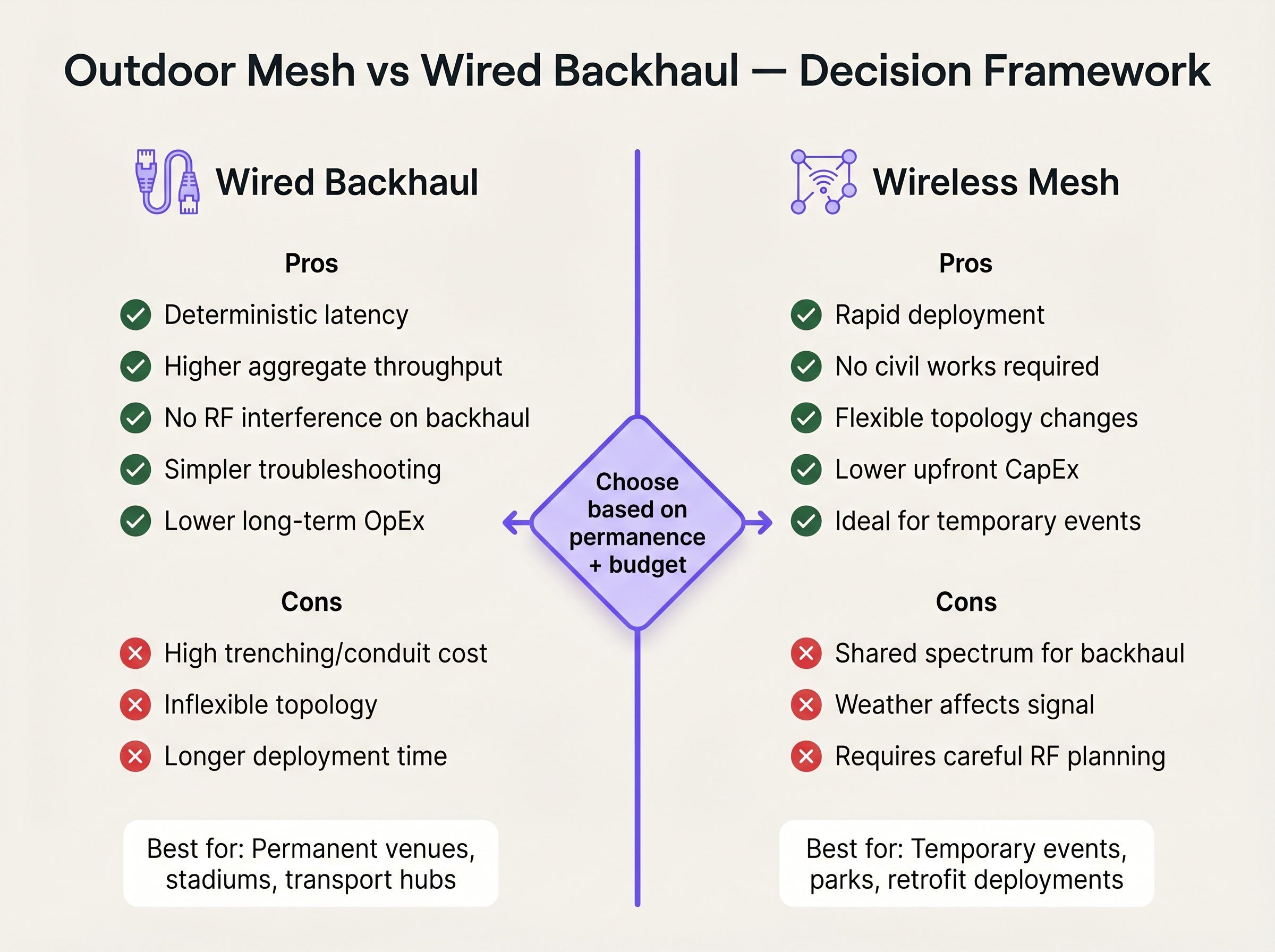
Si bien la malla reduce drásticamente el CapEx de obras civiles y el tiempo de implementación, introduce compromisos técnicos significativos. Cada salto inalámbrico reduce a la mitad el ancho de banda disponible para esa ruta, ya que la radio debe recibir y luego retransmitir los datos. Además, el enlace de backhaul comparte el mismo espectro de RF que los dispositivos cliente, lo que lo hace vulnerable a interferencias y a la degradación de la señal inducida por el clima. Si la malla es inevitable, los ingenieros deben implementar APs de tres radios, dedicando una radio de 5 GHz o 6 GHz exclusivamente para el enlace de backhaul para preservar la capacidad orientada al cliente.
Guía de Implementación
1. Estudio del Sitio y Planificación de RF
Exterioreso los entornos RF son complejos. Las señales se propagan más lejos sin paredes que las atenúen, lo que provoca una grave interferencia cocanal si no se gestiona. Realice un estudio predictivo utilizando software especializado, seguido de un estudio activo con AP-on-a-stick. Utilice antenas de parche direccionales para enfocar la energía RF precisamente donde se congregan los usuarios, en lugar de emplear antenas omnidireccionales que transmiten la señal al espacio vacío.
2. Montaje físico y toma de tierra
Montar un AP en un poste metálico crea un riesgo de rayo. [1]
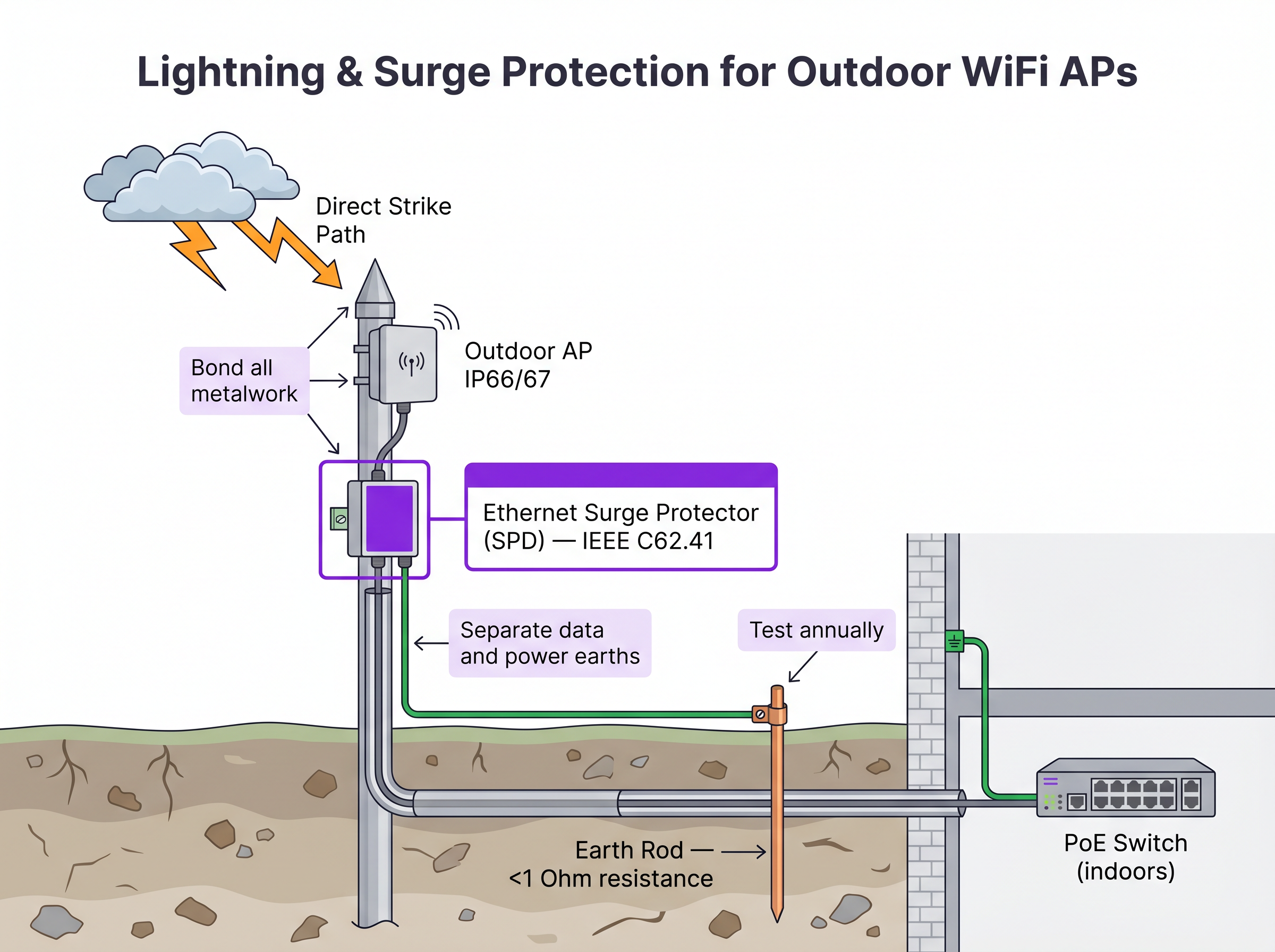
- Dispositivos de protección contra sobretensiones (SPD): Instale SPD Ethernet en línea tanto en el extremo del AP como en el punto de entrada del edificio para proteger la infraestructura de conmutación interior.
- Conexión a tierra: Asegúrese de que el soporte del AP, el poste y los SPD estén conectados a una toma de tierra dedicada con una resistencia inferior a 1 Ohm.
- Carga de viento: Verifique que el hardware de montaje y el propio poste puedan soportar los cálculos de carga de viento máxima local, especialmente para antenas direccionales grandes.
3. Configuración y seguridad
Los APs exteriores son físicamente accesibles para actores maliciosos.
- Deshabilite los puertos Ethernet no utilizados en el AP.
- Implemente el control de acceso a la red (NAC) basado en puerto IEEE 802.1X en el puerto del switch que conecta el AP. Si se retira el AP y se conecta un dispositivo no autorizado al cable, el switch debe deshabilitar dinámicamente el puerto. Para comparaciones detalladas de NAC, consulte nuestra guía: Aruba ClearPass vs Cisco ISE: NAC Platform Comparison .
- Asegúrese de que el tráfico de gestión esté segregado en una VLAN dedicada.
ROI e impacto empresarial
Invertir en infraestructura WiFi exterior de nivel empresarial impacta directamente en la rentabilidad del lugar y la eficiencia operativa. Para los lugares de Hostelería , la cobertura exterior ubicua aumenta las puntuaciones de satisfacción de los huéspedes y permite pedidos móviles en piscinas y playas. En entornos de Retail , facilita la recogida en la acera y los sistemas de punto de venta (POS) exteriores.
Al evitar la falsa economía de desplegar hardware interior en exteriores, o depender en gran medida de la malla donde la zanja era viable, los equipos de TI mitigan el riesgo de fallos catastróficos del hardware durante condiciones climáticas adversas y eliminan el continuo drenaje de OpEx por la resolución de problemas intermitentes de backhaul RF. Una red exterior correctamente diseñada proporciona la base fiable necesaria para servicios avanzados basados en la ubicación como Wayfinding y la integración con plataformas operativas, como se detalla en Connecting WiFi Events to 1,500+ Apps with Zapier and Purple .
Referencias
[1] Estándar IEEE para redes de área local y metropolitana. "IEEE 802.3-2018 - Estándar IEEE para Ethernet", IEEE Standards Association.
Definiciones clave
IP67 (Ingress Protection)
An equipment rating certifying the device is completely dust-tight (6) and can withstand temporary immersion in water up to 1 metre deep for 30 minutes (7).
Mandatory baseline for outdoor hardware in areas subject to heavy storms or flooding to ensure survivability.
IEEE 802.3bt (PoE++)
The Power over Ethernet standard capable of delivering up to 60W (Type 3) or 90W (Type 4) of DC power over standard twisted-pair cabling.
Required for modern, high-density outdoor APs that power multiple radios, dedicated security scanning radios, and internal heating elements.
Drip Loop
A deliberate downward U-shape formed in a cable just before it enters a device enclosure.
A critical physical installation technique that forces water running down the cable to drip off the bottom of the loop rather than entering the equipment chassis.
Surge Protection Device (SPD)
An inline component designed to protect electrical devices from voltage spikes by shunting excess current to ground.
Essential for outdoor networking to prevent lightning strikes near outdoor APs from sending destructive surges down the Ethernet cable into core switching infrastructure.
Wireless Mesh Backhaul
A network topology where access points connect to the core network wirelessly through other access points, rather than via a direct cabled connection.
Used when trenching cables is impossible or too expensive, but requires careful RF planning to mitigate bandwidth degradation and latency.
Co-Channel Interference (CCI)
Signal degradation caused when multiple access points on the same network transmit on the same frequency channel simultaneously.
A severe problem in outdoor deployments where signals travel further without physical walls to block them, necessitating careful channel planning and directional antennas.
Directional Patch Antenna
An antenna designed to focus RF energy in a specific direction (e.g., a 60-degree cone) rather than broadcasting in all directions.
Crucial for high-density outdoor deployments like stadiums to sectorize coverage and prevent APs from interfering with each other.
802.1X Port-Based NAC
A security protocol that requires a device to authenticate before the network switch will allow it to pass traffic.
Critical security control for outdoor APs; prevents an attacker from unplugging an AP and connecting a laptop to gain access to the internal corporate network.
Ejemplos prácticos
A luxury resort needs to provide high-density WiFi coverage to a pool area located 180 metres from the main building's IDF. The ground is paved with expensive decorative stone, making trenching highly undesirable. How should the connectivity be engineered?
- Avoid Trenching: Utilize a Point-to-Point (PtP) wireless bridge using dedicated 60 GHz radios to establish a multi-gigabit wireless backhaul from the main building to a central pole at the pool area. 60 GHz provides high bandwidth and avoids interference with the 5 GHz client WiFi.
- Local Distribution: At the pool pole, install a weatherproof NEMA enclosure containing a hardened, temperature-rated PoE switch.
- Power: Provide local AC power to the NEMA enclosure by tapping into the pool area's lighting or utility power circuit, ensuring it is on a 24/7 unswitched circuit.
- AP Deployment: Connect IP67-rated, dual-band outdoor APs to the hardened PoE switch. Use directional patch antennas to focus coverage on the loungers and cabanas, minimizing signal reflection off the water.
A municipal park is deploying Guest WiFi. The APs will be mounted on metal lampposts. What specific physical layer protections must be implemented to prevent network damage from weather and electrical events?
- Cable Ingress: Use outdoor-rated, UV-stabilized CAT6A cable. Terminate the connection at the AP using the manufacturer-supplied weatherproof cable gland. Crucially, form a 'drip loop' in the cable just before it enters the AP, ensuring water drips off the bottom of the loop rather than running into the connector.
- Lightning Protection: Install an inline Ethernet Surge Protection Device (SPD) on the pole, bonded to the metal pole (if the pole is properly earthed) or a dedicated earth rod.
- Building Protection: Install a second SPD at the point where the Ethernet cable enters the building housing the core switch, bonding it to the building's main earth terminal.
Preguntas de práctica
Q1. You are designing the WiFi for a large outdoor music festival that will run for 3 days. Trenching is not permitted. You need to provide coverage to the main stage viewing area, which is 300 metres from the wired network drop. What is the most appropriate backhaul architecture?
Sugerencia: Consider the duration of the event and the performance requirements of a dense crowd.
Ver respuesta modelo
A Point-to-Point (PtP) wireless bridge (preferably 60 GHz) should be used to shoot the connection from the wired drop to the main stage area. From there, a localized wireless mesh or temporary cabling can distribute the connection to the individual APs serving the crowd. This avoids trenching while providing a high-capacity backbone, which standard multi-hop mesh cannot provide over 300 metres.
Q2. An outdoor AP mounted on a lighting pole is experiencing intermittent power reboots. The cable run is 115 metres of CAT6. The switch is providing 802.3at (30W) PoE+. What are the two most likely causes of the failure?
Sugerencia: Evaluate both the physical layer limitations and the power requirements.
Ver respuesta modelo
- Voltage drop over distance: The 115m run exceeds the 100m Ethernet standard. The resistance in the copper cable causes voltage to drop, meaning the AP may not receive sufficient power to operate under load. 2) Insufficient PoE budget: Modern outdoor APs, especially those with heaters, often require 802.3bt (60W). If the switch only provides 30W, the AP will reboot when it attempts to draw more power than is available.
Q3. During an audit of a newly installed outdoor AP on a building roof, you notice the CAT6A cable runs straight down from the AP port and into a hole drilled in the roof membrane. The AP has an IP67 rating. What is the critical installation error, and what is the risk?
Sugerencia: Consider how water behaves on physical surfaces.
Ver respuesta modelo
The critical error is the absence of a drip loop. Without a drip loop, water will run down the outside of the cable and pool directly at the entry point to the roof, or track into the AP's RJ45 connector if the gland fails. The risk is water ingress into the building or the AP chassis, leading to hardware failure, despite the AP's IP67 rating.
Continúe leyendo esta serie
Power over Ethernet (PoE) para Puntos de Acceso: Una Guía de Implementación
This guide provides infrastructure technicians, network architects, and IT decision-makers with a definitive technical reference for deploying Power over Ethernet (PoE) access points across enterprise venues including hotels, retail estates, stadiums, and public-sector facilities. It covers IEEE standards from 802.3af through 802.3bt, power budget calculation, cabling requirements, VLAN segmentation, and security compliance, with concrete implementation scenarios and measurable ROI benchmarks. Understanding PoE architecture is foundational to any [Guest WiFi](/guest-wifi) or [WiFi Analytics](/guest-wifi-marketing-analytics-platform) deployment, as the reliability of the physical layer directly determines the quality of data capture, user experience, and operational uptime.
Red de malla vs. Puntos de acceso: ¿Cuál es mejor para grandes recintos?
Esta guía técnica ofrece una comparación definitiva entre las redes de malla y los puntos de acceso cableados tradicionales para recintos a gran escala, cubriendo la arquitectura, las compensaciones de rendimiento y la estrategia de implementación. Proporciona a los gerentes de TI, arquitectos de red y CTOs marcos de trabajo accionables para diseñar infraestructuras WiFi de alto rendimiento y conformes para entornos de hostelería, comercio minorista, eventos y sector público. La guía también relaciona estas decisiones arquitectónicas con la plataforma de guest WiFi y análisis de Purple, independiente del hardware, demostrando cómo la elección correcta de la infraestructura impulsa resultados de negocio medibles.
Los mejores puntos de acceso Wi-Fi para empresas y laboratorios domésticos
Esta guía técnica evalúa los mejores puntos de acceso Wi-Fi empresariales para 2025-2026, cubriendo hardware Wi-Fi 6E y Wi-Fi 7 de Cisco, HPE Aruba, Ruckus, Juniper Mist y Ubiquiti en implementaciones de alta densidad para hostelería, comercio minorista y espacios públicos. Ofrece estrategias de arquitectura prácticas, comparaciones de proveedores, marcos de seguridad y métricas de ROI para líderes de TI que construyen redes inalámbricas de próxima generación. La plataforma de análisis y guest WiFi agnóstica al hardware de Purple se presenta como la capa de inteligencia que transforma la infraestructura de red en un activo de datos de primera parte.