
Implementazione WiFi Esterno: Protezione dagli agenti atmosferici, PoE e Opzioni Mesh
Questa guida autorevole illustra le considerazioni ingegneristiche critiche per l'implementazione di WiFi esterno, concentrandosi sulla protezione dagli agenti atmosferici (classificazioni IP), sulle strategie Power over Ethernet (PoE) per lunghi percorsi di cavi e sui compromessi architetturali tra mesh e backhaul cablato. Fornisce raccomandazioni pratiche per i responsabili IT al fine di garantire una connettività resiliente e ad alte prestazioni in ambienti esterni ostili.
Ascolta questa guida
Visualizza trascrizione del podcast
Riepilogo Esecutivo
L'implementazione di WiFi in ambienti esterni—che si tratti di un vasto resort, di un parco commerciale all'aperto o di uno stadio da 50.000 posti—presenta sfide fisiche e architettoniche fondamentalmente diverse dagli spazi interni con moquette. I responsabili IT e gli architetti di rete devono considerare l'ambiente esterno come attivamente ostile alle apparecchiature di rete. Umidità, temperature estreme, fulmini e distanze fisiche estese cospirano tutti per degradare le prestazioni e distruggere l'hardware.
Questa guida fornisce un quadro completo per l'implementazione di WiFi esterno. Esaminiamo le classificazioni obbligatorie di protezione dall'ingresso (IP) richieste per gli access point (AP) e il cablaggio, le strategie per superare la limitazione Ethernet di 100 metri per il Power over Ethernet (PoE) e un'analisi critica di quando utilizzare il mesh wireless rispetto al backhaul cablato. Aderendo a questi principi ingegneristici, gli operatori delle strutture possono garantire che le loro reti esterne forniscano le prestazioni deterministiche richieste per Guest WiFi ad alta densità e una raccolta dati affidabile per WiFi Analytics .
Approfondimento Tecnico
Protezione dagli agenti atmosferici e il sistema di classificazione IP
La base di qualsiasi implementazione esterna è la resilienza fisica. Lo standard industriale per la definizione della protezione ambientale è il sistema di classificazione Ingress Protection (IP). Per le implementazioni esterne aziendali, l'hardware di livello consumer o "resistente alle intemperie" è insufficiente.
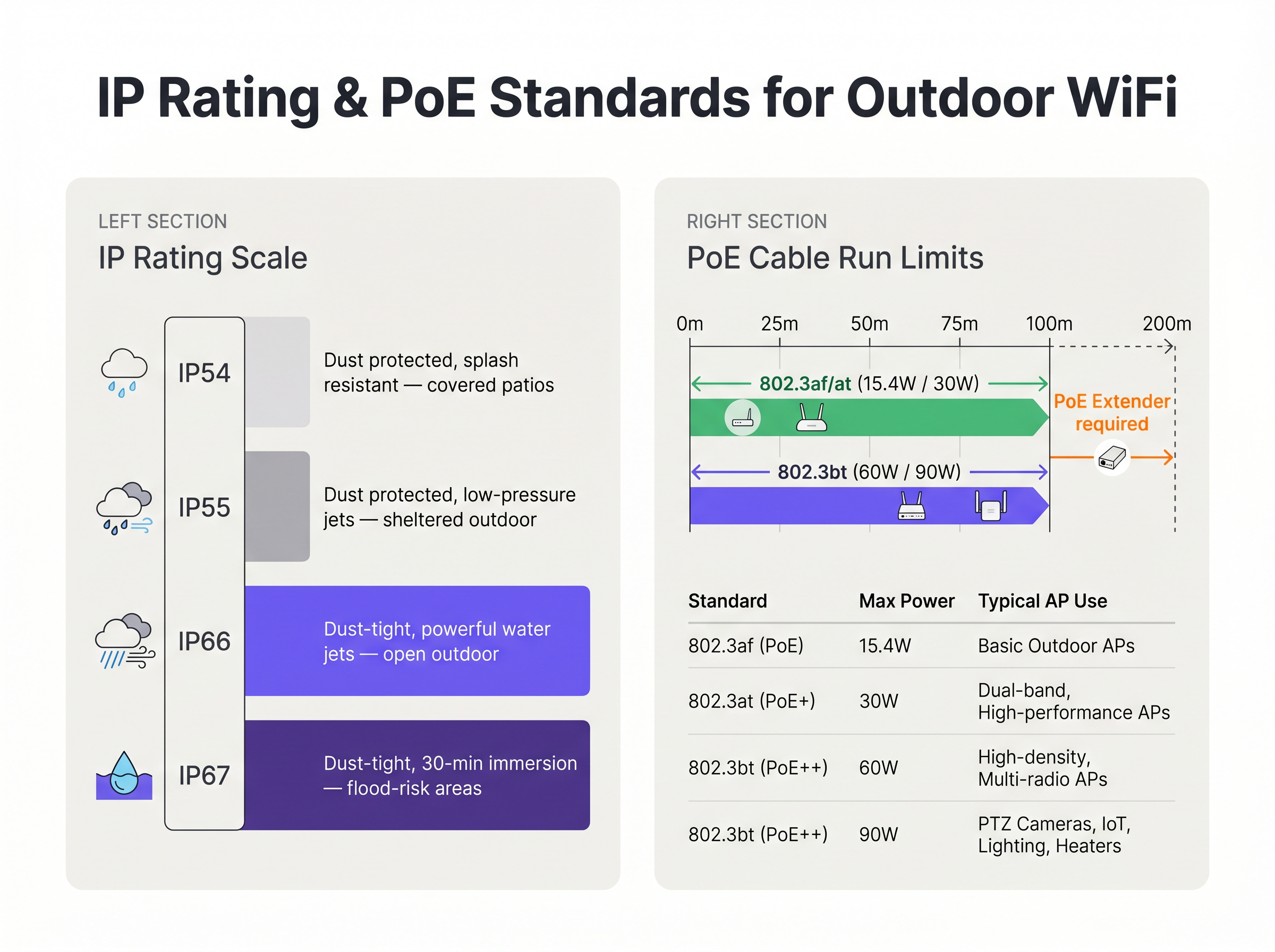
- IP54/IP55: Adatto solo per aree altamente riparate, come patii profondamente coperti o baie di carico protette dalla pioggia diretta.
- IP66: Lo standard minimo per l'implementazione esterna generale. Assicura che l'unità sia completamente a tenuta di polvere e possa resistere a potenti getti d'acqua da qualsiasi direzione.
- IP67: Lo standard d'oro per ambienti esposti, che offre protezione contro l'immersione temporanea in acqua. Questo è obbligatorio per aree soggette a inondazioni, marine o regioni soggette a forti tempeste tropicali.
Fondamentalmente, l'alloggiamento dell'AP è raramente il punto di guasto. La vulnerabilità più comune è l'ingresso del cavo. I connettori RJ45 sigillati in modo improprio consentono all'acqua di scorrere lungo il cavo Ethernet direttamente nel telaio dell'AP o di tornare allo switch PoE. Le implementazioni devono utilizzare pressacavi a tenuta stagna approvati dal produttore, cablaggio CAT6A per esterni (stabilizzato ai raggi UV) e anelli di gocciolamento obbligatori per allontanare l'acqua dal connettore.
Power over Ethernet (PoE) per distanze estese
Le implementazioni esterne superano frequentemente la lunghezza massima del canale di 100 metri specificata da IEEE 802.3 per Ethernet standard su doppino intrecciato. Quando un AP è montato su un palo della luce a 150 metri dal più vicino Intermediate Distribution Frame (IDF), gli ingegneri devono selezionare un metodo appropriato di alimentazione e trasmissione dati.
- Fibra Ottica con Alimentazione Locale: L'utilizzo di fibra monomodale offre una distanza praticamente illimitata per i dati, ma richiede una fonte di alimentazione locale nella posizione dell'AP. Ciò spesso comporta l'intercettazione dei circuiti di alimentazione dell'illuminazione stradale, che potrebbero essere alimentati solo di notte, rendendo necessari costosi backup a batteria in linea o un ricablaggio.
- Estensori PoE: I ripetitori in linea possono rigenerare il segnale dati e trasmettere l'alimentazione PoE, raddoppiando efficacemente la portata a 200 metri. Tuttavia, introducono ulteriori punti di guasto e devono essere alloggiati in contenitori NEMA a tenuta stagna.
- Switch PoE a Lunga Portata: Gli switch specializzati possono trasmettere alimentazione e dati fino a 250 metri su rame standard, ma ciò di solito costringe il collegamento a negoziare automaticamente a 10 Mbps. Sebbene sufficiente per Sensors a bassa larghezza di banda, è del tutto inadeguato per il traffico utente ad alta densità.
Inoltre, gli AP esterni moderni ad alta densità, in particolare quelli con riscaldatori interni per climi freddi, richiedono una potenza considerevole. Spesso richiedono IEEE 802.3bt (PoE++), assorbendo fino a 60W o 90W. L'infrastruttura di switch sottostante deve essere in grado di sostenere questo budget di potenza su tutte le porte utilizzate.
Architettura del Backhaul: Mesh vs. Cablato
La decisione architettonica su come collegare l'AP esterno alla rete centrale determina le prestazioni e l'affidabilità a lungo termine dell'implementazione.
Backhaul Cablato (Lo Standard d'Oro) Scavare condotti e tirare fibra o rame a ogni AP è la soluzione più robusta. Garantisce una latenza deterministica, fornisce il massimo throughput aggregato e assicura che il collegamento di backhaul sia immune alle interferenze RF. Per strutture permanenti come stadi e hub di Trasporto , il backhaul cablato è l'unica architettura accettabile per un ROI a lungo termine.
Mesh Wireless (L'Alternativa Pragmatica) Quando lo scavo è economicamente proibitivo, fisicamente impossibile (ad esempio, siti storici) o l'implementazione è temporanea, si utilizza il mesh wireless. Gli AP Mesh si connettono in modalità wireless a un nodo radice che ha una connessione cablata.
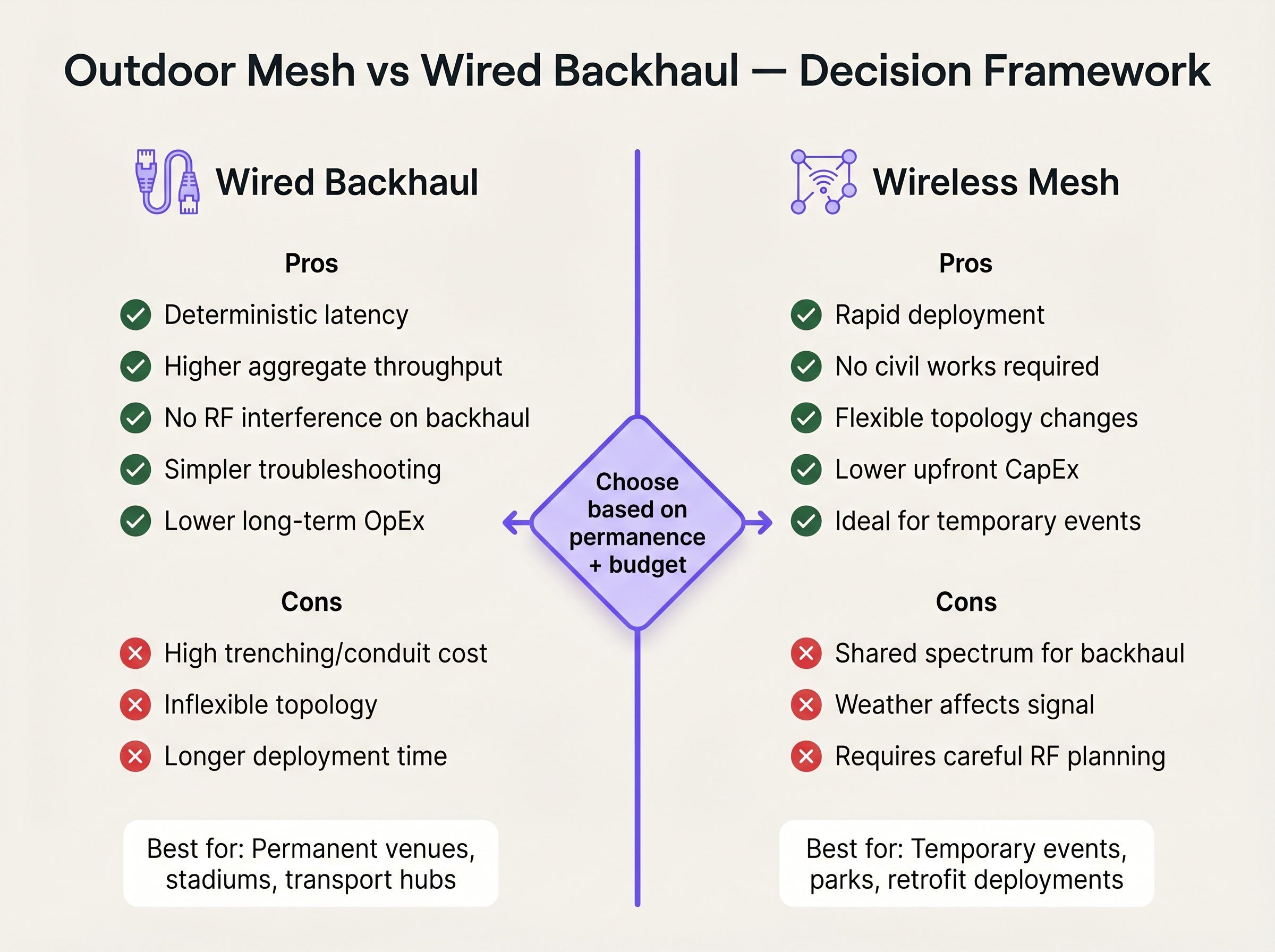
Sebbene il mesh riduca drasticamente il CapEx per le opere civili e il tempo di implementazione, introduce significativi compromessi tecnici. Ogni salto wireless dimezza efficacemente la larghezza di banda disponibile per quel percorso, poiché la radio deve ricevere e quindi ritrasmettere i dati. Inoltre, il collegamento di backhaul condivide lo stesso spettro RF dei dispositivi client, rendendolo vulnerabile a interferenze e degrado del segnale indotto dalle condizioni atmosferiche. Se il mesh è inevitabile, gli ingegneri devono implementare AP tri-radio, dedicando una radio a 5 GHz o 6 GHz esclusivamente al collegamento di backhaul per preservare la capacità rivolta al client.
Guida all'Implementazione
1. Sopralluogo e Pianificazione RF
Esternoo gli ambienti RF sono complessi. I segnali si propagano più lontano senza pareti che li attenuino, portando a gravi interferenze co-canale se non gestite. Conducete un'indagine predittiva utilizzando software specializzato, seguita da un'indagine attiva 'AP-on-a-stick'. Utilizzate antenne patch direzionali per focalizzare l'energia RF precisamente dove gli utenti si radunano, piuttosto che impiegare antenne omnidirezionali che trasmettono il segnale nello spazio vuoto.
2. Montaggio Fisico e Messa a Terra
Il montaggio di un AP su un palo metallico crea un rischio di fulmini. [1]
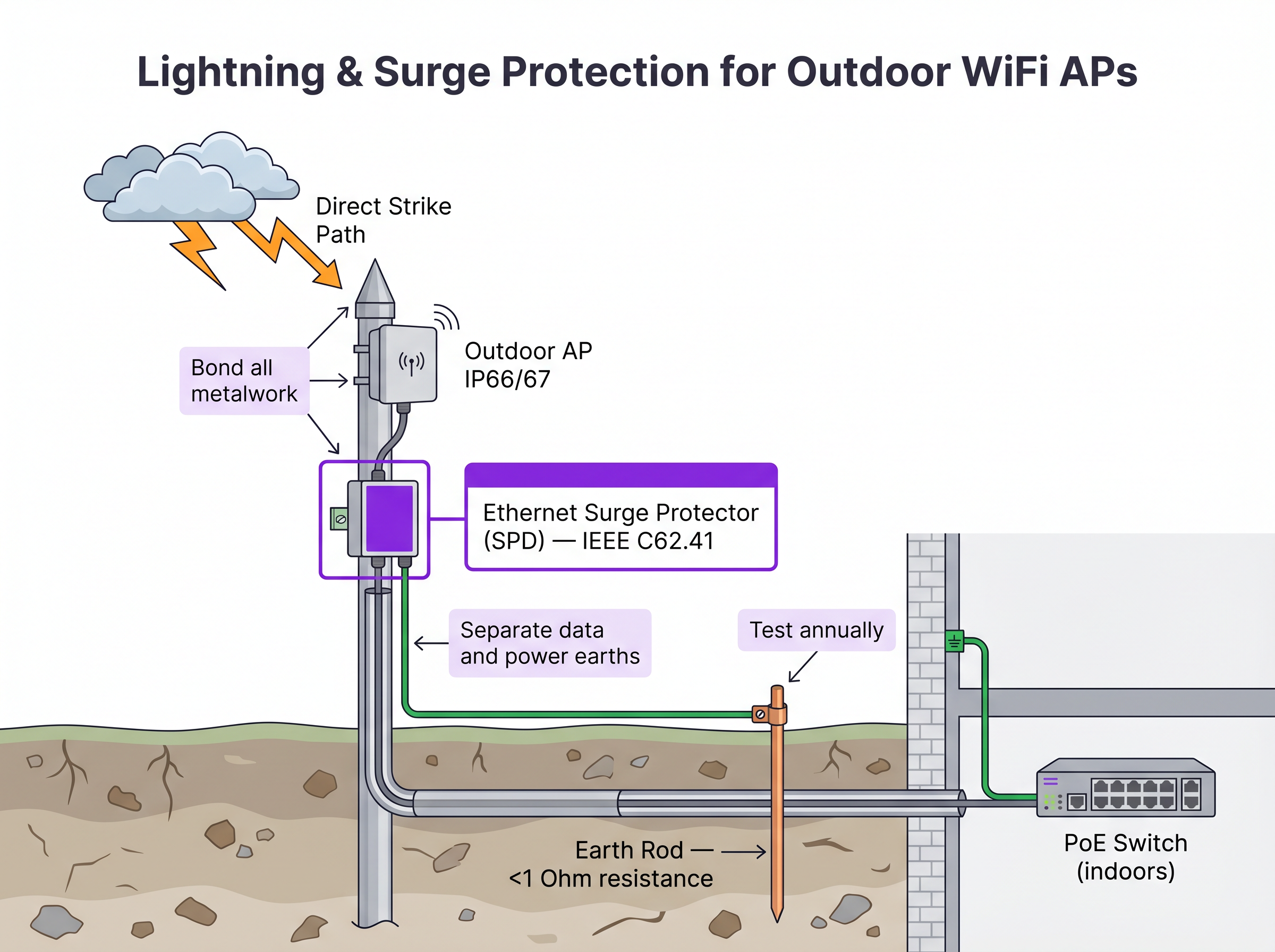
- Dispositivi di Protezione dalle Sovratensioni (SPD): Installate SPD Ethernet in linea sia all'estremità dell'AP che al punto di ingresso dell'edificio per proteggere l'infrastruttura di switching interna.
- Collegamento Equipotenziale: Assicuratevi che il supporto dell'AP, il palo e gli SPD siano collegati a un'asta di terra dedicata con una resistenza inferiore a 1 Ohm.
- Carico del Vento: Verificate che l'hardware di montaggio e il palo stesso possano sopportare i calcoli del carico massimo del vento locale, specialmente per le grandi antenne direzionali.
3. Configurazione e Sicurezza
Gli AP esterni sono fisicamente accessibili ad attori malintenzionati.
- Disabilitate le porte Ethernet non utilizzate sull'AP.
- Implementate il Network Access Control (NAC) basato su porta IEEE 802.1X sulla porta dello switch che collega l'AP. Se l'AP viene rimosso e un dispositivo non autorizzato viene collegato al cavo, lo switch deve disabilitare dinamicamente la porta. Per confronti dettagliati sui NAC, consultate la nostra guida: Aruba ClearPass vs Cisco ISE: NAC Platform Comparison .
- Assicuratevi che il traffico di gestione sia segregato su una VLAN dedicata.
ROI e Impatto sul Business
Investire in un'infrastruttura WiFi esterna di livello enterprise incide direttamente sulla redditività del luogo e sull'efficienza operativa. Per le strutture Hospitality , una copertura esterna onnipresente aumenta i punteggi di soddisfazione degli ospiti e consente l'ordinazione mobile presso piscine e spiagge. Negli ambienti Retail , facilita il ritiro a bordo strada e i sistemi di punto vendita (POS) esterni.
Evitando la falsa economia di implementare hardware interno all'esterno, o di affidarsi eccessivamente al mesh dove lo scavo era fattibile, i team IT mitigano il rischio di guasti hardware catastrofici durante condizioni meteorologiche avverse ed eliminano il continuo dispendio di OpEx dovuto alla risoluzione dei problemi intermittenti di backhaul RF. Una rete esterna correttamente progettata fornisce le fondamenta affidabili necessarie per servizi avanzati basati sulla posizione come Wayfinding e l'integrazione con piattaforme operative, come dettagliato in Connecting WiFi Events to 1,500+ Apps with Zapier and Purple .
Riferimenti
[1] Standard IEEE per reti locali e metropolitane. "IEEE 802.3-2018 - Standard IEEE per Ethernet", IEEE Standards Association.
Definizioni chiave
IP67 (Ingress Protection)
An equipment rating certifying the device is completely dust-tight (6) and can withstand temporary immersion in water up to 1 metre deep for 30 minutes (7).
Mandatory baseline for outdoor hardware in areas subject to heavy storms or flooding to ensure survivability.
IEEE 802.3bt (PoE++)
The Power over Ethernet standard capable of delivering up to 60W (Type 3) or 90W (Type 4) of DC power over standard twisted-pair cabling.
Required for modern, high-density outdoor APs that power multiple radios, dedicated security scanning radios, and internal heating elements.
Drip Loop
A deliberate downward U-shape formed in a cable just before it enters a device enclosure.
A critical physical installation technique that forces water running down the cable to drip off the bottom of the loop rather than entering the equipment chassis.
Surge Protection Device (SPD)
An inline component designed to protect electrical devices from voltage spikes by shunting excess current to ground.
Essential for outdoor networking to prevent lightning strikes near outdoor APs from sending destructive surges down the Ethernet cable into core switching infrastructure.
Wireless Mesh Backhaul
A network topology where access points connect to the core network wirelessly through other access points, rather than via a direct cabled connection.
Used when trenching cables is impossible or too expensive, but requires careful RF planning to mitigate bandwidth degradation and latency.
Co-Channel Interference (CCI)
Signal degradation caused when multiple access points on the same network transmit on the same frequency channel simultaneously.
A severe problem in outdoor deployments where signals travel further without physical walls to block them, necessitating careful channel planning and directional antennas.
Directional Patch Antenna
An antenna designed to focus RF energy in a specific direction (e.g., a 60-degree cone) rather than broadcasting in all directions.
Crucial for high-density outdoor deployments like stadiums to sectorize coverage and prevent APs from interfering with each other.
802.1X Port-Based NAC
A security protocol that requires a device to authenticate before the network switch will allow it to pass traffic.
Critical security control for outdoor APs; prevents an attacker from unplugging an AP and connecting a laptop to gain access to the internal corporate network.
Esempi pratici
A luxury resort needs to provide high-density WiFi coverage to a pool area located 180 metres from the main building's IDF. The ground is paved with expensive decorative stone, making trenching highly undesirable. How should the connectivity be engineered?
- Avoid Trenching: Utilize a Point-to-Point (PtP) wireless bridge using dedicated 60 GHz radios to establish a multi-gigabit wireless backhaul from the main building to a central pole at the pool area. 60 GHz provides high bandwidth and avoids interference with the 5 GHz client WiFi.
- Local Distribution: At the pool pole, install a weatherproof NEMA enclosure containing a hardened, temperature-rated PoE switch.
- Power: Provide local AC power to the NEMA enclosure by tapping into the pool area's lighting or utility power circuit, ensuring it is on a 24/7 unswitched circuit.
- AP Deployment: Connect IP67-rated, dual-band outdoor APs to the hardened PoE switch. Use directional patch antennas to focus coverage on the loungers and cabanas, minimizing signal reflection off the water.
A municipal park is deploying Guest WiFi. The APs will be mounted on metal lampposts. What specific physical layer protections must be implemented to prevent network damage from weather and electrical events?
- Cable Ingress: Use outdoor-rated, UV-stabilized CAT6A cable. Terminate the connection at the AP using the manufacturer-supplied weatherproof cable gland. Crucially, form a 'drip loop' in the cable just before it enters the AP, ensuring water drips off the bottom of the loop rather than running into the connector.
- Lightning Protection: Install an inline Ethernet Surge Protection Device (SPD) on the pole, bonded to the metal pole (if the pole is properly earthed) or a dedicated earth rod.
- Building Protection: Install a second SPD at the point where the Ethernet cable enters the building housing the core switch, bonding it to the building's main earth terminal.
Domande di esercitazione
Q1. You are designing the WiFi for a large outdoor music festival that will run for 3 days. Trenching is not permitted. You need to provide coverage to the main stage viewing area, which is 300 metres from the wired network drop. What is the most appropriate backhaul architecture?
Suggerimento: Consider the duration of the event and the performance requirements of a dense crowd.
Visualizza risposta modello
A Point-to-Point (PtP) wireless bridge (preferably 60 GHz) should be used to shoot the connection from the wired drop to the main stage area. From there, a localized wireless mesh or temporary cabling can distribute the connection to the individual APs serving the crowd. This avoids trenching while providing a high-capacity backbone, which standard multi-hop mesh cannot provide over 300 metres.
Q2. An outdoor AP mounted on a lighting pole is experiencing intermittent power reboots. The cable run is 115 metres of CAT6. The switch is providing 802.3at (30W) PoE+. What are the two most likely causes of the failure?
Suggerimento: Evaluate both the physical layer limitations and the power requirements.
Visualizza risposta modello
- Voltage drop over distance: The 115m run exceeds the 100m Ethernet standard. The resistance in the copper cable causes voltage to drop, meaning the AP may not receive sufficient power to operate under load. 2) Insufficient PoE budget: Modern outdoor APs, especially those with heaters, often require 802.3bt (60W). If the switch only provides 30W, the AP will reboot when it attempts to draw more power than is available.
Q3. During an audit of a newly installed outdoor AP on a building roof, you notice the CAT6A cable runs straight down from the AP port and into a hole drilled in the roof membrane. The AP has an IP67 rating. What is the critical installation error, and what is the risk?
Suggerimento: Consider how water behaves on physical surfaces.
Visualizza risposta modello
The critical error is the absence of a drip loop. Without a drip loop, water will run down the outside of the cable and pool directly at the entry point to the roof, or track into the AP's RJ45 connector if the gland fails. The risk is water ingress into the building or the AP chassis, leading to hardware failure, despite the AP's IP67 rating.
Continua a leggere questa serie
Cos'è un WLC (Wireless LAN Controller) e ne hai ancora bisogno?
Questa guida completa esplora l'evoluzione dei Wireless LAN Controller (WLC) e fornisce un quadro tecnico per determinare l'architettura giusta nel 2026. Copre i modelli hardware tradizionali, gestiti in cloud e senza controller, dettagliando il loro impatto su conformità, scalabilità ed esperienza degli ospiti.
Power over Ethernet (PoE) per gli Access Point: guida all'implementazione
This guide provides infrastructure technicians, network architects, and IT decision-makers with a definitive technical reference for deploying Power over Ethernet (PoE) access points across enterprise venues including hotels, retail estates, stadiums, and public-sector facilities. It covers IEEE standards from 802.3af through 802.3bt, power budget calculation, cabling requirements, VLAN segmentation, and security compliance, with concrete implementation scenarios and measurable ROI benchmarks. Understanding PoE architecture is foundational to any [Guest WiFi](/guest-wifi) or [WiFi Analytics](/guest-wifi-marketing-analytics-platform) deployment, as the reliability of the physical layer directly determines the quality of data capture, user experience, and operational uptime.
Mesh Network vs Access Points: Qual è la scelta migliore per grandi strutture?
Questa guida tecnica fornisce un confronto definitivo tra le reti mesh e i tradizionali Access Point cablati per grandi strutture, coprendo architettura, compromessi prestazionali e strategia di implementazione. Fornisce a IT manager, architetti di rete e CTO framework attuabili per progettare infrastrutture WiFi ad alte prestazioni e conformi per ambienti di ospitalità, vendita al dettaglio, eventi e settore pubblico. La guida mappa anche queste decisioni architettoniche alla piattaforma hardware-agnostic di Purple per guest WiFi e analytics, dimostrando come la giusta scelta infrastrutturale generi risultati di business misurabili.