
Implementação de WiFi Exterior: Impermeabilização, PoE e Opções de Rede Mesh
Este guia autorizado detalha as considerações de engenharia críticas para a implementação de WiFi exterior, focando na impermeabilização (classificações IP), estratégias de Power over Ethernet (PoE) para longos percursos de cabos e as compensações arquitetónicas entre rede mesh e backhaul com fios. Fornece recomendações acionáveis para líderes de TI garantirem conectividade resiliente e de alto desempenho em ambientes exteriores hostis.
Ouça este guia
Ver transcrição do podcast
Resumo Executivo
A implementação de WiFi em ambientes exteriores — seja um resort extenso, um parque comercial ao ar livre ou um estádio com 50.000 lugares — apresenta desafios físicos e arquitetónicos fundamentalmente diferentes dos espaços interiores alcatifados. Os gestores de TI e arquitetos de rede devem tratar o ambiente exterior como ativamente hostil ao equipamento de rede. Humidade, temperaturas extremas, raios e distâncias físicas prolongadas conspiram para degradar o desempenho e destruir o hardware.
Este guia fornece uma estrutura abrangente para a implementação de WiFi exterior. Examinamos as classificações obrigatórias de Ingress Protection (IP) exigidas para pontos de acesso (APs) e cablagem, estratégias para superar a limitação de 100 metros do Ethernet para Power over Ethernet (PoE) e uma análise crítica de quando usar rede mesh sem fios versus backhaul com fios. Ao aderir a estes princípios de engenharia, os operadores de recintos podem garantir que as suas redes exteriores oferecem o desempenho determinístico exigido para Guest WiFi de alta densidade e recolha de dados fiável para WiFi Analytics .
Análise Técnica Detalhada
Impermeabilização e o Sistema de Classificação IP
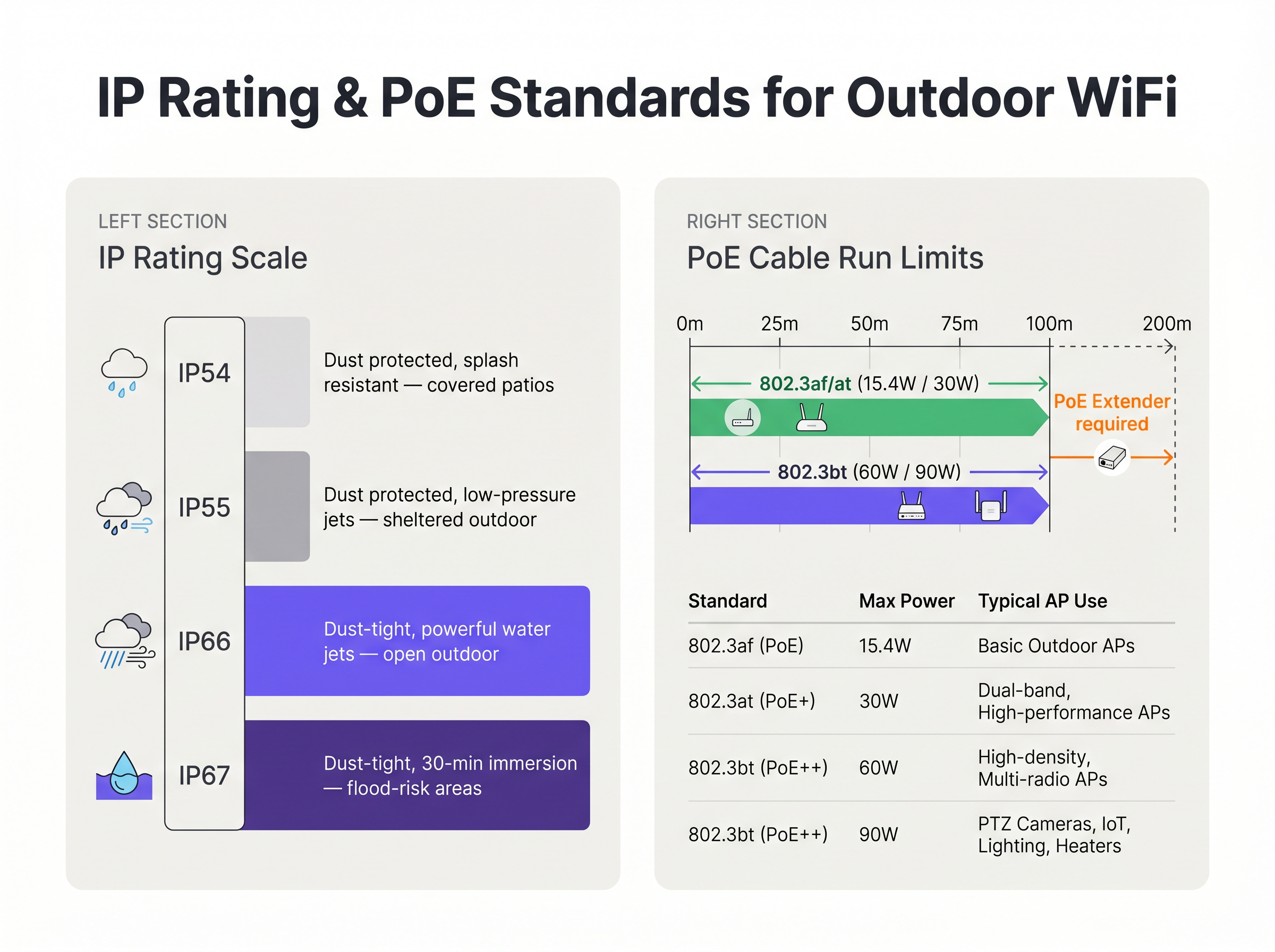
A base de qualquer implementação exterior é a resiliência física. O padrão da indústria para definir a proteção ambiental é o sistema de classificação Ingress Protection (IP). Para implementações exteriores empresariais, hardware de nível de consumidor ou "resistente às intempéries" é insuficiente.
- IP54/IP55: Adequado apenas para áreas altamente abrigadas, como pátios cobertos profundos ou docas de carga protegidas da chuva direta.
- IP66: O padrão mínimo para implementação exterior geral. Garante que a unidade é totalmente estanque ao pó e pode suportar jatos de água potentes de qualquer direção.
- IP67: O padrão ouro para ambientes expostos, oferecendo proteção contra imersão temporária em água. Isto é obrigatório para áreas propensas a inundações, marinas ou regiões sujeitas a tempestades tropicais severas.
Crucialmente, a caixa do AP raramente é o ponto de falha. A vulnerabilidade mais comum é a entrada de cabos. Conectores RJ45 mal vedados permitem que a água siga pelo cabo Ethernet diretamente para o chassis do AP ou de volta para o switch PoE. As implementações devem utilizar bucins de cabo à prova de intempéries aprovados pelo fabricante, cablagem CAT6A com classificação exterior (estabilizada UV) e laços de gotejamento obrigatórios para direcionar a água para longe do conector.
Power over Ethernet (PoE) para Distâncias Estendidas
As implementações exteriores frequentemente excedem o comprimento máximo de canal de 100 metros especificado pelo IEEE 802.3 para Ethernet padrão sobre par trançado. Quando um AP é montado num poste de iluminação a 150 metros do Intermediate Distribution Frame (IDF) mais próximo, os engenheiros devem selecionar um método apropriado de fornecimento de energia e dados.
- Fibra Ótica com Alimentação Local: A utilização de fibra monomodo oferece distância praticamente ilimitada para dados, mas requer uma fonte de alimentação local na localização do AP. Isto frequentemente envolve a ligação a circuitos de iluminação pública, que podem ser energizados apenas à noite, necessitando de dispendiosas baterias de reserva em linha ou de uma nova cablagem.
- Extensores PoE: Repetidores em linha podem regenerar o sinal de dados e transmitir energia PoE, duplicando efetivamente o alcance para 200 metros. No entanto, introduzem pontos de falha adicionais e devem ser alojados em caixas NEMA à prova de intempéries.
- Switches PoE de Longo Alcance: Switches especializados podem transmitir energia e dados até 250 metros sobre cobre padrão, mas isso tipicamente força a ligação a auto-negociar para 10 Mbps. Embora suficiente para Sensors de baixa largura de banda, é totalmente inadequado para tráfego de utilizadores de alta densidade.
Além disso, os APs exteriores modernos de alta densidade, particularmente aqueles com aquecedores internos para climas frios, exigem energia substancial. Frequentemente requerem IEEE 802.3bt (PoE++), consumindo até 60W ou 90W. A infraestrutura de switch subjacente deve ser capaz de sustentar este orçamento de energia em todas as portas utilizadas.
Arquitetura de Backhaul: Mesh vs. Com Fios
A decisão arquitetónica de como conectar o AP exterior de volta à rede central dita o desempenho e a fiabilidade a longo prazo da implementação.
Backhaul com Fios (O Padrão Ouro) A abertura de valas para condutas e a passagem de fibra ou cobre para cada AP é a solução mais robusta. Garante latência determinística, fornece o débito agregado máximo e assegura que a ligação de backhaul é imune a interferências de RF. Para recintos permanentes como estádios e centros de Transport , o backhaul com fios é a única arquitetura aceitável para um ROI a longo prazo.
Rede Mesh Sem Fios (A Alternativa Pragmática) Quando a abertura de valas é economicamente proibitiva, fisicamente impossível (por exemplo, locais de património) ou a implementação é temporária, utiliza-se a rede mesh sem fios. Os APs mesh conectam-se sem fios a um nó raiz que tem uma ligação com fios.
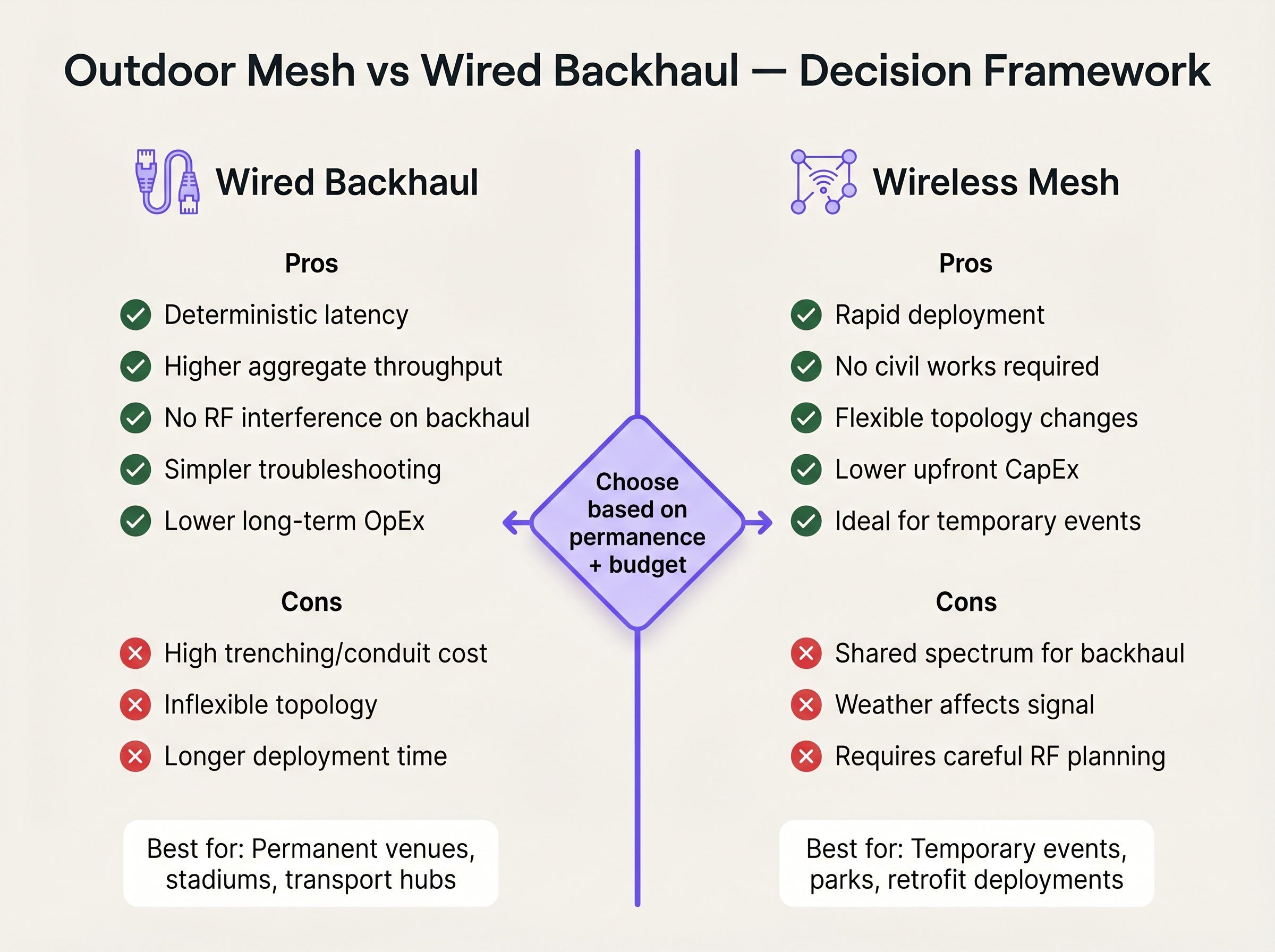
Embora a rede mesh reduza drasticamente o CapEx de obras civis e o tempo de implementação, introduz compromissos técnicos significativos. Cada salto sem fios efetivamente reduz para metade a largura de banda disponível para esse caminho, pois o rádio deve receber e depois retransmitir os dados. Além disso, a ligação de backhaul partilha o mesmo espectro de RF que os dispositivos cliente, tornando-a vulnerável a interferências e degradação do sinal induzida pelo clima. Se a rede mesh for inevitável, os engenheiros devem implementar APs tri-rádio, dedicando um rádio de 5 GHz ou 6 GHz exclusivamente para a ligação de backhaul para preservar a capacidade voltada para o cliente.
Guia de Implementação
1. Levantamento do Local e Planeamento de RF
Outdoou os ambientes de RF são complexos. Os sinais propagam-se mais longe sem paredes para os atenuar, levando a uma interferência de co-canal grave se não for gerida. Realize um levantamento preditivo utilizando software especializado, seguido de um levantamento ativo com AP-on-a-stick. Utilize antenas patch direcionais para focar a energia de RF precisamente onde os utilizadores se congregam, em vez de empregar antenas omnidirecionais que transmitem o sinal para o espaço vazio.
2. Montagem Física e Ligação à Terra
Montar um AP num poste de metal cria um risco de raio. [1]
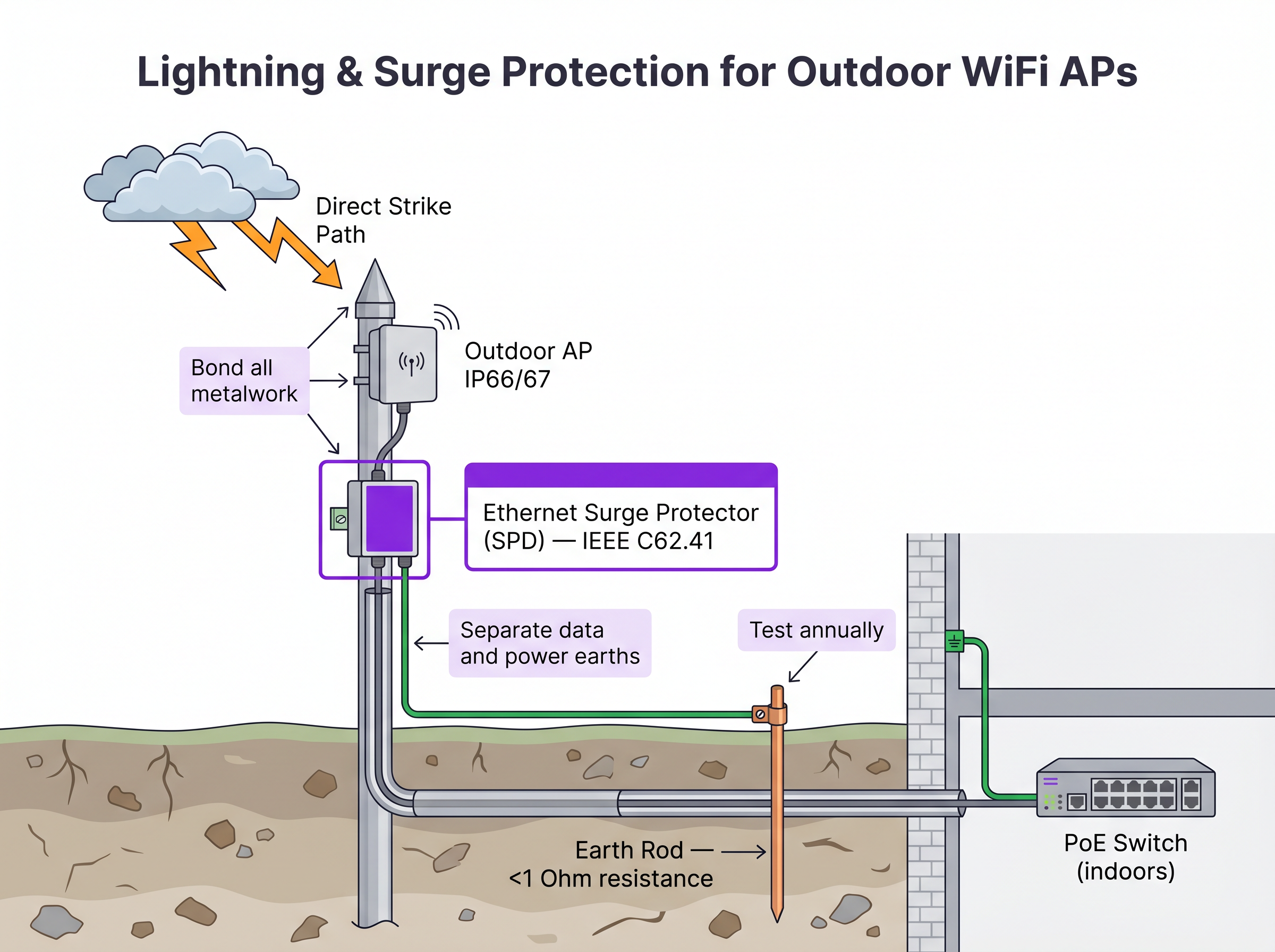
- Dispositivos de Proteção contra Surtos (SPDs): Instale SPDs Ethernet em linha tanto na extremidade do AP como no ponto de entrada do edifício para proteger a infraestrutura de comutação interna.
- Ligação à Terra: Certifique-se de que o suporte do AP, o poste e os SPDs estão ligados a uma haste de terra dedicada com uma resistência inferior a 1 Ohm.
- Carga de Vento: Verifique se o hardware de montagem e o próprio poste podem suportar os cálculos de carga máxima de vento local, especialmente para grandes antenas direcionais.
3. Configuração e Segurança
Os APs exteriores são fisicamente acessíveis a atores maliciosos.
- Desative as portas Ethernet não utilizadas no AP.
- Implemente o Controlo de Acesso à Rede (NAC) baseado em porta IEEE 802.1X na porta do switch que liga o AP. Se o AP for removido e um dispositivo não autorizado for ligado ao cabo, o switch deve desativar dinamicamente a porta. Para comparações detalhadas de NAC, consulte o nosso guia: Aruba ClearPass vs Cisco ISE: Comparação de Plataformas NAC .
- Certifique-se de que o tráfego de gestão está segregado numa VLAN dedicada.
ROI e Impacto nos Negócios
Investir em infraestrutura WiFi exterior de nível empresarial impacta diretamente a rentabilidade do local e a eficiência operacional. Para locais de Hospitalidade , a cobertura exterior ubíqua aumenta os índices de satisfação dos hóspedes e permite pedidos móveis em piscinas e praias. Em ambientes de Retalho , facilita a recolha na berma da estrada e sistemas de ponto de venda (POS) exteriores.
Ao evitar a falsa economia de implementar hardware interior no exterior, ou de depender fortemente de mesh onde a escavação era viável, as equipas de TI mitigam o risco de falha catastrófica de hardware durante condições meteorológicas severas e eliminam o escoamento contínuo de OpEx de resolução de problemas intermitentes de backhaul de RF. Uma rede exterior devidamente projetada fornece a base fiável necessária para serviços avançados baseados em localização, como Wayfinding e integração com plataformas operacionais, conforme detalhado em Ligar Eventos WiFi a Mais de 1.500 Aplicações com Zapier e Purple .
Referências
[1] Norma IEEE para redes locais e metropolitanas. "IEEE 802.3-2018 - Norma IEEE para Ethernet", IEEE Standards Association.
Definições Principais
IP67 (Ingress Protection)
An equipment rating certifying the device is completely dust-tight (6) and can withstand temporary immersion in water up to 1 metre deep for 30 minutes (7).
Mandatory baseline for outdoor hardware in areas subject to heavy storms or flooding to ensure survivability.
IEEE 802.3bt (PoE++)
The Power over Ethernet standard capable of delivering up to 60W (Type 3) or 90W (Type 4) of DC power over standard twisted-pair cabling.
Required for modern, high-density outdoor APs that power multiple radios, dedicated security scanning radios, and internal heating elements.
Drip Loop
A deliberate downward U-shape formed in a cable just before it enters a device enclosure.
A critical physical installation technique that forces water running down the cable to drip off the bottom of the loop rather than entering the equipment chassis.
Surge Protection Device (SPD)
An inline component designed to protect electrical devices from voltage spikes by shunting excess current to ground.
Essential for outdoor networking to prevent lightning strikes near outdoor APs from sending destructive surges down the Ethernet cable into core switching infrastructure.
Wireless Mesh Backhaul
A network topology where access points connect to the core network wirelessly through other access points, rather than via a direct cabled connection.
Used when trenching cables is impossible or too expensive, but requires careful RF planning to mitigate bandwidth degradation and latency.
Co-Channel Interference (CCI)
Signal degradation caused when multiple access points on the same network transmit on the same frequency channel simultaneously.
A severe problem in outdoor deployments where signals travel further without physical walls to block them, necessitating careful channel planning and directional antennas.
Directional Patch Antenna
An antenna designed to focus RF energy in a specific direction (e.g., a 60-degree cone) rather than broadcasting in all directions.
Crucial for high-density outdoor deployments like stadiums to sectorize coverage and prevent APs from interfering with each other.
802.1X Port-Based NAC
A security protocol that requires a device to authenticate before the network switch will allow it to pass traffic.
Critical security control for outdoor APs; prevents an attacker from unplugging an AP and connecting a laptop to gain access to the internal corporate network.
Exemplos Práticos
A luxury resort needs to provide high-density WiFi coverage to a pool area located 180 metres from the main building's IDF. The ground is paved with expensive decorative stone, making trenching highly undesirable. How should the connectivity be engineered?
- Avoid Trenching: Utilize a Point-to-Point (PtP) wireless bridge using dedicated 60 GHz radios to establish a multi-gigabit wireless backhaul from the main building to a central pole at the pool area. 60 GHz provides high bandwidth and avoids interference with the 5 GHz client WiFi.
- Local Distribution: At the pool pole, install a weatherproof NEMA enclosure containing a hardened, temperature-rated PoE switch.
- Power: Provide local AC power to the NEMA enclosure by tapping into the pool area's lighting or utility power circuit, ensuring it is on a 24/7 unswitched circuit.
- AP Deployment: Connect IP67-rated, dual-band outdoor APs to the hardened PoE switch. Use directional patch antennas to focus coverage on the loungers and cabanas, minimizing signal reflection off the water.
A municipal park is deploying Guest WiFi. The APs will be mounted on metal lampposts. What specific physical layer protections must be implemented to prevent network damage from weather and electrical events?
- Cable Ingress: Use outdoor-rated, UV-stabilized CAT6A cable. Terminate the connection at the AP using the manufacturer-supplied weatherproof cable gland. Crucially, form a 'drip loop' in the cable just before it enters the AP, ensuring water drips off the bottom of the loop rather than running into the connector.
- Lightning Protection: Install an inline Ethernet Surge Protection Device (SPD) on the pole, bonded to the metal pole (if the pole is properly earthed) or a dedicated earth rod.
- Building Protection: Install a second SPD at the point where the Ethernet cable enters the building housing the core switch, bonding it to the building's main earth terminal.
Perguntas de Prática
Q1. You are designing the WiFi for a large outdoor music festival that will run for 3 days. Trenching is not permitted. You need to provide coverage to the main stage viewing area, which is 300 metres from the wired network drop. What is the most appropriate backhaul architecture?
Dica: Consider the duration of the event and the performance requirements of a dense crowd.
Ver resposta modelo
A Point-to-Point (PtP) wireless bridge (preferably 60 GHz) should be used to shoot the connection from the wired drop to the main stage area. From there, a localized wireless mesh or temporary cabling can distribute the connection to the individual APs serving the crowd. This avoids trenching while providing a high-capacity backbone, which standard multi-hop mesh cannot provide over 300 metres.
Q2. An outdoor AP mounted on a lighting pole is experiencing intermittent power reboots. The cable run is 115 metres of CAT6. The switch is providing 802.3at (30W) PoE+. What are the two most likely causes of the failure?
Dica: Evaluate both the physical layer limitations and the power requirements.
Ver resposta modelo
- Voltage drop over distance: The 115m run exceeds the 100m Ethernet standard. The resistance in the copper cable causes voltage to drop, meaning the AP may not receive sufficient power to operate under load. 2) Insufficient PoE budget: Modern outdoor APs, especially those with heaters, often require 802.3bt (60W). If the switch only provides 30W, the AP will reboot when it attempts to draw more power than is available.
Q3. During an audit of a newly installed outdoor AP on a building roof, you notice the CAT6A cable runs straight down from the AP port and into a hole drilled in the roof membrane. The AP has an IP67 rating. What is the critical installation error, and what is the risk?
Dica: Consider how water behaves on physical surfaces.
Ver resposta modelo
The critical error is the absence of a drip loop. Without a drip loop, water will run down the outside of the cable and pool directly at the entry point to the roof, or track into the AP's RJ45 connector if the gland fails. The risk is water ingress into the building or the AP chassis, leading to hardware failure, despite the AP's IP67 rating.
Continue a ler esta série
O que é um WLC (Wireless LAN Controller) e Ainda Precisa de Um?
Este guia abrangente explora a evolução dos Wireless LAN Controllers (WLCs) e fornece uma estrutura técnica para determinar a arquitetura certa em 2026. Abrange modelos de hardware tradicionais, geridos na cloud e sem controlador, detalhando o seu impacto na conformidade, escalabilidade e experiência do convidado.
Power over Ethernet (PoE) para Pontos de Acesso: Um Guia de Implementação
This guide provides infrastructure technicians, network architects, and IT decision-makers with a definitive technical reference for deploying Power over Ethernet (PoE) access points across enterprise venues including hotels, retail estates, stadiums, and public-sector facilities. It covers IEEE standards from 802.3af through 802.3bt, power budget calculation, cabling requirements, VLAN segmentation, and security compliance, with concrete implementation scenarios and measurable ROI benchmarks. Understanding PoE architecture is foundational to any [Guest WiFi](/guest-wifi) or [WiFi Analytics](/guest-wifi-marketing-analytics-platform) deployment, as the reliability of the physical layer directly determines the quality of data capture, user experience, and operational uptime.
Rede Mesh vs. Access Points: Qual é Melhor para Grandes Espaços?
Este guia técnico fornece uma comparação definitiva entre redes mesh e Access Points tradicionais com fios para espaços de grande escala, cobrindo arquitetura, compromissos de desempenho e estratégia de implementação. Equipa gestores de TI, arquitetos de rede e CTOs com estruturas acionáveis para projetar infraestruturas WiFi de alto desempenho e conformes para ambientes de hotelaria, retalho, eventos e setor público. O guia também mapeia estas decisões arquitetónicas para a plataforma de guest WiFi e análise de dados agnóstica de hardware da Purple, demonstrando como a escolha certa da infraestrutura impulsiona resultados de negócio mensuráveis.