
Bereitstellung von Outdoor-WiFi: Wetterfestigkeit, PoE und Mesh-Optionen
Dieser maßgebliche Leitfaden erläutert die kritischen technischen Überlegungen für die Bereitstellung von Outdoor-WiFi, mit Fokus auf Wetterfestigkeit (IP-Schutzarten), Power over Ethernet (PoE)-Strategien für lange Kabelwege und die architektonischen Kompromisse zwischen Mesh- und kabelgebundenem Backhaul. Er bietet umsetzbare Empfehlungen für IT-Verantwortliche, um eine robuste, hochleistungsfähige Konnektivität in feindlichen Außenumgebungen zu gewährleisten.
Diesen Leitfaden anhören
Podcast-Transkript ansehen
Executive Summary
Die Bereitstellung von WiFi in Außenbereichen – sei es ein weitläufiges Resort, ein Open-Air-Einkaufspark oder ein Stadion mit 50.000 Plätzen – stellt physische und architektonische Herausforderungen dar, die sich grundlegend von denen in Innenräumen unterscheiden. IT-Manager und Netzwerkarchitekten müssen die Außenumgebung als aktiv feindlich gegenüber Netzwerkgeräten betrachten. Feuchtigkeit, extreme Temperaturen, Blitzeinschläge und große physische Entfernungen wirken zusammen, um die Leistung zu beeinträchtigen und Hardware zu zerstören.
Dieser Leitfaden bietet einen umfassenden Rahmen für die Bereitstellung von Outdoor-WiFi. Wir untersuchen die obligatorischen Ingress Protection (IP)-Schutzarten, die für Access Points (APs) und Verkabelung erforderlich sind, Strategien zur Überwindung der 100-Meter-Ethernet-Begrenzung für Power over Ethernet (PoE) und eine kritische Analyse, wann drahtloses Mesh gegenüber kabelgebundenem Backhaul zu verwenden ist. Durch die Einhaltung dieser technischen Prinzipien können Betreiber von Veranstaltungsorten sicherstellen, dass ihre Outdoor-Netzwerke die deterministische Leistung liefern, die für hochdichtes Guest WiFi und eine zuverlässige Datenerfassung für WiFi Analytics erforderlich ist.
Technical Deep-Dive
Weatherproofing and the IP Rating System
Die Grundlage jeder Outdoor-Bereitstellung ist die physische Widerstandsfähigkeit. Der Industriestandard zur Definition des Umweltschutzes ist das Ingress Protection (IP)-Bewertungssystem. Für Outdoor-Bereitstellungen im Unternehmensbereich ist Hardware der Verbraucherklasse oder „wetterbeständige“ Hardware unzureichend.
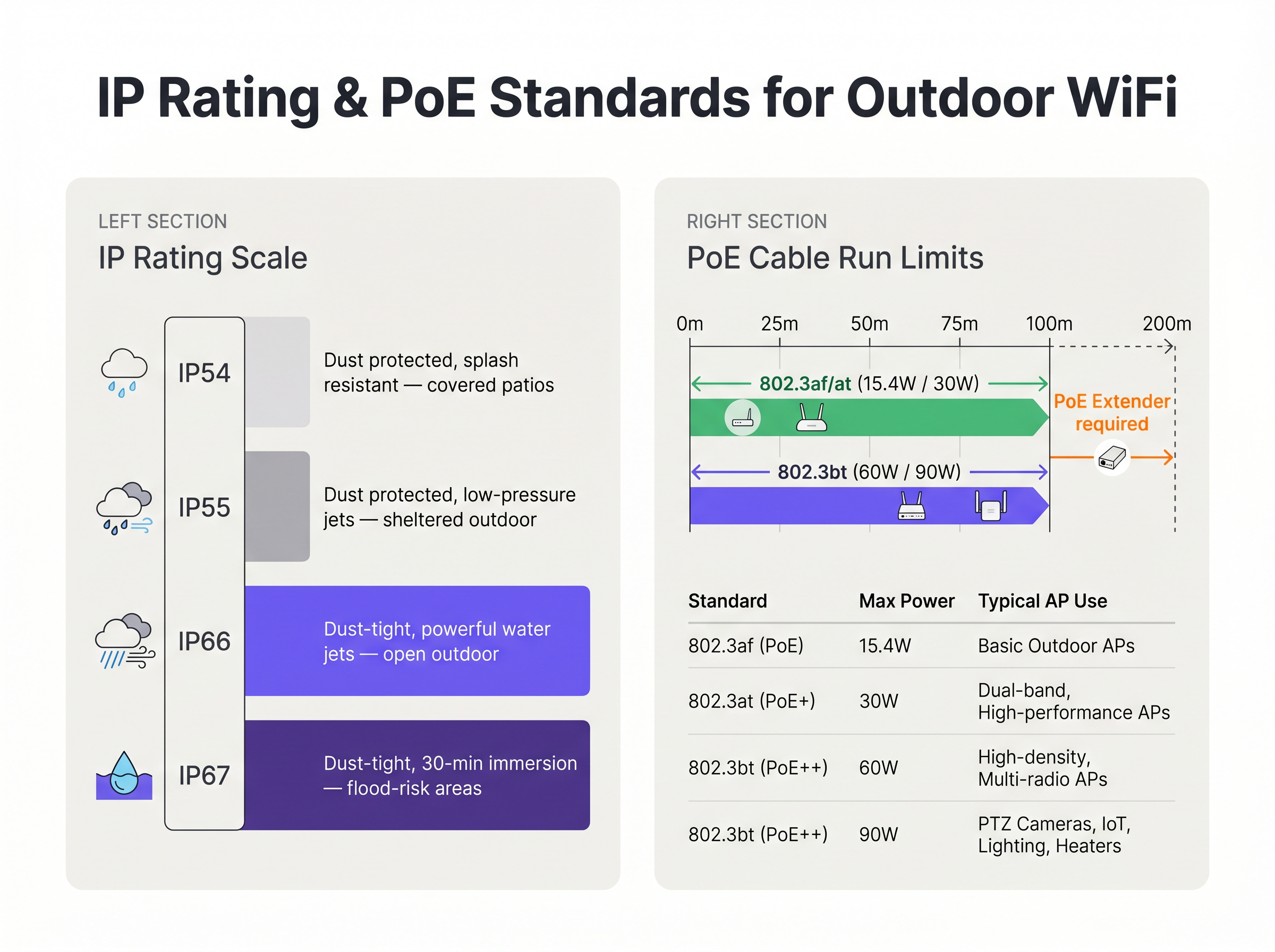
- IP54/IP55: Geeignet nur für stark geschützte Bereiche, wie tief überdachte Terrassen oder Laderampen, die vor direktem Regen geschützt sind.
- IP66: Der Mindeststandard für die allgemeine Outdoor-Bereitstellung. Er gewährleistet, dass das Gerät vollständig staubdicht ist und starken Wasserstrahlen aus jeder Richtung standhält.
- IP67: Der Goldstandard für exponierte Umgebungen, der Schutz vor zeitweiligem Untertauchen in Wasser bietet. Dies ist obligatorisch für hochwassergefährdete Gebiete, Marinas oder Regionen, die schweren tropischen Stürmen ausgesetzt sind.
Entscheidend ist, dass das AP-Gehäuse selten der Fehlerpunkt ist. Die häufigste Schwachstelle ist das Eindringen von Kabeln. Unsachgemäß abgedichtete RJ45-Stecker ermöglichen es Wasser, entlang des Ethernet-Kabels direkt in das AP-Gehäuse oder zurück zum PoE-Switch zu gelangen. Bei Installationen müssen vom Hersteller zugelassene wetterfeste Kabelverschraubungen, für den Außenbereich geeignete (UV-stabilisierte) CAT6A-Verkabelung und obligatorische Tropfschlaufen verwendet werden, um Wasser vom Stecker wegzuleiten.
Power over Ethernet (PoE) for Extended Distances
Outdoor-Bereitstellungen überschreiten häufig die von IEEE 802.3 für Standard-Ethernet über Twisted Pair spezifizierte maximale Kanallänge von 100 Metern. Wenn ein AP an einem Lichtmast 150 Meter vom nächsten Intermediate Distribution Frame (IDF) entfernt montiert ist, müssen Ingenieure eine geeignete Strom- und Datenliefermethode wählen.
- Fibre Optic mit lokaler Stromversorgung: Die Verlegung von Singlemode-Fibre bietet praktisch unbegrenzte Entfernungen für Daten, erfordert jedoch eine lokale Stromquelle am AP-Standort. Dies beinhaltet oft das Anzapfen von Straßenbeleuchtungsstromkreisen, die möglicherweise nur nachts mit Strom versorgt werden, was kostspielige Inline-Batterie-Backups oder Neuverkabelungen erforderlich macht.
- PoE Extenders: Inline-Repeater können das Datensignal regenerieren und PoE-Strom weiterleiten, wodurch die Reichweite effektiv auf 200 Meter verdoppelt wird. Sie führen jedoch zusätzliche Fehlerquellen ein und müssen selbst in wetterfesten NEMA-Gehäusen untergebracht werden.
- Long-Reach PoE Switches: Spezialisierte Switches können Strom und Daten über Standardkupfer bis zu 250 Meter weit übertragen, aber dies zwingt die Verbindung typischerweise dazu, auf 10 Mbps herunterzuhandeln. Obwohl dies für [Sensors] mit geringer Bandbreite ausreicht, ist es für hochdichten Benutzerverkehr völlig unzureichend.
Darüber hinaus benötigen moderne hochdichte Outdoor-APs, insbesondere solche mit internen Heizungen für kalte Klimazonen, erhebliche Leistung. Sie benötigen häufig IEEE 802.3bt (PoE++), das bis zu 60W oder 90W zieht. Die zugrunde liegende Switch-Infrastruktur muss in der Lage sein, dieses Leistungsbudget über alle genutzten Ports aufrechtzuerhalten.
Backhaul Architecture: Mesh vs. Wired
Die architektonische Entscheidung, wie der Outdoor-AP an das Kernnetzwerk angebunden wird, bestimmt die langfristige Leistung und Zuverlässigkeit der Bereitstellung.
Kabelgebundener Backhaul (Der Goldstandard) Das Verlegen von Leerrohren und das Ziehen von Glasfaser oder Kupfer zu jedem AP ist die robusteste Lösung. Es garantiert deterministische Latenz, bietet maximalen aggregierten Durchsatz und stellt sicher, dass die Backhaul-Verbindung immun gegen RF-Interferenzen ist. Für dauerhafte Veranstaltungsorte wie Stadien und Transport -Hubs ist kabelgebundener Backhaul die einzig akzeptable Architektur für einen langfristigen ROI.
Drahtloses Mesh (Die pragmatische Alternative) Wenn die Grabenverlegung wirtschaftlich unerschwinglich, physisch unmöglich (z. B. bei Kulturerbestätten) oder die Bereitstellung temporär ist, wird drahtloses Mesh eingesetzt. Mesh-APs verbinden sich drahtlos mit einem Root-Knoten, der eine kabelgebundene Verbindung hat.
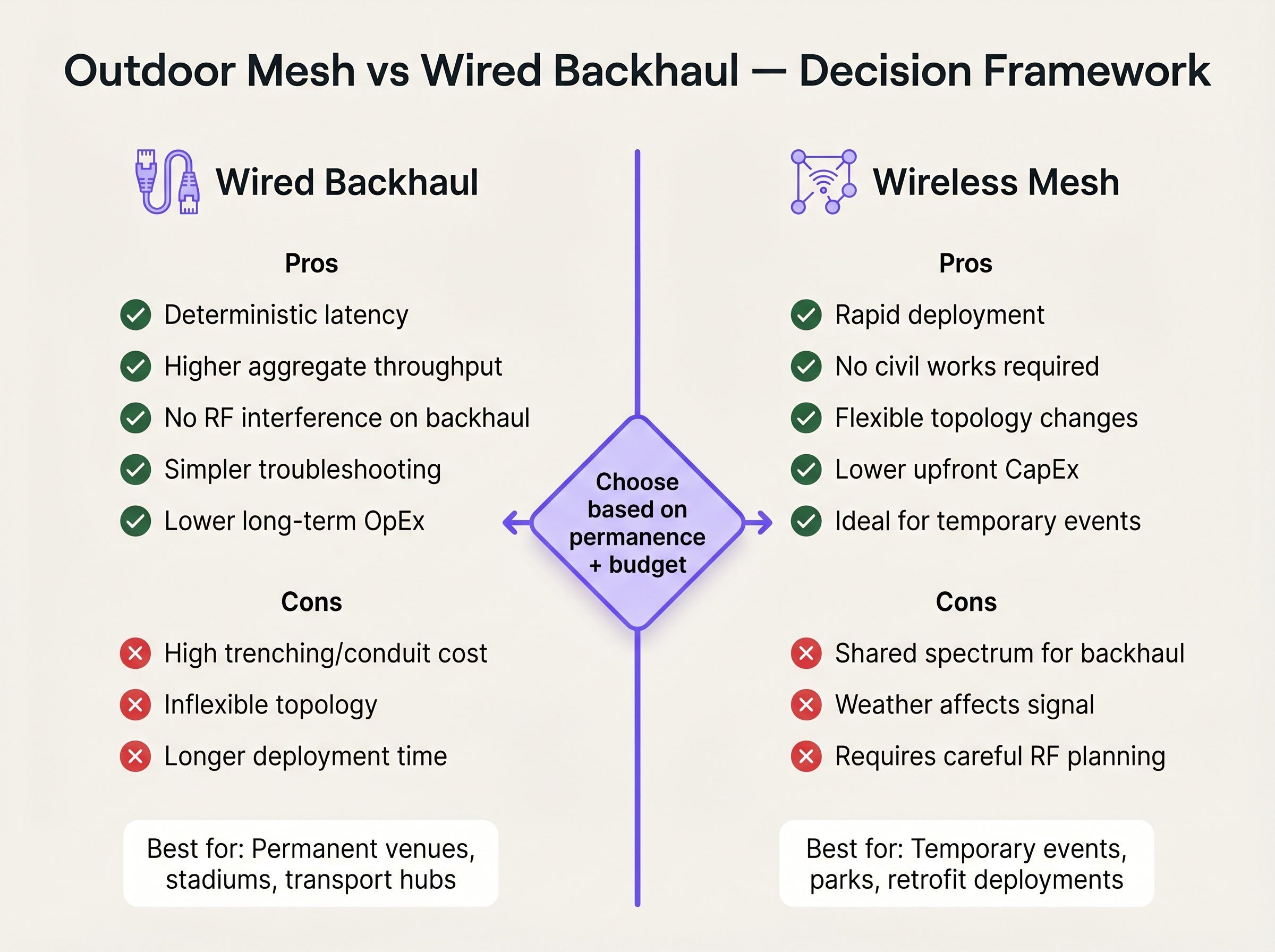
Während Mesh die CapEx für Tiefbauarbeiten und die Bereitstellungszeit drastisch reduziert, führt es erhebliche technische Kompromisse ein. Jeder drahtlose Hop halbiert effektiv die verfügbare Bandbreite für diesen Pfad, da das Radio die Daten empfangen und dann erneut senden muss. Darüber hinaus teilt sich die Backhaul-Verbindung dasselbe RF-Spektrum wie Client-Geräte, wodurch sie anfällig für Interferenzen und wetterbedingte Signalverschlechterung wird. Wenn Mesh unvermeidlich ist, müssen Ingenieure Tri-Radio-APs einsetzen, die ein 5 GHz- oder 6 GHz-Radio ausschließlich für die Backhaul-Verbindung reservieren, um die clientseitige Kapazität zu erhalten.
Implementierungsleitfaden
1. Standortbegehung und RF-Planung
Outdooroder RF-Umgebungen sind komplex. Signale breiten sich ohne Wände, die sie dämpfen, weiter aus, was bei unzureichender Verwaltung zu schwerwiegenden Gleichkanalstörungen führt. Führen Sie eine prädiktive Vermessung mit spezialisierter Software durch, gefolgt von einer aktiven AP-on-a-stick-Vermessung. Verwenden Sie gerichtete Patch-Antennen, um die RF-Energie präzise dort zu bündeln, wo sich Benutzer aufhalten, anstatt omnidirektionale Antennen einzusetzen, die Signale in den leeren Raum abstrahlen.
2. Physische Montage und Erdung
Die Montage eines AP an einem Metallmast birgt Blitzschlaggefahr. [1]
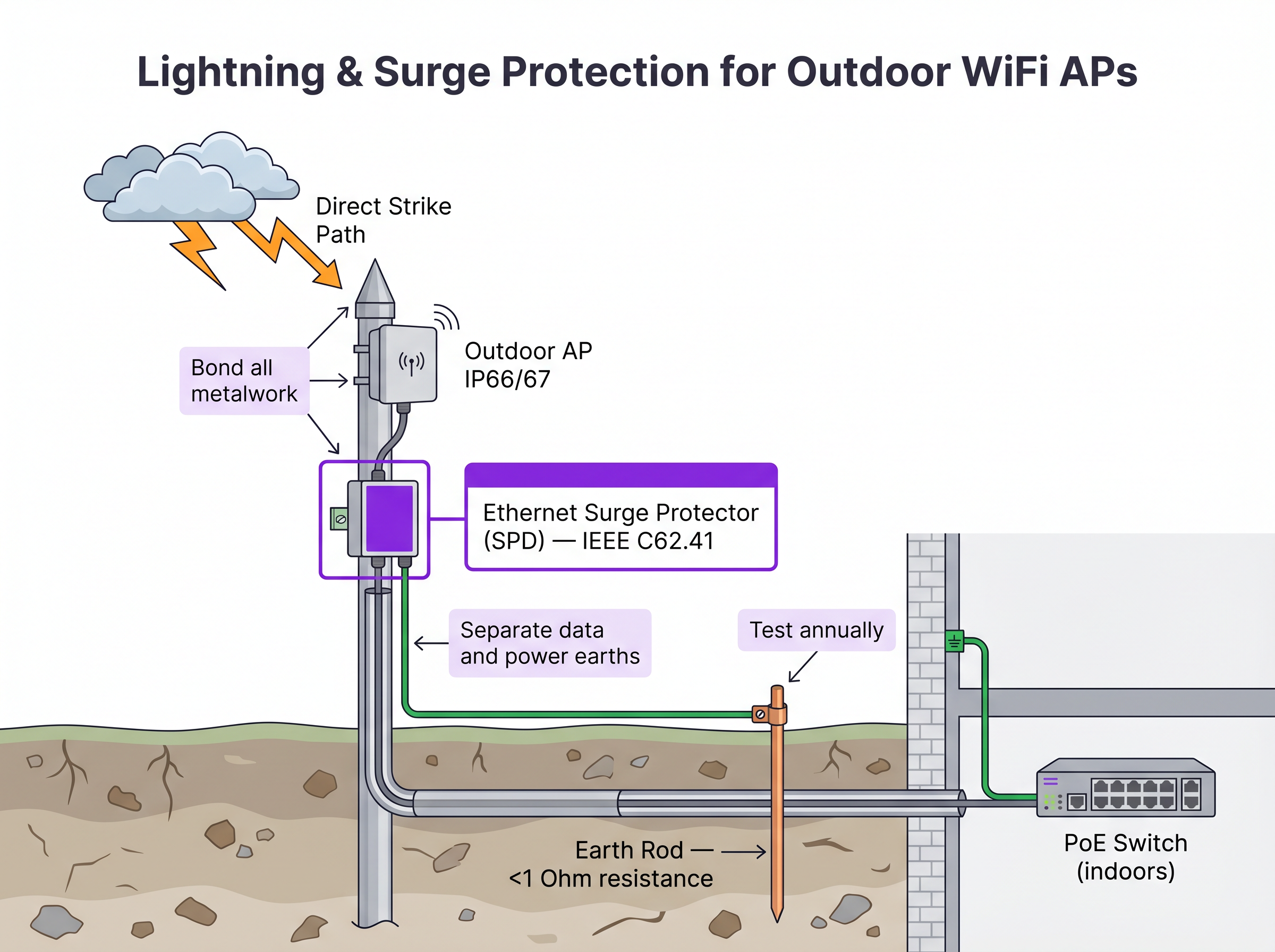
- Überspannungsschutzgeräte (SPDs): Installieren Sie Inline-Ethernet-SPDs sowohl am AP-Ende als auch am Gebäudeeingang, um die interne Switching-Infrastruktur zu schützen.
- Erdung: Stellen Sie sicher, dass die AP-Halterung, der Mast und die SPDs an einen dedizierten Erder mit einem Widerstand von weniger als 1 Ohm angeschlossen sind.
- Windlast: Überprüfen Sie, ob die Montagehardware und der Mast selbst den lokalen maximalen Windlastberechnungen standhalten, insbesondere bei großen Richtantennen.
3. Konfiguration und Sicherheit
Outdoor-APs sind für böswillige Akteure physisch zugänglich.
- Deaktivieren Sie ungenutzte Ethernet-Ports am AP.
- Implementieren Sie IEEE 802.1X portbasierte Network Access Control (NAC) am Switch-Port, der den AP verbindet. Wird der AP entfernt und ein nicht autorisiertes Gerät an das Kabel angeschlossen, muss der Switch den Port dynamisch deaktivieren. Detaillierte NAC-Vergleiche finden Sie in unserem Leitfaden: Aruba ClearPass vs Cisco ISE: NAC Platform Comparison .
- Stellen Sie sicher, dass der Management-Traffic auf einem dedizierten VLAN getrennt wird.
ROI & Geschäftsauswirkungen
Die Investition in eine unternehmensgerechte Outdoor WiFi-Infrastruktur wirkt sich direkt auf die Rentabilität und Betriebseffizienz von Veranstaltungsorten aus. Für Hospitality -Standorte erhöht eine flächendeckende Outdoor-Abdeckung die Gästezufriedenheit und ermöglicht mobile Bestellungen an Pools und Stränden. In Retail -Umgebungen erleichtert sie die Abholung am Straßenrand und Outdoor-Point-of-Sale (POS)-Systeme.
Indem IT-Teams die trügerische Wirtschaftlichkeit vermeiden, Indoor-Hardware im Freien einzusetzen oder sich stark auf Mesh zu verlassen, wo Grabarbeiten machbar wären, mindern sie das Risiko eines katastrophalen Hardwareausfalls bei extremen Wetterbedingungen und eliminieren den fortlaufenden OpEx-Aufwand für die Behebung intermittierender RF-Backhaul-Probleme. Ein ordnungsgemäß konzipiertes Outdoor-Netzwerk bietet die zuverlässige Grundlage für fortschrittliche standortbasierte Dienste wie Wayfinding und die Integration mit operativen Plattformen, wie in Connecting WiFi Events to 1.500+ Apps with Zapier and Purple detailliert beschrieben.
Referenzen
[1] IEEE Standard for Local and metropolitan area networks. "IEEE 802.3-2018 - IEEE Standard for Ethernet", IEEE Standards Association.
Schlüsseldefinitionen
IP67 (Ingress Protection)
An equipment rating certifying the device is completely dust-tight (6) and can withstand temporary immersion in water up to 1 metre deep for 30 minutes (7).
Mandatory baseline for outdoor hardware in areas subject to heavy storms or flooding to ensure survivability.
IEEE 802.3bt (PoE++)
The Power over Ethernet standard capable of delivering up to 60W (Type 3) or 90W (Type 4) of DC power over standard twisted-pair cabling.
Required for modern, high-density outdoor APs that power multiple radios, dedicated security scanning radios, and internal heating elements.
Drip Loop
A deliberate downward U-shape formed in a cable just before it enters a device enclosure.
A critical physical installation technique that forces water running down the cable to drip off the bottom of the loop rather than entering the equipment chassis.
Surge Protection Device (SPD)
An inline component designed to protect electrical devices from voltage spikes by shunting excess current to ground.
Essential for outdoor networking to prevent lightning strikes near outdoor APs from sending destructive surges down the Ethernet cable into core switching infrastructure.
Wireless Mesh Backhaul
A network topology where access points connect to the core network wirelessly through other access points, rather than via a direct cabled connection.
Used when trenching cables is impossible or too expensive, but requires careful RF planning to mitigate bandwidth degradation and latency.
Co-Channel Interference (CCI)
Signal degradation caused when multiple access points on the same network transmit on the same frequency channel simultaneously.
A severe problem in outdoor deployments where signals travel further without physical walls to block them, necessitating careful channel planning and directional antennas.
Directional Patch Antenna
An antenna designed to focus RF energy in a specific direction (e.g., a 60-degree cone) rather than broadcasting in all directions.
Crucial for high-density outdoor deployments like stadiums to sectorize coverage and prevent APs from interfering with each other.
802.1X Port-Based NAC
A security protocol that requires a device to authenticate before the network switch will allow it to pass traffic.
Critical security control for outdoor APs; prevents an attacker from unplugging an AP and connecting a laptop to gain access to the internal corporate network.
Ausgearbeitete Beispiele
A luxury resort needs to provide high-density WiFi coverage to a pool area located 180 metres from the main building's IDF. The ground is paved with expensive decorative stone, making trenching highly undesirable. How should the connectivity be engineered?
- Avoid Trenching: Utilize a Point-to-Point (PtP) wireless bridge using dedicated 60 GHz radios to establish a multi-gigabit wireless backhaul from the main building to a central pole at the pool area. 60 GHz provides high bandwidth and avoids interference with the 5 GHz client WiFi.
- Local Distribution: At the pool pole, install a weatherproof NEMA enclosure containing a hardened, temperature-rated PoE switch.
- Power: Provide local AC power to the NEMA enclosure by tapping into the pool area's lighting or utility power circuit, ensuring it is on a 24/7 unswitched circuit.
- AP Deployment: Connect IP67-rated, dual-band outdoor APs to the hardened PoE switch. Use directional patch antennas to focus coverage on the loungers and cabanas, minimizing signal reflection off the water.
A municipal park is deploying Guest WiFi. The APs will be mounted on metal lampposts. What specific physical layer protections must be implemented to prevent network damage from weather and electrical events?
- Cable Ingress: Use outdoor-rated, UV-stabilized CAT6A cable. Terminate the connection at the AP using the manufacturer-supplied weatherproof cable gland. Crucially, form a 'drip loop' in the cable just before it enters the AP, ensuring water drips off the bottom of the loop rather than running into the connector.
- Lightning Protection: Install an inline Ethernet Surge Protection Device (SPD) on the pole, bonded to the metal pole (if the pole is properly earthed) or a dedicated earth rod.
- Building Protection: Install a second SPD at the point where the Ethernet cable enters the building housing the core switch, bonding it to the building's main earth terminal.
Übungsfragen
Q1. You are designing the WiFi for a large outdoor music festival that will run for 3 days. Trenching is not permitted. You need to provide coverage to the main stage viewing area, which is 300 metres from the wired network drop. What is the most appropriate backhaul architecture?
Hinweis: Consider the duration of the event and the performance requirements of a dense crowd.
Musterlösung anzeigen
A Point-to-Point (PtP) wireless bridge (preferably 60 GHz) should be used to shoot the connection from the wired drop to the main stage area. From there, a localized wireless mesh or temporary cabling can distribute the connection to the individual APs serving the crowd. This avoids trenching while providing a high-capacity backbone, which standard multi-hop mesh cannot provide over 300 metres.
Q2. An outdoor AP mounted on a lighting pole is experiencing intermittent power reboots. The cable run is 115 metres of CAT6. The switch is providing 802.3at (30W) PoE+. What are the two most likely causes of the failure?
Hinweis: Evaluate both the physical layer limitations and the power requirements.
Musterlösung anzeigen
- Voltage drop over distance: The 115m run exceeds the 100m Ethernet standard. The resistance in the copper cable causes voltage to drop, meaning the AP may not receive sufficient power to operate under load. 2) Insufficient PoE budget: Modern outdoor APs, especially those with heaters, often require 802.3bt (60W). If the switch only provides 30W, the AP will reboot when it attempts to draw more power than is available.
Q3. During an audit of a newly installed outdoor AP on a building roof, you notice the CAT6A cable runs straight down from the AP port and into a hole drilled in the roof membrane. The AP has an IP67 rating. What is the critical installation error, and what is the risk?
Hinweis: Consider how water behaves on physical surfaces.
Musterlösung anzeigen
The critical error is the absence of a drip loop. Without a drip loop, water will run down the outside of the cable and pool directly at the entry point to the roof, or track into the AP's RJ45 connector if the gland fails. The risk is water ingress into the building or the AP chassis, leading to hardware failure, despite the AP's IP67 rating.
Weiterlesen in dieser Reihe
Was ist ein WLC (Wireless LAN Controller) und brauchen Sie noch einen?
Dieser umfassende Leitfaden beleuchtet die Entwicklung von Wireless LAN Controllern (WLCs) und bietet einen technischen Rahmen zur Bestimmung der richtigen Architektur im Jahr 2026. Er behandelt traditionelle Hardware-, Cloud-Managed- und Controller-lose Modelle und beschreibt deren Auswirkungen auf Compliance, Skalierbarkeit und das Gästeerlebnis.
Power over Ethernet (PoE) für Access Points: Ein Implementierungsleitfaden
This guide provides infrastructure technicians, network architects, and IT decision-makers with a definitive technical reference for deploying Power over Ethernet (PoE) access points across enterprise venues including hotels, retail estates, stadiums, and public-sector facilities. It covers IEEE standards from 802.3af through 802.3bt, power budget calculation, cabling requirements, VLAN segmentation, and security compliance, with concrete implementation scenarios and measurable ROI benchmarks. Understanding PoE architecture is foundational to any [Guest WiFi](/guest-wifi) or [WiFi Analytics](/guest-wifi-marketing-analytics-platform) deployment, as the reliability of the physical layer directly determines the quality of data capture, user experience, and operational uptime.
Mesh Network vs. Access Points: Was ist besser für große Veranstaltungsorte?
Dieser technische Leitfaden bietet einen umfassenden Vergleich zwischen Mesh-Netzwerken und traditionellen kabelgebundenen Access Points für große Veranstaltungsorte, einschließlich Architektur, Leistungskompromissen und Bereitstellungsstrategie. Er stattet IT-Manager, Netzwerkarchitekten und CTOs mit umsetzbaren Frameworks aus, um leistungsstarke, konforme WiFi-Infrastrukturen für Gastgewerbe, Einzelhandel, Veranstaltungen und den öffentlichen Sektor zu entwerfen. Der Leitfaden ordnet diese architektonischen Entscheidungen auch der hardwareunabhängigen Guest WiFi- und Analyseplattform von Purple zu und zeigt, wie die richtige Infrastrukturwahl messbare Geschäftsergebnisse erzielt.