
PSK por dispositivo por fabricante: comparación de iPSK, DPSK, MPSK y PPSK (y compatibilidad con WPA3)
Una comparación exhaustiva de las implementaciones de PSK por dispositivo en Cisco Meraki, HPE Aruba, Ruckus, Juniper Mist, Extreme, Fortinet y Ubiquiti UniFi. Descubra cómo afecta WPA3-SAE a las estrategias de claves por dispositivo y cuándo implementar modos de transición en lugar de migrar a 802.1X.
Escuchar esta guía
Ver transcripción del podcast
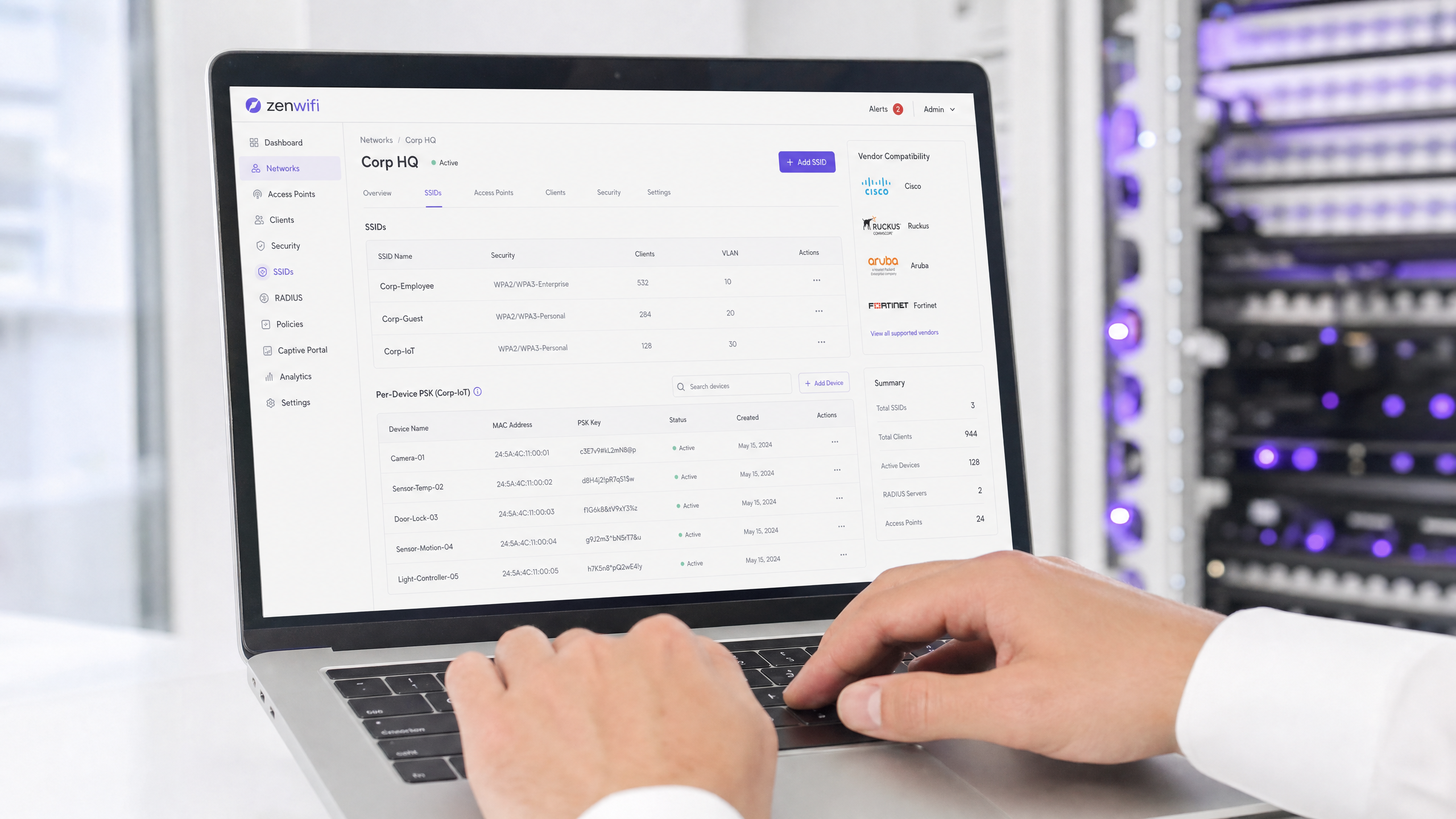
Resumen ejecutivo
La clave precompartida por dispositivo (PSK por dispositivo) es la tecnología de transición esencial para las redes empresariales que necesitan visibilidad por dispositivo sin la complejidad de una autenticación 802.1X completa. Aunque los fabricantes utilizan nombres diferentes (iPSK de Cisco Meraki, MPSK de HPE Aruba, DPSK de Ruckus, PPSK de Juniper Mist), el objetivo fundamental es idéntico: asignar una contraseña única a cada dispositivo en un único SSID.
Sin embargo, el paso a WPA3 introduce una limitación arquitectónica importante. WPA3 sustituye al tradicional intercambio de cuatro vías de WPA2 por la autenticación simultánea de iguales (SAE). La SAE requiere que tanto el punto de acceso como el cliente conozcan la contraseña antes de que comience el intercambio, lo que rompe el mecanismo estándar de búsqueda basado en RADIUS utilizado por la mayoría de las implementaciones de PSK por dispositivo. Esta guía detalla cómo gestiona cada uno de los principales fabricantes la PSK por dispositivo, cómo almacenan y buscan las claves, y cómo abordan el reto de WPA3-SAE, desde los modos de transición de WPA3 hasta extensiones propietarias como DPSK3 de Ruckus.
Análisis técnico detallado
La arquitectura de PSK por dispositivo
WPA2-Personal tradicional utiliza una única frase de contraseña compartida para todo un SSID. Todos los dispositivos utilizan la misma contraseña, lo que significa que no se puede revocar el acceso de un dispositivo sin cambiar la contraseña para todos los demás. Además, no se dispone de visibilidad por dispositivo ni de aplicación de políticas.
La PSK por dispositivo soluciona esto emitiendo una credencial única para cada dispositivo o usuario. Puede revocar una clave sin afectar a las demás. Puede asignar diferentes VLAN, políticas de ancho de banda o programaciones de acceso por clave.
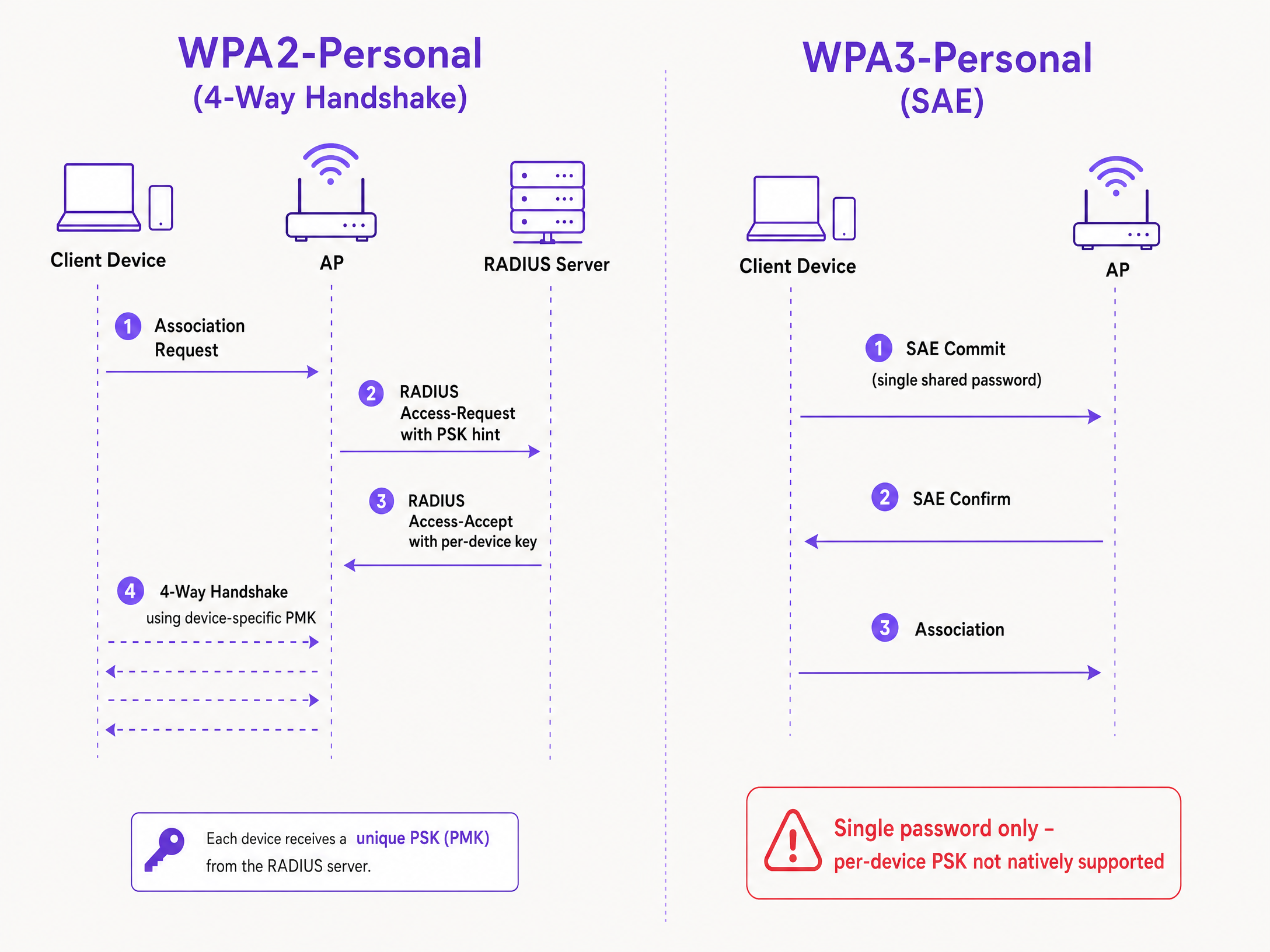
El mecanismo técnico se basa en el intercambio de cuatro vías de WPA2. Cuando un cliente se asocia, el punto de acceso envía la dirección MAC del cliente a un servidor RADIUS (o a una base de datos local) en un mensaje Access-Request. El servidor RADIUS devuelve un mensaje Access-Accept que contiene la clave específica para ese dispositivo. A continuación, el punto de acceso completa el intercambio de cuatro vías utilizando esa clave específica para derivar la clave maestra por pares (PMK).
El reto de WPA3-SAE
WPA3-Personal sustituye el intercambio de cuatro vías por SAE. SAE es un protocolo basado en Diffie-Hellman en el que ambas partes se comprometen a un elemento de contraseña compartido derivado de la frase de contraseña antes de que se complete la asociación.
La diferencia fundamental es que ambas partes deben conocer la contraseña antes de que comience el intercambio SAE. No hay ningún punto en el protocolo en el que un servidor RADIUS pueda inyectar una clave diferente por dispositivo. El punto de acceso y el cliente ya están ejecutando un intercambio criptográfico basado en un único valor compartido. Se trata de una limitación del protocolo definida por el estándar IEEE 802.11, no de una limitación del fabricante.
Comparación de las implementaciones de los fabricantes
Todos los principales fabricantes de soluciones empresariales admiten PSK por dispositivo, pero sus implementaciones y su preparación para WPA3 varían.
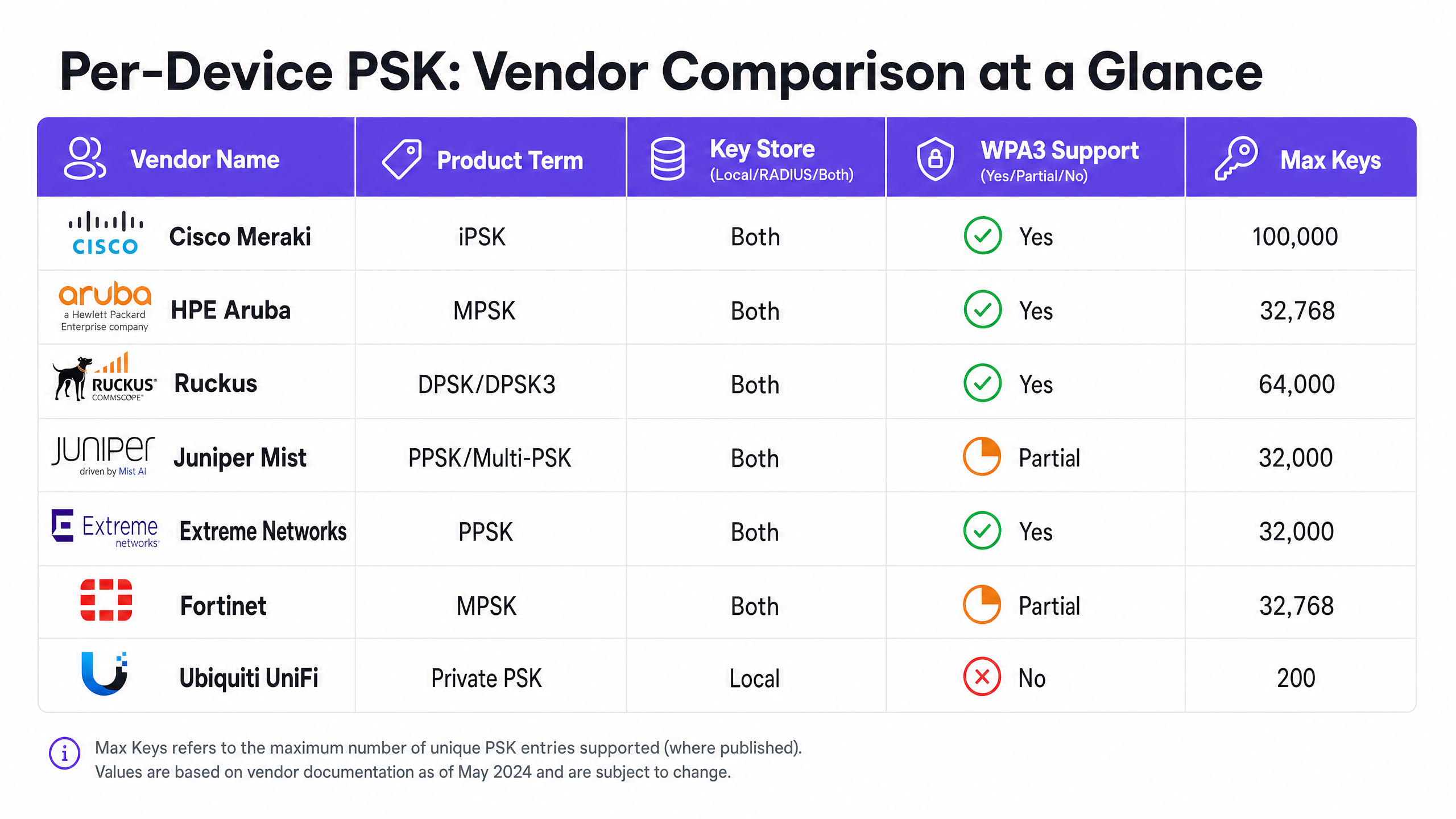
Cisco Meraki (iPSK) Cisco Meraki lo denomina Identity Pre-Shared Key (iPSK). Admite dos modos. Sin RADIUS, puede configurar hasta cinco PSK únicas directamente en el panel de control de Meraki. Con RADIUS (normalmente Cisco ISE), puede escalar hasta 100.000 claves. El servidor RADIUS realiza la búsqueda y devuelve la clave por dispositivo. Para WPA3, Meraki se basa en el modo de transición de WPA3 (modo mixto WPA2/WPA3), donde los clientes WPA2 utilizan el intercambio de cuatro vías y reciben claves por dispositivo, mientras que los clientes WPA3 utilizan SAE con una única contraseña compartida.
HPE Aruba (MPSK) HPE Aruba lo denomina Multiple Pre-Shared Key (MPSK). Aruba admite MPSK Local, donde las claves se almacenan en el controlador, y MPSK con ClearPass, que actúa como motor de políticas y RADIUS. ClearPass puede albergar decenas de miles de claves y asignar VLAN dinámicas. Al igual que Meraki, la compatibilidad con WPA3 se gestiona actualmente mediante el modo de transición.
Ruckus (DPSK y DPSK3) Ruckus lo denomina Dynamic Pre-Shared Key (DPSK). Es una de las implementaciones más maduras, disponible desde los inicios de SmartZone. En modo RADIUS, se integra con Cloudpath. Ruckus destaca por DPSK3, su extensión para WPA3. DPSK3 funciona en modo mixto WPA2/WPA3 y requiere Cloudpath como backend de RADIUS. Permite que los dispositivos compatibles con WPA3 utilicen SAE mientras el sistema gestiona la vinculación de claves por dispositivo a través de la integración con Cloudpath.
Juniper Mist (PPSK / Multi-PSK) Juniper Mist lo denomina Private Pre-Shared Key (PPSK) o Multi-PSK. Mist almacena las claves en la base de datos en la nube, con un límite de 5.000 claves por sitio. Las claves se pueden asignar por usuario, por dispositivo o por grupo. Mist se integra con su servicio Access Assurance, que añade la búsqueda de PSK basada en RADIUS. Juniper admite WPA3 RADIUS PSK a través de Access Assurance, lo que permite que un único SSID WPA3-Personal sirva múltiples frases de contraseña.
Extreme Networks (PPSK) Extreme Networks lo denomina Private Pre-Shared Key (PPSK) a través de ExtremeCloud IQ. Admite el almacenamiento local de claves en el propio punto de acceso, lo que resulta útil para sitios remotos, así como la búsqueda basada en RADIUS a través del servicio RADIUS en la nube de ExtremeCloud IQ. Extreme admite la vinculación de MAC para asociar una PPSK a un dispositivo específico.
Fortinet (MPSK) Fortinet lo denomina Multiple Pre-Shared Key (MPSK), gestionado a través de FortiAP y el controlador inalámbrico FortiGate. Fortinet admite explícitamente los modos de seguridad WPA3-SAE y de transición WPA3-SAE en sus perfiles MPSK. Puede crear un perfil MPSK con claves WPA3-SAE, asignarlas a un VAP y habilitar la asignación dinámica de VLAN.
Ubiquiti UniFi (Private PSK) Ubiquiti UniFi lo denomina Private Pre-Shared Keys. La implementación es solo local; las claves se almacenan en el controlador de red UniFi. Puede asignar diferentes VLANs por clave. Sin embargo, UniFi Private PSK solo funciona en redes WPA2 en 2,4 GHz y 5 GHz. WPA3 y 6 GHz no son compatibles.
Guía de implementación
Al implementar PSK por dispositivo, siga estos pasos para garantizar una arquitectura segura y escalable.
- Audite su ecosistema de dispositivos: identifique qué dispositivos son compatibles con WPA3 y cuáles dependen de WPA2. Es probable que los dispositivos IoT heredados sigan requiriendo WPA2 en el futuro previsible.
- Seleccione la estrategia de SSID adecuada: para un entorno mixto, implemente un diseño de SSID híbrido. Mantenga un SSID WPA2-Personal con PSK por dispositivo para dispositivos IoT heredados y de invitados. Implemente un SSID WPA3-Enterprise para los dispositivos gestionados del personal.
- Implemente el modo de transición con cuidado: si utiliza el modo de transición WPA3 en su SSID de invitados principal, asegúrese de que sus puntos de acceso y servidores RADIUS estén configurados correctamente para gestionar los flujos de autenticación mixtos.
- Integre la gestión de identidades: no gestione las claves manualmente. Integre el aprovisionamiento de claves con su flujo de trabajo de gestión de dispositivos o con un proveedor de identidad como Microsoft Entra ID u Okta.
- Configure VLAN dinámicas: asocie cada PSK por dispositivo a una VLAN específica para aplicar la segmentación de red. Esto es fundamental para aislar los dispositivos IoT del tráfico de invitados.
Buenas prácticas
- Aplique la gestión del ciclo de vida: el uso de PSK por dispositivo requiere una gestión estricta del ciclo de vida. Debe contar con un proceso para revocar las claves cuando los dispositivos se retiren del servicio para evitar la proliferación descontrolada de claves.
- Utilice 802.1X para endpoints gestionados: para portátiles corporativos y dispositivos del personal, migre a WPA3-Enterprise con EAP-TLS. Ofrece una seguridad más sólida y compatibilidad nativa con modelos de confianza cero (zero-trust).
- Pruebe las actualizaciones a WPA3: nunca habilite WPA3 en un SSID con PSK por dispositivo existente sin realizar pruebas previas en un sitio piloto. Verifique las versiones de firmware y la compatibilidad del servidor RADIUS.
- Aproveche Purple para la identidad: integre Purple para gestionar la capa de identidad. Purple funciona como una superposición en la nube que proporciona autenticación, captura de datos y gestión de consentimientos, y devuelve la asignación de VLAN correspondiente a su hardware a través de RADIUS. Consulte Enterprise WiFi Security: A Complete Guide for 2026 para obtener más detalles.
Resolución de problemas y mitigación de riesgos
- Fallos de conexión de clientes en WPA3: si los dispositivos heredados no se conectan a un SSID en modo de transición WPA3, suele deberse a controladores inalámbricos incompatibles. Asegúrese de que los controladores de los clientes estén actualizados. Si el problema persiste, mueva los dispositivos heredados a un SSID exclusivo para WPA2.
- Tiempos de espera de RADIUS agotados (timeouts): si el punto de acceso agota el tiempo de espera mientras aguarda la clave por dispositivo del servidor RADIUS, compruebe la ruta de red y asegúrese de que el servidor RADIUS esté dimensionado para gestionar la carga de autenticación.
- Fallos en la asignación de VLAN: si un dispositivo se conecta pero recibe una dirección IP incorrecta, verifique la asignación de VLAN en el mensaje Access-Accept de RADIUS y asegúrese de que la VLAN exista en el punto de acceso y en el puerto del switch.
ROI e impacto empresarial
La implementación de PSK por dispositivo ofrece un valor empresarial medible al reducir los tickets de soporte y mejorar la seguridad.
- Menor carga de trabajo para el servicio de soporte (helpdesk): la automatización del aprovisionamiento y la revocación de claves elimina los restablecimientos manuales de contraseñas.
- Mejora de la postura de seguridad: aislar los dispositivos en VLAN independientes en función de su clave única reduce el radio de impacto en caso de que un dispositivo se vea comprometido.
- Mayor visibilidad: las claves por dispositivo proporcionan una visibilidad detallada del uso de la red, lo que le permite identificar los dispositivos que acaparan el ancho de banda y optimizar la planificación de la capacidad.
Definiciones clave
Per-Device PSK
A security mechanism that assigns a unique Pre-Shared Key to each device or user on a single SSID, allowing for individual revocation and dynamic policy assignment.
Used when IT teams need per-device visibility and control without deploying full 802.1X authentication.
WPA3-SAE
Simultaneous Authentication of Equals. The secure key establishment protocol used in WPA3-Personal, replacing the WPA2 four-way handshake.
Relevant when upgrading to WPA3 or deploying 6 GHz networks, as it fundamentally changes how passwords are authenticated.
Transition Mode
A mixed-mode configuration where an SSID advertises support for both WPA2-PSK and WPA3-SAE, allowing legacy and modern clients to connect to the same network name.
The standard approach for migrating existing networks to WPA3 without stranding legacy devices.
MAC Binding
The process of associating a specific per-device PSK with the hardware MAC address of a specific device, preventing the key from being used on another device.
Used to prevent credential sharing and ensure strict access control for IoT devices.
Dynamic VLAN Assignment
The ability to assign a device to a specific Virtual LAN based on its authentication credentials (such as its per-device PSK), rather than the SSID it connects to.
Essential for network segmentation, allowing IT to isolate guest traffic from corporate traffic on the same access point.
iPSK
Identity Pre-Shared Key. Cisco Meraki's implementation of per-device PSK.
Encountered when managing Cisco Meraki wireless networks.
DPSK
Dynamic Pre-Shared Key. Ruckus's implementation of per-device PSK, with DPSK3 being the WPA3-compatible version.
Encountered when managing Ruckus wireless networks.
MPSK
Multiple Pre-Shared Key. The term used by HPE Aruba and Fortinet for their per-device PSK implementations.
Encountered when managing HPE Aruba or Fortinet wireless networks.
Ejemplos prácticos
A 200-room hotel needs to provide secure Guest WiFi and isolate smart TVs in each room. They currently use a single WPA2-Personal password for all guests and devices.
Deploy per-device PSK using a RADIUS backend. Integrate Purple to capture guest data and issue a unique PSK to each guest upon registration. For the smart TVs, generate a unique PSK for each TV and map it to a dedicated IoT VLAN. Configure the guest PSKs to map to a separate Guest VLAN with client isolation enabled.
A university campus is upgrading to Wi-Fi 6E and must support WPA3 on the 6 GHz band, but they have thousands of legacy IoT devices that only support WPA2.
Implement a hybrid SSID design. Create a WPA3-Enterprise SSID for student and staff laptops and smartphones, using 802.1X for authentication. Create a separate WPA2-Personal SSID with per-device PSK on the 2.4 GHz and 5 GHz bands specifically for the legacy IoT devices.
Preguntas de práctica
Q1. You are deploying Wi-Fi 6E access points and need to support 6 GHz clients. Your existing 5 GHz network uses iPSK for IoT devices. Can you extend the iPSK configuration to the 6 GHz band?
Sugerencia: Consider the mandatory security protocols for the 6 GHz band.
Q2. A retail chain uses Aruba MPSK to assign unique keys to point-of-sale terminals. They want to upgrade their primary SSID to WPA3 for better security. What is the recommended approach?
Sugerencia: Aruba MPSK requires the WPA2 four-way handshake.
Ver respuesta modelo
Enable WPA3 transition mode (WPA2/WPA3 mixed mode) on the SSID. The point-of-sale terminals will continue to connect using WPA2 and MPSK, while newer devices can connect using WPA3-SAE with a shared password.
Q3. You manage a Ruckus network and want to deploy per-device PSK for WPA3 clients. What specific configuration is required?
Sugerencia: Consider the proprietary extension Ruckus offers and its backend requirements.
Ver respuesta modelo
You must deploy Ruckus DPSK3. This requires Wi-Fi 6 or newer access points running firmware 7.0 or later, configuring the SSID for WPA2/WPA3 mixed mode, and using Ruckus Cloudpath as the RADIUS server.
Continúe leyendo esta serie
¿Qué es la autenticación de dirección MAC? Cuándo usarla y cuándo evitarla
Esta guía de referencia técnica autorizada cubre la autenticación de dirección MAC en entornos empresariales de WiFi: cómo funciona la autenticación MAC basada en RADIUS en la Capa 2, sus vulnerabilidades de seguridad inherentes (incluyendo la suplantación de MAC y el impacto de la aleatorización de MAC a nivel de SO), y los contextos operativos precisos donde sigue siendo una herramienta válida para gestionar dispositivos IoT y sin interfaz. Proporciona una guía de implementación práctica para gerentes de TI y arquitectos de red en hostelería, comercio minorista, atención médica y recintos del sector público, con ejemplos prácticos del mundo real, marcos de decisión y contexto de integración para la plataforma de WiFi para invitados y análisis de Purple.
Cómo configurar WiFi empresarial en iOS y macOS con 802.1X
Esta guía autorizada proporciona a los líderes de TI sénior pasos prácticos para implementar WiFi empresarial 802.1X en dispositivos iOS y macOS. Cubre la autenticación basada en certificados (EAP-TLS), los perfiles de configuración de MDM y la integración de la arquitectura para proteger las redes corporativas al tiempo que apoya las iniciativas BYOD.
Cómo configurar WiFi empresarial en dispositivos Android con EAP-TLS
Esta guía de referencia técnica proporciona a los líderes de TI sénior un plan integral para implementar la autenticación 802.1X EAP-TLS en dispositivos Android. Cubre la mecánica arquitectónica, las estrategias de implementación manuales y basadas en MDM, y las metodologías de resolución de problemas necesarias para proteger las redes inalámbricas empresariales.