
PSK por Dispositivo por Fabricante: Comparativo entre iPSK, DPSK, MPSK e PPSK (e Suporte a WPA3)
Uma comparação abrangente das implementações de PSK por dispositivo no Cisco Meraki, HPE Aruba, Ruckus, Juniper Mist, Extreme, Fortinet e Ubiquiti UniFi. Saiba como o WPA3-SAE impacta as estratégias de chaves por dispositivo e quando implantar modos de transição em vez de migrar para o 802.1X.
Ouça este guia
Ver transcrição do podcast
Resumo Executivo
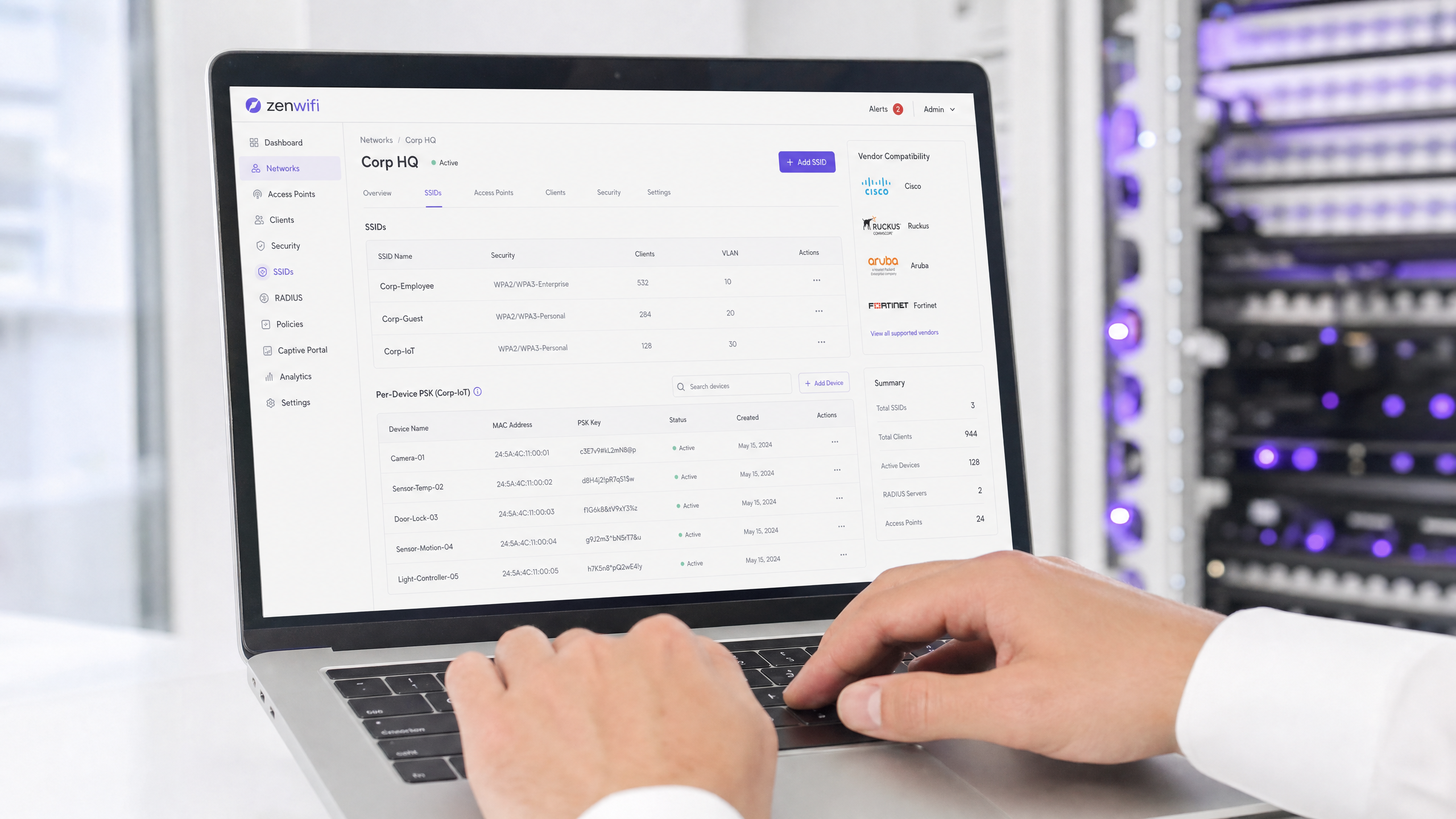
A Pre-Shared Key (PSK) por dispositivo é a tecnologia de transição essencial para redes corporativas que precisam de visibilidade por dispositivo sem a complexidade de uma autenticação 802.1X completa. Embora os fabricantes usem nomes diferentes — Cisco Meraki iPSK, HPE Aruba MPSK, Ruckus DPSK, Juniper Mist PPSK —, o objetivo fundamental é idêntico: atribuir uma senha exclusiva para cada dispositivo em um único SSID.
No entanto, a migração para o WPA3 introduz uma limitação arquitetônica significativa. O WPA3 substitui o tradicional handshake de quatro vias do WPA2 pela Autenticação Simultânea de Iguais (SAE). O SAE exige que a senha seja conhecida tanto pelo ponto de acesso quanto pelo cliente antes do início da troca, o que quebra o mecanismo padrão de consulta baseado em RADIUS usado pela maioria das implementações de PSK por dispositivo. Este guia detalha como cada grande fabricante lida com o PSK por dispositivo, como eles armazenam e consultam as chaves e como enfrentam o desafio do WPA3-SAE — desde modos de transição do WPA3 até extensões proprietárias como o Ruckus DPSK3.
Análise Técnica Detalhada
A Arquitetura do PSK por Dispositivo
O WPA2-Personal tradicional usa uma única senha compartilhada para todo um SSID. Cada dispositivo usa a mesma senha, o que significa que você não pode revogar o acesso de um dispositivo sem alterar a senha de todos. Além disso, você não tem visibilidade por dispositivo ou aplicação de políticas.
O PSK por dispositivo resolve isso emitindo uma credencial exclusiva para cada dispositivo ou usuário. Você pode revogar uma chave sem afetar as outras. É possível atribuir diferentes VLANs, políticas de largura de banda ou cronogramas de acesso por chave.
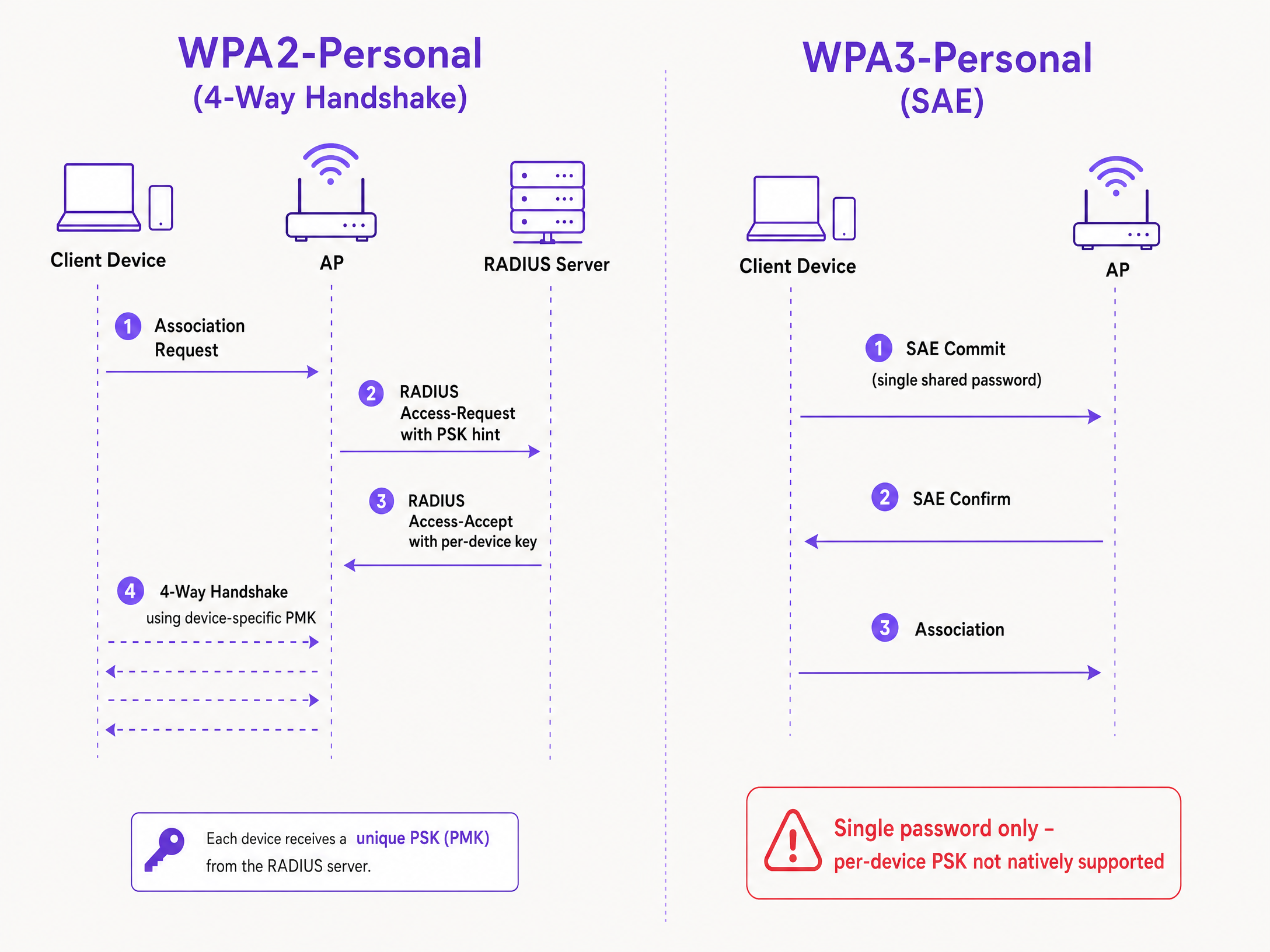
O mecanismo técnico baseia-se no handshake de quatro vias do WPA2. Quando um cliente se associa, o ponto de acesso envia o endereço MAC do cliente para um servidor RADIUS (ou um banco de dados local) em uma mensagem Access-Request. O servidor RADIUS retorna uma mensagem Access-Accept contendo a chave específica para aquele dispositivo. O ponto de acesso então conclui o handshake de quatro vias usando essa chave específica para derivar a Pairwise Master Key (PMK).
O Desafio do WPA3-SAE
O WPA3-Personal substitui o handshake de quatro vias pelo SAE. O SAE é um protocolo baseado em Diffie-Hellman no qual ambos os lados se comprometem com um elemento de senha compartilhado derivado da senha antes que a associação seja concluída.
A diferença crítica é que a senha deve ser conhecida por ambos os lados antes do início da troca SAE. Não há nenhum momento no protocolo em que um servidor RADIUS possa injetar uma chave diferente por dispositivo. O ponto de acesso e o cliente já estão executando uma troca criptográfica baseada em um único valor compartilhado. Esta é uma limitação do protocolo definida pelo padrão IEEE 802.11, não uma limitação do fabricante.
Comparativo de Implementações dos Fabricantes
Todos os principais fabricantes corporativos oferecem suporte a PSK por dispositivo, mas suas implementações e prontidão para o WPA3 variam.
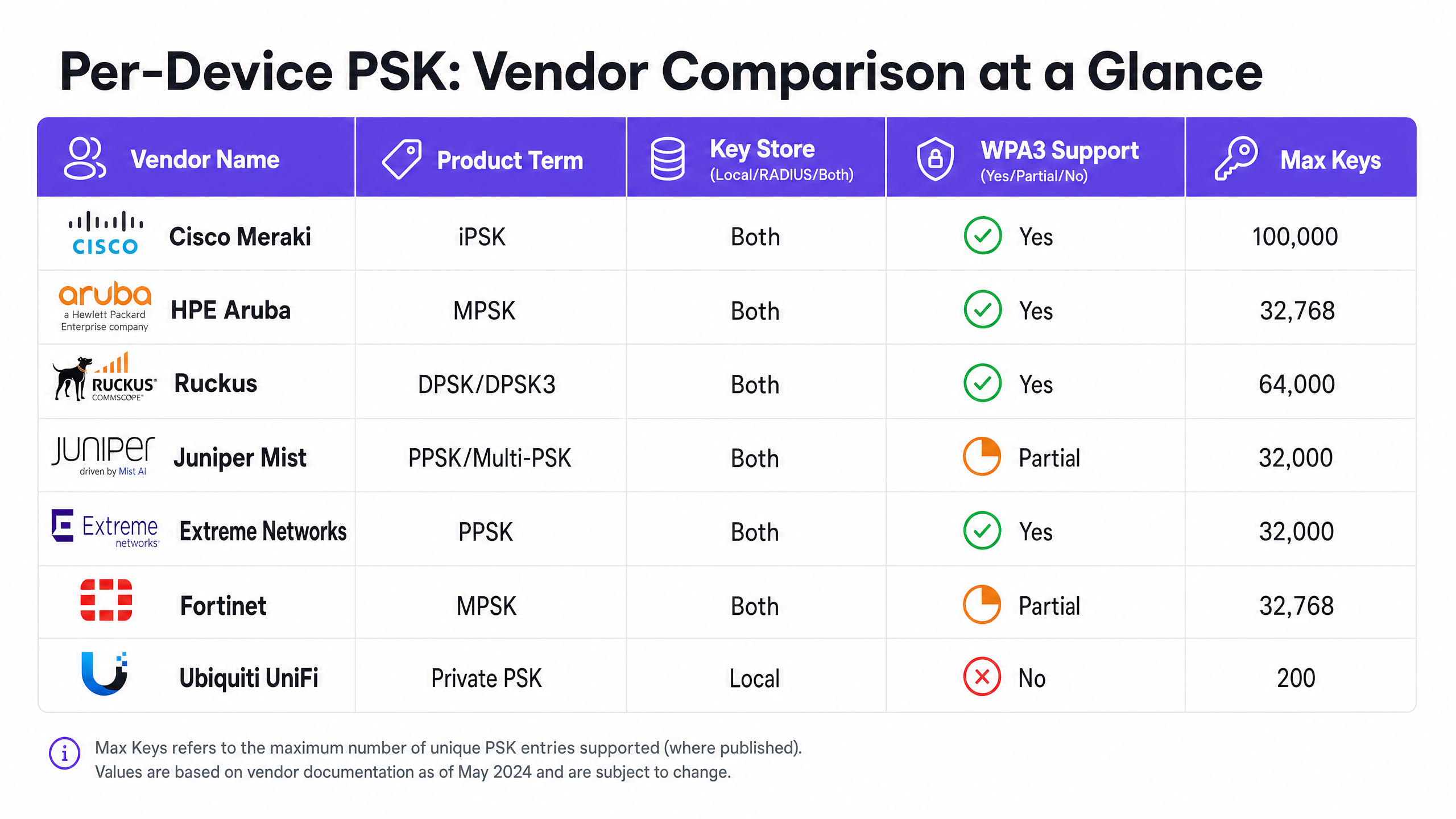
Cisco Meraki (iPSK) A Cisco Meraki chama isso de Identity Pre-Shared Key (iPSK). Ele suporta dois modos. Sem RADIUS, você pode configurar até cinco PSKs exclusivas diretamente no painel da Meraki. Com RADIUS — normalmente o Cisco ISE —, você pode escalar para até 100.000 chaves. O servidor RADIUS realiza a consulta e retorna a chave por dispositivo. Para o WPA3, a Meraki depende do modo de transição do WPA3 (modo misto WPA2/WPA3), no qual os clientes WPA2 usam o handshake de quatro vias e recebem chaves por dispositivo, enquanto os clientes WPA3 usam SAE com uma única senha compartilhada.
HPE Aruba (MPSK) A HPE Aruba chama isso de Multiple Pre-Shared Key (MPSK). A Aruba suporta o MPSK Local, onde as chaves são armazenadas na controladora, e o MPSK com ClearPass, que atua como o mecanismo de RADIUS e políticas. O ClearPass pode armazenar dezenas de milhares de chaves e atribuir VLANs dinâmicas. Assim como na Meraki, o suporte ao WPA3 é atualmente tratado por meio do modo de transição.
Ruckus (DPSK e DPSK3) A Ruckus chama isso de Dynamic Pre-Shared Key (DPSK). É uma das implementações mais maduras, disponível desde os primórdios do SmartZone. No modo RADIUS, ele se integra ao Cloudpath. A Ruckus se destaca pelo DPSK3, sua extensão para WPA3. O DPSK3 opera no modo misto WPA2/WPA3 e exige o Cloudpath como backend RADIUS. Ele permite que dispositivos compatíveis com WPA3 usem SAE enquanto o sistema gerencia a vinculação de chaves por dispositivo por meio da integração com o Cloudpath.
Juniper Mist (PPSK / Multi-PSK) A Juniper Mist chama isso de Private Pre-Shared Key (PPSK) ou Multi-PSK. A Mist armazena as chaves no banco de dados na nuvem, com um limite de 5.000 chaves por site. As chaves podem ser atribuídas por usuário, por dispositivo ou por grupo. A Mist se integra ao seu serviço Access Assurance, que adiciona a consulta de PSK baseada em RADIUS. A Juniper oferece suporte a WPA3 RADIUS PSK por meio do Access Assurance, permitindo que um único SSID WPA3-Personal atenda a várias senhas.
Extreme Networks (PPSK) A Extreme Networks chama isso de Private Pre-Shared Key (PPSK) por meio do ExtremeCloud IQ. Ele suporta o armazenamento local de chaves no próprio ponto de acesso, o que é útil para sites remotos, bem como a consulta baseada em RADIUS por meio do serviço de RADIUS na nuvem do ExtremeCloud IQ. A Extreme suporta a vinculação de MAC para associar um PPSK a um dispositivo específico.
Fortinet (MPSK) A Fortinet chama isso de Multiple Pre-Shared Key (MPSK), gerenciado por meio do FortiAP e da controladora sem fio FortiGate. A Fortinet suporta explicitamente os modos de segurança WPA3-SAE e WPA3-SAE Transition em seus perfis MPSK. Você pode criar um perfil MPSK com chaves WPA3-SAE, atribuí-las a um VAP e habilitar a atribuição dinâmica de VLAN.
Ubiquiti UniFi (Private PSK) A Ubiquiti UniFi chama isso de Private Pre-Shared Keys. A implementação é apenas local; as chaves são armazenadas na controladora UniFi Network. Você pode atribuir diferentes VLANs por chave. No entanto, o UniFi Private PSK funciona apenas em redes WPA2 em 2,4 GHz and 5 GHz. WPA3 e 6 GHz não são suportados.
Guia de Implementação
Ao implantar o PSK por dispositivo, siga estas etapas para garantir uma arquitetura segura e escalável.
- Audite o Cenário de Dispositivos: Identifique quais dispositivos suportam WPA3 e quais dependem de WPA2. Dispositivos IoT legados provavelmente precisarão de WPA2 no futuro próximo.
- Selecione a Estratégia de SSID Correta: Para um ambiente misto, implante um design de SSID híbrido. Mantenha um SSID WPA2-Personal com PSK por dispositivo para IoT legados e dispositivos de convidados. Implante um SSID WPA3-Enterprise para dispositivos gerenciados da equipe.
- Implemente o Modo de Transição com Cuidado: Se você usar o modo de transição WPA3 em seu SSID de convidado principal, certifique-se de que seus pontos de acesso e servidores RADIUS estejam configurados corretamente para lidar com os fluxos de autenticação mistos.
- Integre a Gestão de Identidade: Não gerencie chaves manualmente. Integre seu provisionamento de chaves com seu fluxo de trabalho de gerenciamento de dispositivos ou com um provedor de identidade como o Microsoft Entra ID ou Okta.
- Configure VLANs Dinâmicas: Mapeie cada PSK por dispositivo para uma VLAN específica para forçar a segmentação de rede. Isso é fundamental para isolar dispositivos IoT do tráfego de convidados.
Boas Práticas
- Imponha a Gestão do Ciclo de Vida: O PSK por dispositivo exige uma gestão rigorosa do ciclo de vida. Você deve ter um processo para revogar chaves quando os dispositivos forem desativados para evitar a proliferação de chaves.
- Use 802.1X para Endpoints Gerenciados: Para laptops corporativos e dispositivos da equipe, mude para WPA3-Enterprise com EAP-TLS. Isso oferece maior segurança e compatibilidade nativa com modelos de zero-trust.
- Teste as Atualizações do WPA3: Nunca ative o WPA3 em um SSID com PSK por dispositivo existente sem testar em um site piloto. Verifique as versões de firmware e a compatibilidade do servidor RADIUS.
- Aproveite a Purple para Identidade: Integre a Purple para gerenciar a camada de identidade. A Purple funciona como uma sobreposição na nuvem, fornecendo autenticação, captura de dados e gestão de consentimento, e envia a atribuição de VLAN apropriada de volta ao seu hardware via RADIUS. Consulte Segurança de WiFi Corporativa: Um Guia Completo para 2026 para mais detalhes.
Solução de Problemas e Mitigação de Riscos
- Falha de Conexão de Clientes no WPA3: Se dispositivos legados não conseguirem se conectar a um SSID em modo de transição WPA3, geralmente isso se deve a drivers sem fio incompatíveis. Certifique-se de que os drivers dos clientes estejam atualizados. Se o problema persistir, mova os dispositivos legados para um SSID dedicado apenas a WPA2.
- Timeouts de RADIUS: Se o ponto de acesso expirar esperando pela chave por dispositivo do servidor RADIUS, verifique o caminho da rede e garanta que o servidor RADIUS esteja dimensionado para lidar com a carga de autenticação.
- Falhas na Atribuição de VLAN: Se um dispositivo se conectar, mas receber o endereço IP incorreto, verifique o mapeamento de VLAN na mensagem Access-Accept do RADIUS e certifique-se de que a VLAN exista no ponto de acesso e na porta do switch.
ROI e Impacto nos Negócios
A implementação do PSK por dispositivo entrega um valor comercial mensurável, reduzindo os chamados de suporte e melhorando a segurança.
- Redução da Carga do Helpdesk: A automação do provisionamento e da revogação de chaves elimina as redefinições manuais de senha.
- Melhoria na Postura de Segurança: Isolar os dispositivos em VLANs separadas com base em sua chave exclusiva reduz o raio de impacto de um dispositivo comprometido.
- Visibilidade Aprimorada: As chaves por dispositivo oferecem visibilidade granular sobre a utilização da rede, permitindo identificar gargalos de largura de banda e otimizar o planejamento de capacidade.
Definições principais
Per-Device PSK
A security mechanism that assigns a unique Pre-Shared Key to each device or user on a single SSID, allowing for individual revocation and dynamic policy assignment.
Used when IT teams need per-device visibility and control without deploying full 802.1X authentication.
WPA3-SAE
Simultaneous Authentication of Equals. The secure key establishment protocol used in WPA3-Personal, replacing the WPA2 four-way handshake.
Relevant when upgrading to WPA3 or deploying 6 GHz networks, as it fundamentally changes how passwords are authenticated.
Transition Mode
A mixed-mode configuration where an SSID advertises support for both WPA2-PSK and WPA3-SAE, allowing legacy and modern clients to connect to the same network name.
The standard approach for migrating existing networks to WPA3 without stranding legacy devices.
MAC Binding
The process of associating a specific per-device PSK with the hardware MAC address of a specific device, preventing the key from being used on another device.
Used to prevent credential sharing and ensure strict access control for IoT devices.
Dynamic VLAN Assignment
The ability to assign a device to a specific Virtual LAN based on its authentication credentials (such as its per-device PSK), rather than the SSID it connects to.
Essential for network segmentation, allowing IT to isolate guest traffic from corporate traffic on the same access point.
iPSK
Identity Pre-Shared Key. Cisco Meraki's implementation of per-device PSK.
Encountered when managing Cisco Meraki wireless networks.
DPSK
Dynamic Pre-Shared Key. Ruckus's implementation of per-device PSK, with DPSK3 being the WPA3-compatible version.
Encountered when managing Ruckus wireless networks.
MPSK
Multiple Pre-Shared Key. The term used by HPE Aruba and Fortinet for their per-device PSK implementations.
Encountered when managing HPE Aruba or Fortinet wireless networks.
Exemplos práticos
A 200-room hotel needs to provide secure Guest WiFi and isolate smart TVs in each room. They currently use a single WPA2-Personal password for all guests and devices.
Deploy per-device PSK using a RADIUS backend. Integrate Purple to capture guest data and issue a unique PSK to each guest upon registration. For the smart TVs, generate a unique PSK for each TV and map it to a dedicated IoT VLAN. Configure the guest PSKs to map to a separate Guest VLAN with client isolation enabled.
A university campus is upgrading to Wi-Fi 6E and must support WPA3 on the 6 GHz band, but they have thousands of legacy IoT devices that only support WPA2.
Implement a hybrid SSID design. Create a WPA3-Enterprise SSID for student and staff laptops and smartphones, using 802.1X for authentication. Create a separate WPA2-Personal SSID with per-device PSK on the 2.4 GHz and 5 GHz bands specifically for the legacy IoT devices.
Questões práticas
Q1. You are deploying Wi-Fi 6E access points and need to support 6 GHz clients. Your existing 5 GHz network uses iPSK for IoT devices. Can you extend the iPSK configuration to the 6 GHz band?
Dica: Consider the mandatory security protocols for the 6 GHz band.
Q2. A retail chain uses Aruba MPSK to assign unique keys to point-of-sale terminals. They want to upgrade their primary SSID to WPA3 for better security. What is the recommended approach?
Dica: Aruba MPSK requires the WPA2 four-way handshake.
Ver resposta modelo
Enable WPA3 transition mode (WPA2/WPA3 mixed mode) on the SSID. The point-of-sale terminals will continue to connect using WPA2 and MPSK, while newer devices can connect using WPA3-SAE with a shared password.
Q3. You manage a Ruckus network and want to deploy per-device PSK for WPA3 clients. What specific configuration is required?
Dica: Consider the proprietary extension Ruckus offers and its backend requirements.
Ver resposta modelo
You must deploy Ruckus DPSK3. This requires Wi-Fi 6 or newer access points running firmware 7.0 or later, configuring the SSID for WPA2/WPA3 mixed mode, and using Ruckus Cloudpath as the RADIUS server.
Continue a ler esta série
O Que É Autenticação por Endereço MAC? Quando Usar e Quando Evitar
Este guia de referência técnica abrangente aborda a autenticação por endereço MAC em ambientes de WiFi corporativos — como a autenticação MAC baseada em RADIUS funciona na Camada 2, suas vulnerabilidades de segurança inerentes (incluindo spoofing de MAC e o impacto da randomização de MAC em nível de OS), e os contextos operacionais precisos onde ela permanece uma ferramenta válida para gerenciar dispositivos IoT e sem interface. Ele fornece orientação de implantação acionável para gerentes de TI e arquitetos de rede em locais de hotelaria, varejo, saúde e setor público, com exemplos práticos do mundo real, estruturas de decisão e contexto de integração para a plataforma de guest WiFi e análise da Purple.
Como Configurar WiFi Corporativo em iOS e macOS com 802.1X
Este guia autorizado fornece aos líderes de TI sêniores passos acionáveis para implantar WiFi corporativo 802.1X em dispositivos iOS e macOS. Ele aborda autenticação baseada em certificado (EAP-TLS), perfis de configuração MDM e integração de arquitetura para proteger redes corporativas, ao mesmo tempo que suporta iniciativas BYOD.
Como configurar o WiFi corporativo em dispositivos Android com EAP-TLS
This technical reference guide provides senior IT leaders with a comprehensive blueprint for deploying 802.1X EAP-TLS authentication on Android devices. It covers the architectural mechanics, manual and MDM-driven implementation strategies, and troubleshooting methodologies necessary to secure enterprise wireless networks.