
Per-Device PSK nach Anbieter: iPSK, DPSK, MPSK und PPSK im Vergleich (und WPA3-Unterstützung)
Ein umfassender Vergleich von Per-Device-PSK-Implementierungen bei Cisco Meraki, HPE Aruba, Ruckus, Juniper Mist, Extreme, Fortinet und Ubiquiti UniFi. Erfahren Sie, wie sich WPA3-SAE auf Per-Device-Key-Strategien auswirkt und wann Sie Übergangsmodi implementieren sollten, anstatt auf 802.1X umzusteigen.
Diesen Leitfaden anhören
Podcast-Transkript ansehen
Executive Summary
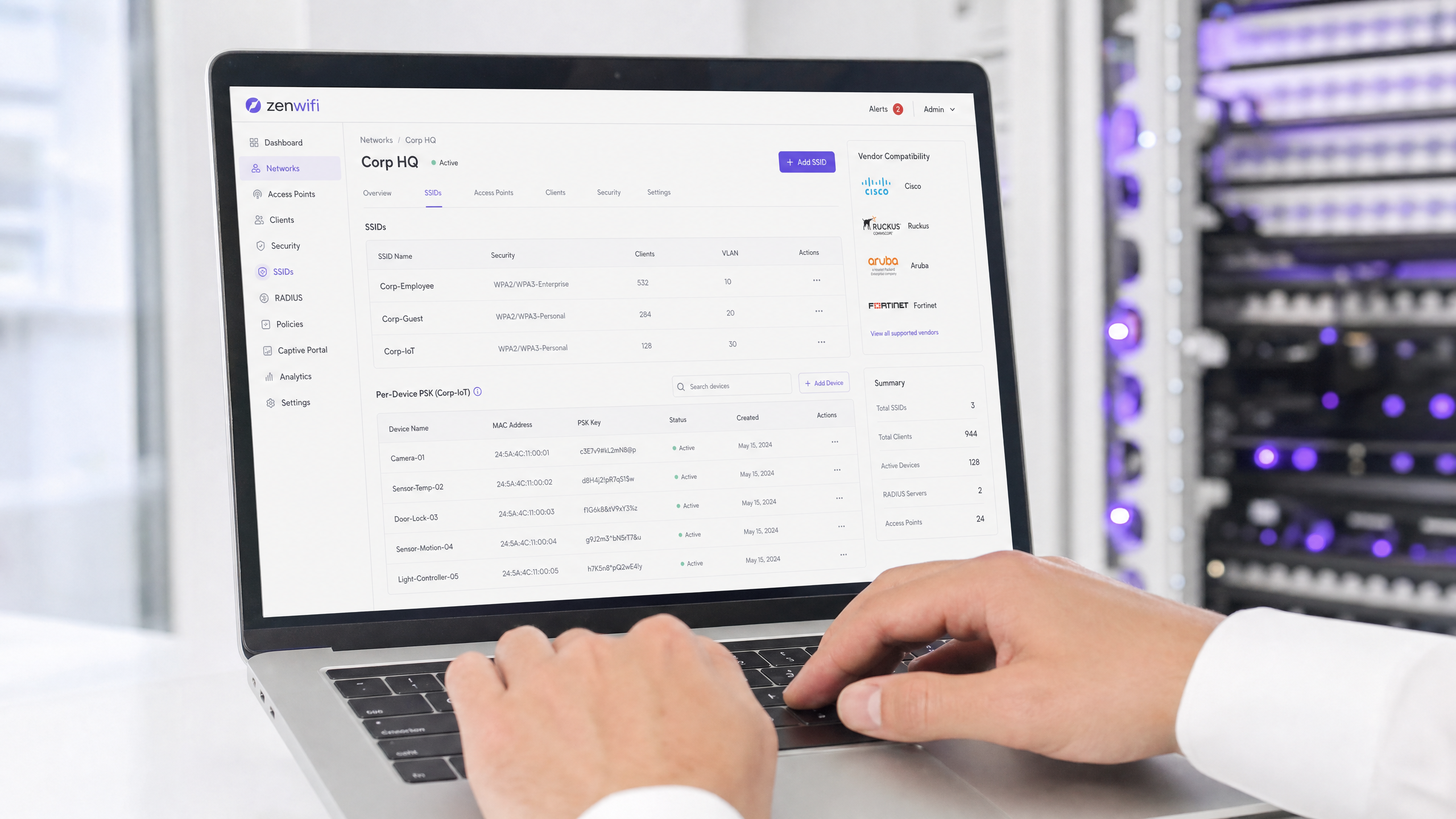
Per-Device Pre-Shared Key (PSK) ist die entscheidende Übergangstechnologie für Unternehmensnetzwerke, die eine Sichtbarkeit auf Geräteebene benötigen, ohne die Komplexität einer vollständigen 802.1X-Authentifizierung in Kauf nehmen zu müssen. Während die Anbieter unterschiedliche Namen verwenden – Cisco Meraki iPSK, HPE Aruba MPSK, Ruckus DPSK, Juniper Mist PPSK –, ist das grundlegende Ziel identisch: die Zuweisung eines eindeutigen Passworts für jedes Gerät auf einer einzigen SSID.
Der Wechsel zu WPA3 bringt jedoch eine erhebliche architektonische Einschränkung mit sich. WPA3 ersetzt den traditionellen WPA2-Vier-Wege-Handshake durch Simultaneous Authentication of Equals (SAE). SAE erfordert, dass das Passwort sowohl dem Access Point als auch dem Client bekannt ist, bevor der Austausch beginnt. Dies bricht den standardmäßigen RADIUS-basierten Lookup-Mechanismus, der von den meisten Per-Device-PSK-Implementierungen verwendet wird. Dieser Leitfaden beschreibt im Detail, wie jeder führende Anbieter Per-Device PSK handhabt, wie Schlüssel gespeichert und abgefragt werden und wie sie der WPA3-SAE-Herausforderung begegnen – von WPA3-Übergangsmodi bis hin zu proprietären Erweiterungen wie Ruckus DPSK3.
Technical Deep-Dive
Die Architektur von Per-Device PSK
Das herkömmliche WPA2-Personal verwendet eine einzige gemeinsame Passphrase für eine gesamte SSID. Jedes Gerät nutzt dasselbe Passwort. Das bedeutet, dass Sie den Zugriff für ein einzelnes Gerät nicht widerrufen können, ohne das Passwort für alle anderen zu ändern. Darüber hinaus haben Sie keine Sichtbarkeit auf Geräteebene oder Richtliniendurchsetzung.
Per-Device PSK löst dieses Problem, indem für jedes Gerät oder jeden Benutzer ein eindeutiger Berechtigungsnachweis ausgestellt wird. Sie können einen Schlüssel widerrufen, ohne die anderen zu beeinträchtigen. Sie können pro Schlüssel unterschiedliche VLANs, Bandbreitenrichtlinien oder Zugriffszeitpläne zuweisen.
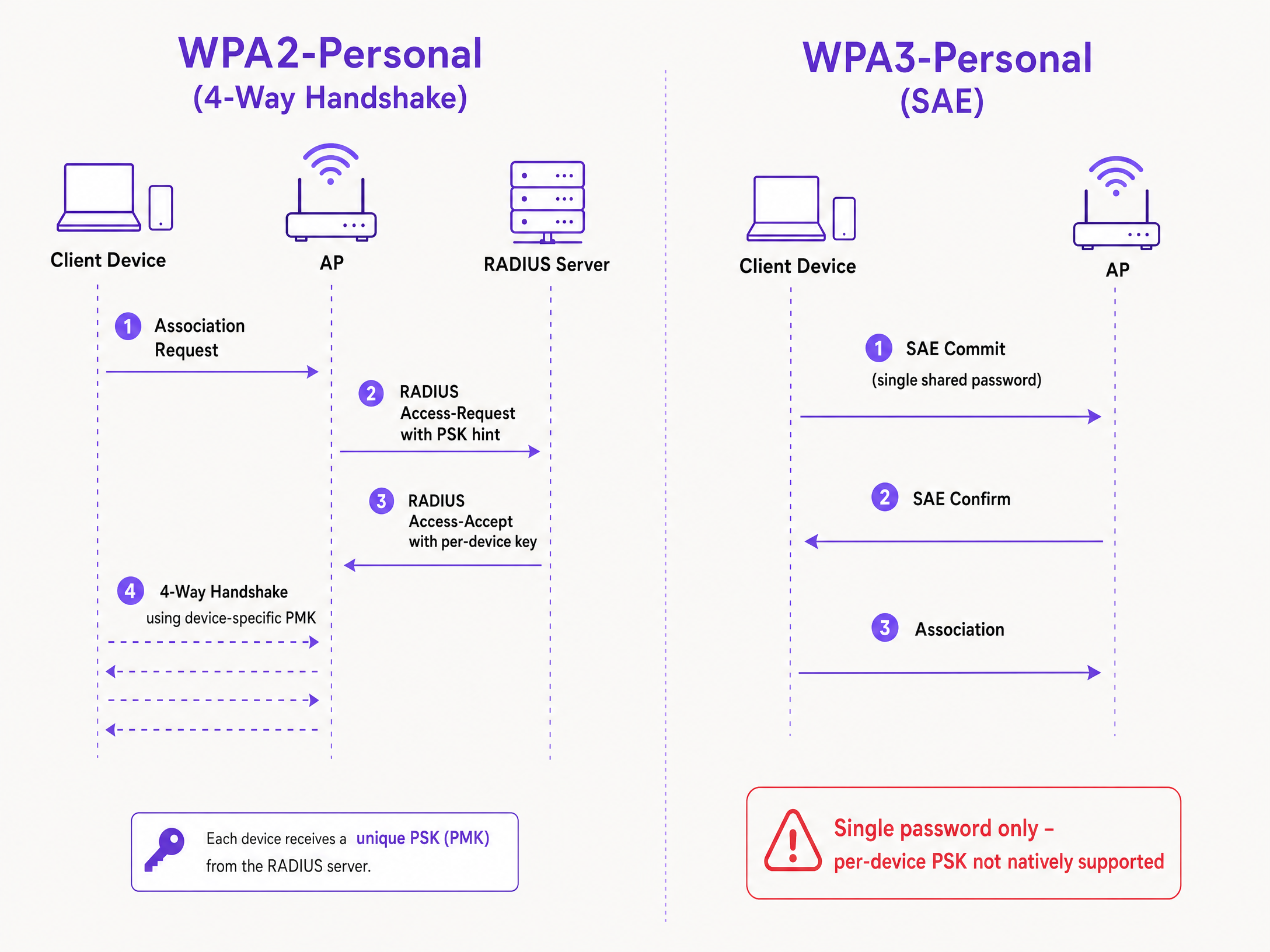
Der technische Mechanismus basiert auf dem WPA2-Vier-Wege-Handshake. Wenn sich ein Client verbindet, sendet der Access Point die MAC-Adresse des Clients in einer Access-Request-Nachricht an einen RADIUS-Server (oder eine lokale Datenbank). Der RADIUS-Server gibt eine Access-Accept-Nachricht zurück, die den spezifischen Schlüssel für dieses Gerät enthält. Der Access Point schließt dann den Vier-Wege-Handshake unter Verwendung dieses spezifischen Schlüssels ab, um den Pairwise Master Key (PMK) abzuleiten.
Die WPA3-SAE-Herausforderung
WPA3-Personal ersetzt den Vier-Wege-Handshake durch SAE. SAE ist ein Diffie-Hellman-basiertes Protokoll, bei dem sich beide Seiten auf ein gemeinsames Passwortelement festlegen, das aus der Passphrase abgeleitet wird, bevor die Verbindung hergestellt wird.
Der entscheidende Unterschied besteht darin, dass das Passwort beiden Seiten bekannt sein muss, bevor der SAE-Austausch beginnt. Es gibt im Protokoll keinen Punkt, an dem ein RADIUS-Server einen anderen Schlüssel pro Gerät einschleusen kann. Der Access Point und der Client führen bereits einen kryptografischen Austausch durch, der auf einem einzigen gemeinsamen Wert basiert. Dies ist eine durch den Standard IEEE 802.11 definierte Protokolleinschränkung, keine Einschränkung des jeweiligen Anbieters.
Anbieter-Implementierungen im Vergleich
Jeder große Enterprise-Anbieter unterstützt Per-Device PSK, aber die Implementierungen und die WPA3-Bereitschaft variieren.
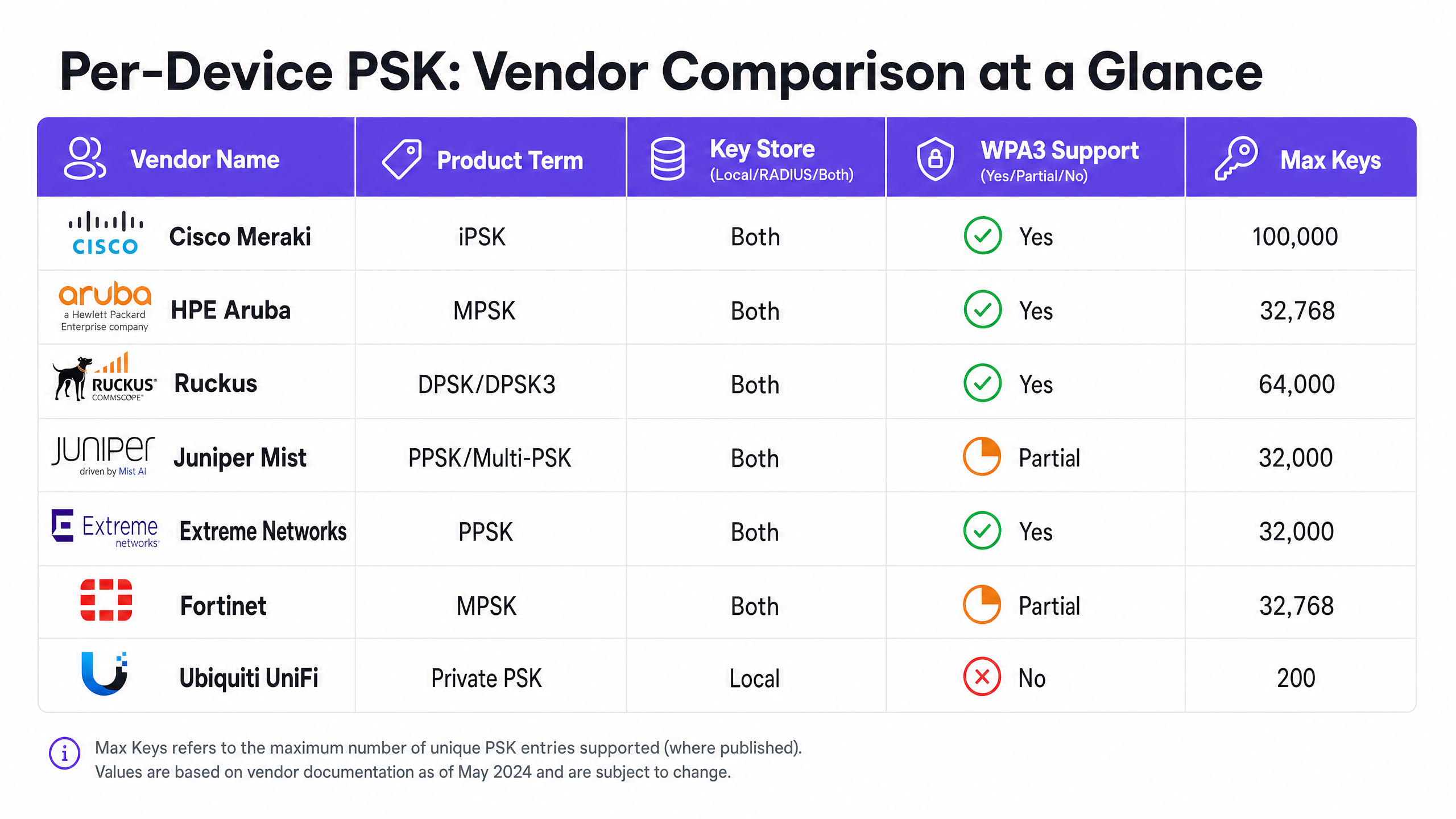
Cisco Meraki (iPSK) Cisco Meraki nennt es Identity Pre-Shared Key (iPSK). Es werden zwei Modi unterstützt. Ohne RADIUS können Sie bis zu fünf eindeutige PSKs direkt im Meraki-Dashboard konfigurieren. Mit RADIUS – typischerweise Cisco ISE – können Sie auf bis zu 100.000 Schlüssel skalieren. Der RADIUS-Server führt die Abfrage durch und gibt den gerätespezifischen Schlüssel zurück. Bei WPA3 setzt Meraki auf den WPA3-Übergangsmodus (WPA2/WPA3-Mischmodus), bei dem WPA2-Clients den Vier-Wege-Handshake nutzen und gerätespezifische Schlüssel erhalten, während WPA3-Clients SAE mit einem einzigen gemeinsamen Passwort verwenden.
HPE Aruba (MPSK) HPE Aruba nennt es Multiple Pre-Shared Key (MPSK). Aruba unterstützt MPSK Local, bei dem die Schlüssel auf dem Controller gespeichert werden, und MPSK mit ClearPass, das als RADIUS- und Richtlinien-Engine fungiert. ClearPass kann Zehntausende von Schlüsseln verwalten und dynamische VLANs zuweisen. Wie bei Meraki wird die WPA3-Unterstützung derzeit über den Übergangsmodus abgewickelt.
Ruckus (DPSK und DPSK3) Ruckus nennt es Dynamic Pre-Shared Key (DPSK). Es ist eine der ausgereiftesten Implementierungen, die seit den frühen SmartZone-Tagen verfügbar ist. Im RADIUS-Modus lässt es sich in Cloudpath integrieren. Ruckus zeichnet sich durch DPSK3 aus, ihre WPA3-Erweiterung. DPSK3 arbeitet im WPA2/WPA3-Mischmodus und erfordert Cloudpath als RADIUS-Backend. Es ermöglicht WPA3-fähigen Geräten die Nutzung von SAE, während das System die gerätespezifische Schlüsselbindung über die Cloudpath-Integration verwaltet.
Juniper Mist (PPSK / Multi-PSK) Juniper Mist nennt es Private Pre-Shared Key (PPSK) oder Multi-PSK. Mist speichert Schlüssel in der Cloud-Datenbank, mit einem Limit von 5.000 Schlüsseln pro Standort. Schlüssel können pro Benutzer, pro Gerät oder pro Gruppe zugewiesen werden. Mist lässt sich in seinen Access Assurance-Dienst integrieren, der eine RADIUS-basierte PSK-Abfrage hinzufügt. Juniper unterstützt WPA3 RADIUS PSK über Access Assurance, sodass eine einzige WPA3-Personal-SSID mehrere Passphrasen bedienen kann.
Extreme Networks (PPSK) Extreme Networks nennt es Private Pre-Shared Key (PPSK) über ExtremeCloud IQ. Es unterstützt die lokale Schlüsselspeicherung direkt auf dem Access Point, was für Außenstellen nützlich ist, sowie die RADIUS-basierte Abfrage über den Cloud-RADIUS-Dienst von ExtremeCloud IQ. Extreme unterstützt MAC-Binding, um einen PPSK an ein bestimmtes Gerät zu binden.
Fortinet (MPSK) Fortinet nennt es Multiple Pre-Shared Key (MPSK), verwaltet über FortiAP und den FortiGate-Wireless-Controller. Fortinet unterstützt explizit die Sicherheitsmodi WPA3-SAE und WPA3-SAE Transition in seinen MPSK-Profilen. Sie können ein MPSK-Profil mit WPA3-SAE-Schlüsseln erstellen, diese einer VAP zuweisen und die dynamische VLAN-Zuweisung aktivieren.
Ubiquiti UniFi (Private PSK) Ubiquiti UniFi nennt es Private Pre-Shared Keys. Die Implementierung ist rein lokal; die Schlüssel werden im UniFi Network Controller gespeichert. Sie können verschiedene VLANs pro Schlüssel. UniFi Private PSK funktioniert jedoch nur in WPA2-Netzwerken auf 2,4 GHz und 5 GHz. WPA3 und 6 GHz werden nicht unterstützt.
Implementierungsleitfaden
Befolgen Sie bei der Bereitstellung von per-device PSK diese Schritte, um eine sichere und skalierbare Architektur zu gewährleisten.
- Auditieren Sie Ihre Gerätelandschaft: Identifizieren Sie, welche Geräte WPA3 unterstützen und welche auf WPA2 angewiesen sind. Ältere IoT-Geräte werden auf absehbare Zeit wahrscheinlich WPA2 benötigen.
- Wählen Sie die richtige SSID-Strategie: Implementieren Sie für eine gemischte Umgebung ein hybrides SSID-Design. Behalten Sie eine WPA2-Personal-SSID mit per-device PSK für ältere IoT- und Gastgeräte bei. Stellen Sie eine WPA3-Enterprise-SSID für verwaltete Mitarbeitergeräte bereit.
- Implementieren Sie den Übergangsmodus mit Sorgfalt: Wenn Sie den WPA3-Übergangsmodus auf Ihrer primären Gast-SSID verwenden, stellen Sie sicher, dass Ihre Access Points und RADIUS-Server korrekt konfiguriert sind, um die gemischten Authentifizierungsflüsse zu verarbeiten.
- Integrieren Sie das Identitätsmanagement: Verwalten Sie Schlüssel nicht manuell. Integrieren Sie Ihre Schlüsselbereitstellung in Ihren Geräteverwaltungs-Workflow oder einen Identitätsanbieter wie Microsoft Entra ID oder Okta.
- Konfigurieren Sie dynamische VLANs: Ordnen Sie jeden per-device PSK einem bestimmten VLAN zu, um eine Netzwerksegmentierung zu erzwingen. Dies ist entscheidend, um IoT-Geräte vom Gast-Traffic zu isolieren.
Best Practices
- Lebenszyklusmanagement durchsetzen: Per-device PSK erfordert ein striktes Lebenszyklusmanagement. Sie müssen über einen Prozess zum Widerrufen von Schlüsseln verfügen, wenn Geräte außer Betrieb genommen werden, um eine unkontrollierte Verbreitung von Schlüsseln zu verhindern.
- Nutzen Sie 802.1X für verwaltete Endgeräte: Wechseln Sie bei Firmen-Laptops und Mitarbeitergeräten zu WPA3-Enterprise mit EAP-TLS. Dies bietet stärkere Sicherheit und native Kompatibilität mit Zero-Trust-Modellen.
- WPA3-Upgrades testen: Aktivieren Sie WPA3 niemals auf einer bestehenden per-device PSK SSID, ohne dies an einem Pilotstandort zu testen. Überprüfen Sie die Firmware-Versionen und die Kompatibilität der RADIUS-Server.
- Nutzen Sie Purple für die Identität: Integrieren Sie Purple, um die Identitätsebene zu verwalten. Purple fungiert als Cloud-Overlay, das Authentifizierung, Datenerfassung und Einwilligungsmanagement bereitstellt und die entsprechende VLAN-Zuweisung über RADIUS an Ihre Hardware zurückgibt. Weitere Details finden Sie unter Enterprise WiFi Security: A Complete Guide for 2026 .
Fehlerbehebung & Risikominderung
- Clients können keine Verbindung über WPA3 herstellen: Wenn ältere Geräte keine Verbindung zu einer SSID im WPA3-Übergangsmodus herstellen können, liegt dies häufig an inkompatiblen WLAN-Treibern. Stellen Sie sicher, dass die Client-Treiber aktualisiert sind. Wenn das Problem weiterhin besteht, verschieben Sie ältere Geräte auf eine dedizierte WPA2-only-SSID.
- RADIUS-Timeouts: Wenn der Access Point bei der Wartung auf den per-device-Schlüssel vom RADIUS-Server ein Timeout überschreitet, überprüfen Sie den Netzwerkpfad und stellen Sie sicher, dass der RADIUS-Server so skaliert ist, dass er die Authentifizierungslast bewältigen kann.
- Fehler bei der VLAN-Zuweisung: Wenn sich ein Gerät verbindet, aber die falsche IP-Adresse erhält, überprüfen Sie die VLAN-Zuordnung in der RADIUS-Access-Accept-Nachricht und stellen Sie sicher, dass das VLAN auf dem Access Point und dem Switch-Port vorhanden ist.
ROI & geschäftliche Auswirkungen
Die Implementierung von per-device PSK liefert einen messbaren geschäftlichen Mehrwert, indem Support-Tickets reduziert und die Sicherheit verbessert werden.
- Entlastung des Helpdesks: Die Automatisierung der Schlüsselbereitstellung und des -widerrufs macht manuelle Passwort-Resets überflüssig.
- Verbesserte Sicherheitslage: Die Isolierung von Geräten in separaten VLANs basierend auf ihrem eindeutigen Schlüssel verringert den Schadensradius eines kompromittierten Geräts.
- Erhöhte Transparenz: Per-device-Schlüssel bieten eine detaillierte Sicht auf die Netzwerkauslastung, sodass Sie Bandbreitenfresser identifizieren und die Kapazitätsplanung optimieren können.
Schlüsseldefinitionen
Per-Device PSK
A security mechanism that assigns a unique Pre-Shared Key to each device or user on a single SSID, allowing for individual revocation and dynamic policy assignment.
Used when IT teams need per-device visibility and control without deploying full 802.1X authentication.
WPA3-SAE
Simultaneous Authentication of Equals. The secure key establishment protocol used in WPA3-Personal, replacing the WPA2 four-way handshake.
Relevant when upgrading to WPA3 or deploying 6 GHz networks, as it fundamentally changes how passwords are authenticated.
Transition Mode
A mixed-mode configuration where an SSID advertises support for both WPA2-PSK and WPA3-SAE, allowing legacy and modern clients to connect to the same network name.
The standard approach for migrating existing networks to WPA3 without stranding legacy devices.
MAC Binding
The process of associating a specific per-device PSK with the hardware MAC address of a specific device, preventing the key from being used on another device.
Used to prevent credential sharing and ensure strict access control for IoT devices.
Dynamic VLAN Assignment
The ability to assign a device to a specific Virtual LAN based on its authentication credentials (such as its per-device PSK), rather than the SSID it connects to.
Essential for network segmentation, allowing IT to isolate guest traffic from corporate traffic on the same access point.
iPSK
Identity Pre-Shared Key. Cisco Meraki's implementation of per-device PSK.
Encountered when managing Cisco Meraki wireless networks.
DPSK
Dynamic Pre-Shared Key. Ruckus's implementation of per-device PSK, with DPSK3 being the WPA3-compatible version.
Encountered when managing Ruckus wireless networks.
MPSK
Multiple Pre-Shared Key. The term used by HPE Aruba and Fortinet for their per-device PSK implementations.
Encountered when managing HPE Aruba or Fortinet wireless networks.
Ausgearbeitete Beispiele
A 200-room hotel needs to provide secure Guest WiFi and isolate smart TVs in each room. They currently use a single WPA2-Personal password for all guests and devices.
Deploy per-device PSK using a RADIUS backend. Integrate Purple to capture guest data and issue a unique PSK to each guest upon registration. For the smart TVs, generate a unique PSK for each TV and map it to a dedicated IoT VLAN. Configure the guest PSKs to map to a separate Guest VLAN with client isolation enabled.
A university campus is upgrading to Wi-Fi 6E and must support WPA3 on the 6 GHz band, but they have thousands of legacy IoT devices that only support WPA2.
Implement a hybrid SSID design. Create a WPA3-Enterprise SSID for student and staff laptops and smartphones, using 802.1X for authentication. Create a separate WPA2-Personal SSID with per-device PSK on the 2.4 GHz and 5 GHz bands specifically for the legacy IoT devices.
Übungsfragen
Q1. You are deploying Wi-Fi 6E access points and need to support 6 GHz clients. Your existing 5 GHz network uses iPSK for IoT devices. Can you extend the iPSK configuration to the 6 GHz band?
Hinweis: Consider the mandatory security protocols for the 6 GHz band.
Q2. A retail chain uses Aruba MPSK to assign unique keys to point-of-sale terminals. They want to upgrade their primary SSID to WPA3 for better security. What is the recommended approach?
Hinweis: Aruba MPSK requires the WPA2 four-way handshake.
Musterlösung anzeigen
Enable WPA3 transition mode (WPA2/WPA3 mixed mode) on the SSID. The point-of-sale terminals will continue to connect using WPA2 and MPSK, while newer devices can connect using WPA3-SAE with a shared password.
Q3. You manage a Ruckus network and want to deploy per-device PSK for WPA3 clients. What specific configuration is required?
Hinweis: Consider the proprietary extension Ruckus offers and its backend requirements.
Musterlösung anzeigen
You must deploy Ruckus DPSK3. This requires Wi-Fi 6 or newer access points running firmware 7.0 or later, configuring the SSID for WPA2/WPA3 mixed mode, and using Ruckus Cloudpath as the RADIUS server.
Weiterlesen in dieser Reihe
Was ist MAC-Adressauthentifizierung? Wann man sie nutzen und wann man sie vermeiden sollte
Dieser maßgebliche technische Leitfaden behandelt die MAC-Adressauthentifizierung in Unternehmens-WiFi-Umgebungen – wie RADIUS-basierte MAC-Authentifizierung auf Layer 2 funktioniert, ihre inhärenten Sicherheitslücken (einschließlich MAC-Spoofing und die Auswirkungen der MAC-Randomisierung auf OS-Ebene) und die genauen operativen Kontexte, in denen sie ein gültiges Werkzeug zur Verwaltung von IoT- und kopflosen Geräten bleibt. Er bietet umsetzbare Bereitstellungsanleitungen für IT-Manager und Netzwerkarchitekten in den Bereichen Gastgewerbe, Einzelhandel, Gesundheitswesen und öffentlicher Sektor, mit realen Fallbeispielen, Entscheidungsrahmen und Integrationskontext für die Gast-WiFi- und Analyseplattform von Purple.
Einrichtung von Enterprise WiFi auf iOS und macOS mit 802.1X
Dieser maßgebliche Leitfaden bietet leitenden IT-Führungskräften umsetzbare Schritte für die Bereitstellung von 802.1X Enterprise WiFi auf iOS- und macOS-Geräten. Er behandelt die zertifikatbasierte Authentifizierung (EAP-TLS), MDM-Konfigurationsprofile und die Architekturintegration zur Sicherung von Unternehmensnetzwerken bei gleichzeitiger Unterstützung von BYOD-Initiativen.
Einrichtung von Enterprise WiFi auf Android-Geräten mit EAP-TLS
Dieser technische Leitfaden bietet erfahrenen IT-Führungskräften einen umfassenden Plan für die Bereitstellung der 802.1X EAP-TLS-Authentifizierung auf Android-Geräten. Er behandelt die architektonischen Mechanismen, manuelle und MDM-gesteuerte Implementierungsstrategien sowie Fehlerbehebungsmethoden, die zur Sicherung von Unternehmens-WLAN-Netzwerken erforderlich sind.