
विक्रेता द्वारा प्रति-डिवाइस PSK: iPSK, DPSK, MPSK और PPSK की तुलना (और WPA3 सपोर्ट)
Cisco Meraki, HPE Aruba, Ruckus, Juniper Mist, Extreme, Fortinet, और Ubiquiti UniFi में प्रति-डिवाइस PSK कार्यान्वयन की एक व्यापक तुलना। जानें कि WPA3-SAE प्रति-डिवाइस कुंजी रणनीतियों को कैसे प्रभावित करता है और कब ट्रांज़िशन मोड को लागू करना चाहिए बनाम 802.1X पर जाना चाहिए।
इस गाइड को सुनें
पॉडकास्ट ट्रांसक्रिप्ट देखें
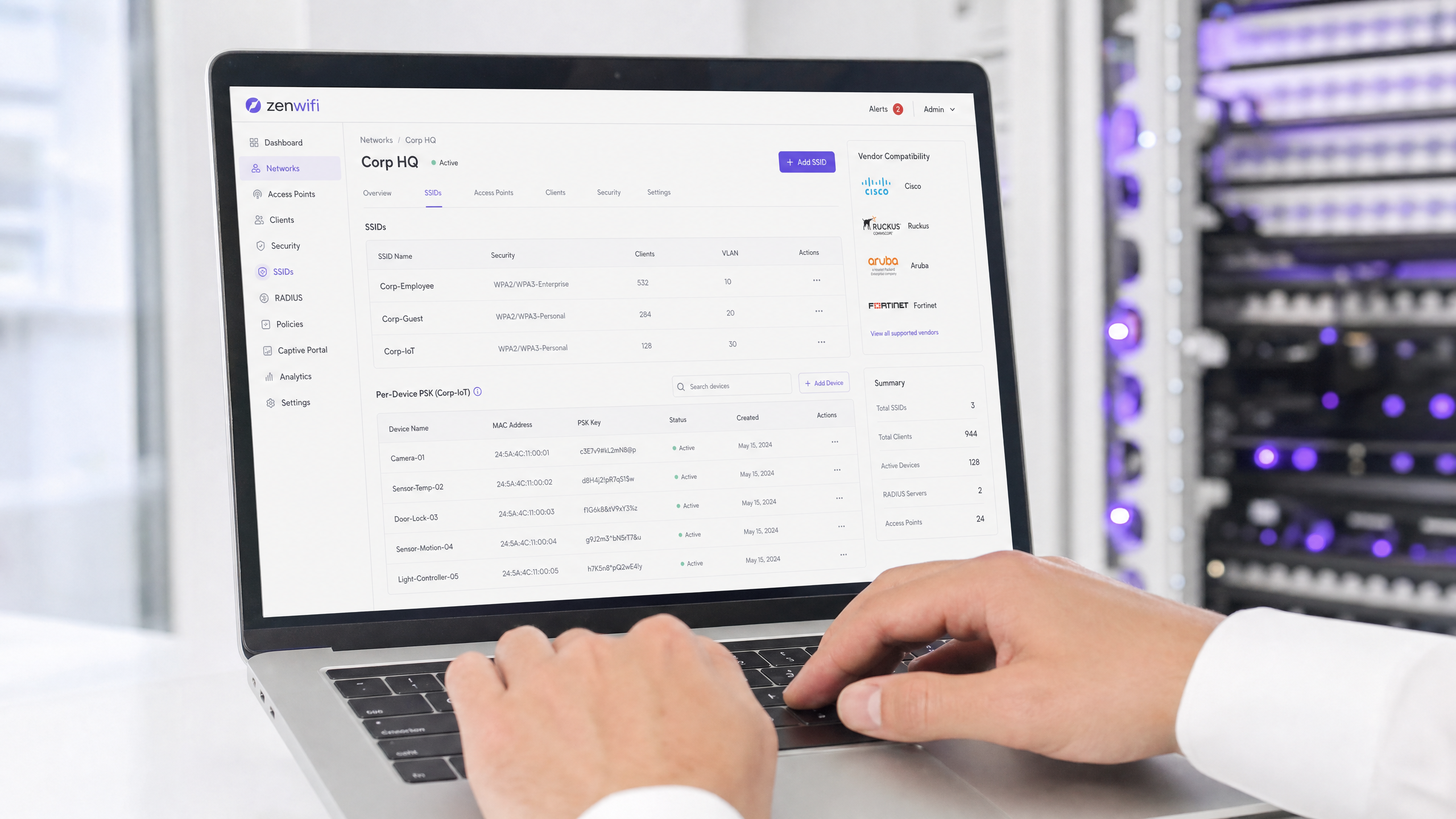
कार्यकारी सारांश
प्रति-डिवाइस Pre-Shared Key (PSK) उन एंटरप्राइज नेटवर्क के लिए आवश्यक ट्रांज़िशन तकनीक है जिन्हें पूर्ण 802.1X प्रमाणीकरण की जटिलता के बिना प्रति-डिवाइस दृश्यता की आवश्यकता होती है। जबकि विक्रेता अलग-अलग नामों का उपयोग करते हैं - Cisco Meraki iPSK, HPE Aruba MPSK, Ruckus DPSK, Juniper Mist PPSK - मूल लक्ष्य समान है: एक ही SSID पर प्रत्येक डिवाइस को एक अद्वितीय पासवर्ड असाइन करना।
हालांकि, WPA3 पर जाने से एक महत्वपूर्ण आर्किटेक्चरल बाधा उत्पन्न होती है। WPA3 पारंपरिक WPA2 फोर-वे हैंडशेक को Simultaneous Authentication of Equals (SAE) से बदल देता है। SAE के लिए आवश्यक है कि एक्सचेंज शुरू होने से पहले एक्सेस पॉइंट और क्लाइंट दोनों को पासवर्ड पता हो, जो अधिकांश प्रति-डिवाइस PSK कार्यान्वयन द्वारा उपयोग किए जाने वाले मानक RADIUS-आधारित लुकअप तंत्र को बाधित करता है। यह गाइड विस्तार से बताती है कि प्रत्येक प्रमुख विक्रेता प्रति-डिवाइस PSK को कैसे संभालता है, वे कुंजियों को कैसे स्टोर और लुकअप करते हैं, और वे WPA3-SAE चुनौती का समाधान कैसे करते हैं - WPA3 ट्रांज़िशन मोड से लेकर Ruckus DPSK3 जैसे मालिकाना एक्सटेंशन तक।
तकनीकी गहन विश्लेषण
प्रति-डिवाइस PSK का आर्किटेक्चर
पारंपरिक WPA2-Personal पूरे SSID के लिए एक एकल साझा पासफ़्रेज़ का उपयोग करता है। प्रत्येक डिवाइस एक ही पासवर्ड का उपयोग करता है, जिसका अर्थ है कि आप सभी के लिए पासवर्ड बदले बिना किसी एक डिवाइस के लिए एक्सेस रद्द नहीं कर सकते। इसके अलावा, आपके पास कोई प्रति-डिवाइस दृश्यता या नीति प्रवर्तन (policy enforcement) नहीं होता है।
प्रति-डिवाइस PSK प्रत्येक डिवाइस या उपयोगकर्ता को एक अद्वितीय क्रेडेंशियल जारी करके इसे हल करता है। आप दूसरों को प्रभावित किए बिना एक कुंजी को रद्द कर सकते हैं। आप प्रति कुंजी विभिन्न VLAN, बैंडविड्थ नीतियां, या एक्सेस शेड्यूल असाइन कर सकते हैं।
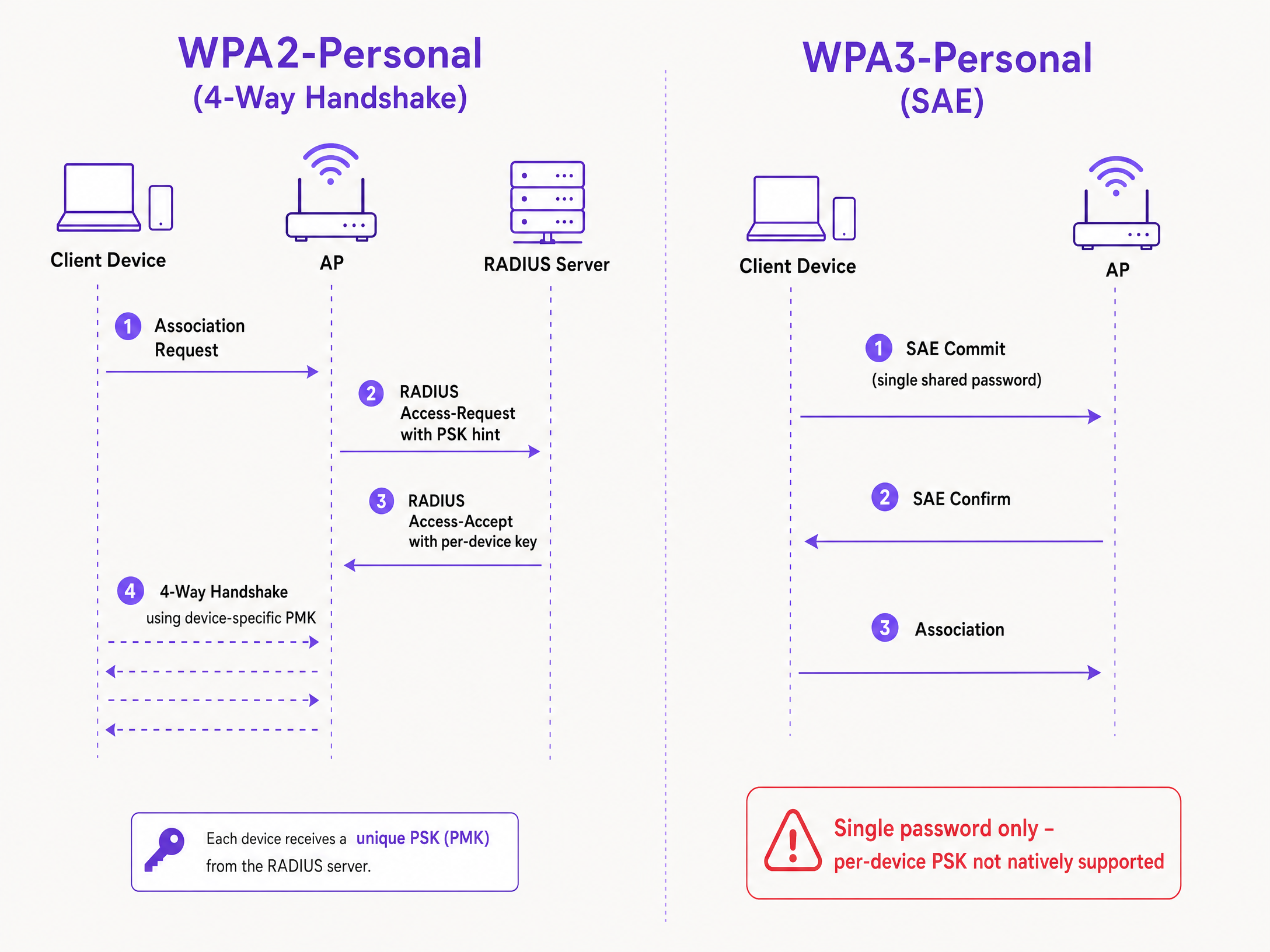
तकनीकी तंत्र WPA2 फोर-वे हैंडशेक पर निर्भर करता है। जब कोई क्लाइंट संबद्ध (associate) होता है, तो एक्सेस पॉइंट Access-Request संदेश में क्लाइंट का MAC पता RADIUS सर्वर (या स्थानीय डेटाबेस) को भेजता है। RADIUS सर्वर एक Access-Accept संदेश लौटाता है जिसमें उस डिवाइस के लिए विशिष्ट कुंजी होती है। इसके बाद एक्सेस पॉइंट Pairwise Master Key (PMK) प्राप्त करने के लिए उस विशिष्ट कुंजी का उपयोग करके फोर-वे हैंडशेक को पूरा करता है।
WPA3-SAE चुनौती
WPA3-Personal फोर-वे हैंडशेक को SAE से बदल देता है। SAE एक Diffie-Hellman-आधारित प्रोटोकॉल है जहां एसोसिएशन पूरा होने से पहले दोनों पक्ष पासफ़्रेज़ से प्राप्त एक साझा पासवर्ड तत्व के लिए प्रतिबद्ध होते हैं।
महत्वपूर्ण अंतर यह है कि SAE एक्सचेंज शुरू होने से पहले दोनों पक्षों को पासवर्ड पता होना चाहिए। प्रोटोकॉल में ऐसा कोई बिंदु नहीं है जहां एक RADIUS सर्वर प्रति डिवाइस एक अलग कुंजी इंजेक्ट कर सके। एक्सेस पॉइंट और क्लाइंट पहले से ही एकल साझा मूल्य के आधार पर एक क्रिप्टोग्राफिक एक्सचेंज निष्पादित कर रहे होते हैं। यह IEEE 802.11 मानक द्वारा परिभाषित एक प्रोटोकॉल बाधा है, न कि कोई विक्रेता सीमा।
विक्रेता कार्यान्वयन की तुलना
प्रत्येक प्रमुख एंटरप्राइज विक्रेता प्रति-डिवाइस PSK का समर्थन करता है, लेकिन उनके कार्यान्वयन और WPA3 तत्परता भिन्न होती है।
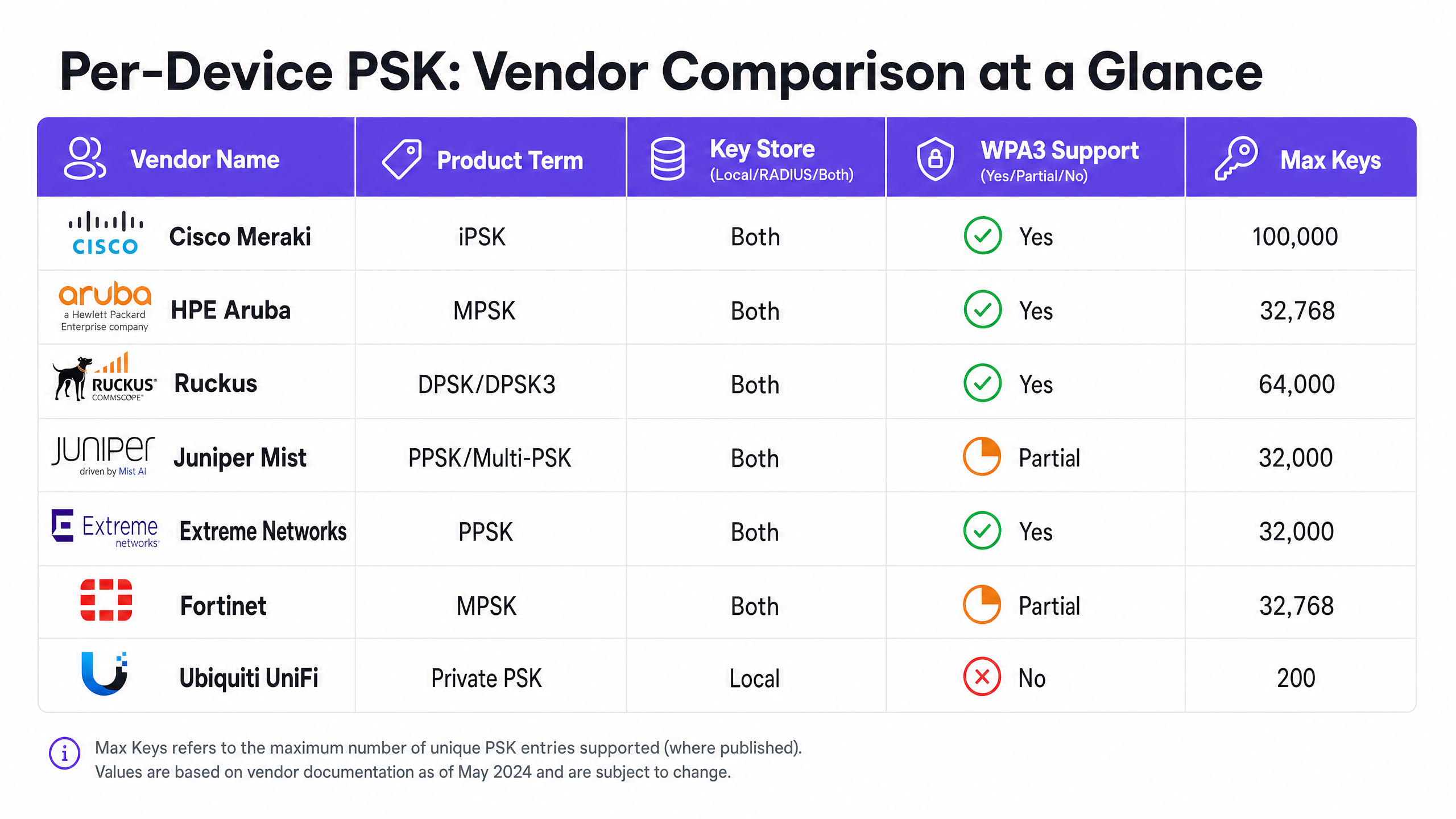
Cisco Meraki (iPSK) Cisco Meraki इसे Identity Pre-Shared Key (iPSK) कहता है। यह दो मोड का समर्थन करता है। RADIUS के बिना, आप सीधे Meraki डैशबोर्ड में अधिकतम पांच अद्वितीय PSK कॉन्फ़िगर कर सकते हैं। RADIUS के साथ - आमतौर पर Cisco ISE - आप इसे 100,000 कुंजियों तक बढ़ा सकते हैं। RADIUS सर्वर लुकअप करता है और प्रति-डिवाइस कुंजी लौटाता है। WPA3 के लिए, Meraki WPA3 ट्रांज़िशन मोड (WPA2/WPA3 मिश्रित मोड) पर निर्भर करता है, जहां WPA2 क्लाइंट फोर-वे हैंडशेक का उपयोग करते हैं और प्रति-डिवाइस कुंजियाँ प्राप्त करते हैं, जबकि WPA3 क्लाइंट एकल साझा पासवर्ड के साथ SAE का उपयोग करते हैं।
HPE Aruba (MPSK) HPE Aruba इसे Multiple Pre-Shared Key (MPSK) कहता है। Aruba, MPSK Local का समर्थन करता है, जहां कुंजियाँ कंट्रोलर पर संग्रहीत होती हैं, और ClearPass के साथ MPSK का समर्थन करता है, जो RADIUS और नीति इंजन (policy engine) के रूप में कार्य करता है। ClearPass हजारों कुंजियों को रख सकता है और डायनेमिक VLAN असाइन कर सकता है। Meraki की तरह, WPA3 सपोर्ट वर्तमान में ट्रांज़िशन मोड के माध्यम से संभाला जाता है।
Ruckus (DPSK और DPSK3) Ruckus इसे Dynamic Pre-Shared Key (DPSK) कहता है। यह सबसे परिपक्व कार्यान्वयनों में से एक है, जो शुरुआती SmartZone के दिनों से उपलब्ध है। RADIUS मोड में, यह Cloudpath के साथ एकीकृत होता है। Ruckus अपने WPA3 एक्सटेंशन, DPSK3 के लिए उल्लेखनीय है। DPSK3, WPA2/WPA3 मिश्रित मोड में काम करता है और इसके लिए RADIUS बैकएंड के रूप में Cloudpath की आवश्यकता होती है। यह WPA3-सक्षम उपकरणों को SAE का उपयोग करने की अनुमति देता है जबकि सिस्टम Cloudpath एकीकरण के माध्यम से प्रति-डिवाइस कुंजी बाइंडिंग का प्रबंधन करता है।
Juniper Mist (PPSK / Multi-PSK) Juniper Mist इसे Private Pre-Shared Key (PPSK) या Multi-PSK कहता है। Mist कुंजियों को क्लाउड डेटाबेस में संग्रहीत करता है, जिसकी सीमा प्रति साइट 5,000 कुंजियाँ है। कुंजियों को प्रति उपयोगकर्ता, प्रति डिवाइस, या प्रति समूह असाइन किया जा सकता है। Mist अपनी Access Assurance सेवा के साथ एकीकृत होता है, जो RADIUS-आधारित PSK लुकअप जोड़ता है। Juniper, Access Assurance के माध्यम से WPA3 RADIUS PSK का समर्थन करता है, जिससे एक ही WPA3-Personal SSID कई पासफ़्रेज़ की सेवा कर सकता है।
Extreme Networks (PPSK) Extreme Networks इसे ExtremeCloud IQ के माध्यम से Private Pre-Shared Key (PPSK) कहता है। यह एक्सेस पॉइंट पर ही स्थानीय कुंजी भंडारण का समर्थन करता है, जो दूरस्थ साइटों के लिए उपयोगी है, साथ ही ExtremeCloud IQ की क्लाउड RADIUS सेवा के माध्यम से RADIUS-आधारित लुकअप का भी समर्थन करता है। Extreme एक विशिष्ट डिवाइस से PPSK को जोड़ने के लिए MAC बाइंडिंग का समर्थन करता।
Fortinet (MPSK) Fortinet इसे Multiple Pre-Shared Key (MPSK) कहता है, जिसे FortiAP और FortiGate वायरलेस कंट्रोलर के माध्यम से प्रबंधित किया जाता है। Fortinet स्पष्ट रूप से अपने MPSK प्रोफाइल में WPA3-SAE और WPA3-SAE Transition सुरक्षा मोड का समर्थन करता है। आप WPA3-SAE कुंजियों के साथ एक MPSK प्रोफ़ाइल बना सकते हैं, उन्हें VAP पर असाइन कर सकते हैं, और डायनेमिक VLAN असाइनमेंट सक्षम कर सकते हैं।
Ubiquiti UniFi (Private PSK) Ubiquiti UniFi इसे Private Pre-Shared Keys कहता है। कार्यान्वयन केवल स्थानीय है; कुंजियाँ UniFi Network कंट्रोलर में संग्रहीत होती हैं। आप विभिन्न VLAप्रति कुंजी Ns। हालांकि, UniFi Private PSK केवल 2.4 GHz और 5 GHz पर WPA2 नेटवर्क पर काम करता है। WPA3 और 6 GHz समर्थित नहीं हैं।
कार्यान्वयन मार्गदर्शिका
प्रति-डिवाइस PSK को तैनात करते समय, एक सुरक्षित और स्केलेबल आर्किटेक्चर सुनिश्चित करने के लिए इन चरणों का पालन करें।
- अपने डिवाइस परिदृश्य का ऑडिट करें: पहचानें कि कौन से डिवाइस WPA3 का समर्थन करते हैं और कौन से WPA2 पर निर्भर हैं। लीगेसी IoT डिवाइसों को निकट भविष्य में WPA2 की आवश्यकता होने की संभावना है।
- सही SSID रणनीति चुनें: एक मिश्रित वातावरण के लिए, एक हाइब्रिड SSID डिज़ाइन तैनात करें। लीगेसी IoT और अतिथि डिवाइसों के लिए प्रति-डिवाइस PSK के साथ एक WPA2-Personal SSID बनाए रखें। प्रबंधित स्टाफ डिवाइसों के लिए एक WPA3-Enterprise SSID तैनात करें।
- ट्रांज़िशन मोड को सावधानीपूर्वक लागू करें: यदि आप अपने प्राथमिक अतिथि SSID पर WPA3 ट्रांज़िशन मोड का उपयोग करते हैं, तो सुनिश्चित करें कि आपके एक्सेस पॉइंट और RADIUS सर्वर मिश्रित प्रमाणीकरण प्रवाह को संभालने के लिए सही ढंग से कॉन्फ़िगर किए गए हैं।
- पहचान प्रबंधन को एकीकृत करें: कुंजियों को मैन्युअल रूप से प्रबंधित न करें। अपने कुंजी प्रावधान (key provisioning) को अपने डिवाइस प्रबंधन वर्कफ़्लो या Microsoft Entra ID या Okta जैसे पहचान प्रदाता के साथ एकीकृत करें।
- डायनेमिक VLAN कॉन्फ़िगर करें: नेटवर्क सेगमेंटेशन लागू करने के लिए प्रत्येक प्रति-डिवाइस PSK को एक विशिष्ट VLAN से मैप करें। IoT डिवाइसों को अतिथि ट्रैफ़िक से अलग करने के लिए यह महत्वपूर्ण है।
सर्वोत्तम प्रथाएं
- लाइफसाइकिल प्रबंधन लागू करें: प्रति-डिवाइस PSK के लिए सख्त लाइफसाइकिल प्रबंधन की आवश्यकता होती है। कुंजी के अनियंत्रित प्रसार को रोकने के लिए डिवाइसों के बंद होने पर कुंजियों को रद्द करने की एक प्रक्रिया आपके पास होनी चाहिए।
- प्रबंधित एंडपॉइंट्स के लिए 802.1X का उपयोग करें: कॉर्पोरेट लैपटॉप और स्टाफ डिवाइसों के लिए, EAP-TLS के साथ WPA3-Enterprise पर जाएं। यह मजबूत सुरक्षा और ज़ीरो-ट्रस्ट मॉडल के साथ मूल संगतता प्रदान करता है।
- WPA3 अपग्रेड का परीक्षण करें: पायलट साइट पर परीक्षण किए बिना किसी मौजूदा प्रति-डिवाइस PSK SSID पर कभी भी WPA3 सक्षम न करें। फ़र्मवेयर संस्करणों और RADIUS सर्वर संगतता को सत्यापित करें।
- पहचान के लिए Purple का लाभ उठाएं: पहचान परत को संभालने के लिए Purple को एकीकृत करें। Purple एक क्लाउड ओवरले के रूप में काम करता है, जो प्रमाणीकरण, डेटा कैप्चर और सहमति प्रबंधन प्रदान करता है, और RADIUS के माध्यम से आपके हार्डवेयर को उपयुक्त VLAN असाइनमेंट वापस भेजता है। अधिक विवरण के लिए Enterprise WiFi Security: A Complete Guide for 2026 देखें।
समस्या निवारण और जोखिम न्यूनीकरण
- WPA3 पर कनेक्ट होने में विफल रहने वाले क्लाइंट: यदि लीगेसी डिवाइस WPA3 ट्रांज़िशन मोड SSID से कनेक्ट होने में विफल रहते हैं, तो यह अक्सर असंगत वायरलेस ड्राइवरों के कारण होता है। सुनिश्चित करें कि क्लाइंट ड्राइवर अपडेट किए गए हैं। यदि समस्या बनी रहती है, तो लीगेसी डिवाइसों को एक समर्पित केवल-WPA2 SSID पर ले जाएं।
- RADIUS टाइमआउट: यदि एक्सेस पॉइंट RADIUS सर्वर से प्रति-डिवाइस कुंजी की प्रतीक्षा करते समय टाइमआउट हो जाता है, तो नेटवर्क पथ की जांच करें और सुनिश्चित करें कि RADIUS सर्वर प्रमाणीकरण लोड को संभालने के लिए स्केल किया गया है।
- VLAN असाइनमेंट विफलताएं: यदि कोई डिवाइस कनेक्ट होता है लेकिन गलत IP पता प्राप्त करता है, तो RADIUS Access-Accept संदेश में VLAN मैपिंग को सत्यापित करें और सुनिश्चित करें कि VLAN एक्सेस पॉइंट और स्विच पोर्ट पर मौजूद है।
ROI और व्यावसायिक प्रभाव
प्रति-डिवाइस PSK को लागू करना सहायता टिकटों को कम करके और सुरक्षा में सुधार करके मापने योग्य व्यावसायिक मूल्य प्रदान करता है।
- हेल्पडेस्क लोड में कमी: कुंजी प्रावधान और रद्दीकरण को स्वचालित करने से मैन्युअल पासवर्ड रीसेट की आवश्यकता समाप्त हो जाती है।
- बेहतर सुरक्षा स्थिति: डिवाइसों को उनकी अनूठी कुंजी के आधार पर अलग-अलग VLAN पर अलग करने से किसी प्रभावित डिवाइस का प्रभाव क्षेत्र (blast radius) कम हो जाता है।
- बेहतर दृश्यता: प्रति-डिवाइस कुंजियाँ नेटवर्क उपयोग में विस्तृत दृश्यता प्रदान करती हैं, जिससे आप बैंडविड्थ का अत्यधिक उपयोग करने वालों की पहचान कर सकते हैं और क्षमता नियोजन को अनुकूलित कर सकते हैं।
मुख्य परिभाषाएं
Per-Device PSK
A security mechanism that assigns a unique Pre-Shared Key to each device or user on a single SSID, allowing for individual revocation and dynamic policy assignment.
Used when IT teams need per-device visibility and control without deploying full 802.1X authentication.
WPA3-SAE
Simultaneous Authentication of Equals. The secure key establishment protocol used in WPA3-Personal, replacing the WPA2 four-way handshake.
Relevant when upgrading to WPA3 or deploying 6 GHz networks, as it fundamentally changes how passwords are authenticated.
Transition Mode
A mixed-mode configuration where an SSID advertises support for both WPA2-PSK and WPA3-SAE, allowing legacy and modern clients to connect to the same network name.
The standard approach for migrating existing networks to WPA3 without stranding legacy devices.
MAC Binding
The process of associating a specific per-device PSK with the hardware MAC address of a specific device, preventing the key from being used on another device.
Used to prevent credential sharing and ensure strict access control for IoT devices.
Dynamic VLAN Assignment
The ability to assign a device to a specific Virtual LAN based on its authentication credentials (such as its per-device PSK), rather than the SSID it connects to.
Essential for network segmentation, allowing IT to isolate guest traffic from corporate traffic on the same access point.
iPSK
Identity Pre-Shared Key. Cisco Meraki's implementation of per-device PSK.
Encountered when managing Cisco Meraki wireless networks.
DPSK
Dynamic Pre-Shared Key. Ruckus's implementation of per-device PSK, with DPSK3 being the WPA3-compatible version.
Encountered when managing Ruckus wireless networks.
MPSK
Multiple Pre-Shared Key. The term used by HPE Aruba and Fortinet for their per-device PSK implementations.
Encountered when managing HPE Aruba or Fortinet wireless networks.
हल किए गए उदाहरण
A 200-room hotel needs to provide secure Guest WiFi and isolate smart TVs in each room. They currently use a single WPA2-Personal password for all guests and devices.
Deploy per-device PSK using a RADIUS backend. Integrate Purple to capture guest data and issue a unique PSK to each guest upon registration. For the smart TVs, generate a unique PSK for each TV and map it to a dedicated IoT VLAN. Configure the guest PSKs to map to a separate Guest VLAN with client isolation enabled.
A university campus is upgrading to Wi-Fi 6E and must support WPA3 on the 6 GHz band, but they have thousands of legacy IoT devices that only support WPA2.
Implement a hybrid SSID design. Create a WPA3-Enterprise SSID for student and staff laptops and smartphones, using 802.1X for authentication. Create a separate WPA2-Personal SSID with per-device PSK on the 2.4 GHz and 5 GHz bands specifically for the legacy IoT devices.
अभ्यास प्रश्न
Q1. You are deploying Wi-Fi 6E access points and need to support 6 GHz clients. Your existing 5 GHz network uses iPSK for IoT devices. Can you extend the iPSK configuration to the 6 GHz band?
संकेत: Consider the mandatory security protocols for the 6 GHz band.
Q2. A retail chain uses Aruba MPSK to assign unique keys to point-of-sale terminals. They want to upgrade their primary SSID to WPA3 for better security. What is the recommended approach?
संकेत: Aruba MPSK requires the WPA2 four-way handshake.
मॉडल उत्तर देखें
Enable WPA3 transition mode (WPA2/WPA3 mixed mode) on the SSID. The point-of-sale terminals will continue to connect using WPA2 and MPSK, while newer devices can connect using WPA3-SAE with a shared password.
Q3. You manage a Ruckus network and want to deploy per-device PSK for WPA3 clients. What specific configuration is required?
संकेत: Consider the proprietary extension Ruckus offers and its backend requirements.
मॉडल उत्तर देखें
You must deploy Ruckus DPSK3. This requires Wi-Fi 6 or newer access points running firmware 7.0 or later, configuring the SSID for WPA2/WPA3 mixed mode, and using Ruckus Cloudpath as the RADIUS server.
इस श्रृंखला में आगे पढ़ें
कैप्टिव पोर्टल प्रमाणीकरण विधियों की तुलना
यह आधिकारिक तकनीकी संदर्भ गाइड पांच मुख्य कैप्टिव पोर्टल प्रमाणीकरण विधियों के आर्किटेक्चरल, परिचालन और अनुपालन ट्रेड-ऑफ का मूल्यांकन करती है। यह नेटवर्क आर्किटेक्ट्स, IT निदेशकों और मार्केटिंग प्रबंधकों को एंटरप्राइज़ वेन्यू में डेटा-संग्रह आवश्यकताओं के साथ गेस्ट ऑनबोर्डिंग घर्षण को संतुलित करने के लिए आवश्यक मात्रात्मक डेटा और निर्णय ढांचे प्रदान करती है।
MAC Address Authentication क्या है? इसका उपयोग कब करें और कब बचें
यह आधिकारिक तकनीकी संदर्भ गाइड एंटरप्राइज़ WiFi वातावरण में MAC एड्रेस ऑथेंटिकेशन को कवर करती है — लेयर 2 पर RADIUS-आधारित MAC ऑथेंटिकेशन कैसे काम करता है, इसकी अंतर्निहित सुरक्षा कमजोरियां (जिसमें MAC स्पूफिंग और OS-स्तरीय MAC रैंडमाइज़ेशन का प्रभाव शामिल है), और सटीक परिचालन संदर्भ जहां यह IoT और हेडलेस डिवाइसों के प्रबंधन के लिए एक वैध उपकरण बना हुआ है। यह हॉस्पिटैलिटी, रिटेल, हेल्थकेयर और सार्वजनिक क्षेत्र के स्थानों में IT प्रबंधकों और नेटवर्क आर्किटेक्ट्स के लिए कार्रवाई योग्य डिप्लॉयमेंट मार्गदर्शन प्रदान करता है, जिसमें वास्तविक दुनिया के काम किए गए उदाहरण, निर्णय ढांचे और Purple के अतिथि WiFi और एनालिटिक्स प्लेटफ़ॉर्म के लिए एकीकरण संदर्भ शामिल हैं।
iOS और macOS पर 802.1X के साथ Enterprise WiFi कैसे सेट अप करें
यह आधिकारिक मार्गदर्शिका वरिष्ठ IT लीडर्स को iOS और macOS डिवाइस पर 802.1X एंटरप्राइज़ WiFi डिप्लॉय करने के लिए कार्रवाई योग्य कदम प्रदान करती है। यह BYOD पहलों का समर्थन करते हुए कॉर्पोरेट नेटवर्क को सुरक्षित करने के लिए सर्टिफिकेट-आधारित प्रमाणीकरण (EAP-TLS), MDM कॉन्फ़िगरेशन प्रोफ़ाइल और आर्किटेक्चर एकीकरण को कवर करती है।