

Small Business WiFi: How to Get the Set-up Right Without Breaking the Budget
This authoritative guide provides IT managers, venue operators, and CTOs with a practical blueprint for deploying enterprise-grade WiFi in small business environments without exceeding budget constraints. It covers layered network architecture, VLAN segmentation, hardware selection, and guest onboarding strategies. By integrating analytics platforms like Purple, businesses can transform their WiFi from a cost centre into a measurable revenue-generating asset.
🎧 Listen to this Guide
View Transcript
Executive Summary
For IT managers, network architects, and venue operations directors, deploying small business WiFi often means walking a tightrope between enterprise-grade expectations and SMB-level budgets. The business demands robust connectivity, seamless guest onboarding, and rich analytics to drive marketing initiatives. Finance wants to pay consumer-grade prices. This guide provides a definitive blueprint for designing and deploying secure, scalable WiFi networks tailored for SMBs — covering layered architecture, VLAN segmentation, hardware selection, and the integration of guest analytics platforms. By treating WiFi as a strategic asset rather than a utility, organisations can generate measurable ROI from day one. Integrating solutions like Guest WiFi and WiFi Analytics ensures that your network not only meets operational needs but also captures first-party customer data to drive loyalty and revenue. For a broader deployment guide, see How to Set Up WiFi for Your Business: A Complete Guide .
Technical Deep-Dive
The Layered Architecture Imperative
The most persistent and costly mistake in SMB WiFi deployments is treating the network like a home set-up on a larger scale. Dropping a high-end consumer router in the middle of a 3,000 sq ft retail floor and expecting it to handle 50 concurrent guest connections, POS terminals, and back-office operations is a guaranteed path to poor performance, security exposure, and compliance failures.
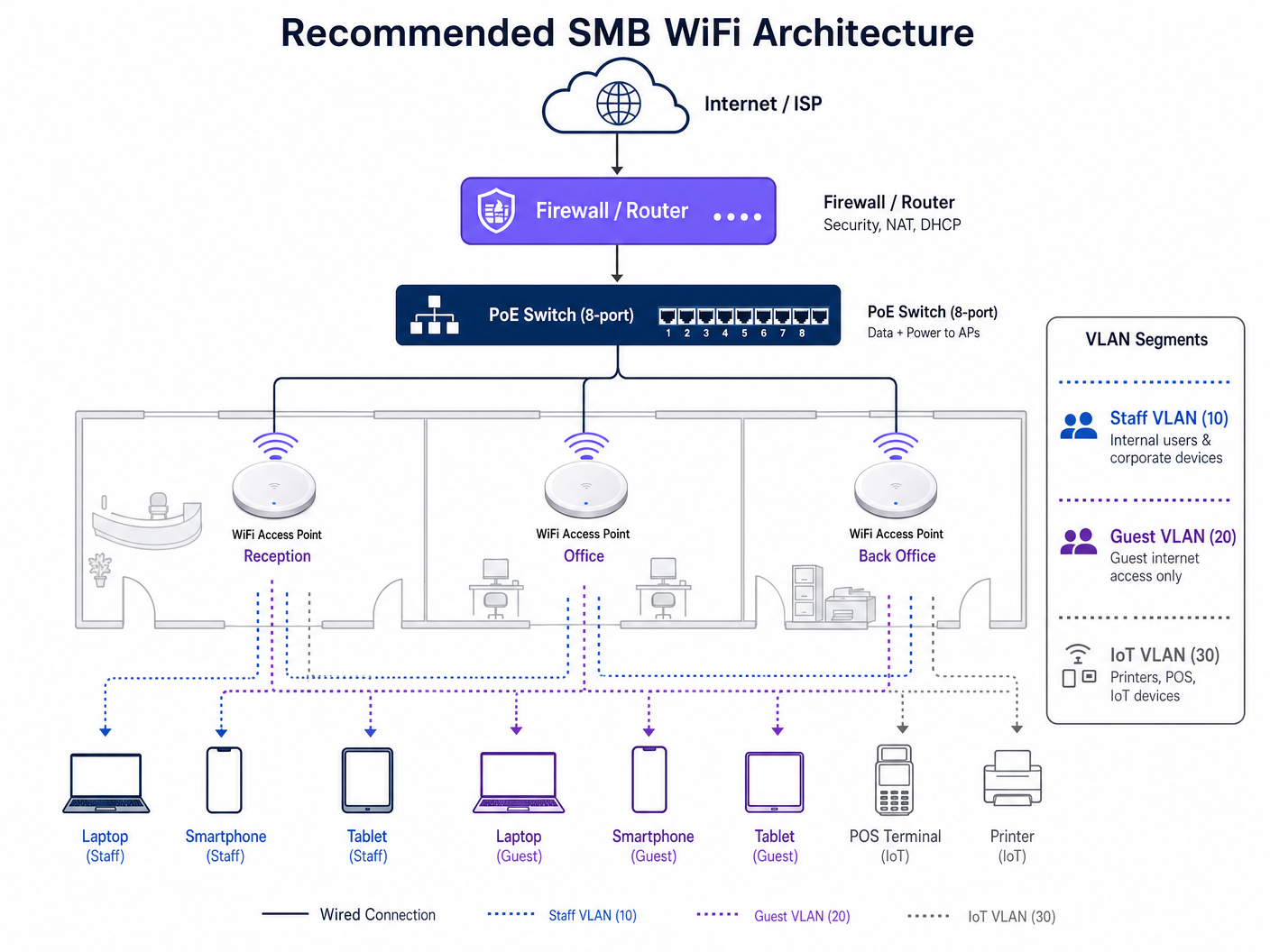
A resilient small business WiFi deployment requires a segmented, layered architecture built on three distinct tiers.
Tier 1 — Edge Gateway and Firewall: This device is the boundary between your internal network and the ISP. It handles Network Address Translation (NAT), DHCP services, and primary security policies. For SMBs, a dedicated firewall appliance (rather than the ISP-supplied router) provides the policy granularity required for VLAN routing and guest network isolation.
Tier 2 — Core Switching: A managed Power over Ethernet (PoE) switch is the backbone of the deployment. PoE eliminates the need for localised power injectors at each Access Point location, simplifying installation and providing centralised power management. Critically, a managed switch enables VLAN tagging across all ports, which is the foundation of network segmentation.
Tier 3 — Wireless Access Layer: Cloud-managed Access Points (APs) supporting the 802.11ax (WiFi 6) standard. WiFi 6 introduces Orthogonal Frequency-Division Multiple Access (OFDMA) and Multi-User Multiple Input Multiple Output (MU-MIMO), which are specifically engineered to handle high-density client environments — exactly what a busy retail floor, café, or hotel lobby demands.
Network Segmentation: VLANs as Digital Fire Doors
Security and performance both demand that network traffic be logically separated using Virtual Local Area Networks (VLANs). A flat network — where guest devices, staff laptops, and POS terminals share the same broadcast domain — is a critical security risk and a direct violation of PCI DSS requirements.
The recommended three-VLAN model for most SMB deployments is as follows:
| VLAN ID | Purpose | Traffic Policy | Key Devices |
|---|---|---|---|
| VLAN 10 | Corporate / Staff | Full internal access | Staff laptops, desktops, printers |
| VLAN 20 | Guest Internet | Internet-only, client isolation enabled | Guest smartphones, tablets |
| VLAN 30 | IoT / Operations | Isolated, firewall-controlled | POS terminals, card readers, CCTV |
Client isolation on VLAN 20 is non-negotiable. This feature prevents guest devices from communicating directly with each other, protecting your customers from peer-to-peer attacks on a shared network.
Frequency Band Strategy
Modern dual-band and tri-band APs broadcast on both 2.4GHz and 5GHz simultaneously. The 5GHz band delivers higher throughput but attenuates more rapidly through walls and obstacles. The 2.4GHz band provides wider coverage but is significantly more congested in dense urban environments. For most SMB venues, enabling Band Steering — which automatically guides capable devices to the 5GHz band — is the optimal configuration.
In the 2.4GHz spectrum, only channels 1, 6, and 11 are non-overlapping. Your channel plan must use only these three to avoid co-channel interference between adjacent APs.
Implementation Guide
Hardware Selection by Tier
When evaluating hardware, categorise solutions into three investment tiers based on your venue's specific requirements for coverage area, concurrent user count, and management complexity.
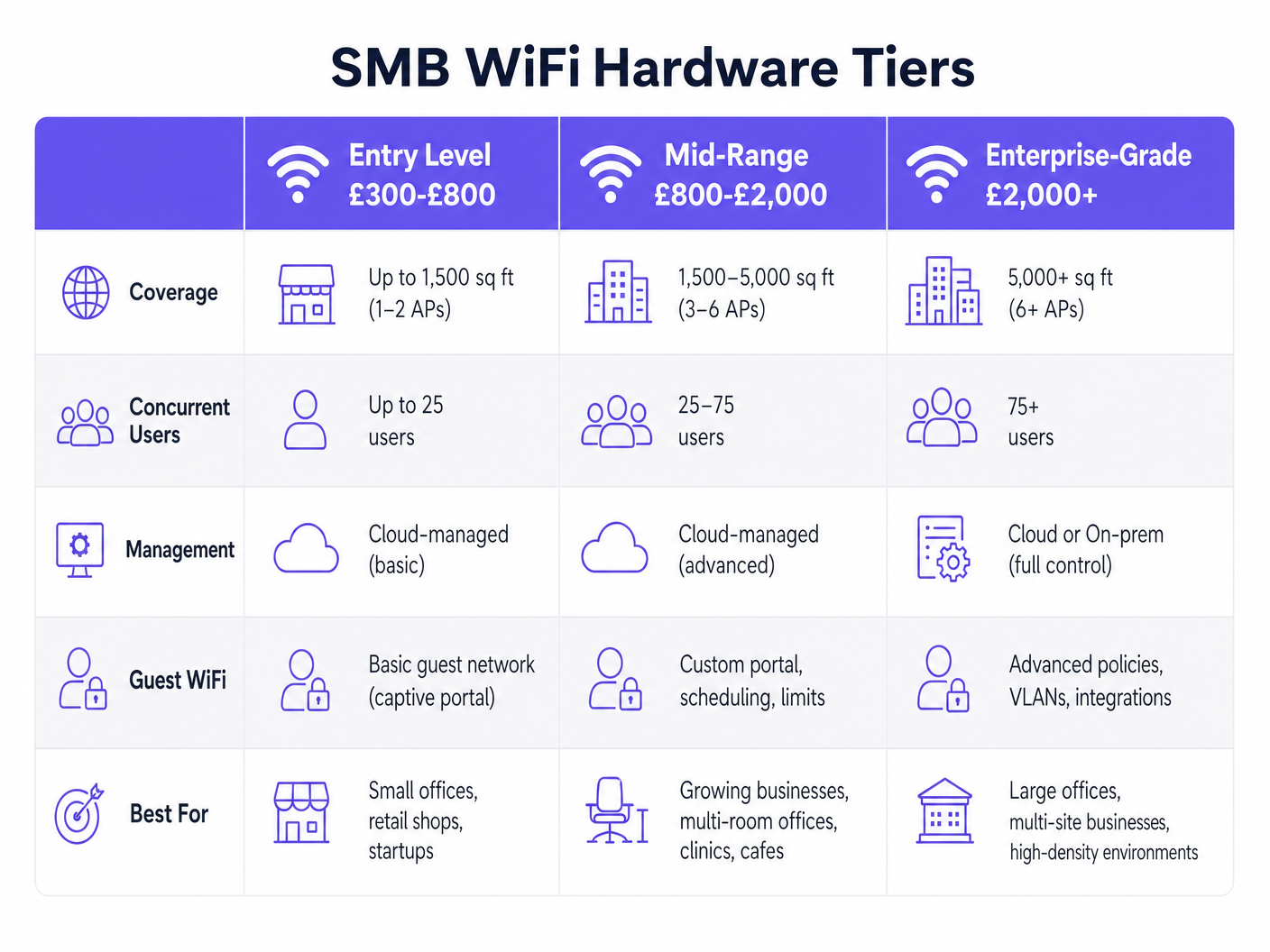
For most SMBs in the 1,500–5,000 sq ft range — a typical retail unit, café, or boutique hotel — the mid-range tier (£800–£2,000 for a 3–6 AP deployment) delivers the best balance of performance, manageability, and cost. Cloud-managed platforms from vendors like Aruba Instant On, Cisco Meraki Go, and Ubiquiti UniFi eliminate the need for on-premise hardware controllers while providing centralised visibility and policy management.
Step-by-Step Deployment Sequence
- Conduct a Predictive Site Survey: Before purchasing hardware, use survey tools to model RF propagation based on your floor plan, wall materials, and ceiling height. This prevents dead zones and determines the optimal number and placement of APs.
- Pull Cat6 Cabling: Always install Cat6 or Cat6A cabling. The labour cost is identical to Cat5e, but Cat6 supports multi-gigabit throughput (2.5Gbps, 5Gbps) and future-proofs your infrastructure for the next generation of APs.
- Configure the Firewall: Set up DHCP pools for each VLAN, configure inter-VLAN routing rules (blocking VLAN 20 and VLAN 30 from accessing VLAN 10), and establish your WAN failover policy if applicable.
- Configure the PoE Switch: Tag each port with the appropriate VLAN. The uplink port to the firewall should be configured as a trunk port carrying all VLANs.
- Deploy and Mount APs: Mount APs on the ceiling in open areas. Avoid hiding them above suspended ceilings near metal ductwork or inside network cabinets. RF signals propagate downwards and outwards — physical obstructions cause significant throughput degradation.
- Configure SSIDs: Map each SSID to its corresponding VLAN. A typical configuration broadcasts two SSIDs: one for staff (WPA3-Enterprise or WPA3-Personal with a strong passphrase) and one for guests (open SSID with a captive portal redirect).
- Integrate the Captive Portal: Connect your guest SSID to a platform like Guest WiFi . This replaces a simple password with a branded, data-capturing onboarding experience.
Best Practices
Guest Onboarding and Data Capture
A WPA2 pre-shared key written on a chalkboard is both a missed opportunity and a security risk. A captive portal is the industry-standard approach to guest network access in commercial environments. It provides three critical functions: legal compliance (terms of service acceptance), identity verification (email, SMS, or social login), and first-party data capture.
Purple's Guest WiFi platform acts as a free identity provider for services like OpenRoaming under the Connect licence. This means guests with compatible devices can connect seamlessly and securely — similar to cellular roaming — without requiring manual portal interaction, while the venue still captures the authentication event and associated profile data.
For Retail and Hospitality operators, this data is transformative. Connecting WiFi authentication events to CRM and marketing automation platforms enables personalised re-engagement campaigns based on actual visit behaviour.
Security Standards Compliance
For any deployment handling payment card data, PCI DSS compliance is mandatory. The standard requires that cardholder data environments be isolated from public-facing networks — which is precisely what VLAN 30 achieves. Firewall rules must explicitly deny all traffic from VLAN 20 (Guest) and VLAN 10 (Staff) to VLAN 30 (IoT/POS), with only the minimum required outbound traffic permitted from VLAN 30.
For deployments in regulated sectors such as Healthcare , additional standards apply. NHS networks must comply with the Data Security and Protection (DSP) Toolkit, which mandates strict access controls and audit logging. See WiFi in Hospitals: A Guide to Secure Clinical Networks for sector-specific guidance.
WPA3 should be enabled wherever hardware supports it. WPA3's Simultaneous Authentication of Equals (SAE) handshake eliminates the vulnerability to offline dictionary attacks that affects WPA2-PSK networks.
Troubleshooting & Risk Mitigation
Common Failure Modes and Mitigations
Co-Channel Interference (CCI): Occurs when adjacent APs operate on the same channel, causing them to compete for airtime. This is the most common cause of poor WiFi performance in multi-AP deployments. Mitigation: Enable Automatic Radio Management (ARM) or equivalent dynamic channel assignment in your cloud management dashboard, and verify the channel plan manually after deployment.
Sticky Clients: Devices that maintain a weak connection to a distant AP rather than roaming to a closer one. This is a client-side behaviour that degrades both the affected device's performance and the AP's available airtime. Mitigation: Enable 802.11k (neighbour reports), 802.11v (BSS transition management), and 802.11r (fast BSS transition) on your APs. Configure minimum RSSI thresholds (typically -75 dBm) to gently disassociate clients with poor signal strength.
DHCP Pool Exhaustion: In high-turnover environments like cafés or Transport hubs, the DHCP address pool for the guest VLAN can be depleted if lease times are too long. Mitigation: Reduce the DHCP lease time for VLAN 20 to 1–2 hours, ensuring addresses are returned to the pool promptly.
AP Placement Errors: APs mounted above suspended ceilings, inside network cabinets, or behind metal fixtures. Mitigation: Always mount APs below the ceiling tile line in open areas, with a clear line of sight to the coverage zone.
ROI & Business Impact
Investing in a managed WiFi infrastructure shifts the technology from a pure operational expense to a revenue-generating asset. The ROI calculation has two components: cost reduction and revenue generation.
On the cost side, cloud-managed infrastructure reduces IT support overhead. Centralised monitoring, automated firmware updates, and remote troubleshooting capabilities mean that a single IT manager can oversee dozens of sites without physical site visits.
On the revenue side, WiFi Analytics provides the data layer that connects physical footfall to digital marketing outcomes. Key metrics include:
| Metric | Business Application |
|---|---|
| Dwell Time | Optimise store layout and staffing levels |
| Return Rate | Measure customer loyalty and campaign effectiveness |
| Peak Hours | Inform operational scheduling and promotions |
| New vs. Returning | Segment marketing audiences for targeted campaigns |
| Captive Portal Conversions | Measure the effectiveness of onboarding offers |
For a 50-seat café deploying a mid-range WiFi system atapproximately £1,200 in hardware and £150/year in cloud management fees, capturing 200 guest email addresses per month and converting 10% into repeat visits through targeted email campaigns represents a measurable and trackable return on the initial capital investment.
For further guidance on indoor positioning and location analytics that can extend your WiFi investment, see Indoor Positioning System: UWB, BLE, & WiFi Guide .
Key Terms & Definitions
VLAN (Virtual Local Area Network)
A logical grouping of devices on the same physical network infrastructure, configured to communicate as if they were on a separate, isolated network segment.
Essential for separating guest traffic from sensitive corporate or POS data. Mandatory for PCI DSS compliance in any venue that processes card payments.
PoE (Power over Ethernet)
A technology standardised under IEEE 802.3af/at/bt that transmits electrical power alongside data over standard Ethernet cabling, eliminating the need for separate power supplies at each Access Point location.
Allows APs to be installed in optimal ceiling positions without requiring a nearby electrical outlet. Managed PoE switches also allow remote power cycling of APs for troubleshooting.
Captive Portal
A web page that a network user is required to interact with before being granted internet access. Typically used to present terms of service, collect authentication credentials, or capture marketing consent.
The industry-standard mechanism for guest WiFi onboarding in commercial venues. Enables first-party data capture and GDPR-compliant consent management.
WiFi 6 (802.11ax)
The sixth generation of the IEEE 802.11 WiFi standard, introducing OFDMA and MU-MIMO to improve performance and efficiency in high-density client environments.
Critical for venues like busy retail stores, hotel lobbies, or conference centres where many devices connect simultaneously. Delivers up to 4x improvement in average throughput per client compared to WiFi 5 in dense environments.
RSSI (Received Signal Strength Indicator)
A measurement of the power level of a received radio signal, typically expressed in dBm (decibels relative to one milliwatt). A value of -65 dBm is considered good; -80 dBm is marginal.
Used to determine whether a client device has a sufficiently strong connection, and to configure minimum RSSI thresholds that force clients to roam to a closer AP.
PCI DSS (Payment Card Industry Data Security Standard)
A set of security standards mandating that all organisations accepting, processing, storing, or transmitting credit card information maintain a secure and isolated network environment.
Requires strict VLAN segmentation to isolate POS and card payment terminals from public guest WiFi networks. Non-compliance can result in significant financial penalties and loss of card processing rights.
SSID (Service Set Identifier)
The publicly broadcast name of a wireless network, used by client devices to identify and connect to a specific WiFi network.
In a segmented deployment, different SSIDs are mapped to different VLANs (e.g., 'VenueGuest' maps to VLAN 20; 'VenueStaff' maps to VLAN 10). Limiting the number of broadcast SSIDs reduces management overhead and RF overhead.
Client Isolation
A wireless security feature that prevents devices connected to the same SSID from communicating directly with each other, routing all traffic through the AP and firewall instead.
Must be enabled on all guest SSIDs to prevent users from accessing or attacking other guests' devices. Standard practice in any public-facing WiFi deployment.
WPA3 (Wi-Fi Protected Access 3)
The third generation of the WPA security protocol, introducing Simultaneous Authentication of Equals (SAE) to replace the WPA2-PSK four-way handshake, eliminating vulnerability to offline dictionary attacks.
Should be enabled on all new deployments where hardware supports it. Particularly important for staff networks handling sensitive business data.
Band Steering
A feature in cloud-managed APs that automatically guides dual-band capable client devices from the congested 2.4GHz band to the higher-throughput 5GHz band.
Improves overall network performance by distributing clients across available spectrum. Should be enabled by default on all modern AP deployments.
Case Studies
A 50-seat independent coffee shop needs to upgrade its WiFi. They currently use a single ISP-provided router. Staff complain the POS system frequently drops offline when the shop is busy, and guests complain about slow internet. Budget is approximately £1,500.
- Configure the ISP router to bridge mode, removing its WiFi and DHCP functions. 2. Install a dedicated firewall/router appliance (e.g., Firewalla Gold, ~£200) to handle DHCP, NAT, and VLAN routing. 3. Deploy an 8-port managed PoE switch (e.g., Netgear GS308EP, ~£80). 4. Install two cloud-managed WiFi 6 APs (e.g., Aruba Instant On AP22, ~£120 each) — one near the front seating area, one near the counter. 5. Configure three VLANs: VLAN 10 (Staff), VLAN 20 (Guest with captive portal and 5Mbps rate limiting per client), VLAN 30 (POS). 6. Connect the POS terminal via hardwired Ethernet to the PoE switch on VLAN 30. 7. Integrate Purple Guest WiFi on VLAN 20 for branded onboarding and data capture. Total hardware cost: approximately £520, well within budget.
A boutique hotel with 40 rooms is experiencing poor coverage in rooms at the end of corridors. They currently have APs installed only in the main hallways. Guests are leaving negative reviews specifically mentioning WiFi quality.
- Conduct a post-installation RF survey to quantify signal levels in affected rooms. 2. Identify the attenuation sources: fire-rated corridor doors and en-suite bathroom walls are typically the primary culprits. 3. Transition from a 'corridor deployment' model to an 'in-room deployment' model using low-profile wall-plate APs (e.g., Aruba Instant On AP11D). 4. Install one wall-plate AP in every other room, providing coverage to the installed room and the adjacent room. 5. Connect each AP back to a PoE switch in the comms room via Cat6 cable run through the ceiling void. 6. Configure the same SSID and VLAN structure as the corridor APs to enable seamless roaming (802.11r) as guests move through the property.
Scenario Analysis
Q1. You are advising a new retail store owner who wants to use a single high-end consumer mesh router system to cover their 4,000 sq ft space and handle both the POS system and guest WiFi access. The owner argues it is simpler and cheaper. How do you advise them, and what is your recommended alternative?
💡 Hint:Consider PCI DSS compliance requirements and RF propagation limitations of consumer mesh systems in commercial environments.
Show Recommended Approach
Advise strongly against this approach on two grounds. First, consumer mesh systems do not support VLAN segmentation, meaning the POS terminal and guest devices would share the same network — a direct violation of PCI DSS requirements. A security breach on the guest network could expose cardholder data. Second, consumer mesh systems are designed for residential environments and typically cannot handle 50+ concurrent clients with the QoS policies required for reliable POS operation. Recommend a dedicated firewall appliance, a managed PoE switch, and two to three ceiling-mounted cloud-managed APs with VLAN 10 (Staff), VLAN 20 (Guest with captive portal), and VLAN 30 (POS) configured. The total hardware cost is comparable to a premium mesh system but delivers enterprise-grade segmentation, centralised management, and compliance.
Q2. A client reports that their guest WiFi is extremely slow during the lunch rush, despite having a 500Mbps internet connection and two WiFi 6 APs. You check the management dashboard and notice individual clients are consuming 80–100Mbps each. What is the most likely cause and how do you resolve it?
💡 Hint:Consider how bandwidth is allocated per client on the guest SSID.
Show Recommended Approach
The most likely cause is the absence of per-client bandwidth rate limiting on the guest SSID. Without rate limiting, a small number of users streaming 4K video or performing large file downloads can consume the majority of the available WAN bandwidth, leaving other guests with near-zero throughput. Resolution: implement per-client rate limiting on the guest SSID via the cloud management dashboard. A typical setting of 5Mbps down / 2Mbps up per client is sufficient for general browsing and social media while preventing any single user from saturating the connection. Additionally, verify that the guest SSID has a lower QoS priority than the staff SSID to ensure business-critical traffic is always prioritised.
Q3. During a post-installation walkthrough of a newly deployed office WiFi system, you notice that the installer has mounted all three APs above the suspended ceiling tiles for aesthetic reasons. The client is happy with the appearance but is reporting patchy coverage. What is the issue and what is your remediation plan?
💡 Hint:Think about what materials are typically found above a suspended ceiling and how they affect RF propagation.
Show Recommended Approach
Mounting APs above suspended ceiling tiles is a common installation error. The space above a suspended ceiling typically contains metal HVAC ductwork, steel cable trays, insulation, and lighting fixtures — all of which reflect, absorb, and scatter RF signals. The ceiling tiles themselves also attenuate the signal before it reaches the client devices below. Remediation: lower all three APs to below the ceiling tile line, mounting them flush to the underside of the suspended ceiling using appropriate mounting brackets. This ensures the APs have a clear line of sight to the coverage area. If ceiling aesthetics are a concern, use low-profile flush-mount APs that sit neatly within a ceiling tile cutout. Re-run an RF survey after remediation to confirm coverage improvement.




