

वाणिज्यिक WiFi सिस्टम: बड़े व्यवसायों को क्या जानने की आवश्यकता है
यह तकनीकी संदर्भ मार्गदर्शिका IT लीडरों और स्थल संचालकों को वाणिज्यिक WiFi सिस्टम के डिज़ाइन, परिनियोजन और प्रबंधन पर कार्रवाई योग्य अंतर्दृष्टि प्रदान करती है। इसमें उच्च-घनत्व वास्तुकला, सुरक्षा अनुपालन, विक्रेता चयन और व्यावसायिक बुद्धिमत्ता के लिए नेटवर्क डेटा का लाभ उठाने का तरीका शामिल है।
🎧 इस गाइड को सुनें
ट्रांसक्रिप्ट देखें
कार्यकारी सारांश
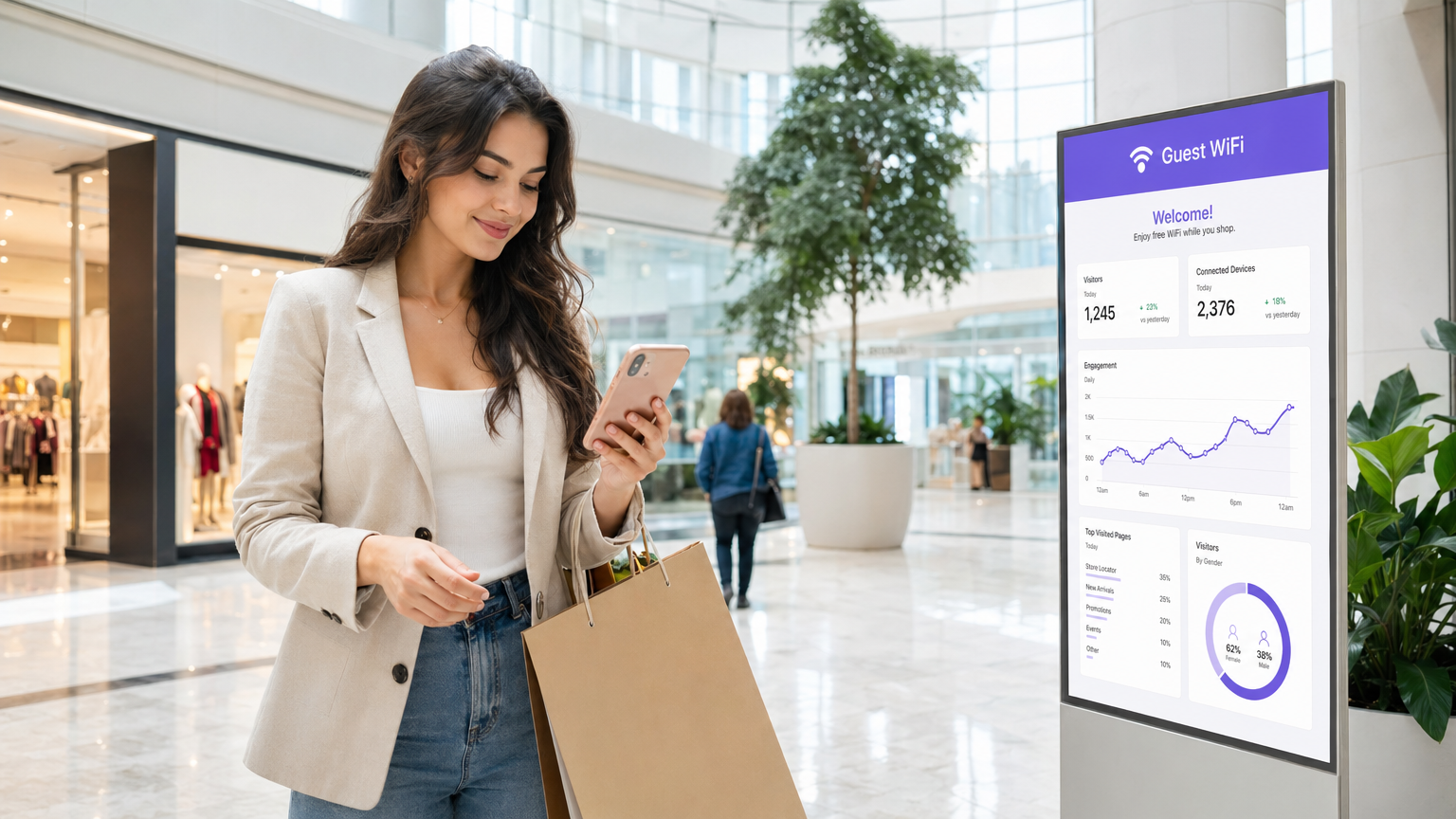
एंटरप्राइज़ स्थलों के लिए—50,000 सीटों वाले स्टेडियमों से लेकर बहु-स्थान खुदरा श्रृंखलाओं तक—उपभोक्ता-ग्रेड वायरलेस नेटवर्क एक महत्वपूर्ण परिचालन जोखिम का प्रतिनिधित्व करते हैं। एक वाणिज्यिक WiFi सिस्टम केवल इंटरनेट एक्सेस प्रदान करने के बारे में नहीं है; यह एक महत्वपूर्ण बुनियादी ढाँचा परत है जो पॉइंट-ऑफ़-सेल (POS) सिस्टम, IoT सेंसर, स्टाफ संचार और अतिथि जुड़ाव का समर्थन करती है। यह मार्गदर्शिका उच्च-घनत्व परिनियोजन के लिए तकनीकी आवश्यकताओं को रेखांकित करती है, जिसमें क्षमता नियोजन, क्लाउड-प्रबंधित वास्तुकला और PCI DSS और GDPR जैसे कड़े सुरक्षा मानकों पर ध्यान केंद्रित किया गया है। मजबूत हार्डवेयर को WiFi Analytics जैसे प्लेटफॉर्म के साथ एकीकृत करके, IT लीडर अपने वायरलेस इन्फ्रास्ट्रक्चर को एक लागत केंद्र से एक राजस्व-उत्पादक संपत्ति में बदल सकते हैं जो फर्स्ट-पार्टी डेटा कैप्चर और बढ़ी हुई परिचालन दक्षता के माध्यम से मापने योग्य ROI प्रदान करता है।
तकनीकी गहन-विश्लेषण
वास्तुकला और टोपोलॉजी
वाणिज्यिक WiFi सिस्टम को लचीलेपन और स्केलेबिलिटी के लिए डिज़ाइन की गई एक संरचित, बहु-स्तरीय वास्तुकला की आवश्यकता होती है। फ्लैट नेटवर्क के विपरीत, एंटरप्राइज़ परिनियोजन ट्रैफ़िक को खंडित करते हैं और नियंत्रण को केंद्रीकृत करते हैं।
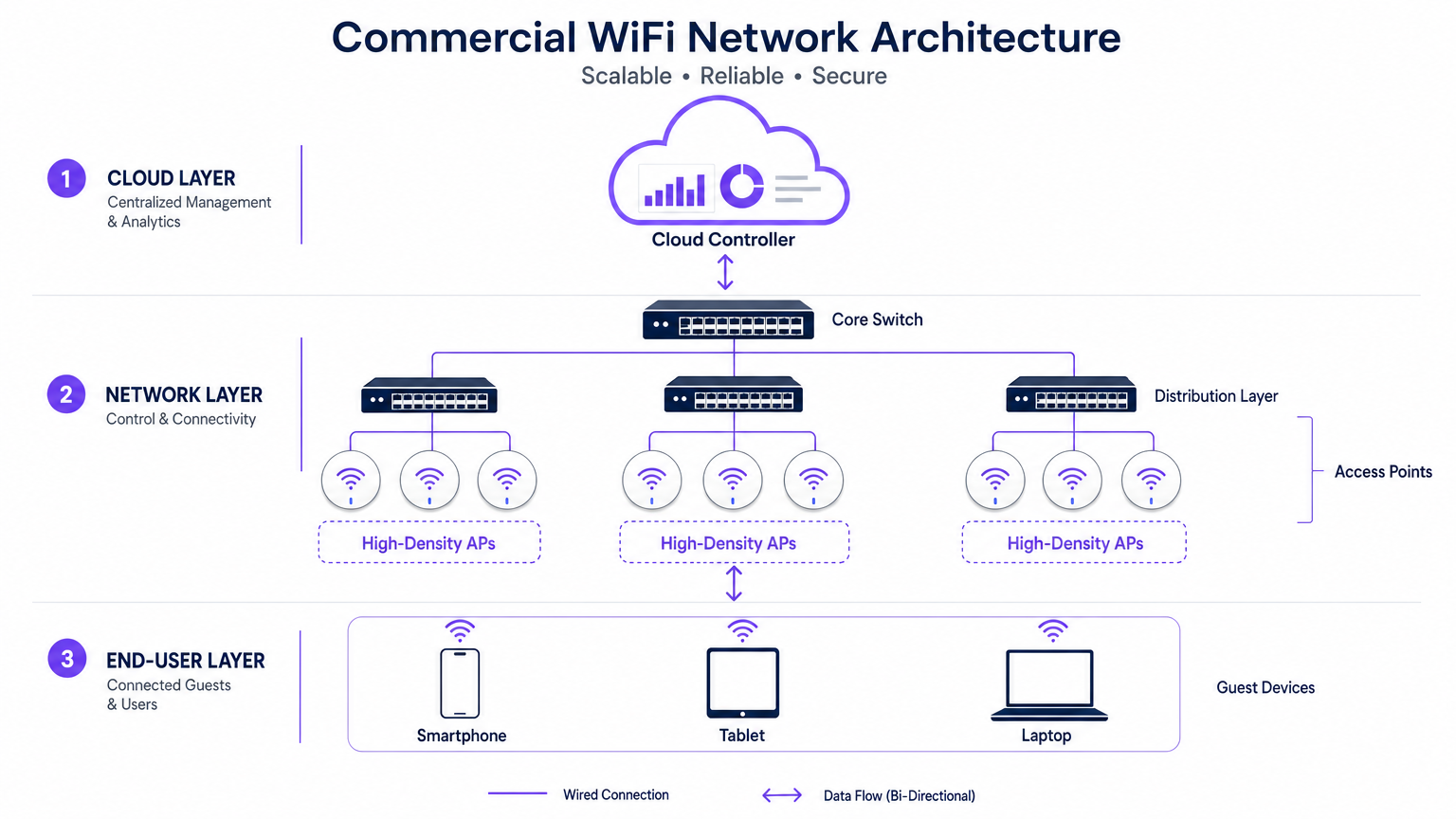
- एज (एक्सेस लेयर): इसमें 802.11ax (WiFi 6) या WiFi 6E जैसे मानकों का उपयोग करने वाले उच्च-घनत्व एक्सेस पॉइंट (APs) शामिल हैं। ये APs सैकड़ों समवर्ती क्लाइंट डिवाइसों को महत्वपूर्ण विलंबता गिरावट के बिना संभालने के लिए ऑर्थोगोनल फ़्रीक्वेंसी-डिवीजन मल्टीपल एक्सेस (OFDMA) और मल्टी-यूज़र मल्टीपल इनपुट मल्टीपल आउटपुट (MU-MIMO) जैसी उन्नत तकनीकों की सुविधा देते हैं।
- वितरण परत: APs PoE+ या PoE++ स्विच से जुड़ते हैं, जो एक ही ईथरनेट केबल पर डेटा बैकहॉल और पावर दोनों प्रदान करते हैं, जिससे जटिल स्थानों में परिनियोजन सरल हो जाता है।
- कोर और गेटवे: ट्रैफ़िक कोर स्विच पर एकत्रित होता है, जो एंटरप्राइज़ फ़ायरवॉल और गेटवे से होकर गुजरता है जो VLAN सेगमेंटेशन, क्वालिटी ऑफ़ सर्विस (QoS) नीतियों और खतरे के शमन को लागू करते हैं।
- क्लाउड प्रबंधन परत: एक केंद्रीकृत क्लाउड कंट्रोलर मल्टी-साइट प्रोविजनिंग, रेडियो फ़्रीक्वेंसी (RF) ऑप्टिमाइज़ेशन और फ़र्मवेयर प्रबंधन के लिए एक सिंगल पेन ऑफ़ ग्लास प्रदान करता है। यह परत बाहरी सेवाओं के साथ भी एकीकृत होती है, जैसे Purple का Guest WiFi प्लेटफॉर्म, जो कनेक्ट लाइसेंस के तहत सहज OpenRoaming प्रमाणीकरण के लिए एक मुफ्त पहचान प्रदाता के रूप में कार्य करता है।
मानक और प्रोटोकॉल
एंटरप्राइज़ नेटवर्क को इंटरऑपरेबिलिटी और सुरक्षा सुनिश्चित करने के लिए कड़े प्रोटोकॉल का पालन करना चाहिए:
- 802.1X और WPA3-Enterprise: कॉर्पोरेट और स्टाफ उपकरणों के सुरक्षित, प्रमाणपत्र-आधारित प्रमाणीकरण के लिए।
- Passpoint (Hotspot 2.0): सेलुलर नेटवर्क और WiFi के बीच सेलुलर-जैसे रोमिंग को सक्षम बनाता है, जिससे अतिथि ऑनबोर्डिंग के लिए घर्षण कम होता है।
- VLAN टैगिंग (802.1Q): महत्वपूर्ण परिचालन नेटवर्क (जैसे, POS, HVAC नियंत्रण) से अतिथि ट्रैफ़िक को अलग करने के लिए आवश्यक है।
कार्यान्वयन मार्गदर्शिका
एक वाणिज्यिक WiFi सिस्टम को परिनियोजित करने के लिए सावधानीपूर्वक योजना और निष्पादन की आवश्यकता होती है। निम्नलिखित चरण बड़े स्थानों के लिए विक्रेता-तटस्थ दृष्टिकोण को रेखांकित करते हैं।
1. आवश्यकताएँ एकत्र करना और RF योजना
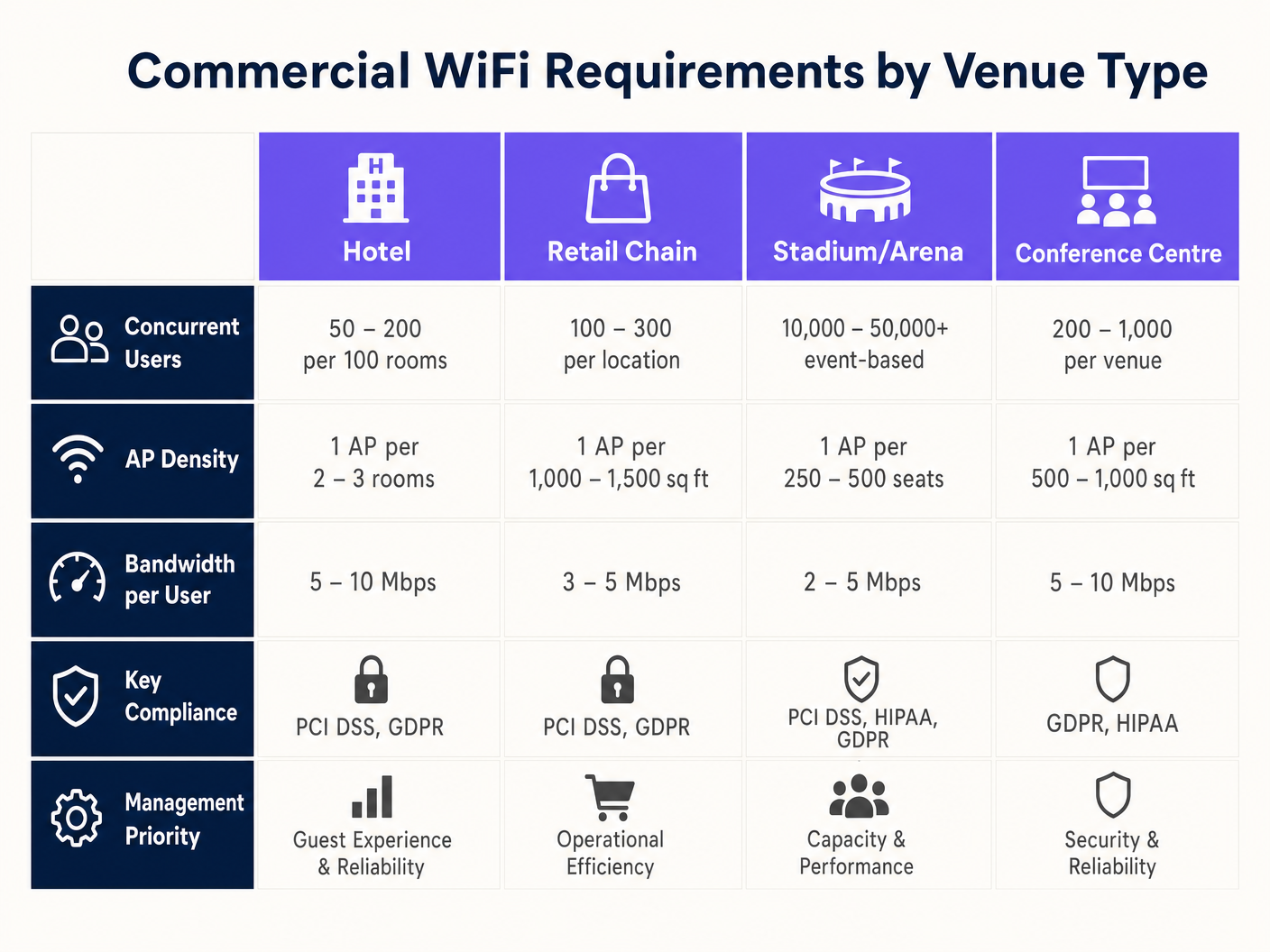
वाणिज्यिक परिनियोजन में सबसे आम विफलता क्षमता के बजाय कवरेज के लिए डिज़ाइन करना है। जबकि एक सिंगल AP 3,000 वर्ग फुट क्षेत्र को कवर कर सकता है, यह एक कॉन्फ्रेंस हॉल में 500 समवर्ती उपयोगकर्ताओं को संभाल नहीं सकता है।
- डिवाइस घनत्व परिभाषित करें: उपयोगकर्ताओं की अपेक्षित संख्या की गणना करें और प्रति उपयोगकर्ता औसत डिवाइस (आमतौर पर 1.5 से 2) से गुणा करें।
- एक भविष्य कहनेवाला सर्वेक्षण करें: पर्यावरण को मॉडल करने के लिए विशेष सॉफ़्टवेयर (जैसे, Ekahau) का उपयोग करें, जिसमें दीवार क्षीणन (ड्राईवॉल बनाम कंक्रीट) और छत की ऊँचाई का हिसाब हो।
- सह-चैनल हस्तक्षेप (CCI) के लिए योजना बनाएं: उच्च-घनत्व वाले क्षेत्रों में, छोटे, गैर-अतिव्यापी माइक्रो-सेल बनाने के लिए दिशात्मक एंटेना का उपयोग करें और ट्रांसमिट पावर कम करें।
2. हार्डवेयर चयन और प्रोविजनिंग
विशिष्ट पर्यावरणीय आवश्यकताओं के आधार पर APs का चयन करें। आउटडोर स्टेडियमों को IP67-रेटेड संलग्नक की आवश्यकता होती है, जबकि Retail वातावरण सौंदर्यपूर्ण, कम-प्रोफ़ाइल डिज़ाइन को प्राथमिकता दे सकते हैं। सुनिश्चित करें कि सभी स्विच चयनित APs को पावर देने के लिए आवश्यक PoE बजट का समर्थन करते हैं, खासकर जब पावर-हंग्री WiFi 6E मॉडल तैनात कर रहे हों।
3. कॉन्फ़िगरेशन और नीति प्रवर्तन
महत्वपूर्ण अनुप्रयोगों को प्राथमिकता देने और बैंडविड्थ की सुरक्षा के लिए नेटवर्क को कॉन्फ़िगर करें। ट्रैफ़िक शेपिंग पर मार्गदर्शन के लिए, How to Manage Bandwidth on a WiFi Network देखें।
- बैंड स्टीयरिंग लागू करें: सक्षम क्लाइंट को कम भीड़भाड़ वाले 5GHz या 6GHz बैंड पर मजबूर करें।
- प्रति-उपयोगकर्ता सीमाएँ निर्धारित करें: एक ही उपयोगकर्ता को दूसरों के लिए अनुभव खराब करने से रोकने के लिए व्यक्तिगत अतिथि बैंडविड्थ (जैसे, 5 Mbps) को सीमित करें।
- Captive Portals कॉन्फ़िगर करें: फर्स्ट-पार्टी डेटा कैप्चर करने और एक्सेस प्रदान करने से पहले नियम और शर्तें लागू करने के लिए Purple जैसे प्लेटफॉर्म के साथ एकीकृत करें।
सर्वोत्तम अभ्यास
- सब कुछ खंडित करें: अतिथि उपकरणों को कभी भी कॉर्पोरेट संपत्तियों के समान VLAN पर अनुमति न दें। अलग सबनेट का उपयोग करें और सख्त फ़ायरवॉल नियम लागू करें।
- RF प्रबंधन को स्वचालित करें: बदलती पर्यावरणीय परिस्थितियों के अनुकूल होने के लिए क्लाउड कंट्रोलर पर गतिशील चैनल चयन और ट्रांसमिट पावर नियंत्रण सक्षम करें।
- निर्बाध रोमिंग को प्राथमिकता दें: सुनिश्चित करें कि 802.11r (फास्ट BSS ट्रांज़िशन) जैसे प्रोटोकॉल सक्षम हैं ताकि कर्मचारियों के स्थल से गुजरने पर VoIP कॉल ड्रॉप या POS डिस्कनेक्शन को रोका जा सके। यह Healthcare वातावरण में विशेष रूप से महत्वपूर्ण है; अधिक विवरण के लिए, WiFi in Hospitals: A Guide to Secure Clinical Netwकार्य .
समस्या निवारण और जोखिम न्यूनीकरण
यहां तक कि अच्छी तरह से डिज़ाइन किए गए नेटवर्क में भी समस्याएँ आती हैं। IT टीमों को सामान्य विफलता मोड का निदान और समाधान करने के लिए तैयार रहना होगा।
- उच्च चैनल उपयोगिता: यदि उपयोगकर्ता मजबूत सिग्नल के बावजूद धीमी गति की रिपोर्ट करते हैं, तो चैनल उपयोगिता की जाँच करें। यदि यह 50% से अधिक है, तो चैनल भीड़भाड़ वाला है। शमन में कम ट्रांसमिट पावर वाले अधिक AP जोड़ना या व्यापक चैनलों का उपयोग करना शामिल है (यदि हस्तक्षेप अनुमति देता है)।
- स्टिकी क्लाइंट्स: वे डिवाइस जो किसी नज़दीकी AP पर रोम करने से इनकार करते हैं, वे समग्र नेटवर्क प्रदर्शन को कम कर देते हैं। शमन में न्यूनतम बुनियादी दरों को ट्यून करना शामिल है (विरासत 1 Mbps और 2 Mbps दरों को अक्षम करना) ताकि क्लाइंट्स को डिस्कनेक्ट करने और एक मजबूत सिग्नल के साथ जुड़ने के लिए मजबूर किया जा सके।
- Captive Portal विफलताएँ: यदि मेहमान लॉगिन पृष्ठ नहीं देख पा रहे हैं, तो DNS रिज़ॉल्यूशन सत्यापित करें और सुनिश्चित करें कि walled garden (प्रमाणीकरण से पहले अनुमत IP पते) Captive Portal प्रदाता के लिए सही ढंग से कॉन्फ़िगर किया गया है।
ROI और व्यावसायिक प्रभाव
एक वाणिज्यिक WiFi सिस्टम एक महत्वपूर्ण पूंजीगत व्यय है, लेकिन इसे साधारण कनेक्टिविटी से परे मापने योग्य रिटर्न देना चाहिए।
- परिचालन दक्षता: विश्वसनीय कनेक्टिविटी मोबाइल POS, इन्वेंट्री प्रबंधन और कर्मचारियों के संचार का समर्थन करती है, जिससे डाउनटाइम कम होता है और सेवा वितरण में सुधार होता है।
- ग्राहक अनुभव: तेज़, घर्षण-रहित इंटरनेट एक्सेस ठहरने के समय और ग्राहक संतुष्टि को बढ़ाता है, जिससे Hospitality और खुदरा सेटिंग्स में राजस्व सीधे प्रभावित होता है।
- डेटा मुद्रीकरण: एक WiFi Analytics प्लेटफॉर्म के साथ एकीकृत करके, स्थल जनसांख्यिकीय डेटा कैप्चर कर सकते हैं, फुटफॉल पैटर्न को ट्रैक कर सकते हैं और लक्षित मार्केटिंग अभियान चला सकते हैं। यह नेटवर्क को एक रणनीतिक संपत्ति में बदल देता है जो वफादारी और बार-बार आने को बढ़ावा देता है।
मुख्य शब्द और परिभाषाएं
High-Density Deployment
A network design specifically engineered to support a massive number of concurrent devices in a confined space (e.g., a stadium or conference centre) without performance degradation.
Crucial for IT managers planning networks for events or busy retail environments where standard coverage models fail.
Co-Channel Interference (CCI)
Performance degradation that occurs when multiple Access Points in close proximity transmit on the same frequency channel, forcing devices to wait for clear airtime.
A primary cause of slow WiFi in dense deployments; mitigated by careful channel planning and reducing AP transmit power.
Band Steering
A network feature that automatically encourages dual-band capable devices to connect to the faster, less congested 5GHz or 6GHz bands instead of the crowded 2.4GHz band.
Used by network administrators to optimize airtime utilization and improve the user experience.
VLAN (Virtual Local Area Network)
A logical grouping of network devices that isolates traffic, even if the devices share the same physical infrastructure (switches and APs).
Essential for maintaining security and PCI compliance by separating guest traffic from point-of-sale systems.
Captive Portal
A web page that users are forced to view and interact with before access is granted to a public WiFi network, often used for authentication, accepting terms, or capturing marketing data.
The primary interface for integrating marketing and analytics platforms (like Purple) with the physical network.
OpenRoaming
A wireless industry standard that allows users to automatically and securely connect to participating WiFi networks without needing to find the network, enter a password, or use a captive portal.
Provides a seamless, cellular-like experience for guests; Purple acts as a free identity provider for this service.
802.11ax (WiFi 6)
The wireless standard designed specifically to improve efficiency and capacity in dense environments, utilizing technologies like OFDMA to serve multiple clients simultaneously.
The baseline standard IT directors should require when executing a hardware refresh for commercial venues.
Sticky Client
A wireless device that remains connected to an Access Point even when a closer, stronger AP is available, degrading performance for itself and other users on that AP.
A common troubleshooting issue resolved by tuning minimum basic rates and roaming protocols.
केस स्टडीज
A 300-room luxury hotel is experiencing complaints about slow WiFi during the evening peak hours (7 PM - 10 PM). The current deployment uses one AP in the hallway for every four rooms. How should the IT Director redesign the network to resolve this?
The IT Director must shift from a 'hallway coverage' model to an 'in-room capacity' model. 1. Conduct an active site survey to measure signal attenuation through the hotel room doors and walls (often heavy fire doors and soundproofed walls). 2. Deploy wall-plate APs directly inside every room or every other room, rather than relying on high-powered hallway APs. 3. Configure the switch ports to provide PoE to the new wall-plate APs. 4. Implement strict bandwidth management policies on the cloud controller, capping per-user throughput at 15 Mbps to ensure fair distribution during peak streaming hours.
A large retail chain wants to deploy Guest WiFi across 50 locations to capture customer emails for their loyalty program, but the CISO is concerned about PCI DSS compliance for the point-of-sale (POS) systems.
- Implement strict network segmentation using VLANs. Assign POS devices to VLAN 10 and Guest WiFi to VLAN 20. 2. Configure the enterprise firewall to block all routing between VLAN 10 and VLAN 20. 3. Deploy a cloud-managed WiFi solution that supports centralized policy enforcement across all 50 sites. 4. Integrate a captive portal (like Purple) on the Guest SSID to capture emails and require users to accept Terms and Conditions before accessing the internet. 5. Ensure the Guest SSID uses client isolation so guest devices cannot communicate with each other.
परिदृश्य विश्लेषण
Q1. You are designing a WiFi network for a new 10,000-seat indoor arena. The business requires high-speed connectivity for a fan engagement app. Should you deploy a small number of high-powered APs mounted high on the ceiling, or a large number of low-powered APs mounted under the seats?
💡 संकेत:Consider the impact of Co-Channel Interference (CCI) and the physical bodies of the attendees on the RF signal.
अनुशंसित दृष्टिकोण दिखाएं
You should deploy a large number of low-powered APs mounted under the seats (pico-cell design). In a high-density environment like an arena, capacity is the primary constraint, not coverage. High-powered ceiling APs would cause massive Co-Channel Interference (CCI) because their signals would overlap significantly. By placing APs under the seats and turning down the transmit power, the physical bodies of the attendees act as RF attenuators, helping to isolate the cells and allowing you to reuse channels more frequently, drastically increasing overall network capacity.
Q2. A retail client wants to offer free Guest WiFi but is concerned that neighboring businesses will use the connection, consuming bandwidth and skewing the analytics data. What configuration changes should you recommend?
💡 संकेत:Think about how to control session duration and authenticate users.
अनुशंसित दृष्टिकोण दिखाएं
Implement a Captive Portal (like Purple) that requires users to authenticate (e.g., via email or social login) before accessing the internet. Additionally, configure session limits (e.g., forcing a re-authentication after 2 hours) and implement bandwidth throttling per user (e.g., capping speeds at 3 Mbps). This ensures only genuine customers willing to provide data get access, prevents bandwidth hogging, and provides accurate demographic data for the analytics platform.
Q3. During a network audit of a hospital, you discover that the Guest WiFi SSID and the clinical VoIP phones are operating on the same VLAN. What is the immediate risk, and how do you remediate it?
💡 संकेत:Consider the security implications and the impact of broadcast traffic on sensitive devices.
अनुशंसित दृष्टिकोण दिखाएं
The immediate risk is a severe security vulnerability (guests could potentially access or attack clinical devices) and performance degradation (guest broadcast traffic could disrupt sensitive VoIP communications). Remediation requires immediate network segmentation. You must create separate VLANs for Guest traffic and Clinical traffic. Configure the switch ports and APs to tag the traffic appropriately (802.1Q), and update the core firewall rules to strictly deny any routing between the Guest VLAN and the Clinical VLAN.




