

Kommerzielle WiFi-Systeme: Was große Unternehmen wissen müssen
Dieser technische Leitfaden bietet IT-Führungskräften und Betreibern von Veranstaltungsorten umsetzbare Einblicke in die Planung, Bereitstellung und Verwaltung kommerzieller WiFi-Systeme. Er behandelt hochdichte Architekturen, Sicherheitskonformität, Anbieterauswahl und wie Netzwerkdaten für Business Intelligence genutzt werden können.
🎧 Diesen Leitfaden anhören
Transkript anzeigen

Zusammenfassung für Führungskräfte
Für Unternehmensstandorte – von Stadien mit 50.000 Plätzen bis hin zu Einzelhandelsketten mit mehreren Standorten – stellen drahtlose Netzwerke der Verbraucherklasse ein erhebliches Betriebsrisiko dar. Ein kommerzielles WiFi-System dient nicht nur der Bereitstellung von Internetzugang; es ist eine kritische Infrastrukturschicht, die Point-of-Sale (POS)-Systeme, IoT-Sensoren, Mitarbeiterkommunikation und Gästebindung unterstützt. Dieser Leitfaden beschreibt die technischen Anforderungen für hochdichte Bereitstellungen, wobei der Schwerpunkt auf Kapazitätsplanung, Cloud-verwalteten Architekturen und strengen Sicherheitsstandards wie PCI DSS und GDPR liegt. Durch die Integration robuster Hardware mit Plattformen wie WiFi Analytics können IT-Führungskräfte ihre drahtlose Infrastruktur von einem Kostenfaktor in einen umsatzgenerierenden Vermögenswert verwandeln, der durch die Erfassung von Erstanbieterdaten und eine verbesserte Betriebseffizienz einen messbaren ROI liefert.
Technischer Tiefgang
Architektur und Topologie
Kommerzielle WiFi-Systeme erfordern eine strukturierte, mehrstufige Architektur, die auf Ausfallsicherheit und Skalierbarkeit ausgelegt ist. Im Gegensatz zu flachen Netzwerken segmentieren Unternehmensbereitstellungen den Datenverkehr und zentralisieren die Steuerung.
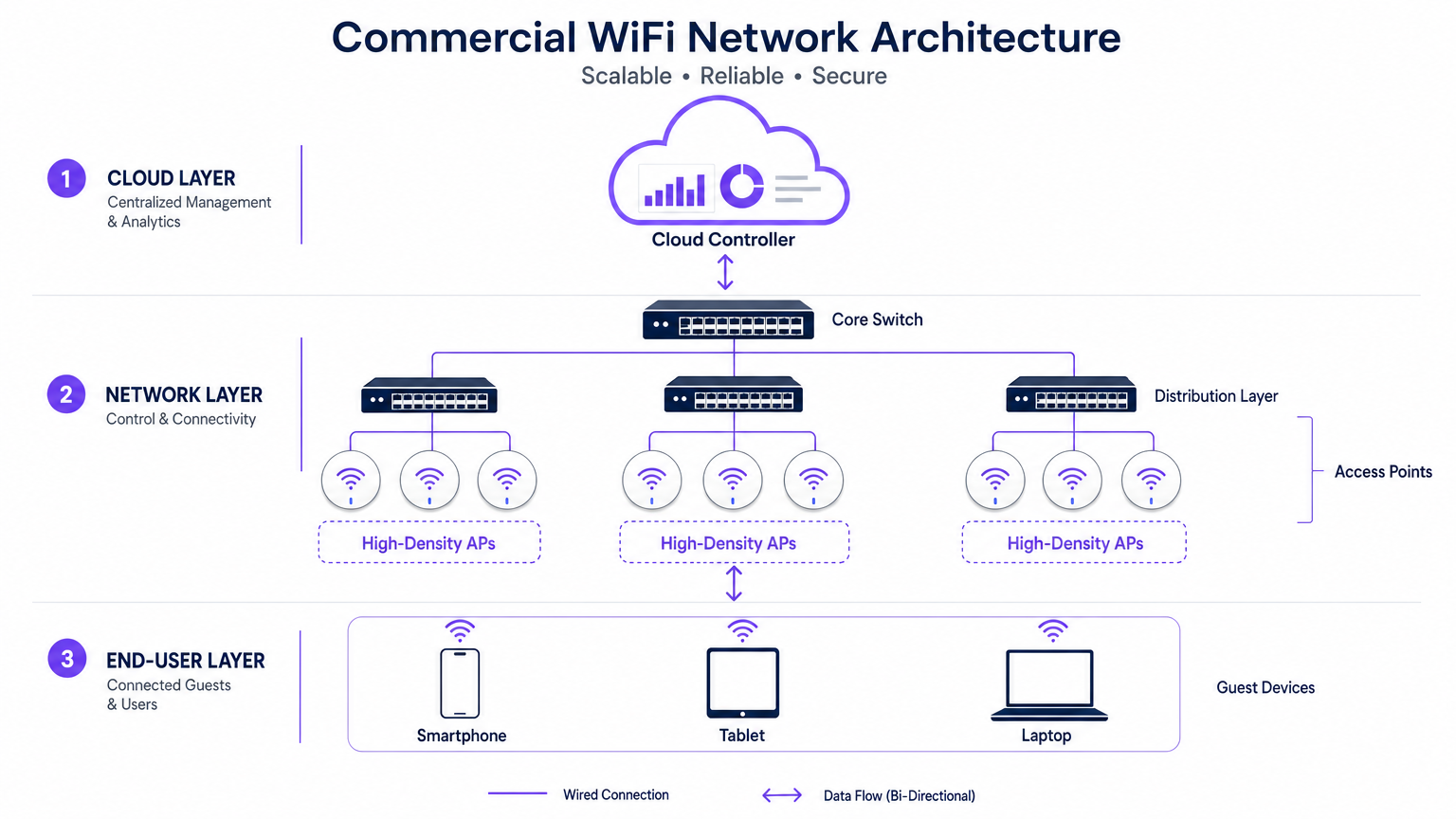
- Der Edge (Zugangsschicht): Diese besteht aus High-Density Access Points (APs), die Standards wie 802.11ax (WiFi 6) oder WiFi 6E nutzen. Diese APs verfügen über fortschrittliche Technologien wie Orthogonal Frequency-Division Multiple Access (OFDMA) und Multi-User Multiple Input Multiple Output (MU-MIMO), um Hunderte von gleichzeitigen Client-Geräten ohne signifikante Latenzverschlechterung zu verwalten.
- Die Verteilungsschicht: APs werden an PoE+- oder PoE++-Switches angeschlossen, die sowohl Daten-Backhaul als auch Strom über ein einziges Ethernet-Kabel bereitstellen, was die Bereitstellung an komplexen Standorten vereinfacht.
- Der Core und das Gateway: Der Datenverkehr wird am Core-Switch aggregiert und durchläuft Unternehmens-Firewalls und Gateways, die VLAN-Segmentierung, Quality of Service (QoS)-Richtlinien und Bedrohungsabwehr durchsetzen.
- Die Cloud-Management-Schicht: Ein zentralisierter Cloud-Controller bietet eine zentrale Oberfläche für die standortübergreifende Bereitstellung, Radio Frequency (RF)-Optimierung und Firmware-Verwaltung. Diese Schicht integriert sich auch mit externen Diensten, wie der Guest WiFi -Plattform von Purple, die als kostenloser Identitätsanbieter für die nahtlose OpenRoaming-Authentifizierung unter der Connect-Lizenz fungiert.
Standards und Protokolle
Unternehmensnetzwerke müssen strenge Protokolle einhalten, um Interoperabilität und Sicherheit zu gewährleisten:
- 802.1X und WPA3-Enterprise: Für die sichere, zertifikatbasierte Authentifizierung von Unternehmens- und Mitarbeitergeräten.
- Passpoint (Hotspot 2.0): Ermöglicht zelluläres Roaming zwischen Mobilfunknetzen und WiFi, wodurch die Reibung bei der Gästeanmeldung reduziert wird.
- VLAN Tagging (802.1Q): Wesentlich für die Isolierung des Gastdatenverkehrs von kritischen Betriebsnetzwerken (z. B. POS, HLK-Steuerungen).
Implementierungsleitfaden
Die Bereitstellung eines kommerziellen WiFi-Systems erfordert eine sorgfältige Planung und Ausführung. Die folgenden Schritte beschreiben einen herstellerneutralen Ansatz für große Veranstaltungsorte.
1. Anforderungserfassung und RF-Planung
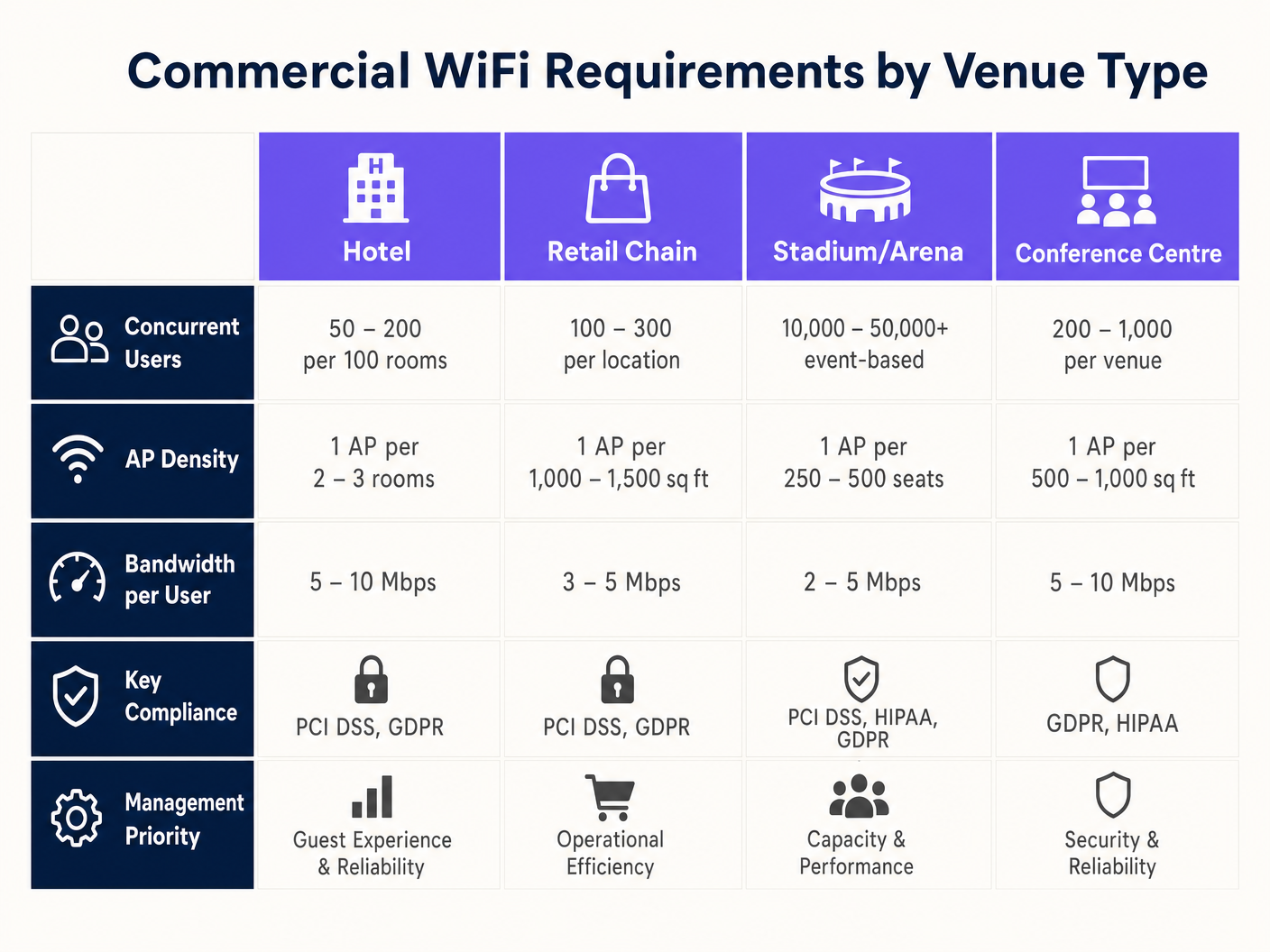
Der häufigste Fehler bei kommerziellen Bereitstellungen ist die Planung auf Abdeckung statt auf Kapazität. Während ein einzelner AP eine Fläche von 3.000 Quadratfuß abdecken kann, kann er 500 gleichzeitige Benutzer in einem Konferenzsaal nicht verwalten.
- Gerätedichte definieren: Berechnen Sie die erwartete Anzahl von Benutzern und multiplizieren Sie diese mit der durchschnittlichen Anzahl von Geräten pro Benutzer (typischerweise 1,5 bis 2).
- Eine prädiktive Umfrage durchführen: Verwenden Sie spezielle Software (z. B. Ekahau), um die Umgebung zu modellieren, unter Berücksichtigung von Wanddämpfung (Trockenbau vs. Beton) und Deckenhöhen.
- Planen Sie für Co-Channel Interference (CCI): In hochdichten Bereichen verwenden Sie Richtantennen und reduzieren Sie die Sendeleistung, um kleinere, nicht überlappende Mikrozellen zu erstellen.
2. Hardwareauswahl und Bereitstellung
Wählen Sie APs basierend auf den spezifischen Umgebungsanforderungen aus. Außenstadien erfordern IP67-zertifizierte Gehäuse, während Einzelhandels -Umgebungen ästhetische, flache Designs bevorzugen können. Stellen Sie sicher, dass alle Switches das erforderliche PoE-Budget unterstützen, um die ausgewählten APs mit Strom zu versorgen, insbesondere bei der Bereitstellung stromhungriger WiFi 6E-Modelle.
3. Konfiguration und Richtliniendurchsetzung
Konfigurieren Sie das Netzwerk, um kritische Anwendungen zu priorisieren und die Bandbreite zu schützen. Anleitungen zur Traffic-Shaping finden Sie unter So verwalten Sie die Bandbreite in einem WiFi-Netzwerk .
- Band Steering implementieren: Führen Sie fähige Clients zu den weniger überlasteten 5GHz- oder 6GHz-Bändern.
- Benutzerbezogene Limits festlegen: Begrenzen Sie die individuelle Gastbandbreite (z. B. 5 Mbit/s), um zu verhindern, dass ein einzelner Benutzer die Erfahrung für andere beeinträchtigt.
- Captive Portals konfigurieren: Integrieren Sie sich mit Plattformen wie Purple, um Erstanbieterdaten zu erfassen und Nutzungsbedingungen durchzusetzen, bevor der Zugriff gewährt wird.
Best Practices
- Alles segmentieren: Erlauben Sie niemals Gastgeräte im selben VLAN wie Unternehmensressourcen. Verwenden Sie separate Subnetze und erzwingen Sie strenge Firewall-Regeln.
- RF-Management automatisieren: Aktivieren Sie die dynamische Kanalauswahl und die Sendeleistungssteuerung auf dem Cloud-Controller, um sich an wechselnde Umgebungsbedingungen anzupassen.
- Nahtloses Roaming priorisieren: Stellen Sie sicher, dass Protokolle wie 802.11r (Fast BSS Transition) aktiviert sind, um unterbrochene VoIP-Anrufe oder POS-Verbindungsabbrüche zu verhindern, wenn sich Mitarbeiter durch den Veranstaltungsort bewegen. Dies ist besonders kritisch in Healthcare -Umgebungen; weitere Details finden Sie in unserem Leitfaden zu WiFi in Krankenhäusern: Ein Leitfaden für sichere klinische Netzworks .
Fehlerbehebung & Risikominderung
Selbst gut konzipierte Netzwerke stoßen auf Probleme. IT-Teams müssen darauf vorbereitet sein, häufige Fehlerursachen zu diagnostizieren und zu beheben.
- Hohe Kanalauslastung: Wenn Benutzer trotz starkem Signal langsame Geschwindigkeiten melden, überprüfen Sie die Kanalauslastung. Überschreitet sie 50 %, ist der Kanal überlastet. Die Abhilfe besteht darin, mehr APs mit geringerer Sendeleistung hinzuzufügen oder breitere Kanäle zu nutzen (sofern Interferenzen dies zulassen).
- Haftende Clients: Geräte, die sich weigern, zu einem näheren AP zu wechseln, beeinträchtigen die gesamte Netzwerkleistung. Die Abhilfe besteht darin, die minimalen Basisraten anzupassen (Deaktivierung der älteren 1-Mbit/s- und 2-Mbit/s-Raten), um Clients zum Trennen und Verbinden mit einem stärkeren Signal zu zwingen.
- Captive Portal-Fehler: Wenn Gäste die Anmeldeseite nicht sehen können, überprüfen Sie die DNS-Auflösung und stellen Sie sicher, dass der Walled Garden (erlaubte IP addresses vor der Authentifizierung) für den Captive Portal-Anbieter korrekt konfiguriert ist.
ROI & Geschäftsauswirkungen
Ein kommerzielles WiFi-System ist eine erhebliche Kapitalinvestition, sollte aber messbare Erträge über die einfache Konnektivität hinaus liefern.
- Betriebliche Effizienz: Zuverlässige Konnektivität unterstützt mobiles POS, Bestandsverwaltung und Mitarbeiterkommunikation, reduziert Ausfallzeiten und verbessert die Servicebereitstellung.
- Kundenerlebnis: Schneller, reibungsloser Internetzugang erhöht die Verweildauer und Kundenzufriedenheit und wirkt sich direkt auf den Umsatz im Gastgewerbe und im Einzelhandel aus.
- Datenmonetarisierung: Durch die Integration mit einer WiFi Analytics-Plattform können Veranstaltungsorte demografische Daten erfassen, Besucherströme verfolgen und gezielte Marketingkampagnen durchführen. Dies verwandelt das Netzwerk in einen strategischen Vermögenswert, der Loyalität und wiederholte Besuche fördert.
Schlüsselbegriffe & Definitionen
High-Density Deployment
A network design specifically engineered to support a massive number of concurrent devices in a confined space (e.g., a stadium or conference centre) without performance degradation.
Crucial for IT managers planning networks for events or busy retail environments where standard coverage models fail.
Co-Channel Interference (CCI)
Performance degradation that occurs when multiple Access Points in close proximity transmit on the same frequency channel, forcing devices to wait for clear airtime.
A primary cause of slow WiFi in dense deployments; mitigated by careful channel planning and reducing AP transmit power.
Band Steering
A network feature that automatically encourages dual-band capable devices to connect to the faster, less congested 5GHz or 6GHz bands instead of the crowded 2.4GHz band.
Used by network administrators to optimize airtime utilization and improve the user experience.
VLAN (Virtual Local Area Network)
A logical grouping of network devices that isolates traffic, even if the devices share the same physical infrastructure (switches and APs).
Essential for maintaining security and PCI compliance by separating guest traffic from point-of-sale systems.
Captive Portal
A web page that users are forced to view and interact with before access is granted to a public WiFi network, often used for authentication, accepting terms, or capturing marketing data.
The primary interface for integrating marketing and analytics platforms (like Purple) with the physical network.
OpenRoaming
A wireless industry standard that allows users to automatically and securely connect to participating WiFi networks without needing to find the network, enter a password, or use a captive portal.
Provides a seamless, cellular-like experience for guests; Purple acts as a free identity provider for this service.
802.11ax (WiFi 6)
The wireless standard designed specifically to improve efficiency and capacity in dense environments, utilizing technologies like OFDMA to serve multiple clients simultaneously.
The baseline standard IT directors should require when executing a hardware refresh for commercial venues.
Sticky Client
A wireless device that remains connected to an Access Point even when a closer, stronger AP is available, degrading performance for itself and other users on that AP.
A common troubleshooting issue resolved by tuning minimum basic rates and roaming protocols.
Fallstudien
A 300-room luxury hotel is experiencing complaints about slow WiFi during the evening peak hours (7 PM - 10 PM). The current deployment uses one AP in the hallway for every four rooms. How should the IT Director redesign the network to resolve this?
The IT Director must shift from a 'hallway coverage' model to an 'in-room capacity' model. 1. Conduct an active site survey to measure signal attenuation through the hotel room doors and walls (often heavy fire doors and soundproofed walls). 2. Deploy wall-plate APs directly inside every room or every other room, rather than relying on high-powered hallway APs. 3. Configure the switch ports to provide PoE to the new wall-plate APs. 4. Implement strict bandwidth management policies on the cloud controller, capping per-user throughput at 15 Mbps to ensure fair distribution during peak streaming hours.
A large retail chain wants to deploy Guest WiFi across 50 locations to capture customer emails for their loyalty program, but the CISO is concerned about PCI DSS compliance for the point-of-sale (POS) systems.
- Implement strict network segmentation using VLANs. Assign POS devices to VLAN 10 and Guest WiFi to VLAN 20. 2. Configure the enterprise firewall to block all routing between VLAN 10 and VLAN 20. 3. Deploy a cloud-managed WiFi solution that supports centralized policy enforcement across all 50 sites. 4. Integrate a captive portal (like Purple) on the Guest SSID to capture emails and require users to accept Terms and Conditions before accessing the internet. 5. Ensure the Guest SSID uses client isolation so guest devices cannot communicate with each other.
Szenarioanalyse
Q1. You are designing a WiFi network for a new 10,000-seat indoor arena. The business requires high-speed connectivity for a fan engagement app. Should you deploy a small number of high-powered APs mounted high on the ceiling, or a large number of low-powered APs mounted under the seats?
💡 Hinweis:Consider the impact of Co-Channel Interference (CCI) and the physical bodies of the attendees on the RF signal.
Empfohlenen Ansatz anzeigen
You should deploy a large number of low-powered APs mounted under the seats (pico-cell design). In a high-density environment like an arena, capacity is the primary constraint, not coverage. High-powered ceiling APs would cause massive Co-Channel Interference (CCI) because their signals would overlap significantly. By placing APs under the seats and turning down the transmit power, the physical bodies of the attendees act as RF attenuators, helping to isolate the cells and allowing you to reuse channels more frequently, drastically increasing overall network capacity.
Q2. A retail client wants to offer free Guest WiFi but is concerned that neighboring businesses will use the connection, consuming bandwidth and skewing the analytics data. What configuration changes should you recommend?
💡 Hinweis:Think about how to control session duration and authenticate users.
Empfohlenen Ansatz anzeigen
Implement a Captive Portal (like Purple) that requires users to authenticate (e.g., via email or social login) before accessing the internet. Additionally, configure session limits (e.g., forcing a re-authentication after 2 hours) and implement bandwidth throttling per user (e.g., capping speeds at 3 Mbps). This ensures only genuine customers willing to provide data get access, prevents bandwidth hogging, and provides accurate demographic data for the analytics platform.
Q3. During a network audit of a hospital, you discover that the Guest WiFi SSID and the clinical VoIP phones are operating on the same VLAN. What is the immediate risk, and how do you remediate it?
💡 Hinweis:Consider the security implications and the impact of broadcast traffic on sensitive devices.
Empfohlenen Ansatz anzeigen
The immediate risk is a severe security vulnerability (guests could potentially access or attack clinical devices) and performance degradation (guest broadcast traffic could disrupt sensitive VoIP communications). Remediation requires immediate network segmentation. You must create separate VLANs for Guest traffic and Clinical traffic. Configure the switch ports and APs to tag the traffic appropriately (802.1Q), and update the core firewall rules to strictly deny any routing between the Guest VLAN and the Clinical VLAN.




