

Commercial WiFi Systems: What Large Businesses Need to Know
This technical reference guide provides IT leaders and venue operators with actionable insights on designing, deploying, and managing commercial WiFi systems. It covers high-density architecture, security compliance, supplier selection, and how to utilise network data for business intelligence.
🎧 Listen to this Guide
View Transcript
Executive Summary
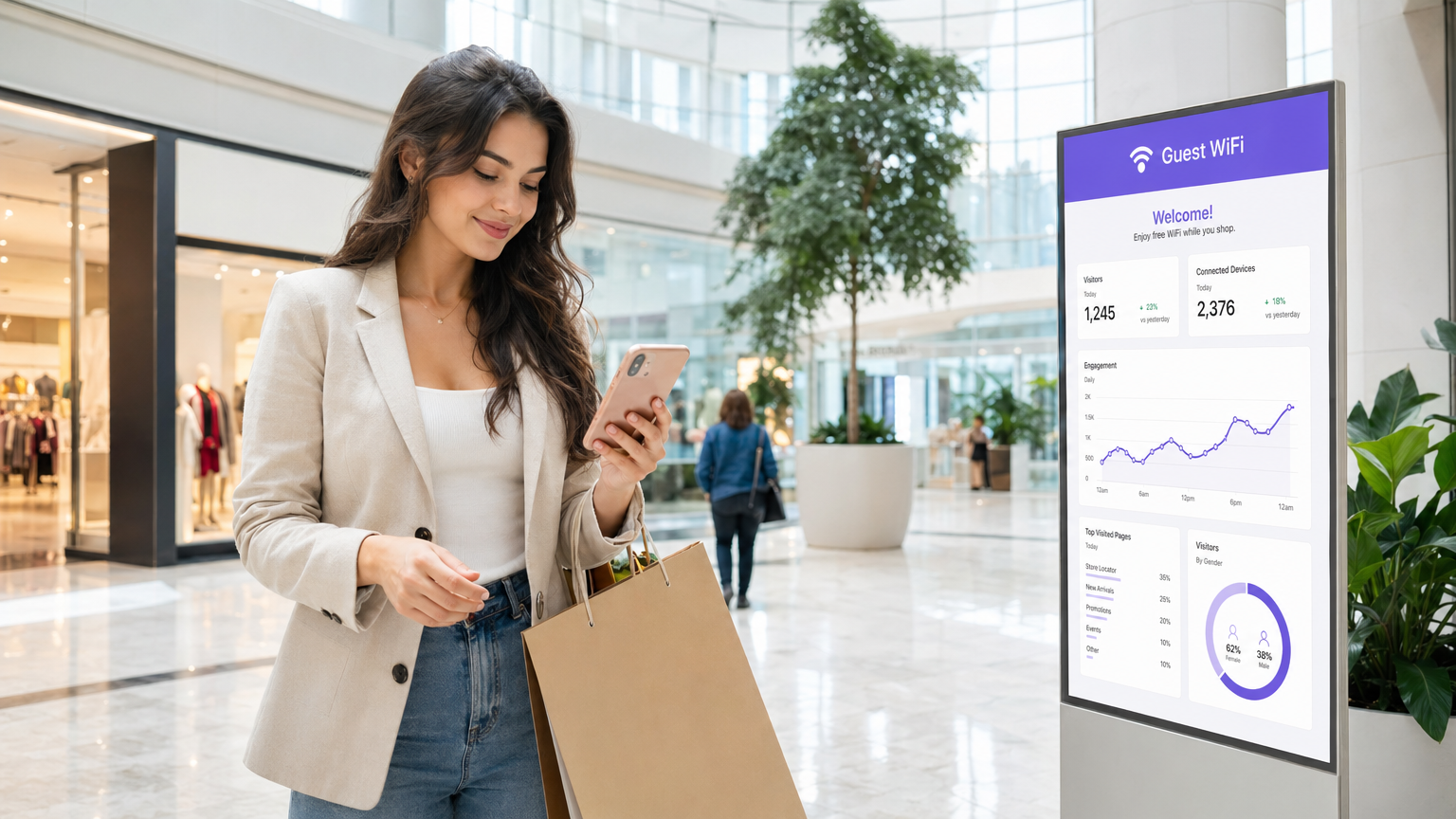
For enterprise venues—from 50,000-seat stadia to multi-site retail chains—consumer-grade wireless networks represent a significant operational risk. A commercial WiFi system is not merely about providing internet access; it is a critical infrastructure layer that supports point-of-sale (POS) systems, IoT sensors, staff communications, and guest engagement. This guide outlines the technical requirements for high-density deployments, focusing on capacity planning, cloud-managed architectures, and stringent security standards like PCI DSS and GDPR. By integrating robust hardware with platforms like WiFi Analytics , IT leaders can transform their wireless infrastructure from a cost centre into a revenue-generating asset that delivers measurable ROI through first-party data capture and enhanced operational efficiency.
Technical Deep-Dive
Architecture and Topology
Commercial WiFi systems require a structured, multi-tier architecture designed for resilience and scalability. Unlike flat networks, enterprise deployments segment traffic and centralise control.
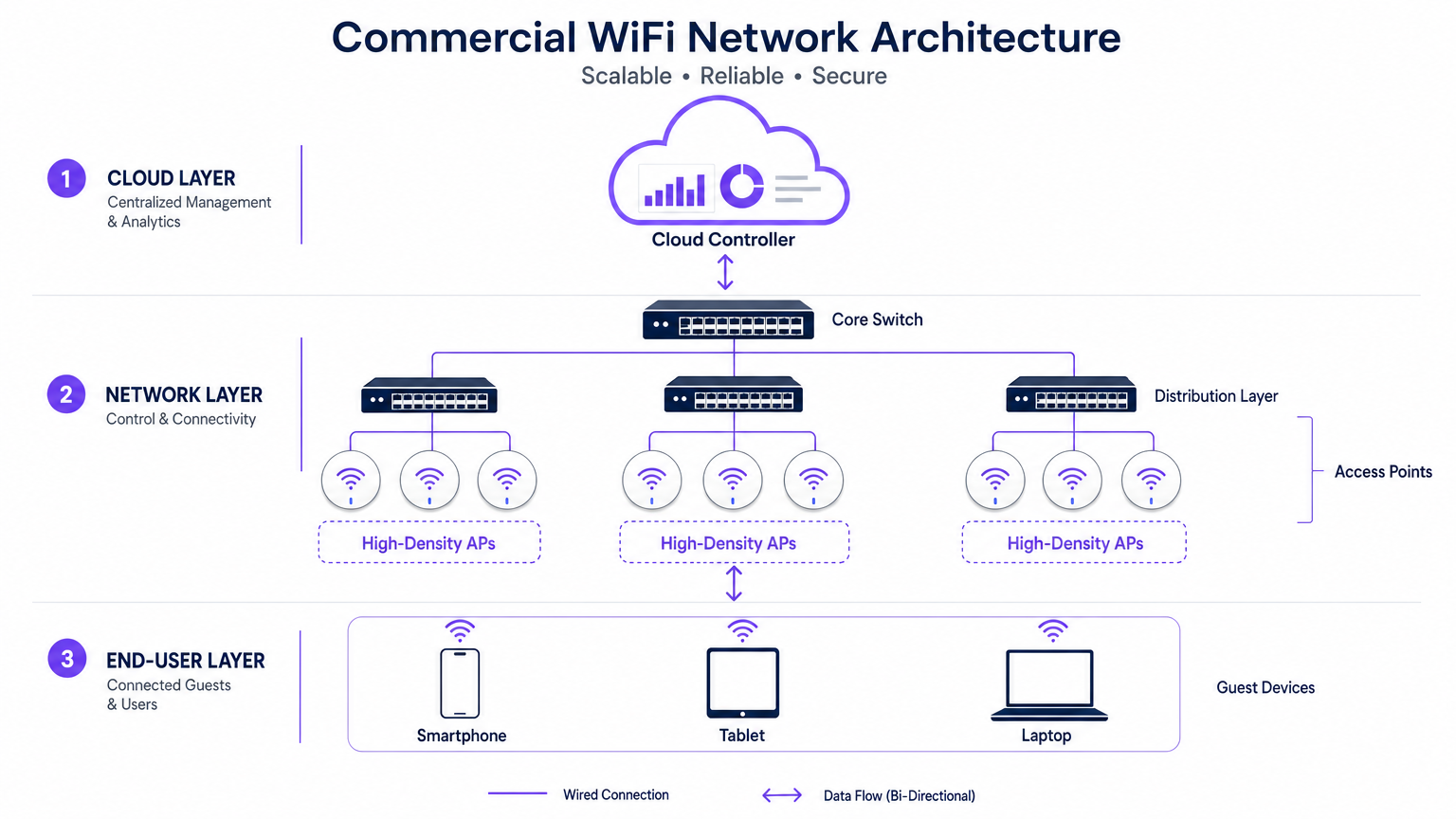
- The Edge (Access Layer): This consists of High-Density Access Points (APs) utilising standards like 802.11ax (WiFi 6) or WiFi 6E. These APs feature advanced technologies such as Orthogonal Frequency-Division Multiple Access (OFDMA) and Multi-User Multiple Input Multiple Output (MU-MIMO) to handle hundreds of concurrent client devices without significant latency degradation.
- The Distribution Layer: APs connect to PoE+ or PoE++ switches, which provide both data backhaul and power over a single Ethernet cable, simplifying deployment in complex venues.
- The Core and Gateway: Traffic aggregates at the core switch, passing through enterprise firewalls and gateways that enforce VLAN segmentation, Quality of Service (QoS) policies, and threat mitigation.
- The Cloud Management Layer: A centralised cloud controller provides a single pane of glass for multi-site provisioning, Radio Frequency (RF) optimisation, and firmware management. This layer also integrates with external services, such as Purple's Guest WiFi platform, which acts as a free identity provider for seamless OpenRoaming authentication under the Connect license.
Standards and Protocols
Enterprise networks must adhere to strict protocols to ensure interoperability and security:
- 802.1X and WPA3-Enterprise: For secure, certificate-based authentication of corporate and staff devices.
- Passpoint (Hotspot 2.0): Enables cellular-like roaming between cellular networks and WiFi, reducing friction for guest onboarding.
- VLAN Tagging (802.1Q): Essential for isolating guest traffic from critical operational networks (e.g., POS, HVAC controls).
Implementation Guide
Deploying a commercial WiFi system requires meticulous planning and execution. The following steps outline a supplier-neutral approach for large venues.
1. Requirements Gathering and RF Planning
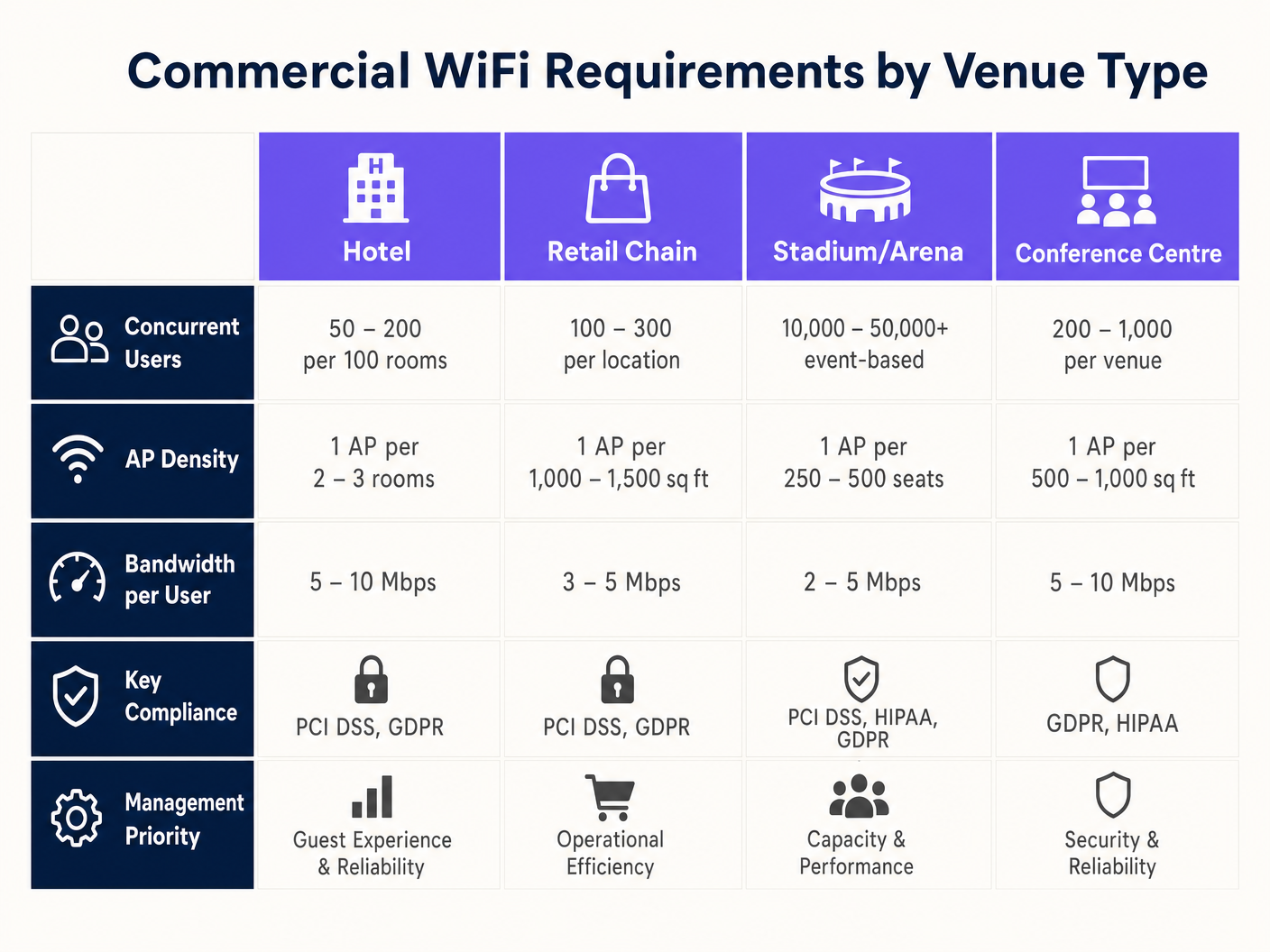
The most common failure in commercial deployments is designing for coverage rather than capacity. While a single AP might cover a 3,000 sq ft area, it cannot handle 500 concurrent users in a conference hall.
- Define Device Density: Calculate the expected number of users and multiply by the average devices per user (typically 1.5 to 2).
- Conduct a Predictive Survey: Use specialised software (e.g., Ekahau) to model the environment, accounting for wall attenuation (drywall vs. concrete) and ceiling heights.
- Plan for Co-Channel Interference (CCI): In high-density areas, use directional aerials and reduce transmit power to create smaller, non-overlapping micro-cells.
2. Hardware Selection and Provisioning
Select APs based on the specific environmental requirements. Outdoor stadia require IP67-rated enclosures, while Retail environments may prioritise aesthetic, low-profile designs. Ensure all switches support the necessary PoE budget to power the selected APs, especially when deploying power-hungry WiFi 6E models.
3. Configuration and Policy Enforcement
Configure the network to prioritise critical applications and protect bandwidth. For guidance on traffic shaping, see How to Manage Bandwidth on a WiFi Network .
- Implement Band Steering: Force capable clients to the less congested 5GHz or 6GHz bands.
- Set Per-User Limits: Cap individual guest bandwidth (e.g., 5 Mbps) to prevent a single user from degrading the experience for others.
- Configure Captive Portals: Integrate with platforms like Purple to capture first-party data and enforce Terms and Conditions before granting access.
Best Practices
- Segment Everything: Never allow guest devices on the same VLAN as corporate assets. Use separate subnets and enforce strict firewall rules.
- Automate RF Management: Enable dynamic channel selection and transmit power control on the cloud controller to adapt to changing environmental conditions.
- Prioritise Seamless Roaming: Ensure protocols like 802.11r (Fast BSS Transition) are enabled to prevent dropped VoIP calls or POS disconnections as staff move through the venue. This is particularly critical in Healthcare environments; for more details, see our guide on WiFi in Hospitals: A Guide to Secure Clinical Networks .
Troubleshooting & Risk Mitigation
Even well-designed networks encounter issues. IT teams must be prepared to diagnose and resolve common failure modes.
- High Channel Utilization: If users report slow speeds despite strong signal, check channel utilization. If it exceeds 50%, the channel is congested. Mitigation involves adding more APs with lower transmit power or utilising wider channels (if interference permits).
- Sticky Clients: Devices that refuse to roam to a closer AP drag down overall network performance. Mitigation involves tuning minimum basic rates (disabling legacy 1 Mbps and 2 Mbps rates) to force clients to disconnect and associate with a stronger signal.
- Captive Portal Failures: If guests cannot see the login page, verify DNS resolution and ensure the walled garden (allowed IP addresses prior to authentication) is correctly configured for the captive portal provider.
ROI & Business Impact
A commercial WiFi system is a significant capital expenditure, but it should deliver measurable returns beyond simple connectivity.
- Operational Efficiency: Reliable connectivity supports mobile POS, inventory management, and staff communication, reducing downtime and improving service delivery.
- Customer Experience: Fast, frictionless internet access increases dwell time and customer satisfaction, directly impacting revenue in Hospitality and retail settings.
- Data Monetisation: By integrating with a WiFi Analytics platform, venues can capture demographic data, track footfall patterns, and execute targeted marketing campaigns. This transforms the network into a strategic asset that drives loyalty and repeat visits.
Key Terms & Definitions
High-Density Deployment
A network design specifically engineered to support a massive number of concurrent devices in a confined space (e.g., a stadium or conference centre) without performance degradation.
Crucial for IT managers planning networks for events or busy retail environments where standard coverage models fail.
Co-Channel Interference (CCI)
Performance degradation that occurs when multiple Access Points in close proximity transmit on the same frequency channel, forcing devices to wait for clear airtime.
A primary cause of slow WiFi in dense deployments; mitigated by careful channel planning and reducing AP transmit power.
Band Steering
A network feature that automatically encourages dual-band capable devices to connect to the faster, less congested 5GHz or 6GHz bands instead of the crowded 2.4GHz band.
Used by network administrators to optimize airtime utilization and improve the user experience.
VLAN (Virtual Local Area Network)
A logical grouping of network devices that isolates traffic, even if the devices share the same physical infrastructure (switches and APs).
Essential for maintaining security and PCI compliance by separating guest traffic from point-of-sale systems.
Captive Portal
A web page that users are forced to view and interact with before access is granted to a public WiFi network, often used for authentication, accepting terms, or capturing marketing data.
The primary interface for integrating marketing and analytics platforms (like Purple) with the physical network.
OpenRoaming
A wireless industry standard that allows users to automatically and securely connect to participating WiFi networks without needing to find the network, enter a password, or use a captive portal.
Provides a seamless, cellular-like experience for guests; Purple acts as a free identity provider for this service.
802.11ax (WiFi 6)
The wireless standard designed specifically to improve efficiency and capacity in dense environments, utilizing technologies like OFDMA to serve multiple clients simultaneously.
The baseline standard IT directors should require when executing a hardware refresh for commercial venues.
Sticky Client
A wireless device that remains connected to an Access Point even when a closer, stronger AP is available, degrading performance for itself and other users on that AP.
A common troubleshooting issue resolved by tuning minimum basic rates and roaming protocols.
Case Studies
A 300-room luxury hotel is experiencing complaints about slow WiFi during the evening peak hours (7 PM - 10 PM). The current deployment uses one AP in the hallway for every four rooms. How should the IT Director redesign the network to resolve this?
The IT Director must shift from a 'hallway coverage' model to an 'in-room capacity' model. 1. Conduct an active site survey to measure signal attenuation through the hotel room doors and walls (often heavy fire doors and soundproofed walls). 2. Deploy wall-plate APs directly inside every room or every other room, rather than relying on high-powered hallway APs. 3. Configure the switch ports to provide PoE to the new wall-plate APs. 4. Implement strict bandwidth management policies on the cloud controller, capping per-user throughput at 15 Mbps to ensure fair distribution during peak streaming hours.
A large retail chain wants to deploy Guest WiFi across 50 locations to capture customer emails for their loyalty program, but the CISO is concerned about PCI DSS compliance for the point-of-sale (POS) systems.
- Implement strict network segmentation using VLANs. Assign POS devices to VLAN 10 and Guest WiFi to VLAN 20. 2. Configure the enterprise firewall to block all routing between VLAN 10 and VLAN 20. 3. Deploy a cloud-managed WiFi solution that supports centralized policy enforcement across all 50 sites. 4. Integrate a captive portal (like Purple) on the Guest SSID to capture emails and require users to accept Terms and Conditions before accessing the internet. 5. Ensure the Guest SSID uses client isolation so guest devices cannot communicate with each other.
Scenario Analysis
Q1. You are designing a WiFi network for a new 10,000-seat indoor arena. The business requires high-speed connectivity for a fan engagement app. Should you deploy a small number of high-powered APs mounted high on the ceiling, or a large number of low-powered APs mounted under the seats?
💡 Hint:Consider the impact of Co-Channel Interference (CCI) and the physical bodies of the attendees on the RF signal.
Show Recommended Approach
You should deploy a large number of low-powered APs mounted under the seats (pico-cell design). In a high-density environment like an arena, capacity is the primary constraint, not coverage. High-powered ceiling APs would cause massive Co-Channel Interference (CCI) because their signals would overlap significantly. By placing APs under the seats and turning down the transmit power, the physical bodies of the attendees act as RF attenuators, helping to isolate the cells and allowing you to reuse channels more frequently, drastically increasing overall network capacity.
Q2. A retail client wants to offer free Guest WiFi but is concerned that neighboring businesses will use the connection, consuming bandwidth and skewing the analytics data. What configuration changes should you recommend?
💡 Hint:Think about how to control session duration and authenticate users.
Show Recommended Approach
Implement a Captive Portal (like Purple) that requires users to authenticate (e.g., via email or social login) before accessing the internet. Additionally, configure session limits (e.g., forcing a re-authentication after 2 hours) and implement bandwidth throttling per user (e.g., capping speeds at 3 Mbps). This ensures only genuine customers willing to provide data get access, prevents bandwidth hogging, and provides accurate demographic data for the analytics platform.
Q3. During a network audit of a hospital, you discover that the Guest WiFi SSID and the clinical VoIP phones are operating on the same VLAN. What is the immediate risk, and how do you remediate it?
💡 Hint:Consider the security implications and the impact of broadcast traffic on sensitive devices.
Show Recommended Approach
The immediate risk is a severe security vulnerability (guests could potentially access or attack clinical devices) and performance degradation (guest broadcast traffic could disrupt sensitive VoIP communications). Remediation requires immediate network segmentation. You must create separate VLANs for Guest traffic and Clinical traffic. Configure the switch ports and APs to tag the traffic appropriately (802.1Q), and update the core firewall rules to strictly deny any routing between the Guest VLAN and the Clinical VLAN.




