

Sistemas WiFi Comerciais: O que Grandes Empresas Precisam Saber
Este guia de referência técnica oferece a líderes de TI e operadores de locais insights acionáveis sobre como projetar, implantar e gerenciar sistemas WiFi comerciais. Ele aborda arquitetura de alta densidade, conformidade de segurança, seleção de fornecedores e como aproveitar os dados de rede para inteligência de negócios.
🎧 Ouça este Guia
Ver Transcrição

Resumo Executivo
Para locais corporativos — de estádios com 50.000 lugares a redes de varejo com múltiplos sites — redes sem fio de nível de consumidor representam um risco operacional significativo. Um sistema WiFi comercial não se trata apenas de fornecer acesso à internet; é uma camada de infraestrutura crítica que suporta sistemas de ponto de venda (POS), sensores IoT, comunicações da equipe e engajamento de convidados. Este guia descreve os requisitos técnicos para implantações de alta densidade, focando no planejamento de capacidade, arquiteturas gerenciadas em nuvem e padrões de segurança rigorosos como PCI DSS e GDPR. Ao integrar hardware robusto com plataformas como WiFi Analytics , líderes de TI podem transformar sua infraestrutura sem fio de um centro de custo em um ativo gerador de receita que oferece ROI mensurável através da captura de dados primários e eficiência operacional aprimorada.
Análise Técnica Detalhada
Arquitetura e Topologia
Sistemas WiFi comerciais exigem uma arquitetura estruturada e de múltiplos níveis, projetada para resiliência e escalabilidade. Diferentemente de redes planas, as implantações corporativas segmentam o tráfego e centralizam o controle.
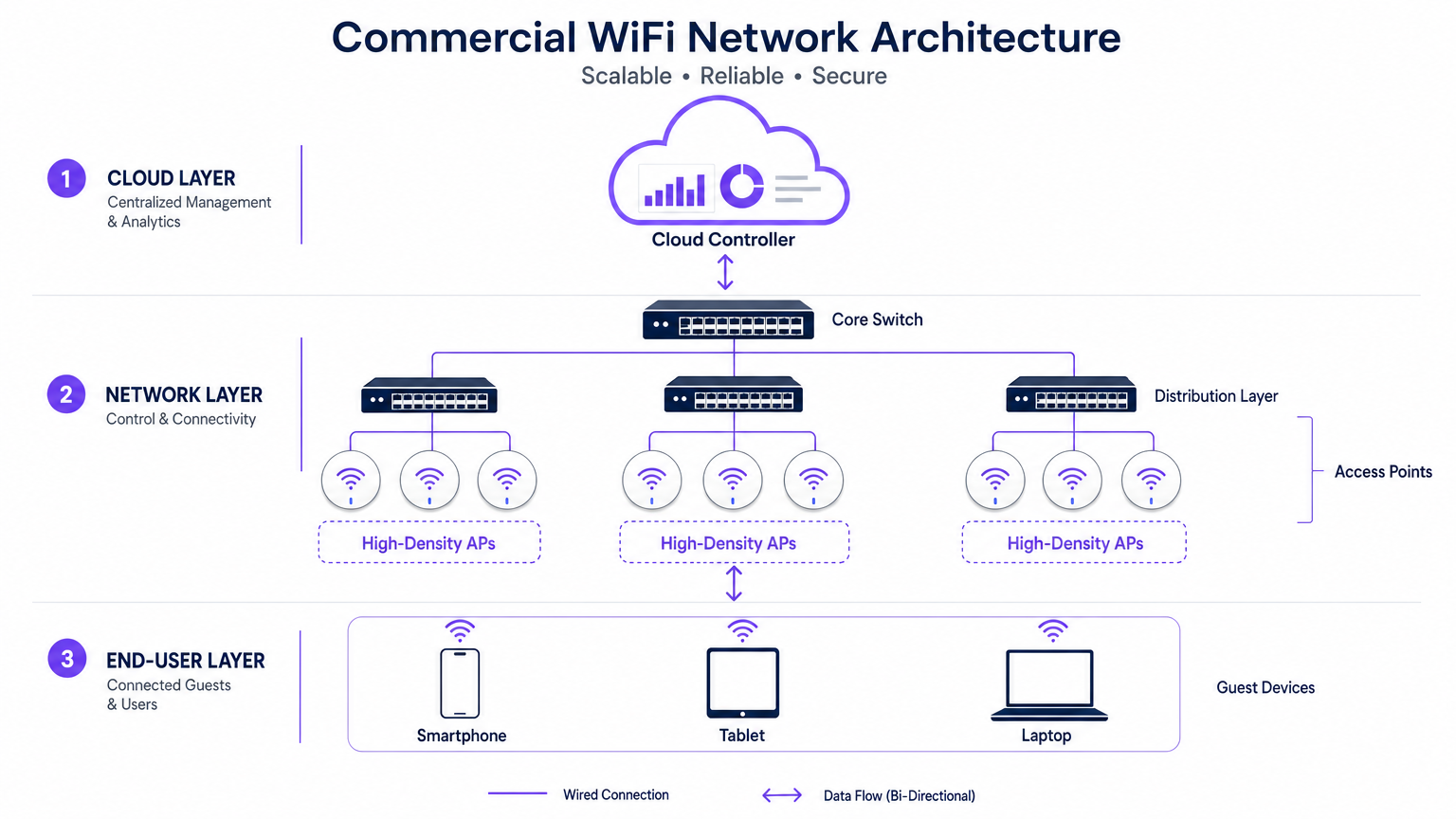
- A Borda (Camada de Acesso): Consiste em Pontos de Acesso (APs) de Alta Densidade utilizando padrões como 802.11ax (WiFi 6) ou WiFi 6E. Esses APs apresentam tecnologias avançadas como Acesso Múltiplo por Divisão de Frequência Ortogonal (OFDMA) e Múltiplas Entradas Múltiplas Saídas para Múltiplos Usuários (MU-MIMO) para lidar com centenas de dispositivos clientes simultâneos sem degradação significativa da latência.
- A Camada de Distribuição: Os APs se conectam a switches PoE+ ou PoE++, que fornecem tanto o backhaul de dados quanto energia por um único cabo Ethernet, simplificando a implantação em locais complexos.
- O Core e o Gateway: O tráfego se agrega no switch core, passando por firewalls e gateways corporativos que impõem segmentação de VLAN, políticas de Qualidade de Serviço (QoS) e mitigação de ameaças.
- A Camada de Gerenciamento em Nuvem: Um controlador em nuvem centralizado oferece um painel único para provisionamento multi-site, otimização de Radiofrequência (RF) e gerenciamento de firmware. Esta camada também se integra com serviços externos, como a plataforma Guest WiFi da Purple, que atua como um provedor de identidade gratuito para autenticação OpenRoaming contínua sob a licença Connect.
Padrões e Protocolos
Redes corporativas devem aderir a protocolos rigorosos para garantir interoperabilidade e segurança:
- 802.1X e WPA3-Enterprise: Para autenticação segura e baseada em certificado de dispositivos corporativos e da equipe.
- Passpoint (Hotspot 2.0): Permite roaming semelhante ao celular entre redes celulares e WiFi, reduzindo o atrito para o onboarding de convidados.
- VLAN Tagging (802.1Q): Essencial para isolar o tráfego de convidados de redes operacionais críticas (por exemplo, POS, controles HVAC).
Guia de Implementação
A implantação de um sistema WiFi comercial exige planejamento e execução meticulosos. As etapas a seguir descrevem uma abordagem neutra em relação ao fornecedor para grandes locais.
1. Coleta de Requisitos e Planejamento de RF
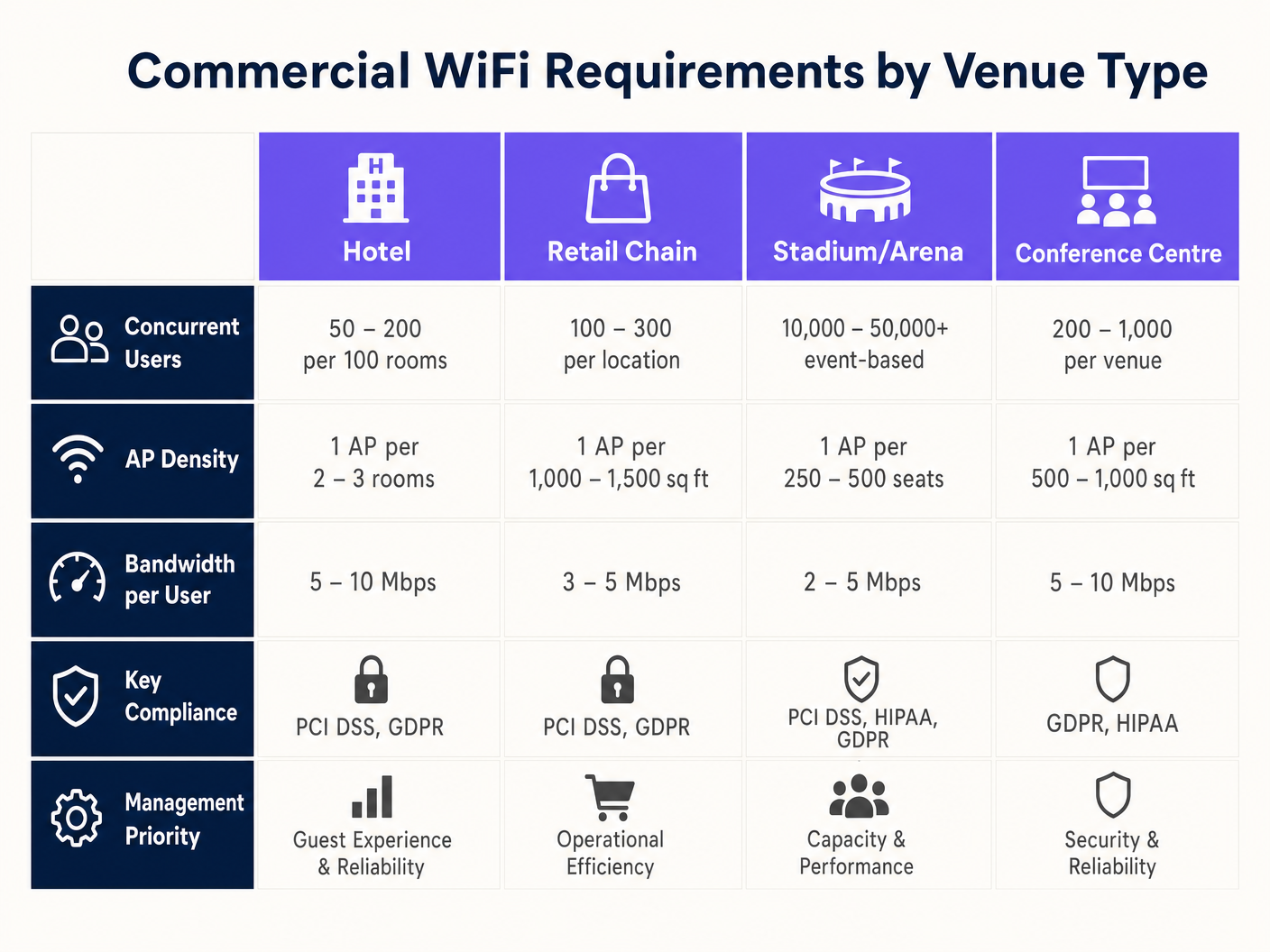
A falha mais comum em implantações comerciais é projetar para cobertura em vez de capacidade. Embora um único AP possa cobrir uma área de 3.000 pés quadrados, ele não pode lidar com 500 usuários simultâneos em um salão de conferências.
- Defina a Densidade de Dispositivos: Calcule o número esperado de usuários e multiplique pela média de dispositivos por usuário (geralmente 1,5 a 2).
- Realize uma Pesquisa Preditiva: Use software especializado (por exemplo, Ekahau) para modelar o ambiente, considerando a atenuação da parede (drywall vs. concreto) e as alturas do teto.
- Planeje para Interferência Co-Canal (CCI): Em áreas de alta densidade, use antenas direcionais e reduza a potência de transmissão para criar microcélulas menores e não sobrepostas.
2. Seleção e Provisionamento de Hardware
Selecione os APs com base nos requisitos ambientais específicos. Estádios ao ar livre exigem gabinetes com classificação IP67, enquanto ambientes de Varejo podem priorizar designs estéticos e de baixo perfil. Garanta que todos os switches suportem o orçamento PoE necessário para alimentar os APs selecionados, especialmente ao implantar modelos WiFi 6E que consomem muita energia.
3. Configuração e Aplicação de Políticas
Configure a rede para priorizar aplicações críticas e proteger a largura de banda. Para orientação sobre modelagem de tráfego, consulte Como Gerenciar a Largura de Banda em uma Rede WiFi .
- Implemente Band Steering: Force clientes capazes para as bandas menos congestionadas de 5GHz ou 6GHz.
- Defina Limites por Usuário: Limite a largura de banda individual do convidado (por exemplo, 5 Mbps) para evitar que um único usuário degrade a experiência para os outros.
- Configure Captive Portals: Integre com plataformas como a Purple para capturar dados primários e aplicar Termos e Condições antes de conceder acesso.
Melhores Práticas
- Segmente Tudo: Nunca permita dispositivos de convidados na mesma VLAN que os ativos corporativos. Use sub-redes separadas e aplique regras de firewall rigorosas.
- Automatize o Gerenciamento de RF: Habilite a seleção dinâmica de canais e o controle de potência de transmissão no controlador em nuvem para se adaptar às condições ambientais em mudança.
- Priorize o Roaming Contínuo: Garanta que protocolos como 802.11r (Fast BSS Transition) estejam habilitados para evitar chamadas VoIP perdidas ou desconexões de POS enquanto a equipe se move pelo local. Isso é particularmente crítico em ambientes de Saúde ; para mais detalhes, consulte nosso guia sobre WiFi em Hospitais: Um Guia para Redes Clínicas Segurasorks .
Solução de Problemas e Mitigação de Riscos
Mesmo redes bem projetadas encontram problemas. As equipes de TI devem estar preparadas para diagnosticar e resolver modos de falha comuns.
- Alta Utilização de Canal: Se os usuários relatarem velocidades lentas apesar de um sinal forte, verifique a utilização do canal. Se exceder 50%, o canal está congestionado. A mitigação envolve adicionar mais APs com menor potência de transmissão ou utilizar canais mais amplos (se a interferência permitir).
- Clientes 'Grudentos' (Sticky Clients): Dispositivos que se recusam a fazer roaming para um AP mais próximo prejudicam o desempenho geral da rede. A mitigação envolve ajustar as taxas básicas mínimas (desabilitando as taxas legadas de 1 Mbps e 2 Mbps) para forçar os clientes a se desconectarem e se associarem a um sinal mais forte.
- Falhas no Captive Portal: Se os convidados não conseguirem ver a página de login, verifique a resolução de DNS e certifique-se de que o walled garden (endereços IP permitidos antes da autenticação) esteja configurado corretamente para o provedor do Captive Portal.
ROI e Impacto nos Negócios
Um sistema de WiFi comercial é um investimento de capital significativo, mas deve gerar retornos mensuráveis além da simples conectividade.
- Eficiência Operacional: A conectividade confiável suporta POS móvel, gerenciamento de estoque e comunicação da equipe, reduzindo o tempo de inatividade e melhorando a entrega de serviços.
- Experiência do Cliente: O acesso rápido e sem atrito à internet aumenta o tempo de permanência e a satisfação do cliente, impactando diretamente a receita em Hospitalidade e ambientes de varejo.
- Monetização de Dados: Ao integrar com uma plataforma de WiFi Analytics, os locais podem capturar dados demográficos, rastrear padrões de fluxo de pessoas e executar campanhas de marketing direcionadas. Isso transforma a rede em um ativo estratégico que impulsiona a lealdade e visitas repetidas.
Termos-Chave e Definições
High-Density Deployment
A network design specifically engineered to support a massive number of concurrent devices in a confined space (e.g., a stadium or conference centre) without performance degradation.
Crucial for IT managers planning networks for events or busy retail environments where standard coverage models fail.
Co-Channel Interference (CCI)
Performance degradation that occurs when multiple Access Points in close proximity transmit on the same frequency channel, forcing devices to wait for clear airtime.
A primary cause of slow WiFi in dense deployments; mitigated by careful channel planning and reducing AP transmit power.
Band Steering
A network feature that automatically encourages dual-band capable devices to connect to the faster, less congested 5GHz or 6GHz bands instead of the crowded 2.4GHz band.
Used by network administrators to optimize airtime utilization and improve the user experience.
VLAN (Virtual Local Area Network)
A logical grouping of network devices that isolates traffic, even if the devices share the same physical infrastructure (switches and APs).
Essential for maintaining security and PCI compliance by separating guest traffic from point-of-sale systems.
Captive Portal
A web page that users are forced to view and interact with before access is granted to a public WiFi network, often used for authentication, accepting terms, or capturing marketing data.
The primary interface for integrating marketing and analytics platforms (like Purple) with the physical network.
OpenRoaming
A wireless industry standard that allows users to automatically and securely connect to participating WiFi networks without needing to find the network, enter a password, or use a captive portal.
Provides a seamless, cellular-like experience for guests; Purple acts as a free identity provider for this service.
802.11ax (WiFi 6)
The wireless standard designed specifically to improve efficiency and capacity in dense environments, utilizing technologies like OFDMA to serve multiple clients simultaneously.
The baseline standard IT directors should require when executing a hardware refresh for commercial venues.
Sticky Client
A wireless device that remains connected to an Access Point even when a closer, stronger AP is available, degrading performance for itself and other users on that AP.
A common troubleshooting issue resolved by tuning minimum basic rates and roaming protocols.
Estudos de Caso
A 300-room luxury hotel is experiencing complaints about slow WiFi during the evening peak hours (7 PM - 10 PM). The current deployment uses one AP in the hallway for every four rooms. How should the IT Director redesign the network to resolve this?
The IT Director must shift from a 'hallway coverage' model to an 'in-room capacity' model. 1. Conduct an active site survey to measure signal attenuation through the hotel room doors and walls (often heavy fire doors and soundproofed walls). 2. Deploy wall-plate APs directly inside every room or every other room, rather than relying on high-powered hallway APs. 3. Configure the switch ports to provide PoE to the new wall-plate APs. 4. Implement strict bandwidth management policies on the cloud controller, capping per-user throughput at 15 Mbps to ensure fair distribution during peak streaming hours.
A large retail chain wants to deploy Guest WiFi across 50 locations to capture customer emails for their loyalty program, but the CISO is concerned about PCI DSS compliance for the point-of-sale (POS) systems.
- Implement strict network segmentation using VLANs. Assign POS devices to VLAN 10 and Guest WiFi to VLAN 20. 2. Configure the enterprise firewall to block all routing between VLAN 10 and VLAN 20. 3. Deploy a cloud-managed WiFi solution that supports centralized policy enforcement across all 50 sites. 4. Integrate a captive portal (like Purple) on the Guest SSID to capture emails and require users to accept Terms and Conditions before accessing the internet. 5. Ensure the Guest SSID uses client isolation so guest devices cannot communicate with each other.
Análise de Cenário
Q1. You are designing a WiFi network for a new 10,000-seat indoor arena. The business requires high-speed connectivity for a fan engagement app. Should you deploy a small number of high-powered APs mounted high on the ceiling, or a large number of low-powered APs mounted under the seats?
💡 Dica:Consider the impact of Co-Channel Interference (CCI) and the physical bodies of the attendees on the RF signal.
Mostrar Abordagem Recomendada
You should deploy a large number of low-powered APs mounted under the seats (pico-cell design). In a high-density environment like an arena, capacity is the primary constraint, not coverage. High-powered ceiling APs would cause massive Co-Channel Interference (CCI) because their signals would overlap significantly. By placing APs under the seats and turning down the transmit power, the physical bodies of the attendees act as RF attenuators, helping to isolate the cells and allowing you to reuse channels more frequently, drastically increasing overall network capacity.
Q2. A retail client wants to offer free Guest WiFi but is concerned that neighboring businesses will use the connection, consuming bandwidth and skewing the analytics data. What configuration changes should you recommend?
💡 Dica:Think about how to control session duration and authenticate users.
Mostrar Abordagem Recomendada
Implement a Captive Portal (like Purple) that requires users to authenticate (e.g., via email or social login) before accessing the internet. Additionally, configure session limits (e.g., forcing a re-authentication after 2 hours) and implement bandwidth throttling per user (e.g., capping speeds at 3 Mbps). This ensures only genuine customers willing to provide data get access, prevents bandwidth hogging, and provides accurate demographic data for the analytics platform.
Q3. During a network audit of a hospital, you discover that the Guest WiFi SSID and the clinical VoIP phones are operating on the same VLAN. What is the immediate risk, and how do you remediate it?
💡 Dica:Consider the security implications and the impact of broadcast traffic on sensitive devices.
Mostrar Abordagem Recomendada
The immediate risk is a severe security vulnerability (guests could potentially access or attack clinical devices) and performance degradation (guest broadcast traffic could disrupt sensitive VoIP communications). Remediation requires immediate network segmentation. You must create separate VLANs for Guest traffic and Clinical traffic. Configure the switch ports and APs to tag the traffic appropriately (802.1Q), and update the core firewall rules to strictly deny any routing between the Guest VLAN and the Clinical VLAN.




