

Sistemas WiFi Comerciales: Lo que las Grandes Empresas Necesitan Saber
Esta guía de referencia técnica proporciona a los líderes de TI y a los operadores de recintos información práctica sobre el diseño, la implementación y la gestión de sistemas WiFi comerciales. Cubre la arquitectura de alta densidad, el cumplimiento de la seguridad, la selección de proveedores y cómo aprovechar los datos de la red para la inteligencia empresarial.
🎧 Escuchar esta guía
Ver transcripción

Resumen Ejecutivo
Para los recintos empresariales —desde estadios con 50.000 asientos hasta cadenas minoristas con múltiples ubicaciones— las redes inalámbricas de consumo representan un riesgo operativo significativo. Un sistema WiFi comercial no se trata simplemente de proporcionar acceso a internet; es una capa de infraestructura crítica que soporta sistemas de punto de venta (POS), sensores IoT, comunicaciones del personal y la interacción con los invitados. Esta guía describe los requisitos técnicos para implementaciones de alta densidad, centrándose en la planificación de la capacidad, arquitecturas gestionadas en la nube y estrictos estándares de seguridad como PCI DSS y GDPR. Al integrar hardware robusto con plataformas como WiFi Analytics , los líderes de TI pueden transformar su infraestructura inalámbrica de un centro de costes en un activo generador de ingresos que ofrece un ROI medible a través de la captura de datos de primera parte y una mayor eficiencia operativa.
Análisis Técnico Detallado
Arquitectura y Topología
Los sistemas WiFi comerciales requieren una arquitectura estructurada de múltiples niveles diseñada para la resiliencia y la escalabilidad. A diferencia de las redes planas, las implementaciones empresariales segmentan el tráfico y centralizan el control.
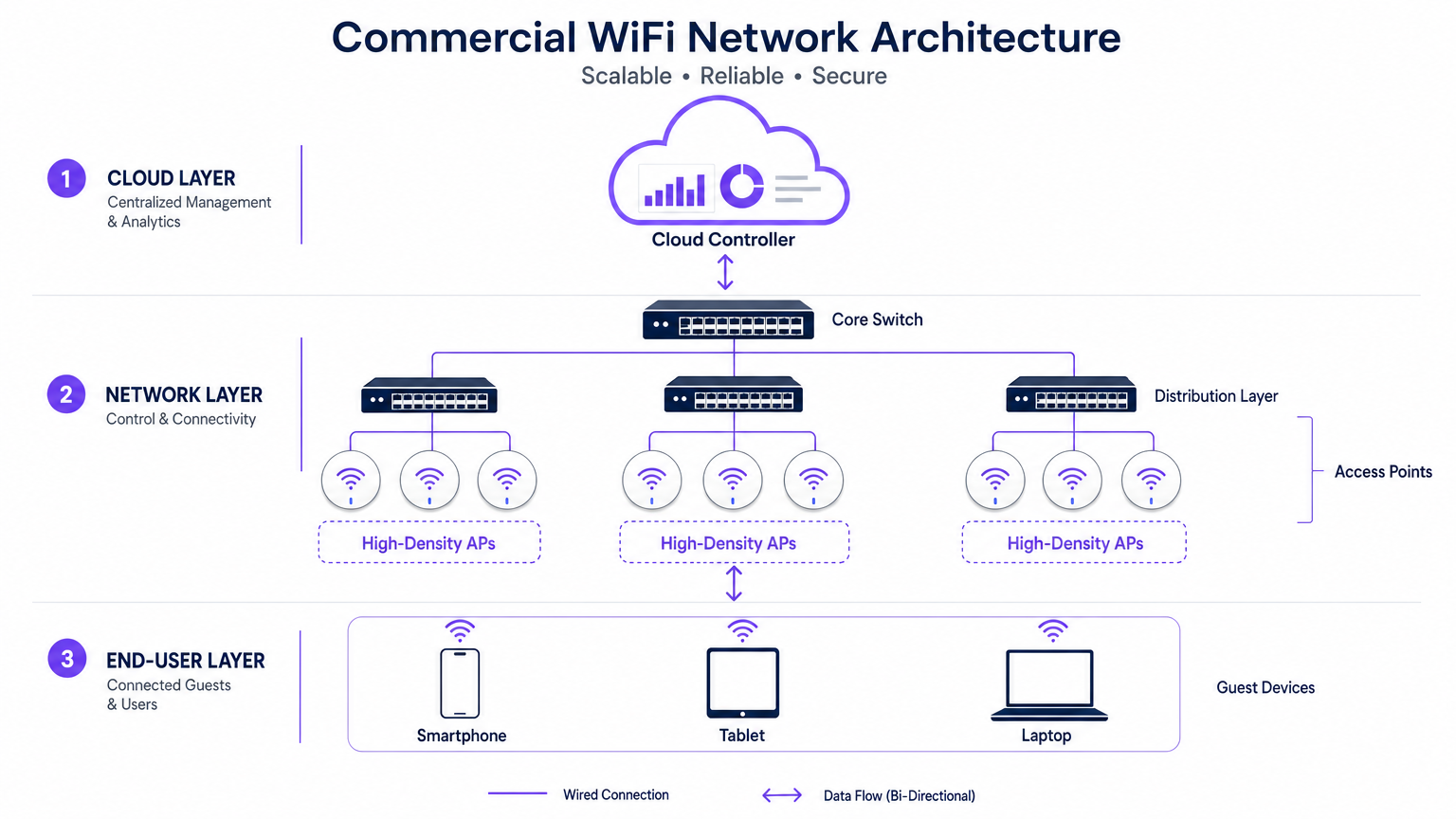
- El Borde (Capa de Acceso): Consiste en Puntos de Acceso (APs) de Alta Densidad que utilizan estándares como 802.11ax (WiFi 6) o WiFi 6E. Estos APs cuentan con tecnologías avanzadas como Acceso Múltiple por División de Frecuencia Ortogonal (OFDMA) y Entrada Múltiple Salida Múltiple de Múltiples Usuarios (MU-MIMO) para manejar cientos de dispositivos cliente concurrentes sin una degradación significativa de la latencia.
- La Capa de Distribución: Los APs se conectan a switches PoE+ o PoE++, que proporcionan tanto el backhaul de datos como la alimentación a través de un único cable Ethernet, simplificando la implementación en recintos complejos.
- El Núcleo y la Pasarela: El tráfico se agrega en el switch central, pasando a través de firewalls y pasarelas empresariales que aplican la segmentación de VLAN, las políticas de Calidad de Servicio (QoS) y la mitigación de amenazas.
- La Capa de Gestión en la Nube: Un controlador de nube centralizado proporciona una única interfaz para el aprovisionamiento multisitio, la optimización de la Radiofrecuencia (RF) y la gestión del firmware. Esta capa también se integra con servicios externos, como la plataforma Guest WiFi de Purple, que actúa como un proveedor de identidad gratuito para una autenticación OpenRoaming sin interrupciones bajo la licencia Connect.
Estándares y Protocolos
Las redes empresariales deben adherirse a protocolos estrictos para garantizar la interoperabilidad y la seguridad:
- 802.1X y WPA3-Enterprise: Para una autenticación segura basada en certificados de dispositivos corporativos y del personal.
- Passpoint (Hotspot 2.0): Permite el roaming similar al celular entre redes móviles y WiFi, reduciendo la fricción para la incorporación de invitados.
- Etiquetado VLAN (802.1Q): Esencial para aislar el tráfico de invitados de las redes operativas críticas (por ejemplo, POS, controles HVAC).
Guía de Implementación
La implementación de un sistema WiFi comercial requiere una planificación y ejecución meticulosas. Los siguientes pasos describen un enfoque neutral respecto al proveedor para grandes recintos.
1. Recopilación de Requisitos y Planificación de RF
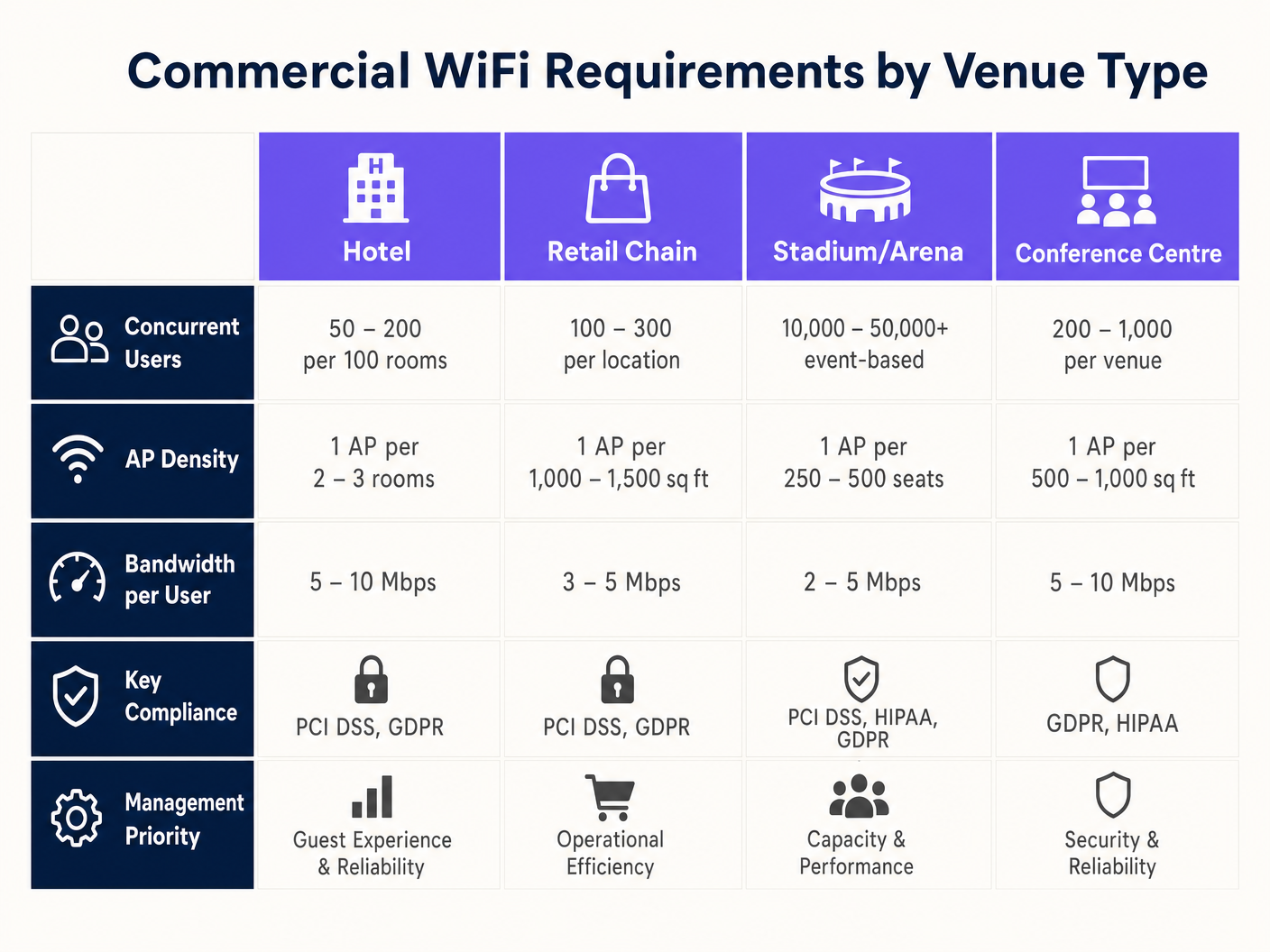
El fallo más común en las implementaciones comerciales es diseñar para la cobertura en lugar de la capacidad. Aunque un solo AP podría cubrir un área de 3.000 pies cuadrados, no puede manejar 500 usuarios concurrentes en una sala de conferencias.
- Definir la Densidad de Dispositivos: Calcule el número esperado de usuarios y multiplíquelo por el promedio de dispositivos por usuario (típicamente de 1,5 a 2).
- Realizar un Estudio Predictivo: Utilice software especializado (por ejemplo, Ekahau) para modelar el entorno, teniendo en cuenta la atenuación de las paredes (pladur vs. hormigón) y las alturas del techo.
- Planificar la Interferencia Co-Canal (CCI): En áreas de alta densidad, utilice antenas direccionales y reduzca la potencia de transmisión para crear microcélulas más pequeñas y no superpuestas.
2. Selección y Aprovisionamiento de Hardware
Seleccione los APs en función de los requisitos ambientales específicos. Los estadios al aire libre requieren carcasas con clasificación IP67, mientras que los entornos Retail pueden priorizar diseños estéticos y de bajo perfil. Asegúrese de que todos los switches soporten el presupuesto PoE necesario para alimentar los APs seleccionados, especialmente al implementar modelos WiFi 6E que consumen mucha energía.
3. Configuración y Aplicación de Políticas
Configure la red para priorizar aplicaciones críticas y proteger el ancho de banda. Para obtener orientación sobre la conformación del tráfico, consulte Cómo Gestionar el Ancho de Banda en una Red WiFi .
- Implementar Band Steering: Dirija a los clientes compatibles a las bandas menos congestionadas de 5GHz o 6GHz.
- Establecer Límites por Usuario: Limite el ancho de banda individual de los invitados (por ejemplo, 5 Mbps) para evitar que un solo usuario degrade la experiencia de los demás.
- Configurar Captive Portals: Intégrese con plataformas como Purple para capturar datos de primera parte y aplicar los Términos y Condiciones antes de conceder el acceso.
Mejores Prácticas
- Segmentar Todo: Nunca permita que los dispositivos de invitados estén en la misma VLAN que los activos corporativos. Utilice subredes separadas y aplique reglas estrictas de firewall.
- Automatizar la Gestión de RF: Habilite la selección dinámica de canales y el control de la potencia de transmisión en el controlador de la nube para adaptarse a las condiciones ambientales cambiantes.
- Priorizar el Roaming Sin Interrupciones: Asegúrese de que protocolos como 802.11r (Fast BSS Transition) estén habilitados para evitar llamadas VoIP caídas o desconexiones de POS mientras el personal se mueve por el recinto. Esto es particularmente crítico en entornos de Healthcare ; para más detalles, consulte nuestra guía sobre WiFi en Hospitales: Una Guía para Redes Clínicas Segurasfuncionamiento .
Resolución de problemas y mitigación de riesgos
Incluso las redes bien diseñadas encuentran problemas. Los equipos de TI deben estar preparados para diagnosticar y resolver los modos de fallo comunes.
- Alta utilización del canal: Si los usuarios informan de velocidades lentas a pesar de una señal fuerte, compruebe la utilización del canal. Si supera el 50%, el canal está congestionado. La mitigación implica añadir más APs con menor potencia de transmisión o utilizar canales más amplios (si la interferencia lo permite).
- Clientes "pegajosos": Los dispositivos que se niegan a conectarse a un AP más cercano reducen el rendimiento general de la red. La mitigación implica ajustar las tasas básicas mínimas (deshabilitando las tasas heredadas de 1 Mbps y 2 Mbps) para forzar a los clientes a desconectarse y asociarse con una señal más fuerte.
- Fallos del Captive Portal: Si los invitados no pueden ver la página de inicio de sesión, verifique la resolución de DNS y asegúrese de que el "walled garden" (direcciones IP permitidas antes de la autenticación) esté configurado correctamente para el proveedor del Captive Portal.
ROI e impacto empresarial
Un sistema WiFi comercial es una inversión de capital significativa, pero debe ofrecer retornos medibles más allá de la simple conectividad.
- Eficiencia operativa: La conectividad fiable soporta los TPV móviles, la gestión de inventario y la comunicación del personal, reduciendo el tiempo de inactividad y mejorando la prestación de servicios.
- Experiencia del cliente: Un acceso a internet rápido y sin fricciones aumenta el tiempo de permanencia y la satisfacción del cliente, impactando directamente en los ingresos en entornos de Hostelería y comercio minorista.
- Monetización de datos: Al integrarse con una plataforma de WiFi Analytics, los establecimientos pueden capturar datos demográficos, rastrear patrones de afluencia y ejecutar campañas de marketing dirigidas. Esto transforma la red en un activo estratégico que impulsa la lealtad y las visitas repetidas.
Términos clave y definiciones
High-Density Deployment
A network design specifically engineered to support a massive number of concurrent devices in a confined space (e.g., a stadium or conference centre) without performance degradation.
Crucial for IT managers planning networks for events or busy retail environments where standard coverage models fail.
Co-Channel Interference (CCI)
Performance degradation that occurs when multiple Access Points in close proximity transmit on the same frequency channel, forcing devices to wait for clear airtime.
A primary cause of slow WiFi in dense deployments; mitigated by careful channel planning and reducing AP transmit power.
Band Steering
A network feature that automatically encourages dual-band capable devices to connect to the faster, less congested 5GHz or 6GHz bands instead of the crowded 2.4GHz band.
Used by network administrators to optimize airtime utilization and improve the user experience.
VLAN (Virtual Local Area Network)
A logical grouping of network devices that isolates traffic, even if the devices share the same physical infrastructure (switches and APs).
Essential for maintaining security and PCI compliance by separating guest traffic from point-of-sale systems.
Captive Portal
A web page that users are forced to view and interact with before access is granted to a public WiFi network, often used for authentication, accepting terms, or capturing marketing data.
The primary interface for integrating marketing and analytics platforms (like Purple) with the physical network.
OpenRoaming
A wireless industry standard that allows users to automatically and securely connect to participating WiFi networks without needing to find the network, enter a password, or use a captive portal.
Provides a seamless, cellular-like experience for guests; Purple acts as a free identity provider for this service.
802.11ax (WiFi 6)
The wireless standard designed specifically to improve efficiency and capacity in dense environments, utilizing technologies like OFDMA to serve multiple clients simultaneously.
The baseline standard IT directors should require when executing a hardware refresh for commercial venues.
Sticky Client
A wireless device that remains connected to an Access Point even when a closer, stronger AP is available, degrading performance for itself and other users on that AP.
A common troubleshooting issue resolved by tuning minimum basic rates and roaming protocols.
Casos de éxito
A 300-room luxury hotel is experiencing complaints about slow WiFi during the evening peak hours (7 PM - 10 PM). The current deployment uses one AP in the hallway for every four rooms. How should the IT Director redesign the network to resolve this?
The IT Director must shift from a 'hallway coverage' model to an 'in-room capacity' model. 1. Conduct an active site survey to measure signal attenuation through the hotel room doors and walls (often heavy fire doors and soundproofed walls). 2. Deploy wall-plate APs directly inside every room or every other room, rather than relying on high-powered hallway APs. 3. Configure the switch ports to provide PoE to the new wall-plate APs. 4. Implement strict bandwidth management policies on the cloud controller, capping per-user throughput at 15 Mbps to ensure fair distribution during peak streaming hours.
A large retail chain wants to deploy Guest WiFi across 50 locations to capture customer emails for their loyalty program, but the CISO is concerned about PCI DSS compliance for the point-of-sale (POS) systems.
- Implement strict network segmentation using VLANs. Assign POS devices to VLAN 10 and Guest WiFi to VLAN 20. 2. Configure the enterprise firewall to block all routing between VLAN 10 and VLAN 20. 3. Deploy a cloud-managed WiFi solution that supports centralized policy enforcement across all 50 sites. 4. Integrate a captive portal (like Purple) on the Guest SSID to capture emails and require users to accept Terms and Conditions before accessing the internet. 5. Ensure the Guest SSID uses client isolation so guest devices cannot communicate with each other.
Análisis de escenarios
Q1. You are designing a WiFi network for a new 10,000-seat indoor arena. The business requires high-speed connectivity for a fan engagement app. Should you deploy a small number of high-powered APs mounted high on the ceiling, or a large number of low-powered APs mounted under the seats?
💡 Sugerencia:Consider the impact of Co-Channel Interference (CCI) and the physical bodies of the attendees on the RF signal.
Mostrar enfoque recomendado
You should deploy a large number of low-powered APs mounted under the seats (pico-cell design). In a high-density environment like an arena, capacity is the primary constraint, not coverage. High-powered ceiling APs would cause massive Co-Channel Interference (CCI) because their signals would overlap significantly. By placing APs under the seats and turning down the transmit power, the physical bodies of the attendees act as RF attenuators, helping to isolate the cells and allowing you to reuse channels more frequently, drastically increasing overall network capacity.
Q2. A retail client wants to offer free Guest WiFi but is concerned that neighboring businesses will use the connection, consuming bandwidth and skewing the analytics data. What configuration changes should you recommend?
💡 Sugerencia:Think about how to control session duration and authenticate users.
Mostrar enfoque recomendado
Implement a Captive Portal (like Purple) that requires users to authenticate (e.g., via email or social login) before accessing the internet. Additionally, configure session limits (e.g., forcing a re-authentication after 2 hours) and implement bandwidth throttling per user (e.g., capping speeds at 3 Mbps). This ensures only genuine customers willing to provide data get access, prevents bandwidth hogging, and provides accurate demographic data for the analytics platform.
Q3. During a network audit of a hospital, you discover that the Guest WiFi SSID and the clinical VoIP phones are operating on the same VLAN. What is the immediate risk, and how do you remediate it?
💡 Sugerencia:Consider the security implications and the impact of broadcast traffic on sensitive devices.
Mostrar enfoque recomendado
The immediate risk is a severe security vulnerability (guests could potentially access or attack clinical devices) and performance degradation (guest broadcast traffic could disrupt sensitive VoIP communications). Remediation requires immediate network segmentation. You must create separate VLANs for Guest traffic and Clinical traffic. Configure the switch ports and APs to tag the traffic appropriately (802.1Q), and update the core firewall rules to strictly deny any routing between the Guest VLAN and the Clinical VLAN.




