

Sistemi WiFi Commerciali: Cosa Devono Sapere le Grandi Aziende
Questa guida di riferimento tecnico fornisce ai leader IT e agli operatori di strutture informazioni utili sulla progettazione, l'implementazione e la gestione dei sistemi WiFi commerciali. Copre l'architettura ad alta densità, la conformità alla sicurezza, la selezione dei fornitori e come sfruttare i dati di rete per la business intelligence.
🎧 Ascolta questa guida
Visualizza trascrizione
Riepilogo Esecutivo
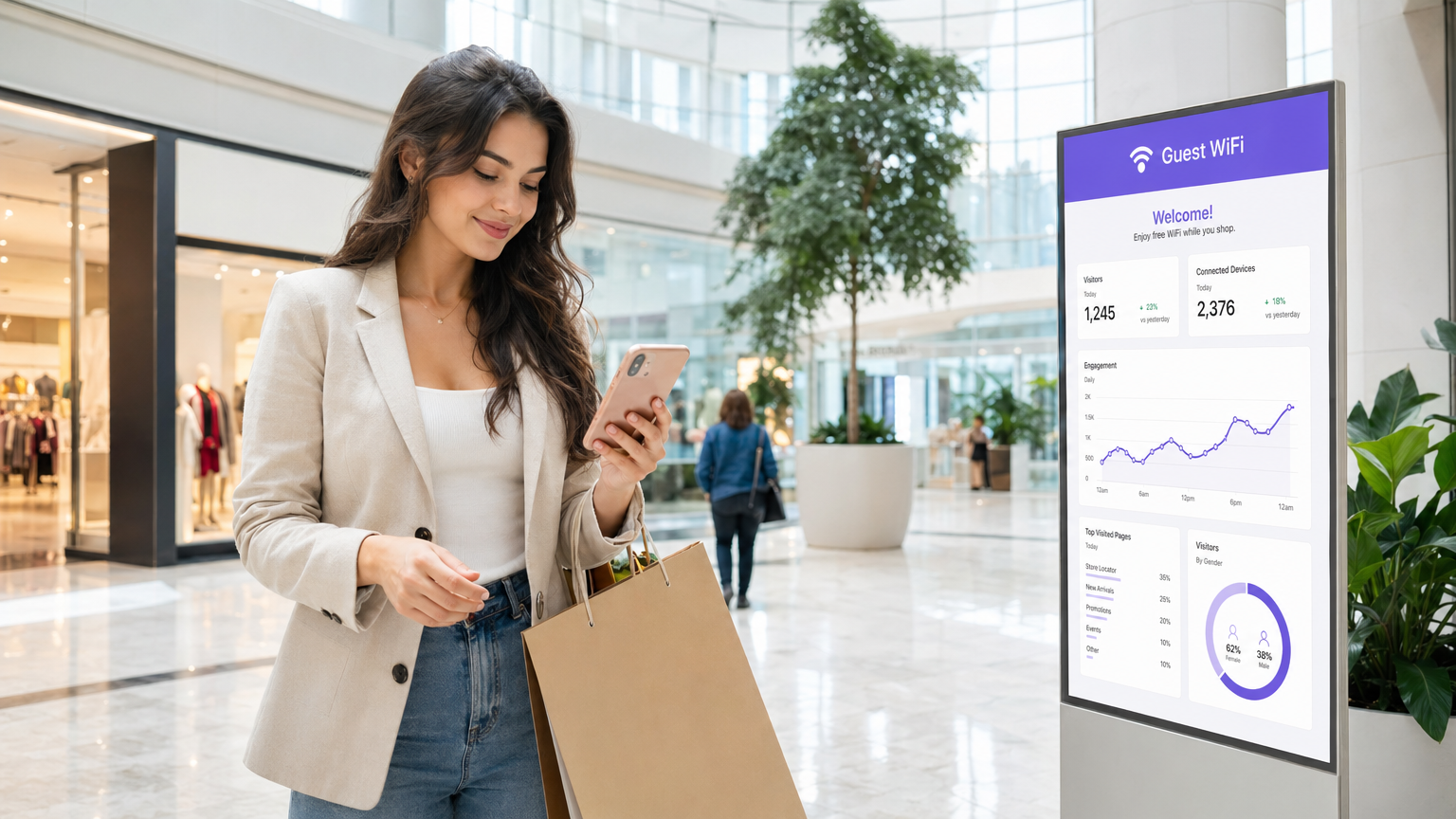
Per le strutture aziendali—dagli stadi da 50.000 posti alle catene di vendita al dettaglio multi-sito—le reti wireless di livello consumer rappresentano un rischio operativo significativo. Un sistema WiFi commerciale non si limita a fornire accesso a Internet; è uno strato infrastrutturale critico che supporta sistemi point-of-sale (POS), sensori IoT, comunicazioni del personale e coinvolgimento degli ospiti. Questa guida delinea i requisiti tecnici per implementazioni ad alta densità, concentrandosi sulla pianificazione della capacità, architetture gestite in cloud e rigorosi standard di sicurezza come PCI DSS e GDPR. Integrando hardware robusto con piattaforme come WiFi Analytics , i leader IT possono trasformare la loro infrastruttura wireless da centro di costo a risorsa generatrice di entrate che offre un ROI misurabile attraverso l'acquisizione di dati di prima parte e una maggiore efficienza operativa.
Approfondimento Tecnico
Architettura e Topologia
I sistemi WiFi commerciali richiedono un'architettura strutturata e multi-livello progettata per la resilienza e la scalabilità. A differenza delle reti piatte, le implementazioni aziendali segmentano il traffico e centralizzano il controllo.
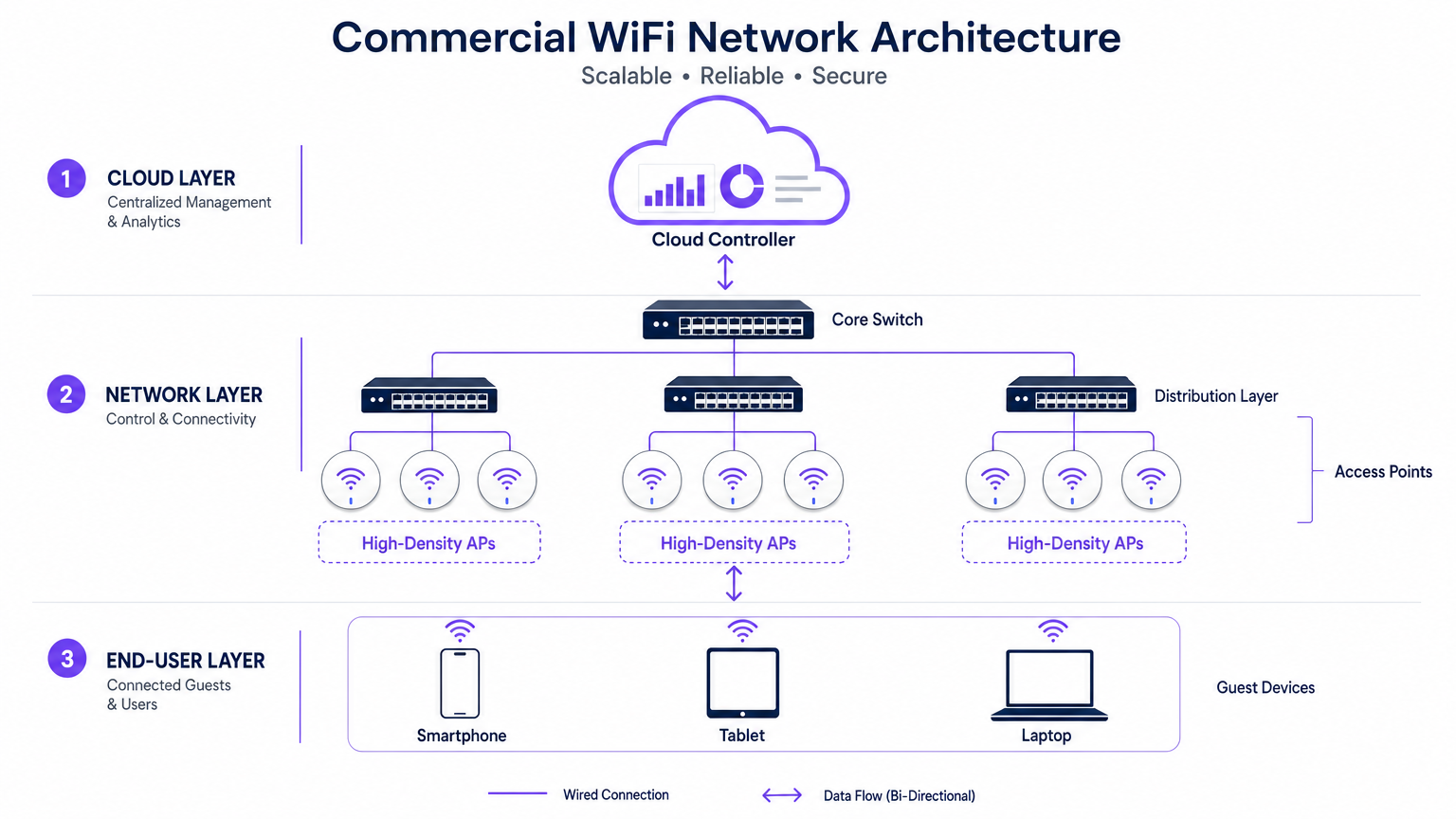
- Il Bordo (Livello di Accesso): Questo consiste in Access Point (AP) ad alta densità che utilizzano standard come 802.11ax (WiFi 6) o WiFi 6E. Questi AP presentano tecnologie avanzate come Orthogonal Frequency-Division Multiple Access (OFDMA) e Multi-User Multiple Input Multiple Output (MU-MIMO) per gestire centinaia di dispositivi client concorrenti senza una significativa degradazione della latenza.
- Il Livello di Distribuzione: Gli AP si connettono a switch PoE+ o PoE++, che forniscono sia il backhaul dei dati che l'alimentazione tramite un singolo cavo Ethernet, semplificando l'implementazione in strutture complesse.
- Il Core e il Gateway: Il traffico si aggrega allo switch core, passando attraverso firewall e gateway aziendali che applicano la segmentazione VLAN, le politiche di Quality of Service (QoS) e la mitigazione delle minacce.
- Il Livello di Gestione Cloud: Un controller cloud centralizzato fornisce un'unica interfaccia per il provisioning multi-sito, l'ottimizzazione della Radio Frequenza (RF) e la gestione del firmware. Questo livello si integra anche con servizi esterni, come la piattaforma Guest WiFi di Purple, che funge da provider di identità gratuito per un'autenticazione OpenRoaming senza interruzioni con la licenza Connect.
Standard e Protocolli
Le reti aziendali devono aderire a protocolli rigorosi per garantire interoperabilità e sicurezza:
- 802.1X e WPA3-Enterprise: Per un'autenticazione sicura basata su certificati di dispositivi aziendali e del personale.
- Passpoint (Hotspot 2.0): Abilita il roaming simile a quello cellulare tra reti cellulari e WiFi, riducendo l'attrito per l'onboarding degli ospiti.
- VLAN Tagging (802.1Q): Essenziale per isolare il traffico degli ospiti dalle reti operative critiche (es. POS, controlli HVAC).
Guida all'Implementazione
L'implementazione di un sistema WiFi commerciale richiede una pianificazione ed esecuzione meticolose. I seguenti passaggi delineano un approccio vendor-neutral per grandi strutture.
1. Raccolta dei Requisiti e Pianificazione RF
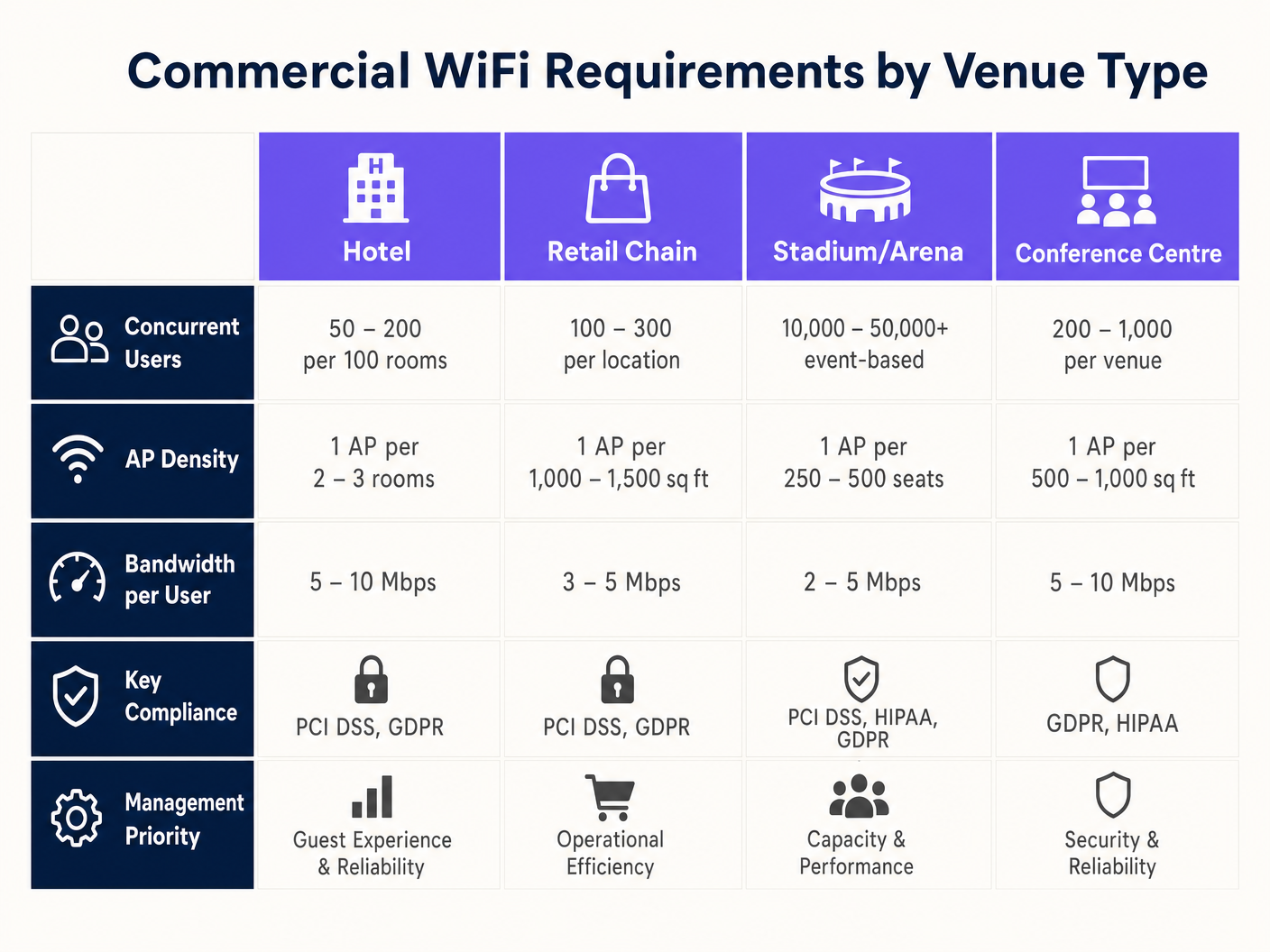
L'errore più comune nelle implementazioni commerciali è progettare per la copertura piuttosto che per la capacità. Mentre un singolo AP potrebbe coprire un'area di 3.000 piedi quadrati, non può gestire 500 utenti concorrenti in una sala conferenze.
- Definire la Densità dei Dispositivi: Calcolare il numero previsto di utenti e moltiplicare per la media dei dispositivi per utente (tipicamente da 1,5 a 2).
- Condurre un'Indagine Predittiva: Utilizzare software specializzato (es. Ekahau) per modellare l'ambiente, tenendo conto dell'attenuazione delle pareti (cartongesso vs. cemento) e delle altezze dei soffitti.
- Pianificare l'Interferenza Co-Canale (CCI): Nelle aree ad alta densità, utilizzare antenne direzionali e ridurre la potenza di trasmissione per creare micro-celle più piccole e non sovrapposte.
2. Selezione e Provisioning dell'Hardware
Selezionare gli AP in base ai requisiti ambientali specifici. Gli stadi all'aperto richiedono involucri con classificazione IP67, mentre gli ambienti Retail possono privilegiare design estetici e a basso profilo. Assicurarsi che tutti gli switch supportino il budget PoE necessario per alimentare gli AP selezionati, specialmente quando si implementano modelli WiFi 6E ad alto consumo energetico.
3. Configurazione e Applicazione delle Politiche
Configurare la rete per dare priorità alle applicazioni critiche e proteggere la larghezza di banda. Per indicazioni sulla modellazione del traffico, consultare Come Gestire la Larghezza di Banda su una Rete WiFi .
- Implementare il Band Steering: Forzare i client compatibili alle bande meno congestionate da 5GHz o 6GHz.
- Impostare Limiti per Utente: Limitare la larghezza di banda individuale degli ospiti (es. 5 Mbps) per impedire che un singolo utente degradi l'esperienza per gli altri.
- Configurare i Captive Portals: Integrare con piattaforme come Purple per acquisire dati di prima parte e applicare Termini e Condizioni prima di concedere l'accesso.
Migliori Pratiche
- Segmentare Tutto: Non consentire mai ai dispositivi degli ospiti di trovarsi sulla stessa VLAN degli asset aziendali. Utilizzare subnet separate e applicare regole firewall rigorose.
- Automatizzare la Gestione RF: Abilitare la selezione dinamica del canale e il controllo della potenza di trasmissione sul controller cloud per adattarsi alle mutevoli condizioni ambientali.
- Dare Priorità al Roaming Senza Interruzioni: Assicurarsi che protocolli come 802.11r (Fast BSS Transition) siano abilitati per prevenire interruzioni di chiamate VoIP o disconnessioni POS mentre il personale si sposta all'interno della struttura. Questo è particolarmente critico negli ambienti Healthcare ; per maggiori dettagli, consultare la nostra guida su WiFi negli Ospedali: Una Guida alle Reti Cliniche Sicurefunziona .
Risoluzione dei problemi e mitigazione dei rischi
Anche le reti ben progettate possono incontrare problemi. I team IT devono essere preparati a diagnosticare e risolvere le modalità di guasto comuni.
- Utilizzo elevato del canale: Se gli utenti segnalano velocità lente nonostante un segnale forte, controllare l'utilizzo del canale. Se supera il 50%, il canale è congestionato. La mitigazione prevede l'aggiunta di più AP con una potenza di trasmissione inferiore o l'utilizzo di canali più ampi (se l'interferenza lo consente).
- Client "appiccicosi": I dispositivi che si rifiutano di passare a un AP più vicino rallentano le prestazioni complessive della rete. La mitigazione prevede la regolazione delle velocità di base minime (disabilitando le velocità legacy di 1 Mbps e 2 Mbps) per forzare i client a disconnettersi e ad associarsi a un segnale più forte.
- Guasti del Captive Portal: Se gli ospiti non riescono a visualizzare la pagina di accesso, verificare la risoluzione DNS e assicurarsi che il walled garden (indirizzi IP consentiti prima dell'autenticazione) sia configurato correttamente per il provider del Captive Portal.
ROI e impatto sul business
Un sistema WiFi commerciale rappresenta una spesa in conto capitale significativa, ma dovrebbe fornire ritorni misurabili oltre la semplice connettività.
- Efficienza operativa: La connettività affidabile supporta i POS mobili, la gestione dell'inventario e la comunicazione del personale, riducendo i tempi di inattività e migliorando l'erogazione del servizio.
- Esperienza del cliente: L'accesso a Internet veloce e senza attriti aumenta il tempo di permanenza e la soddisfazione del cliente, influenzando direttamente i ricavi in Ospitalità e negli ambienti di vendita al dettaglio.
- Monetizzazione dei dati: Integrandosi con una piattaforma di analisi WiFi, le sedi possono acquisire dati demografici, tracciare i modelli di affluenza ed eseguire campagne di marketing mirate. Ciò trasforma la rete in una risorsa strategica che promuove la fedeltà e le visite ripetute.
Termini chiave e definizioni
High-Density Deployment
A network design specifically engineered to support a massive number of concurrent devices in a confined space (e.g., a stadium or conference centre) without performance degradation.
Crucial for IT managers planning networks for events or busy retail environments where standard coverage models fail.
Co-Channel Interference (CCI)
Performance degradation that occurs when multiple Access Points in close proximity transmit on the same frequency channel, forcing devices to wait for clear airtime.
A primary cause of slow WiFi in dense deployments; mitigated by careful channel planning and reducing AP transmit power.
Band Steering
A network feature that automatically encourages dual-band capable devices to connect to the faster, less congested 5GHz or 6GHz bands instead of the crowded 2.4GHz band.
Used by network administrators to optimize airtime utilization and improve the user experience.
VLAN (Virtual Local Area Network)
A logical grouping of network devices that isolates traffic, even if the devices share the same physical infrastructure (switches and APs).
Essential for maintaining security and PCI compliance by separating guest traffic from point-of-sale systems.
Captive Portal
A web page that users are forced to view and interact with before access is granted to a public WiFi network, often used for authentication, accepting terms, or capturing marketing data.
The primary interface for integrating marketing and analytics platforms (like Purple) with the physical network.
OpenRoaming
A wireless industry standard that allows users to automatically and securely connect to participating WiFi networks without needing to find the network, enter a password, or use a captive portal.
Provides a seamless, cellular-like experience for guests; Purple acts as a free identity provider for this service.
802.11ax (WiFi 6)
The wireless standard designed specifically to improve efficiency and capacity in dense environments, utilizing technologies like OFDMA to serve multiple clients simultaneously.
The baseline standard IT directors should require when executing a hardware refresh for commercial venues.
Sticky Client
A wireless device that remains connected to an Access Point even when a closer, stronger AP is available, degrading performance for itself and other users on that AP.
A common troubleshooting issue resolved by tuning minimum basic rates and roaming protocols.
Casi di studio
A 300-room luxury hotel is experiencing complaints about slow WiFi during the evening peak hours (7 PM - 10 PM). The current deployment uses one AP in the hallway for every four rooms. How should the IT Director redesign the network to resolve this?
The IT Director must shift from a 'hallway coverage' model to an 'in-room capacity' model. 1. Conduct an active site survey to measure signal attenuation through the hotel room doors and walls (often heavy fire doors and soundproofed walls). 2. Deploy wall-plate APs directly inside every room or every other room, rather than relying on high-powered hallway APs. 3. Configure the switch ports to provide PoE to the new wall-plate APs. 4. Implement strict bandwidth management policies on the cloud controller, capping per-user throughput at 15 Mbps to ensure fair distribution during peak streaming hours.
A large retail chain wants to deploy Guest WiFi across 50 locations to capture customer emails for their loyalty program, but the CISO is concerned about PCI DSS compliance for the point-of-sale (POS) systems.
- Implement strict network segmentation using VLANs. Assign POS devices to VLAN 10 and Guest WiFi to VLAN 20. 2. Configure the enterprise firewall to block all routing between VLAN 10 and VLAN 20. 3. Deploy a cloud-managed WiFi solution that supports centralized policy enforcement across all 50 sites. 4. Integrate a captive portal (like Purple) on the Guest SSID to capture emails and require users to accept Terms and Conditions before accessing the internet. 5. Ensure the Guest SSID uses client isolation so guest devices cannot communicate with each other.
Analisi degli scenari
Q1. You are designing a WiFi network for a new 10,000-seat indoor arena. The business requires high-speed connectivity for a fan engagement app. Should you deploy a small number of high-powered APs mounted high on the ceiling, or a large number of low-powered APs mounted under the seats?
💡 Suggerimento:Consider the impact of Co-Channel Interference (CCI) and the physical bodies of the attendees on the RF signal.
Mostra l'approccio consigliato
You should deploy a large number of low-powered APs mounted under the seats (pico-cell design). In a high-density environment like an arena, capacity is the primary constraint, not coverage. High-powered ceiling APs would cause massive Co-Channel Interference (CCI) because their signals would overlap significantly. By placing APs under the seats and turning down the transmit power, the physical bodies of the attendees act as RF attenuators, helping to isolate the cells and allowing you to reuse channels more frequently, drastically increasing overall network capacity.
Q2. A retail client wants to offer free Guest WiFi but is concerned that neighboring businesses will use the connection, consuming bandwidth and skewing the analytics data. What configuration changes should you recommend?
💡 Suggerimento:Think about how to control session duration and authenticate users.
Mostra l'approccio consigliato
Implement a Captive Portal (like Purple) that requires users to authenticate (e.g., via email or social login) before accessing the internet. Additionally, configure session limits (e.g., forcing a re-authentication after 2 hours) and implement bandwidth throttling per user (e.g., capping speeds at 3 Mbps). This ensures only genuine customers willing to provide data get access, prevents bandwidth hogging, and provides accurate demographic data for the analytics platform.
Q3. During a network audit of a hospital, you discover that the Guest WiFi SSID and the clinical VoIP phones are operating on the same VLAN. What is the immediate risk, and how do you remediate it?
💡 Suggerimento:Consider the security implications and the impact of broadcast traffic on sensitive devices.
Mostra l'approccio consigliato
The immediate risk is a severe security vulnerability (guests could potentially access or attack clinical devices) and performance degradation (guest broadcast traffic could disrupt sensitive VoIP communications). Remediation requires immediate network segmentation. You must create separate VLANs for Guest traffic and Clinical traffic. Configure the switch ports and APs to tag the traffic appropriately (802.1Q), and update the core firewall rules to strictly deny any routing between the Guest VLAN and the Clinical VLAN.




