

क्या ट्रेन WiFi सुरक्षित है? रेल यात्रियों को क्या जानने की ज़रूरत है
यह मार्गदर्शिका यात्री रेल WiFi नेटवर्क की सुरक्षा वास्तुकला की जाँच करती है, पैकेट स्निफिंग और Evil Twin हमलों से लेकर Man-in-the-Middle कारनामों तक के खतरे के परिदृश्य का विश्लेषण करती है। यह ऑपरेटरों और कॉर्पोरेट IT टीमों के लिए कार्रवाई योग्य परिनियोजन मार्गदर्शन प्रदान करती है, जिसमें क्लाइंट आइसोलेशन, Captive Portal प्रमाणीकरण, DNS फ़िल्टरिंग और Hotspot 2.0 का मार्ग शामिल है — Purple के Guest WiFi और एनालिटिक्स प्लेटफ़ॉर्म के लिए सीधे एकीकरण बिंदुओं के साथ।
🎧 इस गाइड को सुनें
ट्रांसक्रिप्ट देखें
कार्यकारी सारांश
IT प्रबंधकों, नेटवर्क आर्किटेक्ट्स और वेन्यू ऑपरेशंस निदेशकों के लिए, यह सवाल कि क्या ट्रेन WiFi सुरक्षित है, केवल अकादमिक नहीं है — इसके कॉर्पोरेट डिवाइस नीति, फ्लीट सुरक्षा और सार्वजनिक-सामना करने वाले नेटवर्क इन्फ्रास्ट्रक्चर के डिज़ाइन के लिए सीधे निहितार्थ हैं। संक्षिप्त उत्तर यह है कि अधिकांश ट्रेन WiFi नेटवर्क लिंक लेयर पर खुले, अनएन्क्रिप्टेड नेटवर्क के रूप में काम करते हैं, जो एक मापने योग्य अटैक सरफेस बनाता है। हालांकि, सही नियंत्रणों के साथ जोखिम आनुपातिक और प्रबंधनीय है।
यह मार्गदर्शिका पूरी तकनीकी तस्वीर को कवर करती है: रेल WiFi नेटवर्क कैसे आर्किटेक्ट किए जाते हैं, खुले नेटवर्क द्वारा पेश किए जाने वाले विशिष्ट खतरे के वेक्टर, उन जोखिमों को कम करने के लिए ऑपरेटरों को क्या तैनात करना चाहिए, और कॉर्पोरेट IT टीमों को एंडपॉइंट स्तर पर क्या लागू करना चाहिए। हम यह भी जाँचते हैं कि Purple के Guest WiFi समाधान जैसे प्लेटफ़ॉर्म बड़े पैमाने पर सार्वजनिक ट्रांज़िट परिनियोजनों की प्रमाणीकरण, अनुपालन और एनालिटिक्स आवश्यकताओं को कैसे पूरा करते हैं। चाहे आप एक नए फ्लीट परिनियोजन का मूल्यांकन कर रहे हों या अपनी कॉर्पोरेट यात्रा नीति को मजबूत कर रहे हों, यह मार्गदर्शिका आपको एक सूचित निर्णय लेने के लिए तकनीकी ढाँचा प्रदान करती है।
तकनीकी गहन-विश्लेषण: ट्रेन WiFi वास्तव में कैसे काम करता है
ट्रेन WiFi की सुरक्षा स्थिति को समझना वास्तुकला को समझने से शुरू होता है। Hospitality या Retail वातावरण में स्थिर परिनियोजनों के विपरीत, ट्रेन नेटवर्क मोबाइल LANs होते हैं जिन्हें सैकड़ों समवर्ती उपयोगकर्ताओं के लिए एक स्थिर आंतरिक नेटवर्क बनाए रखते हुए विभिन्न बैकहॉल कनेक्शनों के बीच हैंडऑफ़ को लगातार प्रबंधित करना होता है।
मोबाइल एक्सेस राउटर (MAR)
हर ट्रेन WiFi परिनियोजन के मूल में मोबाइल एक्सेस राउटर होता है। यह कठोर डिवाइस, जिसे आमतौर पर ट्रेन के उपकरण बे में लगाया जाता है, कई WAN लिंक को एकत्रित करता है — आमतौर पर अतिरेक के लिए विभिन्न वाहकों से दो या अधिक 4G/5G सेलुलर कनेक्शन, कभी-कभी स्टेशनों पर सैटेलाइट या ट्रैकसाइड WiFi द्वारा पूरक। MAR यात्रियों के सामने वाले एक्सेस पॉइंट को एक एकल, स्थिर आंतरिक नेटवर्क प्रस्तुत करता है जो पूरे डिब्बों में वितरित होते हैं। सेलुलर और सैटेलाइट बैकहॉल लिंक कैरियर लेयर पर एन्क्रिप्टेड होते हैं, जिसका अर्थ है कि इंटरनेट ट्रांज़िट पाथ आमतौर पर भेद्यता नहीं होता है। जोखिम पहले हॉप में निहित है।
ओपन सिस्टम प्रमाणीकरण: मुख्य भेद्यता
अधिकांश ट्रेन WiFi नेटवर्क ओपन सिस्टम प्रमाणीकरण (OSA) का उपयोग करते हैं। कोई WPA2 या WPA3 प्री-शेयर्ड कुंजी नहीं होती है क्योंकि हजारों अस्थायी यात्रियों को पासवर्ड वितरित करना परिचालन रूप से अव्यावहारिक है। इसका परिणाम यह है कि यात्री के डिवाइस और एक्सेस पॉइंट के बीच रेडियो फ़्रीक्वेंसी ट्रैफ़िक लिंक-लेयर एन्क्रिप्शन के बिना प्रसारित होता है। प्रॉमिस्कुअस मोड में रखा गया WiFi एडाप्टर वाला कोई भी डिवाइस उन पैकेटों को कैप्चर कर सकता है।
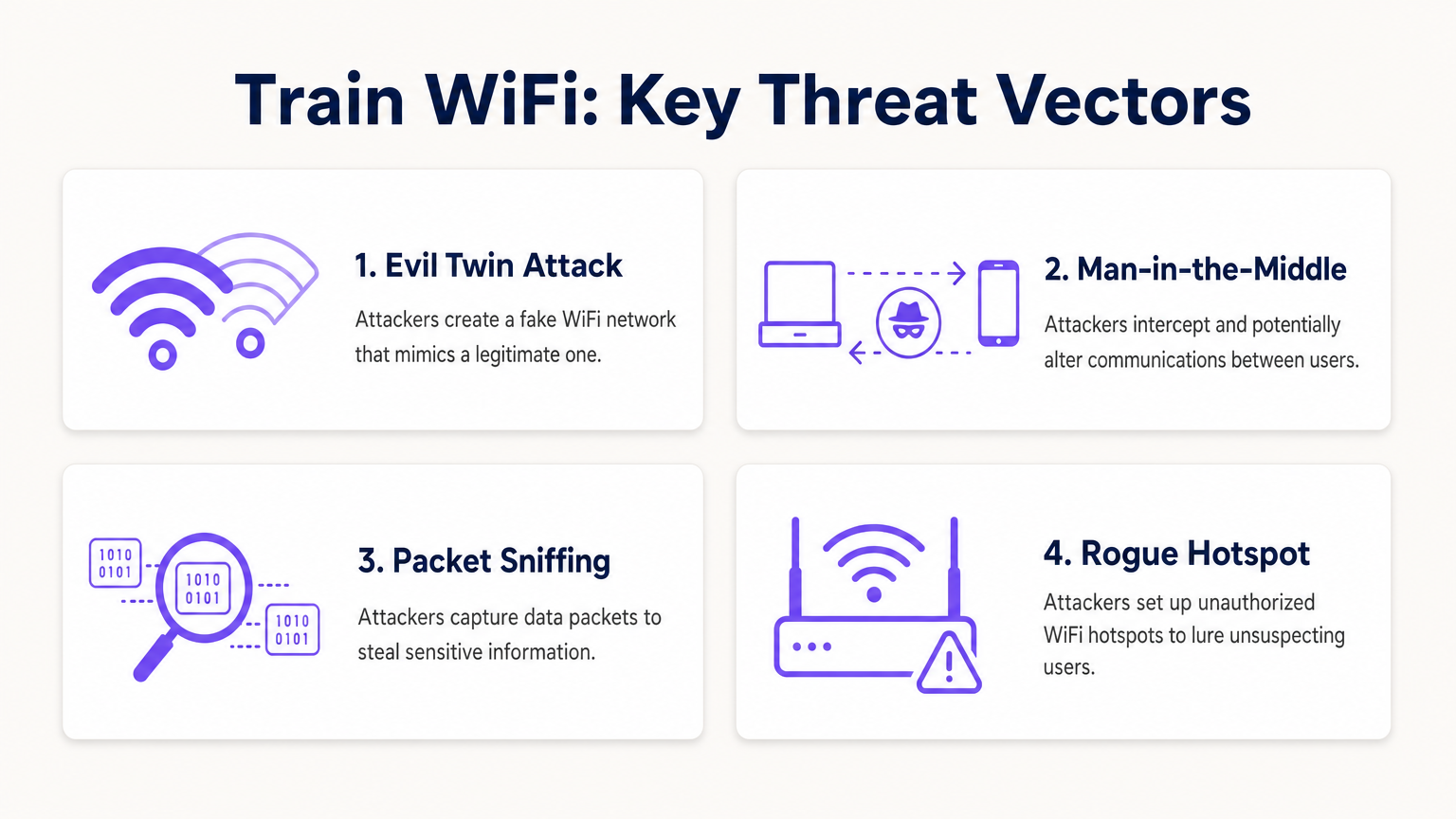
व्यावहारिक निहितार्थ इस बात पर निर्भर करते हैं कि क्या प्रसारित किया जा रहा है। HTTPS के व्यापक रूप से अपनाने का मतलब है कि अधिकांश वेब ट्रैफ़िक का पेलोड एप्लिकेशन लेयर पर TLS एन्क्रिप्शन द्वारा सुरक्षित होता है। एक हमलावर जो एक खुले ट्रेन नेटवर्क पर पैकेटों को इंटरसेप्ट करता है, वह देख सकता है कि एक विशेष डोमेन से कनेक्शन बनाया गया था, लेकिन यदि वह HTTPS पर है तो उस कनेक्शन की सामग्री को पढ़ नहीं सकता है। हालांकि, DNS क्वेरीज़ — जब तक कि DNS-over-HTTPS (DoH) कॉन्फ़िगर नहीं किया जाता है — स्पष्ट रूप से प्रसारित होती हैं, जिससे उपयोगकर्ता द्वारा देखी जा रही डोमेन की पूरी सूची का पता चलता है। लेगेसी HTTP ट्रैफ़िक, जो अभी भी काफी संख्या में साइटों पर मौजूद है, अपने पूरे पेलोड को उजागर करता है।
सक्रिय हमला वेक्टर
निष्क्रिय स्निफिंग सबसे कम प्रयास वाला खतरा है। अधिक खतरनाक परिदृश्यों में सक्रिय हमले शामिल होते हैं।
Evil Twin हमला सार्वजनिक ट्रांज़िट पर सबसे अधिक परिचालन रूप से प्रासंगिक खतरा है। एक हमलावर एक दुष्ट एक्सेस पॉइंट तैनात करता है जो वैध ट्रेन नेटवर्क के समान SSID प्रसारित करता है। ज्ञात नेटवर्क से स्वतः जुड़ने के लिए कॉन्फ़िगर किए गए डिवाइस वैध AP के बजाय दुष्ट AP से कनेक्ट हो सकते हैं। एक बार कनेक्ट होने के बाद, हमलावर गेटवे को नियंत्रित करता है और ट्रैफ़िक को इंटरसेप्ट कर सकता है, क्रेडेंशियल प्राप्त करने के लिए धोखाधड़ी वाले Captive Portal पेज परोस सकता है, या अनएन्क्रिप्टेड HTTP प्रतिक्रियाओं में दुर्भावनापूर्ण सामग्री इंजेक्ट कर सकता है।
Man-in-the-Middle (MitM) हमले ARP स्पूफिंग के माध्यम से स्थानीय नेटवर्क पर निष्पादित किए जा सकते हैं। एक ही सबनेट पर एक हमलावर झूठे ARP उत्तर प्रसारित करता है, अन्य डिवाइसों के ARP कैश को दूषित करता है और उनके ट्रैफ़िक को वैध गेटवे तक पहुँचने से पहले हमलावर की मशीन के माध्यम से पुनर्निर्देशित करता है। यह HTTPS ट्रैफ़िक के खिलाफ भी प्रभावी है यदि हमलावर एक धोखाधड़ी वाला प्रमाणपत्र प्रस्तुत कर सकता है जिसे पीड़ित का डिवाइस स्वीकार करता है।
पीयर-टू-पीयर हमले एक तीसरा वेक्टर प्रस्तुत करते हैं जिसे इन्फ्रास्ट्रक्चर स्तर पर पूरी तरह से रोका जा सकता है। यदि एक्सेस पॉइंट पर क्लाइंट आइसोलेशन कॉन्फ़िगर नहीं किया गया है, तो ट्रेन के WiFi सबनेट पर हर डिवाइस सीधे हर दूसरे डिवाइस के साथ संचार कर सकता है। नेटवर्क स्कैनर चलाने वाला एक एकल समझौता किया गया लैपटॉप अन्य यात्रियों के डिवाइसों को खुले पोर्ट और भेद्यताओं के लिए पहचान और जांच कर सकता है।
एप्लिकेशन-लेयर सुरक्षा की भूमिका
क्योंकि अधिकांश ट्रेन नेटवर्क पर लिंक लेयर अनएन्क्रिप्टेड होती है, सुरक्षा का बोझ एप्लिकेशन और ट्रांसपोर्ट लेयर पर स्थानांतरित हो जाता है। HSTS प्रीलोडिंग के माध्यम से लागू TLS 1.3, वेब ट्रैफ़िक के लिए मजबूत सुरक्षा प्रदान करता है। हालांकि, यह मानता है कि क्लाइंट डिवाइस को एक धोखाधड़ी वाले प्रमाणपत्र प्राधिकरण पर भरोसा करने के लिए प्रेरित नहीं किया गया है — एक जोखिम जो Evil Twin परिदृश्यों में बढ़ जाता है। DNS-over-HTTPS और DNS-over-TLS क्वेरी गोपनीयता की रक्षा करते हैं। एक VPN या ZTNA क्लाइंट Layer 3 पर सभी ट्रैफ़िक को एन्क्रिप्ट करता है, जिससे लिंक-लेयर भेद्यता काफी हद तक अप्रासंगिक हो जाती है।
कार्यान्वयन मार्गदर्शिका: सुरक्षित करनारेल WiFi परिनियोजन
रेल बेड़े में यात्री WiFi को परिनियोजित या अपग्रेड करने वाले ऑपरेटरों के लिए, निम्नलिखित वर्तमान सर्वोत्तम-अभ्यास आधारभूत रेखा का प्रतिनिधित्व करता है। यह अन्य उच्च-घनत्व वाले सार्वजनिक पारगमन वातावरणों पर समान रूप से लागू होता है और परिवहन क्षेत्र के उन परिनियोजनों से सीधे संबंधित है जिन्हें Purple समर्थन करता है।
चरण 1: क्लाइंट आइसोलेशन लागू करें
यह किसी भी सार्वजनिक नेटवर्क के लिए सबसे प्रभावशाली कॉन्फ़िगरेशन परिवर्तन है। क्लाइंट आइसोलेशन — जिसे कभी-कभी AP आइसोलेशन या वायरलेस क्लाइंट आइसोलेशन भी कहा जाता है — एक ही एक्सेस पॉइंट या VLAN से जुड़े उपकरणों को एक-दूसरे के साथ सीधे संचार करने से रोकता है। यह सभी एंटरप्राइज़-ग्रेड वायरलेस हार्डवेयर पर एक मानक सुविधा है और इसके लिए किसी अतिरिक्त लाइसेंसिंग की आवश्यकता नहीं होती है। प्रत्येक सार्वजनिक-सामने वाले SSID में क्लाइंट आइसोलेशन सक्षम होना चाहिए। यात्री नेटवर्क पर इसे अक्षम छोड़ने का कोई वैध परिचालन कारण नहीं है।
चरण 2: प्रोफ़ाइल-आधारित प्रमाणीकरण परिनियोजित करें
बुनियादी क्लिक-थ्रू स्प्लैश पृष्ठों को एक उचित प्रमाणीकरण पोर्टल से बदलें जो कनेक्शन को एक सत्यापित पहचान से जोड़ता है। विकल्पों में सोशल लॉगिन (Google, Facebook, Apple के माध्यम से OAuth), लॉयल्टी खाता एकीकरण, या SMS सत्यापन शामिल हैं। Purple के Guest WiFi समाधान जैसे प्लेटफ़ॉर्म इस प्रमाणीकरण प्रवाह को बड़े पैमाने पर संभालते हैं, GDPR-अनुरूप डेटा कैप्चर, सत्र प्रबंधन और एक कॉन्फ़िगर करने योग्य Captive Portal अनुभव प्रदान करते हैं। प्रोफ़ाइल-आधारित प्रमाणीकरण एक ऑडिट ट्रेल बनाता है, उन दुर्भावनापूर्ण अभिनेताओं को रोकता है जो गुमनामी पसंद करते हैं, और — ऑपरेटरों के लिए महत्वपूर्ण रूप से — प्रथम-पक्ष यात्री डेटा उत्पन्न करता है जो WiFi Analytics प्लेटफ़ॉर्म के माध्यम से लक्षित जुड़ाव और परिचालन विश्लेषण को सक्षम बनाता है।
चरण 3: DNS-आधारित सामग्री फ़िल्टरिंग लागू करें
सभी अतिथि नेटवर्क क्लाइंट को फ़िल्टरिंग DNS रिज़ॉल्वर असाइन करने के लिए DHCP कॉन्फ़िगर करें। DNS-आधारित फ़िल्टरिंग ज्ञात दुर्भावनापूर्ण डोमेन, फ़िशिंग इन्फ्रास्ट्रक्चर और कमांड-एंड-कंट्रोल एंडपॉइंट्स को रिज़ॉल्यूशन चरण में ही ब्लॉक कर देता है — किसी भी कनेक्शन के स्थापित होने से पहले। यह एक हल्का, अत्यधिक प्रभावी नियंत्रण है जिसके लिए किसी एंडपॉइंट एजेंट की आवश्यकता नहीं होती है और यह सभी डिवाइस प्रकारों पर काम करता है। यह यात्री नेटवर्क का उपयोग करके बाहरी C2 सर्वर के साथ संचार करने वाले मैलवेयर-संक्रमित उपकरणों के जोखिम को भी कम करता है।
चरण 4: आधिकारिक SSID प्रकाशित और लागू करें
सही SSID को स्पष्ट और लगातार संप्रेषित करें — सीट-बैक कार्ड पर, ऑपरेटर के ऐप में, टिकट पर और ऑनबोर्ड साइनेज पर। कुछ ऑपरेटर QR कोड परिनियोजित कर रहे हैं जो सीधे नेटवर्क कनेक्शन को ट्रिगर करते हैं, SSID चयन स्क्रीन को पूरी तरह से बायपास करते हैं और Evil Twin हमलों के अवसर को कम करते हैं। यात्री परिचितता बनाने के लिए पूरे बेड़े में SSID सुसंगत सुनिश्चित करें।
चरण 5: Hotspot 2.0 / OpenRoaming में माइग्रेशन की योजना बनाएं
Hotspot 2.0 (Passpoint) और OpenRoaming फ्रेमवर्क सार्वजनिक WiFi सुरक्षा की अगली पीढ़ी का प्रतिनिधित्व करते हैं। ये मानक उपकरणों को 802.1X का उपयोग करके सार्वजनिक नेटवर्क पर स्वचालित रूप से प्रमाणित करने की अनुमति देते हैं, बिना किसी उपयोगकर्ता इंटरैक्शन के WPA2 या WPA3-Enterprise एन्क्रिप्टेड कनेक्शन स्थापित करते हैं। उपयोगकर्ता अनुभव सहज है — डिवाइस स्वचालित रूप से कनेक्ट होता है, जैसे कि यह एक सेलुलर नेटवर्क से होता है — लेकिन सुरक्षा एंटरप्राइज़-ग्रेड है, जिसमें पारस्परिक प्रमाणीकरण और प्रति-सत्र एन्क्रिप्शन कुंजी शामिल हैं। ऑपरेटरों को यह सुनिश्चित करना चाहिए कि नए हार्डवेयर खरीद में Passpoint प्रमाणीकरण शामिल हो और उनका पहचान प्रदाता OpenRoaming फेडरेशन का समर्थन करता हो।
एक अन्य महत्वपूर्ण सार्वजनिक वातावरण में सुरक्षित WiFi परिनियोजन के समानांतर विश्लेषण के लिए, अस्पतालों में WiFi: सुरक्षित क्लिनिकल नेटवर्क के लिए एक मार्गदर्शिका और संबंधित क्या अस्पताल का WiFi सुरक्षित है? मरीजों और आगंतुकों को क्या जानना चाहिए पर हमारी मार्गदर्शिका देखें।
कॉर्पोरेट IT टीमों के लिए सर्वोत्तम अभ्यास
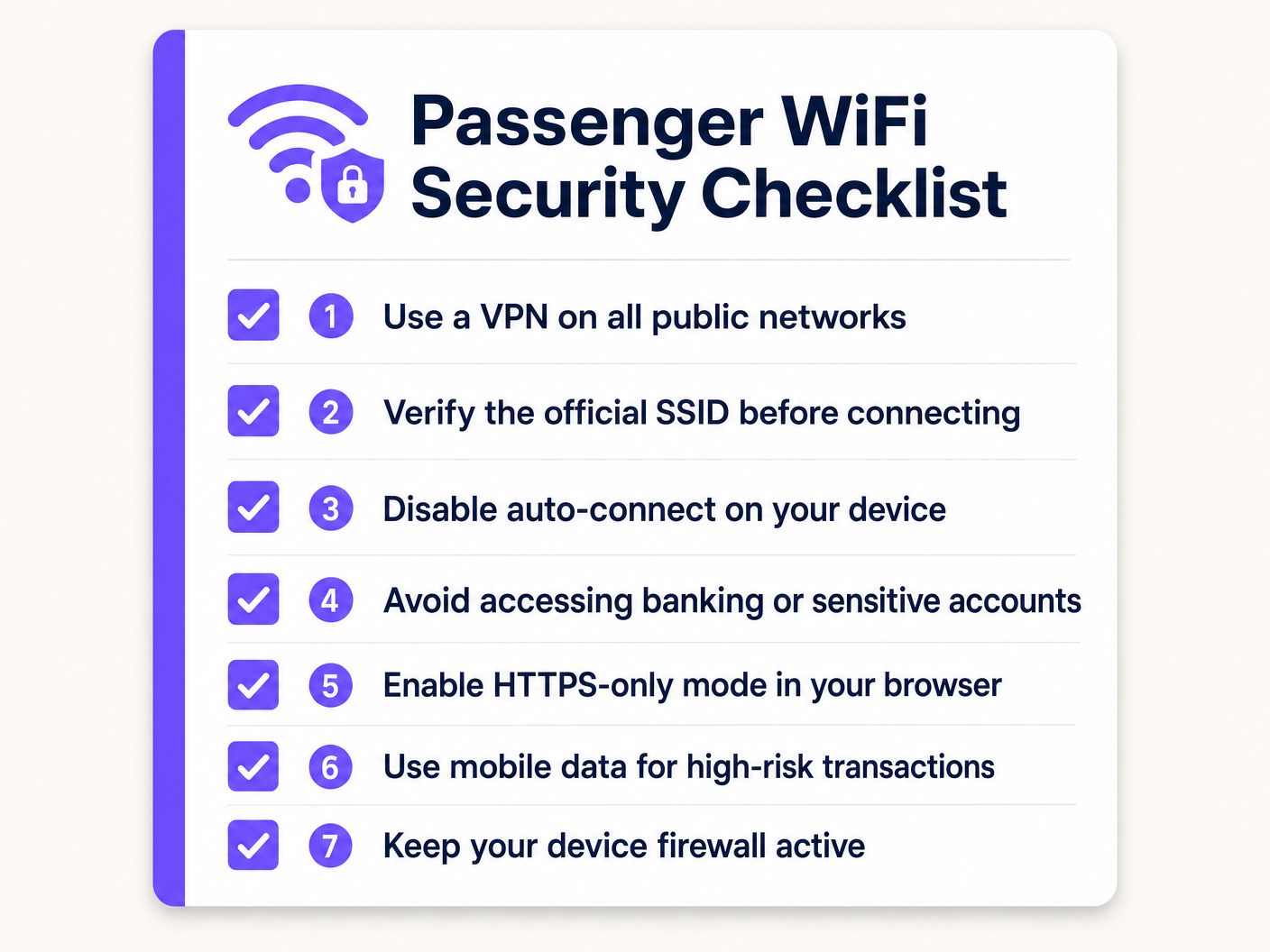
यात्रा करने वाले कर्मचारियों के लिए जिम्मेदार IT प्रबंधकों के लिए, मार्गदर्शक सिद्धांत सीधा है: सभी सार्वजनिक नेटवर्कों को शत्रुतापूर्ण बुनियादी ढांचे के रूप में मानें। आपकी सुरक्षा स्थिति उस नेटवर्क की गुणवत्ता पर निर्भर नहीं होनी चाहिए जिसका आपके कर्मचारी उपयोग कर रहे हैं।
ऑलवेज-ऑन VPN या ZTNA: MDM के माध्यम से एक VPN या Zero Trust Network Access क्लाइंट परिनियोजित करें, जिसे विफल होने पर बंद होने के लिए कॉन्फ़िगर किया गया हो। यदि सुरक्षित टनल स्थापित नहीं किया जा सकता है, तो सभी इंटरनेट ट्रैफ़िक अवरुद्ध हो जाता है। यह सुनिश्चित करता है कि भले ही कोई कर्मचारी किसी दुष्ट AP से कनेक्ट हो, कॉर्पोरेट डेटा एक्सेस पॉइंट तक पहुंचने से पहले एंड-टू-एंड एन्क्रिप्टेड हो। ZTNA पसंदीदा आधुनिक दृष्टिकोण है — यह पहचान और डिवाइस स्वास्थ्य का निरंतर सत्यापन प्रदान करता है, और पूरे कॉर्पोरेट नेटवर्क के बजाय केवल विशिष्ट अनुप्रयोगों तक पहुंच प्रदान करता है।
ओपन नेटवर्कों के लिए ऑटो-जॉइन अक्षम करें: MDM नीतियों को उपकरणों को खुले SSIDs से स्वचालित रूप से कनेक्ट होने से रोकना चाहिए। किसी भी सार्वजनिक नेटवर्क से जुड़ने के लिए स्पष्ट उपयोगकर्ता कार्रवाई की आवश्यकता होती है, जिससे मूक Evil Twin कनेक्शन का जोखिम कम होता है।
HTTPS-ओनली मोड लागू करें: ब्राउज़र नीतियों को HTTPS-ओनली मोड लागू करना चाहिए, जिससे विरासत HTTP साइटों से कनेक्शन रोका जा सके जो ट्रैफ़िक को स्पष्ट रूप से उजागर कर सकते हैं।
उच्च-जोखिम वाली गतिविधि को खंडित करें: कर्मचारियों को उच्च-जोखिम वाले लेनदेन के लिए अपने मोबाइल डेटा कनेक्शन का उपयोग करने के लिए प्रशिक्षित करें — वित्तीय प्रणालियों तक पहुंचना, विशेषाधिकार प्राप्त खातों को प्रमाणित करना, या संवेदनशील दस्तावेजों को संभालना। सेलुलर कनेक्शन अपनी रेडियो-लेयर एन्क्रिप्शन प्रदान करता है और अजनबियों के साथ एक स्थानीय सबनेट साझा नहीं करता है।
प्रमाणपत्र पिनिंग जागरूकता: सुनिश्चित करें कि कॉर्पोरेट एप्लिकेशन जहां संभव हो, प्रमाणपत्र पिनिंग का उपयोग करें, धोखाधड़ी वाले प्रमाणपत्रों पर निर्भर MitM हमलों को रोकते हुए।
समस्या निवारण और जोखिम शमन
सार्वजनिक पारगमन WiFi परिनियोजन में कई विफलता मोड आम हैं। उनका अनुमान लगाने से सुरक्षा जोखिम और परिचालन व्यवधान दोनों कम होते हैं।
दुष्ट AP प्रसार: ट्रेन स्टेशनों और प्लेटफार्मों जैसे उच्च-घनत्व वाले वातावरण में, वैध दिखने वाले SSIDs प्रसारित करने वाले दुष्ट AP एक लगातार खतरा हैं। प्रमुख स्टेशस्थानों और टर्मिनस बिंदुओं का उपयोग करके अनधिकृत APs का पता लगाने और उन पर अलर्ट करने के लिए। कुछ एंटरप्राइज़ वायरलेस प्लेटफ़ॉर्म में WIPS एक अंतर्निहित सुविधा के रूप में शामिल होता है।
Captive Portal Bypass via MAC Spoofing: हमलावर एक प्रमाणित डिवाइस के MAC एड्रेस का अवलोकन कर सकते हैं और Captive Portal को बायपास करने के लिए उसे स्पूफ कर सकते हैं। इसे कम करने के लिए, छोटी सत्र समय-सीमा लागू करें, एक निश्चित निष्क्रिय अवधि के बाद पुनः प्रमाणीकरण की आवश्यकता करें, और असामान्य व्यवहार का पता चलने पर सत्रों को रद्द करने के लिए RADIUS-आधारित डायनामिक प्राधिकरण का उपयोग करें।
Certificate Errors Conditioning Users: यदि यात्री Captive Portal पर अक्सर SSL प्रमाणपत्र चेतावनियों का सामना करते हैं — जो आमतौर पर प्रमाणीकरण से पहले HTTPS अनुरोधों को इंटरसेप्ट करने वाले पोर्टल के कारण होता है — तो वे सुरक्षा चेतावनियों को खारिज करने के आदी हो जाते हैं। सुनिश्चित करें कि Captive Portal डोमेन एक वैध, सार्वजनिक रूप से विश्वसनीय SSL प्रमाणपत्र का उपयोग करता है और ब्राउज़र सुरक्षा चेतावनियों को ट्रिगर करने से बचने के लिए पोर्टल रीडायरेक्ट तंत्र सही ढंग से लागू किया गया है।
Backhaul Failover Gaps: जब कोई ट्रेन सेलुलर कवरेज क्षेत्रों के बीच चलती है, तो MAR अस्थायी रूप से कनेक्टिविटी खो सकता है। इस अवधि के दौरान, DNS रिज़ॉल्यूशन विफल हो सकता है या ट्रैफ़िक ड्रॉप हो सकता है। सुनिश्चित करें कि Captive Portal और प्रमाणीकरण प्रणाली इन अंतरालों को सहजता से संभालती है, ऐसी स्थितियों से बचते हुए जहाँ उपयोगकर्ता चुपचाप डिस्कनेक्ट हो जाते हैं और एक अलग (संभावित रूप से दुर्भावनापूर्ण) नेटवर्क से फिर से कनेक्ट हो जाते हैं।
GDPR and Data Retention Compliance: कोई भी प्रमाणीकरण पोर्टल जो यात्री डेटा — ईमेल पते, सोशल प्रोफाइल, डिवाइस पहचानकर्ता — कैप्चर करता है, उसे लागू डेटा सुरक्षा विनियमों का पालन करना चाहिए, जिसमें यूके और यूरोपीय संघ में GDPR शामिल है। सुनिश्चित करें कि आपका प्लेटफ़ॉर्म कॉन्फ़िगर करने योग्य डेटा प्रतिधारण नीतियां, सहमति प्रबंधन, और विषय पहुंच अनुरोधों का जवाब देने की क्षमता प्रदान करता है। Purple का Guest WiFi प्लेटफ़ॉर्म इन अनुपालन आवश्यकताओं को मुख्य विशेषताओं के रूप में बनाया गया है, न कि बाद के विचारों के रूप में।
ROI और व्यावसायिक प्रभाव
रेल नेटवर्क पर सुरक्षित, बुद्धिमान WiFi इन्फ्रास्ट्रक्चर केवल एक लागत केंद्र नहीं है। जो ऑपरेटर एक ठीक से तैनात प्लेटफ़ॉर्म में निवेश करते हैं, वे कई आयामों में मापने योग्य रिटर्न उत्पन्न कर सकते हैं।
यात्री डेटा और फर्स्ट-पार्टी इंटेलिजेंस: प्रोफाइल-आधारित प्रमाणीकरण यात्री जनसांख्यिकी, यात्रा पैटर्न और प्राथमिकताओं का एक सत्यापित, सहमति प्राप्त डेटासेट उत्पन्न करता है। यह डेटा — WiFi Analytics प्लेटफ़ॉर्म के माध्यम से सुलभ — सेवा योजना, लक्षित संचार, और स्टेशन खुदरा विक्रेताओं और विज्ञापनदाताओं के साथ वाणिज्यिक साझेदारियों पर सीधे लागू होता है। जैसे-जैसे थर्ड-पार्टी कुकी का अवमूल्यन तेज होता है, यह फर्स्ट-पार्टी डेटा तेजी से मूल्यवान होता जाता है।
परिचालन विश्लेषण: मार्केटिंग से परे, WiFi कनेक्शन डेटा कैरिज उपयोग, चरम मांग अवधि और स्टेशनों के माध्यम से यात्री प्रवाह में वास्तविक समय और ऐतिहासिक अंतर्दृष्टि प्रदान करता है। यह हमारे Indoor Positioning System: UWB, BLE, & WiFi Guide में वर्णित इनडोर पोजिशनिंग और एनालिटिक्स उपयोग के मामलों को दर्शाता है, और समय-सारणी, रोलिंग स्टॉक आवंटन और स्टेशन क्षमता प्रबंधन पर डेटा-संचालित निर्णय लेने में सक्षम बनाता है।
कम समर्थन ओवरहेड: एक स्पष्ट प्रमाणीकरण प्रवाह के साथ एक अच्छी तरह से कॉन्फ़िगर किया गया, विश्वसनीय यात्री WiFi नेटवर्क कनेक्टिविटी से संबंधित यात्री शिकायतों और समर्थन संपर्कों की मात्रा को कम करता है। उच्च-गुणवत्ता वाले WiFi वाले ऑपरेटर लगातार इसे यात्री संतुष्टि स्कोर के शीर्ष चालक के रूप में रिपोर्ट करते हैं।
अनुपालन जोखिम में कमी: क्लाइंट आइसोलेशन, कंटेंट फ़िल्टरिंग और GDPR-अनुरूप डेटा हैंडलिंग के साथ ठीक से कॉन्फ़िगर किए गए नेटवर्क नियामक दंड और सुरक्षा घटनाओं से होने वाले प्रतिष्ठा संबंधी नुकसान के प्रति ऑपरेटर के जोखिम को कम करते हैं। एक एकल डेटा उल्लंघन या नियामक जुर्माने की लागत आमतौर पर उचित सुरक्षा इन्फ्रास्ट्रक्चर में निवेश को बौना कर देती है।
समान परिनियोजन पर विचार कर रहे आसन्न क्षेत्रों के ऑपरेटरों के लिए, हमारा Your Guide to Enterprise In Car Wi Fi Solutions वाहन WiFi परिनियोजन की विशिष्ट चुनौतियों को विस्तार से कवर करता है।
मुख्य शब्द और परिभाषाएं
Client Isolation (AP Isolation)
A wireless network configuration that prevents devices connected to the same access point or VLAN from communicating directly with each other, forcing all traffic through the gateway.
The most critical security configuration for any public WiFi deployment. Prevents lateral movement of malware and peer-to-peer attacks between passengers or guests.
Evil Twin Attack
A rogue access point configured to broadcast the same SSID as a legitimate network, tricking devices into connecting and allowing the attacker to intercept or manipulate traffic.
The primary active attack vector on public transit WiFi. Mitigated by publishing the official SSID clearly, using QR-code-based connection, and enforcing VPN on client devices.
Hotspot 2.0 (Passpoint)
A WiFi Alliance standard that enables devices to automatically discover and connect to public WiFi networks using 802.1X authentication, establishing a WPA2/WPA3-Enterprise encrypted connection without user interaction.
The enterprise-grade solution to the open network problem. Operators investing in new AP hardware should ensure Passpoint certification to future-proof their deployment.
Man-in-the-Middle (MitM) Attack
An attack where a malicious actor secretly intercepts and potentially alters communications between two parties who believe they are communicating directly, typically via ARP spoofing or a rogue access point.
Elevated risk on open networks. Mitigated at the endpoint by VPN/ZTNA and by enforcing certificate validation in applications.
Mobile Access Router (MAR)
A specialised router designed for vehicles that aggregates multiple external WAN connections (cellular, satellite) to provide a stable internal network for onboard WiFi access points.
The core hardware component of any train WiFi deployment. The MAR manages complex handoffs between cell towers at speed and is the point where backhaul security is implemented.
Open System Authentication (OSA)
A WiFi connection method requiring no authentication key or encryption to associate with an access point. The default mode for public WiFi networks that do not use a pre-shared key.
The standard deployment model for most public WiFi, including train networks. Inherently vulnerable to passive packet capture at the link layer.
Zero Trust Network Access (ZTNA)
A security framework that requires continuous verification of identity and device health before granting access to specific applications, regardless of network location. Replaces the implicit trust of traditional VPN architectures.
The modern replacement for perimeter-based VPNs for corporate remote access. Ensures corporate data remains secure even when accessed from untrusted public networks like train WiFi.
Wireless Intrusion Prevention System (WIPS)
A network security system that monitors the radio frequency spectrum for the presence of unauthorised access points and takes automated or manual action to mitigate them.
Deployed at stations and terminus points to detect Evil Twin and rogue AP attacks. Often included as a feature in enterprise wireless management platforms.
DNS-over-HTTPS (DoH)
A protocol that encrypts DNS queries by sending them over an HTTPS connection, preventing third parties from observing which domains a user is resolving.
Addresses the DNS leakage vulnerability on open networks where standard DNS queries are transmitted in the clear, revealing browsing patterns even when HTTPS is used for the actual connections.
केस स्टडीज
A national rail operator is upgrading the passenger WiFi across a fleet of 200 trains. Their current deployment uses open WiFi with a basic click-through splash page. They want to improve security, collect verified passenger demographics for marketing, reduce the risk of malware spreading between passenger devices, and ensure GDPR compliance. What is the recommended architectural approach?
Phase 1 — Immediate Controls (0–30 days): Enable client isolation on all existing access points. This is a configuration change, not a hardware change, and can be deployed via the central wireless controller. Implement DNS-based content filtering by updating DHCP scope options to point to a filtering resolver. These two changes address the most critical peer-to-peer and malware distribution risks without any user-facing impact.
Phase 2 — Authentication Upgrade (30–90 days): Replace the click-through splash page with a profile-based captive portal using a platform like Purple's Guest WiFi. Configure social login and email authentication options. Ensure the portal is GDPR-compliant with explicit consent capture, configurable data retention, and a privacy policy link. This generates verified passenger data and creates an audit trail.
Phase 3 — Future-Proofing (90–180 days): Ensure new AP hardware procured for fleet refreshes is Hotspot 2.0 / Passpoint certified. Evaluate OpenRoaming federation membership for seamless, encrypted roaming across the network.
A corporate IT director is defining the travel security policy for 500 remote employees who frequently commute by train. The company uses cloud-based SaaS applications almost exclusively (Microsoft 365, Salesforce, Workday). Employees use a mix of company-managed Windows laptops and personal iOS devices for work email. How should the IT director secure these endpoints when connecting to train WiFi?
For company-managed Windows laptops: Deploy an Always-On VPN or ZTNA client via MDM (e.g., Microsoft Intune). Configure the client to fail closed — no internet access if the tunnel is down. Apply a Windows Firewall policy that blocks all inbound connections on public network profiles. Disable the 'Connect automatically to open networks' setting via Group Policy. Enforce HTTPS-only mode in Edge/Chrome via browser policy.
For personal iOS devices accessing work email: Enforce a Mobile Device Management profile via an MDM solution that configures the work email account through a managed container. Apply a per-app VPN policy that routes only the work email app's traffic through the corporate VPN. This avoids the user friction of routing all personal traffic through the corporate gateway while protecting corporate data.
परिदृश्य विश्लेषण
Q1. A venue operations director managing WiFi across a network of 15 train stations notices a high volume of DNS queries to known malware domains originating from the public guest network. The network currently has no content filtering. What is the most immediate and effective configuration change to mitigate this risk without disabling the network or requiring new hardware?
💡 संकेत:Consider how to stop the resolution of malicious addresses at the network level, using existing DHCP infrastructure.
अनुशंसित दृष्टिकोण दिखाएं
Implement DNS-based content filtering by updating the DHCP scope options on the guest network to assign a filtering DNS resolver (such as Cloudflare Gateway, Cisco Umbrella, or similar) instead of the default ISP resolver. DNS queries to known malware, phishing, and C2 domains will be blocked at the resolution stage before any connection is established. This requires no endpoint agent, works across all device types, and can be deployed in minutes via the DHCP server configuration.
Q2. An IT manager is reviewing a vendor proposal for a new train WiFi deployment. The vendor states that because their system uses a captive portal with SMS OTP verification, the network is secure and no additional endpoint controls are needed for corporate devices. Critically evaluate this claim.
💡 संकेत:Distinguish carefully between user authentication (who can access the network) and data encryption (whether data in transit is protected).
अनुशंसित दृष्टिकोण दिखाएं
The vendor's claim is inaccurate and conflates two distinct security properties. SMS OTP verification on a captive portal provides identity validation and access control — it establishes who is authorised to use the network. It does not provide link-layer encryption. The connection between the client device and the access point remains an Open System Authentication (OSA) connection: data packets are transmitted over the air without encryption and are vulnerable to passive interception by any device in range. For corporate devices, endpoint-enforced controls — specifically an Always-On VPN or ZTNA client — remain necessary regardless of the captive portal authentication method.
Q3. A company requires employees to use an Always-On VPN on public WiFi. An employee boards a train and connects to the passenger WiFi, but the VPN client blocks the captive portal authentication page, preventing them from gaining internet access. The VPN is configured to fail closed. How should the network architect resolve this conflict without compromising the security posture?
💡 संकेत:The VPN tunnel must be established after the captive portal grants network access. Consider how to allow the minimum necessary pre-tunnel traffic.
अनुशंसित दृष्टिकोण दिखाएं
Configure the VPN client to enable captive portal detection. Most enterprise VPN and ZTNA clients support a 'captive portal exception' mode that temporarily allows HTTP traffic to the local gateway IP range before the tunnel is established. This permits the initial captive portal interaction. Once the portal grants internet access, the VPN client detects the change in connectivity state and immediately establishes the encrypted tunnel, at which point the fail-closed policy resumes. The window of unprotected traffic is limited to the captive portal interaction itself — typically a few seconds — and does not involve any corporate application traffic.




