

Il WiFi sui treni è sicuro? Cosa devono sapere i passeggeri ferroviari
Questa guida esamina l'architettura di sicurezza delle reti WiFi sui treni passeggeri, analizzando il panorama delle minacce, dagli attacchi di packet sniffing e Evil Twin agli exploit Man-in-the-Middle. Fornisce indicazioni operative attuabili per operatori e team IT aziendali, coprendo l'isolamento dei client, l'autenticazione tramite Captive Portal, il filtraggio DNS e il percorso verso Hotspot 2.0, con punti di integrazione diretti per la piattaforma Guest WiFi e di analytics di Purple.
🎧 Ascolta questa guida
Visualizza trascrizione
Riepilogo Esecutivo
Per gli IT managers, i network architects e i venue operations directors, la questione se il WiFi sui treni sia sicuro non è accademica — ha implicazioni dirette per la policy sui dispositivi aziendali, la sicurezza della flotta e la progettazione dell'infrastruttura di rete pubblica. La risposta breve è che la maggior parte delle reti WiFi sui treni opera come reti aperte e non crittografate a livello di link layer, il che crea una superficie di attacco misurabile. Tuttavia, il rischio è proporzionale e gestibile con i giusti controlli in atto.
Questa guida copre il quadro tecnico completo: come sono architettate le reti WiFi ferroviarie, i vettori di minaccia specifici che le reti aperte introducono, cosa gli operatori dovrebbero implementare per mitigare tali rischi e cosa i team IT aziendali dovrebbero applicare a livello di endpoint. Esaminiamo anche come piattaforme come la soluzione Guest WiFi di Purple affrontano i requisiti di autenticazione, compliance e analytics di implementazioni su larga scala nel trasporto pubblico. Sia che stiate valutando una nuova implementazione di flotta o rafforzando la vostra policy di viaggio aziendale, questa guida vi fornisce il framework tecnico per prendere una decisione informata.
Approfondimento Tecnico: Come Funziona Realmente il WiFi sui Treni
Comprendere la postura di sicurezza del WiFi sui treni inizia con la comprensione dell'architettura. A differenza delle implementazioni statiche in ambienti Hospitality o Retail, le reti ferroviarie sono LAN mobili che devono gestire continuamente i passaggi tra diverse connessioni di backhaul mantenendo una rete interna stabile per centinaia di utenti contemporanei.
Il Mobile Access Router (MAR)
Al centro di ogni implementazione WiFi sui treni c'è il Mobile Access Router. Questo dispositivo rinforzato, tipicamente montato nel vano attrezzature del treno, aggrega più link WAN — solitamente due o più connessioni cellulari 4G/5G di diversi operatori per la ridondanza, a volte integrate da satellite o WiFi a bordo pista nelle stazioni. Il MAR presenta una singola e stabile rete interna agli access point rivolti ai passeggeri distribuiti in tutte le carrozze. I link di backhaul cellulari e satellitari sono crittografati a livello di carrier layer, il che significa che il percorso di transito internet non è generalmente la vulnerabilità. Il rischio risiede nel primo hop.
Autenticazione a Sistema Aperto: La Vulnerabilità Principale
La maggior parte delle reti WiFi sui treni utilizza l'Open System Authentication (OSA). Non esiste una chiave pre-condivisa WPA2 o WPA3 perché distribuire una password a migliaia di passeggeri di passaggio è operativamente impraticabile. La conseguenza è che il traffico a radiofrequenza tra il dispositivo di un passeggero e l'access point viene trasmesso senza crittografia a livello di link layer. Qualsiasi dispositivo con un adattatore WiFi posto in modalità promiscua può catturare quei pacchetti.
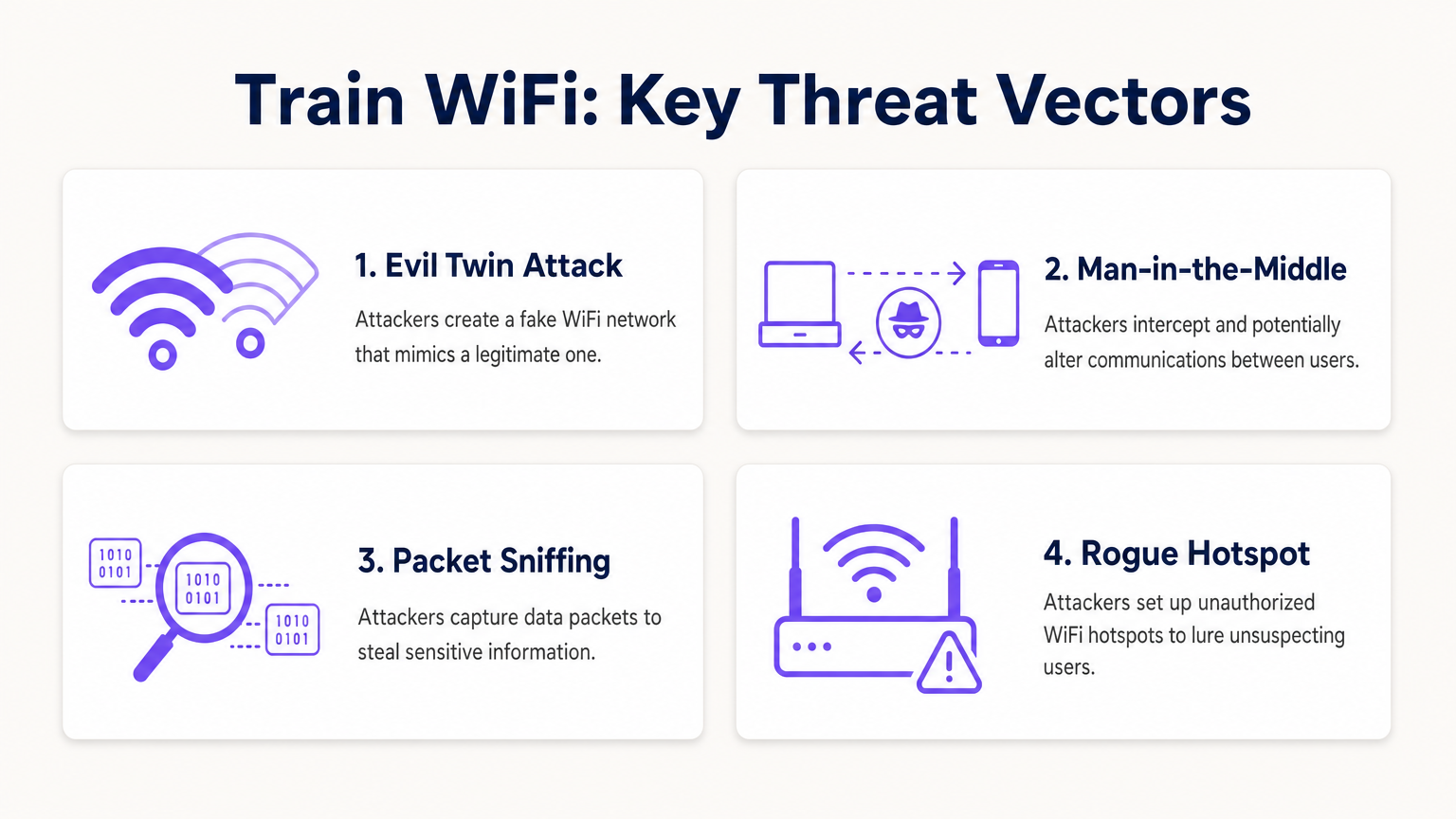
Le implicazioni pratiche dipendono da ciò che viene trasmesso. L'adozione diffusa di HTTPS significa che il payload della maggior parte del traffico web è protetto dalla crittografia TLS a livello di application layer. Un attaccante che intercetta i pacchetti su una rete ferroviaria aperta può vedere che è stata stabilita una connessione a un particolare dominio, ma non può leggere il contenuto di quella connessione se è tramite HTTPS. Tuttavia, le query DNS — a meno che non sia configurato DNS-over-HTTPS (DoH) — vengono trasmesse in chiaro, rivelando l'elenco completo dei domini che un utente sta visitando. Il traffico HTTP legacy, che esiste ancora su un numero non trascurabile di siti, espone il suo payload completo.
Vettori di Attacco Attivi
Lo sniffing passivo è la minaccia che richiede il minor sforzo. Gli scenari più pericolosi coinvolgono attacchi attivi.
L'Evil Twin attack è la minaccia più rilevante dal punto di vista operativo nel trasporto pubblico. Un attaccante distribuisce un access point rogue che trasmette lo stesso SSID della rete ferroviaria legittima. I dispositivi configurati per connettersi automaticamente a reti note potrebbero connettersi all'AP rogue invece che a quello legittimo. Una volta connesso, l'attaccante controlla il gateway e può intercettare il traffico, servire pagine Captive Portal fraudolente per raccogliere credenziali o iniettare contenuti dannosi nelle risposte HTTP non crittografate.
Gli Man-in-the-Middle (MitM) attacks possono essere eseguiti sulla rete locale tramite ARP spoofing. Un attaccante sulla stessa sottorete trasmette risposte ARP false, avvelenando la cache ARP di altri dispositivi e reindirizzando il loro traffico attraverso la macchina dell'attaccante prima che raggiunga il gateway legittimo. Questo è efficace anche contro il traffico HTTPS se l'attaccante può presentare un certificato fraudolento che il dispositivo della vittima accetta.
Gli Peer-to-peer attacks rappresentano un terzo vettore che è interamente prevenibile a livello di infrastruttura. Se l'isolamento del client non è configurato sugli access point, ogni dispositivo sulla sottorete WiFi del treno può comunicare direttamente con ogni altro dispositivo. Un singolo laptop compromesso che esegue uno scanner di rete può identificare e sondare i dispositivi degli altri passeggeri per porte aperte e vulnerabilità.
Il Ruolo della Sicurezza a Livello di Applicazione
Poiché il link layer non è crittografato sulla maggior parte delle reti ferroviarie, l'onere della sicurezza si sposta sui livelli di applicazione e trasporto. TLS 1.3, applicato tramite precaricamento HSTS, fornisce una forte protezione per il traffico web. Tuttavia, ciò presuppone che il dispositivo client non sia stato indotto a fidarsi di un'autorità di certificazione fraudolenta — un rischio elevato negli scenari Evil Twin. DNS-over-HTTPS e DNS-over-TLS proteggono la privacy delle query. Un client VPN o ZTNA crittografa tutto il traffico a Layer 3, rendendo la vulnerabilità del link layer in gran parte irrilevante.
Guida all'Implementazione: Proteggere ilImplementazione WiFi su Rotaia
Per gli operatori che implementano o aggiornano il WiFi per i passeggeri su una flotta ferroviaria, quanto segue rappresenta la base delle migliori pratiche attuali. Questo si applica ugualmente ad altri ambienti di trasporto pubblico ad alta densità ed è direttamente rilevante per le implementazioni nel settore Trasporti supportate da Purple.
Fase 1: Applicare l'isolamento del client
Questa è la singola modifica di configurazione più incisiva per qualsiasi rete pubblica. L'isolamento del client — a volte chiamato isolamento AP o isolamento del client wireless — impedisce ai dispositivi collegati allo stesso access point o VLAN di comunicare direttamente tra loro. È una funzionalità standard su tutto l'hardware wireless di livello enterprise e non richiede licenze aggiuntive. Ogni SSID pubblico deve avere l'isolamento del client abilitato. Non esiste alcuna valida ragione operativa per lasciarlo disabilitato su una rete passeggeri.
Fase 2: Implementare l'autenticazione basata su profilo
Sostituire le semplici pagine splash click-through con un portale di autenticazione adeguato che colleghi la connessione a un'identità verificata. Le opzioni includono il social login (OAuth tramite Google, Facebook, Apple), l'integrazione di account fedeltà o la verifica tramite SMS. Piattaforme come la soluzione Guest WiFi di Purple gestiscono questo flusso di autenticazione su larga scala, fornendo acquisizione dati conforme al GDPR, gestione delle sessioni e un'esperienza di Captive Portal configurabile. L'autenticazione basata su profilo crea una traccia di audit, scoraggia gli attori malintenzionati che preferiscono l'anonimato e — fondamentale per gli operatori — genera i dati di prima parte dei passeggeri che consentono un coinvolgimento mirato e analisi operative tramite la piattaforma WiFi Analytics .
Fase 3: Implementare il filtro dei contenuti basato su DNS
Configurare DHCP per assegnare un risolutore DNS di filtraggio a tutti i client della rete ospite. Il filtraggio basato su DNS blocca domini dannosi noti, infrastrutture di phishing ed endpoint di comando e controllo nella fase di risoluzione — prima che venga stabilita qualsiasi connessione. Questo è un controllo leggero ed estremamente efficace che non richiede alcun agente endpoint e funziona su tutti i tipi di dispositivi. Riduce anche il rischio che dispositivi infetti da malware utilizzino la rete passeggeri per comunicare con server C2 esterni.
Fase 4: Pubblicare e applicare l'SSID ufficiale
Comunicare l'SSID corretto in modo chiaro e coerente — sulle carte sullo schienale del sedile, nell'app dell'operatore, sul biglietto e sulla segnaletica di bordo. Alcuni operatori stanno implementando codici QR che attivano una connessione di rete diretta, bypassando completamente la schermata di selezione dell'SSID e riducendo l'opportunità di attacchi Evil Twin. Assicurarsi che l'SSID sia coerente su tutta la flotta per creare familiarità nei passeggeri.
Fase 5: Pianificare la migrazione a Hotspot 2.0 / OpenRoaming
Hotspot 2.0 (Passpoint) e il framework OpenRoaming rappresentano la prossima generazione di sicurezza WiFi pubblica. Questi standard consentono ai dispositivi di autenticarsi automaticamente alle reti pubbliche utilizzando 802.1X, stabilendo una connessione crittografata WPA2 o WPA3-Enterprise senza alcuna interazione dell'utente. L'esperienza utente è fluida — il dispositivo si connette automaticamente, come farebbe a una rete cellulare — ma la sicurezza è di livello enterprise, con autenticazione reciproca e chiavi di crittografia per sessione. Gli operatori dovrebbero assicurarsi che l'acquisto di nuovo hardware includa la certificazione Passpoint e che il loro provider di identità supporti la federazione OpenRoaming.
Per un'analisi parallela dell'implementazione sicura del WiFi in un altro ambiente pubblico critico, consulta la nostra guida su WiFi negli ospedali: una guida alle reti cliniche sicure e il relativo Il WiFi ospedaliero è sicuro? Cosa dovrebbero sapere pazienti e visitatori .
Migliori pratiche per i team IT aziendali
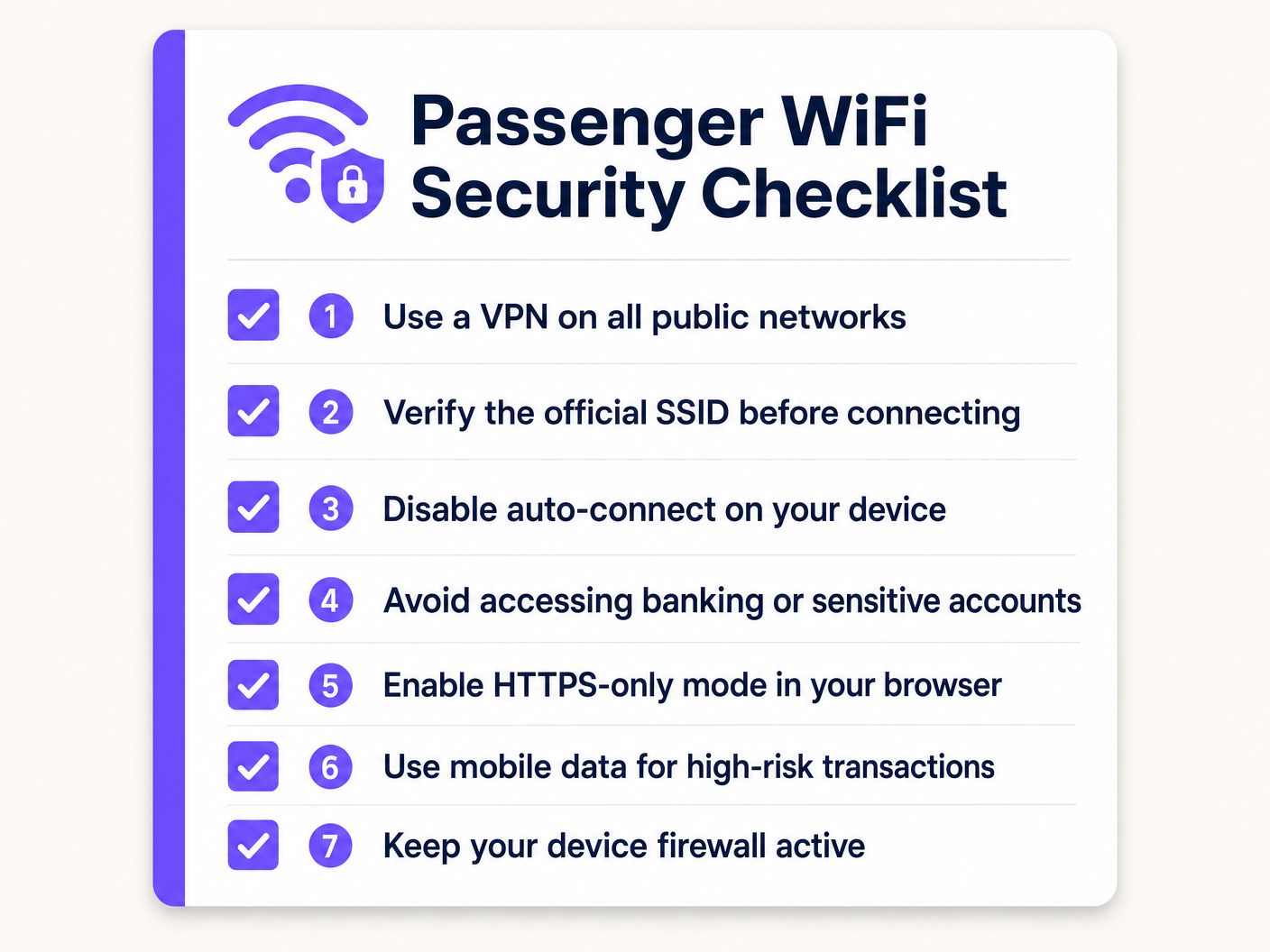
Per i responsabili IT che si occupano dei dipendenti in viaggio, il principio guida è semplice: trattare tutte le reti pubbliche come infrastrutture ostili. La vostra postura di sicurezza non deve dipendere dalla qualità della rete che i vostri dipendenti si trovano a utilizzare.
VPN Always-On o ZTNA: Implementare un client VPN o Zero Trust Network Access tramite MDM, configurato per fallire in modalità chiusa. Se il tunnel sicuro non può essere stabilito, tutto il traffico internet viene bloccato. Ciò garantisce che, anche se un dipendente si connette a un AP non autorizzato, i dati aziendali siano crittografati end-to-end prima di raggiungere l'access point. ZTNA è l'approccio moderno preferito — fornisce una verifica continua dell'identità e dello stato del dispositivo, e concede l'accesso solo ad applicazioni specifiche piuttosto che all'intera rete aziendale.
Disabilitare la connessione automatica per le reti aperte: Le policy MDM dovrebbero impedire ai dispositivi di connettersi automaticamente agli SSID aperti. Richiedere un'azione esplicita dell'utente per unirsi a qualsiasi rete pubblica, riducendo il rischio di connessioni Evil Twin silenziose.
Applicare la modalità solo HTTPS: Le policy del browser dovrebbero imporre la modalità solo HTTPS, impedendo le connessioni a siti HTTP legacy che esporrebbero il traffico in chiaro.
Segmentare le attività ad alto rischio: Formare i dipendenti a utilizzare la loro connessione dati mobile per transazioni ad alto rischio — accesso a sistemi finanziari, autenticazione ad account privilegiati o gestione di documenti sensibili. La connessione cellulare fornisce la propria crittografia a livello radio e non condivide una sottorete locale con estranei.
Consapevolezza del Certificate Pinning: Assicurarsi che le applicazioni aziendali utilizzino il certificate pinning ove possibile, prevenendo attacchi MitM che si basano su certificati fraudolenti.
Risoluzione dei problemi e mitigazione del rischio
Diverse modalità di guasto sono comuni nelle implementazioni WiFi di trasporto pubblico. Anticiparle riduce sia il rischio per la sicurezza che l'interruzione operativa.
Proliferazione di AP non autorizzati: In ambienti ad alta densità come stazioni e piattaforme ferroviarie, gli AP non autorizzati che trasmettono SSID dall'aspetto legittimo rappresentano una minaccia persistente. Implementare sistemi di prevenzione delle intrusioni wireless (WIPS) nelle principali stazioni e punti terminali per rilevare e segnalare AP non autorizzati. Alcune piattaforme wireless aziendali includono WIPS come funzionalità integrata.
Bypass del Captive Portal tramite MAC Spoofing: Gli aggressori possono osservare l'indirizzo MAC di un dispositivo autenticato e falsificarlo per bypassare il captive portal. Mitigare questo rischio implementando timeout di sessione brevi, richiedendo la riautenticazione dopo un periodo di inattività definito e utilizzando l'autorizzazione dinamica basata su RADIUS per revocare le sessioni quando viene rilevato un comportamento anomalo.
Errori di Certificato che Condizionano gli Utenti: Se i passeggeri incontrano frequentemente avvisi di certificato SSL sul captive portal — tipicamente causati dal portale che intercetta le richieste HTTPS prima dell'autenticazione — si abituano a ignorare gli avvisi di sicurezza. Assicurarsi che il dominio del captive portal utilizzi un certificato SSL valido e pubblicamente attendibile e che il meccanismo di reindirizzamento del portale sia implementato correttamente per evitare di attivare avvisi di sicurezza del browser.
Interruzioni del Failover del Backhaul: Quando un treno si sposta tra aree di copertura cellulare, il MAR potrebbe perdere brevemente la connettività. Durante questa finestra, la risoluzione DNS potrebbe fallire o il traffico potrebbe essere interrotto. Assicurarsi che il captive portal e il sistema di autenticazione gestiscano queste interruzioni con eleganza, evitando situazioni in cui gli utenti vengono disconnessi silenziosamente e si riconnettono a una rete diversa (potenzialmente non autorizzata).
Conformità GDPR e Conservazione dei Dati: Qualsiasi portale di autenticazione che acquisisce dati dei passeggeri — indirizzi email, profili social, identificatori di dispositivo — deve essere conforme alle normative sulla protezione dei dati applicabili, incluso il GDPR nel Regno Unito e nell'UE. Assicurarsi che la piattaforma fornisca politiche di conservazione dei dati configurabili, gestione del consenso e la capacità di rispondere alle richieste di accesso dei soggetti. La piattaforma Guest WiFi di Purple è costruita con questi requisiti di conformità come funzionalità principali, non come ripensamenti.
ROI e Impatto Commerciale
Un'infrastruttura WiFi sicura e intelligente sulle reti ferroviarie non è puramente un centro di costo. Gli operatori che investono in una piattaforma correttamente implementata possono generare ritorni misurabili su diverse dimensioni.
Dati dei Passeggeri e Intelligence di Prima Parte: L'autenticazione basata su profilo genera un set di dati verificato e con consenso di demografia dei passeggeri, modelli di viaggio e preferenze. Questi dati — accessibili tramite la piattaforma WiFi Analytics — sono direttamente applicabili alla pianificazione dei servizi, alle comunicazioni mirate e alle partnership commerciali con i rivenditori e gli inserzionisti delle stazioni. Con l'accelerazione della deprecazione dei cookie di terze parti, questi dati di prima parte diventano sempre più preziosi.
Analisi Operativa: Oltre al marketing, i dati di connessione WiFi forniscono informazioni in tempo reale e storiche sull'utilizzo delle carrozze, sui periodi di punta della domanda e sul flusso di passeggeri attraverso le stazioni. Questo rispecchia i casi d'uso di posizionamento indoor e analisi descritti nella nostra Guida ai Sistemi di Posizionamento Indoor: UWB, BLE e WiFi , e consente decisioni basate sui dati per la programmazione, l'allocazione del materiale rotabile e la gestione della capacità delle stazioni.
Riduzione del Carico di Supporto: Una rete WiFi per passeggeri ben configurata e affidabile con un flusso di autenticazione chiaro riduce il volume di reclami dei passeggeri e di contatti di supporto relativi alla connettività. Gli operatori con WiFi di alta qualità lo segnalano costantemente come uno dei principali fattori di soddisfazione dei passeggeri.
Riduzione del Rischio di Conformità: Reti correttamente configurate con isolamento del client, filtraggio dei contenuti e gestione dei dati conforme al GDPR riducono l'esposizione dell'operatore a sanzioni normative e danni alla reputazione derivanti da incidenti di sicurezza. Il costo di una singola violazione dei dati o di una multa normativa tipicamente supera di gran lunga l'investimento in un'infrastruttura di sicurezza adeguata.
Per gli operatori in settori adiacenti che considerano implementazioni simili, la nostra Guida alle Soluzioni Wi-Fi Aziendali per Auto copre in dettaglio le sfide specifiche delle implementazioni WiFi veicolari.
Termini chiave e definizioni
Client Isolation (AP Isolation)
A wireless network configuration that prevents devices connected to the same access point or VLAN from communicating directly with each other, forcing all traffic through the gateway.
The most critical security configuration for any public WiFi deployment. Prevents lateral movement of malware and peer-to-peer attacks between passengers or guests.
Evil Twin Attack
A rogue access point configured to broadcast the same SSID as a legitimate network, tricking devices into connecting and allowing the attacker to intercept or manipulate traffic.
The primary active attack vector on public transit WiFi. Mitigated by publishing the official SSID clearly, using QR-code-based connection, and enforcing VPN on client devices.
Hotspot 2.0 (Passpoint)
A WiFi Alliance standard that enables devices to automatically discover and connect to public WiFi networks using 802.1X authentication, establishing a WPA2/WPA3-Enterprise encrypted connection without user interaction.
The enterprise-grade solution to the open network problem. Operators investing in new AP hardware should ensure Passpoint certification to future-proof their deployment.
Man-in-the-Middle (MitM) Attack
An attack where a malicious actor secretly intercepts and potentially alters communications between two parties who believe they are communicating directly, typically via ARP spoofing or a rogue access point.
Elevated risk on open networks. Mitigated at the endpoint by VPN/ZTNA and by enforcing certificate validation in applications.
Mobile Access Router (MAR)
A specialised router designed for vehicles that aggregates multiple external WAN connections (cellular, satellite) to provide a stable internal network for onboard WiFi access points.
The core hardware component of any train WiFi deployment. The MAR manages complex handoffs between cell towers at speed and is the point where backhaul security is implemented.
Open System Authentication (OSA)
A WiFi connection method requiring no authentication key or encryption to associate with an access point. The default mode for public WiFi networks that do not use a pre-shared key.
The standard deployment model for most public WiFi, including train networks. Inherently vulnerable to passive packet capture at the link layer.
Zero Trust Network Access (ZTNA)
A security framework that requires continuous verification of identity and device health before granting access to specific applications, regardless of network location. Replaces the implicit trust of traditional VPN architectures.
The modern replacement for perimeter-based VPNs for corporate remote access. Ensures corporate data remains secure even when accessed from untrusted public networks like train WiFi.
Wireless Intrusion Prevention System (WIPS)
A network security system that monitors the radio frequency spectrum for the presence of unauthorised access points and takes automated or manual action to mitigate them.
Deployed at stations and terminus points to detect Evil Twin and rogue AP attacks. Often included as a feature in enterprise wireless management platforms.
DNS-over-HTTPS (DoH)
A protocol that encrypts DNS queries by sending them over an HTTPS connection, preventing third parties from observing which domains a user is resolving.
Addresses the DNS leakage vulnerability on open networks where standard DNS queries are transmitted in the clear, revealing browsing patterns even when HTTPS is used for the actual connections.
Casi di studio
A national rail operator is upgrading the passenger WiFi across a fleet of 200 trains. Their current deployment uses open WiFi with a basic click-through splash page. They want to improve security, collect verified passenger demographics for marketing, reduce the risk of malware spreading between passenger devices, and ensure GDPR compliance. What is the recommended architectural approach?
Phase 1 — Immediate Controls (0–30 days): Enable client isolation on all existing access points. This is a configuration change, not a hardware change, and can be deployed via the central wireless controller. Implement DNS-based content filtering by updating DHCP scope options to point to a filtering resolver. These two changes address the most critical peer-to-peer and malware distribution risks without any user-facing impact.
Phase 2 — Authentication Upgrade (30–90 days): Replace the click-through splash page with a profile-based captive portal using a platform like Purple's Guest WiFi. Configure social login and email authentication options. Ensure the portal is GDPR-compliant with explicit consent capture, configurable data retention, and a privacy policy link. This generates verified passenger data and creates an audit trail.
Phase 3 — Future-Proofing (90–180 days): Ensure new AP hardware procured for fleet refreshes is Hotspot 2.0 / Passpoint certified. Evaluate OpenRoaming federation membership for seamless, encrypted roaming across the network.
A corporate IT director is defining the travel security policy for 500 remote employees who frequently commute by train. The company uses cloud-based SaaS applications almost exclusively (Microsoft 365, Salesforce, Workday). Employees use a mix of company-managed Windows laptops and personal iOS devices for work email. How should the IT director secure these endpoints when connecting to train WiFi?
For company-managed Windows laptops: Deploy an Always-On VPN or ZTNA client via MDM (e.g., Microsoft Intune). Configure the client to fail closed — no internet access if the tunnel is down. Apply a Windows Firewall policy that blocks all inbound connections on public network profiles. Disable the 'Connect automatically to open networks' setting via Group Policy. Enforce HTTPS-only mode in Edge/Chrome via browser policy.
For personal iOS devices accessing work email: Enforce a Mobile Device Management profile via an MDM solution that configures the work email account through a managed container. Apply a per-app VPN policy that routes only the work email app's traffic through the corporate VPN. This avoids the user friction of routing all personal traffic through the corporate gateway while protecting corporate data.
Analisi degli scenari
Q1. A venue operations director managing WiFi across a network of 15 train stations notices a high volume of DNS queries to known malware domains originating from the public guest network. The network currently has no content filtering. What is the most immediate and effective configuration change to mitigate this risk without disabling the network or requiring new hardware?
💡 Suggerimento:Consider how to stop the resolution of malicious addresses at the network level, using existing DHCP infrastructure.
Mostra l'approccio consigliato
Implement DNS-based content filtering by updating the DHCP scope options on the guest network to assign a filtering DNS resolver (such as Cloudflare Gateway, Cisco Umbrella, or similar) instead of the default ISP resolver. DNS queries to known malware, phishing, and C2 domains will be blocked at the resolution stage before any connection is established. This requires no endpoint agent, works across all device types, and can be deployed in minutes via the DHCP server configuration.
Q2. An IT manager is reviewing a vendor proposal for a new train WiFi deployment. The vendor states that because their system uses a captive portal with SMS OTP verification, the network is secure and no additional endpoint controls are needed for corporate devices. Critically evaluate this claim.
💡 Suggerimento:Distinguish carefully between user authentication (who can access the network) and data encryption (whether data in transit is protected).
Mostra l'approccio consigliato
The vendor's claim is inaccurate and conflates two distinct security properties. SMS OTP verification on a captive portal provides identity validation and access control — it establishes who is authorised to use the network. It does not provide link-layer encryption. The connection between the client device and the access point remains an Open System Authentication (OSA) connection: data packets are transmitted over the air without encryption and are vulnerable to passive interception by any device in range. For corporate devices, endpoint-enforced controls — specifically an Always-On VPN or ZTNA client — remain necessary regardless of the captive portal authentication method.
Q3. A company requires employees to use an Always-On VPN on public WiFi. An employee boards a train and connects to the passenger WiFi, but the VPN client blocks the captive portal authentication page, preventing them from gaining internet access. The VPN is configured to fail closed. How should the network architect resolve this conflict without compromising the security posture?
💡 Suggerimento:The VPN tunnel must be established after the captive portal grants network access. Consider how to allow the minimum necessary pre-tunnel traffic.
Mostra l'approccio consigliato
Configure the VPN client to enable captive portal detection. Most enterprise VPN and ZTNA clients support a 'captive portal exception' mode that temporarily allows HTTP traffic to the local gateway IP range before the tunnel is established. This permits the initial captive portal interaction. Once the portal grants internet access, the VPN client detects the change in connectivity state and immediately establishes the encrypted tunnel, at which point the fail-closed policy resumes. The window of unprotected traffic is limited to the captive portal interaction itself — typically a few seconds — and does not involve any corporate application traffic.




