
Come funziona l'assegnazione Dynamic VLAN negli edifici multitenant
Questa guida di riferimento tecnica dettaglia l'architettura e l'implementazione dell'assegnazione Dynamic VLAN utilizzando 802.1X e RADIUS in ambienti multitenant. Fornisce indicazioni pratiche per IT manager e progettisti di rete per ridurre il sovraccarico di SSID, applicare l'isolamento a livello Layer 2 e garantire una connettività sicura e scalabile all'interno di edifici condivisi.
Video overview
Ascolta questa guida
Visualizza trascrizione del podcast
Parte della nostra serie principale: Guida al WiFi Multitenant →
Executive Summary
Per i manager IT e gli architetti di rete che supervisionano edifici multi-tenant - come uffici commerciali, complessi commerciali o ampie strutture ricettive - la gestione della segmentazione di rete rappresenta una sfida cruciale. Storicamente, isolare il traffico dei tenant significava distribuire un'infrastruttura fisica separata o trasmettere un SSID univoco per ogni tenant. Entrambi gli approcci sono fondamentalmente imperfetti. La separazione fisica ha costi proibitivi ed è inflessibile, mentre la trasmissione di più SSID degrada gravemente le prestazioni RF a causa dell'eccessivo sovraccarico dei frame di gestione.
L'assegnazione dinamica dei VLAN risolve questo problema consolidando l'ambiente wireless in un unico SSID sicuro. Sfruttando l'autenticazione IEEE 802.1X e il RADIUS, la rete assegna dinamicamente gli utenti alla propria rete locale virtuale (VLAN) dedicata in base alla loro identità, non alla rete che scelgono. Questa guida fornisce un approfondimento tecnico completo sulla progettazione, l'implementazione e la risoluzione dei problemi dell'assegnazione dinamica dei VLAN, garantendo un isolamento sicuro a livello Layer 2, la conformità a standard come PCI-DSS e GDPR, e un solido ROI per i gestori delle strutture.
Approfondimento Tecnico
Il problema dei SSID multipli
In un edificio condiviso, è comune vedere decine di SSID trasmessi (ad es. "TenantA_Corp", "TenantB_Secure", "Building_Guest"). Ogni SSID trasmesso da un Access Point (AP) deve inviare frame di beacon alla velocità dati obbligatoria più bassa (solitamente 1 Mbps o 6 Mbps). All'aumentare del numero di SSID, la percentuale di tempo di trasmissione consumata dal sovraccarico di gestione cresce in modo esponenziale, lasciando meno tempo per la trasmissione effettiva dei dati. Ciò si traduce in un'elevata latenza, una bassa velocità di trasmissione e una scarsa esperienza utente, indipendentemente dalla velocità di connessione internet sottostante.
L'architettura 802.1X e RADIUS
L'assegnazione dinamica dei VLAN sposta la logica di segmentazione dal livello RF al livello di autenticazione. Si affida allo standard IEEE 802.1X per il controllo dell'accesso alla rete basato su porta, integrato con un server RADIUS (Remote Authentication Dial-In User Service).
L'architettura è composta da tre componenti principali:
- Supplicant: Il dispositivo client (laptop, smartphone) che richiede l'accesso alla rete.
- Authenticator: Il dispositivo di accesso alla rete, solitamente l'Access Point WiFi o il controller wireless, che blocca il traffico fino a quando l'autenticazione non va a buon fine.
- Authentication Server: Il server RADIUS che convalida le credenziali rispetto a un archivio di identità (ad es. Active Directory, LDAP) e stabilisce le policy di rete.
Il flusso di autenticazione
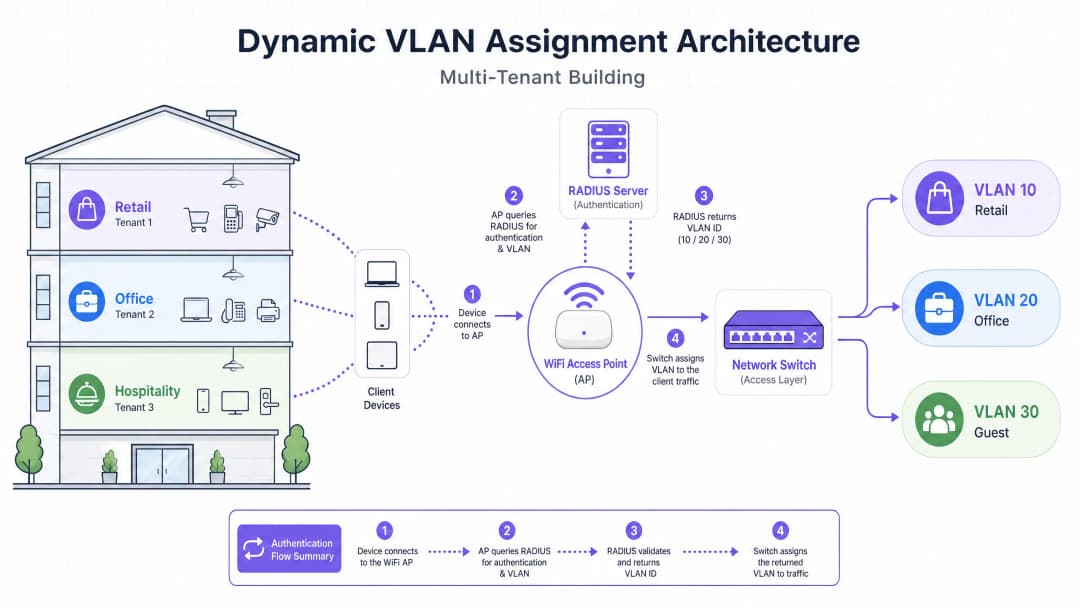
Quando un supplicant tenta di connettersi al SSID unificato, si verifica il seguente flusso:
- Inizializzazione EAPOL: Il supplicant si connette all'AP. L'AP blocca tutto il traffico ad eccezione dei pacchetti Extensible Authentication Protocol over LAN (EAPOL).
- RADIUS Access-Request: L'AP incapsula i dati EAP e li inoltra al server RADIUS come
Access-Request. - Validazione delle credenziali: Il server RADIUS verifica le credenziali dell'utente (tramite EAP-TLS, PEAP, ecc.).
- RADIUS Access-Accept: In seguito alla validazione positiva, il server RADIUS risponde con un messaggio di
Access-Accept. Aspetto cruciale, questo messaggio include attributi RADIUS standard IETF specifici che istruiscono l'AP su quale VLAN assegnare all'utente.
Gli attributi RADIUS critici richiesti per l'assegnazione dinamica della VLAN sono:
Tunnel-Type(64): Impostato suVLAN(Valore 13)Tunnel-Medium-Type(65): Impostato su802(Valore 6)Tunnel-Private-Group-ID(81): Impostato sull'ID VLAN specifico (ad es. "20" per il Tenant A, "30" per il Tenant B)
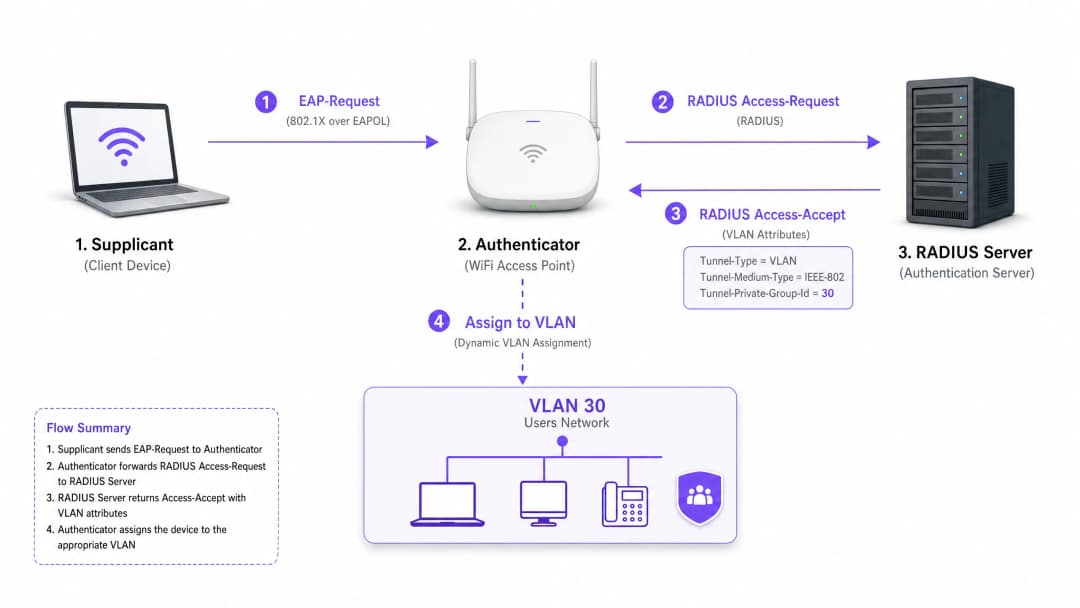
Una volta che l'AP riceve questi attributi, inserisce direttamente il traffico dell'utente nella VLAN specificata. Gli switch di rete a monte gestiscono quindi il traffico come se l'utente fosse fisicamente collegato a una porta dedicata per quel tenant, garantendo un isolamento completo a livello Layer 2.
Hai domande sulla tua configurazione specifica?
Il nostro team collabora con gestori di sedi, responsabili IT e ingegneri di rete in 80.000 sedi. Prenota una chiamata di 20 minuti e ti mostreremo come altri professionisti come te hanno risolto il problema.
Guida all'implementazione
L'implementazione dell'assegnazione dinamica della VLAN richiede un coordinamento attento tra l'infrastruttura wireless, gli switch di edge e l'identity provider. Segui questa sequenza di implementazione indipendente dal fornitore.
Fase 1: Preparazione dell'infrastruttura di rete
- Provisioning delle VLAN: Definisci e crea le VLAN necessarie sull'infrastruttura di routing core e sui server DHCP. Assicurati che ogni VLAN del tenant abbia la propria subnet distinta e politiche di routing appropriate (ad es. routing verso internet, ma blocco del traffico inter-VLAN).
- Trunking degli Switch: Questo è un passaggio cruciale. Le porte dello switch che si collegano agli Access Point devono essere configurate come porte trunk 802.1Q. È necessario taggare tutte le potenziali VLAN dei tenant che l'AP potrebbe dover assegnare. Se il server RADIUS assegna la VLAN 40, ma la VLAN 40 non è taggata sulla porta dello switch, il client si autenticherà ma non riuscirà a ricevere un indirizzo IP.
- Configurazione dell'AP: Configura gli AP per trasmettere un singolo SSID abilitato per 802.1X (ad es. WPA3-Enterprise). Abilita l'impostazione specifica sul controller wireless o sugli AP che consente loro di accettare gli attributi di override RADIUS (spesso denominata "AAA Override" o "Dynamic VLAN").
Fase 2: Integrazione RADIUS e Identità
- Integrazione dell'Identity Store: Collega il tuo server RADIUS al servizio di directory contenente le identità degli utenti e le loro associazioni ai tenant.
- Creazione delle policy di rete: Crea policy all'interno del server RADIUS che mappano i gruppi di utenti agli ID VLAN. Ad esempio, una regola che stabilisce: Se l'utente appartiene al gruppo 'Retail_Staff', restituisci Tunnel-Private-Group-ID = 10.
- Gestione dei certificati: Se si utilizza EAP-TLS (consigliato per i dispositivi aziendali), distribuire i certificati client. Se si utilizza PEAP-MSCHAPv2 (comune per il BYOD), assicurarsi che un certificato server valido e attendibile sia installato sul server RADIUS.
Fase 3: Test e implementazione graduale
- Test pilota: Effettuare i test con un piccolo gruppo di dispositivi su diversi tenant. Verificare che, al momento della connessione, il dispositivo riceva un indirizzo IP dalla subnet corretta e non possa eseguire il ping dei dispositivi in altre VLAN dei tenant.
- Dispositivi IoT e Headless: Per i dispositivi che non supportano lo standard 802.1X (stampanti, smart TV), implementare il MAC Authentication Bypass (MAB). Il server RADIUS autentica il dispositivo in base al suo indirizzo MAC e assegna la VLAN appropriata. Nota: collocare questi dispositivi in VLAN rigorosamente isolate, poiché gli indirizzi MAC possono essere contraffatti.
Best Practice
- Consolidare gli SSID: Puntare a un massimo assoluto di tre SSID: un SSID 802.1X per tutti i tenant, uno per i dispositivi IoT legacy (utilizzando PSK o MAB) e uno per il Guest WiFi (utilizzando un Captive Portal).
- Applicare l'isolamento dei client: All'interno della rete guest e delle reti tenant non attendibili, abilitare l'isolamento dei client di Livello 2 a livello di AP per impedire ai dispositivi di comunicare tra loro, riducendo i rischi di movimento laterale.
- Sfruttare l'analisi avanzata: Integrare il flusso di autenticazione con una solida piattaforma di WiFi Analytics per ottenere visibilità sull'utilizzo della sede, sui tempi di permanenza e sulle prestazioni della rete dei tenant.
- Standardizzare su WPA3: Laddove il supporto dei client lo consenta, rendere obbligatorio il WPA3-Enterprise per l'SSID 802.1X per garantire il massimo livello di crittografia e protezione contro gli attacchi a dizionario.
- Contesto del settore: Adattare l'implementazione al settore verticale. Nei contesti di Retail, assicurarsi che i sistemi POS si trovino su una VLAN rigorosamente isolata per mantenere la conformità PCI-DSS. Nel settore dell'accoglienza Hospitality, assicurarsi che le VLAN degli ospiti siano completamente separate dalle attività operative interne.
Risoluzione dei problemi e mitigazione dei rischi
Modalità di guasto comuni
Lo scenario "Autenticato ma nessun IP":
- Sintomo: Il client si connette, l'autenticazione va a buon fine, ma il dispositivo assegna a se stesso un indirizzo APIPA (169.254.x.x).
- Causa principale: Il server RADIUS ha assegnato una VLAN, ma tale VLAN non è stata creata sul server DHCP o, più comunemente, la VLAN non è taggata sulla porta trunk che collega lo switch all'AP.
- Soluzione: Verificare le configurazioni del trunk 802.1Q sullo switch di distribuzione.
Timeout RADIUS / Server non raggiungibile:
- Sintomo: I client rimangono bloccati su "Connessione in corso..." o viene ripetutamente richiesta l'immissione delle credenziali.
- Causa principale: L'AP non riesce a raggiungere il server RADIUS, o il segreto condiviso RADIUS non corrisponde tra l'AP e il server.
- Soluzione: Verificare la connettività di rete tra l'IP di gestione dell'AP e il server RADIUS. Verificare attentamente il segreto condiviso.
Scadenza del certificato:
- Sintomo: Improvvisi e diffusi errori di autenticazione per tutti gli utenti su PEAP o EAP-TLS.
- Causa principale: Il certificato del server RADIUS è scaduto, causando il rifiuto della connessione da parte dei client.
- Soluzione: Implementare un monitoraggio e un sistema di avvisi tempestivi per i certificati RADIUS. Rinnovare i certificati almeno 30 giorni prima della scadenza.
Strategie di mitigazione dei rischi
- Fail-Open vs. Fail-Closed: Definire una policy chiara per i casi in cui il server RADIUS non sia raggiungibile. Per le reti aziendali dei tenant, il fail-closed (nega l'accesso) è necessario per ragioni di sicurezza. Per l'accesso guest, è possibile configurare una policy di fail-open che sposta gli utenti in una VLAN di "quarantena" altamente limitata e con solo accesso a Internet.
- Ridondanza: Distribuire sempre i server RADIUS in una coppia ad alta affidabilità (HA), preferibilmente distribuita geograficamente se supporta più sedi.
ROI e impatto sul business
L'implementazione dell'assegnazione dinamica della VLAN offre risultati aziendali significativi e misurabili per i gestori delle sedi:
- Riduzione dei costi operativi (OpEx): La gestione centralizzata di un singolo SSID riduce drasticamente i costi operativi IT associati al provisioning, all'aggiornamento e alla risoluzione dei problemi delle singole reti dei tenant.
- Spettro RF ottimizzato: L'eliminazione del sovraccarico di SSID recupera tempo di trasmissione prezioso. Per una guida sulla gestione dello spettro, consulta il nostro articolo su Wi Fi Frequencies: A Guide to Wi-Fi Frequencies in 2026. Ciò si traduce in un throughput più elevato e in un minor numero di ticket di supporto relativi a un "WiFi lento".
- Sicurezza e conformità migliorate: Un rigido isolamento a livello Layer 2 garantisce che una violazione nella rete di un tenant non si diffonda alle altre. Questo è fondamentale per soddisfare i requisiti normativi come PCI-DSS e GDPR.
- Scalabilità: L'onboarding di un nuovo tenant richiede zero modifiche all'infrastruttura fisica o alla configurazione wireless; si tratta semplicemente di creare una nuova policy nel server RADIUS.
Per strategie più complete sulla progettazione di reti per spazi condivisi, consulta la nostra guida su Designing a Multi-Tenant WiFi Architecture for MDU.
Definizioni chiave
802.1X
Uno standard IEEE per il controllo dell'accesso alla rete basato su porta che fornisce un meccanismo di autenticazione ai dispositivi che desiderano collegarsi a una LAN o WLAN.
Il protocollo fondamentale che consente alla rete di richiedere l'identità prima di concedere l'accesso, abilitando criteri dinamici.
RADIUS (Remote Authentication Dial-In User Service)
Un protocollo di rete che fornisce la gestione centralizzata di Authentication, Authorization, and Accounting (AAA) per gli utenti che si connettono e utilizzano un servizio di rete.
Il motore decisionale che convalida le credenziali e indica alla rete quale VLAN assegnare a un utente.
Supplicant
Il dispositivo client (ad esempio, laptop, smartphone) o il software che richiede l'accesso alla rete e fornisce le credenziali.
L'endpoint che deve essere configurato per supportare lo standard 802.1X (ad esempio, selezionando PEAP o EAP-TLS nelle impostazioni WiFi).
Authenticator
Il dispositivo di rete (ad esempio, un Access Point WiFi o uno switch) che facilita il processo di autenticazione inoltrando i messaggi tra il supplicant e il server di autenticazione.
Il gatekeeper che blocca il traffico fino a quando il server RADIUS non dà il via libera, applicando poi la VLAN assegnata.
EAP (Extensible Authentication Protocol)
Un framework di autenticazione frequentemente utilizzato nelle reti wireless e nelle connessioni point-to-point, che supporta molteplici metodi di autenticazione (ad esempio, EAP-TLS, PEAP).
La lingua parlata tra il supplicant e il server RADIUS per scambiare credenziali in modo sicuro.
MAB (MAC Authentication Bypass)
Una tecnica utilizzata per autenticare i dispositivi che non supportano lo standard 802.1X utilizzando il loro indirizzo MAC come credenziale.
Utilizzato per l'onboarding di dispositivi IoT legacy, stampanti o smart TV in un ambiente multi-tenant.
Tunnel-Private-Group-ID
L'attributo RADIUS specifico (Attributo 81) utilizzato per trasmettere il VLAN ID dal server RADIUS all'autenticatore.
Il dato critico che determina effettivamente in quale segmento di rete viene inserito l'utente.
Layer 2 Isolation
Una misura di sicurezza che impedisce ai dispositivi sullo stesso segmento di rete o VLAN di comunicare direttamente tra loro.
Essenziale per le reti ospiti e le reti tenant non attendibili per prevenire il movimento laterale di malware o l'accesso non autorizzato.
Esempi pratici
Un grande centro congressi ospita tre eventi simultanei. L'Evento A richiede un accesso aziendale sicuro, l'Evento B richiede un accesso aperto per i partecipanti e l'Evento C richiede l'accesso a specifici server di presentazione interni. In che modo il progettista di rete dovrebbe implementare questa configurazione utilizzando le VLAN dinamiche?
Il progettista configura un singolo SSID 802.1X per il personale e i partecipanti che necessitano di una connessione sicura, e un SSID aperto separato con un Captive Portal per gli ospiti generici.
Per l'SSID 802.1X, il server RADIUS viene configurato con tre criteri:
- Se Gruppo utenti = "Event_A_Staff", assegna la VLAN 100 (accesso a Internet + VPN aziendale).
- Se Gruppo utenti = "Event_C_Presenters", assegna la VLAN 102 (accesso a Internet + Server di presentazione).
Per l'Evento B, i partecipanti utilizzano l'SSID Guest aperto, che li instrada nella VLAN 101 (solo Internet, con isolamento dei client abilitato).
Una catena retail gestisce un edificio condiviso con una caffetteria, un negozio di abbigliamento e una farmacia. La farmacia deve essere conforme allo standard HIPAA e il negozio di abbigliamento richiede la conformità PCI-DSS per i suoi terminali POS wireless. In che modo viene garantito l'isolamento?
Il team IT distribuisce un singolo SSID WPA3-Enterprise.
- Il personale della farmacia si autentica tramite 802.1X e il server RADIUS lo assegna alla VLAN 50, che presenta rigide regole di firewall per impedire l'accesso a qualsiasi altra sottorete interna.
- I terminali POS del negozio di abbigliamento si autenticano tramite EAP-TLS (basato su certificati) e vengono assegnati alla VLAN 60. La VLAN 60 è instradata direttamente al gateway del gestore dei pagamenti ed è isolata da tutto l'altro traffico.
- La caffetteria utilizza un SSID Guest separato per i clienti, che termina sulla VLAN 70 con isolamento dei client.
Domande di esercitazione
Q1. Un tenant riferisce di riuscire ad autenticarsi correttamente all'SSID 802.1X, ma il suo dispositivo si auto-assegna un indirizzo IP (169.254.x.x) e non riesce a raggiungere internet. Qual è l'errore di configurazione più probabile?
Suggerimento: Pensa al percorso tra l'Access Point e i servizi di rete principali.
Visualizza risposta modello
La causa più probabile è che la VLAN assegnata dal server RADIUS non sia taggata sulla porta trunk 802.1Q che collega lo switch di porta all'Access Point. L'AP cerca di instradare il traffico sulla VLAN corretta, ma lo switch scarta i frame perché non è configurato per accettarli su quella porta.
Q2. Stai progettando una rete multi-tenant per uno spazio di coworking. Il cliente desidera trasmettere un SSID univoco per ciascuno dei 15 tenant per "rendere facile la ricerca della propria rete". Cosa consigli al cliente?
Suggerimento: Considera l'impatto del sovraccarico dei frame di gestione sulle prestazioni RF.
Visualizza risposta modello
Sconsiglia vivamente questo approccio al cliente. Trasmettere 15 SSID consumerà una quantità enorme di tempo di trasmissione (airtime) con i frame di beacon, degradando gravemente le prestazioni della rete, aumentando la latenza e riducendo il throughput per tutti gli utenti. Consiglia di distribuire un singolo SSID 802.1X e utilizzare il Dynamic VLAN Assignment tramite RADIUS per segmentare in modo sicuro i tenant sul backend.
Q3. Un edificio multi-tenant richiede l'accesso alla rete per diversi dispositivi IoT headless (ad esempio, termostati intelligenti, segnaletica digitale) che non supportano i supplicant 802.1X. Come possono questi dispositivi essere integrati in modo sicuro nelle VLAN dei tenant corretti?
Suggerimento: Prendi in considerazione metodi di autenticazione alternativi supportati da RADIUS.
Visualizza risposta modello
Implementa il MAC Authentication Bypass (MAB). L'Access Point invierà l'indirizzo MAC del dispositivo al server RADIUS come nome utente e password. Il server RADIUS può essere configurato per riconoscere questi indirizzi MAC specifici e restituire il VLAN ID appropriato. Poiché gli indirizzi MAC possono essere falsificati, questi dispositivi dovrebbero essere collocati in VLAN rigorosamente isolate con accesso alla rete limitato.
Continua a leggere questa serie
Gestione della larghezza di banda nelle reti di alloggi per studenti
Questa guida fornisce ai responsabili IT, agli architetti di rete e ai direttori delle operazioni immobiliari un riferimento tecnico indipendente dai fornitori per la gestione della larghezza di banda WiFi in ambienti ad alta densità come gli alloggi per studenti. Copre la segmentazione VLAN, la progettazione delle policy di Quality of Service (QoS), il traffic shaping basato sull'identità e la visibilità a livello applicativo - i quattro pilastri di una rete scalabile e ad accesso equo. Con scenari di implementazione reali, risultati misurabili e framework decisionali, questo è il manuale operativo per qualsiasi team responsabile dell'infrastruttura di rete residenziale su larga scala.
WPA2-Enterprise vs Personal per appartamenti e co-working
Questa guida tecnica di riferimento valuta WPA2-Enterprise rispetto a WPA2-Personal per ambienti multi-tenant come appartamenti e spazi di co-working. Fornisce ai network architect e ai responsabili IT informazioni pratiche sull'autenticazione 802.1X, l'assegnazione dinamica delle VLAN e la conformità della sicurezza, dimostrando perché le password condivise introducono rischi inaccettabili nei moderni spazi condivisi. I gestori delle strutture troveranno linee guida concrete per l'implementazione, casi di studio reali e analisi del ROI per supportare una decisione di migrazione in questo trimestre.
Best practice di micro-segmentazione per reti WiFi condivise
Questa guida di riferimento tecnica fornisce strategie pratiche per implementare la micro-segmentazione su infrastrutture WiFi condivise. Descrive dettagliatamente come i responsabili IT e gli architetti di rete possono isolare in modo sicuro il traffico di ospiti, IoT e personale per mitigare i rischi, garantire la conformità e ottimizzare le prestazioni della rete.
Hai domande sulla tua configurazione specifica?
Il nostro team collabora con gestori di sedi, responsabili IT e ingegneri di rete in 80.000 sedi. Prenota una chiamata di 20 minuti e ti mostreremo come altri professionisti come te hanno risolto il problema.