
How to Reduce the Number of WiFi SSIDs Using Per-Device PSK (iPSK, DPSK, MPSK)
This authoritative technical reference guide explains how IT teams can eliminate WiFi performance degradation caused by SSID beacon overhead by collapsing multiple purpose-built networks into a single SSID using per-device PSK (xPSK). It covers the vendor landscape across Cisco iPSK, HPE Aruba MPSK, Ruckus DPSK, Juniper Mist PPSK, and Ubiquiti UniFi PPSK, with practical implementation guidance on dynamic VLAN assignment, IoT onboarding, and PCI DSS compliance. Venue operators in hospitality, retail, stadiums, and public-sector organisations will find actionable architecture guidance and real-world worked examples.
Listen to this guide
View podcast transcript

Executive summary
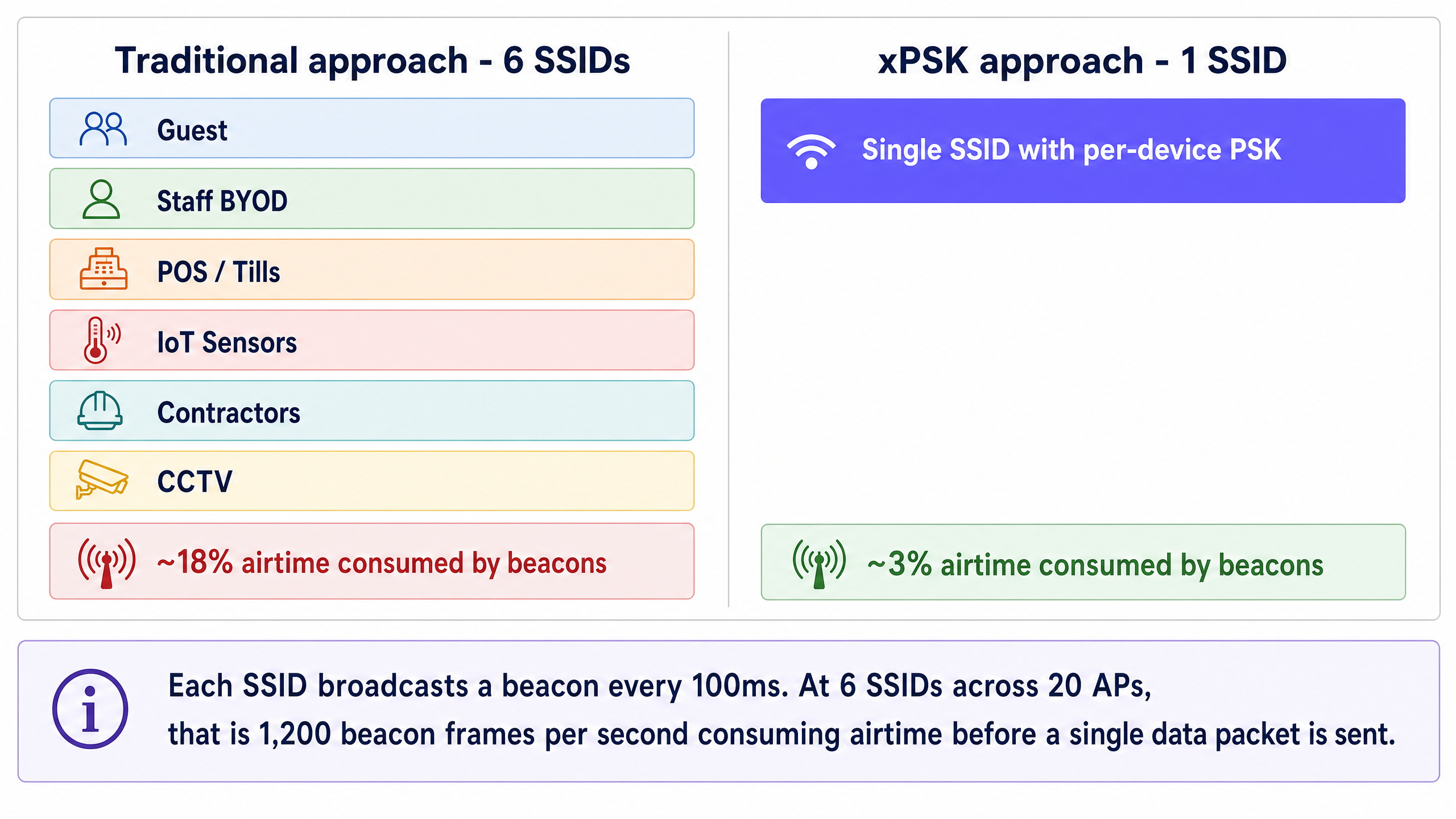
Venue operators face a growing crisis of WiFi spectrum congestion. Every time you broadcast a new SSID to segment guest, staff, point-of-sale, and IoT traffic, you consume valuable airtime with management frame overhead. A network broadcasting six SSIDs can consume nearly 20% of available airtime on beacons alone before a single packet of actual data is transmitted. This degrades performance for every user in the venue.
The solution is to collapse multiple purpose-built SSIDs into a single broadcast network using per-device Pre-Shared Keys (xPSK). By assigning a unique passphrase to each device or user group, IT teams can dynamically steer traffic into specific VLANs and apply role-based access control policies - all on a single SSID. This approach delivers the segmentation benefits of 802.1X enterprise authentication without the heavy burden of certificate management or RADIUS supplicant configuration on guest devices.
This guide details the architectural case for xPSK (including Cisco iPSK, HPE Aruba MPSK, Ruckus DPSK, Juniper Mist PPSK, and Ubiquiti UniFi PPSK), explains the underlying mechanics of dynamic VLAN assignment, and provides a practical roadmap for implementation in enterprise environments across Hospitality , Retail , Healthcare , and Transport verticals.
Technical deep-dive
The hidden cost of SSID sprawl
The performance problems often blamed on poor coverage or capacity are frequently the result of SSID congestion. Every enabled SSID broadcasts a beacon frame every 100 milliseconds. While a single beacon is small, this management traffic is transmitted at the lowest basic data rate - typically 1 or 2 Mbps - to ensure all devices at the cell edge can receive it. This means beacons occupy the channel for a disproportionately long time relative to their payload.
When a venue broadcasts separate networks for Guest WiFi , staff BYOD, tills, IoT sensors, and contractors, the airtime consumption compounds rapidly. If an access point broadcasts six SSIDs and a client device can hear four access points on the same channel, that channel must carry 240 beacon frames per second. This overhead consumes airtime that should carry actual data, increasing latency and reducing throughput across the entire network. The industry consensus is clear: broadcast no more than three SSIDs per radio, and ideally fewer.
The xPSK architecture
Per-device Pre-Shared Key technology - collectively referred to as xPSK - solves this problem by decoupling the passphrase from the SSID. Instead of one shared password for the entire network, the wireless controller or cloud management platform maintains a database of unique keys. When a device associates with the access point, it presents its assigned key during the standard WPA2 or WPA3 4-way handshake. The controller validates the key and maps it to an identity record, which triggers specific policies: dynamic VLAN assignment, bandwidth throttling, or firewall rules.
From the client device's perspective, the connection process is identical to joining a standard home network. There are no certificates to install, no complex supplicant configurations, and no captive portals required for initial association. This makes xPSK ideal for headless IoT devices, smart TVs, and guest BYOD scenarios where 802.1X is impractical.
The VLAN steering mechanism relies on three standard IETF RADIUS attributes returned in the Access-Accept message: Tunnel-Type (Attribute 64, value 13 for VLAN), Tunnel-Medium-Type (Attribute 65, value 6 for IEEE-802), and Tunnel-Private-Group-ID (Attribute 81, containing the VLAN ID string). When the access point receives these attributes, it dynamically tags the device's traffic with the specified VLAN, placing it into the correct network segment regardless of which physical port or access point it connected through.
Vendor implementations at a glance
While the underlying concept is uniform, hardware vendors use different terminology and offer varying levels of scale and integration.
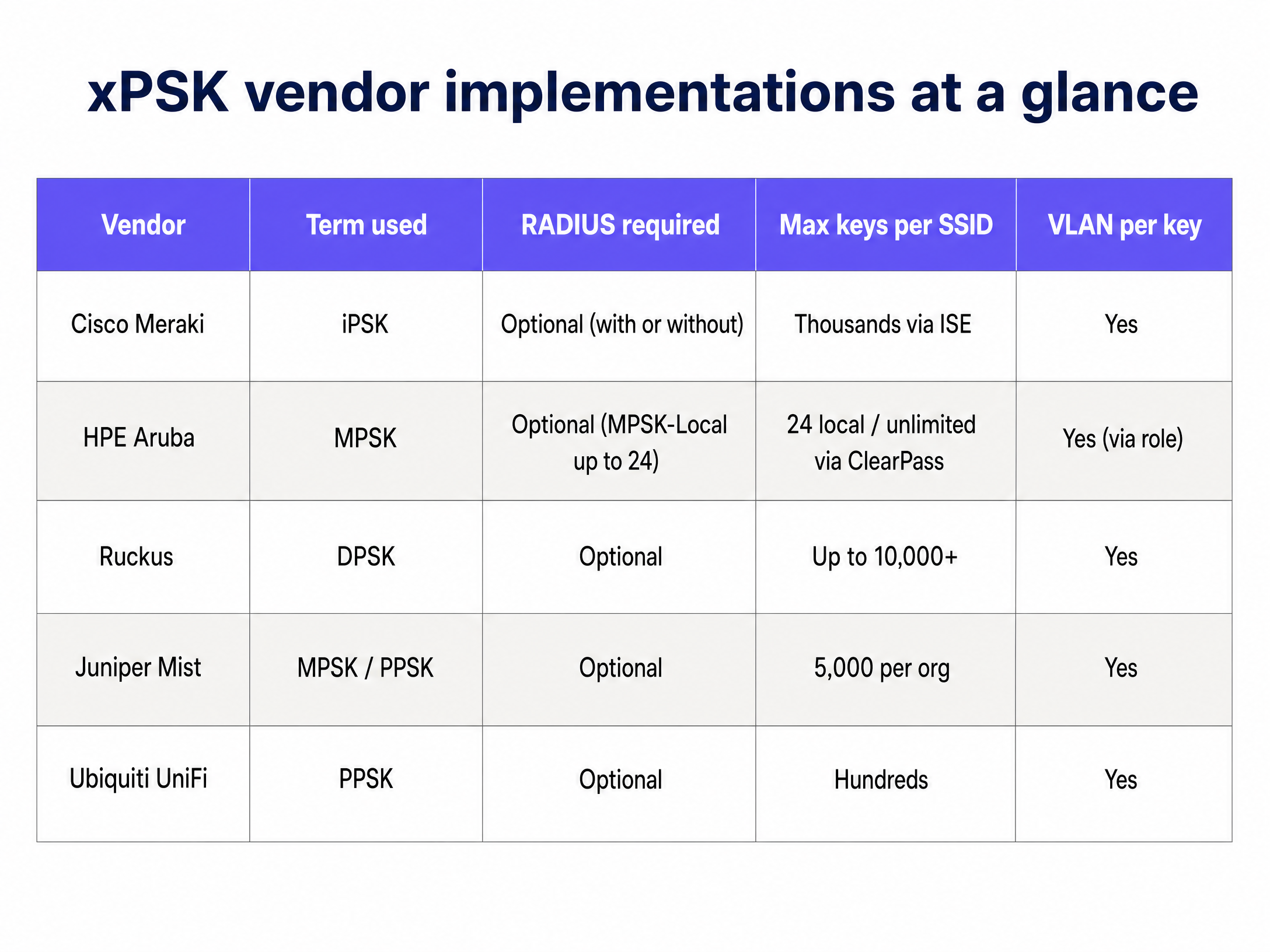
Cisco Meraki (iPSK): Identity PSK integrates tightly with Cisco ISE or Meraki's native cloud RADIUS. You can run it without a separate RADIUS server by managing keys directly in the Meraki dashboard, or scale to thousands of unique keys via ISE with full dynamic profiling and integration with Microsoft Entra ID or Okta.
HPE Aruba (MPSK): Multi Pre-Shared Key supports up to 24 keys locally on the access point (MPSK-Local) without any external server. For larger deployments, pairing with ClearPass removes the scale limit entirely and adds role-based access control on top of VLAN assignment.
Ruckus (DPSK): Dynamic PSK is a mature, patented implementation that has been in the market for over a decade. It supports up to 10,000 unique keys per SSID and has strong API support for automated provisioning, making it well-suited for large hospitality deployments.
Juniper Mist (PPSK/MPSK): Private PSK integrates with Mist's AI-driven cloud platform, supporting up to 5,000 keys per organisation with dynamic role and VLAN assignment. Keys can be imported via CSV or provisioned via API.
Ubiquiti UniFi (PPSK): Private Pre-Shared Key is built into the UniFi Network controller with no additional licensing. It is the most accessible entry point for smaller venues already running UniFi infrastructure.
Extreme Networks (PPSK): Extreme's ExtremeCloud IQ platform supports PPSK with per-key VLAN assignment, suitable for education and public-sector deployments.
Fortinet (MPSK): FortiGate and FortiAP support MPSK with per-key VLAN steering, integrating with FortiAuthenticator as the RADIUS backend.
When to use 802.1X instead
xPSK is not a universal replacement for 802.1X. For corporate-owned devices managed by an MDM platform, where certificates can be pushed silently via Microsoft Entra ID or Okta, 802.1X with EAP-TLS (Extensible Authentication Protocol - Transport Layer Security) remains the most secure option. It provides per-session encryption keys, mutual authentication, and certificate-based identity that cannot be shared or stolen as easily as a passphrase.
Use 802.1X for: managed corporate laptops and tablets, devices enrolled in Microsoft Intune or Jamf, and any scenario where you can guarantee supplicant configuration on every device.
Use xPSK for: guest BYOD, IoT and headless devices, point-of-sale terminals running legacy operating systems, contractor devices, and any scenario where certificate deployment is impractical.
For a broader treatment of enterprise WiFi security standards, see our Enterprise WiFi Security: A Complete Guide for 2026 .
Implementation guide
Step 1: Define your segmentation strategy
Before configuring your wireless controller, map out your required network segments. A typical hospitality or retail environment requires at least four isolated zones:
| Zone | VLAN | Access Policy | Typical Devices |
|---|---|---|---|
| Guest | 20 | Internet only, client isolation | Personal phones, tablets, laptops |
| Staff BYOD | 10 | Internet + specific internal apps | Staff personal devices |
| IoT and Facilities | 30 | Restricted outbound to vendor cloud only | Thermostats, sensors, digital signage |
| POS and Secure Ops | 40 | PCI DSS compliant, isolated | Payment terminals, tills |
Standardise these VLAN IDs across all your venues before deployment. Inconsistent VLAN numbering across sites is one of the most common causes of failed multi-site rollouts.
Step 2: Configure the RADIUS infrastructure
Enterprise deployments require a central RADIUS server to manage the key lifecycle and pass dynamic VLAN attributes. Configure your RADIUS server to return the following attributes upon successful authentication:
Tunnel-Type(64): Set toVLAN(13)Tunnel-Medium-Type(65): Set toIEEE-802(6)Tunnel-Private-Group-ID(81): Set to the assigned VLAN ID (e.g., "40" for POS)
Create separate authorization profiles for each device group. For example, a profile named "POS_Devices" returns VLAN 40. A profile named "IoT_Sensors" returns VLAN 30. Each profile is triggered by the unique key presented during authentication.
Step 3: Deploy the single SSID
Create a new SSID on your wireless controller. Configure the security type as WPA2-Personal (or WPA3-Transition if supported by your specific xPSK implementation) and enable the vendor-specific xPSK feature. Disable all legacy SSIDs once the new SSID is validated.
Ensure that MAC Authentication Bypass (MAB) is configured correctly to allow headless IoT devices to authenticate using their MAC address as the identity, mapping them to the appropriate PSK and VLAN.
Step 4: Automate key distribution
The success of an xPSK deployment depends on frictionless key distribution. For Guest WiFi , integrate key generation with your Property Management System or CRM. Purple's identity-based network platform can automate this process, generating a unique key upon booking and delivering it via email or SMS, then revoking it automatically at checkout.
For IoT devices, IT teams can pre-provision keys in bulk via CSV import or API integration, associating each device's MAC address with a specific key and VLAN role before it connects to the network.
Best practices
Plan for MAC randomisation from day one. Modern operating systems (iOS 14 and later, Android 10 and later, Windows 11) randomise MAC addresses by default. If your xPSK implementation relies on MAC address tracking for policy enforcement, you must require users to disable "Private Wi-Fi Address" for your network, or use a vendor solution that binds the identity to the key rather than the MAC address.
Enforce key lifecycle management. Keys must expire. Tie guest keys to their checkout date. Rotate staff keys annually or upon departure. Stale keys accumulate over time and become a significant security liability. Build the revocation workflow before you go live, not after.
Maintain a fallback VLAN. Configure a critical VLAN on your access points. If the RADIUS server becomes unreachable, devices should fail over to a restricted VLAN that provides basic internet connectivity without exposing internal systems. This prevents a RADIUS outage from taking down the entire venue network.
Audit WPA3 compatibility before forcing it. While WPA3 is the future, many legacy IoT devices do not support it. Test your specific xPSK implementation thoroughly before enabling WPA3-Transition mode, as some vendors require WPA2-only for xPSK functionality.
Standardise key format. Use 16 to 24 character alphanumeric keys. Some legacy devices struggle with keys longer than 32 characters or keys containing complex special characters. Consistency prevents hard-to-diagnose authentication failures.
For a broader treatment of dynamic VLAN segmentation, see our guide on Dynamic VLAN Assignment with RADIUS .
Troubleshooting and risk mitigation
Device connects but lands on the wrong VLAN. Verify that the wireless controller has "AAA Override" or dynamic VLAN assignment enabled. Check the RADIUS logs to confirm that the Tunnel-Private-Group-ID attribute is being sent correctly in the Access-Accept message. A packet capture on the RADIUS exchange will confirm whether the attributes are present.
Authentication fails entirely. Check the key length and character set. Verify that the RADIUS shared secret matches between the controller and the RADIUS server. Confirm that the RADIUS server has the access point's IP address registered as a valid client.
DHCP failure after VLAN assignment. After dynamic VLAN assignment, the device must obtain an IP address for the new subnet. Ensure the DHCP server is configured for all dynamic VLANs and that IP helper addresses are in place on the Layer 3 switch if DHCP is centralised.
MAC randomisation breaks authentication. If devices are failing to re-authenticate after a period of time, MAC randomisation is the most likely cause. Implement a pre-registration workflow or require users to disable the private address feature for your SSID.
ROI and business impact
Collapsing multiple SSIDs into a single xPSK network delivers measurable business value across three dimensions.
Performance. Reclaiming 15 to 20% of wireless airtime from beacon overhead immediately improves application performance and throughput for all users. This extends the usable life of existing access points and delays costly hardware refreshes. In a 200-room hotel with 40 access points, eliminating five redundant SSIDs can recover the equivalent of eight additional access points worth of capacity.
Security and compliance. xPSK eliminates the need to change a shared password across the entire venue when a single contractor leaves. It provides the granular audit trails required for PCI DSS compliance without the massive IT overhead of deploying 802.1X certificates to every point-of-sale terminal. Each device has a unique credential, so a compromised key affects only that device.
Operational efficiency. Automated key provisioning and revocation via API integration with your PMS or identity provider eliminates manual IT intervention for routine access changes. Purple's platform, deployed across 80,000+ live venues, provides this orchestration layer with full WiFi Analytics and reporting on top.
For related architecture guidance, see our guides on OpenWrt Custom Firmware Integration with Purple WiFi and WiFi Network Segmentation with VLANs and SSIDs .
Key Definitions
Beacon frame
An IEEE 802.11 management frame broadcast periodically (every 100ms by default) by an access point to announce the presence, capabilities, and parameters of an SSID.
When IT teams create too many SSIDs, the sheer volume of beacon frames consumes valuable airtime at the lowest data rate, causing network congestion before any user data is sent. This is the primary performance argument for reducing SSID count.
xPSK
An umbrella term for per-device or private Pre-Shared Keys, where multiple unique passwords can be used to authenticate against a single broadcast SSID, with each key mapped to specific network policies.
Used to collapse multiple purpose-built SSIDs into one, reducing beacon overhead while maintaining granular VLAN segmentation and access control.
Dynamic VLAN assignment
The process of placing a user or device into a specific Virtual LAN based on their identity at the moment of authentication, rather than based on the physical port or SSID they connected to.
This allows a single SSID to serve guests, staff, and IoT devices, keeping their traffic completely isolated on the backend without broadcasting separate networks.
RADIUS
Remote Authentication Dial-In User Service. A networking protocol providing centralised Authentication, Authorization, and Accounting (AAA) management for network access.
In an xPSK deployment, the RADIUS server holds the key database and instructs the access point which VLAN to assign to the connecting device via specific Tunnel attributes in the Access-Accept message.
Tunnel-Private-Group-ID
IETF RADIUS Attribute 81. The specific attribute used to pass the VLAN ID string (e.g., '20') from the RADIUS server to the wireless controller during dynamic VLAN assignment.
Without this attribute, dynamic VLAN steering cannot function and all devices land on the default native VLAN, defeating the purpose of xPSK segmentation.
MAC Authentication Bypass (MAB)
A technique that uses a device's MAC address as its identity credential when the device lacks the capability to perform standard 802.1X authentication.
Essential for onboarding headless IoT devices such as smart thermostats, digital signage, and CCTV cameras onto an enterprise xPSK network.
802.1X
An IEEE standard for port-based network access control that provides an authentication mechanism to devices wishing to attach to a LAN or WLAN, typically using EAP (Extensible Authentication Protocol) and a RADIUS server.
While highly secure for corporate laptops with MDM-managed certificates, 802.1X is often too complex for guest BYOD or IoT devices, making xPSK the preferred alternative for those use cases.
Airtime overhead
The percentage of wireless spectrum capacity consumed by management and control frames (such as beacons, probe responses, and association frames) rather than actual user data payloads.
Reducing the number of SSIDs directly reduces airtime overhead, immediately improving network speed and reliability for all connected devices.
MPSK-Local
HPE Aruba's implementation of per-device PSK that stores up to 24 unique keys directly on the access point without requiring an external RADIUS server or ClearPass policy engine.
Suitable for small venues or pilot deployments. For enterprise scale, MPSK with ClearPass removes the 24-key limit and adds role-based access control.
Worked Examples
A 200-room hotel currently broadcasts five SSIDs: Hotel_Guest, Hotel_Staff, Hotel_IoT, Hotel_Events, and Hotel_POS. Guests report slow WiFi despite a recent bandwidth upgrade. The IT manager needs to improve performance without compromising the strict isolation required for the POS terminals under PCI DSS.
Step 1: Audit the RF environment. Use the wireless controller's airtime utilisation report to confirm that beacon overhead from the five SSIDs is consuming 15-18% of available airtime on the 5 GHz band.
Step 2: Design the VLAN segmentation model. Assign VLAN 10 to Staff, VLAN 20 to Guests, VLAN 30 to IoT, and VLAN 40 to POS. Standardise these IDs across all properties.
Step 3: Configure the RADIUS server. Create four authorisation profiles, each returning the appropriate Tunnel-Private-Group-ID attribute. For POS devices, the profile also returns an ACL restricting traffic to the payment gateway IP range only.
Step 4: Deploy a single SSID named 'Hotel_Secure' using WPA2-Personal with iPSK (Cisco Meraki) or DPSK (Ruckus) enabled.
Step 5: Integrate with the Property Management System via API. The PMS generates a unique 20-character alphanumeric key at check-in and delivers it to the guest via SMS. The key is automatically revoked at checkout.
Step 6: Pre-provision IoT and POS devices. Bulk-import device MAC addresses and pre-assigned keys into the RADIUS database before migration day.
Step 7: Disable the legacy SSIDs during a low-traffic maintenance window. Beacon overhead drops from 16% to approximately 3%, immediately recovering airtime for user data.
A national retail chain needs to connect 500 headless IoT devices (smart shelf displays, temperature sensors, CCTV cameras) across 50 stores. These devices do not support 802.1X supplicants and lack a web browser for captive portal authentication. The security team requires that IoT traffic is strictly isolated from the POS network.
Step 1: Create a dedicated IoT VLAN (VLAN 30) on the network infrastructure at every store. Configure firewall rules to allow only outbound traffic to specific vendor cloud IP ranges.
Step 2: Enable xPSK on the existing corporate SSID using the vendor's MPSK or iPSK feature.
Step 3: Export the MAC addresses of all 500 IoT devices from the device management platform.
Step 4: Use a Python script or the RADIUS server's bulk import tool to generate a unique 20-character alphanumeric key for each device and associate it with VLAN 30 in the RADIUS database.
Step 5: Configure MAC Authentication Bypass (MAB) on the SSID. When a device connects, the access point sends its MAC address to the RADIUS server. The server matches the MAC to the pre-provisioned key, validates it, and returns the IoT VLAN assignment.
Step 6: If a device is compromised or decommissioned, revoke only its specific key. No other device is affected and no password change is required across the estate.
Practice Questions
Q1. A stadium IT director wants to deploy a new POS system for food vendors. They already broadcast 'Stadium_Fan_WiFi' and 'Stadium_Staff'. Should they create a third SSID named 'Stadium_POS' to ensure PCI DSS compliance?
Hint: Consider the impact of adding a new SSID on the dense RF environment of a stadium, and whether logical isolation requires physical or broadcast isolation.
View model answer
No. Adding a third SSID in a high-density stadium environment unnecessarily increases beacon overhead and degrades performance for all attendees. Instead, they should enable xPSK on the existing 'Stadium_Staff' SSID. By assigning unique keys to the POS terminals, the RADIUS server can dynamically steer POS traffic into a dedicated, strictly firewalled PCI-compliant VLAN (VLAN 40), achieving logical isolation without consuming additional airtime. PCI DSS requires isolation of the cardholder data environment, which VLAN-based segmentation with appropriate firewall rules satisfies.
Q2. During an xPSK deployment, a contractor connects their laptop using their assigned passphrase. They successfully associate with the access point, but receive an IP address in the 192.168.1.x range (the default native VLAN) instead of the expected 10.0.50.x range (the Contractor VLAN). What is the most likely configuration error?
Hint: Think about the specific RADIUS attributes required to tell the access point how to tag the traffic, and whether the controller is configured to process them.
View model answer
The most likely error is one of two things: either the RADIUS server is not sending the correct Tunnel attributes in the Access-Accept message, or the wireless controller does not have 'AAA Override' (dynamic VLAN assignment) enabled. The RADIUS server must send Tunnel-Type (Attribute 64, value 13), Tunnel-Medium-Type (Attribute 65, value 6), and Tunnel-Private-Group-ID (Attribute 81, containing the VLAN ID string '50'). A packet capture on the RADIUS exchange will confirm whether the attributes are present in the Access-Accept packet.
Q3. A university is migrating from an open guest network to an xPSK model to improve accountability. They notice that returning guests who previously connected successfully are suddenly failing to authenticate a few days later, even though their keys have not expired. What modern smartphone feature is likely causing this?
Hint: Consider privacy features introduced in iOS 14 and Android 10 that affect how devices identify themselves to networks.
View model answer
The issue is caused by MAC Address Randomisation (known as 'Private Wi-Fi Address' on iOS). If the university's xPSK implementation relies on tracking the MAC address to bind the identity to the passphrase, authentication will fail when the phone rotates its MAC address. The solution is to instruct users to disable the private address feature for the university network (which persists per-SSID on iOS and Android), or to use a vendor implementation that does not strictly bind the PSK to a static MAC address, instead relying solely on the presented key for identity.
Continue reading in this series
Managing Bandwidth for Staff WiFi: Shaping, QoS and Reducing Traffic
This guide details practical methods for managing bandwidth for staff WiFi in enterprise venues. It covers traffic shaping, QoS implementation, and how deploying Purple Shield reduces network load without requiring infrastructure upgrades.
Managing Bandwidth for Staff WiFi: Shaping, QoS and Reducing Traffic
This guide details practical methods for managing bandwidth for staff WiFi in enterprise venues. It covers traffic shaping, QoS implementation, and how deploying Purple Shield reduces network load without requiring infrastructure upgrades.
What is a Probe Request? Understanding How Devices Discover Networks
This technical reference guide provides a deep-dive into IEEE 802.11 probe requests, active versus passive scanning, and the impact of MAC randomisation on venue analytics. It delivers actionable implementation strategies for network architects to optimise high-density deployments, mitigate probe storms, and ensure accurate, GDPR-compliant data collection using authenticated identity layers.