
One offline app for path analysis, switch discovery, and a vaulted terminal.
Netforge brings continuous path analysis, Layer 2 switch discovery, IP and subnet calculators, and an encrypted terminal into a single desktop app. No account, no subscription, and nothing leaves your machine.
It replaces PuTTY, WinMTR, and LDWin, plus Tftpd64, Kiwi Syslog Server, and the ad-heavy web calculators you keep bookmarked.

Free for Windows, macOS, and Linux. About 5 to 10 MB.
As seen in




Why it's built the way it is

Free, with no ads or tracking
Download and use it for nothing. No subscription, no paywall, no ads, and no tracking.

Offline-first, private by default
Calculations, scans, and the credential vault all run locally. Nothing leaves your machine. The vault is sealed with Argon2 key derivation and AES-GCM encryption.

5 to 10 MB, not 500
Built on Tauri 2 and Rust, so the installer is 5 to 10 MB rather than the hundreds an Electron app ships. It opens instantly and stays light on memory.

One window, not eight tabs
Path analysis, switch discovery, scanning, device management, topology mapping, the terminal, and IP maths sit in one app. No alt-tabbing between half a dozen single-purpose utilities.
What's inside?

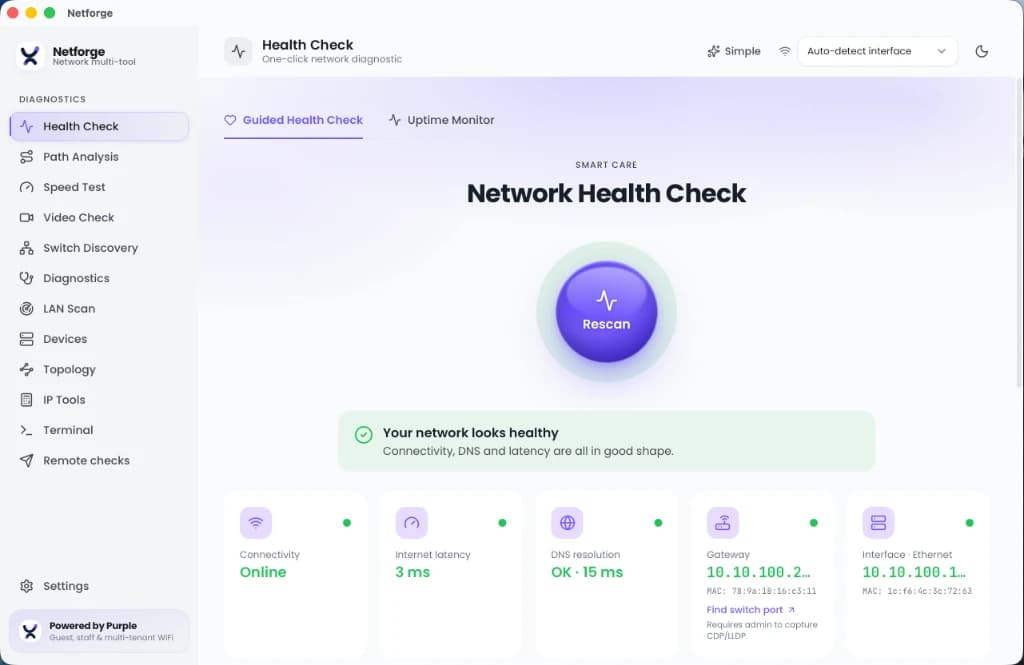
Guided health check
A one-click scan for quick triage, without the clutter.
- Checks active adapters, gateway latency, DNS resolution, and HTTP egress timing in one pass.
- Baseline diffing: save a known-good snapshot and compare later scans to see what changed.
- Evidence export: produce a PDF health report for a client, an ISP, or your own ticket.

Path analysis
Find exactly where loss or latency starts on a route.
- Continuous traceroute with a live, hop-by-hop statistics table, built on the Rust trippy engine.
- An interactive latency timeline that catches intermittent spikes under load.
- Packet-loss percentage shown for every hop.
Switch discovery (Layer 2)
Find which physical port a device is on without hunting for the switch console.
- Decodes CDP and LLDP broadcasts to read the switch name, port, native VLAN, management IP, and advertised capabilities.
- Pick which wired adapter to listen on. Needs a wired connection.

Terminal and encrypted vault
Connect and authenticate without leaving passwords in text files.
- SSH, Telnet, and serial console support, for modern kit and legacy gear alike.
- Credentials, SSH keys, and saved configs live in a local database sealed with Argon2 and AES-GCM.
- Nothing syncs to a cloud. The vault stays protected even if the file is copied.

LAN scan and diagnostics
Map a subnet and probe what is running on it.
- Ping-sweep a subnet to find live hosts.
- Discover mDNS and SSDP services, probe DHCP servers, and check WiFi channels.
- Run targeted probes: DNS records, TCP port scans, SSL/TLS certificate checks, WHOIS, and Wake-on-LAN.

IP and subnet tools
Fast network maths, fully offline.
- Subnet and VLSM calculators for IPv4 and IPv6.
- Offline OUI vendor lookup that maps MAC addresses to manufacturers, refreshed weekly in the background.
- Scope inspector: check an address's RFC status (public, private, or reserved) and format.
- Config diff: compare running and startup router configs side by side.
- An encode/hash bench and CSPRNG generators for quick one-off lookups.

Device management
Talk to switches and routers without standing up a management platform.
- SNMP get and walk against any device, with results readable without a separate MIB browser.
- A built-in TFTP server for pushing and pulling configs and firmware, no Tftpd64 install needed.
- A syslog and SNMP trap receiver for a quick look at device logs and alerts.

Network topology map
See the network, not just a list of devices.
- Builds a live node-link map from path analysis, switch discovery, and LAN scan results as you run them.
- New hops, neighbours, and hosts add themselves to the map as they are found. No manual diagramming.
How it replaces a stack of tools
What you would otherwise spread across legacy desktop apps and ad-supported web calculators.
| Capability | Netforge | Legacy desktop tools | Web-based tools |
|---|---|---|---|
| Path analysis | Built in, live trippy MTR | Needs WinMTR or Ping Plotter | Not supported |
| Switch discovery | Built in, CDP and LLDP | Needs LDWin | Not supported |
| Credential storage | Encrypted local vault (Argon2, AES-GCM) | Text files or the PuTTY registry | Not designed for it |
| Installer size | 5 to 10 MB | 50 MB and up | Nothing to install |
| Offline support | Fully offline | Varies by tool | Needs a connection |
| Ads and tracking | None | Sometimes bundled | Often ad-supported |
| Device management (SNMP, TFTP, syslog) | Built in, all three | Needs Tftpd64, Kiwi Syslog Server, and a MIB browser | Not supported |
| Network topology mapping | Built in, live node-link map | Needs LanTopoLog or a paid NMS | Not supported |
| Cost | Free | Commercial or limited trial | Ad-supported |
Download Netforge
Free for Windows, macOS, and Linux. About 5 to 10 MB. No account required.
Built on Tauri 2 and Rust.
Diagnosing WiFi issues at a business site? See how Purple's staff WiFi platform replaces shared passwords with certificate-based access and cuts IT tickets by 80%.
Master Network Diagnostics & Troubleshooting
Explore in-depth technical guides covering every diagnostic discipline embedded in Netforge Network Multi-Tool.
Network Health Diagnostics
Step-by-step methodology for gateway, DNS, and TCP/UDP port checks to pinpoint connectivity failures.
Read Technical Guide →Path & Route Troubleshooting
Diagnose MTR, traceroute, hop latency variations, and packet loss across complex WAN connections.
Read Technical Guide →Speed & Bufferbloat Testing
Measure bandwidth throughput, latency under load, TCP window sizes, and active queue management.
Read Technical Guide →LAN Discovery & Topology
Learn how LLDP, CDP, mDNS, and MAC OUI vendor resolution map switches, APs, and endpoint devices.
Read Technical Guide →VoIP & Video Stream Quality
Evaluate MOS scores, RTP packet loss bounds, and SIP latency to ensure clear voice and video calls.
Read Technical Guide →Remote Worker Troubleshooting
Helpdesk guide for diagnosing home Wi-Fi bottlenecks, VPN tunnel overhead, and ISP throttling.
Read Technical Guide →Questions, answered
Is Netforge free?
Yes. It is free to download and use, with no subscription, no ads, and no tracking.
Does it work offline?
Yes. Calculations, scans, and credential operations all run locally on your machine, and nothing leaves it.
Which platforms does it run on?
Windows, macOS, and Linux. It is built on Tauri 2 and Rust, so the installer is about 5 to 10 MB.
How are my credentials stored?
In a local encrypted database. Keys are derived with Argon2 and data is sealed with AES-GCM, so the vault stays protected even if the file is copied off the machine.
What tools does it replace?
PuTTY and other SSH, Telnet, or serial clients, WinMTR or Ping Plotter for path analysis, LDWin for CDP and LLDP switch discovery, Tftpd64 and Kiwi Syslog Server for device management, and the assorted web-based subnet and IP calculators.
Can it manage switches and routers directly?
Yes. It includes SNMP get and walk, a built-in TFTP server for configs and firmware, and a syslog and trap receiver, plus a live topology map that builds itself from your path analysis, switch discovery, and LAN scan results.