
Como Usar Dados Primários em Campanhas de Marketing
Este guia completo detalha como equipes de TI e marketing corporativas podem transformar sua infraestrutura de WiFi para convidados em um poderoso motor de dados primários. Ele abrange arquitetura técnica para captura de dados, gerenciamento de consentimento compatível com GDPR, estratégias de segmentação e ativação no mundo real em e-mail, SMS, publicidade social e display programático. Operadores de locais e equipes de TI encontrarão orientações de implementação concretas, exemplos práticos de hospitalidade e varejo, e estruturas de ROI mensuráveis.
Ouça este guia
Ver transcrição do podcast
Resumo Executivo
Para locais corporativos — hotéis, redes de varejo, estádios e centros de conferências — a rede de WiFi para convidados não é mais apenas um centro de custo ou uma comodidade básica. À medida que os cookies de terceiros são descontinuados e as regulamentações de privacidade se tornam mais rigorosas, os locais físicos possuem uma vantagem única e subutilizada: a capacidade de capturar dados primários altamente precisos e consentidos diretamente dos visitantes no ponto de conexão.
Este guia descreve como gerentes de TI e CTOs podem arquitetar sua infraestrutura sem fio para servir como um motor de aquisição de dados compatível para equipes de marketing. Ao implantar um robusto Captive Portal integrado com plataformas de CRM e automação de marketing, os locais podem coletar dados demográficos e comportamentais em escala. Exploraremos a implantação técnica de mecanismos de captura de dados, a integração de análises de Guest WiFi e a execução de campanhas de marketing direcionadas por e-mail, SMS e publicidade social, impulsionando, em última análise, um ROI mensurável e experiências aprimoradas para o cliente. A plataforma Purple atualmente atende mais de 80.000 locais e quase dois milhões de usuários diários, fornecendo a camada de integração que conecta a infraestrutura de rede à ativação de marketing.
Aprofundamento Técnico: A Arquitetura de Aquisição de Dados
A base da coleta de dados primários em um local físico depende da interação entre o dispositivo móvel do usuário, o ponto de acesso sem fio (AP) e a infraestrutura do Captive Portal. Compreender essa arquitetura é essencial antes que qualquer ativação de marketing possa ocorrer.
O Captive Portal e a Autenticação
Quando um usuário se conecta a um SSID aberto, o controlador de rede redireciona sua solicitação HTTP inicial para um Captive Portal. Esta página de boas-vindas é o ponto crítico de troca de valor: o local fornece acesso à internet de alta velocidade, e o usuário fornece seus dados e consentimento. Para maximizar a qualidade dos dados e a experiência do usuário, o processo de autenticação deve ser tanto sem atrito quanto tecnicamente robusto.
Implantações modernas utilizam três métodos de autenticação primários. O Social OAuth permite que os usuários se autentiquem via Facebook, Google ou Apple, fornecendo dados demográficos ricos instantaneamente e reduzindo o abandono de formulários. A autenticação baseada em formulário solicita campos específicos, como endereço de e-mail, número de telefone e código postal, dando ao local controle direto sobre os dados capturados. A Autenticação Contínua via Passpoint (Hotspot 2.0), utilizando o padrão IEEE 802.11u, permite conexões automáticas e seguras para usuários recorrentes, ignorando o Captive Portal inteiramente após a configuração inicial — uma capacidade crítica para ambientes de alto tráfego, como centros de transporte e estádios, conforme explorado em Wi Fi in Auto: The Complete 2026 Enterprise Guide .
Superando a Randomização de MAC
Historicamente, os locais rastreavam os usuários por meio do endereço Media Access Control (MAC) de seus dispositivos. No entanto, sistemas operacionais modernos — iOS 14 e superior, Android 10 e superior — implementam a randomização de MAC, gerando um endereço MAC temporário e exclusivo para cada SSID. Isso quebra fundamentalmente o rastreamento centrado no dispositivo e é uma das causas mais comuns de degradação da qualidade dos dados em implantações legadas.
Para construir um perfil de usuário persistente, a arquitetura deve depender da sessão autenticada, e não do identificador de hardware. Uma vez que um usuário se autentica via Captive Portal, seus dados de sessão — incluindo o MAC randomizado — são vinculados ao seu perfil de CRM dentro da plataforma WiFi Analytics . Visitas subsequentes usando o mesmo método de autenticação serão vinculadas ao perfil unificado, preservando dados comportamentais longitudinais.
Fluxo de Dados e Arquitetura de Integração
Os dados capturados devem fluir perfeitamente da borda da rede para a pilha de marketing. Isso é alcançado via REST APIs ou Webhooks seguros, permitindo a sincronização de dados em tempo real, em vez de exportações em lote.
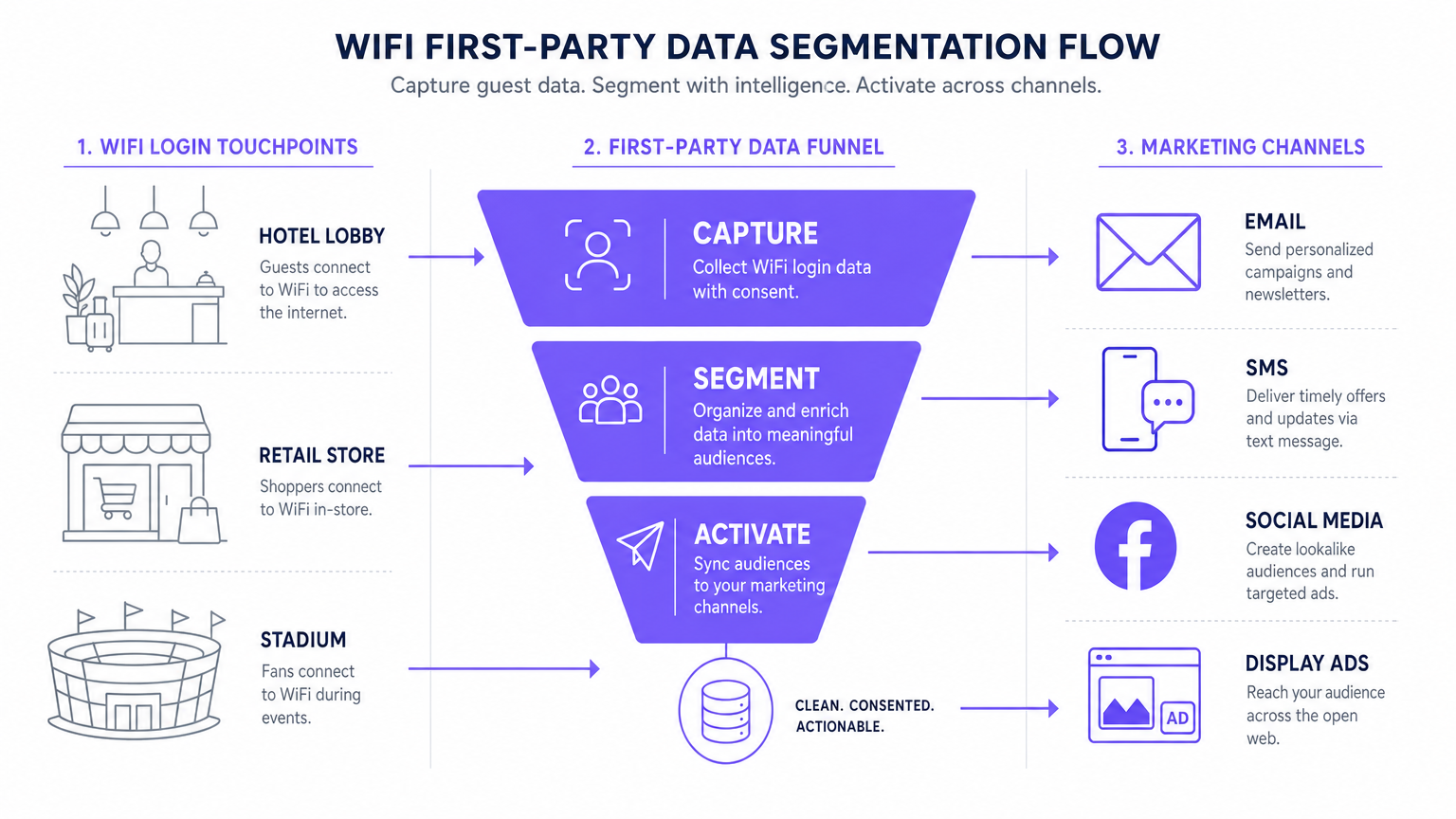
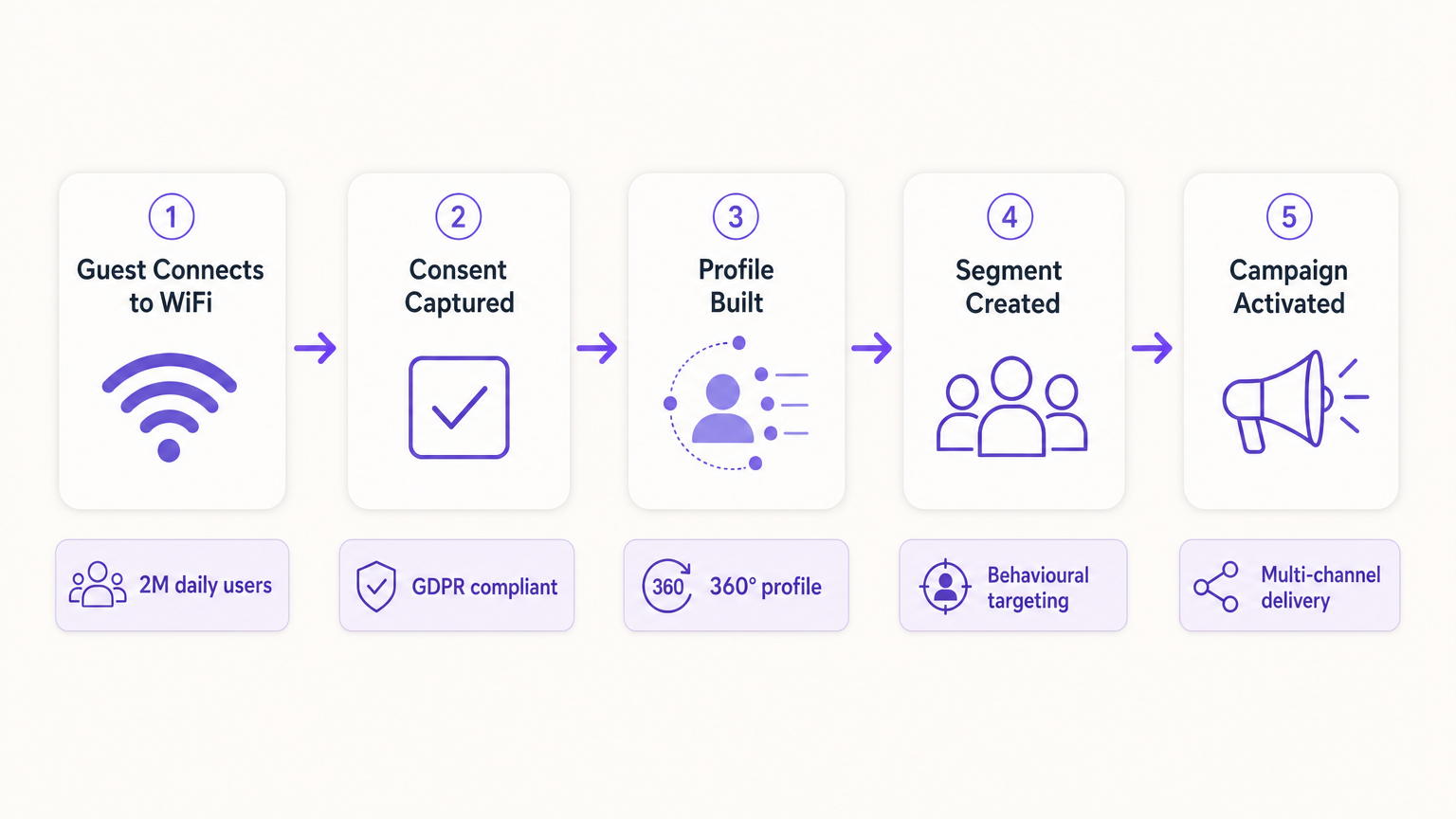
O fluxo de dados padrão segue cinco estágios: Captura (dados coletados no Captive Portal), Normalização (a plataforma de análise deduplica e mescla perfis), Sincronização (Webhooks enviam atualizações em tempo real para o CRM), Segmentação (equipes de marketing definem coortes de público com base em critérios comportamentais e demográficos) e Ativação (campanhas são acionadas por e-mail, SMS e canais programáticos).
Guia de Implementação: Ativando os Dados
Coletar os dados é apenas o primeiro passo. O verdadeiro valor comercial reside na ativação. A seção a seguir detalha como implantar dados WiFi primários nos quatro principais canais de marketing.
1. Marketing por E-mail e Campanhas de Gotejamento
O e-mail continua sendo um canal altamente eficaz para ambientes de hospitalidade e varejo . E-mails de boas-vindas acionados, configurados via Webhook para serem disparados imediatamente após o primeiro login de um usuário, são ideais para entregar incentivos prometidos, como códigos de desconto ou pontos de fidelidade. E-mails de pesquisa pós-visita, automatizados 24 horas após um usuário se desconectar da rede, impulsionam a geração de avaliações e a medição de NPS. Campanhas de reengajamento direcionadas a usuários que não se conectaram há mais de 90 dias são eficazes para impulsionar visitas repetidas, particularmente em hospitalidade onde promoções sazonais são relevantes.
2. SMS e Gatilhos Baseados em Localização
Para engajamento imediato e de alta intenção, o SMS é incomparável. Este canal exige a captura de opt-in explícito para marketing por SMS durante o processo de autenticação — uma caixa de seleção separada e desmarcada do consentimento de marketing por e-mail. Utilizando análises de localização — como as descritas em Sistema de Posicionamento Interno: Guia UWB, BLE e WiFi — a plataforma pode acionar um SMS quando um usuário permanece em uma zona específica por um período definido, criando marketing de micromomento contextualmente relevante.
3. Publicidade Social e Públicos Personalizados
Dados primários são inestimáveis para publicidade programática e social, especialmente à medida que o rastreamento de terceiros diminui. Públicos Semelhantes são criados exportando segmentos de usuários WiFi altamente engajados — por exemplo, usuários que visitam o local mais de duas vezes por mês — para o Facebook Ads Manager ou Google Ads como um Público Personalizado de origem. A plataforma então identifica novos usuários com perfis demográficos e comportamentais semelhantes. Retargeting exibe anúncios gráficos direcionados a usuários que visitaram recentemente o local, reforçando o reconhecimento da marca em toda a web aberta.
4. Exibição Programática
Ao sincronizar segmentos de público primário com uma Plataforma de Demanda (DSP), os locais podem exibir anúncios gráficos direcionados a visitantes conhecidos em inventário de editores premium. Isso é particularmente eficaz para locais de transporte e saúde onde a frequência de visitas e os sinais de intenção são fortes.
Para estratégias fundamentais de coleta de dados, consulte Como Coletar Dados Primários Através do WiFi .
Melhores Práticas para Conformidade e Experiência do Usuário
Privacidade e Consentimento (GDPR e CCPA)
A conformidade é inegociável e deve ser arquitetada na implantação desde o primeiro dia, não adaptada posteriormente. O Captive Portal deve aderir a regulamentações rigorosas de proteção de dados. Consentimento desagregado é obrigatório: a caixa de seleção para comunicações de marketing deve ser totalmente separada da aceitação dos Termos e Condições. Opt-ins granulares devem oferecer caixas de seleção separadas para marketing por e-mail e SMS. Um link para uma política de privacidade clara deve ser exibido de forma proeminente, detalhando exatamente como os dados serão usados, armazenados e compartilhados. Os dados devem ser criptografados em trânsito usando TLS 1.2 ou superior, e em repouso usando criptografia AES-256, em conformidade com PCI DSS onde transações estão envolvidas.
Otimizando o Captive Portal para Conversão
A página de splash deve carregar em até três segundos. Qualquer tempo maior, e as taxas de abandono aumentam significativamente, resultando em oportunidades perdidas de aquisição de dados. O portal deve ser totalmente responsivo para dispositivos móveis e projetado com uma proposta de valor clara e convincente. Progressive profiling é a abordagem recomendada: solicite apenas o endereço de e-mail na primeira visita e enriqueça o perfil com campos adicionais — aniversário, código postal, preferências — em visitas subsequentes. Essa abordagem produz consistentemente taxas de opt-in de 60 a 80 por cento em implantações bem configuradas.
Solução de Problemas e Mitigação de Riscos
| Modo de Falha | Sintoma | Estratégia de Mitigação |
|---|---|---|
| Captive Portal Não Exibido | Usuários se conectam ao SSID, mas não são redirecionados para o portal. | Verifique a configuração de DNS e as configurações do Walled Garden. Garanta que o IP e a URL do portal estejam acessíveis antes que a autenticação seja concluída. |
| Baixas Taxas de Opt-In | Alto volume de conexões, mas baixa captura de consentimento de marketing. | Revise a clareza da proposta de valor. Simplifique o formulário. Garanta que o opt-in de marketing seja proeminente, mas não enganoso. Teste o tempo de carregamento do portal. |
| Falhas na Sincronização de Dados | Perfis atualizados no Purple, mas não refletidos no CRM. | Monitore os logs de entrega de Webhook. Verifique as chaves de API e os limites de taxa na plataforma de destino. Implemente lógica de repetição para entregas falhas. |
| Randomização de MAC Degradando Dados | Pico de visitantes 'novos'; métricas de visitantes recorrentes colapsam. | Mude para rastreamento centrado na identidade. Implemente Passpoint para reautenticação contínua. Incentive a autenticação baseada em aplicativo para identidade persistente. |
| Má Configuração do Walled Garden | O login Social OAuth falha; usuários não conseguem completar a autenticação. | Liste todos os endpoints de autenticação necessários (por exemplo, accounts.google.com, graph.facebook.com) na configuração do Walled Garden no controlador de LAN sem fio. |
ROI e Impacto nos Negócios
Implementar uma estratégia de dados primários via WiFi transforma a rede de uma despesa de TI em um ativo de marketing mensurável com retornos quantificáveis.
Custo Por Aquisição (CPA): O custo de adquirir um novo assinante de e-mail consentido via um Captive Portal é tipicamente uma fração do custo equivalente via publicidade social paga ou de busca. A infraestrutura já está implantada; o custo incremental é a licença da plataforma e a configuração do portal.
Atribuição de Campanha: Ao rastrear quando um usuário recebe uma oferta por e-mail e subsequentemente faz login no WiFi do local, as equipes de marketing podem provar definitivamente a atribuição offline para campanhas digitais — uma capacidade que é cada vez mais valiosa à medida que os modelos de atribuição digital se tornam menos confiáveis.
Aumento do Valor Vitalício do Cliente (CLV): O engajamento personalizado impulsionado por dados primários precisos correlaciona-se diretamente com o aumento da frequência de visitas e maior gasto por visita. Um hotel que pode identificar um hóspede corporativo recorrente e proativamente oferecer um upgrade relevante está proporcionando uma experiência materialmente melhor do que um que trata cada hóspede como anônimo.
Para considerações complexas de IoT e arquitetura de dados, consulte Arquitetura da Internet das Coisas: Um Guia Completo .
Definições principais
Captive Portal
A web page that a user of a public-access network is obliged to view and interact with before internet access is granted. It serves as the primary interface for data capture and consent collection.
This is the critical point of value exchange between the venue and the guest. Its design, load speed, and form structure directly determine the quality and volume of first-party data captured.
MAC Randomisation
A privacy feature in modern operating systems (iOS 14+, Android 10+) that generates a temporary, unique MAC address for each wireless network the device connects to, preventing persistent device-level tracking.
This is the most common cause of data quality degradation in legacy WiFi analytics deployments. It necessitates a shift from device-centric to identity-centric tracking architectures.
First-Party Data
Information that an organisation collects directly from its own customers or users, with their explicit consent, through its own channels and touchpoints.
This is the most valuable and compliant data source for marketing, particularly as third-party cookies are phased out across major browsers and advertising platforms.
Webhook
An HTTP-based callback mechanism that sends a structured data payload to a pre-configured endpoint when a specific event occurs in the source system.
Used to push real-time data from the WiFi analytics platform to a CRM or marketing automation tool immediately after a user authenticates, enabling real-time campaign triggers.
Walled Garden
A network configuration that restricts unauthenticated users to a limited set of pre-approved domains and IP addresses, preventing full internet access until authentication is complete.
Correct Walled Garden configuration is essential for allowing the captive portal to load and for enabling social OAuth logins (e.g., whitelisting Facebook and Google authentication endpoints) before the user has completed the login process.
Passpoint (Hotspot 2.0)
An industry standard based on IEEE 802.11u that enables automatic, secure WiFi connections without requiring manual portal interaction after the initial device provisioning.
Improves user experience for returning visitors and ensures consistent, persistent identity-based connections, facilitating seamless data capture and profile enrichment across multiple visits.
Lookalike Audience
A targeting segment created by advertising platforms (such as Facebook Ads or Google Ads) that identifies new users who share similar characteristics with an existing Custom Audience seed list.
Allows venues to leverage their high-quality offline visitor data — captured via WiFi — to find new, highly qualified prospects online, bridging the gap between physical and digital marketing.
Progressive Profiling
A data collection strategy that gathers customer information incrementally across multiple interactions, rather than requesting all data fields in a single form submission.
Increases captive portal conversion rates by reducing friction on the initial login, while still building a comprehensive, enriched customer profile over subsequent visits.
Dwell Time
The duration for which a device remains associated with a WiFi access point or within a defined location zone, used as a proxy for physical presence and engagement.
A critical signal for location-based marketing triggers. A user dwelling in a specific retail zone for more than ten minutes is a high-intent prospect for a contextually relevant offer.
Exemplos práticos
A 200-room luxury hotel wants to increase bookings for its on-site spa. They currently offer free WiFi but do not capture any guest data beyond the room booking system. How should the IT and Marketing teams collaborate to deploy a first-party data solution?
Phase 1 — IT Deployment: The IT team configures the wireless LAN controller to redirect all unauthenticated guest traffic on the 'Hotel_Guest_WiFi' SSID to the Purple captive portal. The Walled Garden is configured to allow access to the portal's CDN and the OAuth endpoints for social login providers.
Phase 2 — Portal Design: Marketing designs a branded splash page with a clear value proposition: 'Complimentary high-speed WiFi — connect in seconds.' The authentication form requests Name and Email, with a separate, unticked checkbox for marketing consent. A link to the privacy policy is displayed prominently.
Phase 3 — Integration: IT configures a secure Webhook to push new authenticated profiles to the hotel's CRM (e.g., Salesforce). A custom field 'WiFi_Opt_In' is mapped to the marketing consent flag.
Phase 4 — Campaign Execution: Marketing configures an automated trigger in the CRM. If a guest authenticates and their profile indicates they have not previously visited the spa (cross-referenced with the booking system), an automated email is sent two hours after check-in offering a 15% discount on spa treatments, valid for the duration of their stay.
Phase 5 — Measurement: Track the email open rate, click-through rate, and spa booking conversion rate. Compare spa revenue per guest for WiFi-opted-in guests versus non-opted-in guests to quantify ROI.
A national retail chain with 50 locations wants to build a Lookalike Audience for Facebook Ads based on their most frequent in-store shoppers, without relying on third-party pixel data.
Step 1 — Baseline Capture: Confirm that the captive portal at all 50 locations is capturing email addresses and marketing consent. Ensure the portal is configured consistently across all sites using a centralised management platform.
Step 2 — Segment Definition: Within the Purple analytics platform, create a segment defined as 'Users who have authenticated at any location more than three times in the last 60 days.' This cohort represents the brand's most loyal physical shoppers.
Step 3 — Secure Export: Export this segment as a hashed (SHA-256) email list. Hashing ensures the raw email addresses are never transmitted to the advertising platform, maintaining GDPR compliance.
Step 4 — Custom Audience Upload: Upload the hashed list to Facebook Ads Manager as a Custom Audience. Facebook matches the hashes against its own user database.
Step 5 — Lookalike Generation: Generate a 1% Lookalike Audience based on this Custom Audience. This targets new Facebook users who share similar characteristics — demographics, interests, and online behaviours — with the brand's most loyal physical shoppers.
Step 6 — Campaign Deployment: Run a prospecting campaign targeting the Lookalike Audience with a new customer acquisition offer.
Questões práticas
Q1. Your venue is experiencing a 40% drop-off rate at the captive portal. Users are connecting to the SSID but not completing the authentication process. What are the two most likely technical causes and how would you diagnose and resolve each?
Dica: Consider both the network configuration layer and the user experience layer independently.
Ver resposta modelo
Cause 1 — Slow Portal Load Time: The splash page is taking too long to render on mobile devices. Diagnosis: Use browser developer tools to measure Time to First Byte (TTFB) and total page load time from a mobile device on the guest network. Resolution: Compress all images, remove non-essential JavaScript, and serve the portal from a CDN. Target sub-3-second load time.
Cause 2 — Walled Garden Misconfiguration: The portal is loading but social OAuth authentication is failing because the authentication provider endpoints are not whitelisted in the Walled Garden. Diagnosis: Attempt a social login and inspect the network requests in developer tools for blocked connections. Resolution: Add the required OAuth endpoints (e.g., accounts.google.com, graph.facebook.com, appleid.apple.com) to the Walled Garden whitelist on the wireless LAN controller.
Q2. A marketing director wants to send an SMS offer to users exactly 15 minutes after they enter the flagship retail store. How would you architect this solution using the existing WiFi infrastructure, and what compliance considerations apply?
Dica: Think about how presence is detected, how the event is communicated to the marketing platform, and what consent is required.
Ver resposta modelo
Architecture: 1) Ensure the captive portal explicitly captures mobile phone numbers with a separate, unticked SMS marketing opt-in checkbox. 2) Configure the WiFi analytics platform to track dwell time based on device association with the store's access points. 3) Set up a Webhook triggered by the event 'Dwell Time > 15 minutes AND SMS_Opt_In = True.' 4) The Webhook payload — containing the user's phone number and the store identifier — is sent to the SMS platform (e.g., Twilio), which dispatches the pre-configured offer.
Compliance: The SMS opt-in must be explicit and separate from the WiFi terms of service. The message must include a clear opt-out mechanism (e.g., 'Reply STOP to unsubscribe'). Under GDPR, the user must have been informed at the point of consent that their location within the store would be used to trigger marketing messages.
Q3. Following an iOS update rollout across your user base, your analytics platform shows a 60% spike in 'new' visitors while 'returning' visitor metrics have collapsed. Physical footfall counters show no change in actual visitor numbers. What has happened, and what is the long-term architectural response?
Dica: Consider recent privacy features introduced by mobile operating systems and their impact on device-level tracking.
Ver resposta modelo
Diagnosis: This is caused by MAC randomisation. The iOS update has enabled per-network MAC randomisation, meaning each device presents a new, temporary MAC address on each visit. The analytics platform is interpreting each new MAC as a new visitor, breaking device-centric tracking.
Immediate Response: Communicate to the marketing team that historical 'returning visitor' metrics are temporarily unreliable and should not be used for campaign decisions until the identity-centric architecture is in place.
Long-Term Architecture: 1) Ensure all returning users are prompted to re-authenticate via the captive portal. When they log in with their existing email or social account, the new randomised MAC is linked to their existing CRM profile, restoring longitudinal data. 2) Deploy Passpoint profiles to authenticated users' devices. Passpoint uses certificate-based authentication that is not affected by MAC randomisation, ensuring seamless, persistent identity on future visits. 3) Encourage users to download the venue's app, which provides a persistent, app-level identity that is also immune to MAC randomisation.
Continue a ler esta série
Marketing de WiFi para Restaurantes: Como Transformar WiFi Grátis em Clientes Recorrentes
Este guia de referência técnica e autoritário explora a arquitetura e implementação do marketing de WiFi para restaurantes — a prática de usar o acesso à rede de convidados como um canal estruturado de aquisição de dados e automação de marketing. Ele fornece a gerentes de TI, arquitetos de rede e diretores de operações de estabelecimentos um plano tático para implantar captive portals, integrar com plataformas de CRM e acionar campanhas automatizadas que geram negócios recorrentes mensuráveis. Desde a captura de dados em conformidade com a GDPR até fluxos de trabalho de e-mail orientados por eventos, este guia abrange todo o ciclo de vida da implantação com métricas de ROI concretas.
Como Conectar com Clientes: Estratégias Digitais para Negócios Físicos
Este guia de referência técnica e autoritário detalha como empresas com localização física — hotéis, redes de varejo, estádios e locais do setor público — podem implantar infraestrutura de WiFi empresarial como um motor de captura de dados primários e engajamento do cliente. Ele abrange a arquitetura completa, desde o design do Captive Portal e autenticação contínua (IEEE 802.11u/Passpoint) até a integração com CRM, conformidade com GDPR e ROI mensurável. Líderes de TI e operadores de locais encontrarão orientações de implantação acionáveis, estudos de caso reais e uma estrutura de mitigação de riscos com foco na conformidade.
Por que usar WiFi Marketing? O Caso de Negócio com Dados Reais
Este guia de referência técnica descreve o caso de negócio baseado em evidências para o WiFi marketing. Ele fornece a líderes de TI e operadores de locais dados acionáveis sobre ROI, tempo de permanência e métricas de visitas repetidas, derivados de implementações reais.