
Otimizando o WiFi de Hotéis para Viajantes a Negócios
Este guia fornece estratégias práticas e neutras em relação a fornecedores para líderes de TI do setor de hospitalidade otimizarem o WiFi de hotéis para viajantes a negócios, combinando o bloqueio de anúncios em nível de DNS com políticas de Qualidade de Serviço (QoS) de ponta a ponta. Ele abrange a arquitetura técnica, segmentação de VLAN, conformidade de segurança e estudos de caso reais que demonstram como a eliminação do ruído de fundo pode recuperar até 35% da largura de banda desperdiçada. Diretores de operações de locais e arquitetos de rede encontrarão etapas concretas de implementação, estruturas de decisão e benchmarks de ROI mensuráveis para justificar e executar a implantação neste trimestre.
Ouça este guia
Ver transcrição do podcast
執行摘要
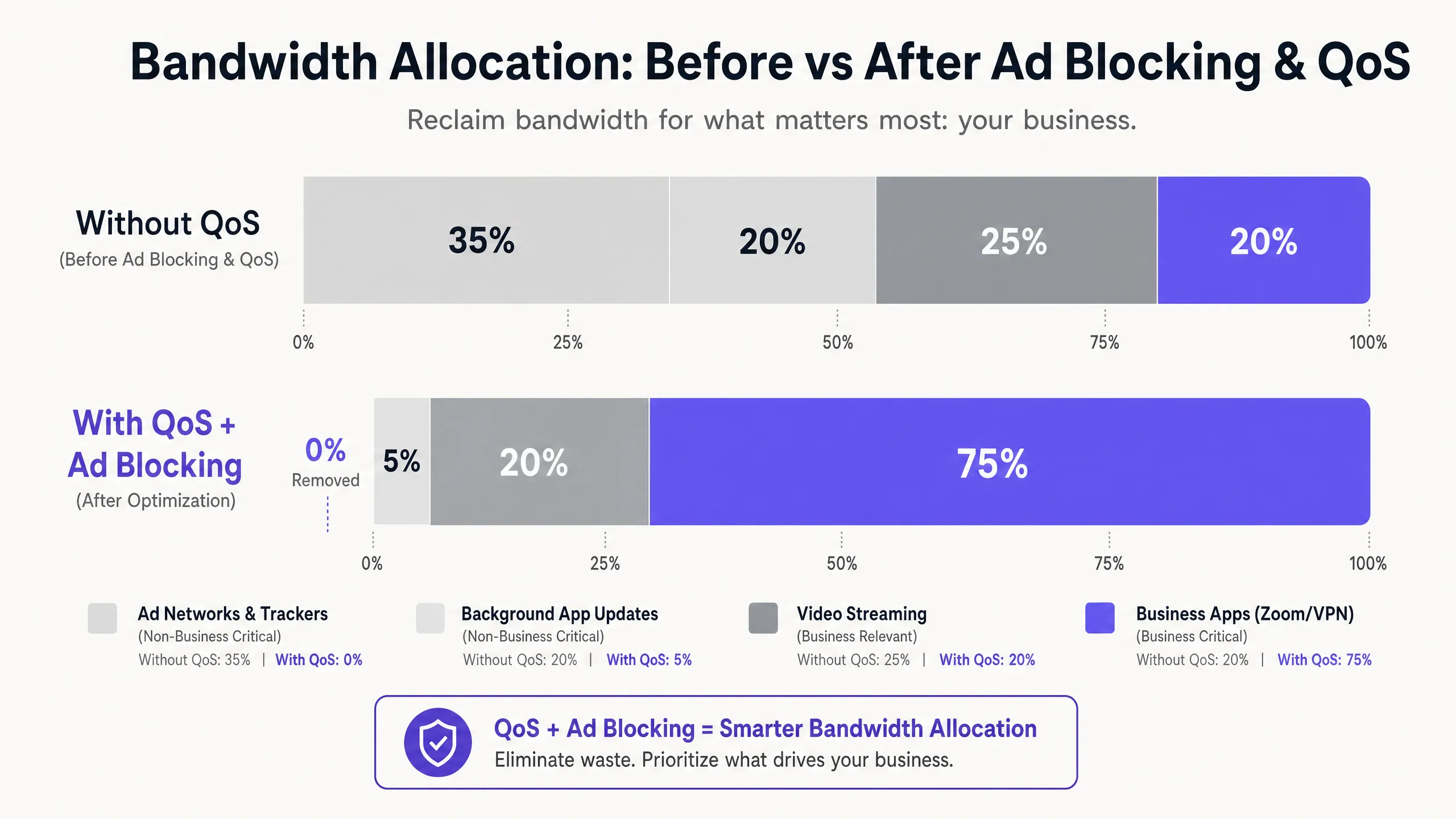
對於 飯店餐旅 領域的 IT 經理和場域營運總監而言,提供可靠的 WiFi 已不再是差異化優勢,而是最基本的營運要求。商務旅客需要高效能的連線,以用於企業 VPN、視訊會議和雲端託管應用程式。然而,大多數飯店網路都在默默地流失頻寬給無形的背景流量:廣告追蹤器、遙測信標和自動應用程式更新,這些流量在單個商務應用程式啟動之前,就可能消耗掉高達 35% 的可用總頻寬。
本指南詳細介紹了一種經過驗證、不限硬體廠商的架構,可收回這些被浪費的頻寬。透過在網路閘道部署 DNS 層級的廣告攔截,並實施透過深層封包檢測 (DPI) 對應的端到端服務品質 (QoS) 策略,網路架構師可以確保對延遲敏感的應用程式(Zoom、Microsoft Teams、IPsec VPN 和 SSL 通道)獲得保證的優先傳輸吞吐量。在大多數情況下,此方法可在現有基礎設施上實施,透過延後 ISP 鏈路升級和提高企業貴賓滿意度評分,帶來可衡量的投資報酬率 (ROI)。
技術深度剖析
現代飯店 WiFi 環境面臨的核心挑戰,是未經請求的背景流量激增。當任何現代裝置(商務筆記型電腦、智慧型手機、平板電腦)連線到網路時,它會立即發起數十個背景連線。這些連線包括來自已安裝應用程式的廣告 SDK 輪詢、作業系統遙測、雲端同步服務以及自動更新檢查。在一個擁有 200 個同時連線房客、且未經管理的扁平網路中,這種背景干擾不僅僅是不便,而是一個結構性的頻寬問題。
針對企業房客網路流量特徵的研究一致表明,在未管理的飯店網路上,廣告網路和第三方追蹤器佔 DNS 查詢量的 25% 到 40%。每個成功解析的查詢都可能啟動資料傳輸,雖然單個負載很小,但在數百個同時連線中累積起來的效果卻非常顯著。這些頻寬本應服務於財務長 (CFO) 的 Zoom 董事會會議,或顧問連線至其企業資料中心的 VPN 工作階段。
第 1 層:基於 DNS 的廣告與追蹤器攔截
最有效的干預點是 DNS 解析。透過將所有訪客的 DNS 查詢導向過濾解析器(無論是本地部署的設備還是雲端 DNS 安全服務),網路可以在任何負載資料傳輸到 WAN 鏈路之前,靜默丟棄對已知廣告伺服器、追蹤器網域和遙測端點的請求。這裡的效率提升是結構性的:與原本會發起的完整 HTTP/S 連線相比,被封鎖的 DNS 查詢所消耗的資源微乎其微。
對於實際運作的飯店部署,託管式 DNS 過濾服務提供了定期更新的封鎖名單並附帶企業級 SLA,這在可用性至關重要的環境中,比自行管理的開源解決方案更為理想。關鍵的設定要求是確保 Walled Garden(在 Captive Portal 驗證前可存取的網域集合)被明確列入白名單,且不受一般過濾原則的限制。未執行此設定是部署後訪客投訴最常見的原因。
第 2 層:深度封包檢測與 QoS 標記
一旦在 DNS 層減少了背景雜訊,剩餘的流量就必須依優先順序進行主動管理。邊緣防火牆或統一威脅管理 (UTM) 設備上的深度封包檢測 (DPI) 可識別特定的應用程式協定。現代 DPI 引擎可以根據封包特徵和連接埠模式,可靠地對 Zoom、Microsoft Teams、Cisco Webex、RTP/SIP 語音流量、IPsec 和 SSL VPN 工作階段進行分類,即使在未使用標準連接埠的情況下也是如此。
被識別為關鍵業務的流量會在 IP 標頭中標記區分服務代碼點 (DSCP) 值。DSCP 欄位提供了 64 種可能的每跳行為,但在實務上,大多數飯店部署使用簡化的三層模型:加速轉發(EF,DSCP 46)用於語音和視訊會議;確保轉發類別 4(AF41,DSCP 34)用於 VPN 和企業應用程式資料;以及盡力而為(BE,DSCP 0)用於一般的網頁瀏覽和串流媒體。
第 3 層:透過 WMM 進行無線 QoS
僅當無線存取點正確將 DSCP 標記對應到適當的 Wi-Fi 多媒體 (WMM) 存取類別時,有線 QoS 設定才會生效。WMM 定義了四個存取類別:語音 (AC_VO)、視訊 (AC_VI)、盡力而為 (AC_BE) 和背景 (AC_BK)。從 DSCP 到 WMM 的對應必須在 AP 上明確設定,因為預設行為因廠商而異。請在您的 AP 管理主控台中驗證此設定;這是一個常見的漏洞,會導致原本設計良好的 QoS 原則在最後一哩路失效。
VLAN 分段與安全架構
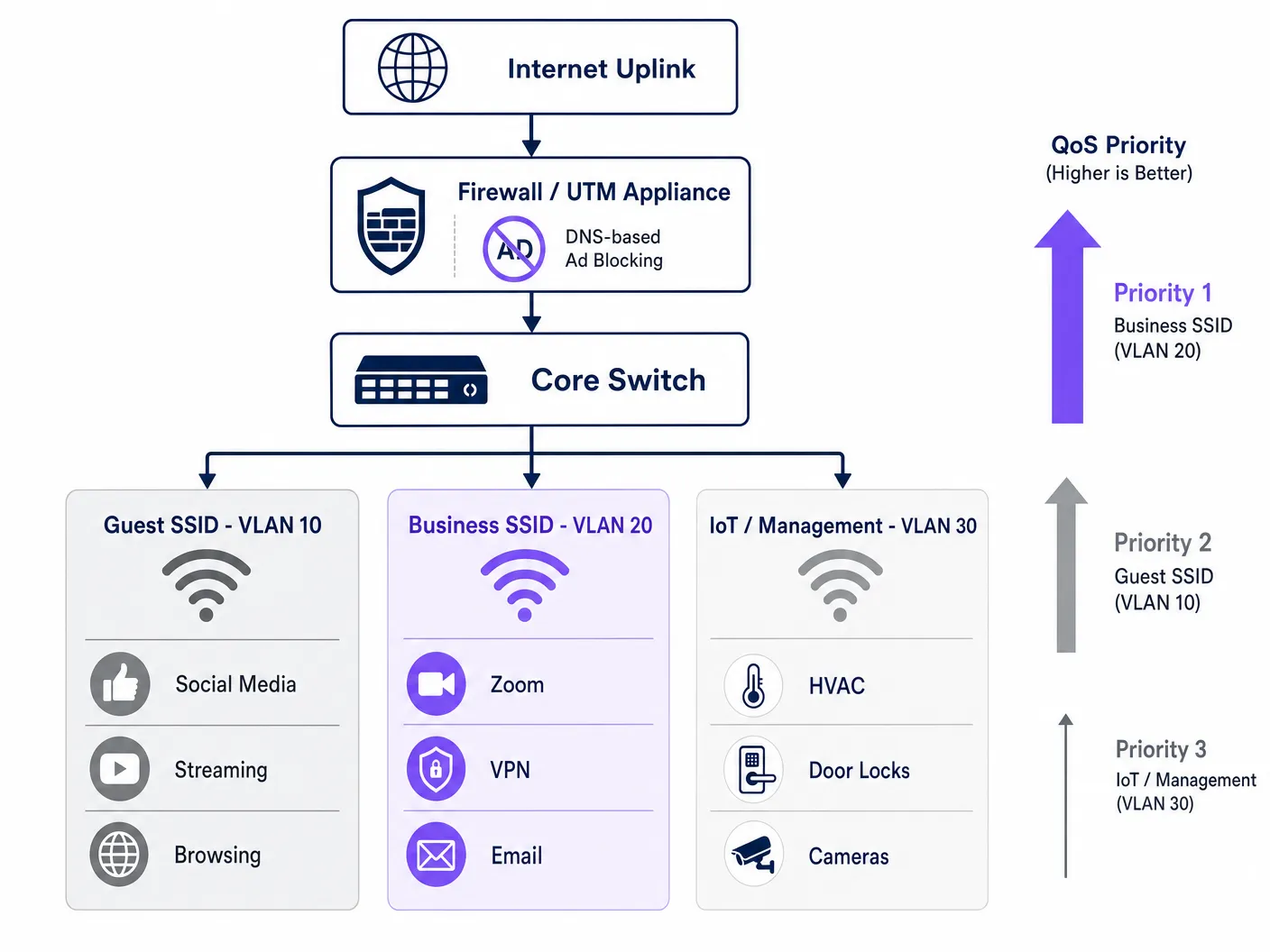
經妥善優化的飯店網路至少應在三個邏輯分段上運作。Guest SSID (VLAN 10) 透過標準網際網路存取為休閒旅客與會議與會者提供服務,並受限於 DNS 過濾與速率限制。Business SSID (VLAN 20) 擁有最高的 QoS 優先權,並透過 WPA3-Enterprise 與 IEEE 802.1X 進行驗證,與 RADIUS 伺服器整合以提供每位使用者專屬的憑證。IoT 與管理 VLAN (VLAN 30) 則將智慧客房設備、HVAC 感測器、電子門鎖及 IP 攝影機與所有賓客流量進行隔離。
這種分段不僅是效能優化,更是合規性要求。根據 PCI DSS,任何接觸付款卡資料的網路分段都必須透過已記錄的文件化防火牆規則與存取控制,與通用網路進行隔離。根據 GDPR,透過 Guest WiFi 驗證收集的個人資料必須以適當的技術安全防護措施進行處理,而網路分段是展現盡職調查(Due Diligence)的基本控制措施。在所有 VLAN 中維持 2026 年 IT 安全稽核軌跡 的完整記錄,對於在評估期間證明合規性至關重要。
導入指南
部署此架構需要系統化的方法,以避免中斷執行中的賓客服務。建議按照以下步驟進行階段式導入。
第一階段 — 流量特性分析(第 1 週)。 在進行任何變更之前,請在核心交換器的 SPAN 埠上部署流量分析工具,以擷取 72 小時的基準資料。識別出前 20 個最消耗頻寬的網域與應用程式類別。此資料可證實投資的合理性,並提供衡量部署後改善成效的基準。許多營運商利用 WiFi Analytics 功能來了解其場域中的設備類型、停留模式與應用程式使用情況。
第二階段 — 試行 DNS 過濾(第 2 週)。 在單一隔離的 VLAN(最好是員工或後勤辦公室分段)上實作 DNS 過濾,並使用保守的阻擋清單。在擴大至賓客分段之前,先監控 48 小時以確認是否有誤判。記錄所有加入圍牆花園(Walled Garden)白名單的網域。
第三階段 — QoS 政策部署(第 3 週)。 在邊界防火牆上設定 DPI 規則與 DSCP 標記。透過在分發層(Distribution Layer)擷取封包,驗證 DSCP 標記在每次交換器躍點(Hop)中是否皆完整保留。在所有存取點(Access Points)上啟用 WMM,並確認 DSCP 到 WMM 的對應已正確套用。如需此階段頻率規劃與頻道管理的指引,請參閱 WiFi 頻率:2026 年 Wi-Fi 頻率指南 。 階段 4 — VLAN 重組(第 4 週)。 將 IoT 設備遷移到專用的管理 VLAN。推出採用 WPA3-Enterprise 驗證的 Business SSID。將新的 SSID 通知企業客戶和會議主辦方。
階段 5 — 監控與最佳化(持續進行)。 建立 KPI:平均 Zoom 通話品質評分、VPN 連線成功率、尖峰時段吞吐量利用率,以及賓客 WiFi 滿意度評分。每月審查並更新 DNS 阻擋清單。
最佳實踐
以下中立於供應商的建議反映了目前的產業標準,適用於各大硬體平台,包括 Cisco Meraki、Ubiquiti UniFi、Aruba Networks 和 Ruckus。
| 實踐方法 | 標準 / 參考來源 | 優先級 |
|---|---|---|
| 在 Business SSID 上啟用 WPA3-Enterprise | IEEE 802.11i / WPA3 | 關鍵 |
| 802.1X RADIUS 驗證 | IEEE 802.1X | 關鍵 |
| 端到端 DSCP 保留 | RFC 2474 | 高 |
| 在所有 AP 上啟用 WMM | Wi-Fi Alliance WMM | 高 |
| 啟用通訊時間公平性 (Airtime Fairness) | 供應商特定 | 中 |
| 使用託管阻擋清單進行 DNS 過濾 | NIST SP 800-81 | 高 |
| VLAN 分割 (Guest/Business/IoT) | IEEE 802.1Q | 關鍵 |
| PCI DSS 網路隔離 | PCI DSS v4.0 Req. 1 | 關鍵(若適用) |
對於在餐旅空間旁同時營運 零售 環境的場所(例如飯店大廳商店或複合式會議零售空間),適用相同的 VLAN 和 QoS 原則,並額外為 POS 流量配置其專屬的高優先級佇列。在 辦公室 Wi-Fi:最佳化您的現代辦公室 Wi-Fi 網路 中討論的原則,可直接轉移套用於飯店商務中心和會議室的部署。
疑難排解與風險緩解
飯店 WiFi 最佳化部署中最常見的失敗模式可歸納為三類。
Captive Portal 故障。 症狀:啟用 DNS 過濾後,賓客無法進入登入頁面。根本原因:過濾原則阻擋了 Captive Portal 重新導向或 Walled Garden 所需的網域。緩解措施:稽核驗證流程所需的所有網域,並在啟用一般過濾器之前將其加入預先驗證白名單。如果您正在診斷更廣泛的壅塞問題,指南 為什麼我們的賓客 WiFi 這麼慢?診斷網路壅塞 提供了一個結構化的診斷框架。對於西班牙語營運商,可在 ¿Por qué nuestro WiFi para invitados es tan lento? Diagnóstico de la congestión de la red 取得對等資源。
DSCP 標記剝離。 症狀:防火牆和 AP 上已設定 QoS,但在負載下企業應用程式效能並未改善。根本原因:中間交換器正在剝離或重新標記 DSCP 標記。緩解措施:使用 Wireshark 或同等工具在網路路徑的多個點擷取封包。驗證每個交換器的 QoS 信任原則是否設定為信任來自上游裝置的 DSCP。
啟用 Airtime Fairness 後的 IoT 裝置不穩定。 症狀:啟用 airtime fairness 後,智慧客房裝置(恆溫器、門鎖)間歇性離線。根本原因:舊型 802.11b/g IoT 裝置傳輸速度慢,且在公平性原則下分配到的空閒時間不足。緩解措施:將 IoT 裝置遷移至已停用 airtime fairness、位於 VLAN 30 的專用 2.4GHz SSID 上。僅對 5GHz 訪客和商用 SSID 套用 airtime fairness。
投資報酬率與商業影響
此項投資的財務理由非常簡單。僅透過 DNS 過濾就能收回 20-35% 的浪費頻寬,大多數飯店業者可將 ISP 線路升級延後 12 至 18 個月。以 1Gbps 專用光纖電路的典型企業寬頻價格計算,這代表延後了 15,000 至 40,000 英鎊的資本支出,具體取決於市場和合約條款。
除了基礎設施節省之外,對企業商務客滿意度的影響是可衡量的。能夠確實行銷可靠、商務級 WiFi 的飯店,在商務旅行市場中能獲得更高的溢價。WiFi 滿意度評分的持續改善(通常透過住宿後調查衡量)與企業客戶的重複預訂率直接相關,而這正是大多數全方位服務飯店中利潤率最高的客群。
對於營運訪客或患者 WiFi 的 醫療保健 和 交通運輸 場所而言,合規性優勢同樣顯著。展示有記錄且可稽核的網路安全與資料處理方法,可降低法規風險並簡化合規性評估。
Definições principais
Filtragem de DNS
O processo de bloquear o acesso a domínios especificados na etapa de resolução de DNS, impedindo que os dispositivos estabeleçam conexões com esses destinos.
Implantada no gateway para evitar que dispositivos de visitantes acessem redes de anúncios e domínios de rastreamento, recuperando largura de banda antes que qualquer dado de carga útil seja transmitido.
Qualidade de Serviço (QoS)
Um conjunto de mecanismos de rede que prioriza determinados tipos de tráfego sobre outros para garantir o desempenho de aplicações sensíveis à latência.
Essencial para garantir que o tráfego de Zoom, VoIP e VPN receba taxa de transferência garantida e baixa latência em uma rede de hotel congestionada e compartilhada por centenas de usuários.
Inspeção Profunda de Pacotes (DPI)
Uma forma avançada de filtragem de pacotes que examina o conteúdo de dados de um pacote além do seu cabeçalho para identificar a aplicação ou protocolo específico.
Utilizada por firewalls de borda para classificar com precisão o tráfego de aplicações (por exemplo, distinguindo uma chamada de Zoom do tráfego HTTPS genérico) para que possa ser marcado para priorização de QoS.
DSCP (Differentiated Services Code Point)
Um campo de 6 bits no cabeçalho do pacote IP usado para classificar e marcar pacotes para tratamento de QoS por salto em dispositivos de rede.
O mecanismo padrão do setor para marcação de pacotes para que switches, roteadores e pontos de acesso saibam qual tráfego é crítico para os negócios e deve ser processado primeiro.
WMM (Wi-Fi Multimedia)
Uma certificação da Wi-Fi Alliance que implementa QoS em redes sem fio definindo quatro categorias de acesso: Voz, Vídeo, Best Effort (Melhor Esforço) e Background (Segundo Plano).
O equivalente sem fio do QoS cabeado. Deve estar ativado em todos os pontos de acesso e mapeado corretamente para os valores DSCP para garantir que as políticas de QoS cabeadas sejam respeitadas no último salto.
Airtime Fairness
Um recurso de agendamento sem fio que aloca tempo de transmissão igual para todos os clientes conectados, em vez de contagens de pacotes iguais, evitando que dispositivos legados lentos monopolizem a capacidade do canal.
Crítico em ambientes hoteleiros onde uma mistura de notebooks corporativos modernos e dispositivos mais antigos compartilham o mesmo AP. Evita que um único dispositivo lento degrade a experiência de todos os outros.
VLAN (Virtual Local Area Network)
Um segmento de rede lógico criado em uma infraestrutura de switch físico usando marcação IEEE 802.1Q para isolar o tráfego entre grupos de dispositivos.
Utilizada para separar o tráfego de visitantes, corporativo e de IoT na mesma infraestrutura física. Um controle obrigatório para a conformidade com o PCI DSS e uma prática recomendada para segurança de rede e gerenciamento de desempenho.
Captive Portal
Um gateway de autenticação baseado na web que intercepta o tráfego HTTP de um novo dispositivo e o redireciona para uma página de login ou registro antes de conceder acesso total à rede.
O principal ponto de contato para autenticação de WiFi de visitantes e coleta de dados primários. Deve ser gerenciado com cuidado para garantir que as políticas de filtragem de DNS não bloqueiem o fluxo de autenticação.
Walled Garden
Um conjunto de domínios e endereços IP que um dispositivo pode acessar antes de concluir a autenticação no Captive Portal, incluindo normalmente o próprio portal e quaisquer serviços de autenticação de terceiros necessários.
Deve ser configurado explicitamente ao implantar a filtragem de DNS para garantir que o fluxo de autenticação não seja interrompido pela política de bloqueio geral.
IEEE 802.1X
Um padrão IEEE para Controle de Acesso à Rede baseado em porta que fornece um mecanismo de autenticação para dispositivos que desejam se conectar a uma rede.
A estrutura de autenticação que sustenta as implantações de WPA3-Enterprise. Integra-se com um servidor RADIUS para fornecer credenciais por usuário e é o padrão recomendado para SSIDs de hotéis de nível corporativo.
Exemplos práticos
Um hotel de 400 quartos no centro da cidade está sediando uma grande conferência de tecnologia com 600 delegados registrados. O local possui um uplink de fibra simétrica de 1Gbps. Durante a primeira manhã da conferência, a equipe de operações de rede recebe uma enxurrada de reclamações: chamadas do Zoom estão caindo, conexões VPN estão expirando e o aplicativo da conferência não carrega. Uma captura de tráfego mostra que o link de 1Gbps está com 94% de utilização. Como a equipe de TI deve responder, tanto imediatamente quanto estruturalmente?
Resposta imediata (dentro de 30 minutos): Implantar um DNS sinkhole de emergência para os 50 principais domínios de redes de anúncios e telemetria identificados na captura de tráfego. Isso por si só deve reduzir de 25% a 35% da carga atual. Simultaneamente, configurar regras de QoS de emergência no firewall de borda para priorizar rigidamente o tráfego nas portas UDP 8801-8802 (Zoom) e TCP 443 com as faixas de IP do Zoom, e limitar a taxa de tráfego para faixas de IP de CDNs de streaming conhecidas a um agregado de 10Mbps.
Resposta estrutural (pós-evento): Segmentar a rede em VLANs dedicadas para palestrantes e delegados da conferência. Implantar um serviço de filtragem de DNS gerenciado com uma blocklist mantida. Implementar QoS baseado em DPI com marcação DSCP para todos os eventos futuros. Negociar um acordo de capacidade de burst com o provedor de internet para períodos de eventos de alta densidade. Considerar um uplink de evento dedicado de 10Gbps para conferências que excedam 300 delegados.
Um grupo de hotéis boutique de 120 quartos com propriedades em três cidades deseja padronizar sua infraestrutura de WiFi. Cada propriedade possui uma mistura de hóspedes a lazer e a negócios. O diretor de TI deseja garantir que os hóspedes a negócios tenham uma experiência premium sem investir em novos hardwares em cada local. A infraestrutura existente é uma mistura de APs Ubiquiti UniFi e firewalls Cisco Meraki. Qual arquitetura deve ser recomendada?
Recomendar uma arquitetura centralizada gerenciada na nuvem, aproveitando os firewalls Meraki existentes para filtragem de DNS (via filtragem de conteúdo integrada do Meraki e integração com Umbrella) e QoS baseado em DPI. Configurar dois SSIDs por propriedade: um SSID Guest padrão (WPA3-Personal com Captive Portal) e um SSID Business (WPA3-Enterprise com 802.1X). Mapear o SSID Business para uma VLAN dedicada com o nível de prioridade de QoS mais alto. Nos APs UniFi, habilitar WMM e configurar o mapeamento DSCP-para-WMM para corresponder à política de marcação do firewall Meraki. Implantar um servidor RADIUS centralizado (ou usar um serviço RADIUS na nuvem) para autenticação 802.1X em todas as três propriedades. Fornecer aos hóspedes de contas corporativas as credenciais do SSID Business no momento do check-in.
Questões práticas
Q1. Você acabou de ativar a filtragem de DNS na VLAN de convidados do seu hotel. Em 10 minutos, a recepção recebe chamadas de hóspedes dizendo que não conseguem se conectar ao WiFi — eles não estão vendo a página de login e estão recebendo um erro de 'Sem Conexão com a Internet'. Qual é a causa mais provável e como você resolve isso?
Dica: Considere a sequência de eventos quando um novo dispositivo se conecta a uma rede aberta e tenta acessar o Captive Portal.
Ver resposta modelo
A política de filtragem de DNS está bloqueando um ou mais domínios necessários para o redirecionamento do Captive Portal ou para o walled garden. Quando um dispositivo se conecta à rede, ele envia uma requisição de teste HTTP para detectar o Captive Portal. Se o resolvedor de DNS não conseguir resolver o domínio de redirecionamento (porque está na lista de bloqueio ou o filtro é muito agressivo), o dispositivo nunca verá a página de login. Resolução: identifique imediatamente o domínio de redirecionamento do Captive Portal, o domínio do servidor de autenticação e quaisquer domínios de provedores de login social (por exemplo, accounts.google.com para login do Google) e adicione-os à lista de permissões do walled garden. O walled garden deve ignorar completamente o filtro de DNS para dispositivos não autenticados.
Q2. Um arquiteto de rede configurou o DPI no firewall de borda para marcar o tráfego do Zoom com DSCP EF (46) e verificou que a configuração está correta. No entanto, durante os horários de pico de conferências, os hóspedes corporativos ainda relatam instabilidade (jitter) e chamadas caídas. Uma captura de pacotes no AP mostra o tráfego do Zoom chegando com DSCP 0 (Best Effort). Qual é a causa mais provável?
Dica: Lembre-se de que o QoS é um requisito de ponta a ponta e que cada dispositivo no caminho deve ser configurado para confiar e encaminhar as marcações de prioridade.
Ver resposta modelo
Um switch entre o firewall e o ponto de acesso está removendo ou remarcando as tags DSCP para 0 (Best Effort). Este é um problema comum quando os switches são configurados com uma política de QoS padrão 'não confiável' que redefine todos os valores DSCP de entrada. Resolução: identifique o(s) switch(es) no caminho entre o firewall e os APs e configure sua política de confiança de QoS para 'confiar no DSCP' nas portas de uplink. Além disso, verifique se os pontos de acesso estão configurados para mapear DSCP EF para WMM AC_VO (Voz) e não definindo como padrão AC_BE.
Q3. Você está prestando consultoria para um hotel de 250 quartos que deseja implementar o Airtime Fairness para melhorar o desempenho do WiFi para hóspedes corporativos. O hotel também possui 80 dispositivos de quarto inteligentes (termostatos, persianas motorizadas) que usam 802.11b/g e estão atualmente no mesmo SSID que os hóspedes. Qual é o risco de ativar o Airtime Fairness nesta configuração e qual é a abordagem recomendada?
Dica: Considere como o Airtime Fairness aloca recursos e como a taxa de transmissão de dispositivos legados 802.11b se compara aos dispositivos modernos 802.11ac/Wi-Fi 6.
Ver resposta modelo
O Airtime Fairness aloca tempo de transmissão igual para todos os clientes, independentemente de sua taxa de dados. Um dispositivo legado 802.11b transmitindo a 1–11 Mbps recebe a mesma fração de tempo que um dispositivo Wi-Fi 6 moderno transmitindo a mais de 600 Mbps. Na prática, o dispositivo legado transmite muito menos dados em sua fração de tempo, o que é aceitável para o próprio dispositivo, mas o problema é que o ponto de acesso deve esperar que o dispositivo lento termine sua transmissão antes de atender o próximo cliente. Isso pode fazer com que os dispositivos de quarto inteligentes percam suas janelas de varredura (polling), levando a desconexões intermitentes. A abordagem recomendada é migrar todos os dispositivos IoT para um SSID dedicado de 2.4GHz na VLAN 30 (IoT/Gerenciamento) com o Airtime Fairness desativado, e ativar o Airtime Fairness apenas nos SSIDs de convidados e corporativos de 5GHz, onde todos os clientes são dispositivos modernos.
Q4. O CTO de um grupo hoteleiro pede que você justifique o custo de implantação de um serviço gerenciado de filtragem de DNS (£8.000/ano) em comparação com a continuação da rede não gerenciada atual. O hotel possui um uplink de fibra de 1Gbps que custa £24.000/ano. Como você estruturaria o argumento de ROI?
Dica: Considere tanto a economia direta de infraestrutura quanto o impacto indireto na receita.
Ver resposta modelo
Estruture o argumento de ROI em duas partes. Economia direta: se a filtragem de DNS recuperar 30% da largura de banda desperdiçada, a taxa de transferência efetiva do link de 1Gbps existente aumenta para o equivalente a aproximadamente 1.3Gbps. Isso adia a necessidade de um upgrade para 10Gbps (normalmente um custo de capital de £45.000–£80.000, além do aumento do aluguel anual da linha) em pelo menos 18–24 meses. O custo do serviço de filtragem de £8.000/ano é recuperado logo no primeiro ano apenas por meio do adiamento de despesas de capital. Impacto indireto na receita: a melhoria nas pontuações de satisfação com o WiFi no segmento corporativo — normalmente uma melhoria de 15–25% com base em implantações comparáveis — influencia diretamente as taxas de novas reservas de contas corporativas. Para um hotel de 250 quartos com 40% de ocupação corporativa a uma tarifa média de £180/noite, mesmo uma melhoria de 2% nas novas reservas corporativas representa aproximadamente £65.000 em receita anual adicional. O caso de ROI combinado é atraente e quantificável dentro de um único ano fiscal.
Continue a ler esta série
Entendendo o RSSI e a Força do Sinal para um Planejamento de Canal Ideal
Este guia oferece uma análise técnica aprofundada sobre RSSI, Relação Sinal-Ruído (SNR) e princípios de propagação de RF para um planejamento de canal ideal. Ele capacita gerentes de TI, arquitetos de rede e diretores de operações de locais com estratégias práticas para mitigar a Interferência de Canal Co-existente e de Canal Adjacente, otimizar a implantação de APs e aproveitar as análises para obter um impacto comercial mensurável em ambientes de hotelaria, varejo e setor público.
20MHz vs 40MHz vs 80MHz: Qual Largura de Canal Você Deve Usar?
Este guia fornece uma referência técnica definitiva e neutra em relação a fornecedores para gerentes de TI, arquitetos de rede e diretores de operações de locais sobre como selecionar a largura de canal WiFi correta — 20MHz, 40MHz ou 80MHz — em implantações corporativas nos setores de hospitalidade, varejo, eventos e ambientes do setor público. Ele aborda a mecânica subjacente do IEEE 802.11, as compensações de capacidade no mundo real e um guia de implantação passo a passo para ajudar as equipes a tomarem a decisão certa neste trimestre. Compreender a seleção da largura de canal é uma das decisões de maior impacto em qualquer projeto de LAN sem fio, influenciando diretamente a taxa de transferência, a interferência, o suporte à densidade de clientes e a confiabilidade dos serviços voltados para convidados.
Wi-Fi 6 vs Wi-Fi 5: Ele Resolve a Interferência de Canal?
Este guia oferece uma análise técnica aprofundada sobre como o Wi-Fi 6 (802.11ax) aborda a interferência de canal em ambientes corporativos de alta densidade por meio de OFDMA e BSS Coloring. Ele equipa gerentes de TI, arquitetos de rede e CTOs com estratégias de implantação práticas, estudos de caso reais dos setores de hotelaria e saúde, e uma estrutura para avaliar o ROI de atualizações de infraestrutura em locais onde o desempenho sem fio é crítico para os negócios.