
Optimising Hotel WiFi for Business Travellers
This guide provides actionable, vendor-neutral strategies for hospitality IT leaders to optimise hotel WiFi for business travellers by combining DNS-level ad blocking with end-to-end Quality of Service (QoS) policies. It covers the technical architecture, VLAN segmentation, security compliance, and real-world case studies demonstrating how eliminating background noise can reclaim up to 35% of wasted bandwidth. Venue operations directors and network architects will find concrete implementation steps, decision frameworks, and measurable ROI benchmarks to justify and execute the deployment this quarter.
Listen to this guide
View podcast transcript
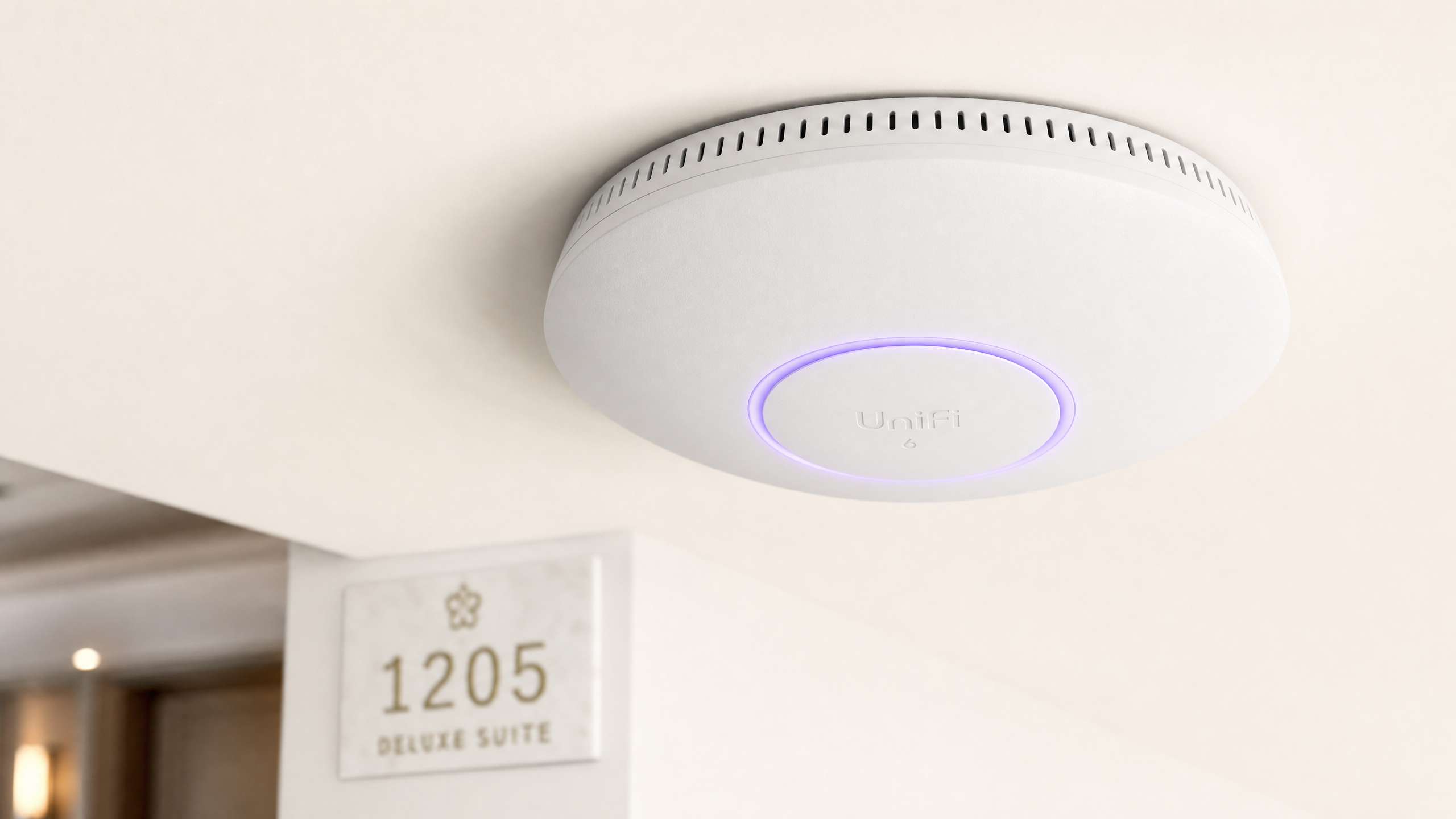
執行摘要
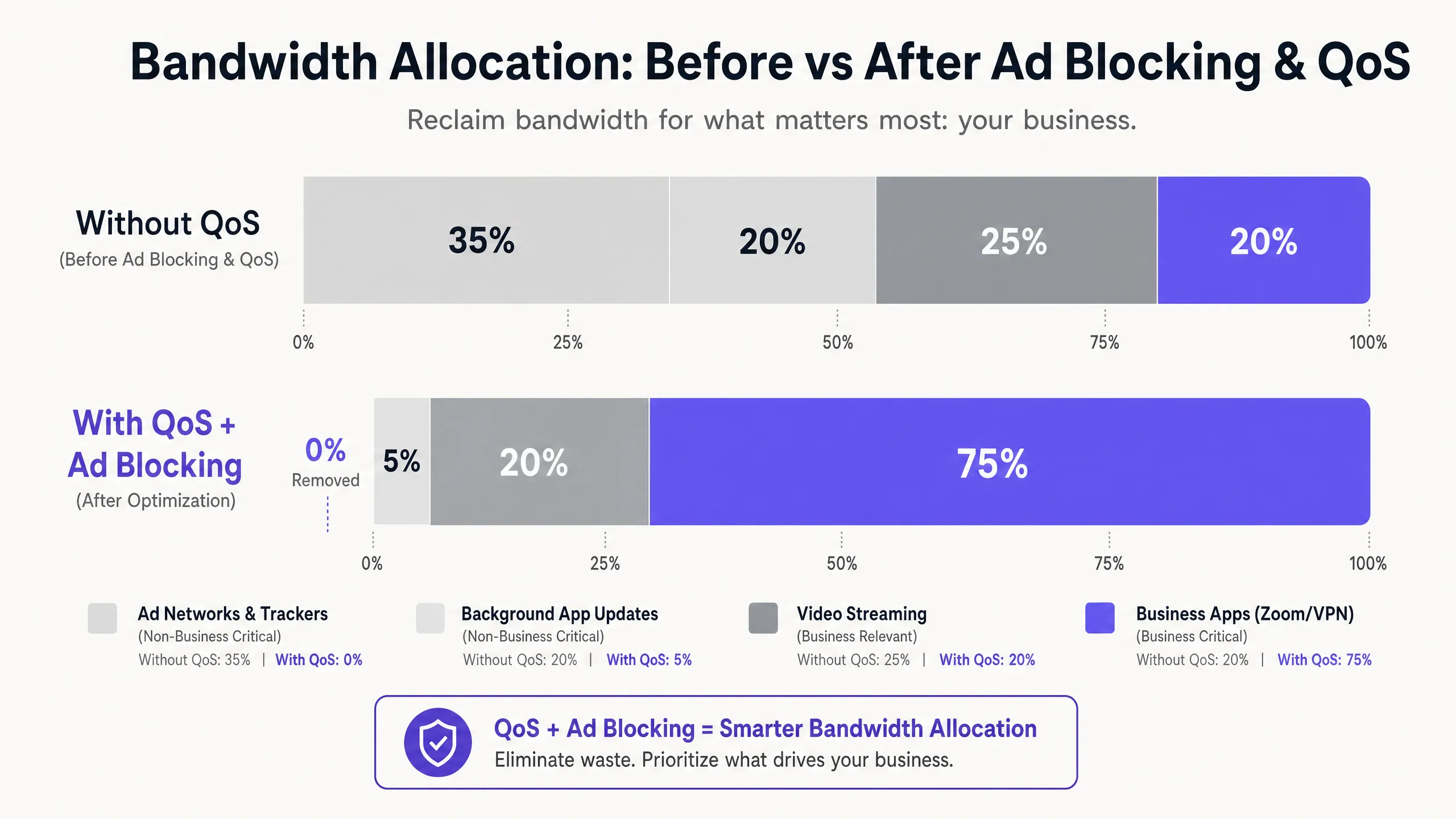
對於 飯店餐旅 領域的 IT 經理和場域營運總監而言,提供可靠的 WiFi 已不再是差異化優勢,而是最基本的營運要求。商務旅客需要高效能的連線,以用於企業 VPN、視訊會議和雲端託管應用程式。然而,大多數飯店網路都在默默地流失頻寬給無形的背景流量:廣告追蹤器、遙測信標和自動應用程式更新,這些流量在單個商務應用程式啟動之前,就可能消耗掉高達 35% 的可用總頻寬。
本指南詳細介紹了一種經過驗證、不限硬體廠商的架構,可收回這些被浪費的頻寬。透過在網路閘道部署 DNS 層級的廣告攔截,並實施透過深層封包檢測 (DPI) 對應的端到端服務品質 (QoS) 策略,網路架構師可以確保對延遲敏感的應用程式(Zoom、Microsoft Teams、IPsec VPN 和 SSL 通道)獲得保證的優先傳輸吞吐量。在大多數情況下,此方法可在現有基礎設施上實施,透過延後 ISP 鏈路升級和提高企業貴賓滿意度評分,帶來可衡量的投資報酬率 (ROI)。
技術深度剖析
現代飯店 WiFi 環境面臨的核心挑戰,是未經請求的背景流量激增。當任何現代裝置(商務筆記型電腦、智慧型手機、平板電腦)連線到網路時,它會立即發起數十個背景連線。這些連線包括來自已安裝應用程式的廣告 SDK 輪詢、作業系統遙測、雲端同步服務以及自動更新檢查。在一個擁有 200 個同時連線房客、且未經管理的扁平網路中,這種背景干擾不僅僅是不便,而是一個結構性的頻寬問題。
針對企業房客網路流量特徵的研究一致表明,在未管理的飯店網路上,廣告網路和第三方追蹤器佔 DNS 查詢量的 25% 到 40%。每個成功解析的查詢都可能啟動資料傳輸,雖然單個負載很小,但在數百個同時連線中累積起來的效果卻非常顯著。這些頻寬本應服務於財務長 (CFO) 的 Zoom 董事會會議,或顧問連線至其企業資料中心的 VPN 工作階段。
第 1 層:基於 DNS 的廣告與追蹤器攔截
最有效的干預點是 DNS 解析。透過將所有訪客的 DNS 查詢導向過濾解析器(無論是本地部署的設備還是雲端 DNS 安全服務),網路可以在任何負載資料傳輸到 WAN 鏈路之前,靜默丟棄對已知廣告伺服器、追蹤器網域和遙測端點的請求。這裡的效率提升是結構性的:與原本會發起的完整 HTTP/S 連線相比,被封鎖的 DNS 查詢所消耗的資源微乎其微。
對於實際運作的飯店部署,託管式 DNS 過濾服務提供了定期更新的封鎖名單並附帶企業級 SLA,這在可用性至關重要的環境中,比自行管理的開源解決方案更為理想。關鍵的設定要求是確保 Walled Garden(在 Captive Portal 驗證前可存取的網域集合)被明確列入白名單,且不受一般過濾原則的限制。未執行此設定是部署後訪客投訴最常見的原因。
第 2 層:深度封包檢測與 QoS 標記
一旦在 DNS 層減少了背景雜訊,剩餘的流量就必須依優先順序進行主動管理。邊緣防火牆或統一威脅管理 (UTM) 設備上的深度封包檢測 (DPI) 可識別特定的應用程式協定。現代 DPI 引擎可以根據封包特徵和連接埠模式,可靠地對 Zoom、Microsoft Teams、Cisco Webex、RTP/SIP 語音流量、IPsec 和 SSL VPN 工作階段進行分類,即使在未使用標準連接埠的情況下也是如此。
被識別為關鍵業務的流量會在 IP 標頭中標記區分服務代碼點 (DSCP) 值。DSCP 欄位提供了 64 種可能的每跳行為,但在實務上,大多數飯店部署使用簡化的三層模型:加速轉發(EF,DSCP 46)用於語音和視訊會議;確保轉發類別 4(AF41,DSCP 34)用於 VPN 和企業應用程式資料;以及盡力而為(BE,DSCP 0)用於一般的網頁瀏覽和串流媒體。
第 3 層:透過 WMM 進行無線 QoS
僅當無線存取點正確將 DSCP 標記對應到適當的 Wi-Fi 多媒體 (WMM) 存取類別時,有線 QoS 設定才會生效。WMM 定義了四個存取類別:語音 (AC_VO)、視訊 (AC_VI)、盡力而為 (AC_BE) 和背景 (AC_BK)。從 DSCP 到 WMM 的對應必須在 AP 上明確設定,因為預設行為因廠商而異。請在您的 AP 管理主控台中驗證此設定;這是一個常見的漏洞,會導致原本設計良好的 QoS 原則在最後一哩路失效。
VLAN 分段與安全架構
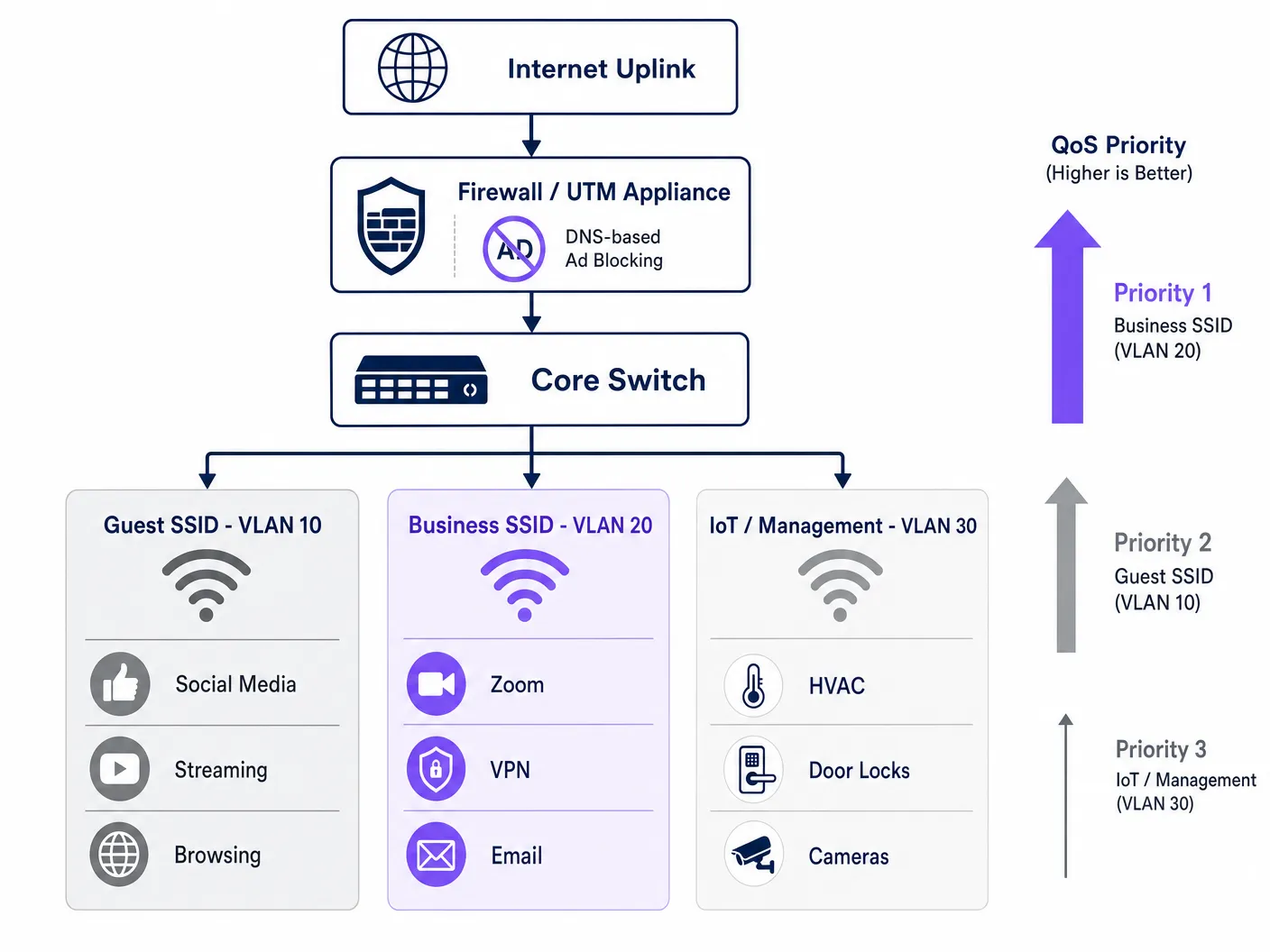
經妥善優化的飯店網路至少應在三個邏輯分段上運作。Guest SSID (VLAN 10) 透過標準網際網路存取為休閒旅客與會議與會者提供服務,並受限於 DNS 過濾與速率限制。Business SSID (VLAN 20) 擁有最高的 QoS 優先權,並透過 WPA3-Enterprise 與 IEEE 802.1X 進行驗證,與 RADIUS 伺服器整合以提供每位使用者專屬的憑證。IoT 與管理 VLAN (VLAN 30) 則將智慧客房設備、HVAC 感測器、電子門鎖及 IP 攝影機與所有賓客流量進行隔離。
這種分段不僅是效能優化,更是合規性要求。根據 PCI DSS,任何接觸付款卡資料的網路分段都必須透過已記錄的文件化防火牆規則與存取控制,與通用網路進行隔離。根據 GDPR,透過 Guest WiFi 驗證收集的個人資料必須以適當的技術安全防護措施進行處理,而網路分段是展現盡職調查(Due Diligence)的基本控制措施。在所有 VLAN 中維持 2026 年 IT 安全稽核軌跡 的完整記錄,對於在評估期間證明合規性至關重要。
導入指南
部署此架構需要系統化的方法,以避免中斷執行中的賓客服務。建議按照以下步驟進行階段式導入。
第一階段 — 流量特性分析(第 1 週)。 在進行任何變更之前,請在核心交換器的 SPAN 埠上部署流量分析工具,以擷取 72 小時的基準資料。識別出前 20 個最消耗頻寬的網域與應用程式類別。此資料可證實投資的合理性,並提供衡量部署後改善成效的基準。許多營運商利用 WiFi Analytics 功能來了解其場域中的設備類型、停留模式與應用程式使用情況。
第二階段 — 試行 DNS 過濾(第 2 週)。 在單一隔離的 VLAN(最好是員工或後勤辦公室分段)上實作 DNS 過濾,並使用保守的阻擋清單。在擴大至賓客分段之前,先監控 48 小時以確認是否有誤判。記錄所有加入圍牆花園(Walled Garden)白名單的網域。
第三階段 — QoS 政策部署(第 3 週)。 在邊界防火牆上設定 DPI 規則與 DSCP 標記。透過在分發層(Distribution Layer)擷取封包,驗證 DSCP 標記在每次交換器躍點(Hop)中是否皆完整保留。在所有存取點(Access Points)上啟用 WMM,並確認 DSCP 到 WMM 的對應已正確套用。如需此階段頻率規劃與頻道管理的指引,請參閱 WiFi 頻率:2026 年 Wi-Fi 頻率指南 。 階段 4 — VLAN 重組(第 4 週)。 將 IoT 設備遷移到專用的管理 VLAN。推出採用 WPA3-Enterprise 驗證的 Business SSID。將新的 SSID 通知企業客戶和會議主辦方。
階段 5 — 監控與最佳化(持續進行)。 建立 KPI:平均 Zoom 通話品質評分、VPN 連線成功率、尖峰時段吞吐量利用率,以及賓客 WiFi 滿意度評分。每月審查並更新 DNS 阻擋清單。
最佳實踐
以下中立於供應商的建議反映了目前的產業標準,適用於各大硬體平台,包括 Cisco Meraki、Ubiquiti UniFi、Aruba Networks 和 Ruckus。
| 實踐方法 | 標準 / 參考來源 | 優先級 |
|---|---|---|
| 在 Business SSID 上啟用 WPA3-Enterprise | IEEE 802.11i / WPA3 | 關鍵 |
| 802.1X RADIUS 驗證 | IEEE 802.1X | 關鍵 |
| 端到端 DSCP 保留 | RFC 2474 | 高 |
| 在所有 AP 上啟用 WMM | Wi-Fi Alliance WMM | 高 |
| 啟用通訊時間公平性 (Airtime Fairness) | 供應商特定 | 中 |
| 使用託管阻擋清單進行 DNS 過濾 | NIST SP 800-81 | 高 |
| VLAN 分割 (Guest/Business/IoT) | IEEE 802.1Q | 關鍵 |
| PCI DSS 網路隔離 | PCI DSS v4.0 Req. 1 | 關鍵(若適用) |
對於在餐旅空間旁同時營運 零售 環境的場所(例如飯店大廳商店或複合式會議零售空間),適用相同的 VLAN 和 QoS 原則,並額外為 POS 流量配置其專屬的高優先級佇列。在 辦公室 Wi-Fi:最佳化您的現代辦公室 Wi-Fi 網路 中討論的原則,可直接轉移套用於飯店商務中心和會議室的部署。
疑難排解與風險緩解
飯店 WiFi 最佳化部署中最常見的失敗模式可歸納為三類。
Captive Portal 故障。 症狀:啟用 DNS 過濾後,賓客無法進入登入頁面。根本原因:過濾原則阻擋了 Captive Portal 重新導向或 Walled Garden 所需的網域。緩解措施:稽核驗證流程所需的所有網域,並在啟用一般過濾器之前將其加入預先驗證白名單。如果您正在診斷更廣泛的壅塞問題,指南 為什麼我們的賓客 WiFi 這麼慢?診斷網路壅塞 提供了一個結構化的診斷框架。對於西班牙語營運商,可在 ¿Por qué nuestro WiFi para invitados es tan lento? Diagnóstico de la congestión de la red 取得對等資源。
DSCP 標記剝離。 症狀:防火牆和 AP 上已設定 QoS,但在負載下企業應用程式效能並未改善。根本原因:中間交換器正在剝離或重新標記 DSCP 標記。緩解措施:使用 Wireshark 或同等工具在網路路徑的多個點擷取封包。驗證每個交換器的 QoS 信任原則是否設定為信任來自上游裝置的 DSCP。
啟用 Airtime Fairness 後的 IoT 裝置不穩定。 症狀:啟用 airtime fairness 後,智慧客房裝置(恆溫器、門鎖)間歇性離線。根本原因:舊型 802.11b/g IoT 裝置傳輸速度慢,且在公平性原則下分配到的空閒時間不足。緩解措施:將 IoT 裝置遷移至已停用 airtime fairness、位於 VLAN 30 的專用 2.4GHz SSID 上。僅對 5GHz 訪客和商用 SSID 套用 airtime fairness。
投資報酬率與商業影響
此項投資的財務理由非常簡單。僅透過 DNS 過濾就能收回 20-35% 的浪費頻寬,大多數飯店業者可將 ISP 線路升級延後 12 至 18 個月。以 1Gbps 專用光纖電路的典型企業寬頻價格計算,這代表延後了 15,000 至 40,000 英鎊的資本支出,具體取決於市場和合約條款。
除了基礎設施節省之外,對企業商務客滿意度的影響是可衡量的。能夠確實行銷可靠、商務級 WiFi 的飯店,在商務旅行市場中能獲得更高的溢價。WiFi 滿意度評分的持續改善(通常透過住宿後調查衡量)與企業客戶的重複預訂率直接相關,而這正是大多數全方位服務飯店中利潤率最高的客群。
對於營運訪客或患者 WiFi 的 醫療保健 和 交通運輸 場所而言,合規性優勢同樣顯著。展示有記錄且可稽核的網路安全與資料處理方法,可降低法規風險並簡化合規性評估。
Key Definitions
DNS Filtering
The process of blocking access to specified domains at the DNS resolution stage, preventing devices from establishing connections to those destinations.
Deployed at the gateway to prevent guest devices from reaching ad networks and tracker domains, reclaiming bandwidth before any payload data is transmitted.
Quality of Service (QoS)
A set of network mechanisms that prioritise certain types of traffic over others to guarantee performance for latency-sensitive applications.
Essential for ensuring that Zoom, VoIP, and VPN traffic receive guaranteed throughput and low latency on a congested hotel network shared by hundreds of users.
Deep Packet Inspection (DPI)
An advanced form of packet filtering that examines the data content of a packet beyond its header to identify the specific application or protocol.
Used by edge firewalls to accurately classify application traffic (e.g., distinguishing a Zoom call from generic HTTPS traffic) so it can be tagged for QoS prioritisation.
DSCP (Differentiated Services Code Point)
A 6-bit field in the IP packet header used to classify and mark packets for per-hop QoS treatment across network devices.
The industry-standard mechanism for tagging packets so that switches, routers, and access points know which traffic is business-critical and should be processed first.
WMM (Wi-Fi Multimedia)
A Wi-Fi Alliance certification that implements QoS on wireless networks by defining four access categories: Voice, Video, Best Effort, and Background.
The wireless equivalent of wired QoS. Must be enabled on all access points and correctly mapped to DSCP values to ensure that wired QoS policies are honoured at the last hop.
Airtime Fairness
A wireless scheduling feature that allocates equal transmission time to all connected clients, rather than equal packet counts, preventing slow legacy devices from monopolising channel capacity.
Critical in hotel environments where a mix of modern business laptops and older devices share the same AP. Prevents a single slow device from degrading the experience for all others.
VLAN (Virtual Local Area Network)
A logical network segment created on a physical switch infrastructure using IEEE 802.1Q tagging to isolate traffic between groups of devices.
Used to separate guest, business, and IoT traffic on the same physical infrastructure. A mandatory control for PCI DSS compliance and a best practice for network security and performance management.
Captive Portal
A web-based authentication gateway that intercepts a new device's HTTP traffic and redirects it to a login or registration page before granting full network access.
The primary touchpoint for guest WiFi authentication and first-party data collection. Must be carefully managed to ensure DNS filtering policies do not block the authentication flow.
Walled Garden
A set of domains and IP addresses that a device can access before completing Captive Portal authentication, typically including the portal itself and any required third-party authentication services.
Must be explicitly configured when deploying DNS filtering to ensure the authentication flow is not disrupted by the general blocking policy.
IEEE 802.1X
An IEEE standard for port-based Network Access Control that provides an authentication mechanism for devices wishing to connect to a network.
The authentication framework underpinning WPA3-Enterprise deployments. Integrates with a RADIUS server to provide per-user credentials and is the recommended standard for business-grade hotel SSIDs.
Worked Examples
A 400-room city-centre hotel is hosting a major technology conference with 600 registered delegates. The venue has a 1Gbps symmetric fibre uplink. During the first morning of the conference, the network operations team receives a flood of complaints: Zoom calls are dropping, VPN connections are timing out, and the conference app is failing to load. A traffic capture shows the 1Gbps link is at 94% utilisation. How should the IT team respond, both immediately and structurally?
Immediate response (within 30 minutes): Deploy an emergency DNS sinkhole for the top 50 ad network and telemetry domains identified in the traffic capture. This alone should shed 25–35% of current load. Simultaneously, configure emergency QoS rules on the edge firewall to hard-prioritise traffic on UDP ports 8801-8802 (Zoom) and TCP 443 with Zoom's IP ranges, and to rate-limit traffic to known streaming CDN IP ranges to 10Mbps aggregate.
Structural response (post-event): Segment the network into dedicated conference delegate and speaker VLANs. Deploy a managed DNS filtering service with a maintained blocklist. Implement DPI-based QoS with DSCP tagging for all future events. Negotiate a burst capacity agreement with the ISP for high-density event periods. Consider a dedicated 10Gbps event uplink for conferences exceeding 300 delegates.
A 120-room boutique hotel group with properties across three cities wants to standardise their WiFi infrastructure. Each property has a mix of leisure and business guests. The IT director wants to ensure that business guests get a premium experience without investing in new hardware at each site. The existing infrastructure is a mix of Ubiquiti UniFi APs and Cisco Meraki firewalls. What architecture should be recommended?
Recommend a centralised cloud-managed architecture leveraging the existing Meraki firewalls for DNS filtering (via Meraki's built-in content filtering and Umbrella integration) and DPI-based QoS. Configure two SSIDs per property: a standard Guest SSID (WPA3-Personal with Captive Portal) and a Business SSID (WPA3-Enterprise with 802.1X). Map the Business SSID to a dedicated VLAN with the highest QoS priority tier. On the UniFi APs, enable WMM and configure the DSCP-to-WMM mapping to match the Meraki firewall's tagging policy. Deploy a centralised RADIUS server (or use a cloud RADIUS service) for 802.1X authentication across all three properties. Provide corporate account guests with Business SSID credentials at check-in.
Practice Questions
Q1. You have just enabled DNS filtering on your hotel's guest VLAN. Within 10 minutes, the front desk receives calls from guests saying they cannot connect to WiFi — they are not seeing the login page and are getting a 'No Internet Connection' error. What is the most likely cause and how do you resolve it?
Hint: Consider the sequence of events when a new device joins an open network and attempts to reach the captive portal.
View model answer
The DNS filtering policy is blocking one or more domains required for the captive portal redirect or the walled garden. When a device joins the network, it sends an HTTP probe request to detect the captive portal. If the DNS resolver cannot resolve the redirect domain (because it is on the blocklist or the filter is too aggressive), the device never sees the login page. Resolution: immediately identify the captive portal's redirect domain, authentication server domain, and any social login provider domains (e.g., accounts.google.com for Google login), and add them to the walled garden whitelist. The walled garden must bypass the DNS filter entirely for unauthenticated devices.
Q2. A network architect has configured DPI on the edge firewall to tag Zoom traffic with DSCP EF (46) and has verified the configuration is correct. However, during peak conference hours, business guests still report jitter and dropped calls. A packet capture at the AP shows Zoom traffic arriving with DSCP 0 (Best Effort). What is the most likely cause?
Hint: Remember that QoS is an end-to-end requirement and that each device in the path must be configured to trust and forward priority markings.
View model answer
A switch between the firewall and the access point is stripping or remarking the DSCP tags to 0 (Best Effort). This is a common issue when switches are configured with a default 'untrusted' QoS policy that resets all incoming DSCP values. Resolution: identify the switch(es) in the path between the firewall and the APs, and configure their QoS trust policy to 'trust DSCP' on the uplink ports. Additionally, verify that the access points are configured to map DSCP EF to WMM AC_VO (Voice) and not defaulting to AC_BE.
Q3. You are advising a 250-room hotel that wants to implement Airtime Fairness to improve WiFi performance for business guests. The hotel also has 80 smart room devices (thermostats, motorised blinds) that use 802.11b/g and are currently on the same SSID as guests. What is the risk of enabling Airtime Fairness in this configuration, and what is the recommended approach?
Hint: Consider how Airtime Fairness allocates resources and how the transmission rate of legacy 802.11b devices compares to modern 802.11ac/Wi-Fi 6 devices.
View model answer
Airtime Fairness allocates equal transmission time to all clients, regardless of their data rate. A legacy 802.11b device transmitting at 1–11 Mbps receives the same time slice as a modern Wi-Fi 6 device transmitting at 600+ Mbps. In practice, the legacy device transmits far less data in its time slice, which is acceptable for the device itself, but the problem is that the access point must wait for the slow device to finish its transmission before serving the next client. This can cause the smart room devices to miss their polling windows, leading to intermittent disconnections. The recommended approach is to migrate all IoT devices to a dedicated 2.4GHz SSID on VLAN 30 (IoT/Management) with Airtime Fairness disabled, and enable Airtime Fairness only on the 5GHz guest and business SSIDs where all clients are modern devices.
Q4. A hotel group's CTO asks you to justify the cost of deploying a managed DNS filtering service (£8,000/year) versus continuing with the current unmanaged network. The hotel has a 1Gbps fibre uplink costing £24,000/year. How would you structure the ROI argument?
Hint: Consider both direct infrastructure savings and indirect revenue impact.
View model answer
Structure the ROI argument in two parts. Direct savings: if DNS filtering reclaims 30% of wasted bandwidth, the effective throughput of the existing 1Gbps link increases to the equivalent of approximately 1.3Gbps. This defers the need for a 10Gbps upgrade (typically £45,000–£80,000 capital cost plus increased annual line rental) by at least 18–24 months. The £8,000/year filtering service cost is recovered within the first year through deferred capital expenditure alone. Indirect revenue impact: improved WiFi satisfaction scores in the corporate segment — typically a 15–25% improvement based on comparable deployments — directly influence repeat booking rates from corporate accounts. For a 250-room hotel with 40% corporate occupancy at an average rate of £180/night, even a 2% improvement in corporate repeat bookings represents approximately £65,000 in additional annual revenue. The combined ROI case is compelling and quantifiable within a single financial year.
Continue reading in this series
Understanding RSSI and Signal Strength for Optimal Channel Planning
This guide provides a comprehensive technical deep-dive into RSSI, Signal-to-Noise Ratio (SNR), and RF propagation principles for optimal channel planning. It equips IT managers, network architects, and venue operations directors with actionable strategies to mitigate Co-Channel and Adjacent Channel Interference, optimise AP placement, and leverage analytics for measurable business impact across hospitality, retail, and public-sector environments.
Understanding RSSI and Signal Strength for Optimal Channel Planning
This guide provides a comprehensive technical deep-dive into RSSI, Signal-to-Noise Ratio (SNR), and RF propagation principles for optimal channel planning. It equips IT managers, network architects, and venue operations directors with actionable strategies to mitigate Co-Channel and Adjacent Channel Interference, optimise AP placement, and leverage analytics for measurable business impact across hospitality, retail, and public-sector environments.
20MHz vs 40MHz vs 80MHz: Which Channel Width Should You Use?
This guide provides a definitive, vendor-neutral technical reference for IT managers, network architects, and venue operations directors on selecting the correct WiFi channel width — 20MHz, 40MHz, or 80MHz — across enterprise deployments in hospitality, retail, events, and public-sector environments. It covers the underlying IEEE 802.11 mechanics, real-world capacity trade-offs, and step-by-step deployment guidance to help teams make the right call this quarter. Understanding channel width selection is one of the highest-leverage decisions in any wireless LAN design, directly impacting throughput, interference, client density support, and the reliability of guest-facing services.