
Como Oferecer aos Clientes de Varejo uma Experiência Personalizada Usando WiFi
Este guia de referência técnica descreve como as equipes de TI e operações de varejo podem aproveitar a infraestrutura de WiFi para visitantes existente para oferecer experiências de cliente personalizadas e conscientes da localização. Ele abrange arquitetura, captura de dados, integração de CRM e conformidade, demonstrando como transformar o fluxo de visitantes anônimos em dados primários acionáveis.
Ouça este guia
Ver transcrição do podcast
📚 Parte da nossa série principal: WiFi Analytics Guide →
कार्यकारी सारांश
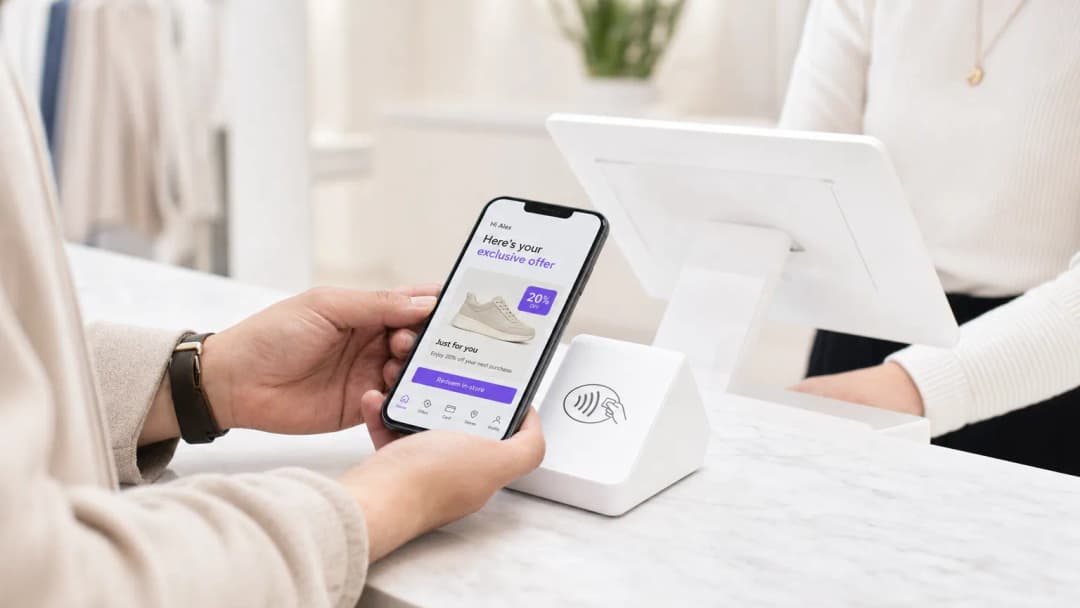
आयटी (IT) मॅनेजर्स आणि व्हेन्यू ऑपरेशन्स डायरेक्टर्ससाठी, ग्राहकांना वैयक्तिकृत अनुभव देण्याचा आदेश अनेकदा गुंतागुंतीच्या, मल्टी-व्हेंडर इंटिग्रेशन प्रोजेक्ट्समध्ये रूपांतरित होतो. तथापि, इन-स्टोअर वैयक्तिकरणासाठी सर्वात प्रभावी पाया कदाचित तुमच्या छतावरील टाइल्समध्ये आधीपासूनच तैनात केलेला आहे: तुमचे एंटरप्राइझ गेस्ट WiFi नेटवर्क.
विद्यमान हार्डवेअरवर (जसे की Cisco Meraki, Aruba, किंवा Ruckus) एक अत्याधुनिक ॲनालिटिक्स आणि ऑथेंटिकेशन प्लॅटफॉर्म लेयर करून, रिटेलर्स एका मूलभूत कनेक्टिव्हिटी सुविधेला फर्स्ट-पार्टी डेटा कॅप्चर करण्यासाठी एका शक्तिशाली इंजिनमध्ये रूपांतरित करू शकतात. हे मार्गदर्शक WiFi-चालित वैयक्तिकरण धोरण कसे तयार करावे, तैनात करावे आणि स्केल कसे करावे याचा तपशील देते. आम्ही Captive Portal द्वारे आयडेंटिटी रिझोल्यूशनचे मेकॅनिक्स, CRM सिस्टीममध्ये ड्वेल टाइम (dwell time) आणि स्पॅशियल ॲनालिटिक्सचे एकत्रीकरण आणि संदर्भानुसार संबंधित ऑफर्सचे स्वयंचलित ट्रिगरिंग एक्सप्लोर करतो—हे सर्व GDPR आणि PCI DSS मानकांचे काटेकोरपणे पालन करून.
तुम्ही एखादे सिंगल फ्लॅगशिप स्टोअर व्यवस्थापित करत असाल किंवा विस्तीर्ण रिटेल इस्टेट, उद्दिष्ट तेच राहते: निनावी फूटफॉलला ज्ञात, ॲड्रेसेबल ग्राहकांमध्ये रूपांतरित करणे, ज्यामुळे मार्केटिंग टीम्सना सर्वोच्च हेतूच्या अचूक क्षणी योग्य संदेश देण्यास सक्षम करता येते.
तांत्रिक सखोल माहिती (Technical Deep-Dive)
आर्किटेक्चर आणि डेटा फ्लो
WiFi Analytics चा पाया एका मजबूत आर्किटेक्चरवर अवलंबून आहे जो ग्राहकांचा डेटा सुरक्षितपणे कॅप्चर करतो आणि त्यावर प्रक्रिया करतो. ठराविक डिप्लॉयमेंट मॉडेलमध्ये क्लाउड किंवा ऑन-प्रिमाइसेस कंट्रोलरला रिपोर्ट करणारे थिन ॲक्सेस पॉइंट्स (APs) समाविष्ट असतात. ॲनालिटिक्स प्लॅटफॉर्म API किंवा Syslog फीड्सद्वारे या कंट्रोलरकडून डेटा घेतो.
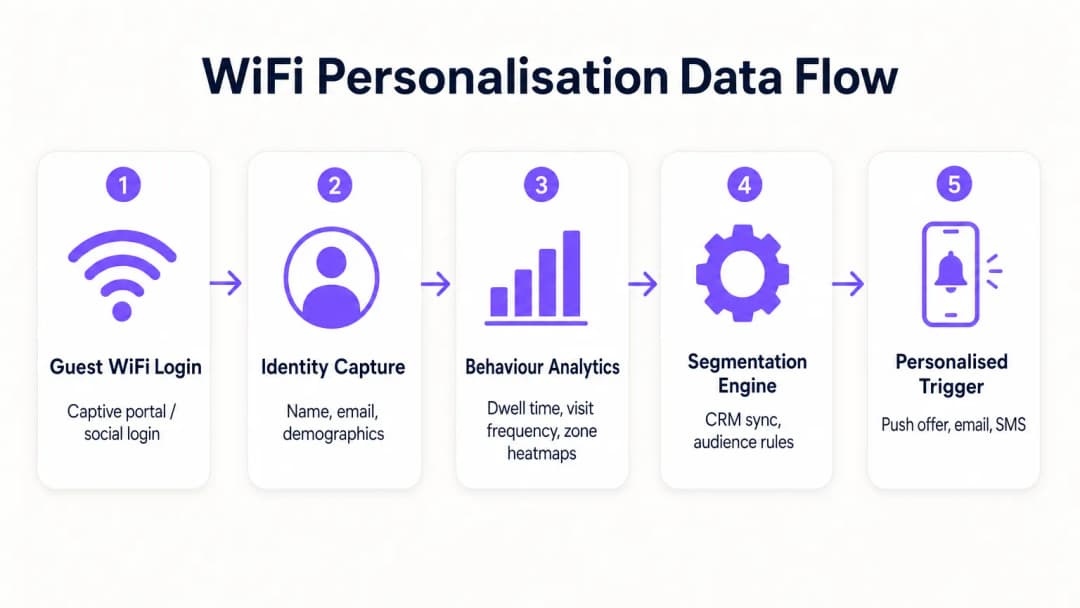
- प्रोब रिक्वेस्ट्स आणि असोसिएशन: ऑथेंटिकेशनच्या आधीही, APs मोबाईल उपकरणांकडून प्रोब रिक्वेस्ट्स शोधतात, MAC ॲड्रेस आणि सिग्नल स्ट्रेंथ (RSSI) कॅप्चर करतात. हे बेसलाइन फूटफॉल आणि झोन डेटा प्रदान करते.
- ऑथेंटिकेशन (Captive Portal): जेव्हा एखादा वापरकर्ता Guest WiFi SSID शी जोडला जातो, तेव्हा त्यांना Captive Portal वर रीडायरेक्ट केले जाते. हा आयडेंटिटी कॅप्चरचा महत्त्वाचा टप्पा आहे. ईमेल, सोशल मीडिया किंवा SMS द्वारे ऑथेंटिकेशन ऑफर करून, सिस्टीम पूर्वीच्या निनावी MAC ॲड्रेसला एका पडताळणी केलेल्या ओळखीशी जोडते.
- ॲनालिटिक्स इंजिन: प्लॅटफॉर्म रिअल-टाइम लोकेशन डेटा (ट्रायलॅटरेशन किंवा RSSI हीटमॅपिंगद्वारे मोजलेला) ऑथेंटिकेट केलेल्या ओळखीशी जोडतो, ड्वेल टाइम, भेट देण्याची वारंवारता आणि झोन प्राधान्यांची सर्वसमावेशक प्रोफाइल तयार करतो.
- इंटिग्रेशन लेयर: वेबहुक्स किंवा REST APIs हा समृद्ध प्रोफाइल डेटा बाह्य सिस्टीममध्ये (CRM, मार्केटिंग ऑटोमेशन, लॉयल्टी प्लॅटफॉर्म) पाठवतात.
आयडेंटिटी रिझोल्यूशन आणि MAC रँडमायझेशन
आधुनिक मोबाईल ऑपरेटिंग सिस्टीम्स (iOS 14+, Android 10+) सतत ट्रॅकिंग टाळण्यासाठी MAC ॲड्रेस रँडमायझेशन लागू करतात. यामुळे दीर्घकालीन ॲनालिटिक्ससाठी केवळ MAC ॲड्रेसवर अवलंबून राहणे कालबाह्य होते. यावर उपाय म्हणजे प्रोफाइल-आधारित ऑथेंटिकेशन. एकदा वापरकर्त्याने Captive Portal द्वारे ऑथेंटिकेट केले की, त्यांचा ईमेल किंवा फोन नंबर कायमस्वरूपी आयडेंटिफायर बनतो. त्यानंतरच्या भेटी, नवीन रँडमाइज्ड MAC ॲड्रेससह असल्या तरीही, पुन्हा ऑथेंटिकेट केल्यावर मूळ प्रोफाइलशी जोडल्या जाऊ शकतात, ज्यामुळे ग्राहक रेकॉर्डमध्ये सातत्य सुनिश्चित होते.
नेटवर्क सेगमेंटेशन आणि सिक्युरिटी
सुरक्षा सर्वोपरि आहे. गेस्ट ट्रॅफिक कॉर्पोरेट नेटवर्कपासून काटेकोरपणे वेगळे केले पाहिजे, विशेषतः समर्पित VLANs द्वारे. हे सार्वजनिक इंटरनेट ॲक्सेस आणि पॉइंट-ऑफ-सेल (POS) डेटा वातावरणातील कोणताही ओव्हरलॅप रोखून PCI DSS चे पालन सुनिश्चित करते. गेस्ट SSID ने ओव्हर-द-एअर ट्रॅफिक एन्क्रिप्ट करण्यासाठी आणि वापरकर्त्याच्या डेटाचे इंटरसेप्शनपासून संरक्षण करण्यासाठी आदर्शपणे WPA3-Personal किंवा WPA3-Enterprise (जिथे समर्थित असेल) वापरले पाहिजे.
अंमलबजावणी मार्गदर्शक (Implementation Guide)
वैयक्तिकरण धोरण तैनात करण्यासाठी IT आणि मार्केटिंग यांच्यात समन्वित प्रयत्नांची आवश्यकता असते.
टप्पा १: इन्फ्रास्ट्रक्चर असेसमेंट
प्रगत ॲनालिटिक्स तैनात करण्यापूर्वी, अंतर्निहित RF वातावरण योग्य असल्याची खात्री करा. कव्हरेज डेन्सिटी पडताळण्यासाठी साइट सर्वेक्षण करा, विशेषतः उच्च-मूल्य असलेल्या झोनमध्ये. ड्वेल टाइम ॲनालिटिक्स सातत्यपूर्ण सिग्नल रिसेप्शनवर अवलंबून असतात; डेड झोन डेटा खराब करतील.
टप्पा २: Captive Portal कॉन्फिगरेशन
GDPR चे पालन सुनिश्चित करताना ऑप्ट-इन दर वाढवण्यासाठी Captive Portal डिझाइन करा. व्हॅल्यू एक्सचेंज स्पष्ट असले पाहिजे. सामान्य लॉगिन ऐवजी, एक प्रोत्साहन द्या: "विशेष इन-स्टोअर ऑफर्ससाठी कनेक्ट करा." महत्त्वाचे म्हणजे, नेटवर्क ॲक्सेससाठीची संमती मार्केटिंग कम्युनिकेशन्सच्या संमतीपासून वेगळी (unbundled) असली पाहिजे. पोर्टलने अटी व शर्ती आणि गोपनीयता धोरणे स्पष्टपणे सादर केली पाहिजेत.
टप्पा ३: इंटिग्रेशन आणि सेगमेंटेशन
WiFi प्लॅटफॉर्मला तुमच्या विद्यमान मार्केटिंग स्टॅकशी कनेक्ट करा. हे तुम्हाला इन-स्टोअर वर्तणुकीशी संबंधित डेटा (उदा., "शू डिपार्टमेंटला २० मिनिटे भेट दिली") ट्रान्झॅक्शनल डेटासह (उदा., "गेल्या महिन्यात ट्रेनर्स खरेदी केले") एकत्र करण्याची अनुमती देते. ॲक्शनेबल सेगमेंट्स तयार करा, जसे की "हाय-व्हॅल्यू चर्न रिस्क" (वारंवार येणारे जुने अभ्यागत जे ६० दिवसांत कनेक्ट झालेले नाहीत).
टप्पा ४: ऑटोमेटेड ट्रिगर्स
ऑटोमेटेड वर्कफ्लो कॉन्फिगर करा. जेव्हा एखाद्या विशिष्ट सेगमेंटमधील ग्राहक ऑथेंटिकेट करतो, तेव्हा API द्वारे एखादी कृती ट्रिगर करा. ही SMS ऑफर, रिटेलरच्या ॲपद्वारे पुश नोटिफिकेशन किंवा ईमेल असू शकते. ऑथेंटिकेशन आणि ट्रिगर एक्झिक्यूशनमधील विलंब (latency) कमीत कमी (३० सेकंदांच्या आत) असावा जेणेकरून ग्राहक अद्याप एंगेज असतानाच संदेश प्राप्त होईल.
ही प्रोफाइल्स तयार करण्याच्या अधिक तपशीलवार धोरणांसाठी, आमच्या WiFi in Retail Stores: Building Customer Profiles From Footfall Data या मार्गदर्शकाचा संदर्भ घ्या किंवा फ्रेंच समतुल्य, Le WiFi dans les magasins de détail : Créer des profils clients à partir des données de fréquentation पहा.
सर्वोत्तम पद्धती (Best Practices)
- व्हॅल्यू एक्सचेंजला प्राधान्य द्या: ग्राहकांना फायदा दिसला तरच ते त्यांचा डेटा शेअर करतील. WiFi वेगवान आणि विश्वासार्ह असल्याची खात्री करा आणि ट्रिगर केलेल्या कोणत्याही ऑफर्स खरोखरच मौल्यवान आहेत याची खात्री करा.
- फ्रीक्वेन्सी कॅप्सचा आदर करा: प्रत्येक वेळी कनेक्ट झाल्यावर ग्राहकांवर नोटिफिकेशन्सचा भडिमार करू नका. कंटाळा आणि ऑप्ट-आउट्स टाळण्यासाठी फ्रीक्वेन्सी कॅपिंग (उदा., आठवड्यातून जास्तीत जास्त एक संदेश) लागू करा.
- विद्यमान गुंतवणुकीचा फायदा घ्या: रिप-अँड-रिप्लेस (rip-and-replace) परिस्थिती टाळा. आधुनिक ॲनालिटिक्स प्लॅटफॉर्म्स आघाडीच्या हार्डवेअर व्हेंडर्ससोबत अखंडपणे इंटिग्रेट होतात, ज्यामुळे तुम्हाला तुमच्या सध्याच्या इन्फ्रास्ट्रक्चरमधून अधिक मूल्य मिळवता येते.
- क्रॉस-पॉलिनेट डेटा: इतर स्रोतांसोबत एकत्र केल्यावर WiFi डेटा सर्वात शक्तिशाली असतो. इन-स्टोअर वर्तन एकूण कस्टमर लाइफटाइम व्हॅल्यूशी कसे संबंधित आहे हे समजून घेण्यासाठी तुमच्या लॉयल्टी प्रोग्रामसोबत इंटिग्रेट करा. हा दृष्टिकोन Retail , Hospitality , आणि अगदी Healthcare सह विविध क्षेत्रांमध्ये अत्यंत संबंधित आहे.
ट्रबलशूटिंग आणि रिस्क मिटिगेशन
- कमी ऑप्ट-इन दर: जर २०% पेक्षा कमी अभ्यागत ऑथेंटिकेट करत असतील, तर Captive Portal डिझाइनचे पुनरावलोकन करा. लॉगिन प्रक्रिया सोपी करा, व्हॅल्यू प्रपोझिशन स्पष्ट करा आणि पोर्टल मोबाईल-रिस्पॉन्सिव्ह असल्याची खात्री करा.
- चुकीचा लोकेशन डेटा: जर झोन ॲनालिटिक्स चुकीचे वाटत असतील, तर AP प्लेसमेंट तपासा आणि नवीन RF सर्वेक्षण करा. भौतिक अडथळे किंवा शेजारील नेटवर्क्सच्या हस्तक्षेपामुळे RSSI कॅल्क्युलेशन्सवर परिणाम होऊ शकतो.
- इंटिग्रेशन फेल्युअर्स: CRMs च्या API कनेक्शन्ससाठी मजबूत एरर हँडलिंग अस्तित्वात असल्याची खात्री करा. वेबहुक डिलिव्हरी सक्सेस रेट्सचे निरीक्षण करा आणि अयशस्वी पेलोड्ससाठी रिट्राय मेकॅनिझम लागू करा.
- कम्प्लायन्स रिस्क: तुमच्या कन्सेंट फ्लोज आणि डेटा रिटेन्शन पॉलिसीजचे नियमितपणे ऑडिट करा. GDPR अंतर्गत डेटा सब्जेक्ट ॲक्सेस रिक्वेस्ट्स (DSARs) हाताळण्यासाठी तुमच्याकडे एक सुव्यवस्थित प्रक्रिया असल्याची खात्री करा.
ROI आणि बिझनेस इम्पॅक्ट

WiFi-चालित वैयक्तिकरणासाठी बिझनेस केस आकर्षक आहे. निनावी अभ्यागतांना ओळखून, रिटेलर्स त्यांचा मार्केटेबल डेटाबेस लक्षणीयरीत्या वाढवू शकतात. ट्रॅक करण्यासाठी प्रमुख मेट्रिक्समध्ये हे समाविष्ट आहे:
- डेटाबेस ग्रोथ रेट: दरमहा कॅप्चर केलेल्या नेट-न्यू व्हेरिफाईड आयडेंटिटीजचे प्रमाण.
- ट्रिगर केलेल्या ऑफर्सचा कन्व्हर्जन रेट: इन-स्टोअर असताना त्यांना पाठवलेली ऑफर रिडीम करणाऱ्या ग्राहकांची टक्केवारी.
- ड्वेल टाइममधील वाढ: वैयक्तिकृत एंगेजमेंटमुळे स्टोअर भेटींचा कालावधी वाढतो का हे मोजणे.
- रिपीट व्हिजिट फ्रीक्वेन्सी: ग्राहकांच्या निष्ठेवर टार्गेटेड री-एंगेजमेंट मोहिमांच्या प्रभावाचा मागोवा घेणे.
मूलभूत कनेक्टिव्हिटीच्या पलीकडे जाऊन, IT टीम्स स्वतःला रेव्हेन्यू इनेबलर्स म्हणून स्थापित करू शकतात, जे आधुनिक, डेटा-चालित रिटेल ऑपरेशन्ससाठी आवश्यक इन्फ्रास्ट्रक्चर प्रदान करतात.
Definições principais
Captive Portal
Uma página da web que o usuário é forçado a visualizar e interagir antes que o acesso a uma rede pública seja concedido.
A interface principal para capturar a identidade do usuário e estabelecer o consentimento para o processamento de dados.
Randomização de Endereço MAC
Um recurso de privacidade no qual os dispositivos móveis usam um endereço de hardware temporário e gerado aleatoriamente ao buscar ou se conectar a redes.
Força as equipes de TI a depender de perfis autenticados em vez de identificadores de hardware para o rastreamento de clientes a longo prazo.
Tempo de Permanência
A duração que um dispositivo conectado ou em busca permanece dentro da área de cobertura de um ponto de acesso específico ou zona definida.
Uma métrica crítica para entender o engajamento do cliente com vitrines específicas, departamentos ou a loja como um todo.
Trilateração
Um método para determinar a localização de um dispositivo medindo a força do seu sinal (RSSI) em relação a três ou mais pontos de acesso.
Usada por plataformas de análise espacial para gerar mapas de calor precisos e rastrear padrões de movimento dos clientes.
Probe Request
Um quadro enviado por um dispositivo cliente para descobrir redes sem fio disponíveis em suas proximidades.
Permite que as plataformas de análise estimem o fluxo de pessoas e capturem dados de presença anônimos, mesmo que o usuário não se autentique.
VLAN (Virtual Local Area Network)
Uma sub-rede lógica que agrupa uma coleção de dispositivos, isolando seu tráfego de outros dispositivos na mesma rede física.
Essencial para a segurança e conformidade com o PCI DSS, garantindo que o tráfego de WiFi de visitantes seja completamente segregado dos sistemas corporativos.
Webhook
Um método para que um aplicativo forneça informações em tempo real a outro aplicativo, normalmente acionado por um evento específico.
Usado para enviar instantaneamente eventos de autenticação da plataforma de WiFi para um CRM, permitindo marketing acionado em tempo real.
RSSI (Received Signal Strength Indicator)
Uma medição da potência presente em um sinal de rádio recebido.
A métrica fundamental usada pelos pontos de acesso para estimar a distância de um dispositivo cliente, permitindo a análise de localização.
Exemplos práticos
Um varejista de moda de médio porte com 50 lojas físicas deseja reduzir a rotatividade de clientes. Eles têm APs Cisco Meraki implantados, mas oferecem apenas uma página de splash simples no estilo 'clique para aceitar'. Como a equipe de TI deve abordar a atualização disso para um mecanismo de personalização?
- Integração de Plataforma: Integre uma plataforma dedicada de análise de WiFi com o painel Meraki existente via API. Nenhum hardware novo é necessário.
- Atualização do Portal: Substitua a página 'clique para aceitar' por um Captive Portal personalizado com a marca, oferecendo Login Social (Facebook/Google) ou autenticação por e-mail, juntamente com uma caixa de seleção explícita de aceitação de marketing.
- Sincronização de CRM: Configure um webhook para enviar as identidades recém-autenticadas e seus dados de visita para o CRM do varejista (por exemplo, Salesforce).
- Execução de Campanha: A equipe de marketing cria um segmento no CRM para 'Clientes que não visitam há 90 dias'. Quando um cliente desse segmento se conecta ao WiFi, um e-mail automatizado oferecendo um desconto de 15% é acionado imediatamente.
O operador de um grande shopping center precisa entender o fluxo de visitantes entre diferentes lojas âncora para otimizar a distribuição dos lojistas e os modelos de aluguel. Atualmente, eles dependem da contagem manual de fluxo de pessoas nas entradas.
- Ajuste de Rede: A equipe de TI otimiza a densidade de APs para garantir uma cobertura consistente em todos os corredores e entradas de lojas, concentrando-se na sobreposição de cobertura para uma trilateração precisa.
- Implantação de Analytics: Implante uma plataforma de análise espacial que ingira dados de probe request dos APs.
- Mapeamento de Zonas: Defina zonas específicas dentro do painel de análise correspondentes a áreas-chave (por exemplo, 'Praça de Alimentação', 'Loja Âncora A', 'Entrada Norte').
- Análise de Dados: Utilize a plataforma para gerar mapas de calor e diagramas de fluxo, analisando os caminhos típicos percorridos pelos visitantes e o tempo de permanência em zonas específicas.
Questões práticas
Q1. Um cliente de varejo deseja acionar um desconto imediato por SMS para qualquer cliente que passar mais de 15 minutos na seção de eletrônicos de alta margem. Atualmente, eles têm um único ponto de acesso cobrindo toda a loja. Qual é a principal limitação técnica?
Dica: Considere como o sistema determina a localização e o tempo de permanência.
Ver resposta modelo
A principal limitação é a falta de resolução espacial. Com apenas um único ponto de acesso, o sistema pode determinar que o cliente está na loja (associado ao AP), mas não pode usar a trilateração para identificar sua localização em uma zona específica, como a seção de eletrônicos. O varejista deve implantar pontos de acesso adicionais para fornecer cobertura sobreposta, permitindo uma análise de localização precisa.
Q2. O diretor de marketing está preocupado que a randomização do endereço MAC no iOS impeça o rastreamento de visitantes recorrentes. Como o arquiteto de TI deve responder?
Dica: Foque na transição do rastreamento baseado em hardware para o rastreamento baseado em identidade.
Ver resposta modelo
O arquiteto deve explicar que, embora a randomização de MAC interrompa o rastreamento passivo de dispositivos anônimos, ela não afeta os usuários autenticados. Ao implementar um Captive Portal que exige e-mail ou login social, o sistema cria um perfil persistente baseado na identidade do usuário. Quando o usuário retorna e se conecta novamente (mesmo com um novo endereço MAC), ele se autentica novamente e a nova sessão é vinculada ao seu perfil persistente existente.
Q3. O operador de um estádio deseja implantar WiFi para visitantes, mas está preocupado com a conformidade com o PCI DSS, pois os terminais de PDV para concessões compartilham os mesmos switches de rede física. Qual princípio de design de rede deve ser aplicado?
Dica: Pense na separação lógica do tráfego de rede.
Ver resposta modelo
A equipe de TI deve impor uma segmentação de rede rigorosa usando Redes Locais Virtuais (VLANs). O tráfego de WiFi de visitantes deve ser colocado em uma VLAN dedicada que seja completamente isolada da VLAN usada pelos terminais de PDV. As regras de firewall devem garantir que nenhum tráfego possa ser roteado entre a VLAN de visitantes e o Ambiente de Dados do Portador de Cartão (CDE), mantendo assim a conformidade com o PCI DSS.
Continue a ler esta série
Mensurando o ROI de Negócios do guest WiFi e Analytics de Localização
Este guia fornece um framework técnico e operacional para mensurar o ROI de negócios do guest WiFi e analytics de localização. Ele detalha como calcular o valor dos investimentos em hardware por meio do aumento de dwell time, eficiência operacional e captura de dados primários nos setores de varejo, hospitalidade e locais públicos. Gerentes de TI, arquitetos de rede, CTOs e diretores de operações de espaços encontrarão frameworks de medição concretos, estudos de caso reais e orientações de conformidade para justificar e maximizar seu investimento em WiFi.
Privacy by Design: Anonimizando Dados de WiFi para Conformidade com a GDPR
Este guia definitivo detalha a arquitetura técnica e as estratégias de implementação para anonimizar dados de WiFi para garantir a conformidade com a GDPR. Ele fornece aos líderes de TI e arquitetos de rede estruturas práticas para equilibrar análises robustas de locais com requisitos estritos de privacidade de dados.
Heatmapping vs Presence Analytics: Diferenças Técnicas
Este guia técnico de autoridade detalha as diferenças arquitetônicas e operacionais críticas entre WiFi heatmapping e presence analytics para operadores de locais corporativos. Ele fornece aos líderes de TI, arquitetos de rede e diretores de operações estruturas de implantação práticas, cenários de implementação do mundo real e as melhores práticas independentes de fornecedor para extrair o ROI máximo de sua infraestrutura sem fio existente.