
How to Offer Retail Customers a Personalised Experience Using WiFi
This technical reference guide outlines how retail IT and operations teams can leverage existing guest WiFi infrastructure to deliver personalised, location-aware customer experiences. It covers architecture, data capture, CRM integration, and compliance, demonstrating how to turn anonymous footfall into actionable first-party data.
Video overview
Listen to this guide
View podcast transcript
📚 Part of our core series: WiFi Analytics Guide →
कार्यकारी सारांश
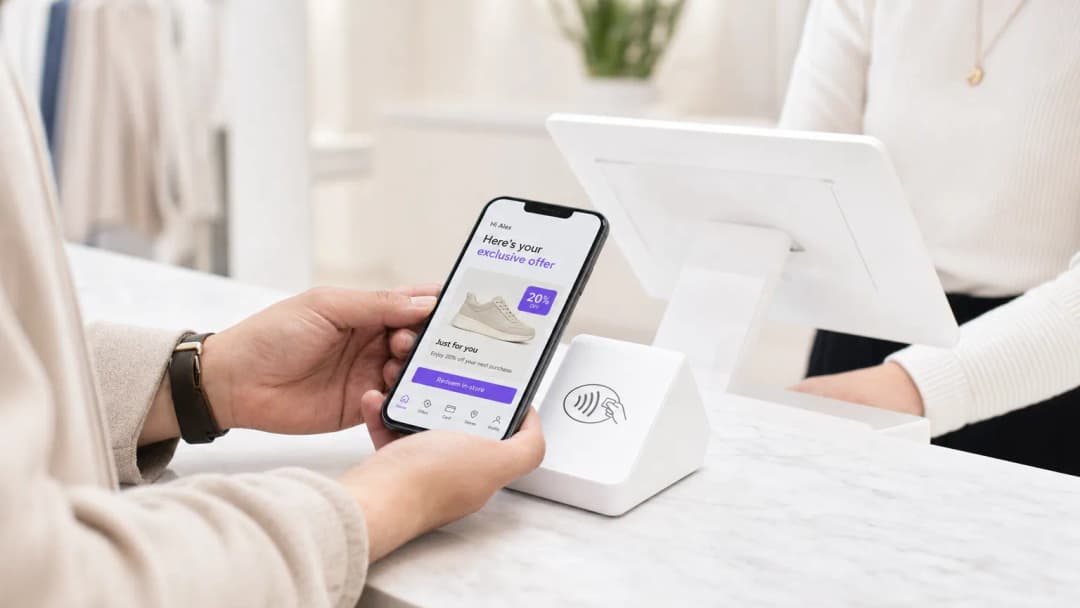
आयटी (IT) मॅनेजर्स आणि व्हेन्यू ऑपरेशन्स डायरेक्टर्ससाठी, ग्राहकांना वैयक्तिकृत अनुभव देण्याचा आदेश अनेकदा गुंतागुंतीच्या, मल्टी-व्हेंडर इंटिग्रेशन प्रोजेक्ट्समध्ये रूपांतरित होतो. तथापि, इन-स्टोअर वैयक्तिकरणासाठी सर्वात प्रभावी पाया कदाचित तुमच्या छतावरील टाइल्समध्ये आधीपासूनच तैनात केलेला आहे: तुमचे एंटरप्राइझ गेस्ट WiFi नेटवर्क.
विद्यमान हार्डवेअरवर (जसे की Cisco Meraki, Aruba, किंवा Ruckus) एक अत्याधुनिक ॲनालिटिक्स आणि ऑथेंटिकेशन प्लॅटफॉर्म लेयर करून, रिटेलर्स एका मूलभूत कनेक्टिव्हिटी सुविधेला फर्स्ट-पार्टी डेटा कॅप्चर करण्यासाठी एका शक्तिशाली इंजिनमध्ये रूपांतरित करू शकतात. हे मार्गदर्शक WiFi-चालित वैयक्तिकरण धोरण कसे तयार करावे, तैनात करावे आणि स्केल कसे करावे याचा तपशील देते. आम्ही Captive Portal द्वारे आयडेंटिटी रिझोल्यूशनचे मेकॅनिक्स, CRM सिस्टीममध्ये ड्वेल टाइम (dwell time) आणि स्पॅशियल ॲनालिटिक्सचे एकत्रीकरण आणि संदर्भानुसार संबंधित ऑफर्सचे स्वयंचलित ट्रिगरिंग एक्सप्लोर करतो—हे सर्व GDPR आणि PCI DSS मानकांचे काटेकोरपणे पालन करून.
तुम्ही एखादे सिंगल फ्लॅगशिप स्टोअर व्यवस्थापित करत असाल किंवा विस्तीर्ण रिटेल इस्टेट, उद्दिष्ट तेच राहते: निनावी फूटफॉलला ज्ञात, ॲड्रेसेबल ग्राहकांमध्ये रूपांतरित करणे, ज्यामुळे मार्केटिंग टीम्सना सर्वोच्च हेतूच्या अचूक क्षणी योग्य संदेश देण्यास सक्षम करता येते.
तांत्रिक सखोल माहिती (Technical Deep-Dive)
आर्किटेक्चर आणि डेटा फ्लो
WiFi Analytics चा पाया एका मजबूत आर्किटेक्चरवर अवलंबून आहे जो ग्राहकांचा डेटा सुरक्षितपणे कॅप्चर करतो आणि त्यावर प्रक्रिया करतो. ठराविक डिप्लॉयमेंट मॉडेलमध्ये क्लाउड किंवा ऑन-प्रिमाइसेस कंट्रोलरला रिपोर्ट करणारे थिन ॲक्सेस पॉइंट्स (APs) समाविष्ट असतात. ॲनालिटिक्स प्लॅटफॉर्म API किंवा Syslog फीड्सद्वारे या कंट्रोलरकडून डेटा घेतो.
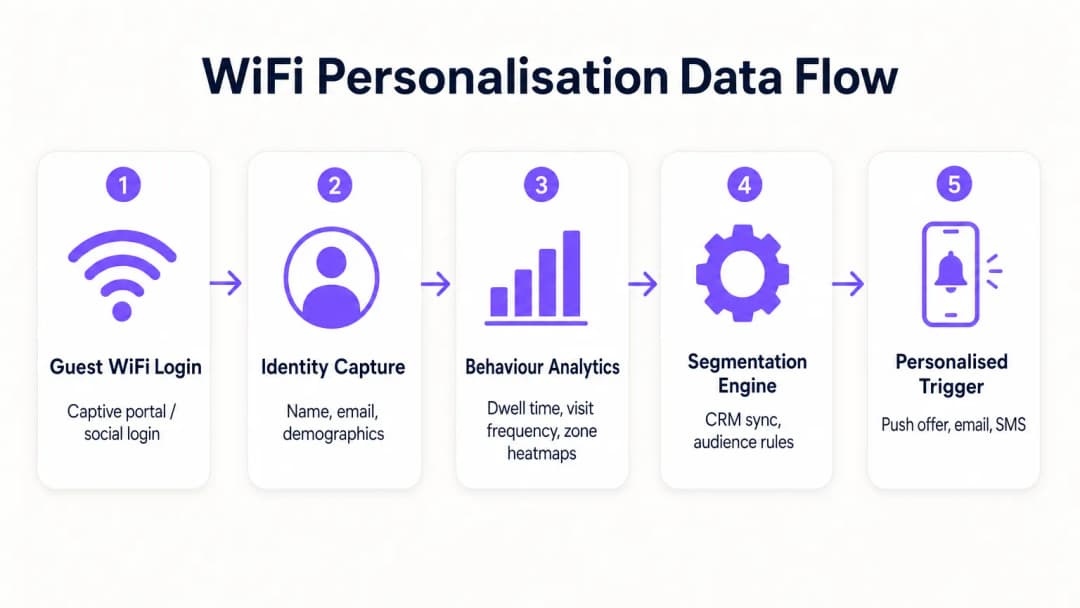
- प्रोब रिक्वेस्ट्स आणि असोसिएशन: ऑथेंटिकेशनच्या आधीही, APs मोबाईल उपकरणांकडून प्रोब रिक्वेस्ट्स शोधतात, MAC ॲड्रेस आणि सिग्नल स्ट्रेंथ (RSSI) कॅप्चर करतात. हे बेसलाइन फूटफॉल आणि झोन डेटा प्रदान करते.
- ऑथेंटिकेशन (Captive Portal): जेव्हा एखादा वापरकर्ता Guest WiFi SSID शी जोडला जातो, तेव्हा त्यांना Captive Portal वर रीडायरेक्ट केले जाते. हा आयडेंटिटी कॅप्चरचा महत्त्वाचा टप्पा आहे. ईमेल, सोशल मीडिया किंवा SMS द्वारे ऑथेंटिकेशन ऑफर करून, सिस्टीम पूर्वीच्या निनावी MAC ॲड्रेसला एका पडताळणी केलेल्या ओळखीशी जोडते.
- ॲनालिटिक्स इंजिन: प्लॅटफॉर्म रिअल-टाइम लोकेशन डेटा (ट्रायलॅटरेशन किंवा RSSI हीटमॅपिंगद्वारे मोजलेला) ऑथेंटिकेट केलेल्या ओळखीशी जोडतो, ड्वेल टाइम, भेट देण्याची वारंवारता आणि झोन प्राधान्यांची सर्वसमावेशक प्रोफाइल तयार करतो.
- इंटिग्रेशन लेयर: वेबहुक्स किंवा REST APIs हा समृद्ध प्रोफाइल डेटा बाह्य सिस्टीममध्ये (CRM, मार्केटिंग ऑटोमेशन, लॉयल्टी प्लॅटफॉर्म) पाठवतात.
आयडेंटिटी रिझोल्यूशन आणि MAC रँडमायझेशन
आधुनिक मोबाईल ऑपरेटिंग सिस्टीम्स (iOS 14+, Android 10+) सतत ट्रॅकिंग टाळण्यासाठी MAC ॲड्रेस रँडमायझेशन लागू करतात. यामुळे दीर्घकालीन ॲनालिटिक्ससाठी केवळ MAC ॲड्रेसवर अवलंबून राहणे कालबाह्य होते. यावर उपाय म्हणजे प्रोफाइल-आधारित ऑथेंटिकेशन. एकदा वापरकर्त्याने Captive Portal द्वारे ऑथेंटिकेट केले की, त्यांचा ईमेल किंवा फोन नंबर कायमस्वरूपी आयडेंटिफायर बनतो. त्यानंतरच्या भेटी, नवीन रँडमाइज्ड MAC ॲड्रेससह असल्या तरीही, पुन्हा ऑथेंटिकेट केल्यावर मूळ प्रोफाइलशी जोडल्या जाऊ शकतात, ज्यामुळे ग्राहक रेकॉर्डमध्ये सातत्य सुनिश्चित होते.
नेटवर्क सेगमेंटेशन आणि सिक्युरिटी
सुरक्षा सर्वोपरि आहे. गेस्ट ट्रॅफिक कॉर्पोरेट नेटवर्कपासून काटेकोरपणे वेगळे केले पाहिजे, विशेषतः समर्पित VLANs द्वारे. हे सार्वजनिक इंटरनेट ॲक्सेस आणि पॉइंट-ऑफ-सेल (POS) डेटा वातावरणातील कोणताही ओव्हरलॅप रोखून PCI DSS चे पालन सुनिश्चित करते. गेस्ट SSID ने ओव्हर-द-एअर ट्रॅफिक एन्क्रिप्ट करण्यासाठी आणि वापरकर्त्याच्या डेटाचे इंटरसेप्शनपासून संरक्षण करण्यासाठी आदर्शपणे WPA3-Personal किंवा WPA3-Enterprise (जिथे समर्थित असेल) वापरले पाहिजे.
अंमलबजावणी मार्गदर्शक (Implementation Guide)
वैयक्तिकरण धोरण तैनात करण्यासाठी IT आणि मार्केटिंग यांच्यात समन्वित प्रयत्नांची आवश्यकता असते.
टप्पा १: इन्फ्रास्ट्रक्चर असेसमेंट
प्रगत ॲनालिटिक्स तैनात करण्यापूर्वी, अंतर्निहित RF वातावरण योग्य असल्याची खात्री करा. कव्हरेज डेन्सिटी पडताळण्यासाठी साइट सर्वेक्षण करा, विशेषतः उच्च-मूल्य असलेल्या झोनमध्ये. ड्वेल टाइम ॲनालिटिक्स सातत्यपूर्ण सिग्नल रिसेप्शनवर अवलंबून असतात; डेड झोन डेटा खराब करतील.
टप्पा २: Captive Portal कॉन्फिगरेशन
GDPR चे पालन सुनिश्चित करताना ऑप्ट-इन दर वाढवण्यासाठी Captive Portal डिझाइन करा. व्हॅल्यू एक्सचेंज स्पष्ट असले पाहिजे. सामान्य लॉगिन ऐवजी, एक प्रोत्साहन द्या: "विशेष इन-स्टोअर ऑफर्ससाठी कनेक्ट करा." महत्त्वाचे म्हणजे, नेटवर्क ॲक्सेससाठीची संमती मार्केटिंग कम्युनिकेशन्सच्या संमतीपासून वेगळी (unbundled) असली पाहिजे. पोर्टलने अटी व शर्ती आणि गोपनीयता धोरणे स्पष्टपणे सादर केली पाहिजेत.
टप्पा ३: इंटिग्रेशन आणि सेगमेंटेशन
WiFi प्लॅटफॉर्मला तुमच्या विद्यमान मार्केटिंग स्टॅकशी कनेक्ट करा. हे तुम्हाला इन-स्टोअर वर्तणुकीशी संबंधित डेटा (उदा., "शू डिपार्टमेंटला २० मिनिटे भेट दिली") ट्रान्झॅक्शनल डेटासह (उदा., "गेल्या महिन्यात ट्रेनर्स खरेदी केले") एकत्र करण्याची अनुमती देते. ॲक्शनेबल सेगमेंट्स तयार करा, जसे की "हाय-व्हॅल्यू चर्न रिस्क" (वारंवार येणारे जुने अभ्यागत जे ६० दिवसांत कनेक्ट झालेले नाहीत).
टप्पा ४: ऑटोमेटेड ट्रिगर्स
ऑटोमेटेड वर्कफ्लो कॉन्फिगर करा. जेव्हा एखाद्या विशिष्ट सेगमेंटमधील ग्राहक ऑथेंटिकेट करतो, तेव्हा API द्वारे एखादी कृती ट्रिगर करा. ही SMS ऑफर, रिटेलरच्या ॲपद्वारे पुश नोटिफिकेशन किंवा ईमेल असू शकते. ऑथेंटिकेशन आणि ट्रिगर एक्झिक्यूशनमधील विलंब (latency) कमीत कमी (३० सेकंदांच्या आत) असावा जेणेकरून ग्राहक अद्याप एंगेज असतानाच संदेश प्राप्त होईल.
ही प्रोफाइल्स तयार करण्याच्या अधिक तपशीलवार धोरणांसाठी, आमच्या WiFi in Retail Stores: Building Customer Profiles From Footfall Data या मार्गदर्शकाचा संदर्भ घ्या किंवा फ्रेंच समतुल्य, Le WiFi dans les magasins de détail : Créer des profils clients à partir des données de fréquentation पहा.
सर्वोत्तम पद्धती (Best Practices)
- व्हॅल्यू एक्सचेंजला प्राधान्य द्या: ग्राहकांना फायदा दिसला तरच ते त्यांचा डेटा शेअर करतील. WiFi वेगवान आणि विश्वासार्ह असल्याची खात्री करा आणि ट्रिगर केलेल्या कोणत्याही ऑफर्स खरोखरच मौल्यवान आहेत याची खात्री करा.
- फ्रीक्वेन्सी कॅप्सचा आदर करा: प्रत्येक वेळी कनेक्ट झाल्यावर ग्राहकांवर नोटिफिकेशन्सचा भडिमार करू नका. कंटाळा आणि ऑप्ट-आउट्स टाळण्यासाठी फ्रीक्वेन्सी कॅपिंग (उदा., आठवड्यातून जास्तीत जास्त एक संदेश) लागू करा.
- विद्यमान गुंतवणुकीचा फायदा घ्या: रिप-अँड-रिप्लेस (rip-and-replace) परिस्थिती टाळा. आधुनिक ॲनालिटिक्स प्लॅटफॉर्म्स आघाडीच्या हार्डवेअर व्हेंडर्ससोबत अखंडपणे इंटिग्रेट होतात, ज्यामुळे तुम्हाला तुमच्या सध्याच्या इन्फ्रास्ट्रक्चरमधून अधिक मूल्य मिळवता येते.
- क्रॉस-पॉलिनेट डेटा: इतर स्रोतांसोबत एकत्र केल्यावर WiFi डेटा सर्वात शक्तिशाली असतो. इन-स्टोअर वर्तन एकूण कस्टमर लाइफटाइम व्हॅल्यूशी कसे संबंधित आहे हे समजून घेण्यासाठी तुमच्या लॉयल्टी प्रोग्रामसोबत इंटिग्रेट करा. हा दृष्टिकोन Retail , Hospitality , आणि अगदी Healthcare सह विविध क्षेत्रांमध्ये अत्यंत संबंधित आहे.
ट्रबलशूटिंग आणि रिस्क मिटिगेशन
- कमी ऑप्ट-इन दर: जर २०% पेक्षा कमी अभ्यागत ऑथेंटिकेट करत असतील, तर Captive Portal डिझाइनचे पुनरावलोकन करा. लॉगिन प्रक्रिया सोपी करा, व्हॅल्यू प्रपोझिशन स्पष्ट करा आणि पोर्टल मोबाईल-रिस्पॉन्सिव्ह असल्याची खात्री करा.
- चुकीचा लोकेशन डेटा: जर झोन ॲनालिटिक्स चुकीचे वाटत असतील, तर AP प्लेसमेंट तपासा आणि नवीन RF सर्वेक्षण करा. भौतिक अडथळे किंवा शेजारील नेटवर्क्सच्या हस्तक्षेपामुळे RSSI कॅल्क्युलेशन्सवर परिणाम होऊ शकतो.
- इंटिग्रेशन फेल्युअर्स: CRMs च्या API कनेक्शन्ससाठी मजबूत एरर हँडलिंग अस्तित्वात असल्याची खात्री करा. वेबहुक डिलिव्हरी सक्सेस रेट्सचे निरीक्षण करा आणि अयशस्वी पेलोड्ससाठी रिट्राय मेकॅनिझम लागू करा.
- कम्प्लायन्स रिस्क: तुमच्या कन्सेंट फ्लोज आणि डेटा रिटेन्शन पॉलिसीजचे नियमितपणे ऑडिट करा. GDPR अंतर्गत डेटा सब्जेक्ट ॲक्सेस रिक्वेस्ट्स (DSARs) हाताळण्यासाठी तुमच्याकडे एक सुव्यवस्थित प्रक्रिया असल्याची खात्री करा.
ROI आणि बिझनेस इम्पॅक्ट

WiFi-चालित वैयक्तिकरणासाठी बिझनेस केस आकर्षक आहे. निनावी अभ्यागतांना ओळखून, रिटेलर्स त्यांचा मार्केटेबल डेटाबेस लक्षणीयरीत्या वाढवू शकतात. ट्रॅक करण्यासाठी प्रमुख मेट्रिक्समध्ये हे समाविष्ट आहे:
- डेटाबेस ग्रोथ रेट: दरमहा कॅप्चर केलेल्या नेट-न्यू व्हेरिफाईड आयडेंटिटीजचे प्रमाण.
- ट्रिगर केलेल्या ऑफर्सचा कन्व्हर्जन रेट: इन-स्टोअर असताना त्यांना पाठवलेली ऑफर रिडीम करणाऱ्या ग्राहकांची टक्केवारी.
- ड्वेल टाइममधील वाढ: वैयक्तिकृत एंगेजमेंटमुळे स्टोअर भेटींचा कालावधी वाढतो का हे मोजणे.
- रिपीट व्हिजिट फ्रीक्वेन्सी: ग्राहकांच्या निष्ठेवर टार्गेटेड री-एंगेजमेंट मोहिमांच्या प्रभावाचा मागोवा घेणे.
मूलभूत कनेक्टिव्हिटीच्या पलीकडे जाऊन, IT टीम्स स्वतःला रेव्हेन्यू इनेबलर्स म्हणून स्थापित करू शकतात, जे आधुनिक, डेटा-चालित रिटेल ऑपरेशन्ससाठी आवश्यक इन्फ्रास्ट्रक्चर प्रदान करतात.
Key Definitions
Captive Portal
A web page that a user is forced to view and interact with before access is granted to a public network.
The primary interface for capturing user identity and establishing consent for data processing.
MAC Address Randomisation
A privacy feature where mobile devices use a temporary, randomly generated hardware address when scanning for or connecting to networks.
Forces IT teams to rely on authenticated profiles rather than hardware identifiers for long-term customer tracking.
Dwell Time
The duration a connected or probing device remains within the coverage area of a specific access point or defined zone.
A critical metric for understanding customer engagement with specific displays, departments, or the store as a whole.
Trilateration
A method of determining the location of a device by measuring its signal strength (RSSI) relative to three or more access points.
Used by spatial analytics platforms to generate accurate heatmaps and track customer movement patterns.
Probe Request
A frame sent by a client device to discover available wireless networks in its vicinity.
Allows analytics platforms to estimate footfall and capture anonymous presence data even if the user does not authenticate.
VLAN (Virtual Local Area Network)
A logical subnetwork that groups a collection of devices, isolating their traffic from other devices on the same physical network.
Essential for security and PCI DSS compliance, ensuring guest WiFi traffic is completely segregated from corporate systems.
Webhook
A method for one application to provide real-time information to another application, typically triggered by a specific event.
Used to instantly push authentication events from the WiFi platform to a CRM, enabling real-time triggered marketing.
RSSI (Received Signal Strength Indicator)
A measurement of the power present in a received radio signal.
The fundamental metric used by access points to estimate the distance of a client device, enabling location analytics.
Worked Examples
A mid-sized high street fashion retailer with 50 locations wants to reduce customer churn. They have Cisco Meraki APs deployed but are only offering a simple 'click-to-accept' splash page. How should the IT team approach upgrading this to a personalisation engine?
- Platform Integration: Integrate a dedicated WiFi analytics platform with the existing Meraki dashboard via API. No new hardware is required.
- Portal Upgrade: Replace the 'click-to-accept' page with a branded captive portal offering Social Login (Facebook/Google) or email authentication, coupled with an explicit marketing opt-in checkbox.
- CRM Sync: Configure a webhook to push newly authenticated identities and their visit data into the retailer's CRM (e.g., Salesforce).
- Campaign Execution: The marketing team creates a segment in the CRM for 'Customers who haven't visited in 90 days'. When a customer in this segment connects to the WiFi, an automated email offering a 15% discount is triggered immediately.
A large shopping centre operator needs to understand the flow of visitors between different anchor stores to optimize tenant placement and rent models. They currently rely on manual footfall counting at entrances.
- Network Tuning: The IT team optimizes the AP density to ensure consistent coverage across all concourses and store entrances, focusing on overlapping coverage for accurate trilateration.
- Analytics Deployment: Deploy a spatial analytics platform that ingests probe request data from the APs.
- Zone Mapping: Define specific zones within the analytics dashboard corresponding to key areas (e.g., 'Food Court', 'Anchor Store A', 'North Entrance').
- Data Analysis: Utilize the platform to generate heatmaps and flow diagrams, analyzing the typical paths taken by visitors and the dwell time in specific zones.
Practice Questions
Q1. A retail client wants to trigger an immediate SMS discount to any customer who spends more than 15 minutes in the high-margin electronics section. They currently have a single access point covering the entire store. What is the primary technical constraint?
Hint: Consider how the system determines location and dwell time.
View model answer
The primary constraint is a lack of spatial resolution. With only a single access point, the system can determine that the customer is in the store (associated with the AP), but it cannot use trilateration to pinpoint their location to a specific zone like the electronics section. The retailer must deploy additional access points to provide overlapping coverage, enabling accurate location analytics.
Q2. The marketing director is concerned that MAC address randomisation in iOS will prevent them from tracking repeat visitors. How should the IT architect respond?
Hint: Focus on the transition from hardware-based tracking to identity-based tracking.
View model answer
The architect should explain that while MAC randomisation disrupts passive tracking of anonymous devices, it does not impact authenticated users. By implementing a captive portal that requires email or social login, the system creates a persistent profile based on the user's identity. When the user returns and reconnects (even with a new MAC address), they re-authenticate, and the new session is linked to their existing persistent profile.
Q3. A stadium operator wants to deploy guest WiFi but is concerned about PCI DSS compliance, as POS terminals for concessions share the same physical network switches. What network design principle must be enforced?
Hint: Think about logical separation of network traffic.
View model answer
The IT team must enforce strict network segmentation using Virtual Local Area Networks (VLANs). The guest WiFi traffic must be placed on a dedicated VLAN that is completely isolated from the VLAN used by the POS terminals. Firewall rules must ensure that no traffic can route between the guest VLAN and the Cardholder Data Environment (CDE), thereby maintaining PCI DSS compliance.
Continue reading in this series
Measuring the Business ROI of Guest WiFi and Location Analytics
This guide provides a technical and operational framework for measuring the business ROI of guest WiFi and location analytics. It details how to calculate value from hardware investments through dwell time uplift, operational efficiency, and first-party data capture across retail, hospitality, and public venues. IT managers, network architects, CTOs, and venue operations directors will find concrete measurement frameworks, real-world case studies, and compliance guidance to justify and maximise their WiFi investment.
Privacy by Design: Anonymizing WiFi Data for GDPR Compliance
This authoritative guide details the technical architecture and implementation strategies for anonymising WiFi data to ensure GDPR compliance. It provides IT leaders and network architects with actionable frameworks for balancing robust venue analytics with strict data privacy requirements.
Heatmapping vs Presence Analytics: Technical Differences
This authoritative technical guide details the critical architectural and operational differences between WiFi heatmapping and presence analytics for enterprise venue operators. It provides IT leaders, network architects, and operations directors with actionable deployment frameworks, real-world implementation scenarios, and vendor-neutral best practices for extracting maximum ROI from their existing wireless infrastructure.