
Como Configurar WiFi de Convidados: Um Guia de Configuração Segura para Empresas
Este guia autoritário fornece aos líderes de TI e arquitetos de rede um plano definitivo para implementar WiFi de convidados seguro em ambientes empresariais. Abrange a arquitetura essencial, a migração para WPA3, a segmentação de VLAN e a integração de captive portal para proteger os sistemas internos enquanto se recolhem dados primários em conformidade.
Video overview
Ouça este guia
Ver transcrição do podcast
Parte da nossa série principal: Guia de WiFi de Convidados →
Resumo Executivo
Para ambientes empresariais - quer se trate de um grande campus universitário, de um estádio de alta densidade ou de uma cadeia de retalho distribuída - depender de uma Pre-Shared Key (PSK) para acesso guest WiFi é um grande risco de segurança. Uma única credencial exposta compromete toda a rede, e revogar o acesso exige a alteração da palavra-passe em todos os dispositivos de todo o campus. A implementação de uma arquitetura segura e segmentada com encriptação WPA3 e uma gestão de identidade robusta elimina completamente este problema. Cada visitante é autenticado individualmente, o acesso pode ser revogado instantaneamente e a segmentação de rede é aplicada de forma dinâmica. Este guia fornece aos gestores de TI e arquitetos de rede um roteiro definitivo para implementar guest WiFi seguro. Abordamos as compensações de arquitetura, a migração para WPA3 e a integração com serviços de diretório. Também mostramos como uma camada de autenticação robusta se integra com soluções de guest WiFi para fornecer aos visitantes um acesso contínuo, enquanto captura WiFi Analytics que transformam a sua rede num ativo de business intelligence.
Aprofundamento Técnico
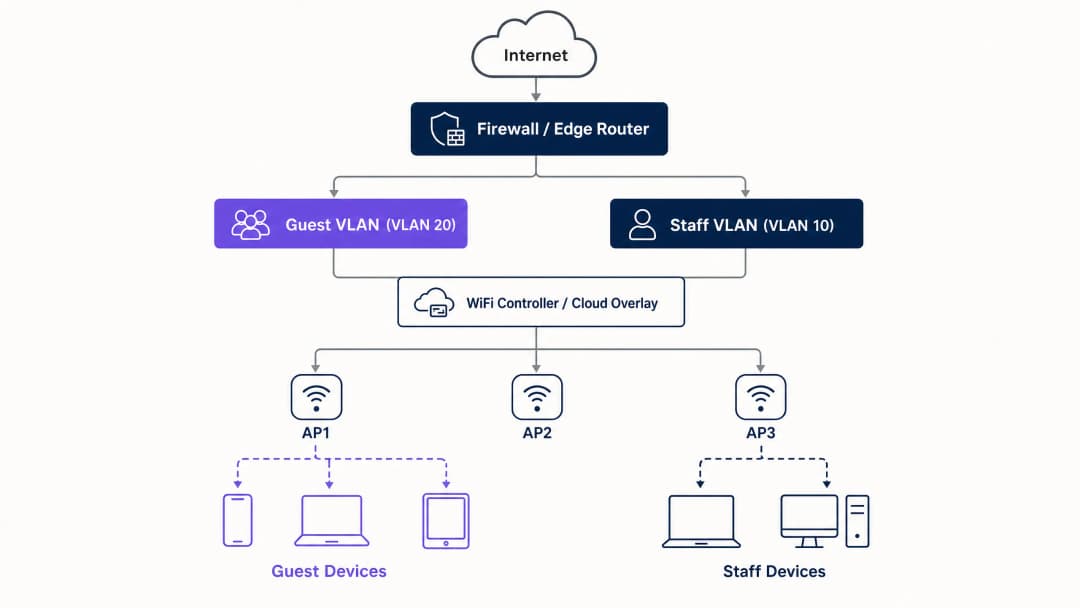
A base de qualquer implementação segura de guest WiFi é a segmentação de rede. Antes de avaliar portais cativos ou análises, deve estabelecer um isolamento estrito entre o tráfego de convidados e os sistemas internos. Isto requer um SSID dedicado associado à sua própria Virtual Local Area Network (VLAN), com regras de firewall que negam o acesso a sub-redes internas por predefinição. Pense na rede de convidados como uma zona externa controlada; os visitantes têm uma entrada separada e apenas obtêm acesso à internet.
Linha de Base da Arquitetura de Segurança
A linha de base técnica exige vários controlos não negociáveis:
- SSID Dedicado: Crie um SSID de convidados separado das redes de funcionários e operacionais.
- Segmentação de VLAN: Associe o SSID a uma VLAN dedicada para isolar o tráfego de convidados.
- Isolamento de Clientes: Ative o isolamento de clientes para impedir que os dispositivos dos convidados comuniquem entre si, mitigando ataques de movimento lateral.
- Política de Firewall: Bloqueie o acesso à LAN principal e às interfaces de gestão.
- DHCP Dedicado: Utilize um escopo de DHCP separado e evite a fuga de registos de DNS internos.
Imperativo de Migração para WPA3
Se está a implementar ou a renovar hardware em 2026, o WPA3 deve ser o padrão predefinido. A WiFi Alliance determinou a certificação WPA3 para todos os novos dispositivos em julho de 2020. A maioria dos pontos de acesso empresariais da Cisco Meraki, HPE Aruba, Ruckus, Juniper Mist, Ubiquiti UniFi, Cambium, Extreme e Fortinet suporta WPA3 através de atualizações de firmware. O WPA3 introduz três melhorias operacionais críticas:
- Simultaneous Authentication of Equals (SAE): Substitui o vulnerável handshake de quatro vias do WPA2, eliminando ataques de dicionário offline. Mesmo que um atacante capture a troca de autenticação, não conseguirá derivar a chave de sessão.
- Forward Secrecy: Garante que, mesmo que uma palavra-passe de rede seja comprometida hoje, o tráfego registado historicamente não seja exposto. Cada sessão gera uma chave efémera única.
- Opportunistic Wireless Encryption (OWE): Estabelece automaticamente uma ligação encriptada em redes abertas sem necessitar de uma palavra-passe. Isto protege os dados em trânsito e apoia diretamente as obrigações de conformidade com o GDPR.
Tem dúvidas sobre a sua configuração específica?
A nossa equipa trabalha com operadores de espaços, gestores de TI e engenheiros de rede em 80.000 espaços. Agende uma chamada de 20 minutos e mostraremos como outros profissionais na sua área o resolveram.
Guia de Implementação
A implementação de WiFi para convidados seguro requer uma abordagem faseada: primeiro a arquitetura, depois a autenticação, seguida da camada do portal e, finalmente, a análise de dados.
Passo 1: Configurar a Base da Rede
Configure as VLANs e as regras de firewall antes de ativar qualquer SSID. Verifique se a VLAN de convidados não consegue encaminhar tráfego para as sub-redes internas. Implemente WPA3-Personal (SAE) ou OWE dependendo da sua estratégia de autenticação. Garanta que o isolamento de clientes está ativo no controlador.
Passo 2: Implementar a Camada de Autenticação
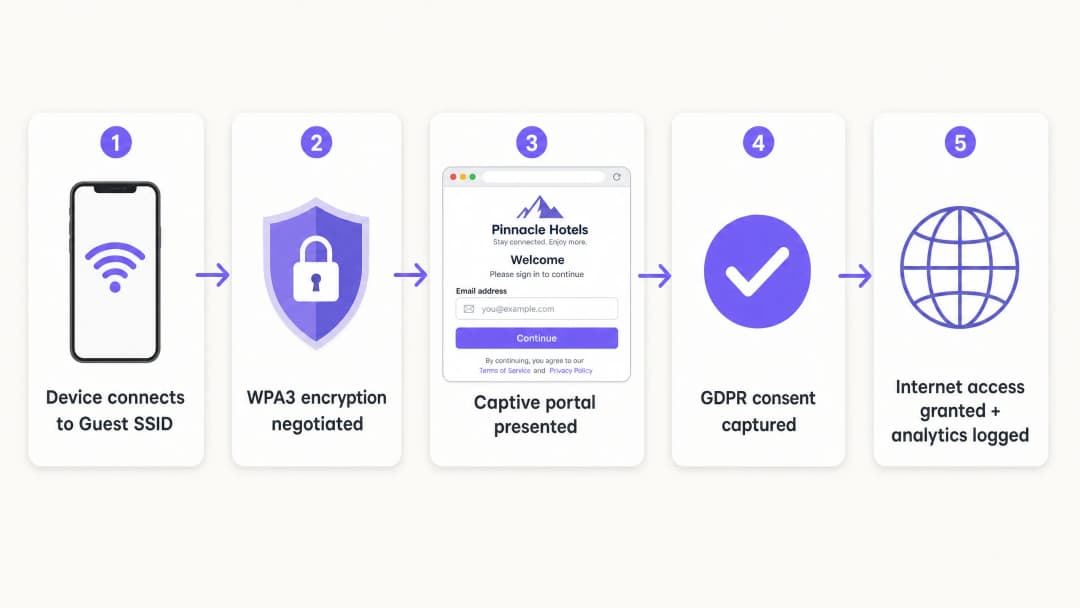
Para funcionários e dispositivos corporativos, o IEEE 802.1X é o padrão. Isto requer que os dispositivos se autentiquem num servidor RADIUS antes de o acesso ser concedido. Para convidados, o Captive Portal continua a ser o mecanismo principal para capturar a identidade e o consentimento.
Passo 3: Implementar a Camada Cloud
O Purple funciona como uma camada cloud independente de hardware. Integra-se com a sua infraestrutura existente para gerir o Captive Portal, o fluxo de consentimento e a análise de dados. A camada gere a identificação enquanto os pontos de acesso físicos aplicam as políticas de rádio e VLAN.
Passo 4: Verificar e Testar
Teste a implementação a partir de um dispositivo cliente físico. Tente aceder a recursos internos, impressoras e interfaces de gestão. Verifique o comportamento de fail-open: decida claramente se os convidados perderão a ligação ou se irão contornar o portal caso o serviço de autenticação fique temporariamente indisponível.
Boas Práticas
- Exigir Validação Estrita de Certificados: Para implementações 802.1X que utilizem PEAP-MSCHAPv2, os clientes devem ser configurados para validar o certificado do servidor RADIUS através de Gestão de Dispositivos Móveis (MDM) ou Objetos de Política de Grupo (GPO). Isto evita ataques de pontos de acesso falsos.
- Utilize a Atribuição Dinâmica de VLAN: Configure o servidor RADIUS para atribuir dinamicamente VLANs com base na associação a grupos de diretório. Isto permite que um único SSID sirva de forma segura funcionários, prestadores de serviços e dispositivos IoT.
- Isole Dispositivos Legados: Os dispositivos que não suportam WPA3 devem ser colocados num SSID WPA2 dedicado, isolado numa VLAN separada. Não comprometa a segurança da rede de convidados principal para garantir a compatibilidade com dispositivos legados.
- Alinhe-se com as Normas do Setor: Garanta que a implementação está em conformidade com os requisitos PCI-DSS, isolando física ou logicamente o tráfego de convidados da infraestrutura de pagamentos. Apoie a conformidade com o GDPR utilizando OWE para encriptação e recolhendo o consentimento explícito através do Captive Portal.
Resolução de Problemas e Mitigação de Riscos
As falhas de implementação mais comuns ocorrem devido a descuidos de configuração e não devido a limitações de hardware.
- Separação Cosmética: Um novo SSID no mesmo domínio de difusão que a rede dos funcionários não oferece qualquer segurança. Verifique a marcação de VLAN e as regras de firewall.
- Isolamento de Clientes Desativado: A falha no isolamento de clientes aumenta o risco de ataques bilaterais contra convidados. Isto é particularmente perigoso em ambientes de hotelaria, onde os convidados partilham a rede por longos períodos.
- Abertura em Falha Não Planeada: Se o Captive Portal estiver inacessível, a rede deve gerir a falha de forma previsível. Para a maioria dos locais públicos, prefere-se a abertura em falha para manter a conectividade, mas esta deve ser uma escolha de configuração consciente e não um acidente.
ROI e Impacto no Negócio
Uma implementação de WiFi de convidados segura transforma um centro de custos de rede num ativo estratégico. Ao substituir palavras-passe partilhadas por um Captive Portal em conformidade, os locais capturam dados primários validados. A plataforma da Purple processa 440 milhões de inícios de sessão anualmente, fornecendo listas de contactos limpas para automatização de marketing.
Além disso, a integração segura reduz os custos fixos de suporte de TI. A implementação do Passpoint ou do OpenRoaming permite que os visitantes frequentes se liguem de forma silenciosa, eliminando os pedidos de reposição de palavra-passe. Para os operadores de retalho, esta conectividade fluida impulsiona o envolvimento com a aplicação e a participação em programas de fidelização, proporcionando um retorno sobre o investimento (ROI) mensurável.
-
Ouça o Briefing
Definições Principais
VLAN (Virtual Local Area Network)
Uma sub-rede lógica que agrupa uma coleção de dispositivos de diferentes LANs físicas.
Utilizada para isolar o tráfego de WiFi de convidados dos dados corporativos, garantindo que os visitantes não conseguem aceder aos servidores internos ou aos sistemas de pagamento.
WPA3
A mais recente certificação de segurança WiFi, que introduz o Simultaneous Authentication of Equals (SAE) e o Forward Secrecy.
Essencial para redes empresariais modernas para prevenir ataques de dicionário offline e proteger dados de tráfego históricos.
OWE (Opportunistic Wireless Encryption)
Uma funcionalidade do WPA3 que encripta automaticamente o tráfego em redes abertas sem necessitar de uma palavra-passe.
Crucial para locais públicos que pretendem oferecer acesso simplificado enquanto protegem os dados dos convidados em trânsito contra a escuta passiva.
Client Isolation
Uma configuração do controlador sem fios que impede que os dispositivos ligados ao mesmo SSID comuniquem diretamente entre si.
Obrigatório para redes de convidados para impedir que dispositivos de visitantes comprometidos ataquem lateralmente outros convidados.
Captive Portal
Uma página web que os utilizadores devem visualizar e com a qual devem interagir antes de lhes ser concedido acesso à rede.
Utilizado pelas equipas de marketing para recolher dados primários e pela TI para impor os termos de serviço, em vez de servir como uma barreira primária de segurança.
IEEE 802.1X
Um padrão IEEE para Network Access Control baseado em portas (PNAC), que fornece um mecanismo de autenticação para dispositivos que desejam ligar-se a uma LAN ou WLAN.
O padrão empresarial para autenticar os dispositivos dos funcionários de forma segura contra um diretório central.
RADIUS
Remote Authentication Dial-In User Service - um protocolo de rede que fornece uma gestão centralizada de Autenticação, Autorização e Auditoria (AAA).
O componente de servidor que verifica as credenciais dos utilizadores num diretório (como o Entra ID) e indica ao ponto de acesso qual a VLAN a atribuir.
Passpoint
Um protocolo desenvolvido pela Wi-Fi Alliance que permite aos dispositivos móveis detetar e ligarem-se automaticamente a redes WiFi seguras.
Permite que os convidados frequentes se liguem de forma silenciosa e segura sem terem de interagir novamente com um captive portal.
Exemplos Práticos
Um hotel de 200 quartos utiliza atualmente um único SSID WPA2 com uma palavra-passe partilhada alterada mensalmente. Precisam de proteger a rede, isolar o tráfego de convidados do sistema de gestão hoteleira e recolher os e-mails dos convidados em conformidade.
- Criar a VLAN 20 para convidados e a VLAN 10 para o pessoal.
- Configurar regras de firewall para bloquear o tráfego da VLAN 20 para a VLAN 10 e para a sub-rede de gestão.
- Implementar um novo SSID de Convidados mapeado para a VLAN 20, utilizando WPA3 OWE (Opportunistic Wireless Encryption).
- Ativar o isolamento de clientes no SSID de Convidados.
- Integrar o overlay de nuvem Purple para apresentar um captive portal personalizado com a marca, recolhendo o e-mail e o consentimento de RGPD antes de conceder acesso à internet.
Um campus universitário necessita de suportar portáteis de funcionários, dispositivos BYOD de estudantes e sensores IoT sem ecrã (termóstatos inteligentes) numa propriedade dispersa, sem transmitir 15 SSIDs diferentes.
- Implementar um único SSID compatível com 802.1X para todos os funcionários e estudantes.
- Configurar o servidor RADIUS para autenticar os utilizadores no Microsoft Entra ID.
- Implementar a Atribuição Dinâmica de VLAN: os funcionários autenticam-se e são direcionados para a VLAN 10; os estudantes autenticam-se e são direcionados para a VLAN 30.
- Criar um SSID WPA2 separado e oculto mapeado para a VLAN 40 especificamente para os dispositivos IoT sem ecrã, utilizando MAC Authentication Bypass (MAB) com regras de firewall rigorosas que limitam o seu acesso de saída.
Perguntas de Prática
Q1. Um diretor de retalho quer lançar amanhã uma nova rede "WiFi Gratuito para Clientes" adicionando simplesmente um segundo SSID sem palavra-passe aos pontos de acesso Meraki existentes. Como gestor de TI, como responde?
Dica: Considere as implicações de PCI-DSS do acesso aberto numa infraestrutura partilhada.
Ver resposta modelo
Rejeite o pedido. Adicionar um SSID aberto ao domínio de difusão existente sem segmentação de VLAN expõe os sistemas de Ponto de Venda (POS) de retalho ao tráfego público, violando as normas PCI-DSS. A rede deve primeiro ser segmentada com uma VLAN dedicada e regras de firewall antes de o SSID ser transmitido.
Q2. Durante uma auditoria de rede, descobre que o Captive Portal do WiFi de convidados está a funcionar corretamente, mas os utilizadores conseguem fazer ping ao endereço IP do servidor de ficheiros principal do espaço. Qual é a falha de configuração mais provável?
Dica: O Captive Portal trata da autenticação, não do encaminhamento.
Ver resposta modelo
A política de firewall ou a Lista de Controlo de Acesso (ACL) que separa a VLAN de convidados da LAN corporativa está em falta ou incorretamente configurada. O Captive Portal apenas controla o acesso à Internet; a infraestrutura de rede subjacente deve impor os limites de encaminhamento.
Q3. Um espaço está a substituir o seu hardware e quer utilizar WPA3, mas a equipa de operações teme que os smartphones mais antigos dos convidados não se consigam ligar. Qual é a estratégia de implementação recomendada?
Dica: Considere como suportar ambos os padrões temporariamente.
Ver resposta modelo
Implementar o Modo de Transição WPA3. Isto permite que o SSID suporte simultaneamente dispositivos compatíveis com WPA3 (utilizando SAE) e dispositivos legados (utilizando WPA2 PSK). Utilize o WiFi Analytics da Purple para monitorizar a proporção de dispositivos legados ao longo de 6 a 12 meses e imponha apenas WPA3 assim que a contagem de dispositivos legados descer abaixo de um limite aceitável.
Continue a ler esta série
Staff WiFi vs. Guest WiFi: Melhores Práticas de Segmentação de Rede Corporativa
Um guia técnico abrangente para líderes de TI sobre como segmentar redes WiFi de funcionários e convidados. Abrange arquitetura de VLAN, autenticação 802.1X, políticas de firewall e o impacto comercial de um design de rede seguro.
Gestão de WiFi de Hóspedes de Hotel: Integrar PMS, Portais e Padrões de Marca
Este guia técnico detalha como estruturar redes WiFi de hotel de classe empresarial, focando-se na segmentação de VLAN, integração de PMS para gestão automatizada de sessões e otimização de Captive Portal para recolha de dados em conformidade com o GDPR.
Como Resolver WiFi Lento Sem Fazer o Upgrade do Seu Plano de Internet
Um guia de referência técnica abrangente para gestores de TI e arquitetos de rede sobre como otimizar o desempenho de WiFi empresarial sem aumentar a largura de banda do ISP. Aborda a sintonização de RF, gestão de densidade de clientes, implementação de QoS e como tirar partido do WiFi analytics para diagnosticar e resolver estrangulamentos.
Tem dúvidas sobre a sua configuração específica?
A nossa equipa trabalha com operadores de espaços, gestores de TI e engenheiros de rede em 80.000 espaços. Agende uma chamada de 20 minutos e mostraremos como outros profissionais na sua área o resolveram.