
Como Configurar um Servidor RADIUS para Autenticação WiFi
Este guia definitivo fornece aos líderes de TI e arquitetos de rede um plano abrangente para implementar um servidor RADIUS para autenticação WiFi empresarial. Abrange as compensações de arquitetura entre implementações locais e na nuvem, a seleção do método EAP, a integração com o Active Directory e a atribuição dinâmica de VLAN. Os operadores de espaços e as equipas de TI encontrarão passos práticos de implementação, casos de estudo reais e estratégias de mitigação de riscos para passar de um ambiente PSK inseguro para uma infraestrutura 802.1X robusta ainda este trimestre.
Video overview
Ouça este guia
Ver transcrição do podcast
Parte da nossa série principal: Guia de Segurança WiFi Empresarial →
Executive Summary
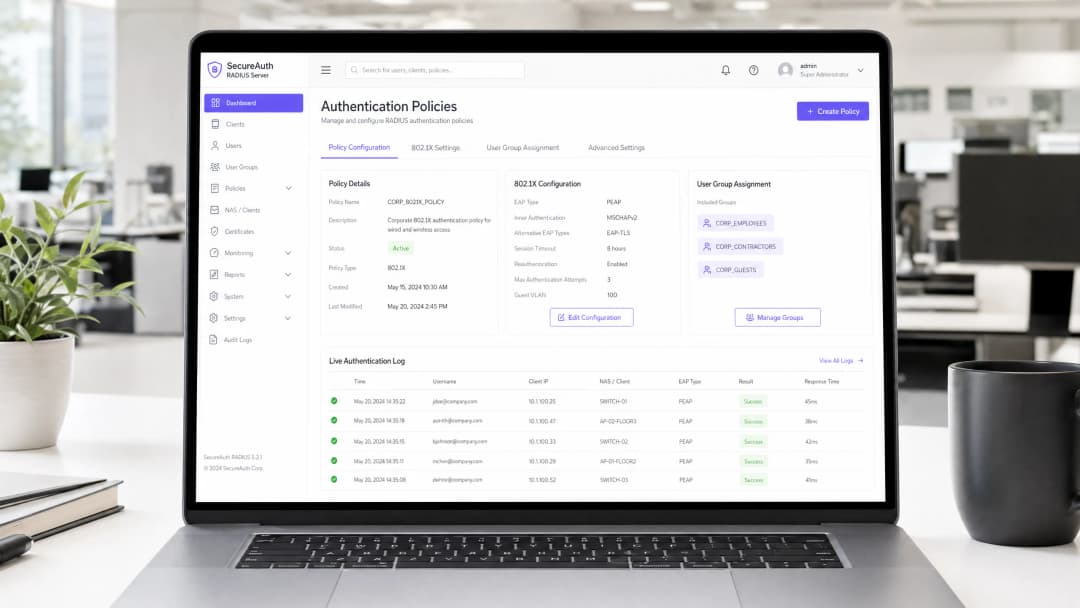
For enterprise environments — whether a sprawling university campus, a high-density stadium, or a distributed retail chain — relying on a Pre-Shared Key (PSK) for WiFi access is a significant security liability. A single compromised credential exposes the entire network, and revoking access requires changing the password for every device on the estate. Implementing 802.1X authentication via a RADIUS (Remote Authentication Dial-In User Service) server eliminates this problem entirely: each user authenticates individually, access can be revoked instantly, and network segmentation is enforced dynamically.
This guide provides a definitive roadmap for IT managers and network architects to deploy RADIUS authentication. We cover the architectural trade-offs between on-premise and cloud-hosted deployments, the configuration of Extensible Authentication Protocol (EAP) methods, and the integration with directory services like Active Directory. We also demonstrate how a robust authentication layer integrates with Guest WiFi solutions to provide seamless access for visitors, while capturing the WiFi Analytics that turn your network into a business intelligence asset.
Technical Deep-Dive
The 802.1X Architecture
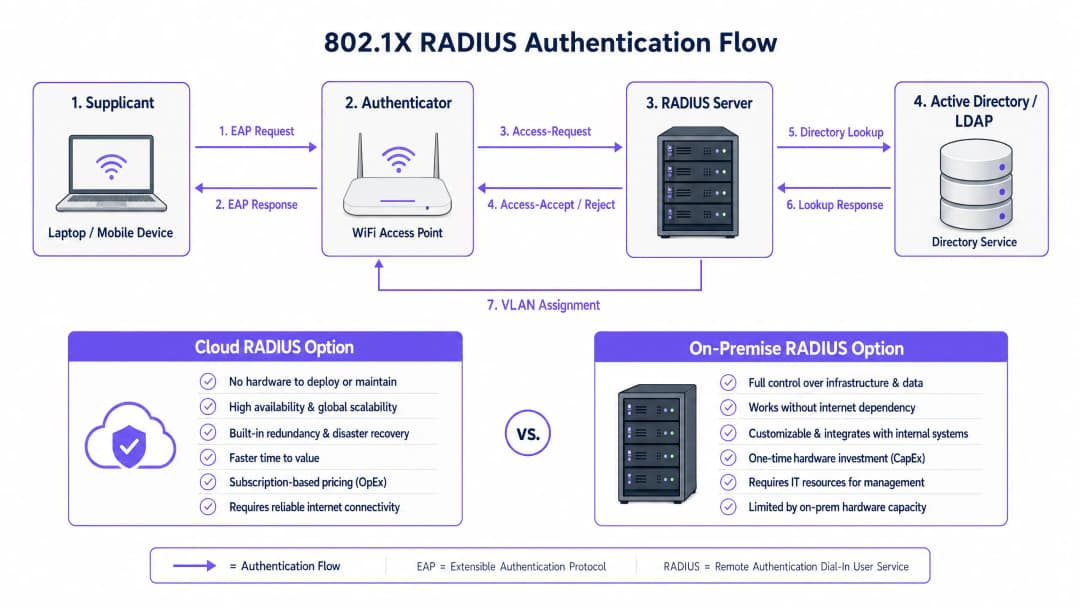
The IEEE 802.1X standard defines port-based Network Access Control (PNAC). In a wireless context, it involves three primary roles working in concert:
| Role | Component | Responsibility |
|---|---|---|
| Supplicant | Client device (laptop, smartphone) | Presents credentials to request network access |
| Authenticator | WiFi Access Point or Controller | Enforces access control; relays EAP messages |
| Authentication Server | RADIUS Server | Validates credentials; returns accept/reject and policy attributes |
When a supplicant associates with an access point, the AP blocks all data traffic except EAP (Extensible Authentication Protocol) messages. The AP encapsulates these EAP messages in RADIUS packets and forwards them to the RADIUS server. The server verifies the credentials against a backend database — typically LDAP or Active Directory — and returns an Access-Accept or Access-Reject message. If accepted, the AP unblocks the port and the client's traffic flows freely.
Choosing an EAP Method
The security of your RADIUS deployment depends heavily on the EAP method selected. The two most prevalent in enterprise deployments are:
EAP-TLS (Transport Layer Security) is the gold standard. It requires digital certificates on both the RADIUS server and every client device, eliminating passwords entirely. Even if an attacker captures the full authentication exchange, there are no credentials to extract. The trade-off is administrative overhead: deploying and managing client certificates requires a functioning Public Key Infrastructure (PKI) and an MDM solution (e.g., Microsoft Intune, Jamf) to distribute certificates to endpoints.
PEAP-MSCHAPv2 (Protected EAP) is the most widely deployed method in practice. It uses a server-side certificate to establish an encrypted TLS tunnel, inside which the client authenticates with a username and password. This is significantly easier to deploy than EAP-TLS because only one certificate — the server's — needs to be managed. However, it carries a critical caveat: if client devices are not explicitly configured to validate the RADIUS server's certificate, they are vulnerable to Man-in-the-Middle (MitM) attacks via rogue access points.
Critical Security Note: Failing to enforce strict certificate validation on client devices effectively nullifies the security benefits of PEAP-MSCHAPv2. An attacker can deploy a rogue AP, present a fraudulent certificate, and capture user credentials in plaintext. This is not a theoretical risk — it is a well-documented attack vector that has been exploited in real-world environments.
Implementation Guide
Step 1: Architectural Decision — On-Premise vs. Cloud RADIUS
The first decision is where to host the RADIUS infrastructure. This is primarily an operational and cost question, not a security one — both models can be deployed securely.
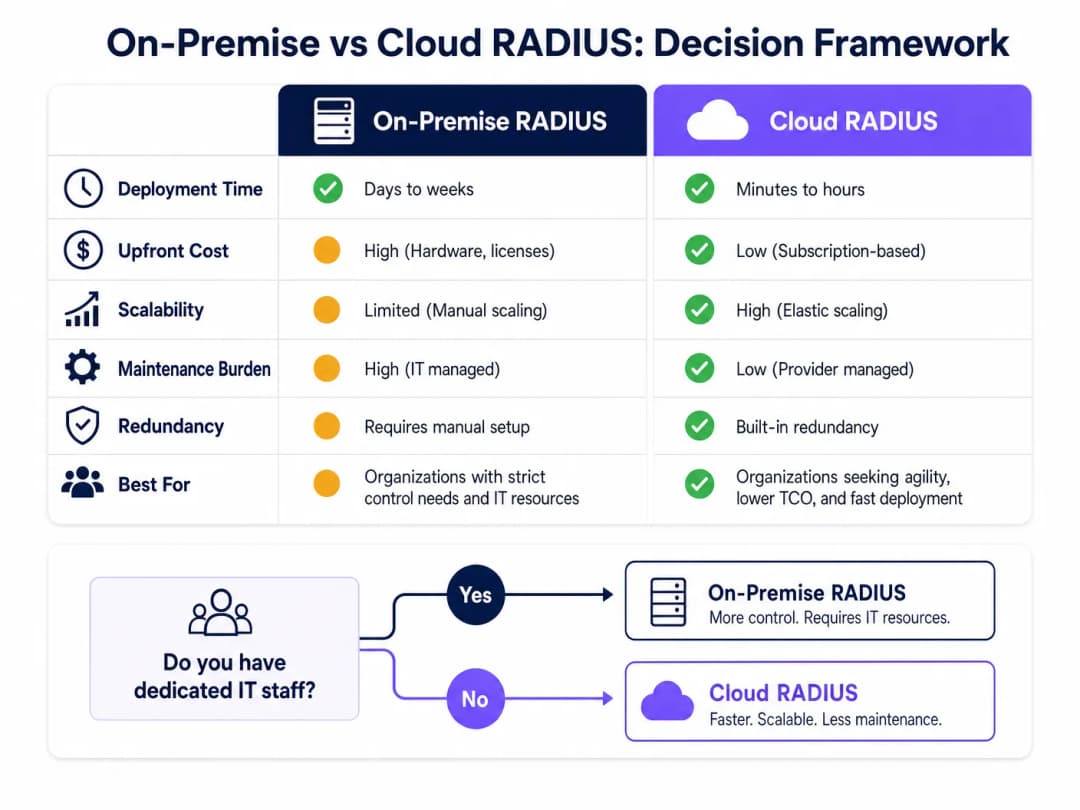
On-Premise RADIUS (e.g., Microsoft NPS, FreeRADIUS, Cisco ISE) is suited for organisations with dedicated IT staff, existing on-premise directory infrastructure, and stringent data sovereignty or compliance requirements. It does not depend on internet connectivity for authentication, which is a meaningful advantage for environments where internet uptime cannot be guaranteed.
Cloud RADIUS is increasingly the preferred model for distributed environments — Retail chains, Hospitality groups, and Transport hubs where deploying servers at every location is operationally impractical. Cloud RADIUS integrates natively with cloud identity providers (Azure AD, Google Workspace, Okta) and provides built-in high availability and global scalability.
Step 2: Install and Configure the RADIUS Server
For an on-premise deployment using Microsoft NPS (the most common choice in Windows-centric environments):
- Install the Network Policy Server role via Server Manager.
- Register the NPS server in Active Directory to allow it to read user dial-in properties.
- Create a RADIUS Client entry for each access point or wireless controller, specifying the AP's IP address and a strong, unique Shared Secret.
- Configure a Network Policy defining the conditions (e.g., user group membership) and constraints (e.g., EAP method, session timeout) for access.
- Configure the Connection Request Policy to process requests locally.
For FreeRADIUS on Linux:
- Install via package manager:
sudo apt-get install freeradius freeradius-ldap. - Configure
/etc/freeradius/3.0/clients.confto define RADIUS clients (APs) and their shared secrets. - Configure the LDAP module in
/etc/freeradius/3.0/mods-available/ldapto point to your Active Directory or LDAP server. - Enable the LDAP module:
sudo ln -s /etc/freeradius/3.0/mods-available/ldap /etc/freeradius/3.0/mods-enabled/. - Define EAP methods in
/etc/freeradius/3.0/mods-available/eap.
Step 3: Configure Access Points
On your wireless controller or individual access points:
- Define the RADIUS server IP address(es) and authentication port (default: UDP 1812).
- Configure the Shared Secret — use a minimum of 22 characters, mixing alphanumeric and special characters. Use a unique secret per location or AP group.
- Configure the SSID to use WPA2-Enterprise or WPA3-Enterprise security mode with 802.1X key management.
- Configure a secondary RADIUS server for failover.
Step 4: Directory Integration
For on-premise AD integration, the RADIUS server must be joined to the domain or have LDAP read access. Ensure service accounts used for LDAP binding have the minimum required permissions. For cloud RADIUS, configure the API-based synchronization or SAML/OIDC integration with your IdP.
Define clear user groups in your directory, as these will drive authorization policies. Recommended group structure:
| Group | VLAN | Access Level |
|---|---|---|
Corp_Staff |
VLAN 10 | Full internal network |
Corp_Contractors |
VLAN 20 | Internet + specific internal resources |
Corp_IoT |
VLAN 30 | Isolated, device-specific ports only |
Corp_Guests |
VLAN 100 | Internet only via captive portal |
Step 5: Client Configuration and Certificate Validation
This is the most operationally critical step. Use Group Policy (GPO) for Windows and MDM profiles for macOS/iOS/Android to push WiFi configurations silently to managed devices. The profile must specify:
- The Root CA that issued the RADIUS server's certificate.
- The expected server name (CN or SAN of the server certificate).
- The EAP method and inner authentication protocol.
For unmanaged BYOD devices, provide clear self-service onboarding instructions, ideally via a Network Access Control (NAC) portal.
Step 6: Implement Dynamic VLAN Assignment
Configure the RADIUS server to return VLAN assignment attributes in the Access-Accept response:
Tunnel-Type=VLAN(13)Tunnel-Medium-Type=IEEE-802(6)Tunnel-Private-Group-Id=<VLAN ID>
The access point reads these attributes and places the authenticated client on the specified VLAN — no manual reconfiguration required as users change roles or locations.
Tem dúvidas sobre a sua configuração específica?
A nossa equipa trabalha com operadores de espaços, gestores de TI e engenheiros de rede em 80.000 espaços. Agende uma chamada de 20 minutos e mostraremos como outros profissionais na sua área o resolveram.
Best Practices
Redundancy is non-negotiable. Deploy a minimum of two RADIUS servers (primary and secondary) and configure all access points to fail over automatically. For on-premise deployments, consider placing the secondary server in a different physical location or availability zone. A RADIUS outage means nobody can authenticate, which is a complete network outage for 802.1X-protected SSIDs.
Monitor certificate expiry proactively. A RADIUS server certificate expiry is one of the most common causes of sudden, widespread authentication failures. Implement monitoring to alert administrators at least 30 days before expiry. This applies to both the server certificate and any intermediate CA certificates in the chain.
Treat the Shared Secret as a critical credential. The shared secret between the AP and the RADIUS server encrypts RADIUS packets. Use unique secrets per location or AP group, store them in a secrets manager, and rotate them periodically. See our guide on Protect Your Network with Strong DNS and Security for broader network security hygiene recommendations.
Align with compliance frameworks. For environments subject to PCI DSS (e.g., retail payment networks), 802.1X authentication directly supports requirements for network access control and audit logging. For GDPR compliance, RADIUS accounting logs (port 1813) provide a detailed audit trail of who accessed the network, from where, and when — valuable for incident response. For Healthcare environments, network segmentation via dynamic VLAN assignment supports HIPAA requirements for protecting electronic protected health information (ePHI).
Troubleshooting & Risk Mitigation
| Failure Mode | Symptom | Resolution |
|---|---|---|
| Certificate expiry | Sudden mass authentication failures | Monitor expiry; renew and redeploy certificate |
| NTP desynchronisation | Intermittent EAP-TLS failures | Ensure RADIUS server and DCs sync to same NTP source |
| LDAP connectivity loss | Authentication fails when AD is unreachable | Deploy redundant DCs; configure RADIUS to cache recent authentications |
| Incorrect Shared Secret | AP logs show RADIUS timeout or Bad authenticator |
Verify secret matches on both AP and RADIUS server |
| Client certificate mismatch | EAP-TLS failures for specific devices | Verify client cert is issued by trusted CA; check cert validity period |
| VLAN not assigned | User authenticated but on wrong network segment | Verify RADIUS attributes are correctly returned; check AP VLAN configuration |
For a deeper dive into the 802.1X configuration process itself, the How to Configure 802.1X WiFi Authentication: A Step-by-Step Guide provides granular, vendor-specific configuration walkthroughs.
ROI & Business Impact
Transitioning from PSK to RADIUS-backed 802.1X requires an initial investment in configuration, and potentially licensing for cloud solutions or hardware for on-premise deployments. The ROI case is straightforward:
Risk mitigation: The average cost of a data breach in the UK is in excess of £3 million (IBM Cost of a Data Breach Report). A compromised PSK can expose the entire network. 802.1X limits the blast radius to a single compromised user account, which can be disabled in seconds via the directory.
Operational efficiency: Dynamic VLAN assignment eliminates manual network reconfiguration as staff change roles. Onboarding a new employee means adding them to the correct AD group — the network access follows automatically.
Compliance posture: For organisations subject to PCI DSS, ISO 27001, or Cyber Essentials Plus, 802.1X is a direct control that auditors expect to see. Deploying it strengthens your compliance posture and reduces audit remediation costs.
Guest experience and analytics: For venue operators, integrating RADIUS for staff authentication with Purple's Guest WiFi platform for visitor access creates a unified, tiered access model. Staff authenticate silently via 802.1X; guests connect via a branded captive portal. Purple's WiFi Analytics platform then provides real-time visibility into visitor dwell times, repeat visit rates, and engagement metrics — data that directly informs marketing spend and venue operations decisions.
For further reading, see the Como Configurar a Autenticação 802.1X WiFi: Um Guia Passo a Passo for Portuguese-language implementation guidance, and What Is a Leased Line? Dedicated Business Internet for guidance on ensuring the underlying connectivity meets enterprise requirements.
Definições Principais
RADIUS (Remote Authentication Dial-In User Service)
Um protocolo de rede que fornece gestão centralizada de Autenticação, Autorização e Auditoria (AAA) para utilizadores que se ligam a um serviço de rede. Definido no RFC 2865.
O componente central do servidor que valida as credenciais do utilizador num diretório antes de conceder acesso ao WiFi. Qualquer implementação de WiFi empresarial que utilize 802.1X requer um servidor RADIUS.
802.1X
Uma norma IEEE para Controlo de Acesso à Rede baseado em portas (PNAC). Fornece um mecanismo de autenticação para dispositivos que pretendem ligar-se a uma LAN ou WLAN, bloqueando todo o tráfego não-EAP até que a autenticação seja bem-sucedida.
A estrutura de referência global que define como o Supplicant, o Authenticator e o Servidor de Autenticação comunicam. Quando as equipas de TI se referem a "segurança de WiFi empresarial", referem-se tipicamente a WPA2/WPA3-Enterprise com 802.1X.
Supplicant
O dispositivo cliente - ou, mais precisamente, a pilha de software 802.1X nesse dispositivo - que inicia o processo de autenticação ao apresentar credenciais à rede.
No Windows, o supplicant integrado é o serviço Wireless AutoConfig. No macOS e iOS, é nativo do SO. Garantir que o supplicant está configurado corretamente (especialmente para validação de certificados) é a fonte mais comum de problemas de implementação.
Authenticator
O dispositivo de rede - tipicamente um ponto de acesso WiFi ou controlador sem fios - que atua como intermediário entre o Supplicant e o servidor RADIUS, aplicando o controlo de acesso com base no resultado da autenticação.
O AP bloqueia todo o tráfego de dados na porta até receber um Access-Accept do servidor RADIUS. Também lê os atributos RADIUS (por exemplo, atribuição de VLAN) a partir da resposta Access-Accept e aplica-os à sessão.
EAP (Extensible Authentication Protocol)
Uma estrutura de autenticação definida no RFC 3748 que fornece um mecanismo de transporte padronizado para vários métodos de autenticação (TLS, PEAP, TTLS, etc.) entre o Supplicant e o Servidor de Autenticação.
O EAP é o "idioma" falado entre o cliente e o servidor RADIUS. A escolha do método EAP (EAP-TLS vs PEAP) determina o nível de segurança e a complexidade de implementação do sistema de autenticação.
PEAP (Protected EAP)
Um método EAP que primeiro estabelece um túnel TLS utilizando o certificado do servidor e, em seguida, realiza uma autenticação secundária (tipicamente MSCHAPv2 com utilizador/palavra-passe) dentro desse túnel encriptado.
O método de autenticação de WiFi empresarial mais comum devido ao seu equilíbrio entre segurança e simplicidade de implementação. Requer apenas um certificado do lado do servidor, tornando-o muito mais fácil de implementar do que o EAP-TLS.
Atribuição Dinâmica de VLAN
Uma funcionalidade RADIUS na qual o servidor inclui atributos específicos de VLAN (Tunnel-Type, Tunnel-Medium-Type, Tunnel-Private-Group-Id) na resposta Access-Accept, instruindo o AP a colocar o cliente autenticado numa VLAN específica.
Permite que um único SSID sirva múltiplos grupos de utilizadores com requisitos de segurança diferentes. Elimina a necessidade de transmitir múltiplos SSIDs para diferentes grupos de utilizadores, reduzindo a sobrecarga de RF e simplificando a experiência do utilizador.
Segredo Partilhado
Uma cadeia de texto pré-configurada conhecida apenas pelo Authenticator (AP) e pelo servidor RADIUS, utilizada para assinar e encriptar pacotes RADIUS, garantindo a integridade e a autenticidade da comunicação.
Um elemento crítico de configuração de segurança. Se o segredo partilhado for fraco ou estiver comprometido, um atacante poderá forjar respostas Access-Accept de RADIUS, concedendo acesso não autorizado à rede. Utilize segredos exclusivos por localização e armazene-os num gestor de segredos.
MAB (MAC Authentication Bypass)
Um mecanismo de autenticação alternativo no qual o endereço MAC de um dispositivo é utilizado como a sua credencial de identidade, permitindo o acesso à rede para dispositivos que não suportam supplicants 802.1X.
Utilizado para dispositivos sem interface de utilizador (impressoras, sensores de IoT, câmaras IP). Como os endereços MAC são visíveis publicamente e fáceis de falsificar, o MAB fornece identificação do dispositivo em vez de uma autenticação forte. Combine sempre com uma atribuição de VLAN restritiva.
Exemplos Práticos
Uma cadeia de retalho nacional com 500 lojas necessita de implementar WiFi seguro para os tablets dos gerentes de loja e terminais POS. Atualmente, utilizam uma única PSK em todas as lojas, que é frequentemente partilhada com funcionários e prestadores de serviços não autorizados. Utilizam o Azure AD para gestão de identidades e não dispõem de pessoal de TI dedicado nas filiais.
Implementar uma solução Cloud RADIUS integrada diretamente com o Azure AD. Isto elimina a necessidade de implementar e gerir servidores RADIUS locais em 500 localizações. A equipa de TI utiliza o Microsoft Intune para enviar um perfil WiFi para todos os tablets dos gerentes de loja e terminais POS configurados para PEAP-MSCHAPv2, impondo rigidamente a validação do certificado do servidor Cloud RADIUS. A política Cloud RADIUS verifica a pertença ao grupo do Azure AD do utilizador antes de conceder acesso: o grupo 'Store_Managers' recebe a VLAN 10 (acesso total ao POS e back-office), o grupo 'Contractors' recebe a VLAN 20 (apenas internet). Quando o contrato de um prestador de serviços termina, a sua remoção do grupo Azure AD revoga imediatamente o seu acesso ao WiFi em todas as 500 localizações em simultâneo - sem necessidade de alterar a PSK.
Um hotel de 400 quartos no centro da cidade necessita de disponibilizar WiFi seguro tanto para os funcionários (receção, limpeza, gestão) como para os hóspedes. Os funcionários necessitam de acesso ao sistema de gestão de propriedade (PMS) e aos servidores internos. Os hóspedes necessitam apenas de acesso à internet. O hotel dispõe de um único ambiente Windows Server local.
Implementar o Microsoft NPS numa VM dedicada Windows Server. Configurar dois SSIDs na infraestrutura sem fios: 'Hotel_Staff' (WPA2-Enterprise, 802.1X) e 'Hotel_Guest' (aberto ou WPA2-Personal, redirecionando para um Captive Portal). Para o SSID dos funcionários, o NPS valida as credenciais face ao Active Directory e devolve atribuições dinâmicas de VLAN: grupo de AD 'Management' → VLAN 10 (acesso total), 'FrontDesk' → VLAN 20 (acesso ao PMS), 'Housekeeping' → VLAN 30 (apenas internet e aplicação de planeamento). Para os hóspedes, integrar o Captive Portal com a plataforma Guest WiFi da Purple para proporcionar uma experiência de início de sessão personalizada com a marca, recolher dados primários (email, consentimento de marketing) e obter análises sobre o tempo de permanência e visitas repetidas. O modelo de dois SSIDs mantém o tráfego de funcionários e de hóspedes completamente separado na camada de rede.
Perguntas de Prática
Q1. A sua organização está a migrar 2 000 computadores portáteis Windows de uma PSK partilhada para 802.1X com PEAP-MSCHAPv2. A sua equipa de segurança alerta que o PEAP é vulnerável à recolha de credenciais através de rogue access points. Qual é o passo de configuração individual mais importante para mitigar este risco e como o implementa à escala?
Dica: Considere o que impede um cliente de confiar num servidor RADIUS fraudulento que apresente um certificado autoassinado.
Ver resposta modelo
O passo crítico é impor uma validação estrita do certificado do servidor em cada dispositivo cliente. Utilizando Group Policy Objects (GPO), envie um perfil de WiFi para todos os 2 000 computadores portáteis que especifique: (1) o certificado Root CA exato que emitiu o certificado do servidor RADIUS, (2) o nome de servidor esperado (CN/SAN) e (3) que o cliente não deve solicitar ao utilizador que confie em novos certificados. Isto garante que, mesmo que um atacante implemente um rogue AP com um certificado fraudulento, o cliente rejeitará o handshake TLS e recusará enviar credenciais. Sem esta configuração, o PEAP não fornece qualquer proteção significativa contra ataques de rogue AP.
Q2. O diretor de TI de um hospital precisa de fornecer acesso à rede para 300 dispositivos IoT médicos (bombas de infusão, equipamento de monitorização) que não suportam 802.1X. Estes dispositivos partilham a mesma infraestrutura wireless com as estações de trabalho dos funcionários. Como deve a infraestrutura RADIUS lidar com estes dispositivos e que controlos de rede devem estar implementados?
Dica: Pense no método de autenticação disponível para dispositivos headless e como compensar a sua fraqueza inerente.
Ver resposta modelo
Configure o MAC Authentication Bypass (MAB) no servidor RADIUS para estes dispositivos específicos. Registe o endereço MAC de cada dispositivo num grupo de Active Directory dedicado ou numa base de dados RADIUS. Como os endereços MAC são facilmente falsificados, o servidor RADIUS deve utilizar a Atribuição Dinâmica de VLAN para colocar todos os dispositivos autenticados por MAB numa VLAN dedicada e altamente restrita (ex: VLAN 30 - IoT). Esta VLAN deve ser protegida por firewall para permitir a comunicação apenas com endereços IP de servidores médicos específicos e bloquear todo o outro tráfego, incluindo o acesso à internet e o movimento lateral para as VLANs dos funcionários. As estações de trabalho dos funcionários autenticam-se via 802.1X e são colocadas numa VLAN separada. Esta arquitetura cumpre os requisitos de segmentação de rede da HIPAA para dispositivos adjacentes a ePHI.
Q3. É o arquiteto de rede de uma cadeia de restaurantes com 50 estabelecimentos. A autenticação está a funcionar corretamente em 49 estabelecimentos utilizando o Cloud RADIUS, mas um estabelecimento específico reporta que todos os dispositivos falham ao autenticar. O portal de gestão do Cloud RADIUS mostra zero pedidos de autenticação provenientes desse estabelecimento. Qual é a sua abordagem de diagnóstico?
Dica: Se o servidor RADIUS não estiver a receber qualquer pedido, o problema está no caminho de comunicação entre o Autenticador e o servidor - não na própria lógica de autenticação.
Ver resposta modelo
Dado que o servidor RADIUS está a receber zero pedidos deste estabelecimento, a falha reside entre os pontos de acesso e o servidor Cloud RADIUS. Passos de diagnóstico por ordem: (1) Verifique o endereço IP e a porta do servidor RADIUS (UDP 1812) configurados nos APs ou no controlador wireless do estabelecimento - um erro tipográfico aqui é a causa mais comum. (2) Verifique as regras locais de firewall ou router nesse estabelecimento para confirmar se o tráfego de saída UDP 1812 é permitido para a gama de IPs do Cloud RADIUS. (3) Verifique se o Shared Secret configurado nos APs corresponde ao segredo configurado para esse estabelecimento no portal do Cloud RADIUS - uma divergência faz com que o servidor RADIUS descarte os pacotes silenciosamente. (4) Verifique se a ligação à internet do estabelecimento está a funcionar - o Cloud RADIUS requer conectividade de internet fiável. Executar uma captura de pacotes no AP ou no router a montante confirmará se os pacotes RADIUS estão a ser enviados e se as respostas estão a ser recebidas.
Continue a ler esta série
Um Guia de Administrador de Rede para Configurar a Autenticação RADIUS para WiFi de Convidados
Uma referência técnica abrangente para administradores de rede sobre a implementação de autenticação RADIUS para WiFi de convidados. Aborda a arquitetura, etapas de configuração independentes de fornecedor, boas práticas de segurança e resolução de problemas comuns de implementação.
Implementar SCEP para WiFi 802.1X e BYOD Seguro no Ensino Superior
Este guia técnico detalha como as equipas de TI do ensino superior podem automatizar o registo de certificados 802.1X para milhares de dispositivos BYOD usando SCEP. Abrange a arquitetura, as vantagens de segurança e as etapas práticas de implementação para substituir o registo manual por um modelo de acesso à rede seguro e sem intervenção (zero-touch).
Configuring RADIUS Authentication for Guest and Staff WiFi Networks
Este guia de referência técnica descreve a arquitetura, configuração e implementação de autenticação RADIUS para redes WiFi empresariais de convidados e funcionários. Fornece aos arquitetos de rede e gestores de TI os protocolos exatos, normas de segurança e metodologias de resolução de problemas necessários para construir sistemas de controlo de acesso sem fios seguros e escaláveis.
Tem dúvidas sobre a sua configuração específica?
A nossa equipa trabalha com operadores de espaços, gestores de TI e engenheiros de rede em 80.000 espaços. Agende uma chamada de 20 minutos e mostraremos como outros profissionais na sua área o resolveram.