
Como Criar uma Página de Boas-Vindas WiFi: Design, Conteúdo e Melhores Práticas
Este guia abrangente explora a arquitetura, os princípios de design e as estratégias de implementação necessárias para construir uma página de boas-vindas WiFi eficaz. Fornece informações acionáveis para líderes de TI sobre a integração de Captive Portals com a infraestrutura de rede, garantindo a conformidade com o GDPR e maximizando a captura de dados primários.
Ouça este guia
Ver transcrição do podcast
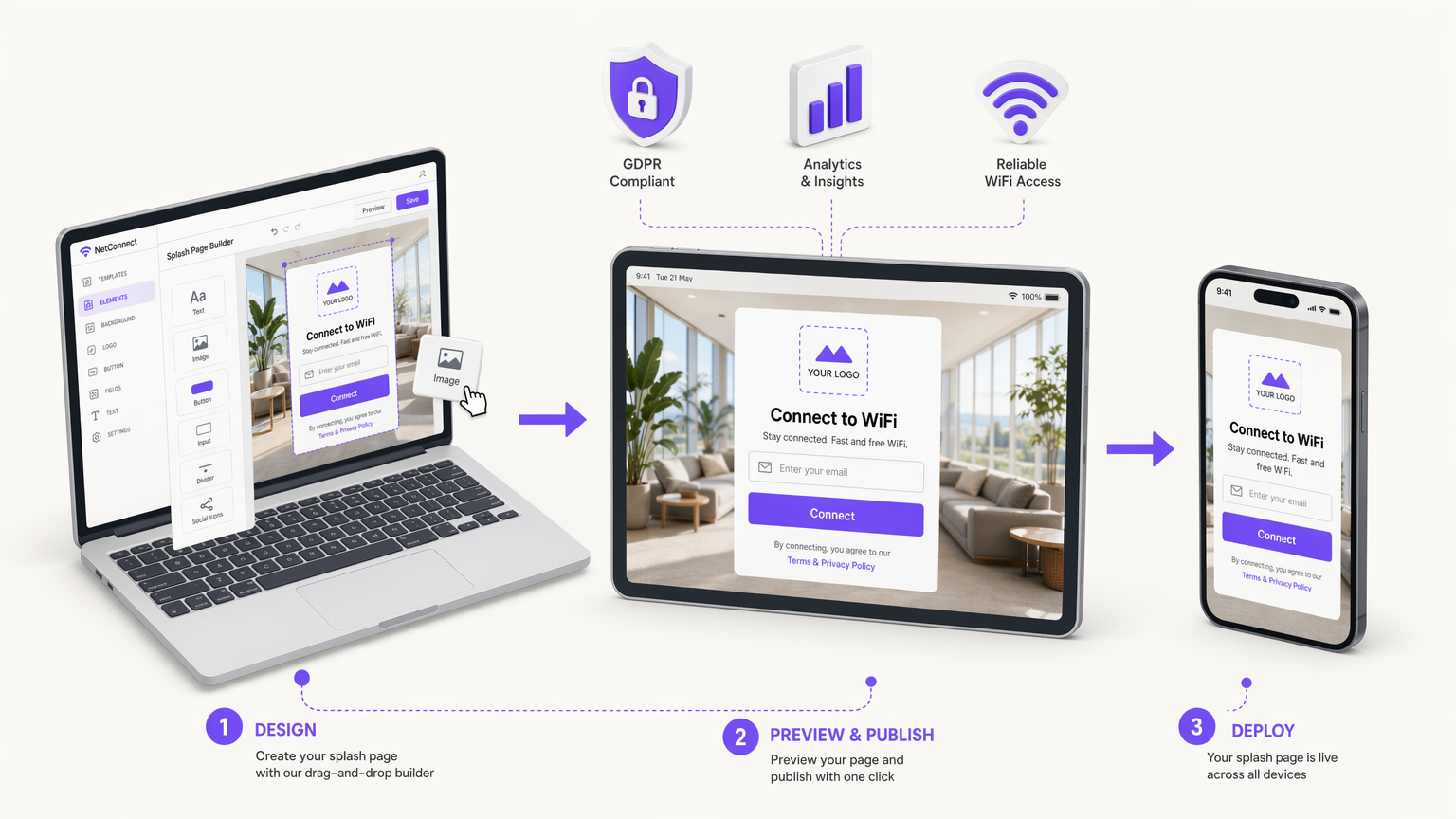
Resumo Executivo
Para equipas de TI empresariais e diretores de operações de espaços, a implementação de WiFi para convidados já não se trata apenas de fornecer acesso à internet — trata-se de estabelecer um ponto de contacto digital seguro, conforme e comercialmente valioso. A página de boas-vindas WiFi, servida através de um Captive Portal, é a interface crítica onde esta troca ocorre. Uma página de boas-vindas bem arquitetada transforma o tráfego de rede anónimo em dados primários verificados, permitindo um envolvimento direcionado e análises operacionais.
Este guia de referência técnica detalha como criar uma página de boas-vindas WiFi que equilibra a experiência do utilizador com requisitos rigorosos de segurança e conformidade. Exploraremos a arquitetura subjacente do Captive Portal, avaliando os méritos das implementações alojadas na cloud versus no local. Também definiremos os componentes essenciais de design necessários para minimizar o atrito na autenticação, particularmente em dispositivos móveis, que representam a grande maioria das ligações de convidados.
Além disso, este guia aborda o mandato crítico da conformidade com o GDPR, descrevendo como implementar mecanismos de consentimento explícito que resistam ao escrutínio regulatório. Ao integrar estes princípios técnicos e de design, organizações em Retalho , Saúde , Hotelaria e Transportes podem implementar soluções robustas de WiFi para Convidados que proporcionam um ROI mensurável, mitigando os riscos de privacidade de dados.
Análise Técnica Aprofundada: Arquitetura do Captive Portal
Compreender como criar uma página de boas-vindas WiFi requer um conhecimento sólido da arquitetura subjacente do Captive Portal. Um Captive Portal é um mecanismo de controlo de acesso à rede que interceta o tráfego HTTP/HTTPS de clientes não autenticados e os redireciona para uma página web específica — a página de boas-vindas — antes de conceder acesso à internet em geral.
Mecanismos de Redirecionamento
O processo de interceção e redirecionamento geralmente baseia-se num de dois métodos principais ao nível do gateway ou do controlador de LAN sem fios (WLC):
- Redirecionamento DNS: Quando um cliente não autenticado tenta resolver um nome de domínio, o gateway interceta o pedido DNS e devolve o endereço IP do servidor do Captive Portal em vez do destino real.
- Redirecionamentos HTTP 302: O gateway interceta os pedidos HTTP GET de clientes não autenticados e responde com um código de estado HTTP 302 Found, direcionando o navegador do cliente para o URL do Captive Portal.
Simultaneamente, a infraestrutura de rede emprega "walled garden" ou listas de controlo de acesso (ACLs) de pré-autenticação. Estas regras de firewall bloqueiam todo o tráfego de saída, exceto para serviços essenciais (como DHCP e DNS) e tráfego destinado ao servidor do Captive Portal e a quaisquer fornecedores de identidade de autenticação necessários (por exemplo, servidores OAuth do Google ou Facebook).
Modelos de Implementação: Cloud vs. No Local
Ao arquitetar uma solução de página de boas-vindas, os líderes de TI devem escolher entre dois modelos de implementação principais. Para uma comparação detalhada, consulte o nosso guia sobre Captive Portal Baseado na Cloud vs. No Local: Qual é o Certo para o Seu Negócio? .
- Captive Portal Alojado na Cloud: A página de boas-vindas e o backend de autenticação são alojados na infraestrutura de um fornecedor (como a plataforma da Purple). O WLC ou gateway local é configurado para redirecionar os clientes para este URL externo via RADIUS (Remote Authentication Dial-In User Service). Este modelo é altamente escalável, oferece gestão centralizada em vários locais e garante alta disponibilidade sem depender de hardware de servidor local.
- Captive Portal No Local: O software do portal é executado em hardware local ou diretamente no WLC. Embora isto ofereça controlo local completo e possa funcionar mesmo que a ligação WAN esteja inativa (embora o acesso à internet ainda estivesse indisponível), requer uma sobrecarga de manutenção significativa e carece das capacidades de análise entre locais inerentes às soluções de cloud.
Para a maioria das implementações empresariais modernas, uma arquitetura alojada na cloud é recomendada para facilitar a captura centralizada de dados e a integração perfeita com plataformas de Análise de WiFi .
Guia de Implementação: Desenhar a Página de Boas-Vindas
O design da página de boas-vindas impacta diretamente as taxas de conexão e a qualidade dos dados. Uma página mal desenhada introduz atrito, levando a altas taxas de abandono. Ao considerar como criar uma página de boas-vindas, adira aos seguintes princípios.
Design Mobile-First e o Captive Network Assistant (CNA)
Mais de 70% das ligações WiFi de convidados originam-se de smartphones. Portanto, a página de boas-vindas deve ser rigorosamente otimizada para viewports móveis (a partir de 320px de largura). No entanto, os dispositivos móveis raramente usam navegadores padrão para autenticação em Captive Portals.
Em vez disso, os sistemas operativos empregam pseudo-navegadores, como o Captive Network Assistant (CNA) da Apple ou o Captive Portal Login do Android. Estes ambientes têm capacidades restritas: frequentemente não possuem suporte para cookies persistentes, têm execução limitada de JavaScript e não suportam múltiplas abas. Consequentemente, o fluxo de autenticação deve ser renderizado no lado do servidor e minimizar a dependência de scripts complexos do lado do cliente.
Componentes Essenciais da UI
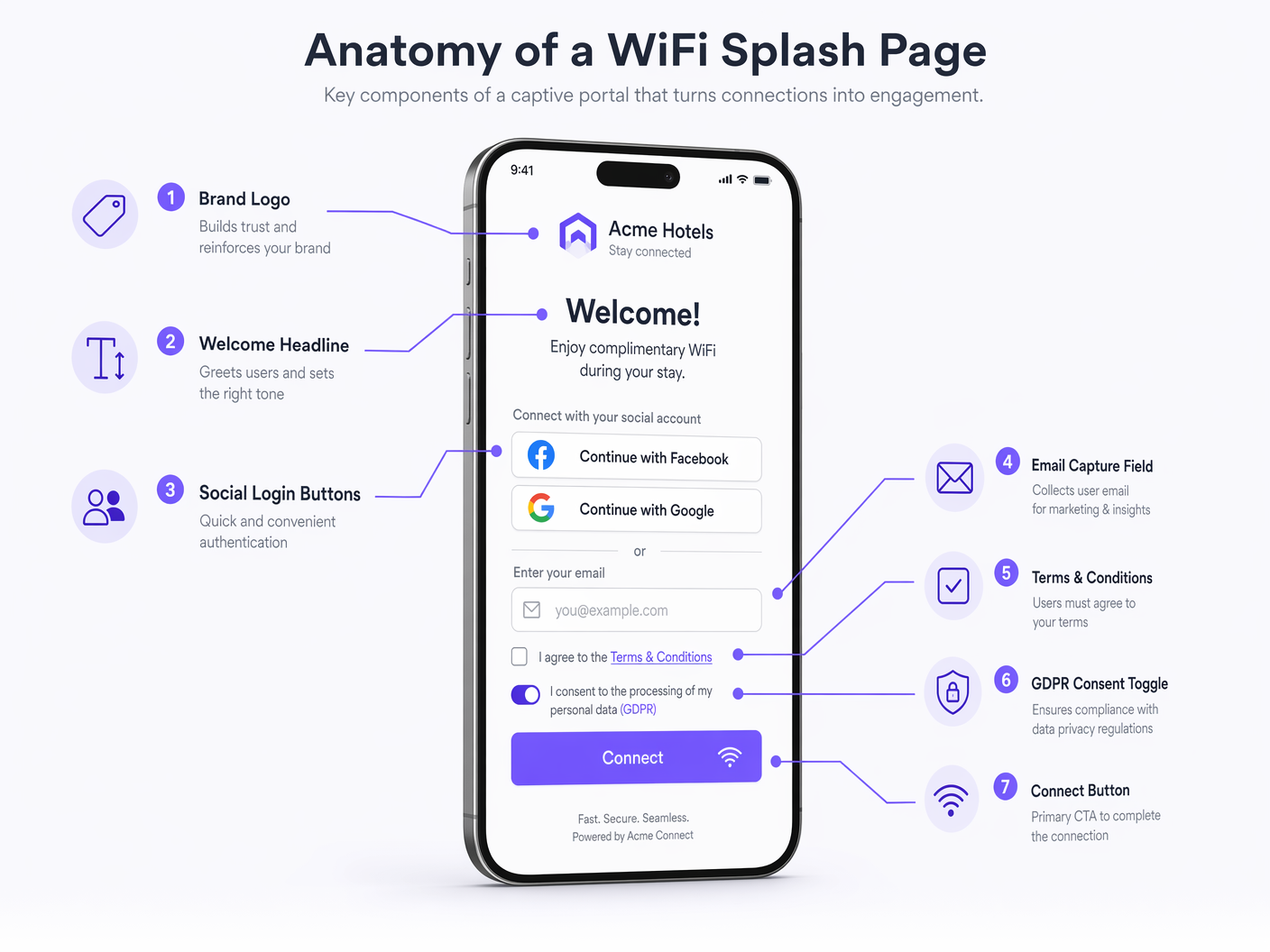
Uma página de boas-vindas com alta taxa de conversão deve incluir os seguintes elementos:
- Identidade da Marca: Exibição proeminente do logótipo corporativo e adesão a paletas de cores da marca. Isto estabelece confiança e verifica a legitimidade da rede.
- Proposta de Valor Clara: Um título conciso (por exemplo, "Ligue-se ao WiFi Gratuito de Alta Velocidade").
- Métodos de Autenticação: Ofereça um equilíbrio entre a recolha de dados e a conveniência do utilizador.
- Captura de E-mail: O padrão para construir uma base de dados de marketing.
- OAuth Social (Google, Facebook): Reduz o atrito e fornece dados demográficos verificados, mas requer a configuração de entradas de walled garden para os respetivos fornecedores de identidade.
- Click-Through: Atrito mínimo, mas não produz dados; geralmente desaconselhado para implementações comerciais.
- Chamada para Ação (CTA) Proeminente: O botão "Ligar" deve ser altamente visível e acessível sem ser necessário fazer scroll (acima da dobra) em dispositivos móveis.
- Redirecionamento Pós-Autenticação: Após a autenticação bem-sucedida, redirecione o utilizador para uma página de destino de alto valor, como uma oferta promocional, um link de download de aplicação ou um mapa do local, em vez de os deixar numa tela de sucesso genérica.
Melhores Práticas: Conformidade e Segurança de Dados
Ao determinar como configurar uma página de splash WiFi, a conformidade legal e a segurança de dados são primordiais. A página de splash é a interface principal para garantir o consentimento do utilizador sob frameworks como o Regulamento Geral sobre a Proteção de Dados (GDPR) e o California Consumer Privacy Act (CCPA).
Mecanismos de Consentimento em Conformidade com o GDPR
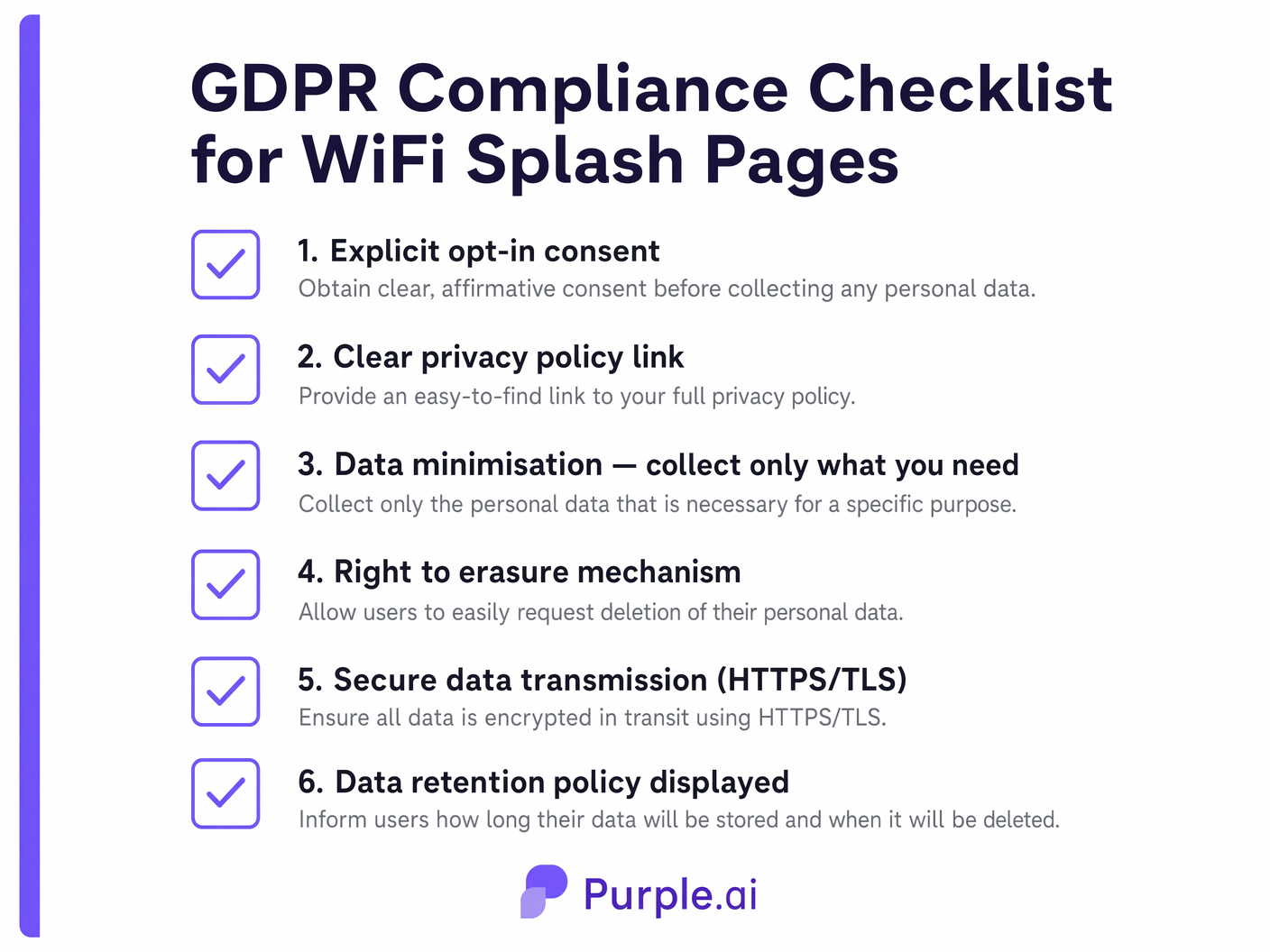
De acordo com o GDPR, o consentimento para o tratamento de dados pessoais (especialmente para fins de marketing) deve ser dado livremente, de forma específica, informada e inequívoca.
- Opt-Ins Granulares: Não pode agrupar a aceitação dos Termos de Serviço (que é necessária para o acesso à rede) com o consentimento para comunicações de marketing. Estes devem ser checkboxes separados.
- Sem Caixas Pré-Marcadas: As caixas de seleção de opt-in de marketing devem estar desmarcadas por predefinição. O utilizador deve tomar uma ação afirmativa para consentir.
- Política de Privacidade Clara: Deve ser fornecido um link direto e acessível para a política de privacidade da organização, detalhando quais dados são recolhidos, como são utilizados e por quanto tempo são retidos.
- Registos de Auditoria: O backend do Captive Portal deve registar o carimbo de data/hora, o endereço IP e a versão exata dos termos aceites pelo utilizador para fornecer um registo de auditoria verificável do consentimento.
Padrões de Segurança
- Criptografia HTTPS/TLS: A página de splash deve ser servida via HTTPS. Os CNAs de SO modernos frequentemente bloqueiam ou exibem avisos graves para captive portals HTTP. Certifique-se de que um certificado TLS válido e confiável está instalado no servidor do portal.
- Minimização de Dados: Recolha apenas os dados estritamente necessários para o propósito declarado. Se precisar apenas de um endereço de e-mail para uma newsletter, não exija a recolha de um número de telefone ou endereço físico.
Resolução de Problemas e Mitigação de Riscos
Mesmo páginas de splash bem projetadas podem encontrar problemas de implementação. As equipas de IT devem mitigar proativamente os seguintes modos de falha comuns:
- Erros de Certificado: Se o gateway intercetar o tráfego e redirecionar para o portal usando um certificado autoassinado ou inválido, o navegador do utilizador apresentará um aviso de segurança, interrompendo efetivamente o processo de conexão. Utilize sempre certificados de Autoridades de Certificação (CAs) confiáveis.
- Má Configuração do Walled Garden: Se as ACLs não permitirem o acesso a recursos externos necessários (por exemplo, ficheiros CSS alojados num CDN, ou servidores de autenticação OAuth), a página de splash será renderizada incorretamente ou a autenticação falhará. Audite regularmente as configurações do walled garden.
- Falhas Silenciosas do CNA: Como os CNAs têm funcionalidade limitada, páginas complexas com muito JavaScript podem simplesmente falhar ao carregar ou processar formulários sem fornecer uma mensagem de erro ao utilizador. Mantenha o HTML/CSS leve e confie no processamento do lado do servidor.
ROI e Impacto nos Negócios
A implementação de uma página de splash WiFi estratégica transforma o WiFi para convidados de um centro de custos num ativo gerador de receita. Ao capturar dados de utilizador verificados, as organizações podem alimentar sistemas CRM e plataformas de automação de marketing.
Por exemplo, uma cadeia de retalho pode analisar dados de conexão para medir o tempo de permanência e a frequência de visitas de retorno, correlacionando estas métricas com campanhas de e-mail direcionadas iniciadas através da página de splash. Da mesma forma, locais de hospitalidade podem utilizar o redirecionamento pós-autenticação para gerar receita auxiliar imediata através de reservas de restaurantes ou spas. A integração do Captive Portal com WiFi Analytics abrangentes fornece a inteligência acionável necessária para justificar o investimento em infraestrutura e otimizar continuamente a experiência do convidado.
Definições Principais
Captive Portal
A web page that a user of a public access network is obliged to view and interact with before access is granted.
The fundamental mechanism that intercepts network traffic and serves the splash page.
Splash Page
The specific user interface presented by the captive portal, used for authentication, branding, and data capture.
The digital storefront of the guest WiFi experience; the primary touchpoint for marketing and compliance.
Walled Garden
A restricted environment that controls the user's access to web content and services prior to full network authentication.
Essential for allowing the splash page to load external assets (like logos or CSS) and facilitating social OAuth logins before the user has full internet access.
Captive Network Assistant (CNA)
A limited pseudo-browser built into mobile operating systems (like iOS and Android) that automatically detects captive portals and displays the splash page.
IT teams must design splash pages specifically to function within the restricted capabilities of CNAs to ensure a smooth mobile connection experience.
HTTP 302 Redirect
An HTTP response status code indicating that the requested resource has been temporarily moved to a different URI.
One of the primary technical methods used by network gateways to intercept unauthenticated traffic and route it to the captive portal server.
RADIUS (Remote Authentication Dial-In User Service)
A networking protocol that provides centralized Authentication, Authorization, and Accounting (AAA) management for users who connect and use a network service.
Used to communicate between the local wireless controller and the cloud-hosted captive portal backend to verify user credentials and authorize network access.
MAC Authentication Bypass (MAB)
A mechanism that uses the MAC address of a device as its identity for network access control.
Often used in conjunction with captive portals to allow returning devices to bypass the splash page and connect automatically based on their previously registered MAC address.
First-Party Data
Information a company collects directly from its customers and owns entirely.
The primary business driver for deploying a splash page; capturing verified emails and demographics directly from guests rather than relying on third-party aggregators.
Exemplos Práticos
A 200-room boutique hotel needs to implement a new guest WiFi solution. The marketing director wants to capture email addresses for a loyalty program, but the IT manager is concerned about GDPR compliance and the impact on the connection experience for international guests using various mobile devices.
The hotel should deploy a cloud-hosted captive portal integrated with their existing WLC. The splash page design must be mobile-first, utilizing server-side rendering to ensure compatibility with all iOS and Android CNAs. For authentication, the page will present a simple form requesting Name and Email Address. Crucially, the form will include two separate, unticked checkboxes: one for accepting the Terms of Service (mandatory for access) and one for opting into the marketing loyalty program (optional). The portal backend will log the timestamp and consent status for audit purposes. Upon connection, users will be redirected to a dynamic landing page offering a discount on room service.
A large stadium with a capacity of 50,000 is upgrading its WiFi infrastructure. They want to use the splash page to encourage fans to download the official team app, but they anticipate massive concurrent connection attempts during the 15-minute half-time interval.
The stadium must prioritize low-friction authentication and high-performance infrastructure. The splash page should offer a 'One-Click Connect' option or social login (e.g., Google/Facebook) to minimize the time spent on the portal. The walled garden must be meticulously configured to allow access to the App Store and Google Play Store prior to full authentication. The splash page itself should be extremely lightweight (minimal high-resolution images, no heavy scripts) to ensure rapid loading even under heavy load. The primary CTA on the splash page, or the immediate post-authentication redirect, should be a direct link to download the team app.
Perguntas de Prática
Q1. A retail client reports that users are seeing a blank screen when attempting to log in via Facebook on their new splash page. Users connecting via standard email capture are unaffected. What is the most likely architectural cause of this issue?
Dica: Consider what network access is required before the user is fully authenticated.
Ver resposta modelo
The most likely cause is a misconfigured walled garden (pre-authentication ACL). The gateway is blocking access to Facebook's OAuth servers prior to full authentication. The IT team must update the walled garden to whitelist the specific IP ranges or domains required by the Facebook authentication API.
Q2. Your marketing team has requested that the WiFi splash page include a mandatory field for 'Mobile Phone Number' alongside 'Email Address' to support an upcoming SMS campaign. How should you advise them regarding GDPR compliance and user experience?
Dica: Apply the principle of data minimization and consider the impact of friction on conversion rates.
Ver resposta modelo
You should advise against making the phone number mandatory. Under GDPR's principle of data minimization, you should only collect data strictly necessary for the service. While an email may be justified for account creation, a phone number is excessive for basic WiFi access. Furthermore, adding mandatory, high-friction fields significantly increases splash page abandonment rates. Recommend keeping the phone number field optional or removing it entirely to prioritize connection rates.
Q3. An enterprise customer wants to deploy a splash page across 50 regional offices. They currently have local Windows Server infrastructure at each site. Should they deploy an on-premise portal on their local servers or utilize a cloud-hosted solution? Justify the architectural decision.
Dica: Consider scalability, centralized management, and analytics requirements for multi-site deployments.
Ver resposta modelo
They should utilize a cloud-hosted solution. While they have local infrastructure, deploying and maintaining portal software across 50 separate servers introduces significant management overhead and inconsistency risks. A cloud-hosted portal provides centralized configuration, unified analytics across all regions, and simplifies updates. It allows the IT team to manage the global WiFi experience from a single dashboard, rather than troubleshooting 50 isolated instances.
Continue a ler esta série
Captive Portal vs Splash Page
Este guia de referência analisa a distinção crítica entre captive portals e splash pages em redes WiFi de convidados. Clarifica como o mecanismo subjacente de interceção de rede funciona em conjunto com a interface visual do convidado, ajudando os líderes de TI e os operadores de espaços a tomar decisões informadas de arquitetura e aquisição.
Como Configurar um Hotspot WiFi para o Seu Negócio
Este guia autorizado fornece a líderes de TI, arquitetos de rede e diretores de operações de espaços um plano prático e neutro em relação a fornecedores para implementar hotspots WiFi para convidados seguros, conformes e que melhoram o negócio. Abrange decisões arquitetónicas críticas — desde a segmentação de VLAN e configuração de Captive Portal até à conformidade com o GDPR e modelagem de tráfego — e demonstra como transformar a infraestrutura de rede de um centro de custos numa plataforma de análise geradora de receita, utilizando as capacidades de Guest WiFi e análise da Purple.
Purple vs. Cisco Spaces (DNA Spaces): Quando Escolher Cada Um
Este guia de referência técnica fornece uma comparação abrangente entre Purple e Cisco Spaces (anteriormente DNA Spaces) para implementações de Captive Portal empresarial e WiFi para convidados. Avalia as diferenças arquitetónicas, a profundidade da automação de marketing e a questão crítica do bloqueio de fornecedor de hardware para ajudar os líderes de TI a tomar decisões informadas sobre infraestruturas.