
O Que É uma Página de Boas-Vindas WiFi?
Este guia de referência técnica fornece a gestores de TI e arquitetos de rede uma explicação definitiva das páginas de boas-vindas WiFi, a sua relação arquitetónica com os Captive Portals e estratégias de implementação acionáveis. Abrange as melhores práticas de implementação, requisitos de conformidade e como medir o impacto comercial da sua infraestrutura de WiFi para convidados.
Ouça este guia
Ver transcrição do podcast
Resumo Executivo
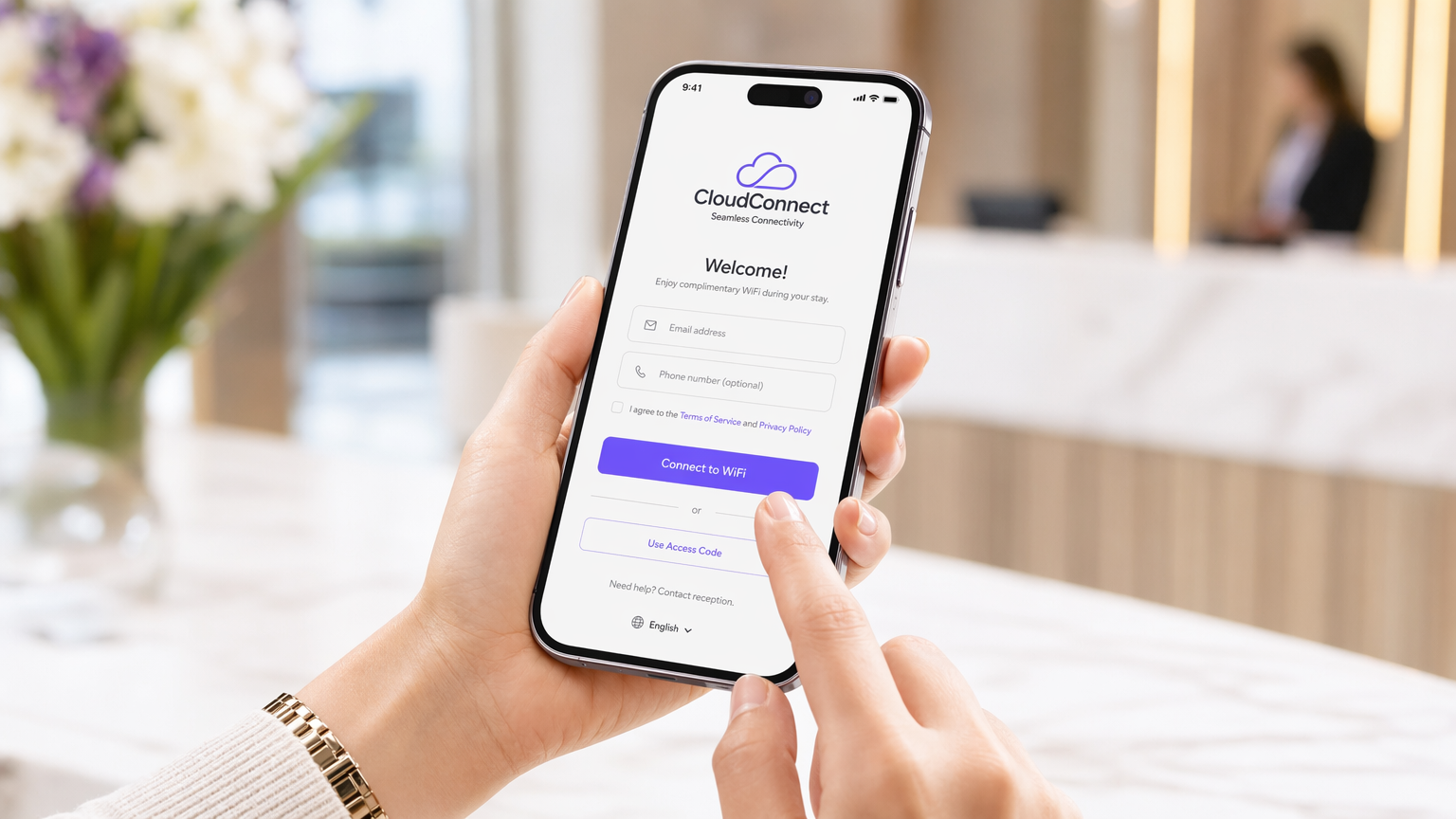
Para gestores de TI e arquitetos de rede que operam em escala, a distinção entre o controlo de acesso à rede e a apresentação ao utilizador é crítica. Uma página de boas-vindas WiFi é a camada de apresentação — a interface web interativa e com a marca apresentada aos utilizadores que se ligam a uma rede wireless de convidados. Embora frequentemente confundida com um Captive Portal (o mecanismo de rede subjacente que interceta o tráfego), a página de boas-vindas serve como a porta de entrada para a experiência do utilizador, gerindo a autenticação, a captura de dados e o consentimento de conformidade.
A implementação de uma página de boas-vindas eficaz exige um equilíbrio entre a mínima fricção para o utilizador e a máxima fidelidade e segurança dos dados para a empresa. Este guia detalha a arquitetura técnica das páginas de boas-vindas, as estratégias de implementação em ambientes complexos como hotelaria e retalho, e fornece uma estrutura para transformar uma necessidade operacional num ativo mensurável utilizando soluções como Guest WiFi .
Análise Técnica Aprofundada: Arquitetura e Normas
Para compreender uma página de boas-vindas, é preciso primeiro compreender a arquitetura do Captive Portal que a serve. O Captive Portal opera nas Camadas 2 e 3 do OSI. Quando um dispositivo se associa a um SSID de convidado, é tipicamente colocado numa VLAN de pré-autenticação. Neste estado, o controlador de acesso interceta as consultas DNS e os pedidos HTTP, executando um redirecionamento 302 para o URL da página de boas-vindas.
A própria página de boas-vindas opera na Camada 7. É a interface HTML, CSS e JavaScript que captura as credenciais ou o consentimento do utilizador. Os sistemas operativos modernos (iOS, Android, Windows) utilizam mecanismos integrados de Captive Portal Network Assistant (CNA) — como as consultas da Apple a captivenetwork.apple.com — para detetar este redirecionamento e exibir automaticamente a página de boas-vindas num pseudo-navegador.
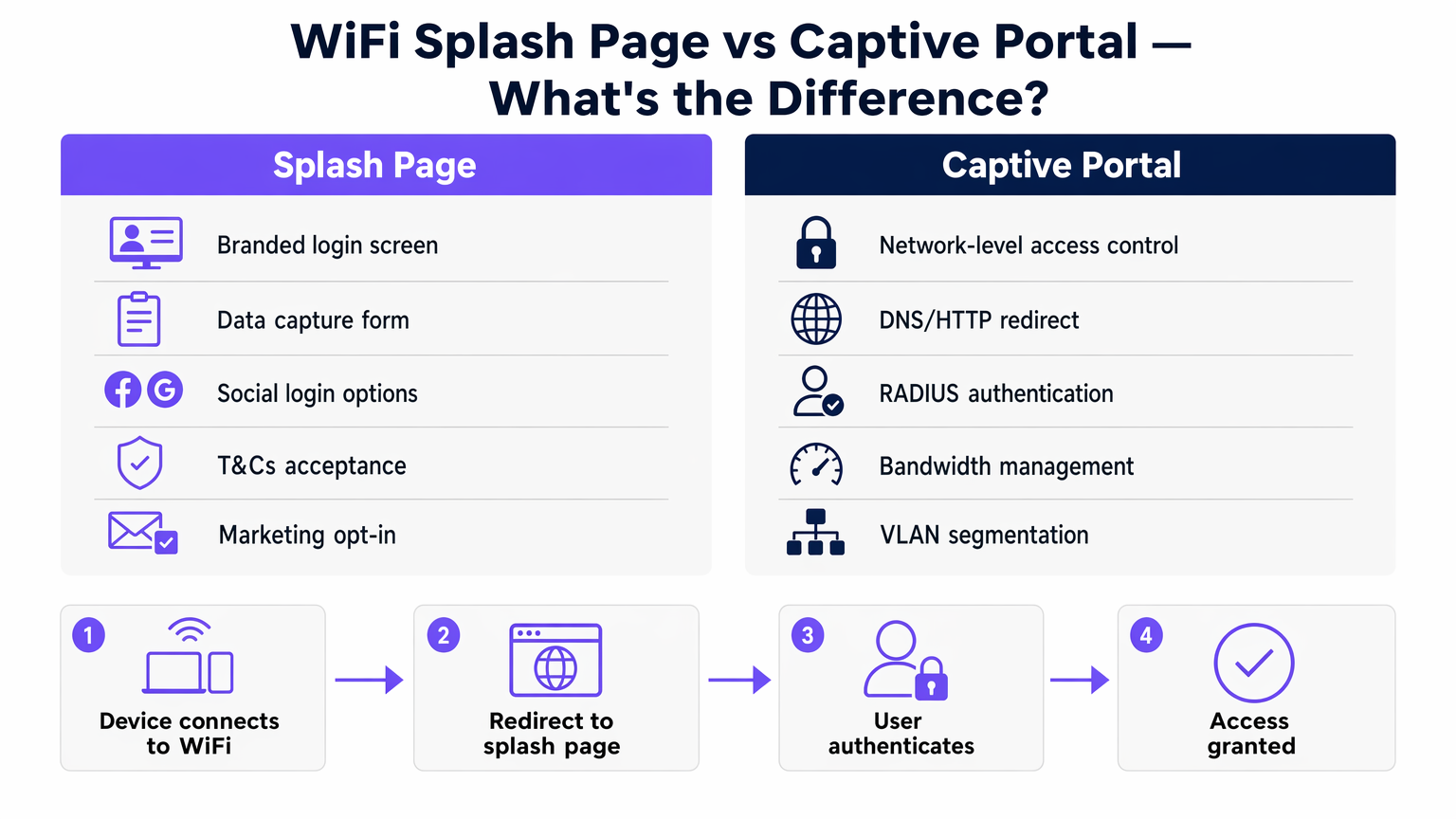
Assim que o utilizador completa o fluxo de autenticação na página de boas-vindas, o controlador do Captive Portal recebe uma mensagem de autorização API ou RADIUS (Remote Authentication Dial-In User Service). O controlador atualiza então as suas tabelas de estado, movendo o endereço MAC do dispositivo para um estado autorizado, muitas vezes transferindo o cliente para uma VLAN pós-autenticação com encaminhamento completo para a internet e aplicando políticas de largura de banda ou de tempo limite de sessão.
Mecanismos de Autenticação e 802.1X
Embora as páginas de boas-vindas simples dependam de redes abertas com autenticação baseada em MAC pós-registo, os ambientes empresariais procuram cada vez mais um onboarding seguro. O Passpoint (Hotspot 2.0) e a autenticação baseada em perfil aproveitam o 802.1X/EAP (Extensible Authentication Protocol) para fornecer ligações encriptadas. Nestes cenários, a página de boas-vindas pode servir como o portal de onboarding inicial onde um utilizador se regista e descarrega um perfil seguro, afastando-se dos SSIDs abertos legados. A Purple opera como um fornecedor de identidade gratuito para serviços como o OpenRoaming, preenchendo a lacuna entre o registo na página de boas-vindas e as ligações subsequentes seguras e sem interrupções.
Guia de Implementação
A implementação de uma página de boas-vindas numa empresa distribuída requer padronização. Quer esteja a equipar uma cadeia de Retalho ou um espaço de Hotelaria , a abordagem de implementação dita a sobrecarga operacional.
- Seleção da Arquitetura: Escolha entre controladores no local e soluções geridas na cloud. As arquiteturas baseadas na cloud — detalhadas no nosso guia sobre Portal Cativo Baseado na Cloud vs. No Local: Qual é o Certo para o Seu Negócio? — oferecem gestão centralizada de páginas de boas-vindas em vários fornecedores de AP, reduzindo a deriva de configuração.
- Configuração de Walled Garden: Certifique-se de que os endereços IP e domínios necessários para carregar a página de boas-vindas (incluindo CDNs, APIs de login social e servidores de autenticação) são explicitamente permitidos nas ACLs (Listas de Controlo de Acesso) de pré-autenticação. A falha na configuração correta do walled garden resulta numa página de boas-vindas que não carrega.
- Estratégia de Autenticação: Selecione métodos de autenticação que se alinhem com os objetivos de negócio. O login social (OAuth) e o registo baseado em formulário produzem dados de alta qualidade para Análise WiFi , enquanto um simples clique oferece alta taxa de transferência, mas zero captura de dados.
- Design Responsivo: Mais de 80% das ligações WiFi de convidados têm origem em dispositivos móveis. A página de boas-vindas deve ser altamente responsiva, utilizando cargas mínimas para garantir uma renderização rápida mesmo em ambientes RF de alta densidade e alta interferência.
Melhores Práticas e Conformidade
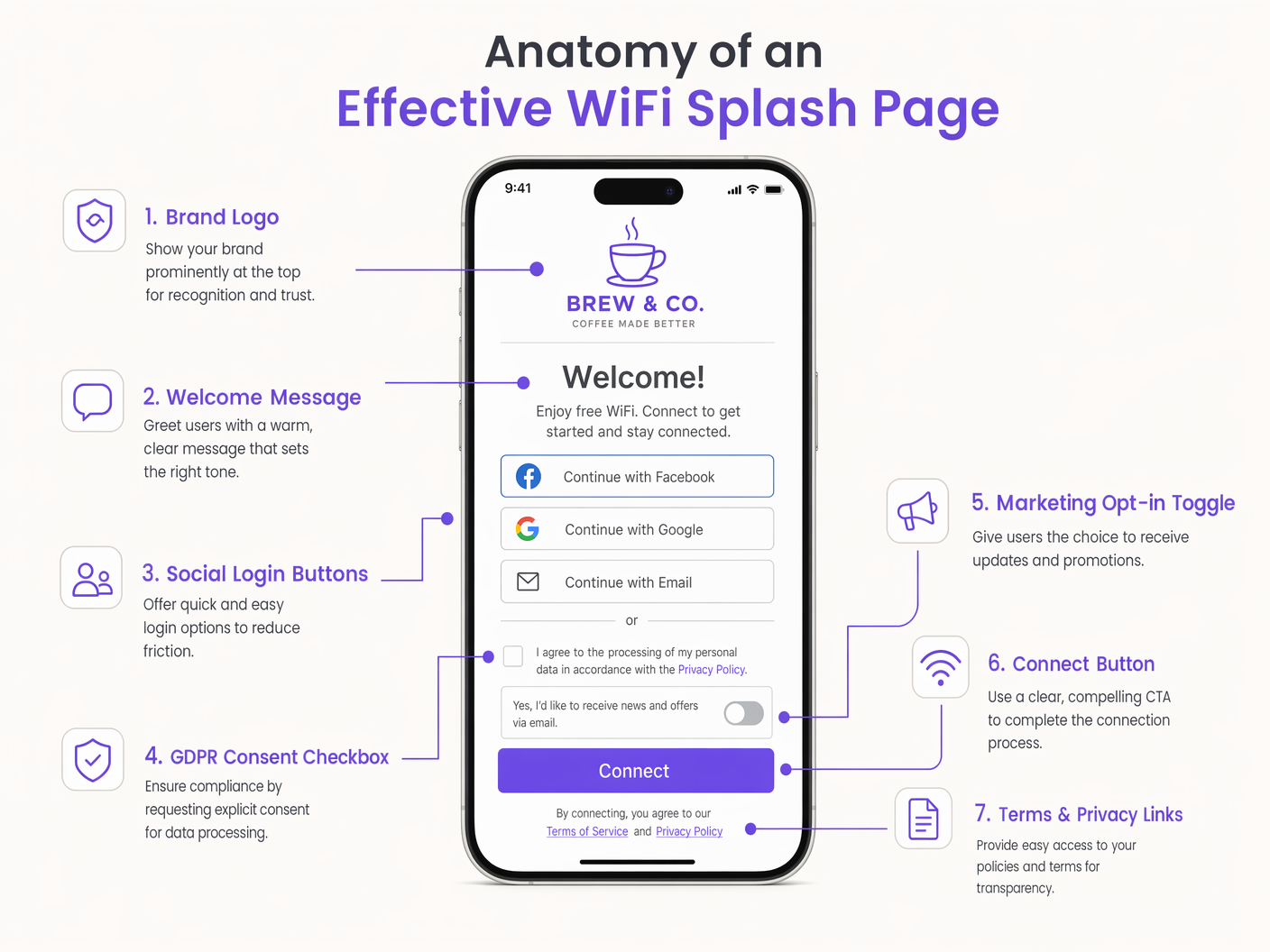
Uma página de boas-vindas é um ponto de controlo de conformidade primário. Operar em jurisdições regidas pelo GDPR ou CCPA exige estrita adesão aos padrões de privacidade de dados.
- Consentimento Explícito: As opções de marketing devem utilizar caixas de seleção desmarcadas. As caixas pré-selecionadas violam o Artigo 7 do GDPR.
- Minimização de Dados: Solicite apenas os dados necessários para o serviço ou para o marketing acordado.
- Âmbito do PCI DSS: Garanta que a rede WiFi de convidados está logicamente separada (através de VLANs e regras de firewall) da rede corporativa e dos sistemas de ponto de venda (POS) para evitar a expansão do âmbito nas auditorias de conformidade PCI.
- Acessibilidade: Garanta que a página de boas-vindas cumpre as normas WCAG (Web Content Accessibility Guidelines), utilizando rácios de contraste apropriados e semântica HTML amigável para leitores de ecrã.
Ouça o nosso briefing técnico sénior sobre a arquitetura da página de boas-vindas e estratégias de implementação:
Resolução de Problemas e Mitigação de Riscos
Mesmo implementações bem arquitetadas encontram problemas. Os modos de falha comuns incluem:
- Falhas na Interceção HTTPS: À medida que a web se move inteiramente para HTTPS, os captive portals legados que tentam intercetar tráfego HTTPS sem um certificado fidedigno irão desencadear avisos de segurança graves no navegador (erros HSTS). A mitigação consiste em depender dos mecanismos CNA ao nível do sistema operativo que utilizam HTTP para deteção, ou implementar um onboarding seguro via Passpoint.
- Latência na Resolução de DNS: Se o servidor DNS atribuído no estado de pré-autenticação for lento ou não responder, o redirecionamento inicial falhará. Garanta que são utilizados resolvedores DNS locais e altamente disponíveis para a rede de convidados.
- Aleatorização de MAC: Os sistemas operativos móveis modernos utilizam endereços MAC aleatórios para privacidade. Embora isto complique o rastreamento a longo prazo de utilizadores não autenticados, as splash pages que ligam sessões a perfis de utilizador autenticados (por exemplo, e-mail ou ID de CRM) mitigam o impacto na análise e gestão de sessões.
ROI e Impacto no Negócio
O impacto no negócio de uma implementação de splash page transforma as TI de um centro de custos num facilitador de receita. Ao capturar dados primários, a splash page alimenta diretamente os sistemas de marketing e operacionais.
Por exemplo, em centros de Transporte , a análise da splash page fornece métricas em tempo real de afluência e tempo de permanência. O retorno do investimento é medido não apenas na redução de tickets de suporte devido a uma experiência de conexão contínua, mas nos dados acionáveis gerados. A estratégia de efeito de rede — oferecer conectividade gratuita para impulsionar a aquisição de utilizadores — depende inteiramente da splash page como mecanismo de conversão. Uma splash page bem otimizada reduz o churn, permite a monetização de media de retalho e suporta integrações de fidelidade, entregando valor de negócio mensurável muito depois da conexão inicial.
Definições Principais
Splash Page
The web-based presentation layer presented to a user attempting to connect to a guest network, used for authentication, consent, and branding.
The primary user interface for guest WiFi, managed jointly by IT and marketing.
Captive Portal
The network-layer infrastructure that intercepts traffic and redirects unauthenticated users to the splash page.
The gatekeeper mechanism configured on access controllers or cloud platforms.
Walled Garden
A whitelist of IP addresses or domains that a user can access before completing authentication on the splash page.
Critical for allowing social logins and CDNs to function during the login process.
Captive Network Assistant (CNA)
The OS-level pseudo-browser that automatically detects a captive portal and pops up the splash page.
Reduces user friction by eliminating the need to manually open a browser to trigger the redirect.
RADIUS
Remote Authentication Dial-In User Service; a networking protocol that provides centralized Authentication, Authorization, and Accounting (AAA).
Used by the captive portal to validate credentials and apply network policies post-login.
MAC Randomization
A privacy feature in modern operating systems that generates a temporary MAC address for each wireless network.
Impacts the ability to track returning devices without requiring them to re-authenticate via the splash page.
VLAN Segmentation
The practice of logically dividing a physical network into multiple broadcast domains.
Essential for isolating guest WiFi traffic from corporate infrastructure for security and PCI compliance.
Passpoint (Hotspot 2.0)
A standard for seamless, secure authentication to public WiFi networks using 802.1X, bypassing the traditional open SSID splash page.
The evolution of guest WiFi, where the splash page serves as the initial provisioning portal rather than a daily login screen.
Exemplos Práticos
A 200-room hotel needs to deploy a guest WiFi solution that integrates with their property management system (PMS) to restrict bandwidth for non-guests while offering premium tiers for loyalty members.
- Deploy a cloud-managed captive portal integrated with the existing AP infrastructure via RADIUS.
- Configure the splash page to request Room Number and Guest Last Name.
- The captive portal queries the PMS API via a webhook to validate the credentials.
- Upon successful validation, the RADIUS server returns a vendor-specific attribute (VSA) applying a premium bandwidth policy profile to the user's session.
A large retail chain experiences a 40% drop-off rate on their guest WiFi splash page. They currently require a 6-field registration form including postal address.
- Redesign the splash page to utilize Social Login (Google, Apple) and a simplified 2-field email registration form.
- Implement progressive profiling: capture minimal data on the first visit, and prompt for additional details (like birth month for loyalty rewards) upon subsequent reconnections.
- Ensure the walled garden includes the necessary OAuth domains for social providers.
Perguntas de Prática
Q1. A venue reports that users connecting via Android devices are seeing the splash page, but users on iOS devices are getting a blank white screen. What is the most likely architectural configuration error?
Dica: Consider the specific domains that different operating systems use to detect captive portals.
Ver resposta modelo
The walled garden (pre-authentication ACL) is likely misconfigured. It is allowing the Android connectivity check domains but blocking Apple's CNA domains (e.g., captivenetwork.apple.com). The access controller must be updated to allow traffic to the specific domains Apple uses for captive portal detection.
Q2. The marketing team wants to add a Facebook login option to the existing splash page. From a network engineering perspective, what configuration change is required before this can function?
Dica: How does the device reach Facebook's servers before the user is fully authenticated?
Ver resposta modelo
The network engineer must update the walled garden to include Facebook's OAuth domains and CDNs. Without this, the device cannot reach Facebook to complete the authentication handshake while still in the restricted pre-authentication state.
Q3. During a compliance audit, it is discovered that the splash page includes a pre-ticked box stating 'I agree to receive marketing emails'. What is the immediate risk, and what is the remediation?
Dica: Consider GDPR Article 7 regarding consent.
Ver resposta modelo
The immediate risk is non-compliance with GDPR, which mandates that consent must be freely given and unambiguous. Pre-ticked boxes are legally invalid. The remediation is to immediately update the splash page HTML to ensure the marketing opt-in checkbox is unchecked by default, requiring an affirmative action from the user.
Continue a ler esta série
Captive Portal vs Splash Page
Este guia de referência analisa a distinção crítica entre captive portals e splash pages em redes WiFi de convidados. Clarifica como o mecanismo subjacente de interceção de rede funciona em conjunto com a interface visual do convidado, ajudando os líderes de TI e os operadores de espaços a tomar decisões informadas de arquitetura e aquisição.
Como Configurar um Hotspot WiFi para o Seu Negócio
Este guia autorizado fornece a líderes de TI, arquitetos de rede e diretores de operações de espaços um plano prático e neutro em relação a fornecedores para implementar hotspots WiFi para convidados seguros, conformes e que melhoram o negócio. Abrange decisões arquitetónicas críticas — desde a segmentação de VLAN e configuração de Captive Portal até à conformidade com o GDPR e modelagem de tráfego — e demonstra como transformar a infraestrutura de rede de um centro de custos numa plataforma de análise geradora de receita, utilizando as capacidades de Guest WiFi e análise da Purple.
Purple vs. Cisco Spaces (DNA Spaces): Quando Escolher Cada Um
Este guia de referência técnica fornece uma comparação abrangente entre Purple e Cisco Spaces (anteriormente DNA Spaces) para implementações de Captive Portal empresarial e WiFi para convidados. Avalia as diferenças arquitetónicas, a profundidade da automação de marketing e a questão crítica do bloqueio de fornecedor de hardware para ajudar os líderes de TI a tomar decisões informadas sobre infraestruturas.