
RadSec: Como o RADIUS over TLS Melhora a Segurança da Autenticação WiFi
Esta referência técnica autoritária explica como o RadSec (RFC 6614) protege a autenticação WiFi empresarial ao encapsular o tráfego RADIUS tradicional em encriptação TLS. Concebido para gestores de TI e arquitetos de rede, aborda a arquitetura, as estratégias de implementação e os passos práticos para mitigar os riscos do tráfego UDP RADIUS não encriptado em redes corporativas e de convidados.
Video overview
Ouça este guia
Ver transcrição do podcast
Parte da nossa série principal: Enterprise WiFi Security Guide →
Resumo Executivo
O RADIUS tradicional sobre UDP (portas 1812/1813) não foi concebido para o panorama moderno de ameaças empresariais. Ao depender exclusivamente de um segredo partilhado e de hashing MD5, deixa as credenciais de autenticação e os atributos de sessão vulneráveis a interceção, particularmente ao atravessar redes públicas ou grandes propriedades distribuídas, como cadeias de hotelaria e retalho. O RadSec (RADIUS sobre TLS, RFC 6614) resolve esta lacuna de segurança fundamental ao encapsular o tráfego RADIUS dentro de um túnel TLS 1.3 baseado em TCP através da porta 2083.
Para CTOs e arquitetos de rede, a implementação do RadSec já não é apenas uma boa prática - é um requisito crítico para proteger o WiFi corporativo, manter a conformidade PCI-DSS 4.0 e participar em estruturas modernas de roaming federado como o OpenRoaming. Este guia detalha a arquitetura, os padrões de implementação e os requisitos operacionais para proteger a sua infraestrutura de autenticação.
Análise Técnica Detalhada: RADIUS vs. RadSec
A Vulnerabilidade no RADIUS Tradicional
Numa implementação 802.1X padrão, o ponto de acesso (autenticador) encaminha as credenciais do cliente para o servidor RADIUS (servidor de autenticação). No RADIUS tradicional, este payload é enviado sobre UDP. A única proteção é uma chave pré-partilhada (PSK) utilizada para ofuscar a palavra-passe via MD5.
Esta arquitetura apresenta três riscos críticos:
- Ausência de Encriptação de Transporte: Os atributos do utilizador, endereços MAC e dados de sessão são transmitidos em texto simples.
- Fraqueza Criptográfica: O MD5 é vulnerável a ataques de dicionário offline se um atacante capturar o tráfego.
- Sem Autenticação Mútua: O ponto de acesso não consegue verificar criptograficamente se está a comunicar com o servidor RADIUS legítimo, permitindo ataques de servidores falsos.
A Arquitetura RadSec (RFC 6614)
O RadSec resolve estas falhas ao mudar a camada de transporte de UDP para TCP e ao envolver todo o payload em TLS.
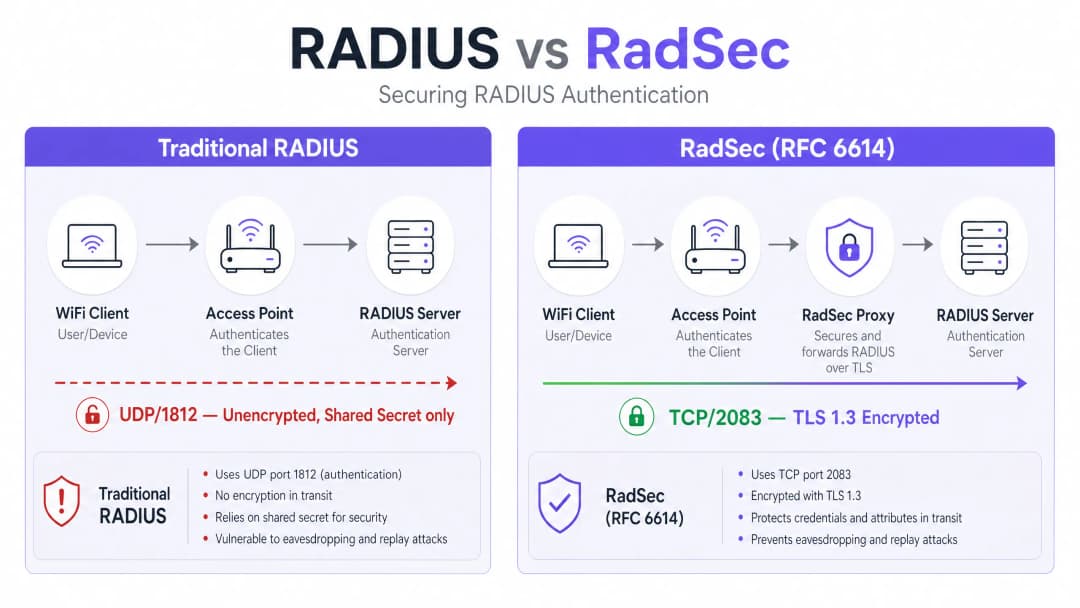
- Transporte: A porta TCP 2083 garante uma entrega fiável e ligações com estado (stateful), melhorando o desempenho em ambientes de elevada latência.
- Encriptação: O TLS 1.2 ou 1.3 fornece uma encriptação robusta e de ponta a ponta de todos os atributos RADIUS.
- Autenticação Mútua: Tanto o cliente RADIUS (ou proxy) como o servidor devem apresentar certificados X.509 válidos emitidos por uma Autoridade de Certificação (CA) fidedigna. O segredo partilhado é mantido apenas para compatibilidade retroativa; o TLS fornece a segurança real.Esta arquitetura é essencial para ambientes distribuídos, tais como cadeias de Retalho ou locais de Hotelaria, onde os pontos de acesso efetuam o backhaul dos pedidos de autenticação através da internet pública para um servidor RADIUS central ou alojado na nuvem.
Tem dúvidas sobre a sua configuração específica?
A nossa equipa trabalha com operadores de espaços, gestores de TI e engenheiros de rede em 80.000 espaços. Agende uma chamada de 20 minutos e mostraremos como outros profissionais na sua área o resolveram.
Guia de Implementação
A implementação do RadSec segue tipicamente um de dois padrões: Suporte Nativo ou Baseado em Proxy.
Padrão 1: RadSec Nativo
Se a sua infraestrutura o suportar nativamente (por exemplo, FreeRADIUS 3.0+, Cisco ISE, Aruba ClearPass), configura os certificados TLS diretamente no servidor RADIUS e nos pontos de acesso/controladores. Isto proporciona uma verdadeira encriptação de ponta a ponta, desde a periferia até ao núcleo.
Padrão 2: O Proxy RadSec
Muitos servidores RADIUS legados (nomeadamente o Microsoft NPS) não suportam nativamente o RadSec. Nestes ambientes, é implementado um proxy (como o radsecproxy).
- Etapa Local: O AP envia RADIUS UDP padrão para o proxy local.
- Etapa WAN: O proxy encapsula o tráfego em TLS e envia-o através de TCP 2083 para o servidor upstream.
Este padrão permite-lhe proteger o tráfego de rede de área alargada sem substituir a infraestrutura legada.
Integração com a Purple
As plataformas de Guest WiFi e WiFi Analytics da Purple integram-se perfeitamente com a infraestrutura RADIUS empresarial. Sob a licença Connect, a Purple atua como um fornecedor de identidade gratuito para o OpenRoaming, onde o RadSec é um requisito obrigatório para proteger o tráfego de federação entre os locais e o hub central.
Melhores Práticas
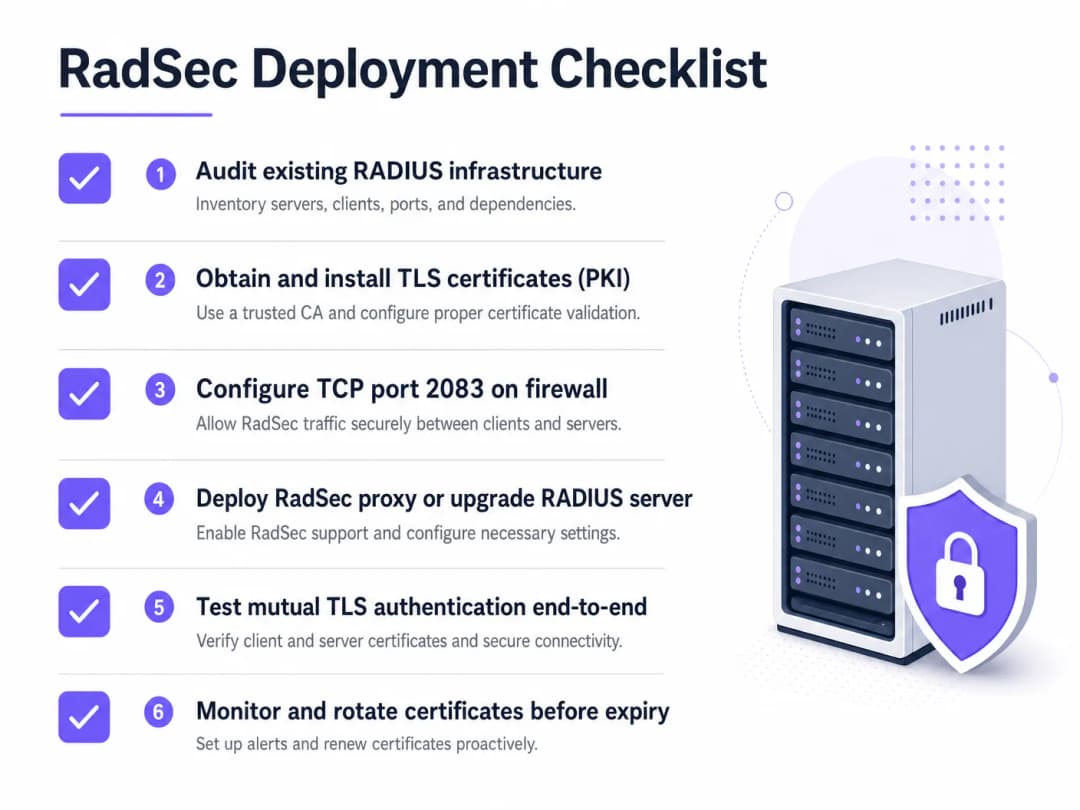
- Gestão do Ciclo de Vida dos Certificados: O TLS mútuo depende de certificados válidos. Implemente a renovação automatizada (por exemplo, via ACME) e uma monitorização rigorosa. Um certificado expirado causará uma interrupção total da autenticação.
- Configuração da Firewall: Certifique-se de que a porta TCP 2083 está explicitamente permitida tanto de saída do local como de entrada no servidor RADIUS. Não assuma que as regras existentes para UDP 1812 se aplicarão.
- Priorizar Tráfego de Alto Risco: Inicie a implementação em ligações que atravessem a internet pública ou WANs não confiáveis antes de avançar para as VLAN de gestão local.
Para saber mais sobre como proteger a periferia, leia o nosso guia sobre Segurança de Pontos de Acesso: O seu Guia Empresarial para 2026.
Resolução de Problemas e Mitigação de Riscos
Quando o RadSec falha, raramente é um problema de autenticação; é quase sempre um problema de TLS ou TCP.
- Sintoma: Os pontos de acesso aparecem como desligados do servidor RADIUS.
- Verificação: Regras de firewall para TCP 2083. O RADIUS tradicional utiliza UDP; as equipas de rede esquecem-se frequentemente de abrir a porta TCP.
- Sintoma: A ligação TCP é estabelecida, mas a autenticação falha imediatamente.
- Verificação: Validação de certificados. Verifique se o Common Name (CN) ou o Subject Alternative Name (SAN) coincidem, se o certificado não expirou e se o cliente confia na CA de assinatura. Utilize
openssl s_client -connect <server>:2083para depurar o handshake.
- Verificação: Validação de certificados. Verifique se o Common Name (CN) ou o Subject Alternative Name (SAN) coincidem, se o certificado não expirou e se o cliente confia na CA de assinatura. Utilize
Garanta que os fundamentos da sua rede são sólidos. Reveja os nossos conselhos em Proteja a Sua Rede com DNS Forte e Segurança.
ROI e Impacto no Negócio
A implementação do RadSec é um investimento na mitigação de riscos. O ROI é medido na prevenção de violações de dados, multas de conformidade (PCI-DSS, GDPR) e danos à reputação. Além disso, permite a participação em federações de roaming modernas como o OpenRoaming, o que pode melhorar significativamente a experiência dos visitantes em ambientes de Saúde e Transportes.
Ouça o Briefing
Para aprofundar a sua compreensão sobre as realidades operacionais da implementação do RadSec, ouça o nosso briefing técnico de 10 minutos:
Para obter passos de configuração específicos em dispositivos clientes, consulte Como Configurar WiFi Corporativo em iOS e macOS com 802.1X ou a versão em português Como Configurar WiFi Corporativo em iOS e macOS com 802.1X.
Definições Principais
RadSec
Uma extensão ao protocolo RADIUS que encapsula o tráfego RADIUS num túnel TLS através da porta TCP 2083.
Utilizado para proteger o tráfego de autenticação ao atravessar redes não confiáveis, impedindo a interceção de credenciais.
TLS Mútuo (mTLS)
Um processo de segurança em que tanto o cliente como o servidor apresentam certificados X.509 para verificar a identidade mútua antes de estabelecer uma ligação encriptada.
O mecanismo de autenticação central do RadSec, substituindo a dependência de segredos partilhados estáticos.
802.1X
O padrão IEEE para controlo de acesso à rede baseado em porta, utilizado para autenticar dispositivos que tentam ligar-se a uma LAN ou WLAN.
A estrutura que depende do RADIUS (e, por extensão, do RadSec) para validar as credenciais do utilizador num diretório.
radsecproxy
Um daemon de código aberto que funciona como proxy, convertendo o tráfego padrão UDP RADIUS em RadSec (TLS sobre TCP) e vice-versa.
Implementado quando o suporte nativo a RadSec está em falta nos pontos de acesso ou em servidores RADIUS legados como o Microsoft NPS.
OpenRoaming
Um padrão de federação desenvolvido pela WiFi Alliance que permite aos utilizadores ligarem-se de forma contínua e segura a redes WiFi participantes em todo o mundo.
O OpenRoaming exige a utilização de RadSec para proteger o tráfego de autenticação entre locais e fornecedores de identidade.
Segredo Partilhado
Uma string de texto estática utilizada no RADIUS tradicional para ofuscar palavras-passe e verificar a origem dos pedidos.
Embora ainda esteja tecnicamente presente nas configurações de RadSec para compatibilidade com versões anteriores, é substituído pela encriptação TLS.
FreeRADIUS
Um servidor RADIUS de código aberto amplamente implementado que fornece suporte nativo para RadSec.
Frequentemente utilizado em ambientes empresariais e federações de roaming devido à sua flexibilidade e capacidades nativas de TLS.
PKI (Infraestrutura de Chaves Públicas)
A infraestrutura de funções, políticas e software necessária para criar, gerir, distribuir e revogar certificados digitais.
Um pré-requisito para a implementação de RadSec, uma vez que deve emitir e gerir certificados para todos os clientes e servidores RADIUS.
Exemplos Práticos
Um grupo hoteleiro com 200 propriedades utiliza o Microsoft NPS centralmente para a autenticação dos funcionários. Os pontos de acesso em cada hotel enviam atualmente pedidos RADIUS pela internet pública através de UDP 1812. O CTO exige a encriptação de todo o tráfego de autenticação, mas a substituição do NPS não é uma opção para este ano.
Implemente um proxy RadSec (por exemplo, radsecproxy) em cada hotel e um proxy correspondente no datacenter central à frente dos servidores NPS. Os APs locais enviam UDP RADIUS para o proxy local. O proxy local estabelece um túnel TLS mútuo sobre TCP 2083 através da internet para o proxy central. O proxy central termina o túnel TLS e encaminha o UDP RADIUS padrão para o servidor NPS.
Uma grande universidade está a implementar o OpenRoaming em todo o seu campus para permitir o acesso contínuo a académicos visitantes. Estão a executar o FreeRADIUS 3.0.
Ative o RadSec nativo no FreeRADIUS. Gere certificados X.509 a partir de uma CA confiada pela federação OpenRoaming. Configure o firewall do campus para permitir o tráfego TCP 2083 de entrada e saída para os hubs da federação. Configure os controladores de LAN sem fios para utilizar RadSec em todos os pedidos de autenticação destinados à federação.
Perguntas de Prática
Q1. A sua equipa implementou RadSec nativo entre os pontos de acesso das suas filiais remotas e o seu servidor FreeRADIUS central. Os APs conseguem efetuar ping ao servidor, mas os pedidos de autenticação estão a expirar por completo e nenhum tráfego está a chegar aos registos do RADIUS.
Dica: O RadSec utiliza um protocolo de transporte e uma porta diferentes do RADIUS tradicional.
Ver resposta modelo
A firewall está provavelmente a bloquear a porta TCP 2083. As equipas de rede habituadas ao RADIUS tradicional muitas vezes apenas permitem as portas UDP 1812/1813. Deve permitir explicitamente a porta TCP 2083 de saída da filial e de entrada no servidor RADIUS.
Q2. Está a auditar a arquitetura de WiFi de um cliente de retalho. Eles utilizam o Microsoft NPS centralmente. Os APs das lojas enviam pedidos de autenticação através da internet através de uma VPN IPsec. O RadSec é necessário neste caso?
Dica: Considere as camadas de encriptação que já se encontram ativas.
Ver resposta modelo
Embora o RadSec seja uma boa prática, a VPN IPsec já está a fornecer encriptação na camada de transporte para o tráfego UDP RADIUS através da internet não fidedigna. Implementar RadSec neste cenário forneceria defesa em profundidade, mas é menos urgente do que se o tráfego estivesse a atravessar a internet de forma nativa.
Q3. Uma semana após uma implementação bem-sucedida de um proxy RadSec, todas as autenticações de WiFi em toda a empresa falham simultaneamente às 09:00 de uma segunda-feira. A equipa de rede confirma que as regras de firewall não foram alteradas.
Dica: Qual é o mecanismo de autenticação principal para o próprio túnel TLS?
Ver resposta modelo
Os certificados X.509 utilizados para autenticação TLS mútua provavelmente expiraram. Quando os certificados expiram, o handshake TLS falha, a ligação TCP cai e o tráfego RADIUS não consegue fluir. Implemente a monitorização e rotação automatizadas de certificados para evitar esta situação.
Continue a ler esta série
Como Segmentar Redes WiFi de Colaboradores e de Convidados com Segurança: Melhores Práticas para LANs Empresariais
Este guia fornece aos gestores de TI e arquitetos de rede um modelo técnico e neutro em termos de fornecedor para proteger LANs empresariais através da segmentação correta do tráfego WiFi de colaboradores e convidados. Abrange a autenticação 802.1X, RADIUS na nuvem, isolamento de VLAN e a gestão do ciclo de vida das credenciais necessária para eliminar palavras-passe partilhadas e proteger os ativos corporativos.
Melhor filtragem DNS: um guia completo para empresas
Este guia de referência técnica explica como a filtragem DNS empresarial protege as redes públicas bloqueando domínios maliciosos na camada de resolução - antes de uma ligação ser estabelecida. Oferece aos diretores de TI, arquitetos de rede e equipas de operações de locais a arquitetura de implementação, configuração de firewall e contexto de conformidade necessários para proteger o Guest WiFi em ambientes de hotelaria, retalho e setor público. O Purple Shield bloqueia malware, botnets e conteúdos inadequados ao nível do DNS em mais de 80.000 locais ativos.
Compreender o Cisco SUDI: Identidade Ancorada em Hardware no Controlo de Acesso Seguro à Rede
Este guia explica como o Cisco SUDI fornece uma identidade criptograficamente segura e ancorada em hardware para a infraestrutura de rede empresarial. Saiba como substituir endereços MAC clonáveis por certificados 802.1AR imutáveis para proteger o controlo de acesso à rede do seu espaço.
Tem dúvidas sobre a sua configuração específica?
A nossa equipa trabalha com operadores de espaços, gestores de TI e engenheiros de rede em 80.000 espaços. Agende uma chamada de 20 minutos e mostraremos como outros profissionais na sua área o resolveram.