

Wi-Fi 7 (802.11be) Explicado: O Que Muda para o WiFi Empresarial
Este guia fornece uma referência técnica definitiva sobre Wi-Fi 7 (IEEE 802.11be) para gestores de TI, arquitetos de rede e CTOs que planeiam atualizações de infraestrutura em 2026–2027. Abrange os quatro avanços arquitetónicos principais — Multi-Link Operation (MLO), canais de 320 MHz, modulação 4K-QAM e Multi-RU — com uma comparação clara com o Wi-Fi 6E, cenários de implementação reais em hotelaria e retalho, e uma avaliação franca das atualizações de hardware e switching necessárias. A Purple é agnóstica em relação ao hardware e suporta qualquer implementação de Wi-Fi 7, tornando este guia um ponto de entrada natural para equipas que avaliam o seu stack de guest WiFi e analytics juntamente com uma atualização de AP.
🎧 Ouça este Guia
Ver Transcrição

Resumo Executivo
O Wi-Fi 7 (IEEE 802.11be) não é uma atualização incremental. É a primeira reformulação fundamental da arquitetura de acesso ao meio sem fios desde que o OFDMA foi introduzido no Wi-Fi 6. As quatro principais mudanças — Multi-Link Operation (MLO), larguras de canal de 320 MHz, modulação 4K-QAM e alocação de Multi-Resource Unit (Multi-RU) — combinam-se para fornecer um débito teórico máximo de 46 Gbps, quase cinco vezes o do Wi-Fi 6E. Mais importante para os operadores empresariais, estas fornecem conectividade determinística e de baixa latência que torna o desempenho sem fios comparável ao Ethernet com fios em ambientes de alta densidade.
Para as equipas de rede que planeiam uma atualização de AP em 2026–2027, a decisão principal é binária: investir em Wi-Fi 6E como um passo de transição, ou esperar e implementar Wi-Fi 7 diretamente. A evidência favorece fortemente a última opção. O Wi-Fi 6E introduziu o espectro de 6 GHz, mas manteve a arquitetura de ligação única do 802.11ax. O MLO do Wi-Fi 7 torna essa limitação arquitetónica obsoleta. O hardware Wi-Fi 6E existente não pode ser atualizado para Wi-Fi 7 via firmware — são necessários novos APs. O planeamento orçamental também deve ter em conta orçamentos de energia PoE mais elevados (802.3bt/PoE++) e uplinks Ethernet de 10 Gigabit na extremidade. A plataforma da Purple é totalmente agnóstica em relação ao hardware e integra-se com qualquer implementação de Wi-Fi 7, garantindo que as suas capacidades de Guest WiFi e WiFi Analytics escalam juntamente com a sua nova infraestrutura.
Análise Técnica Detalhada
Os Quatro Pilares do Wi-Fi 7
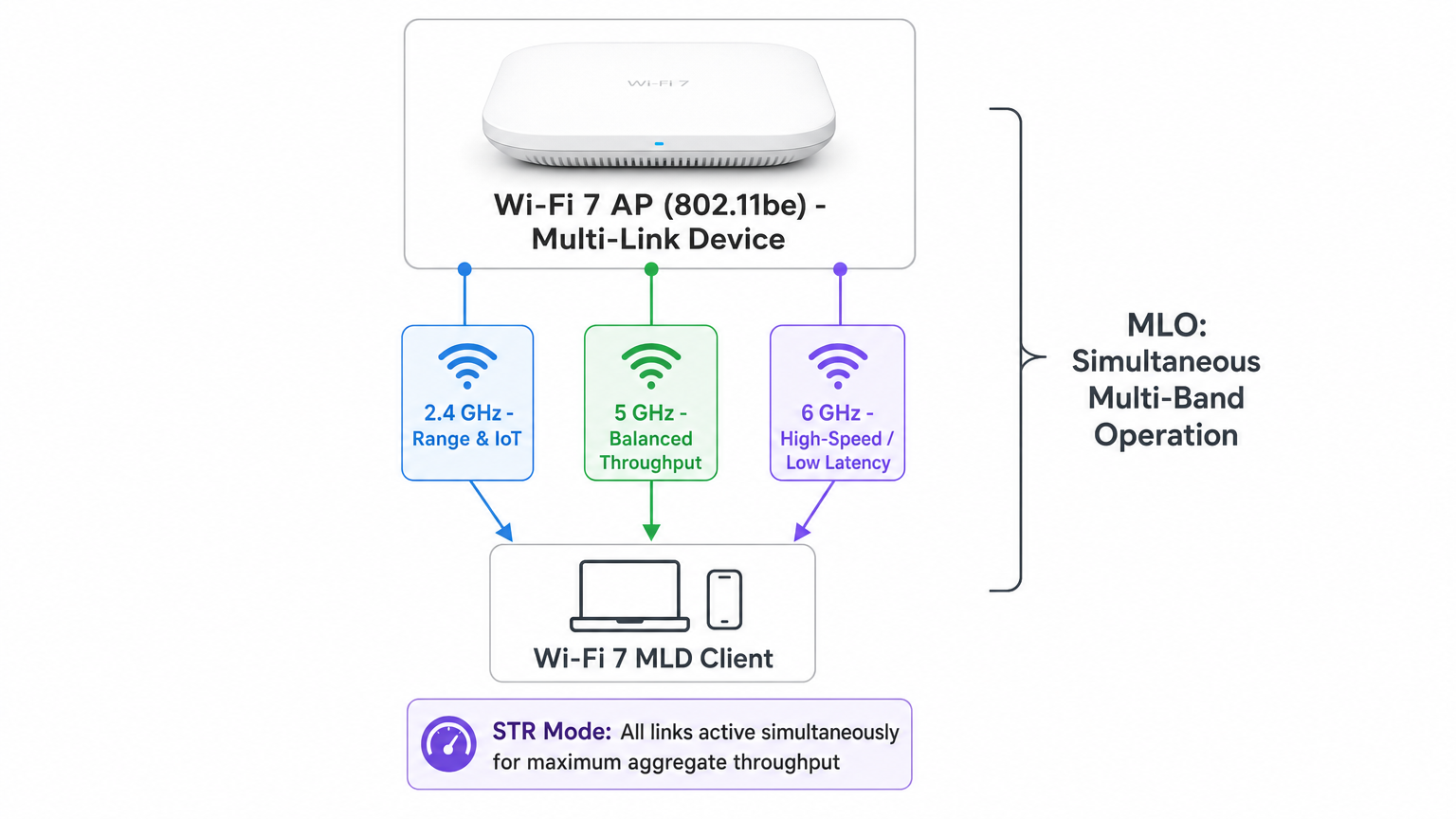
Multi-Link Operation (MLO) é a mudança arquitetónica definidora no 802.11be. Em todas as gerações anteriores de Wi-Fi, um dispositivo cliente mantinha uma única associação a uma única banda a qualquer momento. A direção de banda e o roaming eram processos reativos, impulsionados pelo cliente, que introduziam latência e quedas de conexão. O MLO muda fundamentalmente este modelo. Um Dispositivo Multi-Link (MLD) Wi-Fi 7 — tanto o ponto de acesso quanto o cliente — pode estabelecer associações simultâneas nas bandas de 2.4 GHz, 5 GHz e 6 GHz. A pilha de rede trata estas como uma única ligação lógica, permitindo a direção de tráfego em tempo real, balanceamento de carga e failover entre bandas sem qualquer interrupção visível para o cliente.
O MLO opera em vários modos. STR (Simultaneous Transmit and Receive) é o modo mais capaz e mais amplamente implementado, permitindo operações Tx e Rx concorrentes em várias bandas sem restrições de sincronização. Num teste de laboratório da Cisco usando o modo STR, o Wi-Fi 7 entregou um débito agregado de 747 Mbps versus 506 Mbps para o Wi-Fi 6 sob condições idênticas — uma melhoria de 47 por cento. eMLSR (Enhanced Multi-Link Single Radio) usa um único rádio que alterna rapidamente entre ligações, oferecendo um caminho económico para dispositivos cliente que não podem suportar hardware STR completo. MLSR (Multi-Link Single Radio) é a linha de base obrigatória que todos os MLDs devem suportar.
Larguras de Canal de 320 MHz representam o dobro da largura máxima de canal disponível no Wi-Fi 6E (160 MHz). Estes canais mais largos estão disponíveis apenas na banda de 6 GHz, onde existe espectro contíguo suficiente. Na banda de 5 GHz, as restrições regulamentares e as implementações existentes limitam as larguras de canal práticas a 80 ou 160 MHz. A banda de 6 GHz no Reino Unido e na UE fornece 500 MHz de espectro, permitindo até dois canais de 320 MHz não sobrepostos. Para implementações empresariais em ambientes urbanos densos, o planeamento de canais a 320 MHz requer um trabalho cuidadoso de levantamento de RF para evitar interferências de co-canal, mas os ganhos de débito em ambientes de baixa interferência são substanciais.
4K-QAM (4096-QAM) atualiza a densidade de modulação do 1024-QAM usado no Wi-Fi 6 e 6E. A modulação QAM codifica dados variando a amplitude e a fase do sinal da portadora; ordens QAM mais altas embalam mais bits em cada símbolo. A passagem de 1024-QAM (10 bits por símbolo) para 4096-QAM (12 bits por símbolo) proporciona um aumento de 20 por cento na taxa de dados de pico em condições de sinal ideais. A ressalva prática é que o 4K-QAM requer um sinal forte e limpo — é mais eficaz a curto e médio alcance com bom SNR. Em ambientes de RF ruidosos ou congestionados, o ponto de acesso reverterá automaticamente para ordens QAM mais baixas.
Multi-RU (Multiple Resource Units) aborda um dos problemas mais persistentes em implementações empresariais densas: interferência parcial de canal. No Wi-Fi 6, o OFDMA dividiu o canal em Resource Units (RUs) fixas atribuídas a clientes individuais. Se uma parte do canal fosse bloqueada por interferência, toda a RU afetada ficava inutilizável. O Multi-RU do Wi-Fi 7 permite que um único cliente receba múltiplas RUs não contíguas dentro da mesma oportunidade de transmissão (TXOP), e introduz o Preamble Puncturing, que permite ao AP marcar dinamicamente os subcanais interferidos como indisponíveis e encaminhar o tráfego à sua volta. Isto é particularmente valioso em ambientes de retalho e hotelaria onde a banda de 5 GHz é frequentemente congestionada por redes vizinhas.
Wi-Fi 7 vs Wi-Fi 6E: O Caso Arquitetónico
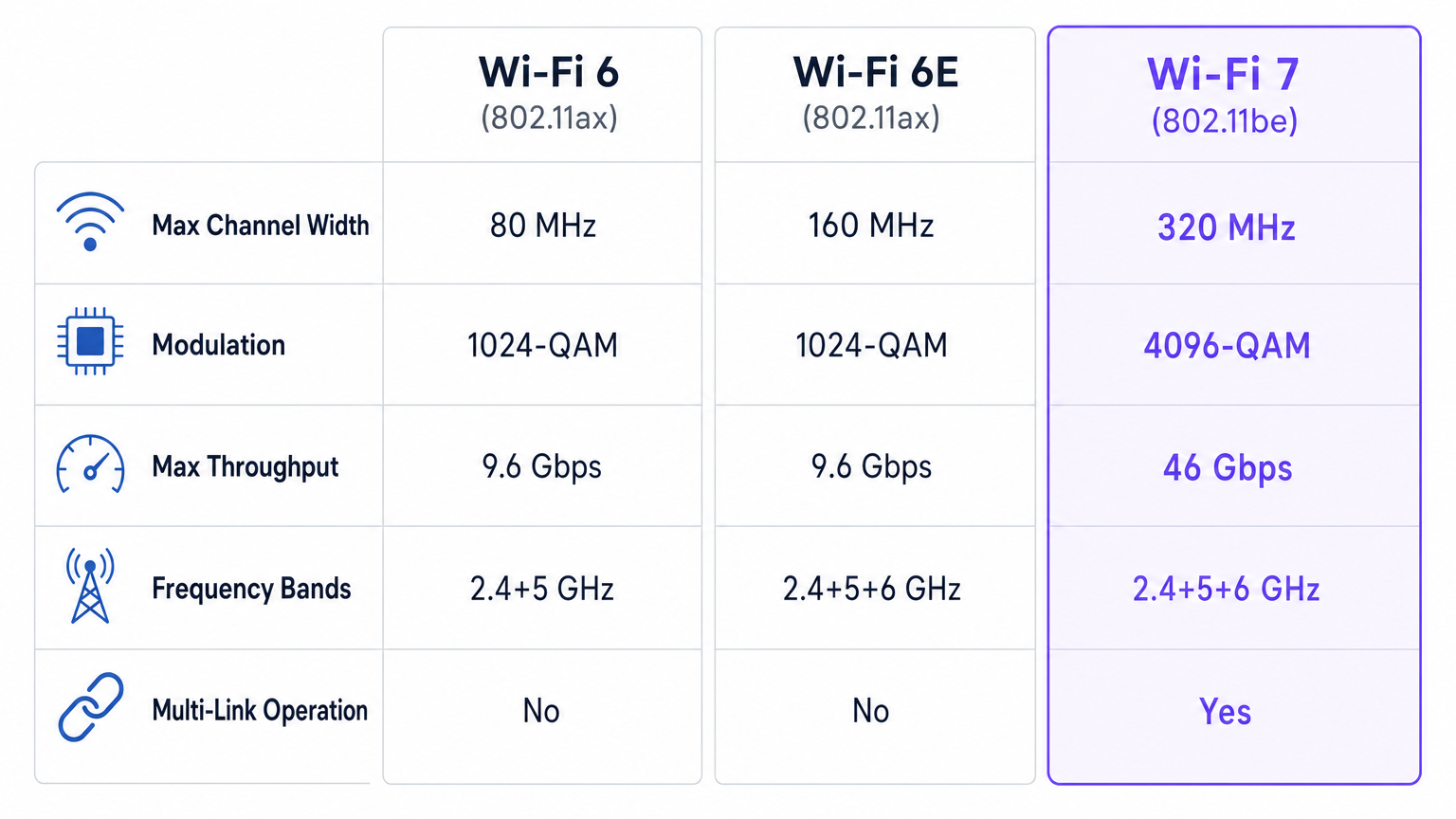
A questão de implementar Wi-Fi 6E ou esperar pelo Wi-Fi 7 tem sido debatida pela indústria desde 2023. A resposta, para a maioria dos operadores empresariais que planeiam uma atualização em 2026–2027, é clara: ignorar o 6E. O Wi-Fi 6E adicionou a banda de 6 GHz, mas manteve a arquitetura de ligação única 802.11ax. Ofereceu mais espectro, mas nenhuma melhoria na forma como esse espectro é gerido. O MLO do Wi-Fi 7, em contraste, muda a relação fundamental entre o cliente e a rede. O espectro de 6 GHz que o Wi-Fi 6E introduziu ainda é totalmente utilizado pelo Wi-Fi 7 — mas agora como um dos três links simultâneos, em vez da única opção.
| Funcionalidade | Wi-Fi 6 (802.11ax) | Wi-Fi 6E (802.11ax) | Wi-Fi 7 (802.11be) |
|---|---|---|---|
| Largura Máxima do Canal | 80 MHz | 160 MHz | 320 MHz |
| Modulação | 1024-QAM | 1024-QAM | 4096-QAM |
| Débito Máximo | 9.6 Gbps | 9.6 Gbps | 46 Gbps |
| Bandas de Frequência | 2.4 + 5 GHz | 2.4 + 5 + 6 GHz | 2.4 + 5 + 6 GHz |
| Operação Multi-Link | Não | Não | Sim |
| Preamble Puncturing | Não | Não | Sim |
| Multi-RU | Não | Não | Sim |
| Fluxos Espaciais | Até 8 | Até 8 | Até 16 |
Para ambientes de saúde onde a fiabilidade da rede é crítica para a segurança, ou centros de transporte onde milhares de sessões simultâneas devem ser geridas, os benefícios de fiabilidade do MLO por si só justificam o investimento em Wi-Fi 7 em detrimento do 6E.
Guia de Implementação
Fase 1: Avaliação da Prontidão da Infraestrutura
Antes de adquirir um único AP Wi-Fi 7, realize uma auditoria completa da infraestrutura. A falha de implementação mais comum não é a camada sem fios — é a infraestrutura com fios subjacente. Os APs Wi-Fi 7 a operar com MLO em três bandas e canais de 320 MHz podem gerar um débito agregado que saturará um uplink de 1 Gigabit sob carga moderada. O uplink mínimo recomendado é 10 Gigabit Ethernet (10GbE) por AP em zonas de alta densidade. Verifique se os seus switches de edge suportam portas 10GbE e se a sua estrutura de switching central consegue lidar com a carga agregada.
O orçamento de PoE é a segunda restrição crítica. Os APs Wi-Fi 7 com rádios tri-banda e capacidade MLO tipicamente requerem 30–60 watts por AP, em comparação com 15–25 watts para um AP Wi-Fi 6 típico. Isto requer switches IEEE 802.3bt (PoE++), que fornecem até 90 watts por porta. Audite a sua infraestrutura PoE existente e orçamente para atualizações de switches onde necessário.
Fase 2: Levantamento de RF e Planeamento de Canais
Realize um levantamento de RF preditivo utilizando as ferramentas de planeamento do seu fornecedor escolhido antes de qualquer instalação física. Para Wi-Fi 7, o levantamento deve ter em conta as três bandas simultaneamente, com atenção particular às características de propagação de 6 GHz. A banda de 6 GHz tem um alcance mais curto do que a de 5 GHz devido a uma maior perda de percurso em espaço livre, o que significa que a densidade de APs pode precisar de aumentar em grandes espaços abertos. Para implementações de canais de 320 MHz, identifique os canais não sobrepostos disponíveis no seu domínio regulatório e planeie a mitigação de interferências co-canal.
Em ambientes de hotelaria , como hotéis, a recomendação padrão é um AP por dois a três quartos de hóspedes para Wi-Fi 6. Para Wi-Fi 7 com MLO, a mesma densidade é apropriada, mas o plano de canais deve ser revisto para maximizar a utilização de 6 GHz em corredores e áreas comuns onde a densidade de dispositivos é mais alta.
Fase 3: Arquitetura de Segurança
O Wi-Fi 7 exige WPA3 como padrão mínimo de segurança. Para implementações empresariais, implemente WPA3-Enterprise com autenticação IEEE 802.1X utilizando certificados EAP-TLS ou PEAP-MSCHAPv2. A segmentação da rede é crítica: separe o tráfego de convidados, dispositivos corporativos e endpoints IoT em VLANs distintas com políticas de firewall apropriadas entre eles.
Para implementações de guest WiFi — hotéis, retalho, centros de conferências, locais do setor público — uma solução de captive portal compatível é essencial. A plataforma Guest WiFi da Purple lida com a captura de dados em conformidade com o GDPR, gestão de consentimento de marketing e segmentação de rede alinhada com PCI DSS de forma nativa, integrando-se com qualquer fornecedor de AP Wi-Fi 7. Isto remove o ónus de conformidade da equipa de rede e garante que os dados capturados através da sua nova rede de alto desempenho são acionáveis através da plataforma WiFi Analytics da Purple.
Fase 4: Implementação Faseada
Não tente uma implementação Wi-Fi 7 de campus completo numa única fase. Comece com zonas de alta densidade ou de missão crítica onde o ROI é mais imediato: salas de conferências, lobbies, pisos de negociação, concourses de estádios ou caixas de retalho. Valide o desempenho, refine os planos de canais e construa familiaridade operacional antes de expandir. Uma abordagem faseada também permite que o ecossistema de dispositivos cliente amadureça — a adoção de clientes Wi-Fi 7 está a acelerar rapidamente, com a maioria dos smartphones e laptops emblemáticos a serem enviados com chipsets Wi-Fi 7 a partir de 2024.
Melhores Práticas
As implementações empresariais de Wi-Fi 7 que cumprem as suas promessas de desempenho partilham várias características comuns. Primeiro, tratam a infraestrutura com fios como uma preocupação de primeira classe, não como um pormenor. A camada sem fios só pode ter um desempenho tão bom quanto a infraestrutura de switching e uplink subjacente. Segundo, impõem WPA3 e IEEE 802.1X desde o primeiro dia, em vez de adaptar a segurança a uma rede já implementada. Terceiro, segmentam o tráfego agressivamente — o tráfego de convidados, corporativo e IoT nunca deve partilhar a mesma VLAN ou SSID.
Para ambientes com muitos dispositivos IoT, o MLO do Wi-Fi 7 fornece um mecanismo de segmentação natural: os dispositivos IoT podem ser fixados à banda de 2.4 GHz para alcance e eficiência energética, enquanto os dispositivos corporativos aproveitam as bandas de 5 GHz e 6 GHz via MLO. Isto é diretamente relevante para os padrões arquitetónicos descritos no guia Internet of Things Architecture da Purple, onde a segmentação da rede e a gestão de bandas são identificadas como princípios de design críticos.
Para locais que implementam sistemas de posicionamento interior , as capacidades melhoradas de temporização e alcance do Wi-Fi 7 — ativadas pelas larguras de canal mais amplas e agendamento OFDMA mais preciso — melhoram a precisão dos serviços de localização baseados em Wi-Fi. Isto é particularmente relevante para grandes ambientes de retalho e centros de transporte onde a orientação e o rastreamento de ativos são prioridades operacionais.
Resolução de Problemas e Mitigação de Riscos
Os modos de falha mais comuns nas implementações de Wi-Fi 7 são previsíveis e evitáveis. Estrangulamentos no backhaul são a principal causa de baixo desempenho: um AP que oferece um débito sem fios agregado de 2+ Gbps, ligado através de um uplink de 1 Gbps, atingirá o seu limite imediatamente sob carga. Verifique a capacidade do uplink antes da implementação. Esgotamento do orçamento PoE é o segundo problema mais comum — um switch com orçamento PoE insuficiente limitará a energia do AP, fazendo com que os rádios operem com potência reduzida ou se desativem completamente. Calcule sempre o consumo total de PoE em todos os APs num switch antes da implementação.
Compatibilidade do cliente é um risco matizado. O MLO exige que tanto o AP como o cliente sejam compatíveis com Wi-Fi 7 MLD. Os clientes legados associar-se-ão normalmente, mas não beneficiarão do MLO. Em ambientes de clientes mistos, certifique-se de que a implementação do seu fornecedor de AP lida com a associação de clientes legados de forma elegante, sem degradar o desempenho dos clientes Wi-Fi 7. Preamble Puncturing pode causar problemas de interoperabilidade com alguns clientes legados — teste exaustivamente num ambiente de laboratório antes da implementação em produção.
Para conformidade regulamentar, verifique se a sua implementação de 6 GHz cumpre os requisitos regulamentares locais. No Reino Unido, a Ofcom aprovou a banda de 6 GHz para uso interior sob as regras de Baixa Potência Interior (LPI). As implementações de 6 GHz no exterior exigem operação de Potência Padrão com Coordenação Automática de Frequência (AFC), o que adiciona complexidade operacional. Consulte a documentação do seu fornecedor de AP para obter orientação sobre a integração do AFC.
ROI e Impacto no Negócio
O caso de negócio para o Wi-Fi 7 é mais forte em ambientes onde o desempenho da rede impacta diretamente a receita ou a eficiência operacional. Na hotelaria , um estudo de 2024 revelou que a qualidade do WiFi para hóspedes é o terceiro fator mais citado nas avaliações de hotéis, atrás da limpeza dos quartos e do serviço do pessoal. Uma implementação de Wi-Fi 7 que elimina o buffering e as ligações perdidas comuns em ambientes hoteleiros densos tem um impacto direto e mensurável nas pontuações de satisfação dos hóspedes e nas taxas de reserva repetida.
No retalho , o cálculo do ROI centra-se na fiabilidade do ponto de venda e no tempo de permanência do cliente. O MLO do Wi-Fi 7 garante que os terminais de pagamento mantêm uma ligação fiável mesmo durante os períodos de pico de vendas, quando o ambiente de RF está mais congestionado. Para retalhistas que utilizam a plataforma WiFi Analytics da Purple, a fiabilidade melhorada da ligação também significa dados de sessão mais completos, taxas de conclusão do Captive Portal mais elevadas e análises de tráfego mais precisas.
Para operadores de estádios e centros de conferências, os ganhos de capacidade dos canais de 320 MHz e do Multi-RU são transformadores. Um estádio com 50.000 lugares e 40.000 dispositivos conectados simultaneamente é um dos ambientes de RF mais exigentes que existem. A capacidade do Wi-Fi 7 de gerir o espectro dinamicamente, encaminhar o tráfego através de múltiplas bandas simultaneamente e perfurar a interferência torna-o o primeiro padrão sem fios genuinamente capaz de fornecer conectividade fiável a essa escala sem exigir densidades de AP impraticáveis.
O modelo de custos para o Wi-Fi 7 deve ter em conta a pilha completa da infraestrutura: APs, switches PoE++, cablagem e uplinks 10GbE, e licenciamento da plataforma de gestão. Para a maioria dos operadores empresariais, o custo total de uma atualização para Wi-Fi 7 é 30–50 por cento superior ao de uma implementação equivalente de Wi-Fi 6. No entanto, quando amortizado ao longo de um ciclo de vida de hardware de 5–7 anos, e quando as poupanças operacionais resultantes da redução de problemas, menos chamadas de suporte e melhor desempenho das aplicações são tidas em conta, o caso de TCO para o Wi-Fi 7 em relação ao Wi-Fi 6E é convincente.
Para uma comparação detalhada de como a plataforma da Purple se integra com implementações empresariais de Wi-Fi em vários fornecedores, consulte o guia de comparação Purple vs Cloud4Wi . Para ambientes automóveis e de frotas que consideram o Wi-Fi 7 para infraestruturas de veículos conectados, o Wi-Fi in Auto: The Complete 2026 Enterprise Guide fornece um quadro de implementação específico do setor.
Termos-Chave e Definições
Multi-Link Operation (MLO)
An 802.11be capability that allows a Wi-Fi 7 Multi-Link Device (MLD) to establish and maintain simultaneous associations across multiple frequency bands (2.4 GHz, 5 GHz, 6 GHz). The network stack presents these as a single logical link, enabling real-time traffic steering, load balancing, and seamless failover across bands.
MLO is the defining architectural change in Wi-Fi 7. IT teams encounter this when evaluating whether Wi-Fi 7 APs and client devices are 'MLD-capable' — both ends of the link must support MLO for the feature to activate. Legacy clients will associate normally but will not benefit from MLO.
STR (Simultaneous Transmit and Receive)
The most capable MLO operating mode, in which a Multi-Link Device can transmit and receive data on multiple bands concurrently without synchronisation constraints. STR requires dedicated radio hardware for each active link and is the mode implemented by most enterprise AP vendors.
When evaluating Wi-Fi 7 AP specifications, network architects should confirm that the AP supports STR mode rather than only eMLSR. STR delivers the full MLO throughput and latency benefits; eMLSR is a cost-reduced alternative that switches between links rather than operating them simultaneously.
4K-QAM (4096-QAM)
A modulation scheme that encodes 12 bits per symbol by varying the amplitude and phase of the carrier signal across 4,096 distinct states. This represents a 20 percent increase in spectral efficiency over the 1024-QAM (10 bits per symbol) used in Wi-Fi 6 and 6E, but requires a high signal-to-noise ratio to operate reliably.
IT teams will encounter 4K-QAM in AP specification sheets as a headline throughput figure. The practical caveat is that 4K-QAM only activates at close range with strong SNR — at the cell edge, the AP falls back to lower QAM orders. Design AP placement to ensure adequate SNR for 4K-QAM in high-priority zones.
Multi-RU (Multiple Resource Units)
An 802.11be feature that allows a single client device to be assigned multiple non-contiguous Resource Units (RUs) within a single OFDMA transmission opportunity. This enables more efficient spectrum utilisation and, combined with Preamble Puncturing, allows the AP to route traffic around interfered sub-channels.
Multi-RU is particularly valuable in high-density environments where partial channel interference is common. Network teams in retail and hospitality environments will see the most benefit from Multi-RU, as it directly addresses the spectrum fragmentation caused by neighbouring networks and legacy devices.
Preamble Puncturing
A Wi-Fi 7 mechanism that allows an access point to mark specific 20 MHz sub-channels within a wider channel as unavailable due to interference, and transmit data across the remaining sub-channels. This prevents the entire wide channel from being abandoned when only a portion is affected by interference.
Preamble Puncturing is a key enabler of 320 MHz channel deployments in environments where the full channel width cannot always be used cleanly. IT teams should verify that their AP vendor's implementation handles Preamble Puncturing gracefully with legacy clients, as some older devices may not decode punctured preambles correctly.
MLD (Multi-Link Device)
A Wi-Fi 7 device — either an access point or a client — that supports Multi-Link Operation. An AP MLD manages multiple affiliated APs (one per band), while a non-AP MLD (client) manages multiple affiliated stations. Both ends of a link must be MLD-capable for MLO to activate.
When procuring Wi-Fi 7 APs and evaluating client device compatibility, the MLD designation is the key indicator of MLO support. Not all Wi-Fi 7 certified devices are MLD-capable — verify this explicitly in vendor specifications, particularly for IoT devices and low-cost client hardware.
IEEE 802.3bt (PoE++)
The IEEE standard for Power over Ethernet that delivers up to 90 watts per port (Type 4), compared to 30 watts for 802.3at (PoE+). Wi-Fi 7 APs with tri-band radios and MLO capability typically require 30–60 watts, making 802.3bt switches a prerequisite for full-performance Wi-Fi 7 deployments.
PoE budget is the most commonly overlooked infrastructure constraint in Wi-Fi 7 planning. IT teams must audit existing switch PoE capabilities before AP procurement. Deploying a Wi-Fi 7 AP on a switch that cannot supply sufficient power will result in radios operating at reduced power or being disabled entirely.
WPA3-Enterprise
The Wi-Fi Alliance's enterprise security certification for WPA3, requiring IEEE 802.1X authentication with EAP (Extensible Authentication Protocol) and, in its 192-bit mode, AES-256-GCMP encryption. WPA3 is mandatory for Wi-Fi 7 certification and provides significantly stronger protection against offline dictionary attacks than WPA2.
IT teams must ensure their RADIUS infrastructure and client supplicant configurations are updated to support WPA3-Enterprise before deploying Wi-Fi 7. In environments with legacy devices that only support WPA2, a transition mode SSID may be required, but this should be treated as a temporary measure with a defined sunset date.
AFC (Automated Frequency Coordination)
A regulatory mechanism required for Standard Power operation in the 6 GHz band, in which an AP queries a cloud-based AFC database to determine which channels and power levels are available at its specific location without causing interference to incumbent fixed and satellite services.
AFC is relevant for enterprise operators deploying Wi-Fi 7 APs outdoors or in locations where Standard Power operation is required for coverage. Indoor Low Power Indoor (LPI) deployments do not require AFC in most regulatory domains, including the UK. IT teams planning outdoor 6 GHz deployments must ensure their AP vendor supports AFC and that the AFC service is configured correctly.
Estudos de Caso
A 350-room full-service hotel is running Wi-Fi 6 deployed in 2021. The network team is seeing increasing guest complaints about buffering during peak evening hours (7–10 PM) when occupancy exceeds 80 percent. The CTO wants to know whether to upgrade to Wi-Fi 6E now or wait for Wi-Fi 7, and what the full infrastructure scope of a Wi-Fi 7 deployment would look like.
The recommendation is to skip Wi-Fi 6E entirely and plan a Wi-Fi 7 deployment for Q3 2026. The evening peak complaints are a classic symptom of spectrum congestion in the 5 GHz band — the 2.4 GHz band is saturated by IoT devices, and the 5 GHz band is being contested by hundreds of concurrent client sessions. Wi-Fi 6E would add 6 GHz capacity but would not address the fundamental single-link architecture that forces clients to compete for a single band. Wi-Fi 7's MLO would allow each client device to simultaneously use 5 GHz and 6 GHz, effectively doubling available throughput per client during peak periods.
Infrastructure scope: The hotel has 350 rooms across 8 floors, plus lobby, restaurant, meeting rooms, and pool area — approximately 180 APs total. Current switches are 1 GbE PoE (802.3at). Required upgrades: (1) Replace all edge switches with 802.3bt PoE++ switches supporting 10GbE uplinks — budget approximately £800–£1,200 per switch, 18 switches required. (2) Deploy Wi-Fi 7 APs at existing mounting locations — budget approximately £400–£700 per AP depending on vendor. (3) Verify fibre uplinks from IDF to MDF are 10GbE capable. (4) Deploy Purple's Guest WiFi platform for GDPR-compliant captive portal and analytics, replacing the existing legacy splash page. Total estimated infrastructure investment: £180,000–£280,000, with a projected 5-year TCO saving of £40,000–£60,000 versus a Wi-Fi 6E deployment that would require replacement again in 3–4 years.
A national retail chain with 120 stores is planning a network refresh. Each store has approximately 15–20 APs, a mix of payment terminals, staff tablets, digital signage, and customer guest WiFi. The IT director wants to understand whether Wi-Fi 7 is justified for retail, or whether the investment is better directed at improving the wired backbone.
Wi-Fi 7 is justified for this retail deployment, but the business case must be built on operational reliability rather than raw throughput. The critical use case is payment terminal reliability. Under PCI DSS, payment card data must be transmitted over a network that meets specific security and availability requirements. In a busy retail environment during peak trading (Black Friday, Christmas), the 5 GHz band can become severely congested, causing intermittent payment terminal failures. Wi-Fi 7's MLO and Preamble Puncturing directly address this: payment terminals can be assigned dedicated 6 GHz links via MLO, isolated from the congested 5 GHz band used by customer devices.
Deployment recommendation: Deploy Wi-Fi 7 APs in a phased rollout starting with the 20 highest-volume stores. Configure three SSIDs per store: (1) Corporate/POS — WPA3-Enterprise, 802.1X, VLAN-isolated, 6 GHz preferred via MLO band steering. (2) Staff devices — WPA3-Personal, 5 GHz. (3) Guest WiFi — Purple captive portal, GDPR-compliant, 2.4/5 GHz, analytics-enabled. Use Purple's WiFi Analytics platform to measure customer dwell time, footfall patterns, and return visit rates across the rollout stores versus control stores. This creates a measurable ROI dataset to justify the remaining 100-store rollout. Per-store infrastructure cost estimate: £8,000–£15,000 including APs and switch upgrades.
Análise de Cenários
Q1. Your organisation operates a 15,000-seat conference centre. During major events, the network team reports that 5 GHz throughput collapses when attendance exceeds 8,000. You have been asked to evaluate whether Wi-Fi 7 would resolve this and to outline the key infrastructure changes required. What is your recommendation and what are the three most critical infrastructure prerequisites?
💡 Dica:Consider how MLO and Multi-RU specifically address high-density spectrum congestion, and what the wired infrastructure must support to avoid backhaul bottlenecks.
Mostrar Abordagem Recomendada
Wi-Fi 7 is the correct solution for this scenario. The 5 GHz collapse at 8,000+ attendees is a classic high-density spectrum congestion problem that Wi-Fi 6E would only partially address (by adding 6 GHz capacity) but Wi-Fi 7 solves architecturally through MLO and Multi-RU. MLO allows each client to simultaneously use 5 GHz and 6 GHz, effectively doubling available spectrum per client. Multi-RU and Preamble Puncturing allow the AP to route traffic around interfered sub-channels, maintaining throughput even when the RF environment is heavily contested.
The three critical infrastructure prerequisites are: (1) 10 Gigabit Ethernet uplinks from every AP to the edge switch — at 15,000 seats with high device density, 1 GbE uplinks will be saturated. (2) IEEE 802.3bt (PoE++) switches — Wi-Fi 7 tri-band APs require 30–60W per AP, exceeding the 30W limit of 802.3at switches. (3) A revised 6 GHz channel plan — the conference centre must map available 6 GHz spectrum, plan non-overlapping 320 MHz channels, and verify that 6 GHz propagation characteristics provide adequate coverage at the planned AP density.
Q2. A retail IT director asks: 'We have 200 stores on Wi-Fi 6. Our payment terminals are reliable and our guest WiFi works. Should we upgrade to Wi-Fi 7 now, or wait until Wi-Fi 6 hardware reaches end-of-support?' What is your recommendation and how do you frame the business case?
💡 Dica:Consider the hardware lifecycle, the skip-6E argument, and how to frame a phased pilot with measurable ROI rather than a full-fleet commitment.
Mostrar Abordagem Recomendada
The recommendation is to plan a phased Wi-Fi 7 pilot now, targeting the 20 highest-volume stores, rather than waiting for Wi-Fi 6 end-of-support. The rationale is twofold. First, Wi-Fi 6 hardware deployed in 2020–2022 will reach end-of-support around 2027–2028, at which point the only upgrade path is Wi-Fi 7 (Wi-Fi 6E is a dead-end transition). Starting a pilot now builds operational expertise and creates a measurable ROI dataset before the forced upgrade. Second, Wi-Fi 7's MLO provides a genuine operational benefit for retail: POS terminals can be assigned dedicated 6 GHz links via MLO, isolated from the congested 5 GHz band used by customer devices, improving payment terminal reliability during peak trading.
The business case should be framed around three measurable outcomes from the pilot stores: (1) Payment terminal uptime during peak trading hours (target: 99.9% vs current baseline). (2) Customer dwell time and return visit rate, measured via Purple's WiFi Analytics platform. (3) IT support ticket volume for network-related issues. If the pilot stores show improvement across these metrics, the board-level case for the remaining 180-store rollout is data-driven rather than speculative.
Q3. A network architect is designing a Wi-Fi 7 deployment for a 500-bed NHS hospital. The deployment must support clinical applications (electronic patient records, medical imaging), staff devices, and patient guest WiFi. What are the three most important security and compliance considerations, and how does Wi-Fi 7 specifically address them?
💡 Dica:Consider WPA3 requirements, network segmentation for clinical vs guest traffic, IoT medical device management, and the specific compliance frameworks relevant to NHS environments.
Mostrar Abordagem Recomendada
The three most important security and compliance considerations are: (1) Network segmentation and traffic isolation. Clinical applications (EPR, PACS/DICOM imaging) must be completely isolated from patient guest WiFi and staff personal devices. Wi-Fi 7's MLO enables band-level traffic segmentation: clinical devices can be assigned dedicated 6 GHz links with WPA3-Enterprise and 802.1X authentication, while patient guest WiFi operates on separate 2.4/5 GHz SSIDs with a GDPR-compliant captive portal. VLANs and firewall policies enforce the segmentation at the wired layer. (2) Medical IoT device management. NHS hospitals have large populations of legacy medical IoT devices (infusion pumps, monitoring equipment) that may only support WPA2 or even WPA. Wi-Fi 7 APs must support a transition mode SSID for these devices, with strict VLAN isolation and NAC policies to prevent lateral movement. MLO's ability to pin IoT traffic to the 2.4 GHz band while clinical applications use 6 GHz provides a natural architectural separation. (3) Compliance with NHS DSPT (Data Security and Protection Toolkit) and GDPR. Patient guest WiFi must capture only the minimum necessary personal data, with explicit consent, and must be stored in compliance with GDPR data residency requirements. A platform like Purple's Guest WiFi handles consent management and data minimisation out of the box, reducing the compliance burden on the network team.




