
WiFi em Museus e Galerias: Criar uma Experiência Conectada para o Visitante
Este guia fornece um plano técnico abrangente para a implementação de WiFi de alta densidade em museus e galerias. Abrange a arquitetura de rede, estratégias de envolvimento do visitante e como aproveitar a análise de WiFi para impulsionar o ROI e a eficiência operacional.
Ouça este guia
Ver transcrição do podcast
Resumo Executivo
Para museus e galerias modernos, o WiFi já não é uma utilidade passiva; é a infraestrutura fundamental da jornada digital do visitante. À medida que as instituições culturais transitam de exposições estáticas para ambientes interativos e ricos em multimédia, a procura por redes sem fios cresceu exponencialmente. Este guia fornece a gestores de TI, arquitetos de rede e diretores de operações de espaços um plano prático para projetar e implementar redes WiFi de alta densidade em locais culturais complexos.
Exploraremos os desafios específicos de RF apresentados por edifícios históricos e grande afluência, os requisitos arquitetónicos para conectividade contínua e como plataformas como a Purple podem transformar um centro de custos num ativo estratégico através do onboarding de Guest WiFi e de WiFi Analytics avançados. Ao implementar as estratégias aqui delineadas, os espaços podem fornecer conectividade fiável para bilhética digital, orientação e exposições interativas, enquanto capturam dados primários acionáveis para impulsionar a adesão e as receitas.
Análise Técnica Detalhada
O Desafio de RF em Instituições Culturais
Os museus apresentam ambientes de RF (Radiofrequência) únicos. Ao contrário dos espaços de escritório padrão, estes locais frequentemente possuem paredes de pedra espessas, estruturas metálicas extensas e layouts amplos e de vários níveis. Estas características físicas causam atenuação significativa do sinal e interferência de múltiplos caminhos.
Além disso, a densidade de utilizadores pode flutuar drasticamente. Uma exposição especial pode atrair milhares de visitantes para um espaço confinado, sobrecarregando uma rede mal projetada. Para mitigar estes problemas, é necessária uma arquitetura de rede robusta e de alta densidade.
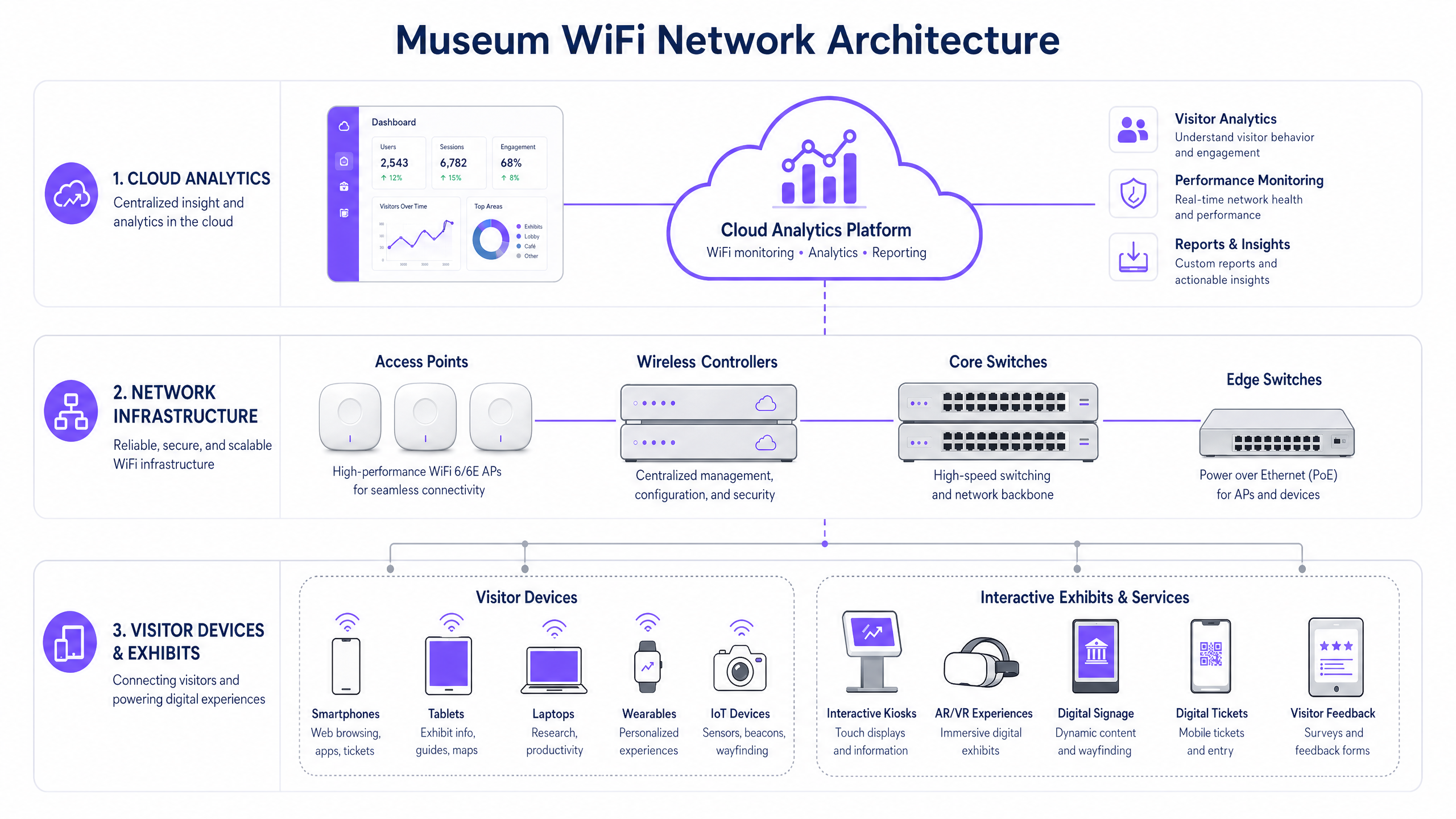
Arquitetura de Rede de Alta Densidade
Para suportar uma experiência conectada do visitante, a infraestrutura subjacente deve ser resiliente e escalável.
- Padrão WiFi 6/6E: A implementação de IEEE 802.11ax (WiFi 6) ou WiFi 6E é crítica. Estes padrões introduzem OFDMA (Orthogonal Frequency-Division Multiple Access) e MU-MIMO (Multi-User, Multiple Input, Multiple Output), que melhoram drasticamente a eficiência da rede em ambientes de alta densidade, permitindo que os pontos de acesso comuniquem com múltiplos dispositivos simultaneamente.
- Densidade e Posicionamento de Pontos de Acesso (AP): Um levantamento preditivo do local é inegociável. Os APs devem ser colocados estrategicamente para fornecer cobertura sobreposta sem causar interferência de co-canal. Em edifícios históricos onde a cablagem é restrita, a rede mesh ou pontes sem fios ponto-a-ponto podem ser necessárias, embora as ligações por cabo sejam sempre preferíveis para a infraestrutura central.
- Segregação de Rede: O tráfego de visitantes deve ser estritamente segregado das redes corporativas, sistemas de Ponto de Venda (POS) e Sistemas de Gestão de Edifícios (BMS). Isto é tipicamente alcançado usando VLANs (Virtual Local Area Networks) e políticas de firewall robustas para garantir segurança e conformidade.
Guia de Implementação
A implementação de uma rede WiFi em museus requer um planeamento cuidadoso para equilibrar desempenho, estética e experiência do utilizador.
Passo 1: A Experiência de Onboarding Digital
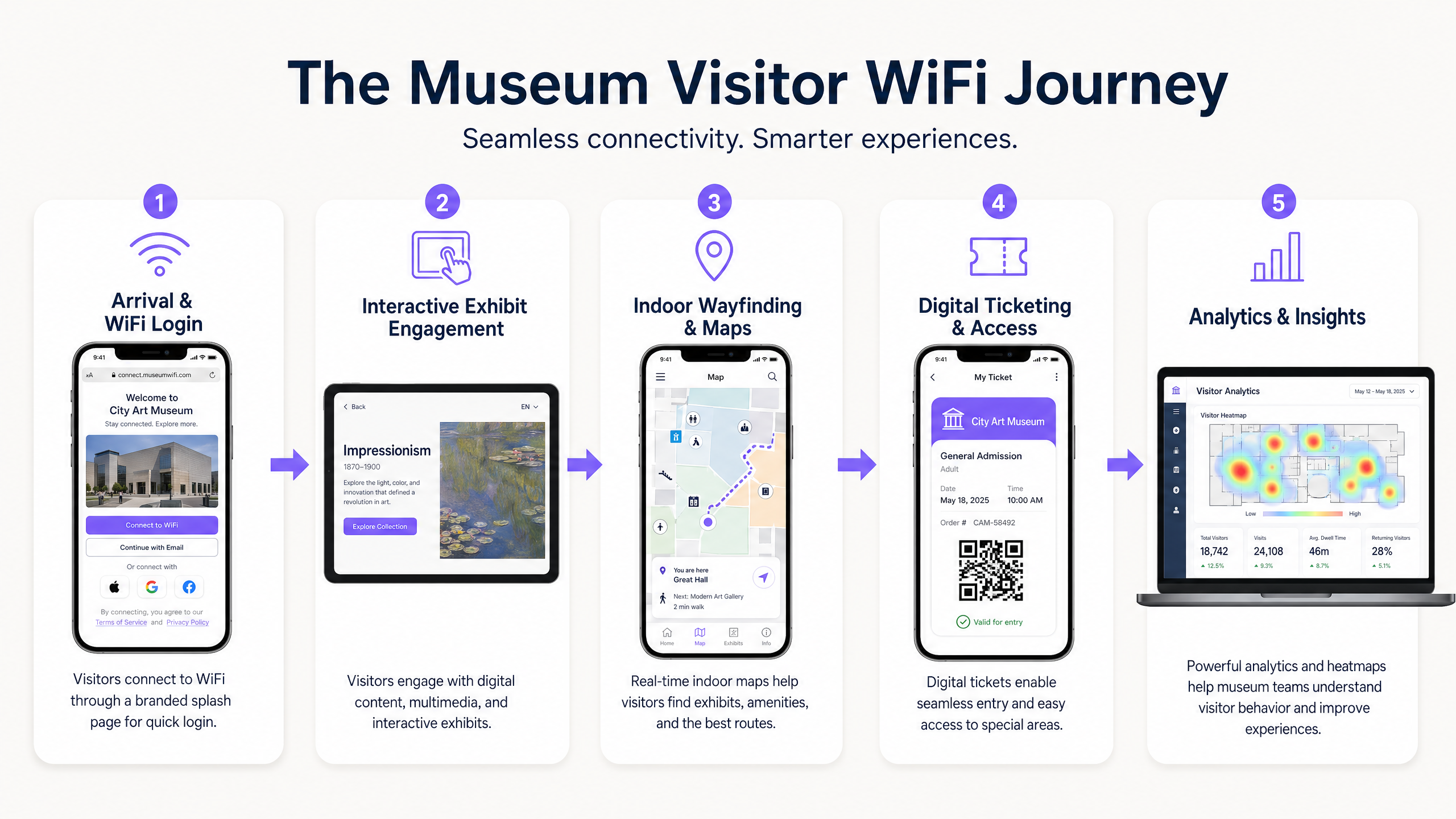
O Captive Portal é o primeiro ponto de contacto digital. Deve ser sem atrito, mas seguro. A integração de uma solução como o Guest WiFi da Purple permite a autenticação baseada em perfil. Os visitantes podem autenticar-se via redes sociais, e-mail ou protocolos contínuos como o OpenRoaming. Isto reduz o atrito e incentiva a adoção da rede, o que é crucial para a recolha de dados.
Passo 2: Habilitar a Jornada do Visitante
Uma vez conectado, a rede deve suportar toda a jornada do visitante:
- Bilhética Digital e Acesso: A alta disponibilidade nos pontos de entrada é essencial para a leitura de bilhetes digitais sem atrasos.
- Exposições Interativas: A largura de banda dedicada deve ser alocada para streaming multimédia e experiências de AR/VR associadas às exposições.
- Orientação Interna: Ao utilizar a rede WiFi em conjunto com beacons BLE (Bluetooth Low Energy), os espaços podem oferecer navegação interna precisa, guiando os visitantes através de layouts complexos de galerias.
Passo 3: Captura de Dados e Análise
O verdadeiro valor da rede reside nos dados que gera. A implementação de WiFi Analytics permite que as equipas de TI e marketing visualizem o comportamento do visitante. Mapas de calor podem revelar exposições populares, tempos de permanência e padrões de fluxo. Estes dados são inestimáveis para otimizar layouts de espaços, agendar pessoal e personalizar campanhas de marketing.
Melhores Práticas
- Priorizar Segurança e Conformidade: Garanta que a rede cumpre as regulamentações de proteção de dados, como o GDPR. Ao capturar dados de visitantes, os mecanismos de opt-in devem ser transparentes e claramente comunicados. Proteja a rede usando encriptação WPA3 sempre que possível e imponha um isolamento rigoroso entre o tráfego de convidados e o corporativo.
- Implementar Gestão de Largura de Banda: Utilize protocolos de Qualidade de Serviço (QoS) para priorizar o tráfego crítico (por exemplo, scanners de bilhetes) sobre a navegação geral dos convidados. Implemente limites de largura de banda por utilizador para evitar que um único utilizador degrade a experiência para os outros.
- Monitorização Contínua: O desempenho da rede não é estático. Utilize dashboards de gestão baseados na cloud para monitorizar a saúde dos APs, as taxas de conexão de clientes e o débito geral da rede em tempo real.
Resolução de Problemas e Mitigação de Riscos
Mesmo as redes mais bem projetadas encontram problemas. Os modos de falha comuns include:
- Interferência Co-Canal (CCI): Em implementações densas, os APs no mesmo canal podem interferir uns com os outros. Mitigação: Implementar atribuição dinâmica de canais e ajustar cuidadosamente os níveis de potência de transmissão.
- Falhas do Captive Portal: Se o Captive Portal não carregar, os visitantes não conseguem ligar-se. Mitigação: Garantir que a infraestrutura DNS é robusta e considerar a implementação de acesso 'walled garden' para serviços essenciais mesmo antes da autenticação completa. (Ver: Proteja a Sua Rede com DNS e Segurança Robustos ).
- Incompatibilidade de Dispositivos: A rede deve suportar uma vasta gama de dispositivos cliente, incluindo hardware legado mais antigo. Mitigação: Manter o suporte para padrões mais antigos (por exemplo, 802.11ac) enquanto se otimiza para dispositivos modernos, garantindo que o denominador comum mais baixo não prejudique o desempenho geral da rede.
ROI e Impacto no Negócio
Implementar uma rede WiFi de nível empresarial é um investimento significativo. No entanto, o ROI é mensurável em várias dimensões:
- Eficiência Operacional: A recolha automatizada de dados reduz a necessidade de inquéritos manuais aos visitantes. A orientação interior reduz a carga sobre o pessoal para fornecer direções.
- Aumento das Receitas: Campanhas de marketing direcionadas, impulsionadas por dados de primeira parte capturados via Guest WiFi , podem impulsionar atualizações de adesão, vendas de bilhetes para exposições especiais e compras em lojas/cafés.
- Satisfação Aprimorada do Visitante: Uma experiência digital contínua correlaciona-se diretamente com pontuações mais altas de satisfação do visitante e avaliações online positivas, impulsionando a afluência futura.
Ao ver a rede WiFi não apenas como uma despesa de TI, mas como uma plataforma estratégica para envolvimento e análise, museus e galerias podem melhorar significativamente o seu sucesso operacional e comercial.
Definições Principais
High-Density Environment
A physical space where a large number of client devices are connecting to the network simultaneously, requiring specialized RF design and AP configuration.
Museum atriums, special exhibition halls, and auditoriums are prime examples where standard office WiFi designs will fail.
Captive Portal
A web page that the user of a public-access network is obliged to view and interact with before access is granted.
This is the primary tool for visitor onboarding and data capture in a museum setting, often integrated with CRM systems.
WiFi 6 (802.11ax)
The current standard for wireless networks, designed specifically to improve efficiency and capacity in high-density environments.
Essential for modern museum deployments to handle the multitude of visitor smartphones and interactive exhibit devices.
VLAN (Virtual Local Area Network)
A logical grouping of devices on a network, allowing for the segmentation of traffic even if devices share the same physical infrastructure.
Used to separate visitor WiFi traffic from sensitive corporate or ticketing data, ensuring security.
Band Steering
A feature that encourages dual-band capable clients to connect to the less congested 5GHz or 6GHz bands rather than the crowded 2.4GHz band.
Crucial for optimizing performance in crowded museum spaces.
First-Party Data
Information a company collects directly from its customers and owns.
Gathered via the WiFi captive portal, this data is highly valuable for targeted marketing and understanding the visitor demographic.
RSSI (Received Signal Strength Indicator)
A measurement of the power present in a received radio signal.
Used during site surveys and troubleshooting to determine if a visitor has sufficient signal strength to maintain a reliable connection.
OpenRoaming
A roaming federation service enabling an automatic and secure WiFi experience globally.
Allows visitors to seamlessly connect to the museum WiFi without manually interacting with a captive portal, improving the user experience.
Exemplos Práticos
A historic gallery with strict preservation orders needs to deploy WiFi to support a new AR (Augmented Reality) exhibit. Running new CAT6 cabling to the exhibit space is prohibited. How should the network architect proceed?
The architect should design a wireless mesh network or utilize point-to-point wireless bridges. High-capacity APs (WiFi 6) should be placed at the perimeter where cabling is permitted. These edge APs will wirelessly backhaul traffic from mesh APs located near the AR exhibit. The mesh APs should be housed in aesthetically appropriate, non-metallic enclosures to comply with preservation orders.
A large science museum is experiencing network congestion in its main atrium during peak weekend hours, leading to slow captive portal load times and visitor complaints.
The IT team should implement several optimization steps: 1) Enable band steering to force capable devices onto the less congested 5GHz band. 2) Implement strict per-user bandwidth limits (e.g., 5 Mbps down/up) to prevent bandwidth hogging. 3) Review the AP deployment in the atrium; if APs are maxed out on client connections, additional APs with directional antennas may be required to sectorize the coverage area and increase overall capacity.
Perguntas de Prática
Q1. A museum is planning a temporary outdoor exhibit in an adjacent courtyard. The exhibit will require reliable WiFi for digital interactive kiosks. Running cabling to the courtyard is not feasible. What is the most appropriate wireless architecture?
Dica: Consider the need for reliable backhaul for the kiosks without physical cabling.
Ver resposta modelo
Deploy a point-to-multipoint wireless bridge from the main building to the courtyard. Use outdoor-rated, directional antennas on the building to establish a strong backhaul link to outdoor APs in the courtyard. These outdoor APs will then provide localized WiFi coverage for the kiosks.
Q2. The marketing director wants to use WiFi analytics to track how many visitors enter a specific, small gallery room (5m x 5m). Currently, there is one AP in the adjacent hallway providing coverage to the room. Will this setup provide accurate location data for that specific room?
Dica: Think about how location tracking works using WiFi and the requirements for accuracy.
Ver resposta modelo
No, it will likely not provide accurate data. WiFi location analytics generally require trilateration, meaning a client device needs to be heard by at least three APs to accurately determine its position. A single AP in an adjacent hallway can only determine that the device is nearby, not its precise location within a small 5x5m room. Additional APs or BLE beacons would be required for precise indoor location tracking.
Q3. During a busy weekend, the IT dashboard shows that the 2.4GHz band is heavily congested, while the 5GHz band has plenty of capacity. However, many dual-band capable devices are still connecting to 2.4GHz. What configuration change should be implemented?
Dica: What feature forces or encourages capable devices to use a specific frequency band?
Ver resposta modelo
Enable and aggressively configure 'Band Steering' on the wireless controller. This feature will actively encourage dual-band capable clients to connect to the 5GHz band, freeing up airtime on the 2.4GHz band for legacy devices that only support 2.4GHz.
Continue a ler esta série
O que é um Pedido de Sondagem? Compreender Como os Dispositivos Descobrem Redes
Este guia de referência técnica oferece uma análise aprofundada dos pedidos de sondagem IEEE 802.11, da varredura ativa versus passiva e do impacto da aleatorização de MAC na análise de locais. Apresenta estratégias de implementação acionáveis para arquitetos de rede otimizarem implementações de alta densidade, mitigarem tempestades de sondagem e garantirem a recolha de dados precisa e em conformidade com o GDPR, utilizando camadas de identidade autenticadas.
Como Corrigir WiFi Lento Sem Atualizar o Seu Plano de Internet
Um guia de referência técnica abrangente para gestores de TI e arquitetos de rede sobre como otimizar o desempenho de WiFi empresarial sem aumentar a largura de banda do ISP. Abrange a otimização de RF, gestão da densidade de clientes, implementação de QoS e como aproveitar a análise de WiFi para diagnosticar e resolver gargalos.
A Lista de Verificação para Migrar de NAC Legado para NAC Nativo da Nuvem
Este guia de referência técnica e autoritário fornece uma lista de verificação estruturada em três fases para migrar do Network Access Control (NAC) legado para uma arquitetura nativa da nuvem. Ele equipa gestores de TI e arquitetos de rede com estratégias acionáveis para gerir a integração de identidades, a paridade de políticas e a conformidade sem interromper as operações do local.