
Secure staff WiFi without the high maintenance
Every employee gets their own certificate-based connection through the account they already use. No shared passwords to rotate, no tickets to chase, and access ends the moment someone leaves.


















Trusted by 80,000+ venues including Manchester Airports Group, University of Sheffield and Chase.
How do you stop staff sharing the WiFi password?
Replace the shared passphrase with per-user certificates. Purple issues each device a credential over WPA2 or WPA3-Enterprise and 802.1X, authenticated against cloud RADIUS. Identity comes from Microsoft Entra ID, Okta or Google Workspace, so when someone leaves, SCIM revokes their WiFi access along with their email. No hardware swap needed.
See Purple Staff WiFi in action
A short walkthrough, from an employee signing in to access dropping the moment they leave.
Sign in once. Connected everywhere. Revoked instantly.
Four steps. No tickets, no password resets, nothing to remember.
Sign in
In the Purple app, with the Microsoft Entra ID, Okta or Google account they already have.
Get a WiFi pass
A certificate-based pass lands on their device, like adding a card to a wallet.
Connect everywhere
Every device, every site, automatically - each user with their own encryption keys.
Gone when they go
Disable someone in your directory and their WiFi drops within minutes.
How we secure it
Purple runs the cloud RADIUS, holds a 99.9% uptime SLA, and logs every connection. Read the full architecture.
The full employee lifecycle
Follow one employee from the day they join to the minute their access ends.
Ready to see the cost? Staff WiFi is part of the Connect, Capture, and Engage plan pricing - see which tier fits your venue.
Control who is on your network - and their level of access
You should know who is on your network. The Purple platform shows you in one glance - every user, every device, every site - and puts each person's level of access in your hands. Connect your directory once, watch sessions live, and pull the evidence in seconds when someone asks.
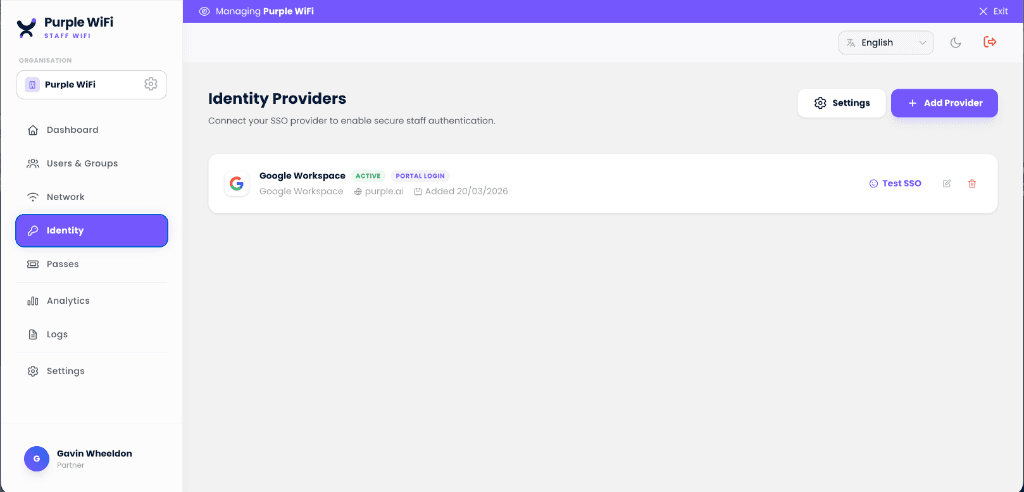
Connect your identity provider in minutes
Staff authenticate with the account they already have. Group membership drives VLAN policy, and SCIM provisions and revokes access automatically as people join, move, and leave.

An audit trail that writes itself
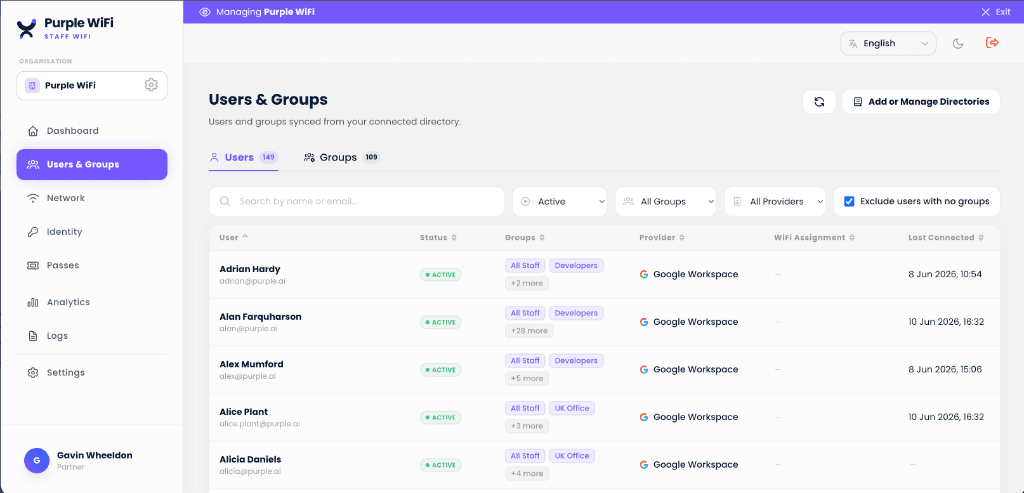
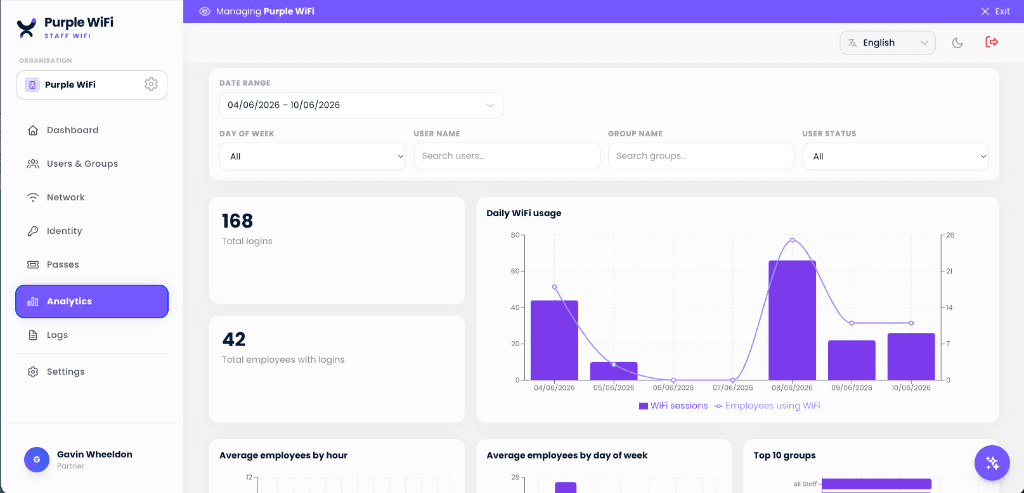
A live user directory shows who can reach the network and how they authenticate. Every session is logged with user, device, time, and location for compliance, and the same occupancy data helps reclaim up to 35% of unused office space.
Ask your WiFi data in plain English
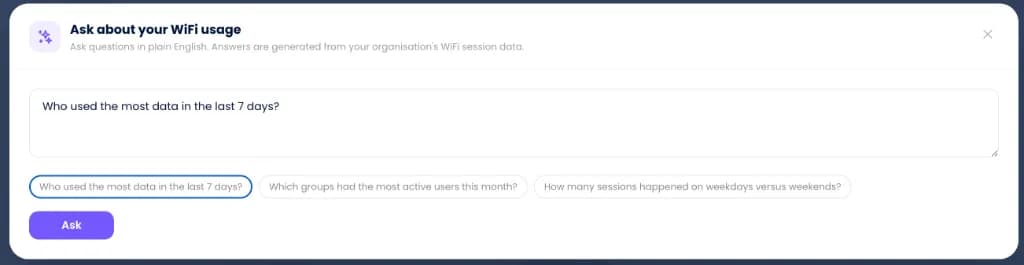
Query active sessions, bandwidth spikes, or compliance history using natural language. Answers are generated instantly from your network session data, making deep audits as simple as asking a question.
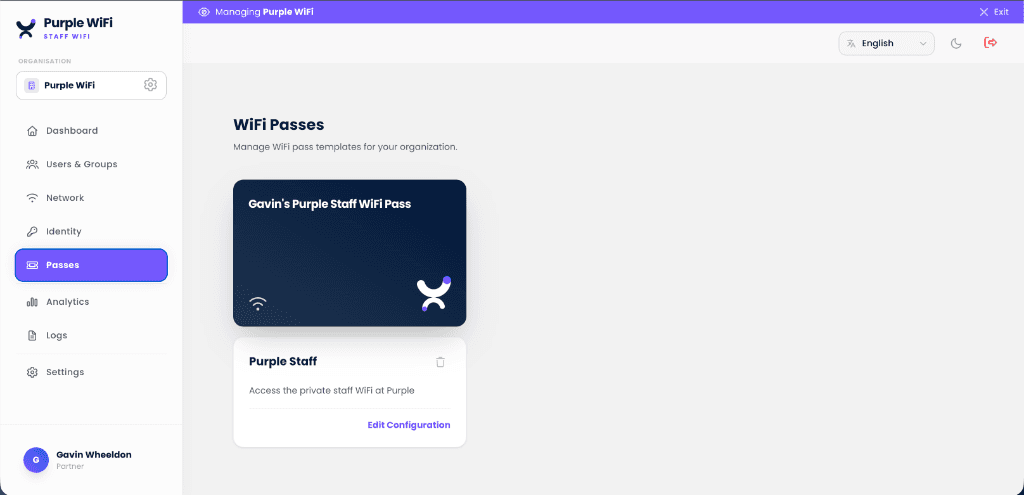
Design the WiFi pass once, issue it everywhere
Build a branded pass template for your organisation, then every employee gets a unique, unshareable pass on their device - authenticating over Passpoint or xPSK, whichever fits the device. Revoke any one of them without rotating a shared password.
Add Shield to cut bandwidth and distractions
Shield blocks ads, trackers and distracting content at the DNS layer, giving you back bandwidth and focus. No new hardware, no firewall changes - live in minutes.
Explore Shield
Zero-touch enrolment through the MDM you already run
Purple issues the certificate, your MDM delivers it. Push 802.1X profiles and EAP-TLS certificates over SCEP or PKCS to managed devices, and staff join the network without typing anything. Deployments complete in under 30 minutes.

Microsoft Intune
Windows, macOS, iOS, Android
Deploy certificate-based WiFi profiles over SCEP or PKCS from the console you already use. Compliance state feeds Conditional Access, so a device that fails a rule is refused at authentication.

Jamf Pro
macOS, iOS, iPadOS
Distribute 802.1X profiles and certificates to Apple hardware through Jamf's SCEP proxy. Devices arrive on the network already trusted - no user prompt, no shared password.

JumpCloud
macOS, Windows, Linux
JumpCloud manages the device and its posture while Purple runs the RADIUS layer. One directory identity governs both the endpoint and its network access.
Running Kandji, Hexnode, Workspace ONE, or another UEM? Any platform that can deliver a SCEP or PKCS payload enrols devices the same way.
Map your MDM rolloutMicrosoft and Intune are trademarks of the Microsoft group of companies. Jamf and Jamf Pro are trademarks of JAMF Software, LLC. JumpCloud is a trademark of JumpCloud Inc. All are used with permission; this page is not endorsed by or affiliated with them.
The right way in, for every person and device
An SSID is an authentication boundary, not a segmentation boundary. There are only three ways of proving identity, so you only ever need three networks - and VLANs handle everything else.
1. For untrusted guests
Open guest with captive portal
Any device with a browser connects - even a phone you have never seen. Sign-in captures opted-in, GDPR-compliant data, on an isolated VLAN. This is Purple Guest WiFi.
2. For people with the app or a profile
Passpoint with certificate-based 802.1X
Staff sign in once in the Purple app and get a certificate-based pass. From then on their devices connect the moment they walk in, encrypted over the air.
3. For personal keys - devices and people
xPSK personal keys
Printers, tills, contractors, BYOD - and staff who prefer a key to a profile. One key each on one SSID: rotate any key on its own, and each group lands on the right VLAN automatically.
Talk to a staff WiFi specialist
Tell us about your estate and identity provider, and we will map a path from shared passwords to identity-based access. Migration from FreeRADIUS, NPS, or Cisco ISE is usually a weekend exercise.
Staff WiFi for your industry
See how Staff WiFi works in venues like yours, and how Purple compares to alternatives.
Used in these industries
Compare alternatives
One platform, three networks
Explore the authentication stack
Enterprise WiFi security
The pillar guide behind staff WiFi: WPA2/3-Enterprise, 802.1X, EAP-TLS, cloud RADIUS, and identity-provider integration, plus the full cluster of deep-dive guides.
RADIUS-as-a-Service
Cloud RADIUS for WPA2/3-Enterprise: EAP-TLS, PEAP, and iPSK. No on-prem server, multi-region failover.
WPA2 & WPA3-Enterprise
Secure WiFi with 802.1X on your existing access points. Identity-provider integration and managed certificates.
Passwordless WiFi
EAP-TLS, iPSK, Passpoint, and SAML/SSO. Replace shared passwords with identity-based credentials.
Identity-Based Networking
The platform view: every connection on the network tied to a verified person or device, and revoked with that identity.
Frequently Asked Questions
How do you stop staff sharing the WiFi password?
Replace the shared passphrase with per-user certificates. Purple issues each device a credential over WPA2 or WPA3-Enterprise and 802.1X, authenticated against cloud RADIUS. Identity comes from Microsoft Entra ID, Okta or Google Workspace, so when someone leaves, SCIM revokes their WiFi access along with their email. No hardware swap needed.
What is staff WiFi and how is it different from guest WiFi?
Staff WiFi is an employee-only wireless network authenticated per-user, isolated from the guest and payment networks. Where guest WiFi optimizes for low-friction sign-up, staff WiFi optimizes for identity - each employee authenticates with their own credential (certificate, password, or iPSK) via 802.1X against a RADIUS server, and their access can be revoked the moment they leave the company without touching anyone else on the network.
What authentication does Purple staff WiFi use?
WPA2-Enterprise or WPA3-Enterprise with 802.1X. The standard options are EAP-TLS (certificate-based, the gold standard for managed laptops), PEAP (username + password for legacy devices), and iPSK (unique per-device pre-shared key for BYOD and IoT). Authentication runs against your identity provider - Microsoft Entra ID, Okta, Google Workspace, or any SAML 2.0 IdP.
Do I need my own RADIUS server?
No. Purple operates the RADIUS server as a cloud service - RADIUS-as-a-Service - with multi-region failover and a 99.9% uptime SLA. Your access points point at Purple, Purple validates credentials against your identity provider, and no one in your team operates RADIUS infrastructure. If you already run FreeRADIUS, NPS, or Cisco ISE, migration is a weekend exercise.
How does Purple staff WiFi integrate with Entra ID, Okta, or Google Workspace?
Directly via SAML and SCIM. When an employee is added to the IdP, their WiFi access is provisioned automatically; when they leave, access is revoked at the same moment their email is revoked. Group membership in the IdP drives VLAN policy - marketing, engineering, and contractors can each land on their own network segment without manual configuration.
Does Purple support employee WiFi for BYOD and IoT devices?
Yes. BYOD onboarding uses certificate enrollment via an MDM (Intune, Jamf, Kandji, Hexnode) for managed devices, or a self-service portal for unmanaged phones and tablets. IoT devices - printers, access controllers, smart lighting - typically use iPSK (Identity PSK) on a dedicated SSID so each device has a unique key you can revoke without affecting others.
Can I revoke one employee's WiFi access without disrupting others?
Yes, instantly. Because staff WiFi is per-user, disabling the employee in your identity provider revokes their WiFi access at the next authentication attempt. Compare this to a shared WiFi password, where one departing employee forces a company-wide password rotation. This is the single biggest operational reason to move from WPA-Personal to WPA-Enterprise.
Does Purple staff WiFi work with my existing access points?
Yes. Purple runs on any enterprise-grade access point that speaks RADIUS - Cisco Meraki, Cisco Catalyst, Aruba, Ruckus, Juniper Mist, Ubiquiti UniFi, Cambium, Extreme, Fortinet FortiAP, and more. You do not replace hardware; you reconfigure SSIDs to authenticate via Purple.
How does staff WiFi handle Conditional Access and Zero Trust?
Purple respects Conditional Access policies from Entra ID - a device that fails compliance checks is not admitted to the network. For broader Zero Trust postures, Purple emits every authentication event to SIEM (Microsoft Sentinel, Splunk, Elastic, Datadog) via webhook or syslog, so network access becomes a signal in your broader security analytics.
Does Purple staff WiFi work across multiple sites and locations?
Yes - multi-site estates are where Purple fits best. Because the cloud RADIUS service and identity-provider integration are centralized, you roll out the same passwordless 802.1X policy across every council building, hotel, store, campus, or branch from a single dashboard, with no per-site RADIUS hardware to ship or maintain. It is a strong fit for organizations that run staff, guest, and hard-to-manage IoT devices across many locations: UK councils and public sector, hospitality and retail chains, and multi-academy trusts and schools.
What is identity-based networking?
Identity-based networking ties every connection to a verified identity - a person through their corporate directory account, or a device through its certificate or unique key - instead of to a shared password. Purple delivers it with cloud RADIUS, EAP-TLS certificates, iPSK, and SCIM provisioning against Microsoft Entra ID, Okta, or Google Workspace, so access follows the user: granted when they join, scoped to their role, and revoked automatically when they leave. It is the model behind passwordless staff WiFi and the foundation for zero trust network access.
Last reviewed:
Ready to make your staff WiFi passwordless?
Per-user certificates instead of a shared password, policy from your identity provider, and access that ends the moment someone is disabled in the directory.