
How to Configure SCEP for Secure Enterprise WiFi and BYOD Provisioning
本技术指南介绍了如何配置简单证书注册协议 (SCEP),以自动执行安全 802.1X 企业 WiFi 身份验证和 BYOD 资源调配。它为网络架构师和 IT 经理提供了权威的部署顺序、来自酒店和零售行业的实际应用场景,以及风险缓解策略,以消除企业网络中脆弱的预共享密钥和 MAC 身份验证绕过 (MAB)。
收听本指南
查看播客转录
执行摘要
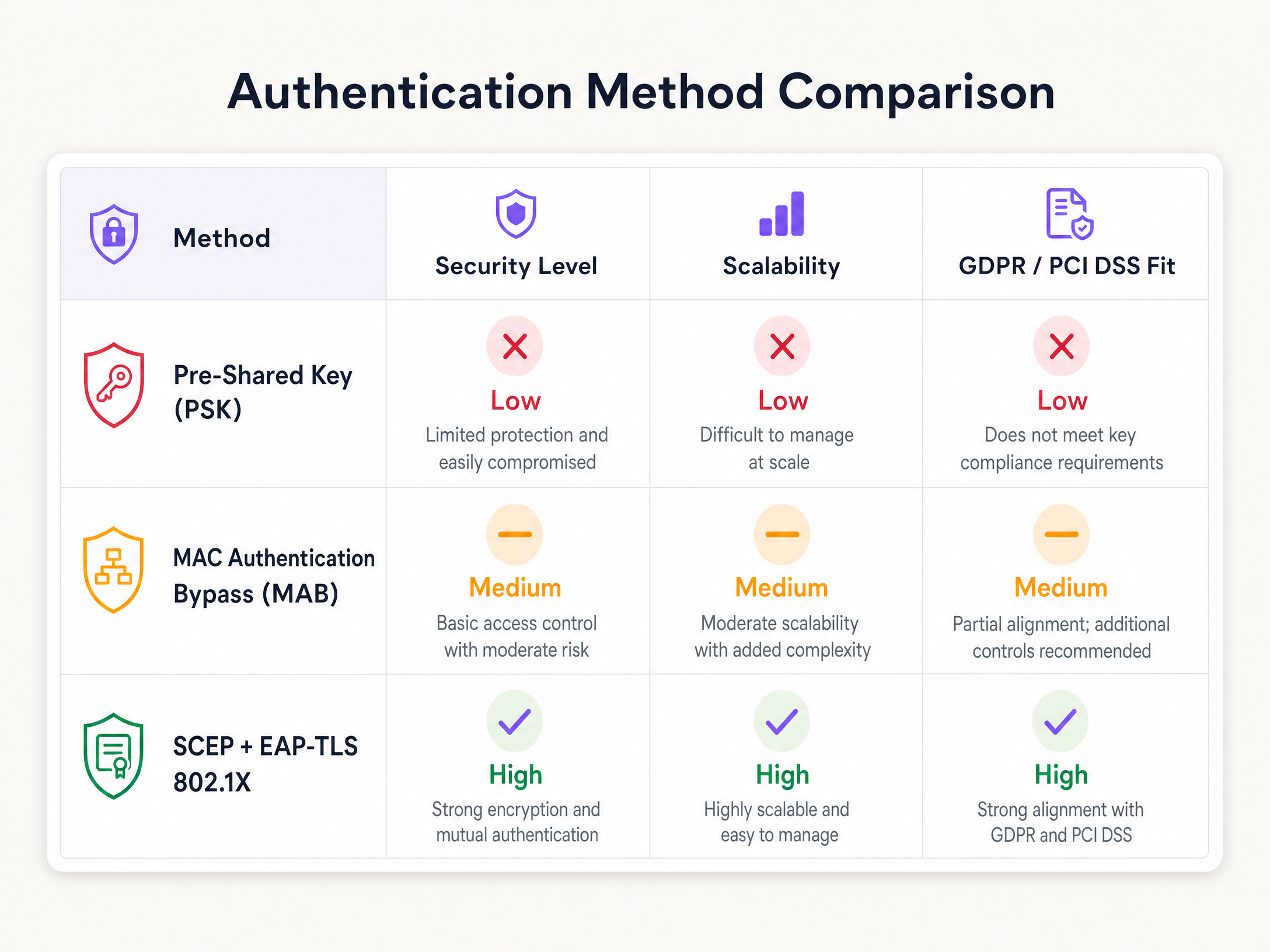
对于在酒店、零售和公共部门运营的企业场所而言,依靠预共享密钥 (PSK) 或 MAC 身份验证绕过 (MAB) 来实现员工和 BYOD WiFi 接入是一种安全隐患。现代网络架构要求使用 EAP-TLS(可扩展身份验证协议-传输层安全)进行 802.1X 身份验证,以确保每个设备在访问网络之前都经过加密验证。运营方面的挑战在于如何向数千台非托管设备分发唯一的客户端证书,同时又不会让您的 IT 服务台被支持工单淹没。
RFC 8894 中定义的简单证书注册协议 (SCEP) 通过自动化的证书生命周期管理解决了这一分发难题。通过利用 SCEP,IT 团队可以将受信任的根证书和客户端证书推送到终端,从而确保私钥永远不会离开设备。本指南为 SCEP WiFi 证书部署提供了权威的架构蓝图和逐步实施策略。我们涵盖了成功部署所需的关键部署顺序、来自酒店和零售行业的实际场景,以及风险缓解策略,以确保您的 Guest WiFi 和企业网络保持安全和高效。
技术深挖:SCEP 架构
SCEP 是企业设备注册的行业标准,由 VeriSign 创建并于 1999 年作为 IETF 互联网草案发布。它在公钥基础设施 (PKI) 环境中自动颁发 X.509 证书,从而消除了大规模手动证书管理的需要。
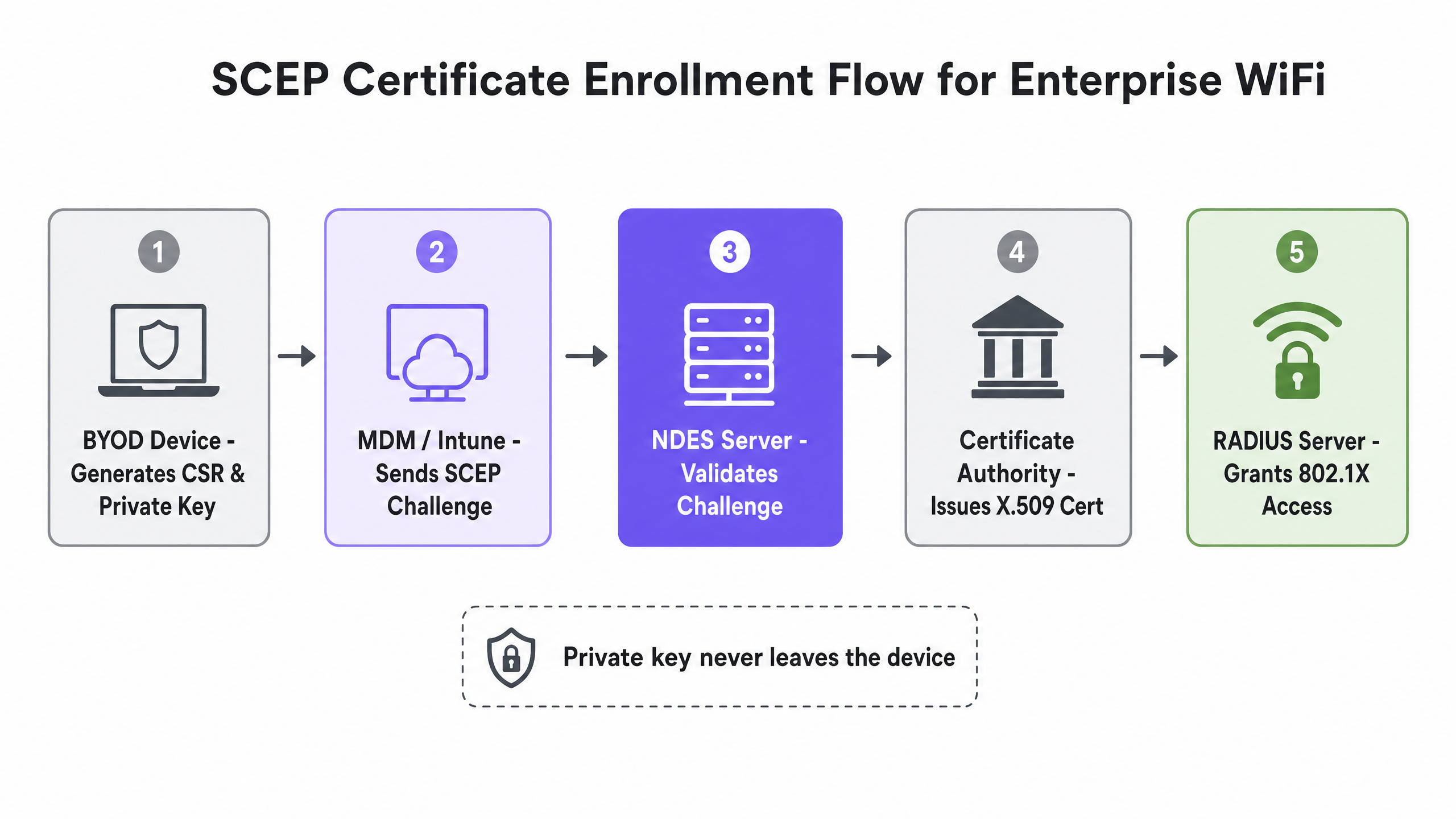
在 SCEP 工作流中,设备在本地生成自己的私钥和公钥对。它创建一个证书签名请求 (CSR),并通过网络设备注册服务 (NDES) 服务器将其发送到您的证书颁发机构 (CA)。CA 使用共享密钥验证该请求,并将签名的公钥证书返回给设备。关键的安全优势在于私钥永远不会离开设备。它在本地生成并存储在设备的硬件安全飞地中——Windows 上的受信任平台模块 (TPM) 或 iOS 上的 Secure Enclave。与由 CA 集中生成密钥对并通过网络传输的 PKCS(公钥加密标准)相比,这使得 SCEP 成为 802.1X 身份验证的强烈推荐方法。
SCEP 证书注册的四个步骤如下:第一,设备连接到由 NDES 服务器托管的 SCEP 终端 URL。第二,设备提供 SCEP 共享密钥(静态密码或由 MDM 平台生成的动态挑战),以对注册请求进行身份验证。第三,设备生成包含其公钥和身份信息的 CSR。第四,CA 验证 CSR 并颁发签名的 X.509 证书,该证书将返回给设备。
SCEP 与 PKCS:选择正确的机制
在设计证书部署策略时,在 SCEP 和 PKCS 之间进行选择会产生直接的安全影响。下表总结了关键区别。
| 属性 | SCEP | PKCS |
|---|---|---|
| 私钥生成 | 在设备上(安全飞地) | 在 CA 服务器上 |
| 私钥传输 | 从不传输 | 通过网络传输 |
| 基础设施要求 | 需要 NDES 服务器 | 不需要 NDES |
| 最佳适用场景 | WiFi 和 VPN 身份验证 | S/MIME 电子邮件加密 |
| 802.1X 的安全态势 | 推荐 | 不推荐 |
对于企业 WiFi 的 SCEP,请始终选择 SCEP。私钥保留在设备上是根本的安全属性,这使得基于证书的 802.1X 身份验证优于任何基于凭据的方法。
BYOD 自助服务入网流程
安全 BYOD 入网的基础是从传统身份验证过渡到 EAP-TLS,而无需进行完整的移动设备管理 (MDM) 注册。强迫员工将个人智能手机注册到企业 MDM 中会引发合理的隐私担忧,并会遇到强烈抵制。自助服务入网门户解决了这一问题。
用户将其个人设备连接到专用的配置 SSID,该 SSID 充当围墙花园,仅限制对入网门户和身份提供商的访问。用户通过与 Microsoft Entra ID、Okta 或 Google Workspace 的 SAML 或 OAuth 集成进行身份验证。身份验证成功后,系统会通过 SCEP 生成一个唯一的、特定于设备的客户端证书。配置描述文件(Apple 的 .mobileconfig 文件或 Android Passpoint 配置文件)会被推送到设备。然后,设备使用 EAP-TLS 自动连接到安全的组织 SSID。用户无需了解任何关于证书或 802.1X 的信息。
实施指南:部署顺序
成功为 802.1X 配置 SCEP 需要严格遵守特定的部署顺序。在配置身份验证之前,必须先建立信任。偏离此顺序是部署失败最常见的原因。
步骤 1:部署受信任的根证书。 在任何设备可以请求客户端证书或信任您的 RADIUS 服务器之前,它必须信任颁发证书的证书颁发机构。导出您的根 CA 证书(以及任何中级 CA 证书)为 .cer 文件。通过您的 MDM 平台将此配置文件部署到您的目标设备组。此步骤是不可妥协的。
步骤 2:配置 SCEP 证书配置文件。 这将指示设备如何获取其客户端证书。配置使用者名称格式 - 对于用户驱动的身份验证,标准格式为 CN={{UserPrincipalName}};对于设备身份验证,请使用 CN={{AAD_Device_ID}}。将密钥用法设置为 Digital signature 和 Key encipherment。在扩展密钥用法下,指定 Client Authentication (OID: 1.3.6.1.5.5.7.3.2)。将此配置文件链接到步骤 1 中的受信任根证书配置文件。提供 NDES 服务器的外部 URL。
步骤 3:部署 802.1X WiFi 配置文件。 推送将证书与网络 SSID 绑定的 WiFi 配置。输入与您的接入点广播完全一致的网络名称。将安全类型设置为 WPA2-Enterprise 或 WPA3-Enterprise。将 EAP 类型设置为 EAP-TLS。选择 SCEP 证书配置文件作为客户端身份验证证书。指定用于服务器验证的受信任根证书,以确保设备仅连接到您的合法 RADIUS 服务器。
此顺序适用于所有受支持的硬件平台:Cisco Meraki、HPE Aruba、Ruckus、Juniper Mist、Ubiquiti UniFi、Cambium、Extreme 和 Fortinet。Purple 与硬件无关的云覆盖网络可与所有这些平台集成,这意味着您的证书基础设施不会绑定到单一硬件供应商。
最佳实践
通过 Azure AD 应用程序代理发布 NDES。 NDES 服务器必须能够从互联网访问,以便允许远程设备在到达现场之前预配证书。将内部服务器直接暴露给互联网存在重大的安全风险。通过 Azure AD 应用程序代理进行发布可提供安全的远程访问,而无需打开入站防火墙端口,并允许您将条件访问策略应用于注册流程。
为 BYOD 颁发短期证书。 由于 BYOD 设备是未托管的,因此受损设备留在网络上的风险更高。颁发有效期为 90 天而非多年的证书。当证书过期时,用户必须通过自助入网门户重新进行身份验证。这自然会从网络中清除陈旧的设备,无需人工 IT 干预。
在 RADIUS 服务器上强制执行严格的 CRL 检查。 证书部署只是安全等式的一半。如果员工离职,如果其客户端证书仍然有效,禁用其 Active Directory 帐户可能不会立即撤销其 WiFi 访问权限。配置您的 RADIUS 服务器以强制执行严格的证书撤销列表 (CRL) 检查。确保您的 CRL 分发点 (CDP) 高度可用。如果 RADIUS 服务器无法访问 CRL,则所有用户的身份验证都会失败——这将导致大范围的停机。
将 BYOD 隔离到专用 VLAN。 BYOD 设备是未托管的。您无法控制其操作系统更新、防病毒状态或已安装的应用程序。将 BYOD 设备放置在专用 VLAN 上,该 VLAN 提供互联网访问,并且仅对员工角色所需的特定内部应用程序提供受限访问。切勿将 BYOD 设备与企业服务器或托管设备放在同一个 VLAN 中。
故障排除与风险缓解
WiFi 配置文件应用失败。 设备接收到了受信任根证书和 SCEP 证书,但 WiFi 配置文件在 MDM 控制台中显示为“错误”。这几乎总是由于组目标不匹配引起的。如果 SCEP 配置文件分配给用户组,而 WiFi 配置文件分配给设备组,则 MDM 无法解析该依赖关系。审计您的分配,并确保受信任根证书、SCEP 和 WiFi 配置文件都指向完全相同的 Azure AD 组。
NDES 403 Forbidden 错误。 设备无法检索 SCEP 证书,且 NDES IIS 日志显示 HTTP 403 错误。连接器服务帐户可能缺少对证书模板的必要权限,或者您的防火墙正在阻止 SCEP 使用的特定查询字符串参数。验证连接器帐户在 CA 模板上是否具有“读取”和“注册”权限。检查防火墙日志以确保包含 ?operation=GetCACaps 的 URL 未被阻止。
Android 碎片化。 Apple iOS 设备能够一致地处理 .mobileconfig 配置文件。Android 则高度碎片化——不同的制造商和操作系统版本处理 WiFi 配置文件和证书安装的方式各不相同。在自助入网门户上提供清晰的、针对特定操作系统的说明。使用 Passpoint (Hotspot 2.0) 可以通过在不同制造商之间提供一致的连接流程,从而显著改善 Android 体验。
证书撤销延迟。 当员工离职时,必须立即撤销其访问权限。禁用其 IdP 帐户是第一步,但 RADIUS 服务器还必须验证证书的状态。配置您的 RADIUS 服务器,除了 CRL 检查之外,还使用在线证书状态协议 (OCSP)。OCSP 提供实时的撤销状态,而不是依赖于定期更新的列表。
投资回报率 (ROI) 与业务影响
过渡到 SCEP 802.1X 证书部署可在安全和运营方面带来可衡量的回报。基于密码的 WiFi 会因密码过期、锁定和输入错误而产生大量的服务台工单。基于证书的身份验证对用户是无感的——设备会自动连接。这通常可以将与 WiFi 相关的服务台工单量减少 70%,从而让 IT 人员能够专注于战略性工作。
EAP-TLS 消除了凭据收集和中间人 (MitM) 攻击的风险。这对于 零售 环境中的 PCI DSS 合规性以及跨所有领域的 GDPR 合规性至关重要。各个行业。在 酒店餐饮 行业中,员工需要处理支付数据和宾客个人信息,数据泄露的成本远超部署适当 PKI 基础设施的成本。对于 交通运输 运营商和 医疗保健 场所,同样的合规驱动因素同样适用。
对于已经在使用 Purple 的 访客 WiFi 和 WiFi 分析 平台的场所,将安全入网扩展到员工的 BYOD 设备可提供统一、强大的网络管理策略。Purple 在全球 80,000 多个活跃场所运营,并在 2024 年处理了 4.4 亿次登录(Purple 内部数据),持有 ISO 27001、GDPR、CCPA 和 Cyber Essentials 认证。我们的 SecurePass 和 Shield 安全插件可与本指南中描述的基于证书的身份验证架构直接集成。
如需更广泛地了解企业网络安全,请参阅我们的 企业 WiFi 安全:2026 年完整指南 。有关针对网络管理员的 GDPR 合规性注意事项,请参阅 网络管理员 GDPR 与访客数据隐私合规指南 。
关键定义
SCEP (Simple Certificate Enrollment Protocol)
A protocol defined in RFC 8894 that automates the issuance of X.509 digital certificates to devices within a PKI environment. The device generates its own private key locally, which never leaves the device.
Used to deploy WiFi authentication certificates to corporate and BYOD devices at scale without manual IT intervention. The industry standard for 802.1X certificate provisioning.
802.1X
An IEEE standard (IEEE Std 802.1X-2020) for port-based network access control. It provides an authentication mechanism to devices wishing to attach to a LAN or WLAN before they are granted access to network resources.
The foundation of secure enterprise WiFi, replacing vulnerable pre-shared keys. Requires a RADIUS server, a supplicant on the client device, and an authenticator on the access point.
EAP-TLS (Extensible Authentication Protocol-Transport Layer Security)
An authentication framework that requires both the server and the client to present valid digital certificates. Provides mutual authentication, ensuring the device trusts the network and the network trusts the device.
The most secure method for 802.1X authentication. Eliminates credential theft and Man-in-the-Middle attacks. The target authentication protocol that SCEP certificate deployment is designed to enable.
NDES (Network Device Enrollment Service)
A Microsoft Windows Server role that acts as a bridge, allowing devices without domain credentials to obtain certificates from an Active Directory Certificate Services CA via SCEP.
A required infrastructure component when implementing SCEP with Microsoft Intune. Should be published via Azure AD Application Proxy to allow secure remote certificate provisioning.
BYOD (Bring Your Own Device)
The practice of allowing employees to use their personal smartphones, tablets, or laptops to access enterprise networks and applications.
Requires careful network segmentation and secure onboarding to prevent unmanaged devices from compromising the corporate network. Full MDM enrolment is often impractical for personal devices due to privacy concerns.
CRL (Certificate Revocation List)
A list published by the Certificate Authority containing the serial numbers of certificates that have been revoked before their expiration date.
Must be checked by the RADIUS server during every authentication attempt to ensure terminated employees or compromised devices cannot access the network. CRL Distribution Points must be highly available.
CSR (Certificate Signing Request)
A message generated by a device and sent to a Certificate Authority to apply for a digital identity certificate. Contains the device's public key and identity information.
Generated by the device during the SCEP process. The private key used to sign the CSR remains on the device and is never transmitted.
RADIUS (Remote Authentication Dial-In User Service)
A networking protocol that provides centralised Authentication, Authorisation, and Accounting (AAA) management for users and devices connecting to a network.
The server that validates the client certificate during 802.1X authentication and grants or denies network access. Must be configured to enforce strict CRL or OCSP checking.
PKCS (Public Key Cryptography Standards)
A set of standards where both the public and private keys are generated by the Certificate Authority and then securely delivered to the endpoint.
Less suitable than SCEP for WiFi authentication because the private key is transmitted over the network. Better suited for S/MIME email encryption where key escrow is required.
OCSP (Online Certificate Status Protocol)
A protocol that provides real-time certificate revocation status, as an alternative to the periodically updated CRL.
Preferred over CRL for high-security environments because it provides instant revocation status rather than relying on a list that may be hours old.
应用实例
A 200-room hotel needs to provide secure WiFi access for 50 housekeeping staff using their personal smartphones (BYOD) to access the housekeeping scheduling app. The IT manager wants to avoid full MDM enrolment to respect staff privacy, but needs to ensure access is revoked immediately when a staff member resigns.
The hotel deploys a self-service onboarding portal integrated with Microsoft Entra ID. Staff connect to an open provisioning SSID, authenticate with their Entra ID credentials, and download a SCEP profile. The SCEP server issues a 30-day client certificate directly to the device, with the private key generated and stored locally on the smartphone's secure enclave. The device automatically connects to the 'Staff_WiFi' SSID using EAP-TLS. The RADIUS server assigns these devices to a restricted VLAN that permits access only to the scheduling app and the internet. When a staff member resigns, their Entra ID account is disabled. The RADIUS server, configured for strict CRL checking, denies network access at the next authentication attempt. The 30-day certificate validity ensures that even if CRL checking were delayed, access would lapse within a month.
A national retail chain with 500 stores needs to deploy secure WiFi for corporate-owned point-of-sale (POS) tablets running Windows. The network architect must ensure that even if a tablet is stolen, the network credentials cannot be extracted and used to access the corporate network from another device. PCI DSS compliance is mandatory.
The network architect configures Microsoft Intune to deploy certificates via SCEP. Intune pushes the Trusted Root certificate to the 'POS Devices' group, followed by a SCEP profile that instructs each tablet to generate its own private key in the Windows TPM. The tablet submits a CSR to the NDES server, receives the client certificate, and connects to the 'Retail_POS' SSID using WPA3-Enterprise and EAP-TLS. The RADIUS server authenticates the certificate and places the device on the isolated POS VLAN, which only permits traffic to the payment processor and inventory management system. All three Intune profiles - Trusted Root, SCEP, and WiFi - are assigned to the same 'POS Devices' device group to prevent dependency failures. NDES is published via Azure AD Application Proxy to allow certificate renewal without requiring the tablet to be on-site.
练习题
Q1. You are deploying a SCEP profile via Intune to a fleet of Windows laptops. The devices successfully receive the Trusted Root certificate, but the WiFi profile fails to apply and shows as 'Error' in the Intune console. The SCEP profile is assigned to the 'All Users' Azure AD group, while the WiFi profile is assigned to the 'Corporate Laptops' device group. What is the cause of the failure and how do you resolve it?
提示:Consider the dependencies between the profiles and how Intune resolves group targeting when a profile depends on another profile.
查看标准答案
The failure is caused by a group targeting mismatch. Intune cannot resolve the dependency between the SCEP profile and the WiFi profile because they target different group types - one targets users and the other targets devices. To resolve this, audit all three profile assignments and ensure the Trusted Root, SCEP, and WiFi profiles are all deployed to the exact same Azure AD group. Choose either user targeting or device targeting consistently across all profiles.
Q2. A retail venue wants to secure its POS tablets. The IT director suggests using PKCS instead of SCEP because it simplifies infrastructure by removing the need for an NDES server. As the network architect, why should you recommend SCEP for 802.1X WiFi authentication, and under what circumstances would PKCS be the correct choice?
提示:Think about where the private key is generated and stored in both protocols, and consider the security implications for network authentication versus email encryption.
查看标准答案
Recommend SCEP for 802.1X WiFi authentication because the private key is generated locally on the device and stored in its hardware secure enclave. The private key never leaves the device and is never transmitted across the network. If a tablet is stolen, the credentials cannot be extracted and used from another device. With PKCS, the CA generates the key pair centrally and transmits it to the device, introducing a transmission risk that is unacceptable for network authentication. PKCS is the correct choice only for S/MIME email encryption, where key escrow is required to allow encrypted emails to be decrypted if the original device is lost.
Q3. You are designing a BYOD onboarding portal for a 500-bed hospital. Clinical staff will use their personal smartphones to access non-critical internal apps such as the staff rota and internal messaging. You need to minimise the risk of stale devices remaining on the network after staff leave, without requiring manual IT intervention for each departure. What specific certificate configuration should you implement?
提示:Consider the lifecycle of the certificate and how you can force devices to re-authenticate periodically without requiring IT to manually revoke each certificate.
查看标准答案
Implement short-lived certificates with a validity period of 30 to 90 days. When the certificate expires, the BYOD device is forced to re-authenticate through the captive portal using the staff member's corporate IdP credentials. If the staff member has left and their IdP account has been disabled, they cannot complete re-authentication and will not receive a new certificate. This naturally prunes stale devices from the network without requiring IT to manually revoke individual certificates. Combine this with OCSP checking on the RADIUS server to ensure immediate revocation when an account is disabled, providing defence in depth between certificate expiry cycles.
Q4. Your NDES server is returning HTTP 403 Forbidden errors for all SCEP certificate requests. The NDES server is accessible from the internet via Azure AD Application Proxy. What are the two most likely causes of this error and how do you diagnose each one?
提示:Consider both the permissions on the certificate template and the network path between the device and the NDES server.
查看标准答案
The two most likely causes are: first, the Intune Certificate Connector service account lacks the necessary permissions on the CA certificate template. Verify that the service account has 'Read' and 'Enroll' permissions on the template in the CA console. Second, the firewall or Application Proxy is blocking the specific query string parameters used by SCEP. Check firewall and Application Proxy logs for requests containing parameters such as '?operation=GetCACaps' or '?operation=PKIOperation'. These are standard SCEP operations that must be permitted. If the Application Proxy is stripping query strings, adjust the pre-authentication settings to allow pass-through for the NDES URL path.
继续阅读本系列
如何在 Starlink 上设置 Captive Portal:远程与海洋场所指南
本指南详细介绍了如何绕过原生 Starlink 硬件,并使用企业级路由设备集成云端托管的 Captive Portal。您将学习如何克服 CGNAT 限制、强制执行 VLAN 隔离、管理卫星带宽限制并确保合规性。
酒店访客 WiFi 管理:整合 PMS、门户与品牌标准
本技术指南详细介绍了如何构建企业级酒店 WiFi 网络,重点关注 VLAN 隔离、用于自动化会话管理的 PMS 集成,以及符合 GDPR 合规要求的数据采集 Captive Portal 优化。
Captive Portal Best Practices: Designing for High Conversion and Compliance
本技术指南为 IT 经理、网络架构师和场所运营总监提供了部署 Captive Portal 的完整蓝图,旨在平衡网络安全与高用户转化率。内容涵盖了从 VLAN 划分、RADIUS 认证到符合 GDPR 的同意设计以及认证方式选择的完整架构。结合 Purple 在 2024 年覆盖 80,000 多个场所、4.4 亿次登录的运营经验,每项建议均基于真实的部署数据。