
How to Optimize Captive Portals for Maximum Network Security and User Conversion
本指南为企业场所优化 Captive Portal 提供了完整的技术蓝图,涵盖网络分段架构、身份验证方式选择、符合 GDPR 的合规同意设计以及转化率优化。本书面向酒店、连锁零售、体育场馆和公共部门机构的 IT 经理、网络架构师和 CTO,帮助他们在网络安全与第一方数据获取之间取得平衡。Purple 在全球 80,000 多个场所运营 Captive Portal 基础设施,并在 2024 年处理了 4.4 亿次登录,本指南中的框架正是这些运营经验的结晶。
收听本指南
查看播客转录
执行摘要
Captive Portal 是公共 WiFi 上的登录页面。它也是您最重要的网络安全决策,如果您开展营销活动,它还是您最宝贵的数据获取界面。安全与转化这两个目标并不冲突。它们需要不同的配置决策,本指南将同时涵盖这两个方面。
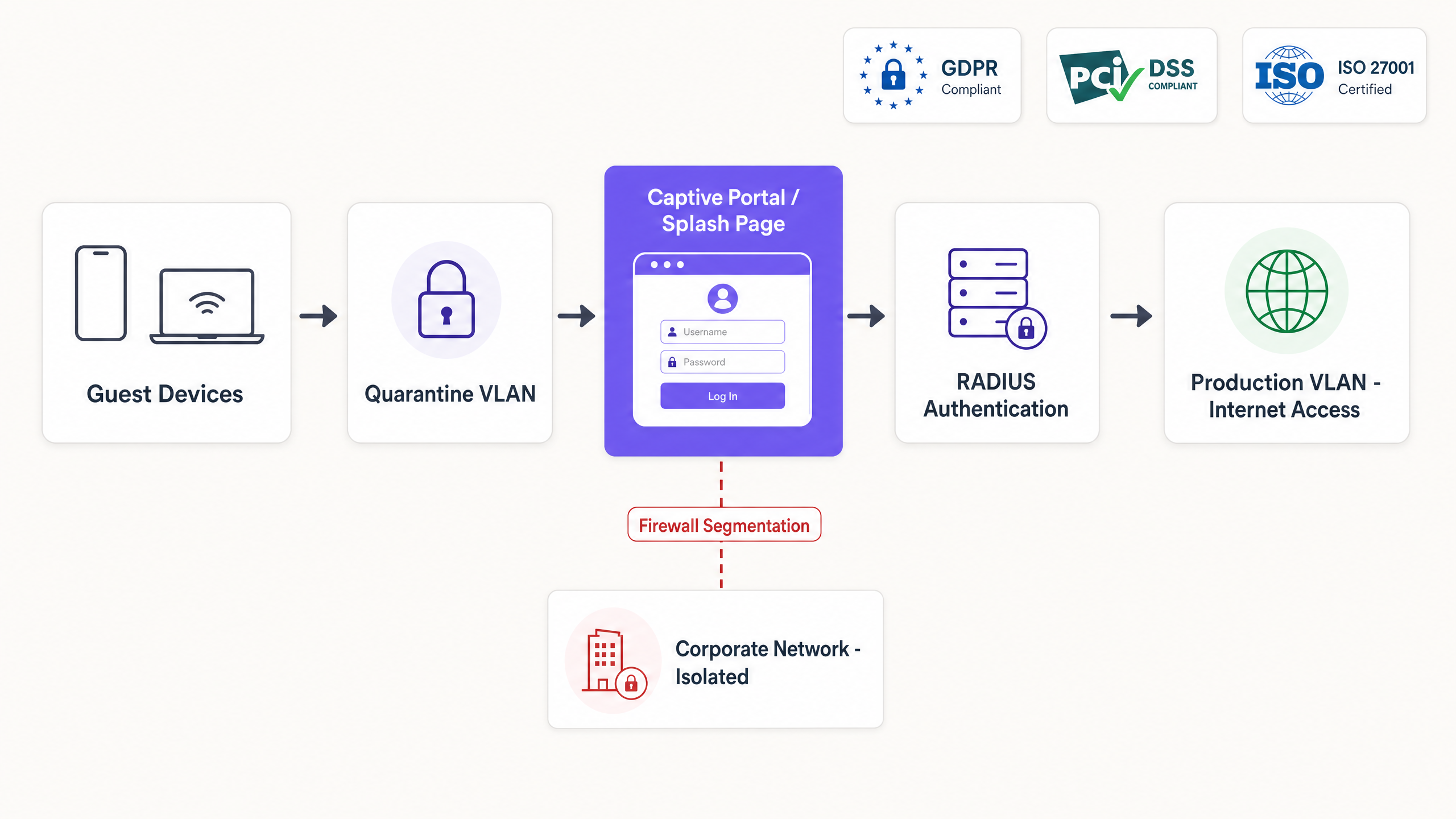
核心架构在身份验证完成之前,将每个访客设备置于隔离 VLAN 中。RADIUS 服务器管理会话,并通过授权变更 (CoA) 消息将设备释放到生产 VLAN。网络分段可确保访客流量永远不会到达企业基础设施或 POS 系统。在支付终端与访客 WiFi 共享物理基础设施的任何环境中,这都是 PCI DSS 的要求。
在转化方面,每增加一个表单字段,选择加入率就会降低 8% 到 12%。选择合适的身份验证方式取决于您的场所类型和数据目标。电子邮件获取可实现 65% 至 80% 的转化率,并获得直接拥有的数据。通过 OAuth 2.0 进行社交登录可减少摩擦,但会带来第三方依赖风险。短信一次性密码 (SMS OTP) 提供最高的数据质量,但转化率最低。对于没有营销目标的公共部门环境,一键连接(Click-through)是正确的选择。
Purple 在 80,000 多个场所运营 Guest WiFi 基础设施。本文件中的指南反映了 2024 年处理的 4.4 亿次登录(Purple 内部数据,2024 年)。
技术深度解析
Captive Portal 的实际工作原理
在设备关联 SSID 后,Captive Portal 会拦截 HTTP 和 HTTPS 请求。接入点将设备置于隔离 VLAN 中,防火墙仅允许 DNS 查询和一小部分预先批准的目的地(即围墙花园/Walled Garden)。设备的操作系统通过探测已知 URL(例如 iOS 上的 captive.apple.com 或 Android 上的 connectivitycheck.gstatic.com)来检测这种受限状态。当探测返回异常响应时,操作系统会自动启动 Portal 页面。
用户进行身份验证。Portal 通过 CoA 消息将结果发送给网络的 RADIUS 服务器。接入控制器解除隔离限制,将设备移至生产 VLAN,并记录包含时间戳、MAC 地址、身份和所应用策略的会话。根据身份验证方式的不同,整个端到端流程需要 1 到 10 秒。
网络分段
隔离 VLAN 是必选项。如果没有它,开放 SSID 上未通过身份验证的设备就可以探测内部网络、访问管理界面或连接 POS 系统。在 PCI DSS 适用环境中(即刷卡支付终端与访客 WiFi 共享物理基础设施的任何场所),支付卡行业数据安全标准 v4.0 要求持卡人数据环境与访客网络之间必须进行完全的网络隔离。
分段是在接入控制器级别实现的。在 Cisco Meraki 上,这通过组策略(Group Policies)进行配置。在 HPE Aruba 上,通过用户角色(User Roles)进行配置。在 Ruckus 上,通过区域配置(Zone configuration)进行配置。在 Juniper Mist 上,通过 WLAN 策略进行配置。这四种方案的原理完全相同:未授权设备接收受限策略;已授权设备接收生产策略。RADIUS 服务器负责执行这一转换。
对于拥有多种用户类型(访客、员工、承包商)的场所,请部署独立的 SSID,每个 SSID 映射到具有自身防火墙规则和带宽策略的独立 VLAN。不要尝试通过单个 SSID 和单个 Captive Portal 来服务所有用户类型。策略管理的复杂性远超任何所谓的简便性。
保护无线边缘安全
Captive Portal 运行在第 7 层。它不会对无线链路进行加密。在开放的 SSID 上,设备与接入点之间的流量是未加密的,并且对无线电覆盖范围内的任何设备都是可见的。
有三种方法可以解决这个问题:
结合 Captive Portal 的 WPA3。 WPA3-Personal 提供了对等实体同时身份验证 (SAE),从而消除了针对 WPA2-PSK 的离线字典攻击。Captive Portal 仍会触发身份验证,但无线链路已加密。这是 2026 年新部署的最低可接受标准。
结合 802.1X 的 Passpoint (Hotspot 2.0)。 Passpoint 使用 EAP-TLS 或 PEAP 提供基于证书或凭据的身份验证。Captive Portal 处理初始引导和同意获取。在第二次访问时,Passpoint 会使用配置的配置文件静默验证设备,完全绕过 Portal。这是运营商级漫游标准 OpenRoaming 所采用的架构。有关 EAP 方法的更多详细信息,请参阅我们的指南: EAP Method WiFi: A Guide to Secure Network Access 。
iPSK (身份预共享密钥)。 iPSK 通过 Portal 为每个用户或设备分配唯一的 WPA2 或 WPA3 密码。该密码存储在 RADIUS 服务器中,并映射到特定的 VLAN 和策略。这在共享 SSID 上提供了个性化的加密和可追溯性,而无需完整 802.1X 部署的基础设施开销。它是长租公寓(build-to-rent)和学生公寓环境中多租户 WiFi 的标准架构。
有关基于证书的身份验证的详细信息,请参阅 WiFi Certificate Authentication: Secure Network Access 。
实施指南
步骤 1:定义围墙花园
映射身份验证所需的每个外部依赖项在配置 Portal 之前进行配置。如果您提供 Google 社交登录,请将 accounts.google.com 及相关的 Google 身份验证域名加入白名单。如果您使用 Stripe 进行付费访问,请将 Stripe 的 API 端点加入白名单。如果您使用 Apple 登录,请将 appleid.apple.com 加入白名单。
未能维护准确的围墙花园(Walled Garden)是生产环境中 Captive Portal 渲染失败的主要原因。请使用围墙花园验证工具为您的特定控制器生成可直接复制粘贴的规则。Purple 提供免费的 Walled Garden 域名验证工具,可输出适用于 Cisco Meraki、Ubiquiti UniFi、HPE Aruba 和 Catalyst 控制器的即用型规则。
步骤 2:配置 RADIUS 集成
将您的接入控制器与云 RADIUS 提供商集成。配置控制器以将未授权的流量重定向到 Portal URL,并指定用于身份验证和计费的 RADIUS 服务器。确保 RADIUS 共享密钥至少包含 22 个字符,包含大小写字母和特殊字符,并且每 90 天轮换一次。
对于 Cisco Meraki 部署,在“无线 > 访问控制”(Wireless > Access Control)下配置 RADIUS 服务器。对于 HPE Aruba,在“安全 > 身份验证服务器”(Security > Authentication Servers)下进行配置。对于 Ruckus,在“服务 > 身份验证”(Services > Authentication)下进行配置。对于 Juniper Mist,在“网络 > WLAN”(Network > WLAN)下进行配置。
步骤 3:选择身份验证方法
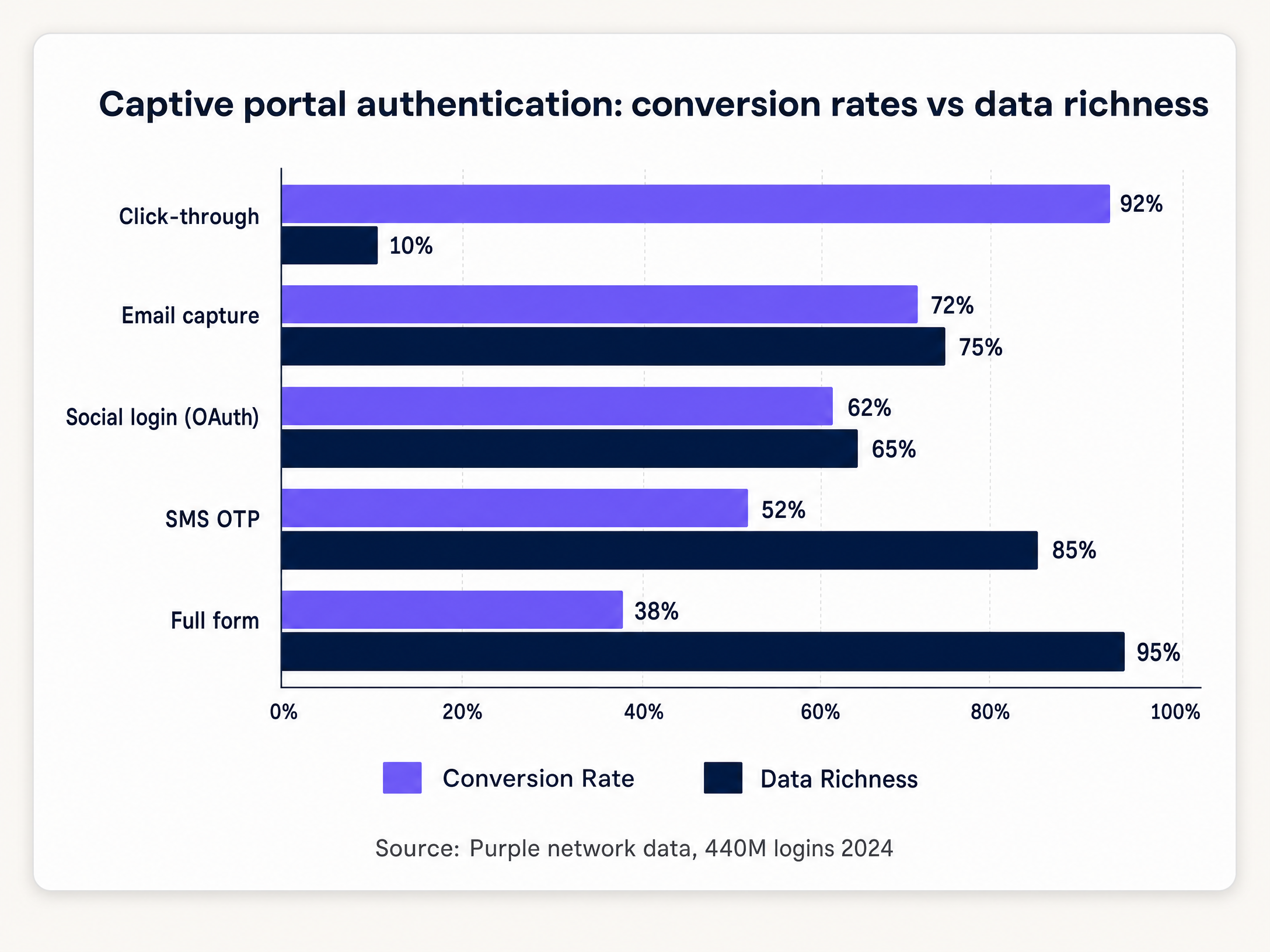
下表将场所类型与推荐的身份验证方法及预期转化率范围进行了映射。
| 场所类型 | 推荐方法 | 预期转化率 | 捕获的数据 |
|---|---|---|---|
| 酒店与款待业 | 邮箱捕获 + 社交登录 | 65-80% | 电子邮件、姓名、可选的人口统计信息 |
| 零售业 | 邮箱捕获 | 68-75% | 电子邮件、姓名 |
| 体育场与活动 | 短信验证码 | 45-55% | 已验证的手机号码 |
| 会议中心 | 社交登录 + 邮箱 | 60-70% | 电子邮件、职业档案 |
| 公共部门 | 一键登录 (Click-through) | 90-95% | 仅 MAC 地址、时间戳 |
| 医疗保健 | 一键登录 (Click-through) | 90-95% | 仅 MAC 地址、时间戳 |
来源:Purple 网络数据,4.4 亿次登录,2024 年。
步骤 4:设计同意流程
将网络访问所需的条款与营销传播所需的同意区分开来。根据英国 GDPR(保留在英国法律中的条例 (EU) 2016/679),这是两个截然不同的合法依据。
网络访问可以根据第 6(1)(f) 条的合法利益基础进行授权,涵盖网络管理和安全。营销传播则需要根据第 6(1)(a) 条获得明确同意。同意必须是自由给予的、具体的、知情的且毫不含糊的。预先勾选的框不符合这一标准。
在 Portal 页面上实现两个不同的复选框。第一个是必填的,涵盖服务条款和网络访问。第二个是可选的,默认不勾选,涵盖营销订阅。记录每个会话的时间戳、IP 地址、MAC 地址和同意状态。在监管机构查询时,此审计跟踪即为您的合规证据。
步骤 5:通过 RADIUS VSA 应用带宽策略
配置 RADIUS 服务器,使其在身份验证成功后返回厂商特定属性 (VSA)。VSA 指示接入点根据用户配置文件应用特定的带宽限制、内容过滤和会话超时。
在 HPE Aruba 上,Aruba-User-Role VSA 将用户分配到具有预定义策略的命名角色。在 Cisco Meraki 上,组策略 ID 通过 Filter-Id 属性返回。在 Ruckus 上,Ruckus-User-Groups 属性将用户映射到已配置的组。这种机制实现了动态策略执行,而无需为不同的用户层级配置单独的 SSID。
最佳实践
转化率优化
渐进式画像(Progressive profiling)的效果优于单次会话数据收集。在首次访问时询问电子邮件地址。在第二次访问时,请求出生日期或邮政编码。在第三次访问时,询问营销偏好。这种方法在随着时间的推移建立更丰富的用户画像的同时,保持了高转化率。
超过 85% 的 Captive Portal 交互发生在移动设备上(Purple 内部数据,2024 年)。请针对小屏幕进行设计。按钮必须足够大,无需缩放即可点击。文本在默认字号下必须清晰易读。登录流程必须在三次点击或更少次数内完成。
对于 零售业 部署,请将 Portal 页面与您的 CRM 或会员平台集成。Pizza Express 使用品牌定制的 Captive Portal 在两年内将 370 万名顾客添加到其 CRM 中,将每次 WiFi 连接转化为经过验证的营销订阅(Purple 客户数据,Pizza Express)。该 Portal 页面成为了会员注册和促销重新互动的首要渠道。
行为分析集成
Captive Portal 会话是物理场所分析与数字营销系统之间的关联键。每个经过身份验证的会话都会生成一个包含时间戳、停留时间和重复访问状态的客流量事件。通过与 WiFi Analytics 集成,这些数据可推动客流量归因、人口统计细分和营销活动投资回报率 (ROI) 衡量。
要深入了解来自 WiFi 网络的行为数据如何为场所运营提供信息,请参阅 行为分析:WiFi 网络洞察 。
安全加固
仅通过 HTTPS 提供 Portal 页面,并使用来自受信任证书颁发机构的有效 TLS 证书。HTTP Portal 会使用户凭据面临被拦截的风险,并触发降低转化率的浏览器安全警告。实施 HTTP 严格传输安全 (HSTS),最小 max-age 为 31536000 秒。
在身份验证端点上实施速率限制。如果没有速率限制,Portal 页面很容易受到针对凭据填充和针对凭证码的暴力破解攻击。限制身份验证将每个 IP 地址每分钟的身份验证尝试限制为 5 次。
每年至少对门户应用程序进行一次渗透测试。Purple 拥有 ISO 27001 认证和 Cyber Essentials 认证,并定期接受第三方渗透测试。对于 医疗保健 和 交通运输 部署,每季度进行一次测试是合适的标准。
故障排除与风险缓解
门户未显示
这是最常见的故障模式。设备的操作系统会向已知 URL 发送 captive portal 探测。如果防火墙阻止了该域名,操作系统就无法检测到受限状态,门户也就永远不会自动启动。用户必须手动导航到非 HTTPS URL 才能触发重定向。
首先检查围墙花园配置。确保在身份验证前可以访问以下域名:captive.apple.com、www.apple.com、connectivitycheck.gstatic.com、clients3.google.com 和 msftconnecttest.com。这些分别是 iOS、Android 和 Windows 使用的探测 URL。
MAC 地址随机化
iOS 14 和 Android 10 默认引入了针对每个网络的 MAC 地址随机化。再次连接的设备在每次连接时都会呈现新的 MAC 地址,从而破坏了会话持久性。门户会重新要求用户进行验证,他们必须重新登录。
通过在首次登录时配置 Passpoint 配置文件来缓解此问题。该配置文件包含设备用于后续连接的凭据,从而完全绕过基于 MAC 的识别。或者,使用基于应用程序的身份验证流程,该流程依赖于存储在应用程序中的身份令牌,而不是设备 MAC 地址。
大规模场景下的 DHCP 和 DNS 耗尽
在大型场所(如体育场、会议中心、交通枢纽),在活动或会议开始时,成千上万台设备会同时连接。如果 DHCP 地址池过小,设备将无法获取 IP 地址。如果 DNS 服务器无法处理查询量,captive portal 探测就会失败,门户也就不会出现。
根据峰值并发连接数(而非平均值)来规划 DHCP 地址池的大小。对于一个拥有 60,000 个座位的体育场,假设有 40,000 台并发设备。分配一个至少包含 50,000 个地址的 DHCP 地址池,并设置较短的租期(15 到 30 分钟)以快速回收地址。为访客网络部署一个专用的 DNS 解析器,与企业 DNS 基础设施分开。
OAuth 提供商 API 变更
社交登录提供商会在不经通知的情况下更改其 API 条款。Facebook 已逐步限制通过其 Graph API 可获取的数据。如果社交登录是您唯一的身份验证方法,且提供商更改了其条款,您的门户将对所有用户失效。
在社交登录的同时,务必部署至少一种非 OAuth 方法。收集电子邮件是标准的备用方案。在 OAuth 身份验证端点上配置监控,以便在错误率上升时发出警报,这通常发生在 API 变更之前或与之重合。
投资回报率(ROI)与业务影响
如果仅凭基础设施支出来衡量,captive portal 是一个成本中心。但如果通过它所捕获的数据价值以及它所赋能的营销计划来衡量,它就是一项收入资产。
一个拥有 500 家门店的零售连锁店,如果每家门店每月处理 10,000 次登录,且选择加入率为 65%,那么每年将产生 3900 万个经过验证的 CRM 联系人。按照每年每个联系人 0.10 英镑的保守电子邮件营销收入归因计算,仅单一数据捕获渠道就能带来 390 万英镑的归因收入。
对于 酒店餐饮 运营商而言,该门户是宾客旅程中的第一个接触点。Premier Inn 和 Whitbread 利用访客 WiFi 数据来指导忠诚度计划的设计,并衡量 WiFi 参与度与重复预订率之间的相关性(Purple 客户数据,Whitbread)。
对于交通运营商而言,该门户提供了客流数据,可为零售布局、人员配置决策和特许经营业绩提供参考。曼彻斯特机场集团(MAG)利用 WiFi 分析来衡量航站楼不同区域的旅客停留时间,将 WiFi 会话数据与每位旅客的零售支出相关联(Purple 客户数据,MAG)。
根据三个指标来衡量门户性能:选择加入率(电子邮件捕获的目标在 60% 以上)、数据质量率(通过验证的电子邮件地址百分比,目标在 80% 以上)以及重复访问率(无需重新输入凭据即可进行身份验证的返回用户百分比,目标在 70% 以上)。
Purple 的 WiFi Analytics 平台在所有场所实时提供这些指标,并可按位置、时间段和用户群组进行细分。
关键定义
Captive portal
A web application that intercepts network traffic after a device associates with an SSID, requiring user interaction (authentication, payment, or terms acceptance) before granting internet access.
The primary mechanism for onboarding visitors onto public or guest WiFi networks. Every device that connects passes through it, making it the most consistent data capture surface in a physical venue.
Walled garden
A restricted network environment that allows access only to specific, approved IP addresses or domains prior to authentication.
Required to allow devices to reach the captive portal page, DNS servers, and necessary third-party authentication services before full internet access is granted. Misconfiguration is the leading cause of portal rendering failures.
RADIUS (Remote Authentication Dial-In User Service)
A networking protocol that provides centralised authentication, authorisation, and accounting management for users connecting to a network service.
The standard protocol used by captive portals to communicate with access points and controllers. Every enterprise-grade access point from Cisco Meraki, HPE Aruba, Ruckus, Juniper Mist, and Ubiquiti UniFi supports RADIUS.
Change of Authorisation (CoA)
A RADIUS extension defined in RFC 5176 that allows a server to dynamically modify the authorisation attributes of an active session.
Used by the captive portal to instruct the access controller to move a device from the quarantine VLAN to the production VLAN immediately after successful login, without requiring the device to reconnect.
Passpoint (Hotspot 2.0)
An IEEE 802.11u-based standard that enables mobile devices to automatically discover and connect to WiFi networks securely using 802.1X authentication, without manual portal interaction.
The standard approach for returning-user authentication in enterprise venues. The captive portal handles first-visit onboarding and consent capture; Passpoint handles all subsequent visits silently and securely.
VLAN (Virtual Local Area Network)
A logical subnetwork that groups devices from different physical network segments, enforcing traffic isolation at the data link layer.
Used to segment guest traffic from corporate traffic. Without VLAN segmentation, a guest device on the same physical switch as a point-of-sale terminal can probe or attack it.
iPSK (Identity Pre-Shared Key)
A security method where each user or device is assigned a unique WPA2 or WPA3 passphrase for the same SSID, stored and enforced by the RADIUS server.
Provides individualised encryption and per-user policy enforcement on a shared SSID without the infrastructure overhead of a full 802.1X deployment. Standard architecture for Multi-Tenant WiFi.
MAC address randomisation
A privacy feature in iOS 14+, Android 10+, and Windows 10+ that generates a per-network randomised MAC address to prevent cross-network device tracking.
Breaks MAC-based session persistence on captive portals. A returning device presents a new MAC address, triggering re-authentication. Mitigated by Passpoint profiles or app-based identity tokens.
Vendor-Specific Attribute (VSA)
A RADIUS attribute in the vendor-specific namespace (attribute 26) that carries hardware-vendor-specific policy instructions from the RADIUS server to the access controller.
Used to assign bandwidth limits, VLAN IDs, content filter policies, and session timeouts dynamically based on the authenticated user's profile. Each hardware vendor (Aruba, Meraki, Ruckus) defines its own VSA namespace.
应用实例
A 200-room hotel using HPE Aruba access points needs tiered WiFi: basic free access for standard guests and high-speed access for loyalty members. How should the captive portal and network be configured?
Deploy a single guest SSID across the property. Configure the captive portal to integrate with the hotel's Property Management System (PMS) via API. Present two authentication options on the portal: 'Log in with Room Number and Name' and 'Log in with Loyalty Credentials'. When a loyalty member authenticates, the portal queries the PMS, verifies the tier, and sends a RADIUS CoA to the Aruba controller. The RADIUS response includes an Aruba-User-Role VSA assigning the user to a high-bandwidth role (for example, 50 Mbps down, 20 Mbps up). Standard guests receive a default rate-limited role (5 Mbps down, 2 Mbps up). Both user types connect to the same SSID and VLAN, but receive different bandwidth policies enforced by the controller.
A national retail chain with 500 locations wants to implement guest WiFi to capture email addresses for marketing. The legal team has flagged GDPR compliance concerns. How should the portal consent flow be designed?
Design a portal with a single email input field. Below the field, implement two distinct checkboxes. Checkbox 1 (mandatory, unticked by default): 'I accept the Terms of Service and Privacy Policy. I understand that my device data will be processed to provide network access.' Checkbox 2 (optional, unticked by default): 'I consent to receive marketing communications, offers, and promotions by email.' Configure the backend to log the timestamp, IP address, MAC address, and the state of both checkboxes for each session. Store this consent audit trail in a GDPR-compliant data store with a retention period aligned to the marketing programme (typically 24 months from last interaction). Integrate the email addresses from Checkbox 2 opt-ins directly into the CRM via API.
练习题
Q1. A stadium IT director reports that during halftime, the captive portal fails to load for thousands of users simultaneously, even though WiFi signal strength is strong across the venue. What is the most likely architectural bottleneck, and what is the remediation?
提示:Consider the services a device requires before it can even request the portal page. Signal strength is not the constraint.
查看标准答案
The most likely bottleneck is DHCP pool exhaustion or DNS resolver overload. When thousands of devices connect simultaneously, each must obtain an IP address via DHCP and resolve the OS captivity probe URL via DNS before the portal can load. If the DHCP pool is undersized or the DNS server cannot handle the query volume, the process stalls before the user sees anything. Remediation: size the DHCP pool for peak concurrent connections (not average), set a short lease time of 15 to 30 minutes to recycle addresses, and deploy a dedicated DNS resolver for the guest network with sufficient capacity for peak query rates.
Q2. You are deploying a captive portal in a hospital waiting room. The primary goal is providing internet access for patients and visitors. There is no marketing objective. Which authentication method should you choose, and what are the compliance implications?
提示:Balance friction against the value of the data collected. Consider what happens when you collect personal data you do not need.
查看标准答案
Click-through (terms and conditions only) is the correct choice. It delivers 90 to 95% conversion with minimal friction. Since there is no marketing objective, collecting personal data such as email addresses introduces GDPR compliance obligations (lawful basis, data minimisation, retention policies, subject access rights) without providing any business value. In a healthcare environment, the reputational risk of a data breach involving patient or visitor personal data is particularly significant. Click-through limits data collection to MAC address and timestamp, which is sufficient for network management under legitimate interest.
Q3. A retailer wants to offer Google and Apple social login on their captive portal. Their network uses Cisco Meraki access points. What network configuration is mandatory for social login to function, and what is the fallback risk?
提示:How does the device reach the identity provider before it has internet access? What happens if the provider changes its terms?
查看标准答案
You must configure the walled garden on the Meraki access controller to whitelist the authentication domains for both providers: accounts.google.com and associated Google OAuth endpoints, and appleid.apple.com and associated Apple authentication endpoints. Without these entries, the quarantine VLAN will block the OAuth request, and social login will fail silently. The fallback risk is provider API change: if Google or Apple modifies its OAuth terms or API endpoints, the authentication flow breaks for all users who rely on that method. Always deploy email capture as a parallel authentication option so users have a non-OAuth fallback.
Q4. A conference centre operator wants to use SMS OTP as the primary authentication method for a three-day event with an expected 8,000 unique logins per day. What cost implications should be modelled before committing to this method?
提示:SMS OTP has a per-message cost. Calculate the total at scale and consider the conversion rate impact.
查看标准答案
At 8,000 logins per day over three days, you are processing 24,000 SMS messages. At a typical UK carrier rate of 2 to 5 pence per message, the cost is between £480 and £1,200 for the event. If attendees are international, costs increase significantly (up to 10 to 15 pence per message for some markets). Additionally, SMS OTP conversion rates are 45 to 55%, meaning approximately 4,400 to 4,800 of the 8,000 expected logins will complete. The remaining attendees will need an alternative method. Model the per-message cost, factor in the conversion rate, and ensure a fallback method (email capture or click-through) is available for users who do not complete SMS verification.
继续阅读本系列
如何在 Starlink 上设置 Captive Portal:远程与海洋场所指南
本指南详细介绍了如何绕过原生 Starlink 硬件,并使用企业级路由设备集成云端托管的 Captive Portal。您将学习如何克服 CGNAT 限制、强制执行 VLAN 隔离、管理卫星带宽限制并确保合规性。
酒店访客 WiFi 管理:整合 PMS、门户与品牌标准
本技术指南详细介绍了如何构建企业级酒店 WiFi 网络,重点关注 VLAN 隔离、用于自动化会话管理的 PMS 集成,以及符合 GDPR 合规要求的数据采集 Captive Portal 优化。
Captive Portal Best Practices: Designing for High Conversion and Compliance
本技术指南为 IT 经理、网络架构师和场所运营总监提供了部署 Captive Portal 的完整蓝图,旨在平衡网络安全与高用户转化率。内容涵盖了从 VLAN 划分、RADIUS 认证到符合 GDPR 的同意设计以及认证方式选择的完整架构。结合 Purple 在 2024 年覆盖 80,000 多个场所、4.4 亿次登录的运营经验,每项建议均基于真实的部署数据。