
企业级 SCEP 设置指南:面向高等教育和大型网络的基于证书的 Wi-Fi 身份验证
本指南为使用 SCEP 部署基于证书的 WiFi 身份验证提供了全面的技术蓝图。内容涵盖了从预共享密钥到 EAP-TLS 的架构转型、跨 MDM 平台的部署顺序,以及针对大型网络的关键风险缓解策略。
收听本指南
查看播客转录
执行摘要
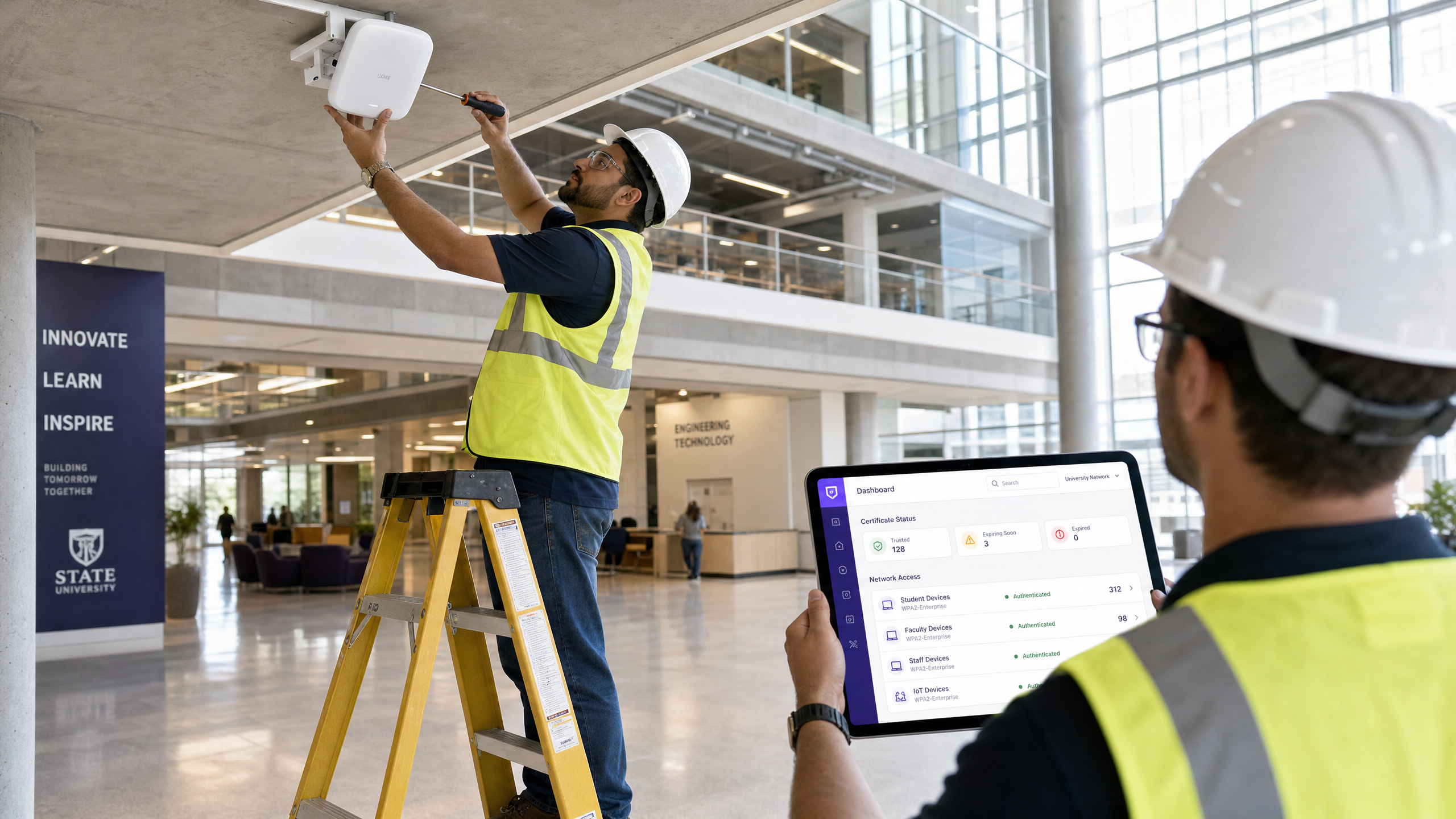
对于企业级场所——无论是现代高等教育校园、多站点零售业务,还是大型酒店集团——依靠预共享密钥来提供员工和运营 WiFi 会引入不可接受的安全漏洞和运营开销。现代网络架构要求使用 EAP-TLS 进行 802.1X 身份验证,以确保每个设备在访问网络之前都经过密码学验证。
挑战在于分发:在不让您的服务台被支持工单淹没的情况下,将唯一的客户端证书部署到数以千计的 Windows、iOS 和 Android 设备上。Microsoft Intune、Jamf 和其他 MDM 平台通过自动化的证书生命周期管理解决了这一问题。通过利用 SCEP(简单证书注册协议),IT 团队可以静默地将受信任的根证书和客户端证书推送到托管终端。
本指南为企业级 SCEP 证书部署提供了权威的架构蓝图和分步实施策略。我们将探讨成功部署所需的部署顺序,概述实际的风险缓解策略,并详细介绍 Purple 基于身份的网络方法如何与这些要求相匹配。
技术深挖:SCEP 与 802.1X 架构
在设计基于证书的 WiFi 部署策略时,理解底层协议的交互至关重要。SCEP 是传输机制;EAP-TLS 是身份验证协议。
SCEP(简单证书注册协议)
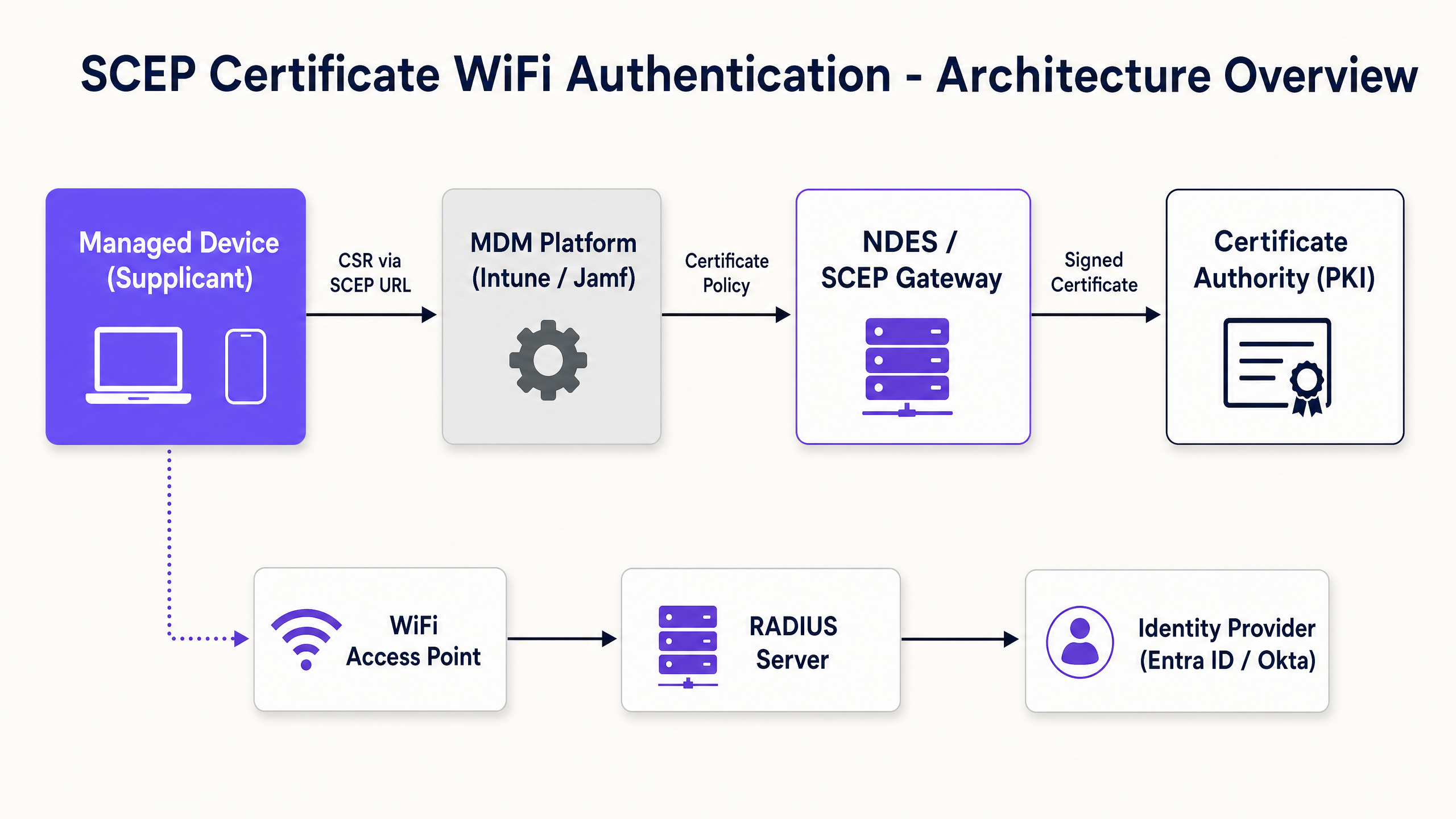
SCEP 是企业设备注册的行业标准。在 SCEP 工作流中,MDM 服务指示终端生成自己的私钥和公钥对。设备创建证书签名请求 (CSR),并通过网络设备注册服务 (NDES) 服务器或云网关将其发送到您的证书颁发机构 (CA)。CA 对请求进行签名并将公钥证书返回给设备。
SCEP 的关键安全优势在于私钥永远不会离开设备。它在本地生成,存储在设备的安全硬件飞地(secure enclave)中,并且绝不会在网络上传输。这使得 SCEP 成为 802.1X 身份验证强烈推荐的方法。
EAP-TLS 与双向身份验证
EAP-TLS(使用传输层安全的可扩展身份验证协议)位于 802.1X 框架内。EAP-TLS 被广泛认为是企业无线网络最安全的身份验证方法,因为它需要双向身份验证。客户端设备和 RADIUS 服务器都必须出示有效的证书。在没有密码学证明的情况下,双方互不信任。这种双向身份验证可以保护网络免受流氓接入点和凭据窃取的影响。
当设备连接到您的 WiFi SSID 时,它会向 RADIUS 服务器出示其证书。RADIUS 服务器根据您的 CA 信任链验证该证书,检查证书吊销列表 (CRL) 以确认该证书未被吊销,如果成功,则向接入点发送接受消息。
实施指南:部署顺序
成功为 802.1X 配置 MDM WiFi 配置文件需要严格遵守特定的部署顺序。配置文件依赖关系决定了在配置身份验证之前必须先建立信任。
步骤 1:部署受信任的根证书配置文件
在任何设备可以请求客户端证书或信任您的 RADIUS 服务器之前,它必须信任颁发证书的证书颁发机构。
- 将您的根 CA 证书导出为 .cer 文件。
- 在您的 MDM(例如 Intune 或 Jamf)中,创建一个受信任的证书配置文件。
- 上传 .cer 文件并将此配置文件部署到您的目标设备组。
步骤 2:配置 SCEP 证书配置文件
建立信任后,配置 SCEP 配置文件以指示设备如何获取其客户端证书。
- 创建一个新的配置文件并选择 SCEP 证书。
- 配置使用者名称格式。对于用户驱动的身份验证,请使用用户主体名称 (User Principal Name)。
- 将密钥用法设置为数字签名和密钥加密。
- 在扩展密钥用法下,指定客户端身份验证。
- 将此配置文件链接到步骤 1 中创建的受信任根证书配置文件。
- 提供您的 NDES 服务器或 SCEP 网关的外部 URL。
步骤 3:部署 802.1X WiFi 配置文件
最后一步是推送将证书与网络 SSID 绑定的 WiFi 配置。
- 创建一个 Wi-Fi 配置文件。
- 输入与您的接入点广播完全一致的网络名称 (SSID)。
- 选择 WPA2-Enterprise 或 WPA3-Enterprise 作为安全类型。
- 将 EAP 类型设置为 EAP-TLS。
- 选择步骤 2 中创建的 SCEP 证书配置文件作为客户端身份验证证书。
- 指定用于服务器验证的受信任根证书。
最佳实践与行业标准
在实施 SCEP 证书部署时,请遵循这些与厂商无关的最佳实践,以确保合规性和可靠性。
NDES 服务器部署与安全
NDES 服务器必须能够从互联网访问,以便允许远程设备在到达现场之前配置证书。然而,将内部服务器直接暴露给互联网是一个重大的安全风险。使用 Azure AD Application Proxy 发布 NDES URL,或使用云托管的 SCEP 网关。这提供了安全的远程访问,而无需打开入站防火墙端口。
RADIUS 和 CRL 检查
证书部署只是安全方程式的一半;吊销同样至关重要。如果员工离职,如果其客户端证书仍然有效且 RADIUS 服务器没有严格检查证书吊销列表 (CRL),则禁用其 Active Directory 帐户可能不会立即吊销其 WiFi 访问权限。配置您的 RADIUS 服务器以执行严格的 CRL 检查,并确保您的 CRL 分发点高度可用。
硬件无关性部署
SCEP 和 EAP-TLS 是厂商中立的标准。您的部署应该与硬件无关,在 Cisco Meraki、HPE Aruba、Ruckus、Juniper Mist、Ubiquiti UniFi、Cambium、Extreme 和 Fortinet 基础设施中无缝运行。
故障排除与风险缓解
即使经过精心规划,证书部署也可能会遇到问题。
问题:WiFi 配置文件应用失败
这几乎总是由于组目标不匹配引起的。如果将 SCEP 配置文件分配给用户组,而将 WiFi 配置文件分配给设备组,则 MDM 无法解析该依赖关系。确保受信任的根证书、SCEP 和 WiFi 配置文件都部署到完全相同的组中。
问题:NDES 403 Forbidden 错误
设备无法获取 SCEP 证书。Intune Certificate Connector 服务帐户可能缺少对证书模板的必要权限,或者防火墙上的 URL 过滤阻止了 SCEP 使用的特定查询字符串参数。
投资回报率 (ROI) 与业务影响
过渡到 SCEP 802.1X 证书部署可在安全和运营方面带来可衡量的回报。
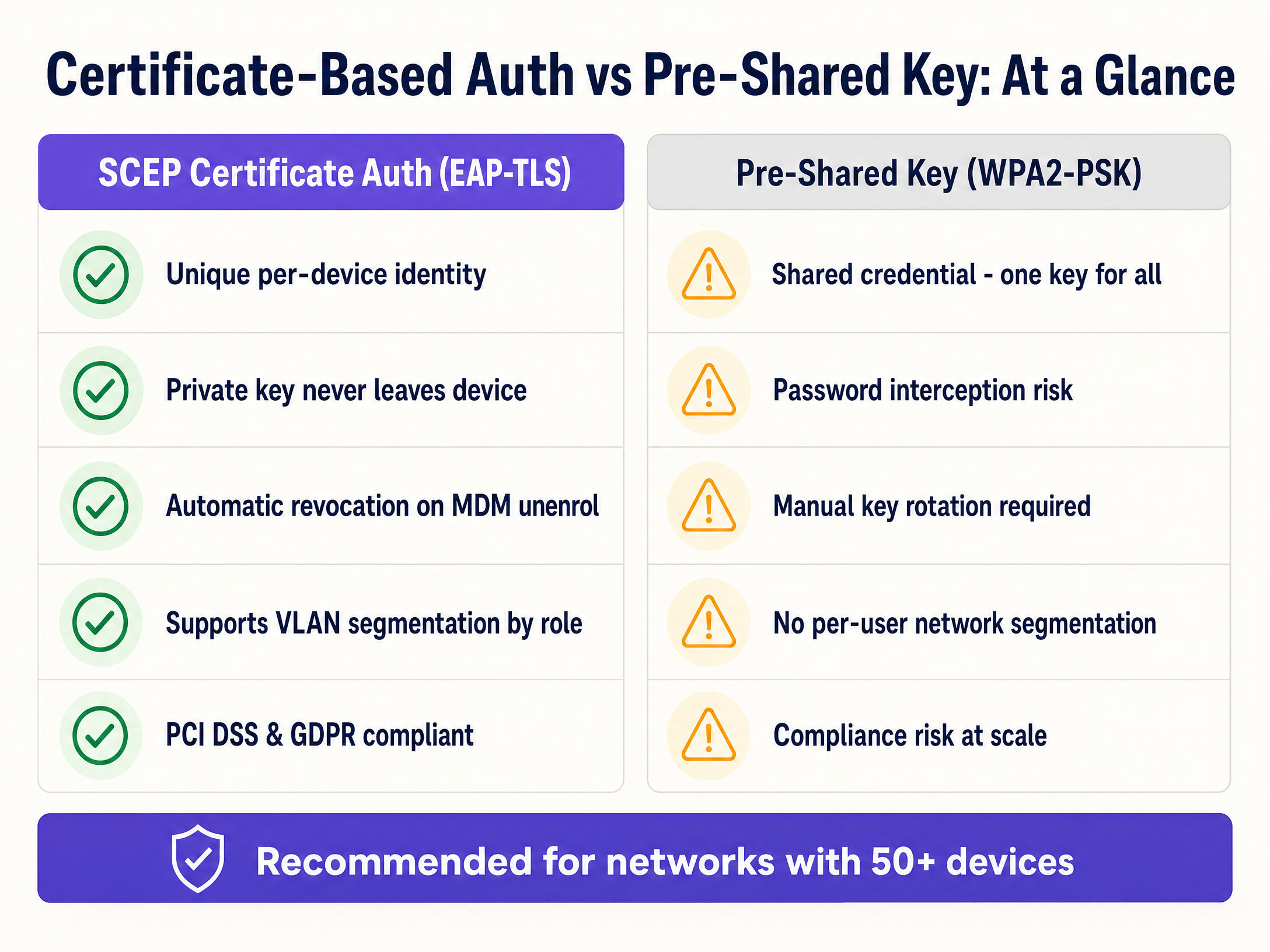
- 减少服务台工单: 基于密码的 WiFi 会产生大量的支持工单。基于证书的身份验证对用户是无感的,通常可减少 70% 与 WiFi 相关的服务台工作量。
- 增强安全态势: EAP-TLS 消除了凭据收集和中间人攻击的风险。这对于遵守 PCI DSS 和 GDPR 等框架至关重要。
- 无缝入网: 对于同时管理大量 Apple 设备和 Windows 设备的组织,与现有 MDM 工作流集成可确保统一、零接触的配置体验。
- 动态分段: 支持基于身份的动态 VLAN 分配,无需单独的 SSID 即可将 IoT 设备与企业数据隔离。
如需进一步阅读,请探索我们关于 企业 WiFi 安全:2026 年完整指南 和 如何在员工离职时吊销 WiFi 访问权限 的相关指南。
关键定义
SCEP (Simple Certificate Enrollment Protocol)
A protocol that automates the request and issuance of digital certificates to managed devices without human intervention.
Used by MDM platforms to securely provision unique identities to devices for network authentication.
EAP-TLS (Extensible Authentication Protocol - Transport Layer Security)
The most secure 802.1X authentication method, requiring both the client and the RADIUS server to present valid digital certificates.
The target authentication protocol that SCEP certificates are provisioned to support.
802.1X
An IEEE standard for port-based network access control that provides an authentication mechanism to devices wishing to attach to a LAN or WLAN.
The overarching framework that secures enterprise networks against unauthorized access.
RADIUS
A networking protocol that provides centralized Authentication, Authorization, and Accounting management for users who connect and use a network service.
The server component that validates the client certificate and determines which VLAN the device should join.
CSR (Certificate Signing Request)
A block of encoded text given to a Certificate Authority when applying for an SSL/TLS certificate, containing the public key and identity information.
Generated locally on the device during the SCEP enrollment process.
NDES (Network Device Enrollment Service)
A Microsoft Windows Server role that acts as a bridge, allowing devices to obtain certificates via SCEP.
The gateway that receives the CSR from the device and forwards it to the internal Certificate Authority.
CRL (Certificate Revocation List)
A list published by the Certificate Authority containing the serial numbers of certificates that have been revoked and should no longer be trusted.
Checked by the RADIUS server during authentication to ensure a terminated employee's device cannot connect.
VLAN (Virtual Local Area Network)
A logical subnetwork that groups a collection of devices from different physical LANs.
Used in conjunction with RADIUS to dynamically segment network traffic based on the identity presented in the SCEP certificate.
应用实例
A 400-room hotel needs to deploy secure operational WiFi for 150 staff devices (tablets and laptops) while ensuring strict separation from the Guest WiFi network.
The IT team configures a cloud SCEP gateway integrated with their MDM. They deploy a Trusted Root profile, followed by a SCEP profile targeting the 'Hotel Operations' device group. A WiFi profile for the 'Staff-Secure' SSID is then deployed, configured for WPA3-Enterprise and EAP-TLS. The RADIUS server is configured to assign these authenticated devices to VLAN 40, completely isolating them from the Guest WiFi (VLAN 50).
A large university campus with 25,000 students and 3,000 staff needs to secure its 'Edu-Secure' network. They currently use PEAP with usernames and passwords, resulting in 500+ helpdesk tickets per month due to password expirations.
The university migrates staff and faculty devices to EAP-TLS using Intune and SCEP. They deploy the certificate profiles in the strict sequence (Root -> SCEP -> WiFi) to the staff user groups. For unmanaged student BYOD devices, they deploy a separate onboarding portal that provisions temporary certificates, or utilize Purple's Guest WiFi platform with profile-based authentication for seamless, secure access.
练习题
Q1. Your team is deploying a new SCEP certificate profile to a fleet of 500 Windows laptops. The Trusted Root profile was deployed to the 'All Corporate Devices' group. The SCEP profile was deployed to the 'All Corporate Users' group. The WiFi profile is showing as 'Not Applicable' on the laptops. What is the root cause?
提示:Consider the Intune profile dependency rules and group targeting requirements.
查看标准答案
The root cause is a mismatch in group targeting. Intune requires that dependent profiles (Root, SCEP, WiFi) be deployed to the exact same group type. Because the Root profile targets devices and the SCEP profile targets users, the dependency chain is broken. All three profiles must target either the same Device group or the same User group.
Q2. A hotel operations director wants to secure the staff WiFi network using EAP-TLS. They suggest using PKCS instead of SCEP because it does not require an NDES server. As the network architect, why should you advise against this for WiFi authentication?
提示:Think about where the private key is generated and how it travels.
查看标准答案
You should advise against PKCS for WiFi authentication because it requires the private key to be generated centrally by the CA and transmitted over the network to the device. SCEP is significantly more secure because the device generates the private key locally and stores it in a secure hardware enclave; the private key never leaves the device.
Q3. During a network audit, you discover that the RADIUS server is configured to ignore CRL (Certificate Revocation List) checking errors. What specific security risk does this introduce when an employee is terminated?
提示:Consider what happens to the validity of the certificate if the MDM unenrols the device but the RADIUS server cannot verify revocation status.
查看标准答案
If CRL checking is ignored or fails open, a terminated employee whose device has been unenrolled (and certificate revoked by the CA) may still be able to connect to the WiFi network. The RADIUS server will see a cryptographically valid certificate and, without checking the CRL, will grant access, creating a severe security vulnerability.
继续阅读本系列
Grandstream GWN 接入点与 Purple WiFi 集成
本权威技术参考指南详细介绍了如何将 Grandstream GWN 接入点与 Purple 的访客 WiFi 和分析平台进行集成。它涵盖了 Grandstream Captive Portal 配置、RADIUS AAA 设置、围墙花园(walled garden)设置、带有动态 VLAN 引导的安全员工 802.1X 认证以及多租户 PPSK 细分——为大规模部署访客和员工 WiFi 的 MSP 及 IT 团队提供可操作的逐步指导。
员工 WiFi 条款和条件:法律与合规要点
本指南涵盖了为企业场所起草和执行员工 WiFi 条款和条件的法律与技术要点。它详细介绍了可接受使用政策 (AUP) 中应包含的内容、如何满足 GDPR 和 PCI DSS 要求,以及如何部署基于身份的身份验证和网络分段来保护企业资产。酒店、零售连锁店、体育场馆和公共部门组织的 IT 经理、人力资源团队和运营总监将获得可在本季度实施的切实可行的指导。
如何在员工离职时撤销其 WiFi 访问权限
本指南详细介绍了如何在员工离职时撤销其 WiFi 访问权限,用基于用户的 802.1X 证书或 iPSK 取代不安全的共享密码。它涵盖了通过 SCIM 进行的自动停用,以满足 ISO 27001 和 SOC 2 审计要求。