跳至主要内容

Cambium Networks cnPilot 和 cnMaestro 与 Purple WiFi 的集成

本权威指南详细介绍了 Cambium Networks cnPilot 接入点和 cnMaestro 云控制器与 Purple WiFi 智能平台的集成。内容涵盖架构、Captive Portal 配置、围墙花园要求、802.1X 员工 WiFi,以及在多租户环境下使用 Cambium ePSK 进行的动态 VLAN 划分。

📖 5 分钟阅读📝 1,178 🔧 2 应用实例3 练习题📚 8 关键定义

收听本指南

查看播客转录
Cambium Networks cnPilot and cnMaestro Integration with Purple WiFi. A Consultant Briefing. Welcome. If you're running a Cambium Networks environment and you've been asked to deliver a guest WiFi experience that captures data, drives marketing, and stays compliant — this briefing is exactly what you need. I'm going to walk you through how Cambium cnPilot access points, the cnMaestro cloud controller, and Purple WiFi fit together. We'll cover the architecture, the RADIUS authentication flow, walled garden configuration, secure staff WiFi using 802.1X, and multi-tenant segmentation using Cambium's ePSK feature with dynamic VLAN assignment. Whether you're managing a hotel estate, a retail portfolio, a conference centre, or a public-sector campus, the principles are the same. Let's get into it. First, a quick orientation on the two platforms. Cambium Networks produces the cnPilot range of enterprise WiFi access points — the e410, e425H, e430H, and e505 for indoor and outdoor deployments. These APs are managed centrally through cnMaestro, Cambium's cloud management platform. cnMaestro gives you centralised visibility, configuration management, and firmware updates across your entire AP estate — whether that's a handful of devices in a single venue or thousands of APs across a national estate. Purple WiFi is an enterprise guest WiFi intelligence platform. It handles the captive portal — the branded splash page your guests see when they connect — and it also acts as a RADIUS authentication server, a data capture engine, and a marketing automation platform. Purple operates across 80,000 live venues and has processed 440 million logins in 2024 alone. The combination of Cambium cnMaestro and Purple gives you a production-grade guest WiFi stack that is both technically solid and commercially valuable. Now, let's talk about the integration architecture. The core mechanism is a captive portal redirect combined with RADIUS authentication. Here is how the flow works in practice. A guest device associates with your guest SSID. That SSID is configured in cnMaestro as an open network — no pre-shared key for guests. The Cambium AP intercepts the first HTTP request from the device and redirects it to Purple's captive portal URL. This redirect is configured in cnMaestro under the WLAN's Guest Access settings, where you set the External Page URL to your Purple venue portal endpoint. The guest then interacts with the Purple portal. They might authenticate via social login, email, SMS verification, or a custom form. Once they complete the authentication flow, Purple's backend sends a RADIUS Access-Accept message back to the Cambium AP on UDP port 1812. The AP then moves the device from the pre-authentication state to full network access. Let me walk you through the exact configuration steps in cnMaestro. Navigate to Configuration, then WiFi Profiles, then WLANs. Create a new WLAN for your guest network. Set the SSID name — something like "Hotel Guest WiFi" — and set the security to Open. Under Guest Access, enable the External Hotspot option. This is the key setting that tells cnMaestro to redirect unauthenticated clients to an external portal. Set the External Page URL to your Purple venue portal URL. Enable RADIUS authentication and enter Purple's RADIUS server IP address, the shared secret, and set the authentication port to UDP 1812. Enable RADIUS accounting on UDP 1813 — this is critical for Purple's analytics to function correctly. Without accounting records, Purple cannot build session data, dwell time metrics, or visit frequency analytics. Now, the walled garden. This is the list of domains and IP addresses that guest devices can reach before they authenticate. You need to whitelist Purple's portal domain and any CDN endpoints used to serve portal assets. You also need to whitelist any authentication provider domains — if you're using social login via Google or Facebook, their OAuth domains need to be in the walled garden. A misconfigured walled garden is the single most common cause of captive portal failures. The guest device needs to resolve DNS and reach the Purple portal over HTTPS before it can authenticate. In cnMaestro, the walled garden is configured under the External Hotspot settings. Add entries for Purple's portal domain, any social login provider domains, and any payment gateway domains if you're running paid WiFi tiers. Now let's talk about secure staff WiFi using IEEE 802.1X. For staff networks, you do not want a captive portal. You want certificate-based or credential-based authentication that happens silently at the device level. In cnMaestro, create a separate WLAN for staff. Set the security to WPA2-Enterprise. Configure the RADIUS server details — again, Purple's RADIUS server IP on UDP 1812. Staff devices authenticate using EAP-PEAP with username and password credentials, or EAP-TLS with device certificates for the highest security posture. Purple integrates with Microsoft Entra ID, Okta, and Google Workspace as identity providers. This means your staff can authenticate to the WiFi using their existing corporate credentials — no separate WiFi password to manage. Purple validates the credentials against your identity provider and returns an Access-Accept to the Cambium AP. Dynamic VLAN assignment then places the authenticated staff device on the correct staff VLAN, isolating it from guest traffic. Now, multi-tenant segmentation using Cambium ePSK. ePSK — enhanced pre-shared key — is Cambium's implementation of what the industry calls PPSK or iPSK. The concept is straightforward: instead of one shared password for an entire SSID, each user or tenant gets their own unique passphrase. They all connect to the same SSID, but each unique key maps to a specific VLAN, giving you network isolation without the complexity of running multiple SSIDs. cnMaestro supports up to 2,000 ePSK entries per WLAN. Each ePSK can be assigned a specific VLAN ID, a rate limit, and an expiry date. This makes it ideal for multi-tenant environments — think a conference centre where each exhibitor gets their own isolated network segment, or a build-to-rent residential building where each resident gets their own private area network. To configure ePSK in cnMaestro, navigate to Configuration, WiFi Profiles, WLANs. Create a new WLAN. Set the security to WPA2 Pre-Shared Key. Enable the ePSK option. You can then add individual ePSK entries manually, or use the cnMaestro API to provision them programmatically — which is the approach you want for large-scale deployments. For each ePSK entry, set the passphrase, the assigned VLAN ID, and optionally the rate limit and expiry. When a device connects using that passphrase, the Cambium AP automatically places it on the assigned VLAN. No RADIUS required for the ePSK flow itself — the VLAN assignment is handled locally by the AP based on the passphrase used. Purple integrates with this model by managing the ePSK lifecycle through the cnMaestro API. Purple can provision new ePSK entries when a new tenant is onboarded, update the VLAN assignment, set expiry dates, and revoke access when a tenant leaves. This removes the manual overhead of managing hundreds or thousands of individual keys. Right, let's talk about what can go wrong and how to avoid it. The most common pitfall is the walled garden. If your walled garden entries are incomplete, the captive portal redirect never completes. Guests see a connection timeout, not a login page. Always test with a fresh device — not one that has previously connected — and verify that the Purple portal loads before authentication. Check that DNS resolution works for the Purple portal domain from the pre-authentication state. Second: RADIUS shared secret mismatches. In large deployments with multiple sites, it is easy to have a shared secret configured differently in cnMaestro versus what Purple has on record. Always verify the shared secret on both sides before going live. Use a strong, randomly generated secret — at least 32 characters — and store it in a secrets manager, not a spreadsheet. Third: RADIUS accounting. Do not skip it. The accounting records are what Purple uses to build session analytics — dwell time, visit frequency, device type. Configure RADIUS accounting on UDP 1813 in cnMaestro. Without it, you lose the analytics value that Purple provides. It is a five-minute configuration step. Fourth: VLAN trunking. For dynamic VLAN assignment to work, the VLANs must be trunked on the switch ports connecting to your Cambium APs. If VLAN 100 for guests is not allowed on the trunk, authenticated guests will not get an IP address and will appear to have no internet access even after successful authentication. Verify your switch trunk configuration before testing. Fifth: ePSK VLAN range conflicts. Make sure your ePSK VLAN range does not conflict with existing VLANs in your network — particularly management VLANs or infrastructure VLANs. Document your VLAN allocation before you start. Sixth: firmware version. Ensure your cnPilot APs are running firmware version 6.0 or later for full external hotspot support and ePSK functionality. Earlier firmware versions have known issues with captive portal redirect behaviour. Now for some rapid-fire questions. Can I use Purple with Cambium without RADIUS — just a simple redirect? Yes, but you lose dynamic VLAN assignment and session accounting data. For anything beyond a basic splash page, RADIUS is strongly recommended. Does Purple support WPA3 on Cambium APs? Yes. Purple's portal-based authentication is compatible with WPA3-SAE on the SSID. The RADIUS flow is independent of the wireless security protocol. Can I run Purple across multiple Cambium sites from a single Purple account? Absolutely. Purple's multi-venue architecture is designed exactly for this. Each site maps to a venue in Purple, and cnMaestro's network policies scale cleanly across a national estate. How many ePSK entries can cnMaestro support? Up to 2,000 per WLAN. For deployments requiring more, use a RADIUS-based approach for key management. To summarise: the Cambium cnMaestro and Purple WiFi integration is a well-proven architecture that delivers guest WiFi with data capture, RADIUS authentication, dynamic VLAN segmentation, and full analytics — all managed centrally through cnMaestro's cloud console. The key steps to get this live: configure your guest WLAN in cnMaestro with External Hotspot enabled and the Purple portal URL set, add Purple's RADIUS server details for authentication and accounting, configure your walled garden entries, verify VLAN trunking on your switches, and test with a fresh device before go-live. For multi-tenant deployments, configure ePSK on a dedicated WLAN, assign VLAN IDs per tenant, and use the cnMaestro API for lifecycle management at scale. The ROI case is straightforward. Purple's analytics platform turns your guest WiFi from a cost centre into a first-party data asset. Harrods achieved a 57-times marketing ROI from their Purple guest WiFi deployment. AGS Airports generated an 842% ROI. Combined with Cambium's enterprise-grade infrastructure, you get a solution that scales from a single venue to a national estate without architectural changes. For your next steps: get Purple's RADIUS server details from your Purple account manager, pull up the cnMaestro WLAN configuration for your guest SSID, and run through the configuration checklist. Most single-site deployments go live within a day. Thanks for listening. If you want to go deeper on captive portal design, VLAN segmentation strategy, or ePSK lifecycle management, the Purple documentation and support team are the right next call.

header_image.png

执行摘要

对于标准化采用 Cambium Networks 基础设施的企业场所,部署生产级的访客 WiFi 解决方案需要无线接入层与身份管理平台之间的紧密集成。本指南为将 Cambium cnPilot 接入点和 cnMaestro 云控制器与 Purple WiFi 进行集成提供了确定性的蓝图。通过将 Cambium 的可扩展硬件与 Purple 的 Captive Portal、RADIUS 认证和分析功能相结合,IT 团队可以将无线网络从成本中心转变为战略资产。此处详述的架构支持从基础访客接入到使用 Cambium 专用预共享密钥 (PPSK) 的复杂多租户划分等各种场景,为酒店、零售和公共部门环境提供安全、合规且数据丰富的连接。

技术深度解析

Cambium Networks 与 Purple 之间的集成依赖于标准的 HTTP 重定向和 RADIUS 协议。这种独立于厂商的方法确保了强大的安全性、跨平台兼容性以及通过 cnMaestro 实现的集中式管理。

集成架构

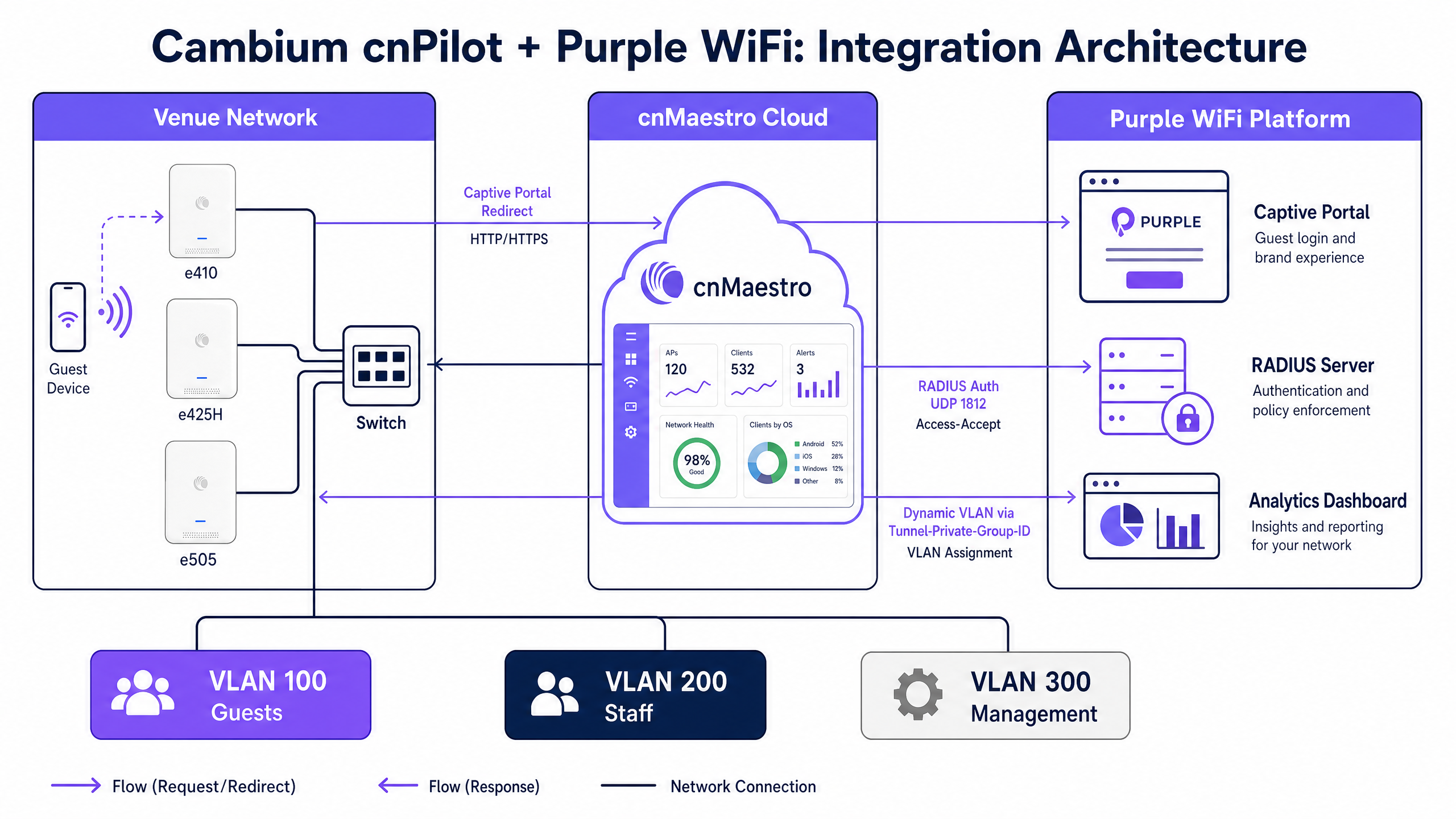
其核心机制包括由 Cambium AP 管理的 Captive Portal 重定向,以及由 Purple 管理的 RADIUS 认证。
architecture_overview.png

当访客设备关联到开放的访客 SSID 时,Cambium AP 会拦截初始的 HTTP 请求。AP 不会将流量路由到互联网,而是将设备重定向到 Purple 托管的 Captive Portal URL。访客在 Purple 的展示页面(splash page)上完成认证流程,该页面支持社交登录、电子邮件注册和自定义数据收集表单。

认证成功后,Purple 的后端会通过 UDP 端口 1812 向 Cambium AP 发送 RADIUS Access-Accept 消息。此消息指示 AP 将客户端设备从认证前的围墙花园(walled garden)状态过渡到完全网络访问状态。同时,AP 通过 UDP 端口 1813 向 Purple 发送 RADIUS 计费数据,从而在 Purple 的分析仪表板中填充会话时长、数据使用量和设备类型信息。

围墙花园要求

围墙花园是 Captive Portal 流程的关键组成部分。它定义了未认证设备可以访问的特定 IP 地址和域名。如果围墙花园配置错误,设备将无法加载 Purple 门户,从而导致连接超时。

要使集成正常运行,围墙花园必须包含 Purple 的门户域名、托管门户资产的任何内容分发网络 (CDN) 端点,以及任何受支持的身份提供商(如 Facebook、Google 或 Microsoft Entra ID)的域名。

使用 Cambium ePSK 进行多租户划分

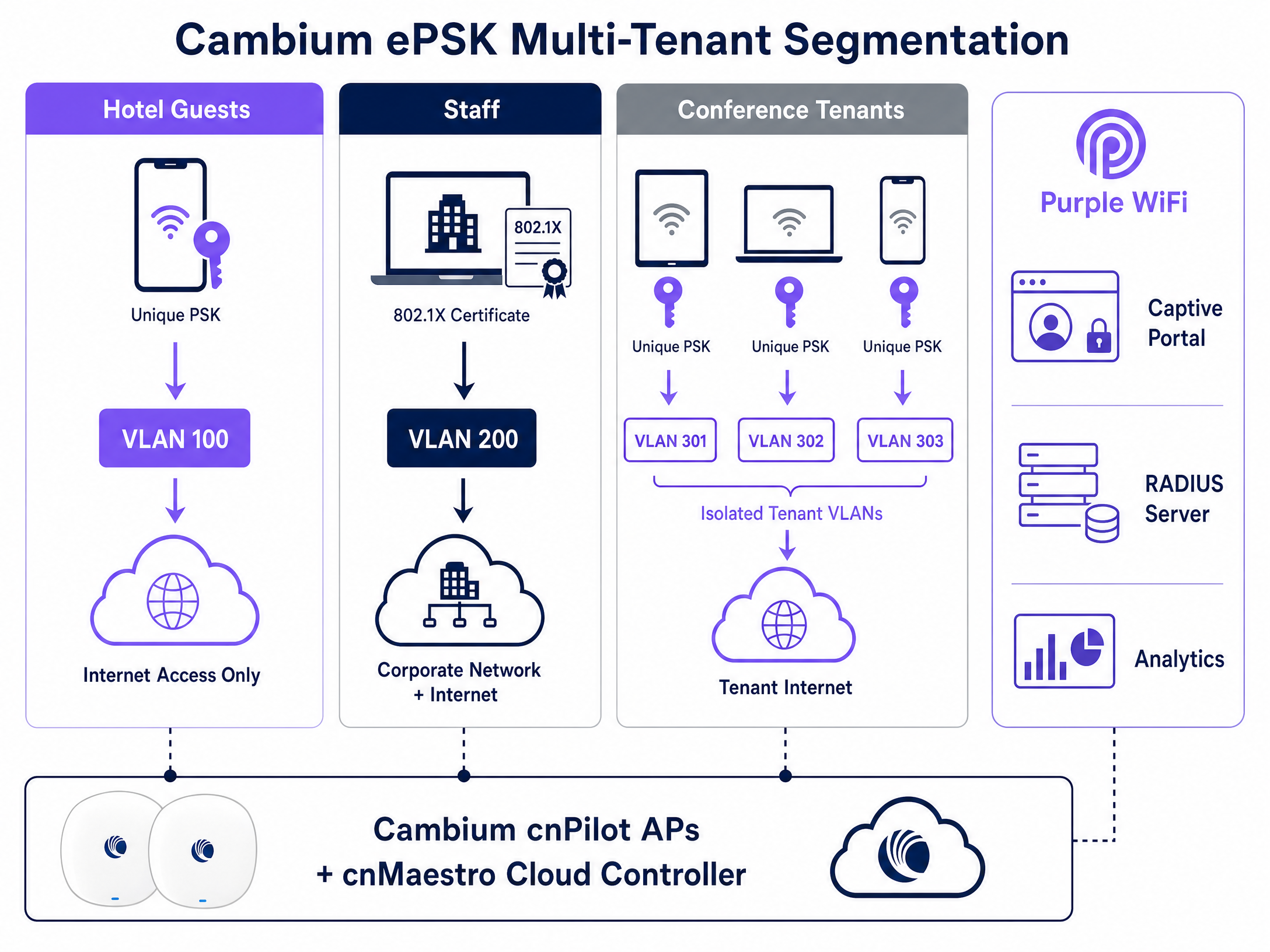
Cambium 对专用预共享密钥(品牌名称为 ePSK)的实现允许网络架构师在不广播多个 SSID 的情况下安全地划分流量。
ppsk_vlan_diagram.png

通过 ePSK,单个 SSID 最多可支持 2,000 个唯一的密码。每个密码都映射到一个特定的 VLAN。当用户使用其唯一密钥进行连接时,Cambium AP 会自动将其流量分配到指定的 VLAN 中。此功能对于多租户环境(如联合办公空间或住宅楼)非常宝贵,在这些环境中,每个租户都需要一个隔离的网络段。

Purple 通过 cnMaestro API 管理 ePSK 生命周期来与该架构集成,从而实现租户凭证的分发、VLAN 分配和撤销的自动化。

实施指南

部署 Cambium 和 Purple 的集成需要在 cnMaestro 云控制台中进行精确配置。请按照以下步骤建立基础访客 WiFi 服务。

1. 配置访客 WLAN

导航到 cnMaestro 中的 Configuration(配置)菜单,选择 WiFi Profiles(WiFi 配置文件),然后打开 WLANs 选项卡。创建一个新的 WLAN 配置文件。

  • Name / SSID:定义访客网络名称(例如,“Venue Guest WiFi”)。
  • Security:设置为 Open
  • Client Isolation:设置为 Enable,以防止访客设备在本地子网上相互通信。

2. 启用外部热点

在 WLAN 配置中,找到 Guest Access(访客接入)部分。

  • Enable Guest Access:勾选此框。
  • Portal Type:选择 External Hotspot
  • External Page URL:输入您的 Purple 客户经理提供的特定 Captive Portal URL。

3. 配置 RADIUS 认证和计费

在同一个 Guest Access 部分中,配置 RADIUS 参数。

  • Authentication Server:输入 Purple 的主 RADIUS 服务器 IP 地址。
  • Authentication Port1812
  • Accounting Server:输入 Purple 的主 RADIUS 服务器 IP 地址。
  • Accounting Port1813
  • Shared Secret:输入 Purple 提供的复杂共享密钥。确保两端平台上的设置完全一致。

4. 定义围墙花园

在 External Hotspot 设置下,填充围墙花园列表。您必须添加核心 Purple 域名以及您所选认证方式所需的特定域名(例如,社交登录提供商)。

5. 为员工 WiFi 配置 802.1X

为了保障员工接入的安全,请在 cnMaestro 中创建一个单独的 WLAN 配置文件。

  • Security:设置为 WPA2-Enterprise
  • RADIUS Server:指向端口 1812 上的 Purple RADIUS 服务器 IP。

员工通过 Microsoft Entra ID 或 Google Workspace 使用其企业凭证进行认证,Purple 验证。然后 Purple 会返回一个 Tunnel-Private-Group-ID RADIUS 属性,指示 Cambium AP 将员工设备分配到安全的企业 VLAN 中。

最佳实践

  • VLAN Trunking(VLAN 中继): 确保连接到 Cambium AP 的交换机端口上已对所有必需的 VLAN(访客、员工、管理)进行了中继。如果中继中缺失了某个 VLAN,已认证的客户端将无法通过 DHCP 获取 IP 地址。
  • 固件一致性: 将您的 AP 设备标准化为 cnPilot 固件版本 6.0 或更高版本。该版本为外部热点重定向和 ePSK 功能提供了最稳定的支持。
  • 计费是强制性的: 切勿禁用 RADIUS 计费。Purple 完全依赖 UDP 1813 计费流来生成停留时间指标、访问频率数据和合规日志。
  • 避免为员工使用本地 PSK: 在员工网络中,使用 802.1X 认证取代传统的共享密码。这种方法通过将网络访问与可审计的个人身份绑定,符合 ISO 27001 的要求。

故障排除与风险规避

当出现集成问题时,它们通常表现在初始的 Captive Portal 重定向或 RADIUS 认证阶段。

  • Portal 页面加载失败: 这几乎总是围墙花园(Walled Garden)的问题。如果访客设备连接到 SSID,但收到连接超时而不是展示页面,则说明 AP 正在阻止对 Purple Portal 域名的访问。请验证您在 cnMaestro 中的围墙花园条目,并确保在认证前允许 DNS 解析。
  • 认证失败(凭据无效错误): 检查 RADIUS 共享密钥。cnMaestro 与 Purple 之间的不匹配会导致 RADIUS 服务器静默丢弃认证请求。
  • 设备已认证但无法访问互联网: 这表明动态 VLAN 分配或 DHCP 过程失败。请验证 Purple 是否在 RADIUS 响应中返回了正确的 VLAN ID,并确认交换机端口中继配置允许该 VLAN。

ROI 与业务影响

在 Cambium Networks 基础设施上部署 Purple WiFi,可将标准的网络工具转化为可衡量的商业资产。通过在认证点捕获第一方数据,场所可以构建全面的访客画像并开展精准的营销活动。

例如,Harrods 实施了 Purple Guest WiFi,并通过将捕获的数据与其会员计划相结合,实现了 57 倍的营销 ROI。同样,AGS Airports 通过利用分层带宽和针对性的旅客互动,实现了 842% 的 ROI。通过在 Cambium cnMaestro 和 Purple 上进行标准化,IT 领导者可以提供安全、合规的连接,同时为营销部门提供推动收入增长所需的数据。

关键定义

Captive Portal

A customized login page that requires users to authenticate or accept terms before gaining access to a public or enterprise WiFi network.

Used in Guest WiFi deployments to capture first-party data, enforce acceptable use policies, and present venue branding before granting internet access.

RADIUS

Remote Authentication Dial-In User Service; a networking protocol that provides centralized Authentication, Authorization, and Accounting (AAA) management.

The protocol Cambium APs use to communicate with Purple to verify user credentials and report session data.

Walled Garden

A limited environment that controls user access to web content and services pre-authentication.

Required in cnMaestro to allow guest devices to reach the Purple splash page and identity provider domains (like Facebook or Google) before they have full internet access.

ePSK

Enhanced Pre-Shared Key; Cambium's implementation of private pre-shared keys, allowing unique passphrases for individual users on a single SSID.

Used to provide secure, isolated network segments for multi-tenant environments without broadcasting numerous SSIDs.

Dynamic VLAN Assignment

The process of placing an authenticated device onto a specific Virtual Local Area Network based on RADIUS attributes rather than the physical port or SSID.

Allows IT to use a single SSID while securely separating guest traffic from staff or management traffic.

802.1X

An IEEE standard for port-based network access control, providing an authentication mechanism to devices wishing to attach to a LAN or WLAN.

The standard used for secure Staff WiFi, replacing shared passwords with individual corporate credentials validated against an identity provider.

cnMaestro

Cambium Networks' cloud-based or on-premises management platform for centralized control of wireless and wired network infrastructure.

The interface where network architects configure the WLAN profiles, RADIUS settings, and walled gardens required for the Purple integration.

First-Party Data

Information a company collects directly from its customers and owns entirely.

The primary business output of a Purple Guest WiFi deployment, used to drive marketing campaigns and understand visitor behavior.

应用实例

A 200-room hotel needs to deploy secure WiFi for guests, staff, and a conference centre. Guests require a branded captive portal, staff need secure access to internal systems, and the conference centre requires isolated networks for different event organizers. How should the network architect configure the Cambium cnMaestro environment to support this using Purple?

The architect should deploy three distinct WLAN profiles in cnMaestro.

  1. Guest WLAN: Configured as an Open network with 'External Hotspot' enabled. The redirect URL points to the Purple captive portal. RADIUS authentication (UDP 1812) and accounting (UDP 1813) point to Purple's servers. The walled garden includes Purple's domains.
  2. Staff WLAN: Configured as WPA2-Enterprise (802.1X). RADIUS points to Purple, which integrates with the hotel's Microsoft Entra ID. Staff authenticate with corporate credentials, and Purple assigns them to the Staff VLAN.
  3. Conference WLAN: Configured with WPA2 Pre-Shared Key and Cambium ePSK enabled. Purple provisions unique ePSK passphrases for each event organizer via the cnMaestro API, assigning each key to an isolated VLAN (e.g., VLAN 301, 302).
考官评语: This approach correctly maps the technical capabilities of Cambium and Purple to the business requirements. It isolates traffic securely using dynamic VLAN assignment and ePSK, avoiding the spectrum degradation caused by broadcasting multiple SSIDs for every conference tenant.

A retail chain has deployed Cambium e410 APs and configured the Purple captive portal. However, shoppers report that the splash page never appears on their smartphones; instead, the browser shows a connection timeout. What is the root cause and how is it resolved?

The root cause is an incomplete walled garden configuration in cnMaestro. The Cambium AP is blocking the HTTP/HTTPS traffic required to load the Purple portal before the user is authenticated.

To resolve this, the network engineer must log into cnMaestro, navigate to the Guest WLAN profile, and update the External Hotspot walled garden list. They must add Purple's specific portal domains and any associated CDN endpoints. Once applied, unauthenticated devices will be able to reach the portal and complete the login flow.

考官评语: Walled garden misconfigurations are the most frequent cause of captive portal failures. This solution correctly identifies the pre-authentication state constraints and provides the exact configuration path in cnMaestro to rectify the issue.

练习题

Q1. You are deploying Purple Guest WiFi across 50 retail stores using Cambium e505 APs. Users can connect to the SSID and see the splash page, but after logging in, they cannot access the internet. You verify that Purple is sending the Access-Accept message. What is the most likely infrastructure issue?

提示:Consider what happens at the switch level when a device tries to obtain an IP address after authentication.

查看标准答案

The most likely issue is missing VLAN trunking on the switch ports connecting to the Cambium APs. While the AP authorizes the device, if the assigned Guest VLAN is not permitted on the switch trunk, the device cannot reach the DHCP server to obtain an IP address, resulting in no internet access.

Q2. A university campus wants to use a single SSID for all students in the dormitories, but requires that each student's devices are isolated into their own private network segment to allow casting to their specific smart TV. How do you implement this using Cambium and Purple?

提示:Look at Cambium's implementation of private pre-shared keys.

查看标准答案

Implement Cambium ePSK (Enhanced Pre-Shared Key) on the dormitory WLAN. Purple will manage the ePSK lifecycle via the cnMaestro API, generating a unique passphrase for each student. When a student connects their devices using their specific key, the Cambium AP assigns them to a unique VLAN, creating an isolated private area network.

Q3. During a pilot deployment, Purple's analytics dashboard shows zero dwell time or data usage metrics for the Cambium test site, even though users are successfully authenticating and browsing the internet. What configuration step was missed in cnMaestro?

提示:Analytics require session data, which is handled by a specific UDP port in the AAA configuration.

查看标准答案

RADIUS Accounting was not configured. The network engineer must enable RADIUS Accounting in the cnMaestro Guest WLAN profile and point it to Purple's RADIUS server on UDP port 1813. Without this, Purple only handles authentication and receives no session lifecycle data.