Designing Secure Staff WiFi Networks Separated from Guest Traffic
一份面向网络架构师和 IT 领导者的权威技术参考指南,旨在设计安全、高性能的员工 WiFi 网络。本指南详细介绍了如何使用 VLAN、802.1X 身份验证和 WPA3-Enterprise 将业务流量与公共访客网络进行逻辑和物理隔离,以满足合规性要求(PCI DSS、GDPR)并消除横向移动安全风险。
收听本指南
查看播客转录

执行摘要
对于酒店、零售、医疗保健和公共部门的企业场所运营商、IT 经理和网络架构师而言,无线连接是一项任务关键型公用设施。然而,一个常见且危险的架构缺陷是将公共 访客 WiFi 与私有员工网络混为一谈。扁平且未分割的网络架构允许横向移动,从而使关键的后台系统——例如物业管理系统 (PMS)、销售点 (POS) 终端和电子健康记录 (EHR)——暴露给不可信的访客设备。
本技术参考指南概述了一个与厂商无关的企业级框架,用于设计和部署与公共访客流量严格隔离的安全员工 WiFi 网络。通过实施虚拟局域网 (VLAN)、IEEE 802.1X 身份验证和 WPA3-Enterprise,企业可以消除横向移动风险,确保合规性(PCI DSS、GDPR),并保证业务吞吐量。本指南提供了可操作的部署顺序、故障排除步骤和实际案例研究,以帮助 IT 团队在本季度保障其无线资产的安全。
听听我们关于设计安全员工网络的配套技术简报:
技术深度解析
逻辑与物理网络隔离
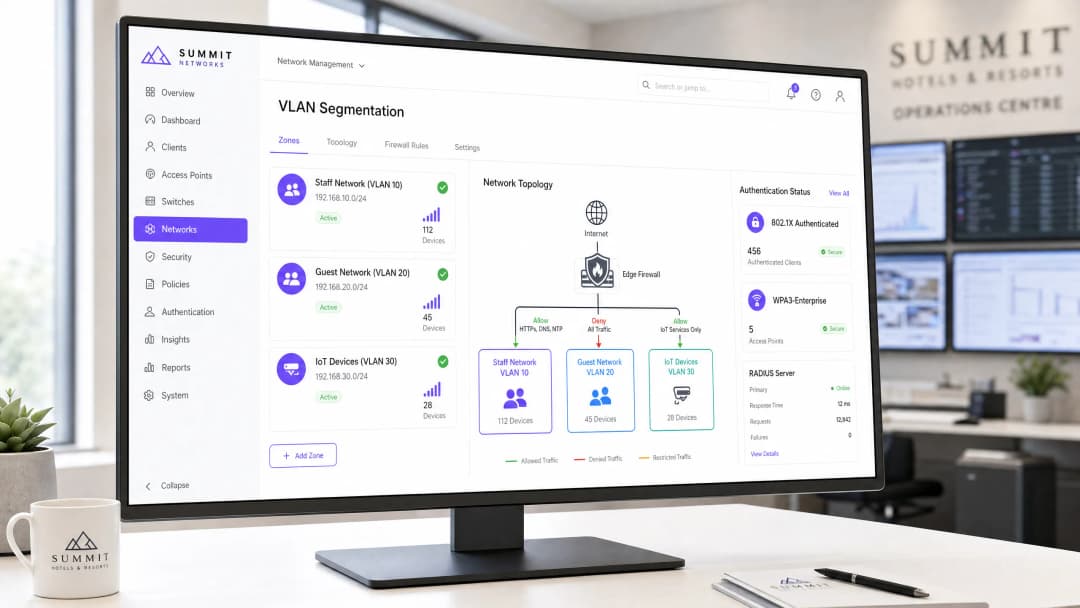
隔离员工和访客流量的基础安全控制措施是网络隔离。在企业无线环境中,逻辑隔离是通过在接入点 (AP) 层将不同的服务集标识符 (SSID) 映射到隔离的虚拟局域网 (VLAN) 来实现的 [1]。这确保了访客设备和员工硬件驻留在完全独立的广播域中,从而防止它们之间进行任何直接的数据包传输。
+---------------------------------------------------------------------------------+
| Internet |
+---------------------------------------------------------------------------------+
|
v
+---------------------------------------------------------------------------------+
| Edge Firewall / Next-Gen Firewall |
+---------------------------------------------------------------------------------+
| | |
| (VLAN 10: Allow PMS/ERP) | (VLAN 20: Deny Internal) | (VLAN 30: Restricted)
v v v
+--------------------+ +--------------------+ +--------------------+
| Staff Network | | Guest Network | | IoT/Building Sys. |
| VLAN 10 | | VLAN 20 | | VLAN 30 |
+--------------------+ +--------------------+ +--------------------+
| | |
+------------------------------+------------------------------+
|
v
+---------------------------------------------------------------------------------+
| Wireless Controller / Cloud Management Platform |
+---------------------------------------------------------------------------------+

为了实施绝对隔离,必须在这些 VLAN 的边界处部署第 3 层状态防火墙或下一代防火墙 (NGFW) [2]。防火墙执行零信任 (Zero-Trust) 姿态,将访客 VLAN 视为敌对且不可信的区域。下表概述了强制性的防火墙访问控制列表 (ACL) 策略:
| 源 VLAN | 目的 VLAN | 协议 / 端口 | 操作 | 架构合理性说明 |
|---|---|---|---|---|
| VLAN 10 (员工) | VLAN 20 (访客) | 任何 | 拒绝 | 防止员工设备与未托管且可能已被入侵的访客硬件进行交互。 |
| VLAN 20 (访客) | VLAN 10 (员工) | 任何 | 拒绝 | 防止访客设备扫描或发起与员工系统的连接。 |
| VLAN 20 (访客) | WAN (互联网) | HTTP/S, DNS, NTP | 允许 | 将访客流量严格限制为向外的互联网访问。 |
| VLAN 30 (IoT) | VLAN 10 & 20 | 任何 | 拒绝 | 防止不安全的 IoT 硬件(例如智能温控器、闭路电视)被用作跳板 [3]。 |
| VLAN 10 (员工) | 内部服务器 | HTTPS, SSH, SQL | 允许 | 将员工访问严格限制在授权的业务应用(例如 PMS、ERP)内。 |
企业级身份验证与加密标准
如果这些 VLAN 的入口点安全性较差,那么部署独立的 VLAN 也是徒劳的。许多企业犯了一个关键错误,即使用预共享密钥 (WPA2-PSK) 来保护其员工 WiFi 的安全。基于 PSK 的网络对所有设备使用单一的共享密码。这会带来严重的运营和安全隐患:如果员工离职,必须在整个场所的每台设备上轮换密码,否则前员工仍将保留网络访问权限。
员工无线安全的企业标准是 IEEE 802.1X 身份验证结合 WPA3-Enterprise [4]。该架构将身份验证从共享密码转变为个人的、与目录关联的凭证或数字证书,由中央 RADIUS (Remote Authentication Dial-In User Service) 服务器进行验证。

1. 基于凭证的身份验证 (PEAP-MSCHAPv2)
在此部署中,员工设备使用其个人企业目录凭证(例如 Active Directory、LDAP、Okta 或 Microsoft Entra ID)进行身份验证 [5]。
- 握手过程:AP 作为认证器,将封装在可扩展身份验证协议 (EAP) 隧道中的客户端凭证转发给 RADIUS 服务器。
- 安全提升:消除共享密码。当员工离职并在中央目录中被停用时,其网络访问权限将立即终止。
2. 基于证书的身份验证 (EAP-TLS)
对于受管的企业设备群,EAP-TLS 代表了无线安全的黄金标准 [6]。
- 握手过程:身份验证不依赖密码,而是依赖非对称加密。客户端设备出示由组织公钥基础设施 (PKI) 或移动设备管理 (MDM) 平台颁发的唯一数字证书。
- 安全提升:免受凭证窃取、钓鱼和窥屏攻击。身份验证在密码学上与特定的物理设备绑定。
3. WPA3-Enterprise 对比 WPA2-Enterprise
虽然 WPA2-Enterprise 已成为二十年来的标准,但现代部署必须强制使用 WPA3-Enterprise。WPA3 引入了对等实体同时身份验证 (SAE),取代了 WPA2 的 4 次握手,彻底消除了离线字典攻击 [7]。WPA3 还强制要求使用受保护的管理帧 (PMF),防止攻击者注入去身份验证帧来断开员工设备的连接或进行恶意 AP“双面恶魔 (evil twin)”攻击。
实施指南
阶段 1:VLAN 和子网规划
- 定义 IP 子网:为每个网络段分配不重叠的 CIDR 块。例如:
- 员工 (VLAN 10):
10.10.10.0/24(254 个主机) - 访客 (VLAN 20):
172.16.0.0/20(4,094 个主机 - 专为高密度访客并发而设计) - 物联网 (VLAN 30):
10.10.30.0/24(254 个主机)
- 员工 (VLAN 10):
- 配置核心交换机:在核心和汇聚交换机上配置 VLAN。确保连接到接入点 (AP) 的交换机端口配置为 802.1Q trunk 端口,承载 VLAN 10、20 和 30,并使用专用的非默认本征 VLAN(例如 VLAN 99)来传输 AP 管理流量。
阶段 2:RADIUS 服务器与目录集成
- 部署 RADIUS:设置冗余 RADIUS 服务器。对于本地 Active Directory,部署 Microsoft 网络策略服务器 (NPS)。对于云优先环境,部署与 Microsoft Entra ID 或 Okta 集成的 Cloud RADIUS 解决方案 [5]。
- 注册网络接入服务器 (NAS):将所有无线控制器或独立 AP 的 IP 地址添加为 RADIUS 客户端,并配置强壮且随机生成的共享密钥。
- 配置连接请求和网络策略:
- 创建一条匹配来自 Staff SSID 连接请求的策略。
- 限制仅允许特定的 Active Directory 安全组(例如
GG-WiFi-Staff)访问。 - 强制执行 PEAP-MSCHAPv2 or EAP-TLS 作为允许的 EAP 类型。
阶段 3:无线控制器和 SSID 配置
- 创建 Staff SSID:配置 SSID(例如
Corporate-Staff)。- 安全类型:WPA3-Enterprise(如果存在旧设备,则使用 WPA2/WPA3 过渡模式)。
- 身份验证:针对您的 RADIUS 服务器组进行 802.1X 认证。
- VLAN 映射:将 SSID 直接映射到 VLAN 10。
- 创建 Guest SSID:配置 SSID(例如
Guest-WiFi)。- 安全类型:开放式,结合机会性无线加密 (OWE),无需密码即可加密访客流量 [8]。
- VLAN 映射:将 SSID 直接映射到 VLAN 20。
- 门户重定向:将未认证的 HTTP/S 流量重定向到您的 Captive Portal 平台(例如 Purple),以进行数据采集和 WiFi Analytics 。
- 启用客户端隔离:在 Guest SSID 上,在 AP 层显式启用客户端间隔离(有时称为本地代理 ARP 或站点隔离)。这可以防止已连接的访客发现或攻击同一访客 VLAN 上的其他设备。
阶段 4:服务质量 (QoS) 和带宽分配
为了防止访客流量使互联网网关饱和并干扰员工业务,请在您的 WAN 边缘和无线控制器上配置严格的服务质量策略 [9]:
- 带宽预留:为 VLAN 10(员工)分配最低保证带宽池。例如,专门为员工流量预留总 WAN 容量的 20%。
- 速率限制:使用 Captive Portal 管理平台在访客 VLAN 上强制执行单用户带宽限制(例如,每个访客设备最大 5 Mbps 下载 / 1 Mbps 上传)。
- 流量优先级划分 (802.11e / WMM):将员工语音 (VoIP) 和视频流量分类为语音 (AC_VO) 或视频 (AC_VI) 类别,同时将访客流量放入后台 (AC_BK) 或尽力而为 (AC_BE) 队列。
最佳实践与行业标准
PCI DSS 合规性(要求 1.3 和 11.4)
对于处理信用卡交易的零售、酒店和体育场馆,根据支付卡行业数据安全标准 (PCI DSS),确保网络安全是一项严格的法律要求 [10]。
- 要求 1.3:强制执行正式的防火墙配置,限制持卡人数据环境 (CDE) 与其他网络(包括访客 WiFi)之间的流量。
- 要求 11.4:部署无线入侵防御系统 (WIPS) 以主动扫描射频频谱,检测并自动阻断试图进行 i冒充您的员工 SSID。
GDPR 与隐私合规
在运营捕获用户数据的访客网络时,必须遵守通用数据保护条例 (GDPR) [11]。
- 非捆绑式同意:Captive Portal 欢迎页面必须将网络访问同意与营销信息接收同意分开。
- 数据隔离:通过 Guest WiFi 欢迎页面捕获的任何个人数据必须安全地存储在隔离且加密的数据库中(例如 Purple 的 ISO 27001 认证平台),并且绝不能保存在连接到员工网络的任何本地服务器上。
故障排除与风险缓解
IT 团队在部署 802.1X 时经常会遇到部署问题。下表详细列出了常见的故障模式、诊断指标和即时修复步骤:
| 问题 / 现象 | 根本原因 | 诊断步骤 | 修复措施 |
|---|---|---|---|
| RADIUS 超时 / “服务器不可达” | UDP 端口被阻止,或配置了错误的共享密钥。 | 在连接尝试期间,在 RADIUS 服务器上运行 tcpdump port 1812。 |
验证防火墙策略是否允许 AP 与 RADIUS 之间的 UDP 端口 1812(认证)和 1813(计费)。仔细检查共享密钥。 |
| 客户端出现“证书不可信”错误 | 客户端设备不信任 RADIUS 服务器的 SSL 证书。 | 检查客户端 WiFi 日志,或检查 RADIUS 证书是否为自签名证书。 | 在 RADIUS 服务器上部署来自商业证书颁发机构 (CA) 的公开、受信任的 SSL 证书,或通过 MDM 将私有 CA 根证书推送到员工设备。 |
| 员工移动时频繁断开连接 | 快速漫游 (802.11r) 已禁用或配置错误。 | 在 AP 切换期间,监控无线控制器日志中是否存在较长的重新认证时间(>500ms)。 | 在员工 SSID 上启用 802.11r (快速 BSS 切换) 和 802.11k/v,以允许设备缓存凭据并实现无缝漫游。 |
| 员工 PMS/ERP 应用程序运行缓慢 | 访客流量占满了共享的互联网专线。 | 在访客高峰时段,检查防火墙上的 WAN 接口利用率图表。 | 在 WAN 防火墙上执行严格的 QoS 带宽预留策略。在访客 Captive Portal 上实施单设备限速。 |
投资回报率 (ROI) 与业务影响
设计和部署分段、安全的员工 WiFi 网络不仅仅是一项技术工作,更是一项战略性业务投资。在向高管层或首席财务官 (CFO) 汇报此项计划时,请重点关注以下关键业务成果:
1. 风险缓解与责任降低
因受损的访客设备横向移动到企业网络而导致的单次数据泄露,可能会造成数百万美元的监管罚款、取证审计和品牌声誉损失。对于零售和酒店运营商而言,保持严格的 PCI DSS 合规性可以防止刷卡处理能力丧失的灾难性后果。
2. 运营效率与员工生产力
在 体育场馆 或 酒店 等高密度环境中,一线员工依赖移动设备进行运营(例如移动办理入住、数字化客房整理、桌边点餐)。通过实施 QoS 并为员工预留带宽,您可以消除运营停机时间,直接提高餐厅的翻台率,减少访客排队办理入住的时间,并提升员工满意度。
3. 值得信赖的数据分析与营销投资回报率
通过将员工设备与访客网络分离,您可以净化营销数据。每天连接的员工设备可能会使客流量分析、停留时间和回头客指标产生偏差。合理的分段可确保您的 WiFi Analytics 平台捕获纯净、未受污染的访客行为数据,从而使营销团队能够执行高度针对性、高转化率的营销活动,从而推动直接预订和客户忠诚度。
参考文献
- IEEE 802.1Q 局域网和城域网标准:网桥和桥接网络。 https://standards.ieee.org
- NIST 特别出版物 800-162:基于属性的访问控制 (ABAC) 定义和注意事项指南。 https://csrc.nist.gov
- OWASP 十大物联网漏洞及缓解框架。 https://owasp.org
- Wi-Fi 联盟:WPA3 安全规范。 https://www.wi-fi.org
- Microsoft TechNet:使用 NPS 部署 802.1X 无线访问。 https://learn.microsoft.com
- IETF RFC 5216:EAP-TLS 认证协议。 https://datatracker.ietf.org
- IETF RFC 7664:对等实体同时认证 (SAE) 加密握手。 https://datatracker.ietf.org
- IETF RFC 8110:机会性无线加密 (OWE)。 https://datatracker.ietf.org
- IEEE 802.11e 服务质量增强。 https://standards.ieee.org
- PCI 安全标准委员会:支付卡行业数据安全标准 (PCI DSS) v4.0。 https://www.pcisecuritystandards.org
- 欧洲数据保护委员会 (EDPB):关于第 2016/679 号条例下同意的指南 05/2020。 https://edpb.europa.eu
关键定义
VLAN (Virtual Local Area Network)
A logical subnetwork that groups together a collection of devices on one or more physical local area networks, isolating their traffic broadcast domains.
Used to separate guest devices from staff hardware on the same physical switches and access points.
IEEE 802.1X
An IEEE standard for port-based Network Access Control (NAC) that provides an authentication mechanism to devices wishing to attach to a LAN or WLAN.
The standard protocol used to enforce per-user credential or certificate authentication on enterprise staff WiFi networks.
RADIUS (Remote Authentication Dial-In User Service)
A networking protocol that provides centralised Authentication, Authorization, and Accounting (AAA) management for users who connect and use a network service.
The server (e.g., Microsoft NPS or Cloud RADIUS) that validates staff credentials against Active Directory before allowing network access.
WPA3-Enterprise
The latest generation of Wi-Fi Protected Access security for enterprise networks, mandating 192-bit cryptographic strength and Protected Management Frames.
The required wireless security protocol for new staff networks, eliminating offline dictionary attacks and rogue AP deauthentication exploits.
Client Isolation
A security setting on wireless access points that prevents connected wireless clients from communicating directly with each other.
Mandatory configuration on guest networks to block lateral attacks and malware spreading between guest devices.
EAP-TLS (Extensible Authentication Protocol - Transport Layer Security)
An EAP type that uses digital certificates for mutual authentication between the client and the RADIUS server, eliminating the need for passwords.
The highest-security authentication method for corporate-managed device fleets, deployed via MDM platforms.
WIPS (Wireless Intrusion Prevention System)
A security device or software capability that monitors the radio spectrum for the presence of unauthorised access points and automatically takes countermeasures.
Required for PCI DSS compliance to detect and mitigate rogue APs or 'evil twin' attacks in retail and hospitality environments.
Airtime Fairness
A wireless scheduling feature that allocates equal transmission time (airtime) to each wireless client, rather than equal packet counts.
Prevents slow, legacy guest devices from hogging wireless channel capacity and dragging down the performance of fast staff devices.
应用实例
A 250-room luxury hotel running a shared, unsegmented network is preparing for a PCI DSS audit. The hotel uses mobile tablets for front-desk check-in, a PMS server on-premises, and offers free guest WiFi. How should the network architect redesign the wireless infrastructure to ensure compliance and security?
- Physical & Logical Segmentation: Create VLAN 10 for Staff (PMS & tablets), VLAN 20 for Guest WiFi, and VLAN 30 for IoT (smart TVs, thermostats). Configure the switchports connecting to the APs as 802.1Q trunks.
- Authentication Hardening: Replace the shared WPA2-PSK on the staff network with WPA3-Enterprise (802.1X). Integrate the wireless controller with the hotel's Active Directory via NPS (RADIUS). Provision the front-desk tablets with WPA3-Enterprise credentials or EAP-TLS certificates via MDM.
- Firewall Access Control: Deploy a stateful firewall. Write rules to allow VLAN 10 to access the PMS server IP over HTTPS/SQL ports, but deny all traffic from VLAN 20 (Guest) to VLAN 10 and VLAN 30. Enable Client Isolation on VLAN 20.
- Compliance Validation: Enable WIPS on the wireless controller to monitor and alert on rogue APs, satisfying PCI DSS Requirement 11.4.
A high-density retail chain with 50 stores wants to deploy guest WiFi to capture customer analytics while ensuring that store-operational handheld scanners (used for inventory and stock management) do not suffer from wireless congestion or dropouts during peak trading hours. How should the IT team design the SSID and QoS architecture?
- SSID Separation: Deploy two SSIDs across all stores:
Retail-Operations(VLAN 10) andGuest-Free-WiFi(VLAN 20). - 802.1X Authentication: Secure
Retail-Operationsusing WPA3-Enterprise. Authenticate the handheld scanners using certificate-based EAP-TLS, pre-provisioned via the chain's MDM platform. Configure the guest SSID with an open network behind a captive portal managed by Purple. - Quality of Service (QoS) & WMM: On the wireless controller, enable Wi-Fi Multi-Media (WMM). Map the
Retail-Operationstraffic to the Video (AC_VI) or Voice (AC_VO) access categories, ensuring priority over guest traffic. MapGuest-Free-WiFito Best Effort (AC_BE). - Bandwidth Rate Limiting: On the WAN edge firewall, configure a traffic-shaping policy. Guarantee a minimum of 15 Mbps symmetrical bandwidth for VLAN 10 at each store. On the Purple captive portal platform, enforce a per-user rate limit of 3 Mbps download and 1 Mbps upload for guest devices on VLAN 20.
A municipal public-sector conference centre frequently hosts large events with up to 5,000 concurrent guest users. The IT director notices that during events, administrative staff on the same physical network experience severe latency on corporate video calls and file transfers. How can this be resolved without purchasing additional physical internet lines?
- VLAN Segmentation: Verify that admin staff sit on VLAN 100 and guests sit on VLAN 200.
- WAN-Edge Traffic Shaping: On the primary internet gateway (e.g., a 1 Gbps symmetrical leased line), configure a Class-Based Weighted Fair Queueing (CBWFQ) policy. Define a class for VLAN 100 with a guaranteed bandwidth of 200 Mbps and a priority queue for real-time voice/video traffic.
- Dynamic Bandwidth Allocation: Configure a policy on the firewall that dynamically limits the total bandwidth allocated to VLAN 200 (Guest) to a maximum of 80% of total WAN capacity (800 Mbps) during business hours, leaving 200 Mbps always available for staff.
- Wireless Airtime Fairness: On the wireless access points, enable Airtime Fairness. This prevents slow legacy guest devices (e.g., older 802.11n smartphones) from monopolising the wireless channels and dragging down the throughput of modern staff devices.
练习题
Q1. A hotel group is deploying a new staff WiFi network. The network architect suggests using WPA2-Personal (PSK) with a strong password because it is easier for staff to enter on their devices. As the Senior Technical Content Strategist, write a decision-forcing scenario exercise that demonstrates why this approach is a security risk and what the recommended alternative is.
提示:Consider what happens when a disgruntled employee is terminated or leaves the company.
查看标准答案
Recommended Approach: Reject the WPA2-Personal (PSK) proposal and mandate WPA3-Enterprise (802.1X) authentication.
Reasoning: Using WPA2-PSK creates a massive security blind spot. If a staff member leaves the company, they still know the shared password. To maintain security, the IT team would have to change the password on every single staff device (laptops, PMS tablets, VoIP phones) across the hotel. In practice, this operational overhead is so high that passwords are rarely changed, leaving the network vulnerable to unauthorized access by former employees.
By deploying WPA3-Enterprise with 802.1X, each employee authenticates using their individual corporate directory credentials (e.g., Active Directory). When an employee is offboarded, their account is disabled in Active Directory, and their network access is revoked instantly and automatically, without affecting any other staff devices.
Q2. During a network audit of a retail chain, the auditor notes that the guest WiFi network and the POS payment terminals sit on different IP subnets but are connected to the same physical Layer 3 switch without any ACLs configured. The IT manager argues that because they are on different subnets, they are secure. Create a scenario-based exercise to evaluate this setup against PCI DSS requirements.
提示:Does an IP subnet boundary block traffic by default on a Layer 3 switch?
查看标准答案
Recommended Approach: The current setup is non-compliant and highly insecure. The IT team must implement strict VLAN segmentation and stateful firewall rules to isolate the POS network from the guest network.
Reasoning: IP subnets only define logical groupings; they do not enforce security boundaries. On a standard Layer 3 switch, routing between subnets is enabled by default. This means any device on the guest subnet can route traffic directly to the POS subnet simply by sending packets to the switch's gateway IP. An attacker on the guest WiFi could easily scan, discover, and attempt to exploit vulnerabilities on the POS payment terminals, violating PCI DSS Requirement 1.3.
To remediate this, the POS terminals must be placed on a dedicated VLAN (e.g., VLAN 40) and the guest WiFi on VLAN 20. A stateful firewall must sit between these VLANs, with an explicit rule configured to DENY all traffic originating from VLAN 20 (Guest) destined for VLAN 40 (POS). Additionally, Client Isolation must be enabled on the guest SSID to prevent lateral attacks within the guest network itself.
Q3. A conference centre is hosting a major tech summit with 3,000 attendees. The administrative staff, who share the same internet connection, report that they cannot access their cloud-based ticketing system or make clear VoIP calls due to extreme network slowness. Explain how to design a traffic management strategy to resolve this issue without upgrading the physical internet bandwidth.
提示:Think about over-the-air channel congestion and WAN-link saturation.
查看标准答案
Recommended Approach: Implement a multi-layered traffic management strategy combining wireless-level QoS, WAN-edge bandwidth reservation, and per-user rate limiting.
Reasoning: The slowness is caused by two bottlenecks: over-the-air channel congestion (RF saturation) and WAN-link saturation. To resolve this without upgrading the physical line:
- WAN Bandwidth Reservation: On the edge firewall, configure Class-Based Weighted Fair Queueing (CBWFQ). Reserve a minimum guaranteed pool of 150 Mbps symmetrical bandwidth exclusively for the staff VLAN (VLAN 10), ensuring it can never be starved by guest traffic.
- Per-User Rate Limiting: On the captive portal platform (e.g., Purple), configure a traffic-shaping profile that limits each guest connection to a maximum of 3 Mbps download and 1 Mbps upload. This prevents a small number of high-bandwidth guest users (e.g., streaming 4K video) from saturating the WAN link.
- Wireless Quality of Service (QoS): Enable Wi-Fi Multi-Media (WMM) on the access points. Map staff VoIP and ticketing traffic to high-priority queues (AC_VO and AC_VI), while mapping all guest traffic to the Best Effort (AC_BE) or Background (AC_BK) queues.
- Airtime Fairness: Enable Airtime Fairness on all APs to ensure that slow legacy devices do not monopolise wireless channel transmission time, preserving channel capacity for fast staff devices.
继续阅读本系列
WPA3-Enterprise 对比 WPA2-Enterprise:升级您的员工 WiFi
本权威技术参考指南概述了将员工无线网络从 WPA2-Enterprise 升级到 WPA3-Enterprise 的架构差异、安全增强功能和迁移策略。本指南专为高级 IT 决策者和网络架构师设计,提供可操作的部署蓝图、酒店和零售行业的真实案例研究,以及全面的风险缓解框架,以确保无缝过渡,同时保持对 PCI DSS v4.0 和 GDPR Article 32 的合规性。
Managing BYOD (Bring Your Own Device) Security on Staff Networks
面向企业 IT 经理和网络架构师的权威技术参考指南,旨在保障员工网络上的 BYOD(自带设备)访问安全。本指南概述了在人流量大的场所中减少数据泄露并保持合规性所需的精确网络架构、认证协议和 MDM 集成工作流。
企业在网络中防范非法接入点
本技术参考指南详细介绍了使用无线入侵防御系统(WIPS)和无线入侵检测系统(WIDS)在企业网络中防范非法接入点的架构、部署和操作程序。它为IT安全管理员提供了可操作的框架,用于在复杂的物理环境中(包括酒店、零售、医疗和公共部门场所)检测、分类和消除未经授权的AP。本指南涵盖了威胁分类、自动遏制机制、合规影响(PCI DSS、GDPR、HIPAA)以及可衡量的业务成果。