

TL;DR / Key Takeaways
- WiFi marketing captures verified, consented first-party data at the moment a visitor signs in - £0.28 average cost per lead across 80,000 venues, +50% opt-in vs other channels.
- It matters more in 2026 than ever before. Third-party cookies have become unreliable across browsers, Apple privacy broke mobile signal, paid-channel CPLs keep rising, and CMO budgets have shifted to first-party data infrastructure.
- The capture-to-activation flow is 7 stages: connect, consented capture, verification, CRM sync, automation, profile enrichment, campaign activation. The first event takes under 30 seconds; everything else runs automatically.
- Documented outcomes: Harrods 57x ROI, Pizza Express 3.7M users into CRM in two years, Premier Inn loyalty uplift. Captive-portal CPL is typically 25-50x cheaper than paid social (£6-12).
What is WiFi marketing?
WiFi marketing is the practice of capturing visitor data at the point of WiFi sign-up, then using that data to drive measurable marketing outcomes: email, SMS, automated journeys, loyalty enrolment, segmentation, personalisation, and attribution.
Every WiFi marketing programme begins the same way - a visitor connecting to free, frictionless WiFi. That act of getting people online is exactly what World WiFi Day celebrates each June, and it is the foundation everything below is built on.
The capture happens through the captive portal the visitor sees when they connect to your network. They provide an email address (sometimes name, phone, or other fields), they consent to marketing communications, and the consented data flows to your CRM. From there, the same marketing automation you already use takes over.
WiFi marketing is distinct from three adjacent disciplines:
- Digital marketing runs on third-party data and click signals; it has no direct physical-visit data.
- Footfall analytics measures who visits but does not capture identity or enable activation.
- Loyalty marketing requires explicit programme enrolment; WiFi is one of the most effective on-ramps to loyalty.
When the three integrate, WiFi marketing becomes the join key between physical-venue presence and digital marketing systems.

Why WiFi marketing matters in 2026
Four structural changes have made WiFi marketing more strategically important than it was even two years ago. WiFi marketing solves a piece of that problem using a channel most venues already operate - the capture mechanism is already in place (the captive portal), the compliance framework is well-established (GDPR-grade consent), the activation tooling is the CRM and marketing automation systems already paid for. Pizza Express, AGS Airports, and the University of Sheffield run marketing on Purple.
Third-party cookies are unreliable
Safari and Firefox blocked them years ago, and although Google walked back its plan to remove them from Chrome, consent rules and browser privacy features have hollowed them out. The cross-site tracking model that powered a decade of digital marketing can no longer be relied on for retargeting or attribution.
Apple privacy eroded mobile signal
App Tracking Transparency restricted cross-app identifiers. Mail Privacy Protection broke open-rate signals as a meaningful metric. The mobile marketing stack lost a lot of its read.
Paid-channel cost keeps rising
Meta and Google CPMs have climbed steadily since 2022, with paid-social CPLs in retail and hospitality commonly reported in the $8-15 / £6-12 per lead range. Captive-portal CPLs across Purple's customer base sit at $0.35 / £0.28.
CMO budget shifted to first-party
Every recent CMO research report (Forrester, Gartner, IAB) names first-party data infrastructure as a top-three priority. Marketing teams are now actively budgeting for systems that replace deprecated third-party signal.
First-party, zero-party, and third-party data
The three categories matter because they are treated differently by regulators, by browsers, and by the marketing systems that depend on them. The hierarchy: zero-party > first-party > second-party > third-party. WiFi marketing operates primarily in the first-party and zero-party tiers.
Zero-party
Volunteered preferences: stated interests, dietary requirements, channel preferences, life events. Captured through survey questions in the captive portal flow or through profile-enrichment campaigns.
First-party
Data you collected yourself from people who chose to interact with you. The captive portal captures this every time a visitor signs in. Compliant when collected with proper consent.
Second-party
Another organisation's first-party data shared with you through a partnership.
Third-party
Data you bought or rented: ad networks, brokers, cross-site cookies. Blocked by Safari and Firefox, squeezed by consent rules, and declining in reach and reliability.
How WiFi marketing works in practice
The capture-to-activation flow has seven stages. The first capture event takes the visitor under 30 seconds. Everything downstream runs automatically.
- 1
Visitor connects
The captive portal appears as the device joins the venue WiFi.
- 2
Consented capture
Email, name, optional fields. Marketing opt-in is an explicit checkbox (never pre-ticked). Optional zero-party fields capture stated preferences.
- 3
Verification
Email verification rejects invalid or disposable addresses. Phone verification confirms validity. Without it, expect 17% invalid rate; with Verify, database accuracy improves by 83%.
- 4
CRM sync
Native connectors handle HubSpot, Salesforce, Dynamics 365, Mailchimp, Klaviyo, Iterable, Braze, Marketo, Pardot, Bloomreach. Webhooks for anything else.
- 5
Automation fires
Welcome email, segment assignment, loyalty enrolment, personalisation rules, behavioural triggers. The marketing automation you already run.
- 6
Profile enrichment
Subsequent visits enrich the profile: return-visitor detection, dwell time, venue patterns. Gets richer over time without further explicit capture.
- 7
Campaign activation
Email, SMS, paid-social audience matching, lookalike modelling. Standard outbound marketing, now powered by physical-venue first-party data.
What data you can capture from WiFi
The captive portal can capture more than just an email. The right question is what you should capture, which depends on what you will do with it. The principle is data minimisation: most venues over-ask at sign-up and then complain about poor opt-in rates.
Identity
- Email (always)
- First and last name (usually)
- Phone number (sometimes, for SMS use cases)
Demographics (with care)
- Date of birth or age range
- Gender, only where meaningfully needed
- postcode for catchment analysis
Zero-party preferences
- Dietary preferences (restaurants)
- Travel preferences (hotels, airports)
- Loyalty interest, channel preferences
- Event or product interest
Behavioural (automatic)
- Visit frequency
- First / last visit date
- Venues visited across an estate
- Dwell time, day-of-week patterns
What you shouldn’t capture
- Anything you do not need for a stated purpose.
- Sensitive categories (health, religion, political views) without explicit justification.
- Children’s data without parental consent (under-13 / under-16 depending on jurisdiction).
- Anything you would struggle to explain to a regulator.

Activating WiFi data: CRM and marketing automation
Captured data is only valuable when connected to your existing marketing systems. Purple ships native connectors for the marketing stack the buyer team already runs.
Plus webhook and API access for anything not on the native list. Full connectors library →
Common patterns: welcome email, visit-triggered campaign, re-engagement sequence, loyalty enrolment, survey trigger, birthday or anniversary, segment-based personalisation, look-alike audience build in Meta or Google Ads.
Planning a guest WiFi marketing rollout? Use our free Access Point Calculator (from our free WiFi tools library) to estimate the number of access points needed to cover your visitor footprint.

57x ROI from guest WiFi marketing
Harrods turned every guest WiFi connection into a touchpoint for first-party data capture, segmentation, and re-engagement. The captive portal became the join key between in-store presence and the digital marketing stack.

ROI: how to calculate and prove it
WiFi marketing ROI is calculable. Most teams underprove it because they do not track the right inputs.
Cost inputs
- Per-venue WiFi marketing platform subscription
- One-time setup and integration
- Marketing automation tool (already paid for)
- Internal marketing team time (modest)
Value inputs
- Incremental revenue from email and SMS to captured contacts
- Loyalty enrolment uplift and the LTV of new members
- Repeat-visit-rate improvement from marketing campaigns
- Reduced paid-acquisition cost (organic email takes some of the load)
- Reduced churn from the loyalty cohort
Documented customer outcomes: Harrods 57× ROI, Pizza Express 3.7M users into CRM in two years, Premier Inn loyalty programme uplift. Use our free WiFi Marketing ROI Calculator to model your specific venue database growth and campaign returns before procurement.
With third-party cookies growing less reliable, physical venues must capture first-party data directly from their visitor footfall. Use our free WiFi Marketing ROI & Cookie Deprecation Calculator to model database growth and campaign sales lift.
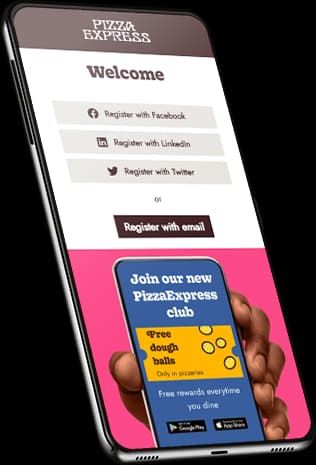

3.7 million guests into the CRM in two years
Pizza Express used a branded captive portal to turn every guest WiFi connection into a verified marketing opt-in. The portal became the on-ramp to loyalty, promotions, and re-engagement at scale.
Compliance and consent
Any system collecting personal data is subject to data-protection law. WiFi marketing is no different from email marketing here, except the consent moment is unusually visible (it happens during sign-in, with the user’s full attention).
Purple ships GDPR, CCPA, and PIPEDA-compliant flows out of the box, with consent statements configurable per region and per venue. Data residency is selectable at provision (EU, UK, US).
Two compliance points that catch venues out:
- Legitimate interest doesn’t cover marketing emails. Capturing email at sign-in is fine on legitimate interest; sending marketing emails afterwards is not. You need explicit opt-in.
- Pre-ticked boxes invalidate consent under PECR and UK GDPR. Marketing opt-in must be a deliberate user action.
Full detail on the data privacy page.
WiFi marketing by sector
The technology is the same. The use cases, conversion benchmarks, and optimal campaign mix vary by sector.
Hotels
Pre-stay engagement (welcome email with property guide), in-stay upsell (spa, restaurant, late check-out), post-stay feedback and review prompts. Strongest captive-portal opt-in rates because guests are already committed customers. Premier Inn uses the captive portal to promote loyalty enrolment.
Hotels use cases →Retail
Cost-per-lead efficiency vs paid social. Segment-driven email campaigns. Loyalty enrolment. In-store-driven retargeting via verified email addresses pushed to Meta or Google audiences. High-street and big-box retailers benefit most from the data-volume side.
Retail use cases →Restaurants and QSR
Dwell-time segmentation (regulars vs occasional), repeat-visit campaigns, birthday and anniversary offers. Pizza Express captured 3.7 million unique users into their CRM in the first two years of deployment.
Restaurants and QSR use cases →Stadiums and attractions
Pre-event content (parking, queues, schedule), in-event engagement (offers, F&B), post-event memberships and season-ticket conversion. One of the few ways to identify individual attendees in 20,000-80,000 capacity events.
Stadiums and attractions use cases →Travel hubs
Pre-departure dwell engagement (retail offers, lounge upsells), post-arrival ground-transport offers, post-trip surveys. Airports and rail operators have unusually long dwell times and high WiFi sign-up rates.
Travel hubs use cases →Shopping malls
Tenant-aggregated marketing (mall-level email programme), footfall-driven retargeting, loyalty - the marketing yield from a centre-wide first-party database typically beats any single tenant's own capture.
Shopping malls use cases →Extend capture into zero-party data with Surveys
The Surveys add-on turns the captive portal into a structured zero-party data engine: post-visit feedback, NPS, product or menu preferences, channel preferences. 91% average completion rate and £0.76 average cost per feedback response, integrated to the same CRM as the original sign-up.

Common pitfalls
Six mistakes that consistently undermine WiFi marketing programmes.
Asking for too much data at sign-up
Each additional form field drops conversion. Strip to email plus one or two fields maximum. Enrich the profile through subsequent interactions, not all at first sign-up.
Skipping email verification
17% of email addresses entered into a captive portal are invalid or disposable without verification. Verify at sign-up before they pollute the database and skew metrics.
Pre-ticked opt-in boxes
Illegal under GDPR. Also reduces engagement - consented users open more, complain less, and convert better than auto-opted users would.
Treating WiFi data as transactional
The first sign-up is the beginning, not the end. Treat each captured identity as an ongoing relationship that gets enriched on every visit.
Failing to integrate with the CRM
Data sitting in the WiFi platform but not flowing to the CRM will not drive marketing outcomes. Integration is the difference between a working programme and a notional one.
Not measuring ROI properly
Programmes that do not track cost per lead, revenue attribution, and incrementality against control groups lose budget at the first procurement review.
How to choose a WiFi marketing platform
A practical checklist for evaluating WiFi marketing software. We publish direct comparisons against Cloud4Wi and the other category alternatives.
Runs on the access points you already own. Avoid platforms that require a hardware refresh.
Native connectors for your specific CRM and marketing automation tools, not just generic webhooks.
Email and phone verification at capture time, not as a post-hoc cleanup.
GDPR, CCPA, PIPEDA, LGPD support out of the box. Timestamp, IP, and consent-version logging.
Choose where the data is stored. EU, UK, US at minimum.
One dashboard across multiple venues with per-venue customisation.
Extend capture beyond identity into zero-party data through surveys.
Built-in cost-per-lead reporting, integration to your attribution tooling, exportable for board reporting.
Native connectors to your loyalty platform (Annex, Eagle Eye, Comarch, custom).
Drag-and-drop portal builder for marketing teams, HTML and CSS access for design teams.
Per-venue subscription scales predictably. Per-MAC or per-bandwidth pricing distorts decisions.
ISO 27001 at minimum. SOC 2 or equivalent if you are an enterprise buyer.
Frequently asked questions
What is WiFi marketing?
+
WiFi marketing is the practice of capturing visitor data at the point of WiFi sign-up via a captive portal, then using that data to drive marketing outcomes through email, SMS, automated journeys, and loyalty programmes. It is one of the most effective first-party data channels available to physical venues.
How much data can a captive portal capture?
+
As much as the venue configures. Typical fields are email, name, and a marketing opt-in. Optional fields include phone, date of birth, postcode, dietary or travel preferences, loyalty interest, and custom survey questions. The principle is data minimisation: ask for what you will use, no more.
Is WiFi marketing GDPR-compliant?
+
Yes, when properly configured. The captive portal records explicit opt-in consent per sign-up with timestamp and IP. Marketing emails to captured contacts run on the consented contact list, and the send itself meets PECR and UK GDPR. Access and deletion requests are technically supported.
What's the average cost per lead from WiFi marketing?
+
£0.28 / $0.35 average across Purple's customer base. Paid social CPLs in retail and hospitality average £6-12 in 2026. WiFi marketing is typically 25-50x cheaper per lead.
How does WiFi marketing compare to paid social?
+
WiFi marketing produces verified, contextually-tagged, consented first-party data. Paid social produces audience reach against probabilistic targeting. The two are complementary: WiFi captures data, paid social activates it via custom audiences and look-alikes. Venues running both typically see paid-social efficiency improve once WiFi-captured emails are used to build audiences.
Can I integrate WiFi data with my CRM?
+
Yes. Purple ships native connectors for HubSpot, Salesforce, Microsoft Dynamics 365, Mailchimp, Klaviyo, Iterable, Braze, Marketo, Pardot, and Bloomreach. Webhook and API support cover anything not on the native list.
How do I measure ROI from WiFi marketing?
+
Track cost per lead (compare to paid alternatives), incremental revenue from email and SMS campaigns to captured contacts, loyalty enrolment uplift, and repeat-visit-rate change. The Purple ROI calculator models the typical case based on venue type and size.
Is WiFi marketing replacing cookies?
+
It is one of several first-party data sources replacing aspects of what cookies used to do. WiFi marketing is particularly strong for physical-venue customer identification, repeat-visit modelling, and consented email capture. It complements rather than replaces other first-party channels like website forms or loyalty sign-ups.
Can WiFi marketing capture zero-party data?
+
Yes. The captive portal can ask survey questions during sign-up, and the Surveys add-on enables post-visit surveys to captured contacts. Both capture declared preferences, which is the definition of zero-party data.
What about Apple Mail Privacy Protection?
+
Mail Privacy Protection (MPP) inflated open rates and broke open-tracking as a useful signal. WiFi marketing is largely unaffected at the capture stage because the value sits in the consented email address itself. It does affect downstream measurement: use click data, conversion data, and revenue attribution rather than open rates as your primary metrics.