
Captive Portal Best Practices: Design für hohe Konversion und Compliance
Dieser technische Leitfaden bietet IT-Managern, Netzwerkarchitekten und Leitern des Standortbetriebs ein umfassendes Konzept für die Bereitstellung von Captive Portals, die Netzwerksicherheit mit hoher Benutzerkonversion verbinden. Er deckt die gesamte Architektur von der VLAN-Segmentierung und RADIUS-Authentifizierung bis hin zum GDPR-konformen Einwilligungsdesign und der Auswahl der Authentifizierungsmethode ab. Basierend auf der Betriebserfahrung von Purple in über 80.000 Standorten und 440 Millionen Logins im Jahr 2024 basiert jede Empfehlung auf realen Bereitstellungsdaten.
Video overview
Diesen Leitfaden anhören
Podcast-Transkript ansehen
Teil unserer Kernserie: Captive Portal Leitfaden →

Management-Zusammenfassung
Ein Captive Portal ist die Anmeldeseite im öffentlichen WiFi. Es ist gleichzeitig Ihre wichtigste Entscheidung für die Netzwerksicherheit und, falls Sie ein Marketingprogramm betreiben, Ihr wertvollster Bereich zur Datenerfassung. Beide Ziele - Sicherheit und Konversion - stehen nicht im Widerspruch zueinander. Sie erfordern jedoch unterschiedliche Konfigurationsentscheidungen, und dieser Leitfaden deckt beide ab.
Die Kernarchitektur platziert jedes Gastgerät in einem Quarantäne-VLAN, bis die Authentifizierung abgeschlossen ist. Ein RADIUS-Server verwaltet die Sitzung, und eine Change of Authorisation (CoA)-Nachricht verschiebt das Gerät in das Produktiv-VLAN. Die Netzwerksegmentierung stellt sicher, dass der Gastdatenverkehr niemals die Unternehmensinfrastruktur oder Point-of-Sale-Systeme erreicht. In jeder Umgebung, in der sich Zahlungsterminals die physische Infrastruktur mit dem Gast-WiFi teilen, ist diese Isolierung eine PCI-DSS-Anforderung und nicht nur eine Empfehlung.
In Bezug auf die Konversion reduziert jedes zusätzliche Formularfeld die Opt-in-Raten um 8 bis 12%. Die richtige Authentifizierungsmethode hängt von Ihrem Standorttyp und Ihren Datenzielen ab. Die Erfassung von E-Mail-Adressen bietet eine Konversion von 65 bis 80% mit direkt eigenen Daten. Das Social-Login über OAuth 2.0 verringert Reibungsverluste, führt jedoch zu Abhängigkeiten von Drittanbietern. Dieser Leitfaden bietet den technischen Entwurf zur Abstimmung dieser Anforderungen, basierend auf den operativen Erfahrungen von Purple in über 80.000 Standorten und 440 Millionen Logins im Jahr 2024 (interne Daten von Purple).
Weitere Informationen zu verwandten Entscheidungen in der Netzwerkarchitektur finden Sie in unserem Leitfaden How to Optimise Captive Portals for Maximum Network Security and User Conversion.
Technische Details
Ein Captive Portal fängt HTTP- oder HTTPS-Anfragen von Geräten ab, die mit Ihrer SSID verbunden sind, und leitet den Benutzer auf eine Begrüßungsseite weiter, bevor der Internetzugang gewährt wird. Der zugrundeliegende Mechanismus basiert auf dem Zusammenspiel von Netzwerksegmentierung und RADIUS-Authentifizierung.
Wenn sich ein Gerät verbindet, verschiebt der Access Point - unabhängig davon, ob es sich um Cisco Meraki, HPE Aruba, Ruckus, Juniper Mist, Ubiquiti UniFi, Cambium, Extreme oder Fortinet handelt - dieses in ein Quarantäne-VLAN. In diesem Zustand blockiert die Firewall den gesamten Datenverkehr mit Ausnahme von DNS-Anfragen und dem Zugriff auf eine bestimmte Liste zugelassener Ziele (auch bekannt als Walled Garden). Der Walled Garden muss die Portal-URL und alle externen Authentifizierungsdienste (wie Google Workspace oder Microsoft Entra ID) enthalten. Wenn der Walled Garden falsch konfiguriert ist und die Captivity-Prüfung des Betriebssystems (zum Beispiel captive.apple.com unter iOS) blockiert wird, lädt das Portal nicht. Dies ist die häufigste Fehlerursache in diesem Bereich.
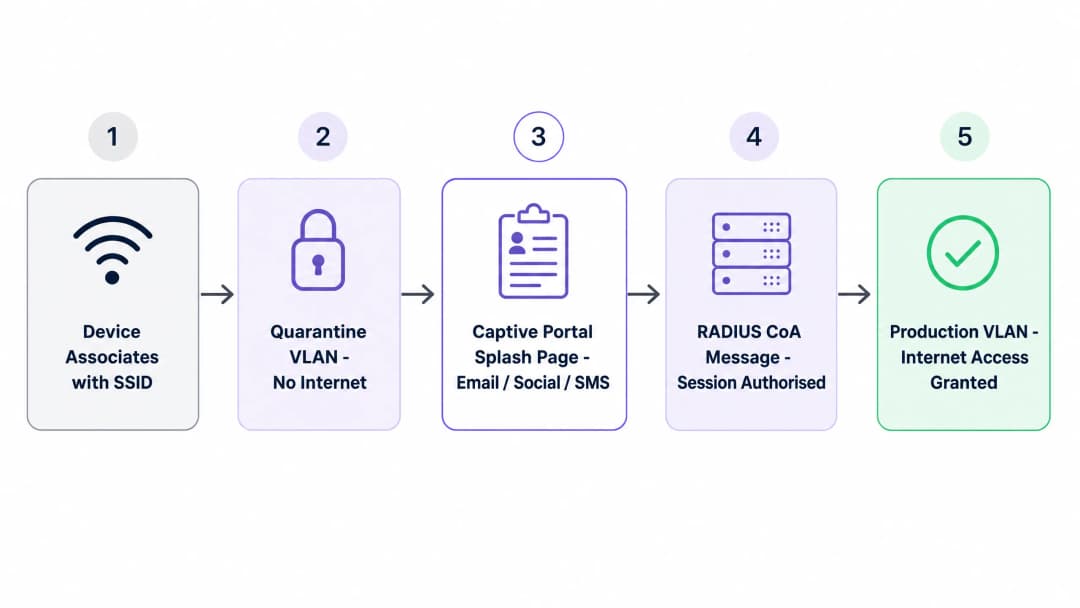
Sobald der Benutzer den Anmeldevorgang abgeschlossen hat, kommuniziert das Portal mit Ihrem RADIUS-Server. Der Server sendet eine Change of Authorisation (CoA)-Nachricht an den Access Controller und weist ihn an, den Quarantänestatus aufzuheben und das Gerät in das Produktiv-VLAN zu verschieben. Diese Isolierung ist von entscheidender Bedeutung: In einem flachen Netzwerk kann ein kompromittiertes Gastgerät interne Systeme ausspionieren. Die VLAN-Segmentierung stellt sicher, dass nicht authentifizierte Geräte keine Kassensysteme oder Unternehmensdatenbanken erreichen können.
Vergleich der Authentifizierungsmethoden
Jede der fünf wichtigsten Authentifizierungsmethoden für Captive Portals bringt unterschiedliche Kompromisse in Bezug auf Conversion-Rate, Datenqualität und Aufwand für die Compliance mit sich. Die folgende Tabelle fasst die wichtigsten Variablen zusammen.
| Methode | Conversion-Rate | Datenqualität | GDPR-Aufwand | Am besten geeignet für |
|---|---|---|---|---|
| Nur Click-through / Nutzungsbedingungen | 90-95% | Minimal (MAC + Zeitstempel) | Niedrig | Öffentlicher Sektor, Bibliotheken, NHS |
| E-Mail-Erfassung | 65-80% | Hoch (direkt im Besitz) | Mittel | Hotellerie, Einzelhandel, Events |
| Social Login (OAuth 2.0) | 55-70% | Mittel (abhängig vom Anbieter) | Mittel-hoch | Verbraucher-Locations mit Google- oder Apple-Nutzern |
| SMS OTP | 45-60% | Sehr hoch (verifizierte Mobilnummer) | Mittel | Fokus auf Kundenbindung: Systemgastronomie, Stadien, Einzelhandel |
| Vollständige Formularregistrierung | 30-45% | Am höchsten (umfangreiches Profil) | Hoch | Hotels, Gesundheitswesen, gehobener Einzelhandel |
Quelle: Purple Betriebsdaten, 440 Millionen Logins 2024.
 Für die meisten Standortbetreiber ist der optimale Ausgangspunkt ein Portal mit zwei Methoden: die E-Mail-Erfassung als primäre Option und der Google-Login als sekundäre Option. Diese Kombination erzielt in der Regel eine Konversionsrate von 65 bis 75 % und baut gleichzeitig eine direkt im Besitz befindliche E-Mail-Datenbank auf. Sie sind nicht vollständig von einem Drittanbieter-OAuth-Provider abhängig, bieten aber eine bequeme Option für Nutzer, die dies bevorzugen.
Für Betriebe im Bereich Gastgewerbe, die Treueprogramme betreiben, fügen Sie SMS OTP als dritte Option hinzu oder machen Sie es zur primären Methode. Eine niedrigere Konversionsrate ist akzeptabel, da die Datenqualität dies rechtfertigt. Eine verifizierte Mobiltelefonnummer in Ihrem CRM ist wesentlich wertvoller als eine nicht verifizierte E-Mail-Adresse.
Für Bereitstellungen im öffentlichen Sektor - Kommunen, NHS-Trusts, Bibliotheken - ist das Click-through mit der Annahme von Bedingungen die richtige Entscheidung. Der Compliance-Aufwand für die Erhebung personenbezogener Daten im öffentlichen Sektor ist erheblich höher, und das Ziel ist Konnektivität, nicht der Aufbau eines CRMs.
Compliance-Architektur
Unter der GDPR müssen Sie die Verbindung von der Datenerfassung trennen. Sie können den Netzwerkzugriff auf der Grundlage des berechtigten Interesses gemäß Artikel 6 Absatz 1 Buchstabe f der UK GDPR bereitstellen. Sie können jedoch nicht dieselbe Begründung für den Versand von Marketing-E-Mails verwenden. Marketing erfordert eine ausdrückliche, aktive Einwilligung gemäß Artikel 6 Absatz 1 Buchstabe a.
Ihr Portal muss separate, nicht angekreuzte Kontrollkästchen aufweisen. Eines betrifft die Nutzungsbedingungen für den WiFi-Zugang. Das zweite, separate Kontrollkästchen betrifft die Marketing-Einwilligung. Bereits angekreuzte Kästchen stellen keine wirksame Einwilligung dar. Das System muss jedes Einwilligungsereignis protokollieren und aufzeichnen, wer wann eingewilligt hat und welche genaue Version der Datenschutzerklärung angezeigt wurde. Dieser Audit-Trail dient als Nachweis Ihrer Compliance im Falle einer behördlichen Überprüfung.
Für Einzelhandels-Betreiber mit Kartenzahlungsterminals vor Ort verlangt PCI-DSS, dass die Karteninhaber-Datenumgebung von jeglichem anderen Netzwerkverkehr isoliert ist. Eine ordnungsgemäße VLAN-Segmentierung kann den PCI-DSS-Audit-Umfang um 60 bis 80 % reduzieren (Specgravity, 2024) und die jährlichen Compliance-Kosten senken.
Haben Sie Fragen zu Ihrem spezifischen Setup?
Unser Team arbeitet mit Standortbetreibern, IT-Managern und Netzwerktechnikern an über 80.000 Standorten zusammen. Buchen Sie ein 20-minütiges Gespräch und wir zeigen Ihnen, wie andere diese Herausforderungen gelöst haben.
Implementierungsleitfaden
Die Bereitstellung eines Captive Portals, das sowohl sicher als auch konversionsstark ist, erfordert einen strukturierten Ansatz. Das folgende fünfstufige Framework gilt für alle Hardware-Plattformen.
Schritt 1 - Klassifizierung des Datenverkehrs. Bevor Sie einen einzigen Switch-Port anfassen, dokumentieren Sie jeden Gerätetyp und jede Verkehrsklasse in Ihrer Umgebung: Gastgeräte, Mitarbeitergeräte, IoT, Zahlungsterminals, Gebäudemanagementsysteme, Videoüberwachung. Jedes erfordert ein dediziertes VLAN.
Schritt 2 - VLAN-Design. Weisen Sie jeder Verkehrsklasse eine VLAN-ID und ein IP-Subnetz zu. Platzieren Sie das Gast-VLAN in einem völlig separaten Subnetz ohne Routen zu Ihrem internen Adressraum. Ihre Firewall muss eine explizite 'Deny-All'-Regel zwischen dem Gast-VLAN und allem Internen haben, die nur den ausgehenden Internetzugang erlaubt.
Schritt 3 - Walled-Garden-Konfiguration. Lassen Sie die Portal-URL, die Domänen der Identitätsanbieter (Google Workspace, Microsoft Entra ID, Okta) und die URLs für die OS-Captivity-Prüfung explizit zu. Testen Sie dies vor dem Go-live auf iOS-, Android- und Windows-Geräten.
Schritt 4 - Firewall-Richtlinie. Dokumentieren Sie jeden zulässigen Inter-VLAN-Fluss explizit. Lehnen Sie standardmäßig alles andere ab. Dies ist der Punkt, an dem die meisten Implementierungen scheitern: Eine VLAN-Architektur ist nur so stark wie die Firewall-Regeln, die sie erzwingen.
Schritt 5 - Überwachung und Validierung. Richten Sie eine Netzwerküberwachung ein und überprüfen Sie, ob die Segmentierung funktioniert. Führen Sie regelmäßige Penetrationstests durch oder verwenden Sie zumindest ein Scan-Tool von einem Gastgerät aus, um zu bestätigen, dass Sie interne Subnetze nicht erreichen können.
Die Guest WiFi-Plattform von Purple lässt sich über Standard-RADIUS und VLAN-Tagging in alle gängigen Enterprise-Wireless-Anbieter integrieren. Sie müssen Ihre vorhandenen Access Points nicht ersetzen. Die Plattform übernimmt das Rendering von Captive Portals, das Einwilligungsmanagement und nachgelagerte WiFi Analytics für Cisco Meraki, HPE Aruba, Ruckus, Juniper Mist, Ubiquiti UniFi, Cambium, Extreme und Fortinet-Bereitstellungen.
Best Practices
Die folgenden Empfehlungen spiegeln die Betriebsmuster wider, die im gesamten Purple-Netzwerk mit mehr als 80.000 Standorten beobachtet wurden.
Formularfelder minimieren. Jedes zusätzliche Feld in Ihrem Anmeldeformular senkt Ihre Conversion-Rate. Fragen Sie nur nach Daten, die Sie aktiv nutzen. Eine E-Mail-Adresse und der Vorname reichen für die meisten Marketing-Anwendungsfälle völlig aus. Geburtsdatum, Postleitzahl und Telefonnummer sollten nur dann abgefragt werden, wenn Ihre CRM-Workflows diese tatsächlich erfordern.
Zugangs- und Marketing-Einwilligung trennen. Stellen Sie sicher, dass Ihr Captive Portal über separate, nicht vorab ausgewählte Kontrollkästchen für die WiFi-Nutzungsbedingungen und das Marketing-Opt-in verfügt. Die Verknüpfung dieser beiden Punkte ist der häufigste Fehler bei der Einhaltung der GDPR, den wir in der Praxis sehen.
Client-Isolierung aktivieren. Konfigurieren Sie den Access Controller so, dass Geräte auf der Gast-SSID nicht direkt miteinander kommunizieren können. Dies eliminiert Peer-to-Peer-Angriffsvektoren im Gastnetzwerk.
Bandbreite verwalten. Erzwingen Sie Bandbreitenbegrenzungen pro Client (in der Regel 5 bis 20 Mbps im Downstream) auf dem Gast-VLAN. Dadurch wird verhindert, dass ein einzelner Benutzer den Uplink überlastet und das Erlebnis für alle anderen beeinträchtigt.
MAC-Randomisierung einplanen. Moderne iOS- und Android-Geräte verwenden standardmäßig zufällige MAC-Adressen. Ein wiederkehrender Gast wird als neuer Benutzer erkannt und muss sich erneut über das Portal authentifizieren. Reduzieren Sie dieses Verhalten, indem Sie Benutzer dazu ermutigen, ein Passpoint-Profil zu installieren, oder indem Sie app-basierte Authentifizierungsabläufe nutzen, die auf Identitäts-Token statt auf MAC-Adressen basieren.
Anzahl der SSIDs gering halten. Jede zusätzliche SSID, die Sie ausstrahlen, verbraucht Sendezeit für Beacon-Frames. In einer dicht besiedelten Umgebung mit Hunderten von Access Points kann die Ausstrahlung von mehr als vier SSIDs pro Funkmodul den Durchsatz erheblich beeinträchtigen. Drei ist ein praktisches Ziel: Gast, Unternehmen, IoT. Für eine umfassende Übersicht über Authentifizierungsstandards lesen Sie unseren Leitfaden EAP Method WiFi: A Guide to Secure Network Access.
Fehlerbehebung und Risikominderung
Das am häufigsten auftretende Problem in diesem Bereich ist, dass das Portal nicht angezeigt wird. Dies ist fast immer auf einen Konfigurationsfehler im Walled Garden zurückzuführen. Wenn die Firewall die Verbindungsprüfung (Captivity Probe) des Betriebssystems blockiert, kann das OS das Captive Network nicht erkennen, und das Portal wird nie gestartet. Überprüfen Sie in einem solchen Fall immer zuerst Ihre Walled Garden Einträge.
Die zweite häufige Fehlerquelle ist die Erschöpfung des DHCP-Pools. In Umgebungen mit hoher Dichte wie Stadien oder Konferenzzentren verbinden sich Tausende von Geräten gleichzeitig. Wenn Ihr DHCP-Pool keine freien Adressen mehr hat, stoppt der Authentifizierungsprozess, bevor das Portal überhaupt bereitgestellt werden kann. Dimensionieren Sie Ihre Infrastruktur daher für Spitzenzeiten bei den gleichzeitigen Verbindungen und nicht für die durchschnittliche Auslastung.
Das dritte Risiko ist eine OAuth Abhängigkeit ohne Fallback-Option. Wenn Sie Social Login als einzige Authentifizierungsmethode implementieren und der Anbieter seine API-Bedingungen ändert, bricht Ihr Authentifizierungsprozess ab. Dies ist in der Vergangenheit bereits bei der Graph API von Facebook passiert. Richten Sie neben dem Social Login immer mindestens eine direkt in Ihrem Besitz befindliche Methode ein.
Für transport Knotenpunkte und große Veranstaltungsorte besteht das vierte Risiko in einer Überlastung des DNS-Resolvers. Bei hohem Aufkommen kann das Volumen der DNS-Anfragen während Stoßzeiten einen zu schwach dimensionierten Resolver überfordern. Richten Sie eine dedizierte DNS-Infrastruktur für das Gäste-VLAN ein und überwachen Sie die Abfrageraten.
Für Umgebungen im Bereich healthcare ist der fünfte Aspekt die Isolierung klinischer Geräte. In Übereinstimmung mit den NHS Digital Richtlinien müssen klinische Geräte in einem separaten VLAN vom allgemeinen Gäste WiFi betrieben werden. Die Captive Portal Architektur darf es Gastgeräten keinesfalls erlauben, auf Subnetze zuzugreifen, die Datenverkehr von klinischen Geräten übertragen.
ROI und geschäftlicher Nutzen
Ein gut strukturiertes Captive Portal verwandelt das Gäste WiFi von einem Kostenfaktor in ein strategisches Asset. Durch die Erfassung von First-Party-Daten bauen Sie eine verifizierte CRM-Datenbank auf, die Treueprogramme und zielgerichtete Marketingkampagnen unterstützt.
Der Erfolg wird an zwei Hauptkennzahlen gemessen: der Konversionsrate (der Prozentsatz der verbundenen Geräte, die die Authentifizierung abschließen) und der Opt-In-Rate (der Prozentsatz der authentifizierten Benutzer, die dem Marketing zustimmen). Eine Einzelhandelskette kann so die Konvertierung von WiFi Nutzern in Loyalty-Mitglieder verfolgen und die anschließende Kundenfrequenz sowie Umsatzsteigerung messen.
Bei einer Einzelhandelskette mit 500 Standorten, die eine E-Mail-Erfassung mit einer Konversionsrate von 70 % betreibt, generieren 10.000 tägliche WiFi Sitzungen im gesamten Unternehmen 7.000 neue oder wiederkehrende CRM-Kontakte pro Tag. Bei einer konservativ geschätzten Konversionsrate von 2 % von der E-Mail zum Ladenbesuch für Marketingkampagnen sind das 140 zusätzliche Ladenbesuche pro Tag, die direkt über den WiFi Kanal generiert werden.
Darüber hinaus reduziert eine ordnungsgemäße Netzwerksegmentierung den Umfang von PCI DSS-Audits. Eine korrekte Segmentierung kann den PCI DSS-Audit-Umfang um 60 bis 80% reduzieren (Specgravity, 2024), was die jährlichen Compliance-Kosten senkt und das finanzielle Risiko einer Datenschutzverletzung mindert. Die Nichteinhaltung der GDPR kann zu Geldbußen von bis zu 4% des weltweiten Jahresumsatzes führen, was eine konforme Portal-Architektur zu einer direkten Maßnahme zur finanziellen Risikominderung macht.
Die Plattform von Purple ist nach ISO 27001, GDPR, CCPA und Cyber Essentials zertifiziert und stellt die erforderlichen Compliance-Dokumente für Ihre Rechts- und Beschaffungsabteilungen bereit. Mit einer Verfügbarkeit von 99,999% an über 80.000 Standorten ist die Infrastruktur für den Einsatz in Großunternehmen dimensioniert.
Für weitere Informationen zu verwandten Netzwerkkonzepten lesen Sie bitte unseren Leitfaden WAN Computer Definition: A Practical Guide for 2026.
Schlüsseldefinitionen
Captive Portal
Eine Webseite, die den Netzwerkverkehr abfängt und eine Benutzerinteraktion - Authentifizierung oder Akzeptanz der Bedingungen - erfordert, bevor der vollständige Internetzugang gewährt wird. Definiert in IETF RFC 8952.
Die primäre Schnittstelle für das Onboarding von Gästen, die Durchsetzung von Sicherheitsrichtlinien und die Erfassung von First-Party-Daten an jedem öffentlichen oder halböffentlichen WiFi-Standort.
VLAN (Virtual Local Area Network)
Eine logische Gruppierung von Netzwerkgeräten, die sich so verhalten, als befänden sie sich in einem einzigen isolierten LAN, unabhängig vom physischen Standort. Definiert in IEEE 802.1Q.
Wird verwendet, um den Gästeverkehr von der Unternehmensinfrastruktur zu segmentieren. Erforderlich nach PCI-DSS, um die Karteninhaber-Datenumgebung zu isolieren.
Walled Garden
Eine eingeschränkte Netzwerkumgebung, die vor Abschluss der Authentifizierung nur den Zugriff auf bestimmte genehmigte URLs und IP-Adressen zulässt.
Muss die Portal-URL, die Domänen der Identitätsanbieter und die URLs für die Betriebssystem-Erkennung des Portals enthalten. Eine Fehlkonfiguration ist die Hauptursache für Portal-Fehler.
RADIUS
Remote Authentication Dial-In User Service. Ein Netzwerkprotokoll, das eine zentrale Autorisierung, Authentifizierung und Benutzerabrechnung für den Netzwerkzugriff bereitstellt.
Das Backend-System, das Anmeldedaten verifiziert und den Access Point anweist, den Netzwerkzugriff zu gewähren oder zu verweigern. Erforderlich für Enterprise Captive Portal Bereitstellungen.
Change of Authorisation (CoA)
Eine RADIUS-Nachricht, die den Autorisierungsstatus einer aktiven Benutzersitzung dynamisch ändert, ohne dass eine erneute Authentifizierung erforderlich ist.
Wird verwendet, um ein Gerät nach erfolgreichem Portal-Login aus dem Quarantäne-VLAN in das Produktions-VLAN zu verschieben oder um den Zugriff zu entziehen, wenn sich eine Sitzungsrichtlinie ändert.
Client-Isolierung
Eine Funktion des Wireless Controllers, die verhindert, dass Geräte, die mit derselben SSID verbunden sind, auf Layer 2 direkt miteinander kommunizieren.
Unerlässlich für Gastnetzwerke, um Peer-to-Peer-Angriffe und laterale Bewegungen zwischen Gastgeräten zu verhindern.
Passpoint (Hotspot 2.0)
Ein auf IEEE 802.11u basierendes Protokoll, das es Geräten ermöglicht, sich automatisch und sicher mit WiFi-Netzwerken zu verbinden, indem sie Anmeldedaten eines Dienstanbieters verwenden, ohne dass eine manuelle Interaktion mit dem Portal erforderlich ist.
Wird verwendet, um die Randomisierung von MAC-Adressen zu umgehen und nahtloses Roaming an verschiedenen Standorten zu ermöglichen. Relevant für kundenbindungsorientierte Bereitstellungen, bei denen die Sitzungspermanenz wichtig ist.
PCI-DSS
Payment Card Industry Data Security Standard. Ein Informationssicherheitsstandard für Organisationen, die Kreditkarten bekannter Marken verarbeiten.
Erfordert eine strenge Netzwerksegmentierung, um die Karteninhaber-Datenumgebung vom Datenverkehr des Gast-WiFi zu isolieren. Eine Nichtbeachtung zieht finanzielle Strafen und den Verlust von Kartenverarbeitungsrechten nach sich.
OAuth 2.0
Ein offenes Autorisierungs-Framework, das es Drittanbieter-Anwendungen ermöglicht, begrenzten Zugriff auf Benutzerkonten bei einem HTTP-Dienst wie Google Workspace oder Microsoft Entra ID zu erhalten.
Wird für den Social Login auf Captive Portals verwendet. Reduziert Reibungsverluste, führt jedoch zu einer Abhängigkeit von den API-Bedingungen und der Verfügbarkeit des Identity Providers.
Ausgearbeitete Beispiele
Ein Hotel mit 200 Zimmern, das HPE Aruba Access Points nutzt, muss gestaffeltes WiFi bereitstellen: einfachen kostenlosen Zugang für Standardgäste und High-Speed-Zugang für Treuemitglieder, ohne mehrere SSIDs auszustrahlen.
Bereitstellung einer einzigen Gäste-SSID, die über eine API in das Property Management System (PMS) integriert ist. Das Portal bietet zwei Optionen: Login mit Zimmernummer und Nachname oder Login mit den Zugangsdaten des Treueprogramms. Wenn sich ein Treuemitglied authentifiziert, fragt das Portal das PMS über die API ab, verifiziert die Stufe und sendet einen RADIUS Change of Authorisation (CoA) an den Aruba-Controller mit einem herstellerspezifischen Attribut (VSA), das die Rolle mit hoher Bandbreite zuweist. Standardgäste erhalten eine standardmäßige Rolle mit Bandbreitenbegrenzung. Eine SSID, dynamische Richtliniendurchsetzung auf der RADIUS-Ebene, saubere Benutzererfahrung ohne zusätzlichen RF-Overhead.
Eine nationale Einzelhandelskette mit 500 Standorten möchte E-Mail-Adressen für das Marketing an allen Standorten erfassen, aber das Rechtsteam hat Bedenken hinsichtlich der GDPR-Compliance beim bestehenden Portal-Design geäußert.
Neugestaltung des Portals mit einem einzigen E-Mail-Eingabefeld und zwei separaten Kontrollkästchen. Das erste Kontrollkästchen ist obligatorisch und lautet: "Ich akzeptiere die Nutzungsbedingungen und die Datenschutzrichtlinie für den Netzwerkzugang." Das zweite Kontrollkästchen ist optional, standardmäßig nicht angehakt und lautet: "Ich stimme dem Erhalt von Marketingmitteilungen und Sonderangeboten von [Brand] zu." Das Backend protokolliert den Zeitstempel, die IP-Adresse, die Portal-Version und das Einwilligungsereignis für jeden Benutzer. Die Rechtsgrundlage für den WiFi-Zugang ist berechtigtes Interesse. Die Rechtsgrundlage für das Marketing ist die ausdrückliche Einwilligung. Diese werden separat im CRM erfasst.
Übungsfragen
Q1. Der IT-Leiter eines Stadions berichtet, dass sich Benutzer in der Halbzeitpause mit der Gast-SSID verbinden können, das Captive Portal jedoch bei Tausenden von Geräten gleichzeitig nicht geladen wird. Die korrekte Konfiguration des Walled Garden wurde überprüft. Was ist die wahrscheinlichste Ursache auf Architekturebene?
Hinweis: Berücksichtigen Sie die Infrastrukturressourcen, die erforderlich sind, bevor ein Gerät HTTP-Datenverkehr an das Portal leiten kann - insbesondere, was vor der DNS-Auflösung geschieht.
Musterlösung anzeigen
Erschöpfung des DHCP-Pools oder Überlastung des DNS-Resolvers. Wenn der DHCP-Pool in Umgebungen mit hoher Dichte IP-Adressen nicht schnell genug zuweisen kann oder der DNS-Resolver das Anfragevolumen von Tausenden gleichzeitigen Verbindungen nicht bewältigen kann, gerät der Authentifizierungsfluss ins Stocken, bevor das Portal bereitgestellt werden kann. Die Infrastruktur muss für Spitzenlasten bei gleichzeitigen Verbindungen ausgelegt sein, nicht für die durchschnittliche Last. Eine separate DHCP- und DNS-Infrastruktur für das Gast-VLAN ist die empfohlene Abhilfemaßnahme.
Q2. Ein Marketingteam im Einzelhandel möchte das Geburtsdatum von Kunden über das Captive Portal erfassen, um Geburtstagsangebote zu versenden. Es ist geplant, das Feld für das Geburtsdatum als Pflichtfeld für den WiFi-Zugriff einzurichten. Ist dies mit der UK GDPR konform? Wenn nicht, wie sollte es umgestaltet werden?
Hinweis: Prüfen Sie die Grundsätze der Datenminimierung (Artikel 5 Absatz 1 Buchstabe c) und die Anforderung, dass die Einwilligung freiwillig erteilt werden muss.
Musterlösung anzeigen
Nein. Die Verpflichtung zur Angabe von Marketingdaten für den Zugriff auf einen Dienst verstößt gegen den Grundsatz der Freiwilligkeit der Einwilligung - ein Benutzer kann seine Einwilligung nicht freiwillig erteilen, wenn eine Verweigerung den Verlust des Dienstes zur Folge hat. Darüber hinaus verstößt die Erfassung des Geburtsdatums, wenn es für den Netzwerkzugriff nicht zwingend erforderlich ist, gegen den Grundsatz der Datenminimierung. Die korrekte Umsetzung: Das Geburtsdatum ist ein optionales Feld, das deutlich als solches gekennzeichnet ist, mit einem separaten, nicht vorausgewählten Kontrollkästchen für die Einwilligung zum Geburtstagsmarketing. Die Rechtsgrundlage für den WiFi-Zugriff bleibt das berechtigte Interesse. Die Rechtsgrundlage für das Geburtstagsmarketing ist die ausdrückliche Einwilligung.
Q3. Die Sicherheitsüberprüfung eines Hotels zeigt, dass ein mit dem Gäste-WiFi verbundenes Gerät die IP-Adresse eines Kassenterminals im Restaurant anpingen kann. Das IT-Team bestätigt, dass sich das Gästenetzwerk und das Kassensystem-Netzwerk auf separaten VLANs befinden. Welcher Konfigurationsschritt wurde vergessen?
Hinweis: VLANs bieten eine logische Trennung, aber der Datenverkehr zwischen VLANs muss über ein Routing-Gerät laufen. Was regelt, was dieses Gerät zulässt?
Musterlösung anzeigen
Die Inter-VLAN-Routing-Regeln auf der Firewall sind falsch konfiguriert oder fehlen. Obwohl der Gästedatenverkehr und der Kassendatenverkehr auf separaten VLANs liegen, muss die Firewall eine Default-Deny-Richtlinie zwischen ihnen mit expliziten Freigaberegeln nur für die erforderlichen Datenströme durchsetzen. Das Gäste-VLAN sollte Regeln haben, die nur den ausgehenden Internetzugang zulassen - keine Routen zu internen Subnetzen, einschließlich des Kassen-VLANs. Die Lösung besteht darin, die Inter-VLAN-Firewall-Richtlinie zu überprüfen und zu korrigieren und dies anschließend durch den Versuch zu validieren, von einem Gästegerät aus auf interne Subnetze zuzugreifen.
Q4. Ein Konferenzzentrum führt Social-Login (Google OAuth) als einzige Authentifizierungsmethode für sein Captive Portal ein. Drei Monate nach dem Start aktualisiert Google seine OAuth-API und das Portal funktioniert für alle Benutzer nicht mehr. Wie hätte die Bereitstellung aufgebaut sein müssen, um dies zu verhindern?
Hinweis: Berücksichtigen Sie den Single Point of Failure und wie ein ausfallsicheres Multi-Methoden-Design aussieht.
Musterlösung anzeigen
Die Bereitstellung hätte mindestens eine Nicht-OAuth-Authentifizierungsmethode als Fallback enthalten müssen - wobei die E-Mail-Erfassung die praktischste Wahl ist. Ein duales Portal mit E-Mail-Erfassung als Primärmethode und Google OAuth als Sekundärmethode hätte die Kontinuität gewahrt, als der OAuth-Ablauf ausfiel. Die Methode zur E-Mail-Erfassung hat keine Abhängigkeit von Drittanbietern und liefert einen direkt im eigenen Besitz befindlichen Datenbestand. OAuth-Anbieter sollten immer als Komfortoptionen und nicht als primäre Authentifizierungsinfrastruktur behandelt werden.
Weiterlesen in dieser Reihe
Ubiquiti UniFi Guest Portal leitet nicht weiter: Ursachen und Lösungen
Dieser Leitfaden grenzt einen Fehler bei der Weiterleitung des UniFi Guest Portals ein, indem er nacheinander den Guest-Status, die Weiterleitung, die Pre-Authorisation-Route und die Controller-Autorisierung prüft. Er bietet IT-Teams vor Ort eine bewährte Methode, um Verwirrung zwischen Guest-Netzwerk und Hotspot, externe Portal-Übergaben, aktuelle UniFi OS Kontoanforderungen und DNS-Isolierungstests zu adressieren.
Cisco Meraki Splashpage funktioniert nicht: Ein Flussdiagramm zur Fehlersuche
Diese praktische Day-Two-Anleitung isoliert, wo ein Cisco Meraki Splash-Flow fehlgeschlagen ist: Client-Autorisierung, Initiierung der HTTP-Weiterleitung, Erreichbarkeit des Walled Garden oder RADIUS-Anmeldung. Sie bietet IT-Teams vor Ort einen kontrollierten Nachweisweg, um das Guest WiFi wiederherzustellen, ohne weitreichende Änderungen an einer Live-Infrastruktur vorzunehmen.
Enterprise Guest WiFi Einrichtungsleitfaden: VLAN Segmentierung, Sicherheit und Captive Portals
Dieser technische Leitfaden zeigt IT-Teams, wie sie Guest WiFi als kontrollierten Internetzugangsdienst unter Verwendung von VLAN Segmentierung, Firewall-Richtlinien und einem Captive Portal einrichten. Er erklärt zudem, wie die Registrierungsformulare und Onboarding-Steuerelemente von Purple eine angemessene Visitor Experience unterstützen, ohne die Sicherheitsgrenzen um Mitarbeiter-, Zahlungs- und Betriebssysteme zu schwächen.
Haben Sie Fragen zu Ihrem spezifischen Setup?
Unser Team arbeitet mit Standortbetreibern, IT-Managern und Netzwerktechnikern an über 80.000 Standorten zusammen. Buchen Sie ein 20-minütiges Gespräch und wir zeigen Ihnen, wie andere diese Herausforderungen gelöst haben.